
Flutter 框架跨平台鸿蒙开发 - 社区闲置物品交换应用开发教程
通过本教程,我们成功开发了一个功能完整的Flutter社区闲置物品交换应用。
Flutter社区闲置物品交换应用开发教程
项目概述
在现代社会,闲置物品的处理成为了一个普遍问题。很多人家中都有大量闲置但仍有价值的物品,直接丢弃既浪费又不环保,而传统的二手交易往往涉及金钱交易,流程复杂。社区闲置物品交换应用应运而生,为邻里之间提供了一个便捷的物品交换平台,既能让闲置物品重新发挥价值,又能促进社区邻里关系。
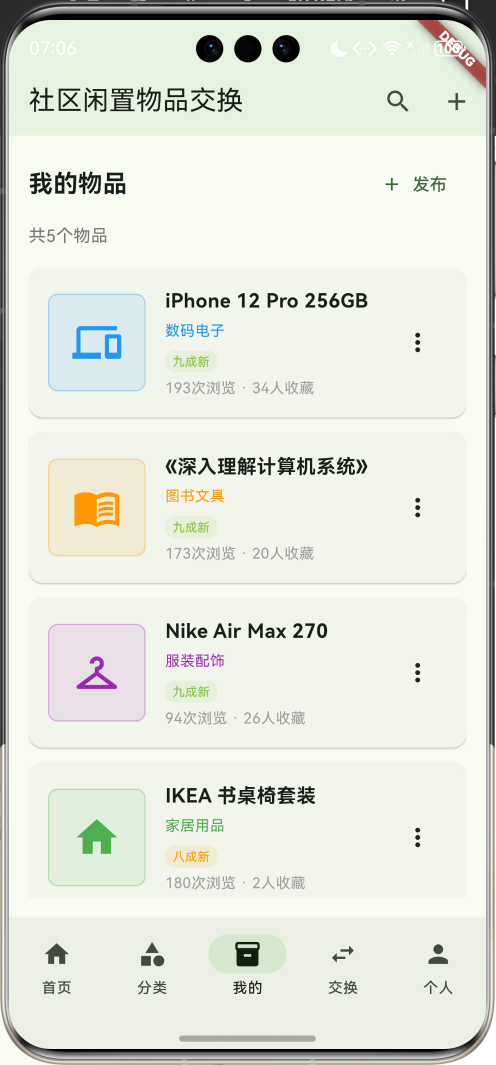
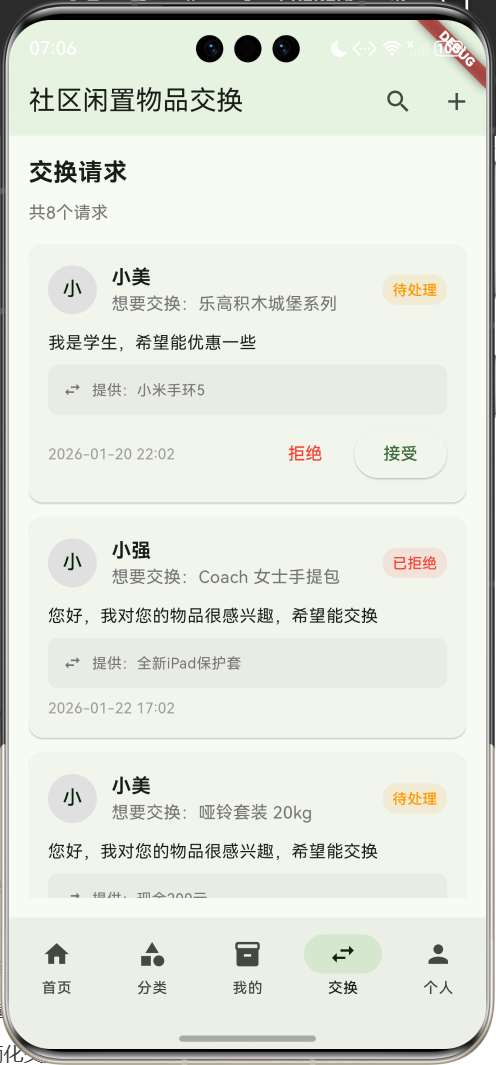
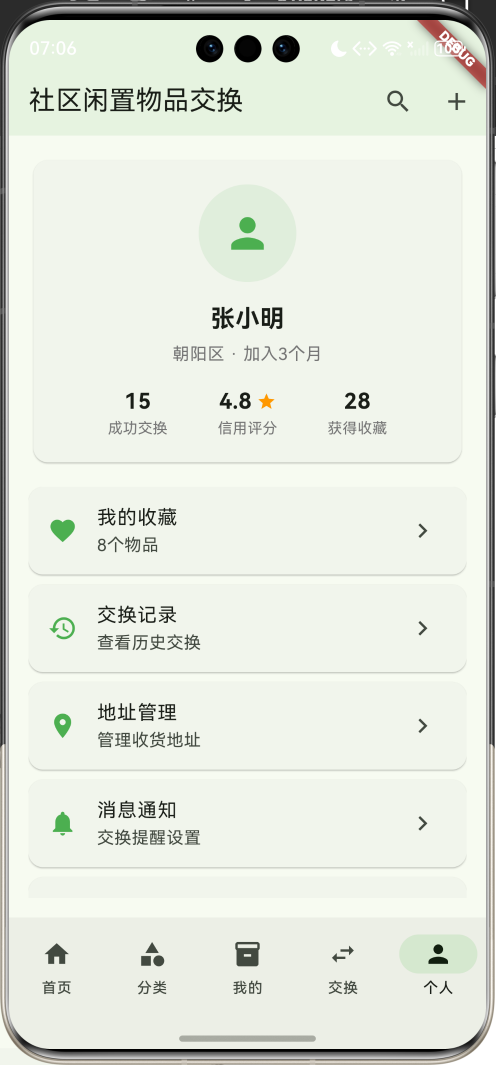
运行效果图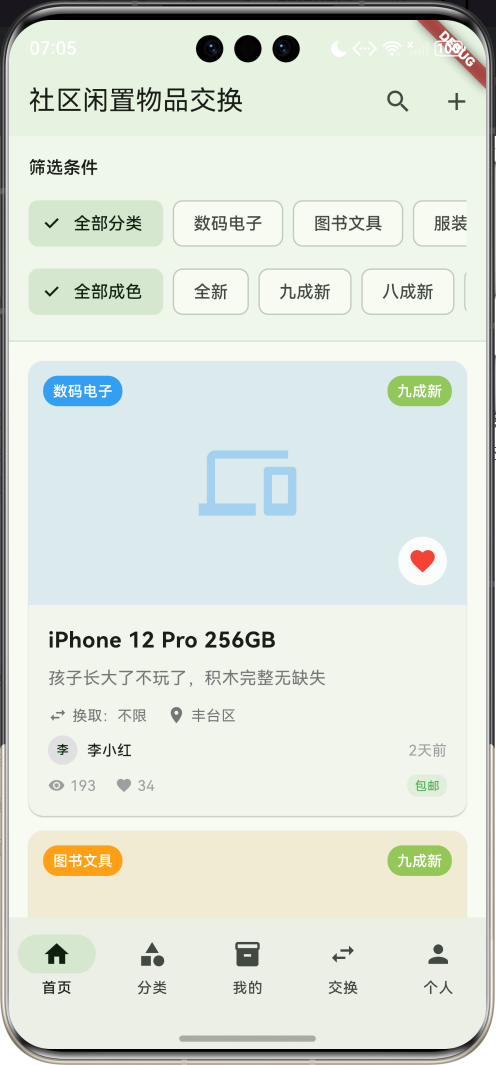
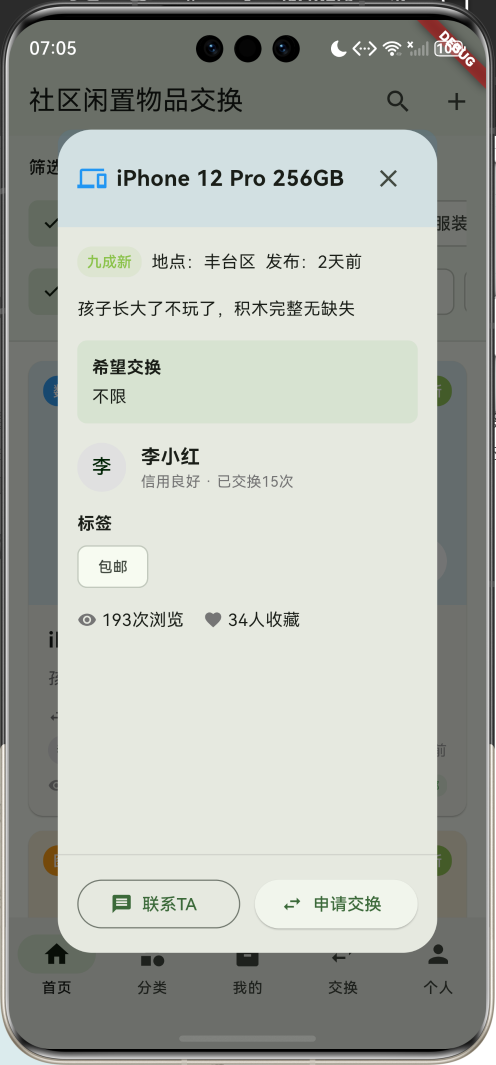
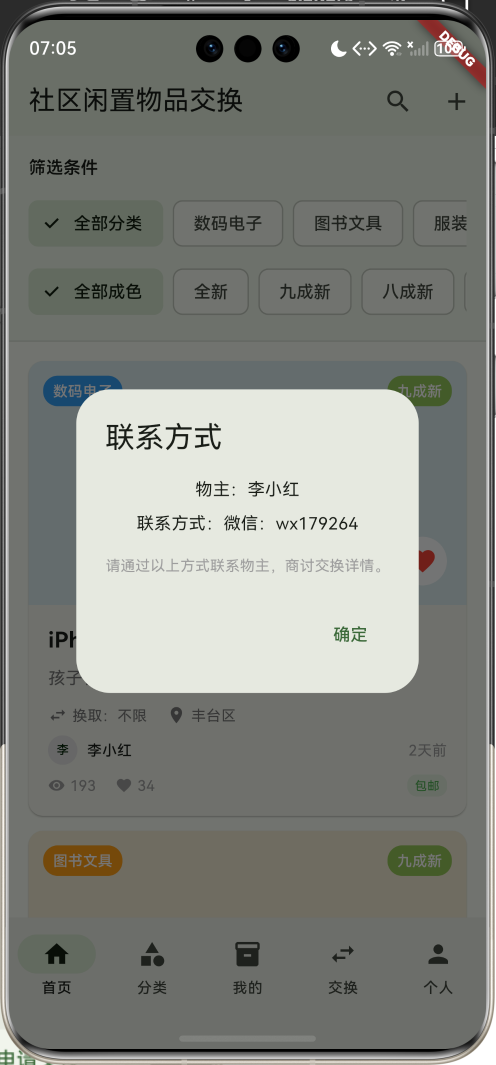
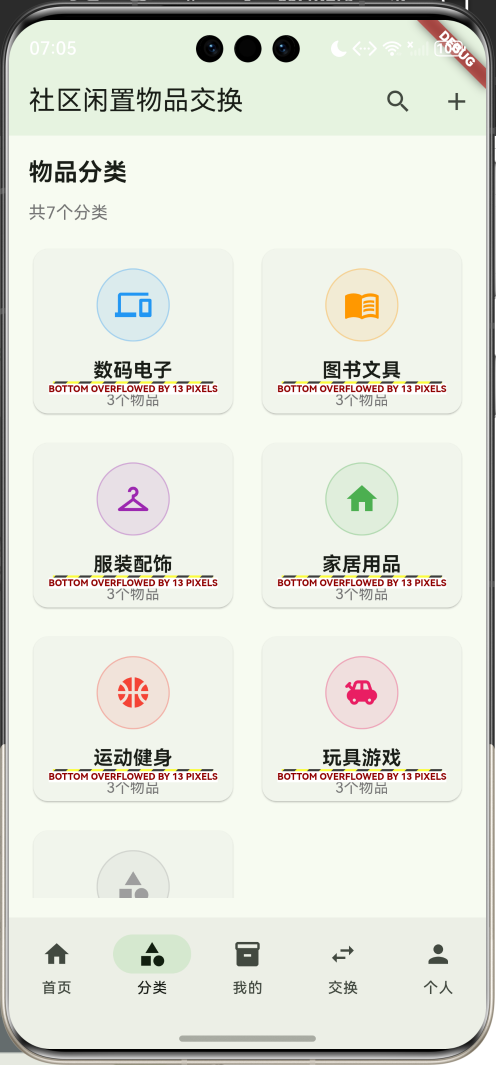
应用特色
- 绿色环保理念:通过物品交换减少浪费,践行可持续发展
- 社区化交换:基于地理位置的本地化交换,方便快捷
- 多样化分类:涵盖数码电子、图书文具、服装配饰等七大分类
- 智能筛选系统:支持分类、成色、地区等多维度筛选
- 信用评价体系:建立用户信用档案,保障交换安全
- 便捷交流功能:内置联系和申请系统,简化交换流程
技术栈
- 框架:Flutter 3.x
- 开发语言:Dart
- UI设计:Material Design 3
- 状态管理:StatefulWidget
- 数据存储:内存存储(可扩展为本地数据库)
核心功能模块
1. 物品浏览与搜索
- 物品列表展示和详情查看
- 多维度筛选和关键词搜索
- 物品分类浏览
- 成色和地区筛选
2. 物品发布与管理
- 发布闲置物品信息
- 管理个人发布的物品
- 物品状态更新(可用/已交换)
- 物品编辑和删除
3. 交换申请系统
- 发起交换申请
- 处理收到的交换请求
- 交换状态跟踪
- 联系方式管理
4. 用户个人中心
- 个人信息展示
- 交换记录查看
- 收藏物品管理
- 信用评分系统
数据模型设计
ItemCategory(物品分类)模型
class ItemCategory {
  final String id;              // 分类唯一标识
  final String name;            // 分类名称
  final IconData icon;          // 分类图标
  final Color color;            // 分类颜色
  final String description;     // 分类描述
}
ItemCategory模型定义了物品分类的基本信息,为不同类型的物品提供统一的视觉标识和分类管理。
ExchangeItem(交换物品)模型
class ExchangeItem {
  final String id;              // 物品唯一标识
  final String title;           // 物品标题
  final String description;     // 物品描述
  final String categoryId;      // 分类ID
  final String condition;       // 物品成色
  final String location;        // 所在地区
  final String ownerName;       // 物主姓名
  final String ownerAvatar;     // 物主头像
  final DateTime publishDate;   // 发布日期
  final List<String> images;    // 物品图片
  final String exchangeFor;     // 希望交换的物品
  final bool isAvailable;       // 是否可用
  final int viewCount;          // 浏览次数
  final int likeCount;          // 收藏次数
  final bool isLiked;           // 是否已收藏
  final List<String> tags;      // 物品标签
  final String contactInfo;     // 联系方式
}
ExchangeItem模型包含了交换物品的完整信息,通过计算属性提供分类名称、颜色、图标等显示信息,以及时间格式化等便捷功能。
ExchangeRequest(交换请求)模型
class ExchangeRequest {
  final String id;              // 请求唯一标识
  final String itemId;          // 关联物品ID
  final String requesterName;   // 申请人姓名
  final String requesterAvatar; // 申请人头像
  final String message;         // 申请留言
  final String offerDescription; // 提供物品描述
  final List<String> offerImages; // 提供物品图片
  final DateTime requestDate;   // 申请日期
  final String status;          // 请求状态
  final String contactInfo;     // 联系方式
}
ExchangeRequest模型管理交换申请的完整流程,支持待处理、已接受、已拒绝三种状态,并提供状态颜色和文本的计算属性。
UserProfile(用户档案)模型
class UserProfile {
  final String id;              // 用户唯一标识
  final String name;            // 用户姓名
  final String avatar;          // 用户头像
  final String location;        // 所在地区
  final DateTime joinDate;      // 加入日期
  final int exchangeCount;      // 交换次数
  final double rating;          // 信用评分
  final int reviewCount;        // 评价数量
  final String bio;             // 个人简介
  final List<String> interests; // 兴趣标签
}
UserProfile模型存储用户的个人信息和信用数据,为建立社区信任体系提供基础。
项目结构设计
lib/
├── main.dart                 # 应用入口文件
├── models/                   # 数据模型
│   ├── item_category.dart   # 物品分类模型
│   ├── exchange_item.dart   # 交换物品模型
│   ├── exchange_request.dart # 交换请求模型
│   └── user_profile.dart    # 用户档案模型
├── screens/                  # 页面文件
│   ├── home_screen.dart     # 首页
│   ├── categories_screen.dart # 分类页面
│   ├── my_items_screen.dart # 我的物品页面
│   ├── requests_screen.dart # 交换请求页面
│   └── profile_screen.dart  # 个人中心页面
├── widgets/                  # 自定义组件
│   ├── item_card.dart       # 物品卡片
│   ├── category_card.dart   # 分类卡片
│   ├── request_card.dart    # 请求卡片
│   └── filter_bar.dart      # 筛选栏
└── services/                 # 业务逻辑
    └── exchange_service.dart # 交换数据服务
主界面设计与实现
底部导航栏设计
应用采用五个主要功能模块的底部导航设计:
- 首页:浏览和搜索社区内的闲置物品
- 分类:按分类浏览物品
- 我的:管理个人发布的物品
- 交换:处理交换请求
- 个人:个人中心和设置
bottomNavigationBar: NavigationBar(
  selectedIndex: _selectedIndex,
  onDestinationSelected: (index) {
    setState(() => _selectedIndex = index);
  },
  destinations: const [
    NavigationDestination(icon: Icon(Icons.home), label: '首页'),
    NavigationDestination(icon: Icon(Icons.category), label: '分类'),
    NavigationDestination(icon: Icon(Icons.inventory), label: '我的'),
    NavigationDestination(icon: Icon(Icons.swap_horiz), label: '交换'),
    NavigationDestination(icon: Icon(Icons.person), label: '个人'),
  ],
),
应用栏设计
appBar: AppBar(
  title: const Text('社区闲置物品交换'),
  backgroundColor: Colors.green.withValues(alpha: 0.1),
  actions: [
    IconButton(
      onPressed: () {
        _showSearchDialog();
      },
      icon: const Icon(Icons.search),
    ),
    IconButton(
      onPressed: () {
        _showPublishDialog();
      },
      icon: const Icon(Icons.add),
    ),
  ],
),
应用栏采用绿色主题,体现环保理念。提供搜索和发布功能的快捷入口,提升用户体验。
首页物品浏览实现
物品筛选功能
首页顶部提供多维度筛选功能:
Widget _buildFilters() {
  return Container(
    padding: const EdgeInsets.all(16),
    decoration: BoxDecoration(
      color: Colors.green.withValues(alpha: 0.05),
      border: Border(bottom: BorderSide(color: Colors.grey.withValues(alpha: 0.3))),
    ),
    child: Column(
      crossAxisAlignment: CrossAxisAlignment.start,
      children: [
        const Text('筛选条件', style: TextStyle(fontWeight: FontWeight.w600)),
        const SizedBox(height: 12),
        // 分类筛选
        SingleChildScrollView(
          scrollDirection: Axis.horizontal,
          child: Row(
            children: [
              FilterChip(
                label: const Text('全部分类'),
                selected: _selectedCategoryId.isEmpty,
                onSelected: (selected) {
                  setState(() {
                    _selectedCategoryId = '';
                  });
                },
              ),
              const SizedBox(width: 8),
              ..._categories.map((category) {
                return Padding(
                  padding: const EdgeInsets.only(right: 8),
                  child: FilterChip(
                    label: Text(category.name),
                    selected: _selectedCategoryId == category.id,
                    onSelected: (selected) {
                      setState(() {
                        _selectedCategoryId = selected ? category.id : '';
                      });
                    },
                  ),
                );
              }),
            ],
          ),
        ),
        const SizedBox(height: 8),
        // 成色筛选
        SingleChildScrollView(
          scrollDirection: Axis.horizontal,
          child: Row(
            children: [
              FilterChip(
                label: const Text('全部成色'),
                selected: _selectedCondition.isEmpty,
                onSelected: (selected) {
                  setState(() {
                    _selectedCondition = '';
                  });
                },
              ),
              const SizedBox(width: 8),
              ...['全新', '九成新', '八成新', '七成新'].map((condition) {
                return Padding(
                  padding: const EdgeInsets.only(right: 8),
                  child: FilterChip(
                    label: Text(condition),
                    selected: _selectedCondition == condition,
                    onSelected: (selected) {
                      setState(() {
                        _selectedCondition = selected ? condition : '';
                      });
                    },
                  ),
                );
              }),
            ],
          ),
        ),
      ],
    ),
  );
}
筛选功能支持以下维度:
- 分类筛选:数码电子、图书文具、服装配饰、家居用品、运动健身、玩具游戏、其他物品
- 成色筛选:全新、九成新、八成新、七成新
- 关键词搜索:支持物品标题和描述的模糊搜索
物品卡片设计
每个交换物品以卡片形式展示关键信息:
Widget _buildItemCard(ExchangeItem item) {
  return Card(
    margin: const EdgeInsets.only(bottom: 12),
    child: InkWell(
      onTap: () => _showItemDetail(item),
      borderRadius: BorderRadius.circular(12),
      child: Column(
        crossAxisAlignment: CrossAxisAlignment.start,
        children: [
          // 物品图片区域
          Container(
            height: 200,
            width: double.infinity,
            decoration: BoxDecoration(
              color: item.categoryColor.withValues(alpha: 0.1),
              borderRadius: const BorderRadius.vertical(top: Radius.circular(12)),
            ),
            child: Stack(
              children: [
                Center(
                  child: Icon(
                    item.categoryIcon,
                    size: 80,
                    color: item.categoryColor.withValues(alpha: 0.3),
                  ),
                ),
                // 分类标签
                Positioned(
                  top: 12,
                  left: 12,
                  child: Container(
                    padding: const EdgeInsets.symmetric(horizontal: 8, vertical: 4),
                    decoration: BoxDecoration(
                      color: item.categoryColor.withValues(alpha: 0.9),
                      borderRadius: BorderRadius.circular(12),
                    ),
                    child: Text(
                      item.categoryName,
                      style: const TextStyle(
                        fontSize: 12,
                        color: Colors.white,
                        fontWeight: FontWeight.w500,
                      ),
                    ),
                  ),
                ),
                // 成色标签
                Positioned(
                  top: 12,
                  right: 12,
                  child: Container(
                    padding: const EdgeInsets.symmetric(horizontal: 8, vertical: 4),
                    decoration: BoxDecoration(
                      color: item.conditionColor.withValues(alpha: 0.9),
                      borderRadius: BorderRadius.circular(12),
                    ),
                    child: Text(
                      item.condition,
                      style: const TextStyle(
                        fontSize: 12,
                        color: Colors.white,
                        fontWeight: FontWeight.w500,
                      ),
                    ),
                  ),
                ),
                // 收藏按钮
                Positioned(
                  bottom: 12,
                  right: 12,
                  child: IconButton(
                    onPressed: () {
                      setState(() {
                        // 切换收藏状态
                      });
                    },
                    icon: Icon(
                      item.isLiked ? Icons.favorite : Icons.favorite_border,
                      color: Colors.red,
                    ),
                    style: IconButton.styleFrom(
                      backgroundColor: Colors.white.withValues(alpha: 0.9),
                    ),
                  ),
                ),
              ],
            ),
          ),
          // 物品信息区域
          Padding(
            padding: const EdgeInsets.all(16),
            child: Column(
              crossAxisAlignment: CrossAxisAlignment.start,
              children: [
                Text(
                  item.title,
                  style: const TextStyle(
                    fontSize: 18,
                    fontWeight: FontWeight.bold,
                  ),
                ),
                const SizedBox(height: 8),
                Text(
                  item.description,
                  style: TextStyle(fontSize: 14, color: Colors.grey[600]),
                  maxLines: 2,
                  overflow: TextOverflow.ellipsis,
                ),
                const SizedBox(height: 12),
                // 交换信息和位置
                Row(
                  children: [
                    Icon(Icons.swap_horiz, size: 16, color: Colors.grey[600]),
                    const SizedBox(width: 4),
                    Text(
                      '换取:${item.exchangeFor}',
                      style: TextStyle(fontSize: 12, color: Colors.grey[600]),
                    ),
                    const SizedBox(width: 16),
                    Icon(Icons.location_on, size: 16, color: Colors.grey[600]),
                    const SizedBox(width: 4),
                    Text(
                      item.location,
                      style: TextStyle(fontSize: 12, color: Colors.grey[600]),
                    ),
                  ],
                ),
                const SizedBox(height: 8),
                // 用户信息和发布时间
                Row(
                  children: [
                    CircleAvatar(
                      radius: 12,
                      backgroundColor: Colors.grey[300],
                      child: Text(
                        item.ownerName[0],
                        style: const TextStyle(fontSize: 10),
                      ),
                    ),
                    const SizedBox(width: 8),
                    Text(
                      item.ownerName,
                      style: const TextStyle(fontSize: 12, fontWeight: FontWeight.w500),
                    ),
                    const Spacer(),
                    Text(
                      item.timeAgo,
                      style: TextStyle(fontSize: 12, color: Colors.grey[500]),
                    ),
                  ],
                ),
                const SizedBox(height: 8),
                // 统计信息和标签
                Row(
                  children: [
                    Icon(Icons.visibility, size: 14, color: Colors.grey[500]),
                    const SizedBox(width: 4),
                    Text(
                      '${item.viewCount}',
                      style: TextStyle(fontSize: 12, color: Colors.grey[500]),
                    ),
                    const SizedBox(width: 16),
                    Icon(Icons.favorite, size: 14, color: Colors.grey[500]),
                    const SizedBox(width: 4),
                    Text(
                      '${item.likeCount}',
                      style: TextStyle(fontSize: 12, color: Colors.grey[500]),
                    ),
                    const Spacer(),
                    // 标签展示
                    if (item.tags.isNotEmpty)
                      Wrap(
                        spacing: 4,
                        children: item.tags.take(2).map((tag) {
                          return Container(
                            padding: const EdgeInsets.symmetric(horizontal: 6, vertical: 2),
                            decoration: BoxDecoration(
                              color: Colors.green.withValues(alpha: 0.1),
                              borderRadius: BorderRadius.circular(8),
                            ),
                            child: Text(
                              tag,
                              style: const TextStyle(fontSize: 10, color: Colors.green),
                            ),
                          );
                        }).toList(),
                      ),
                  ],
                ),
              ],
            ),
          ),
        ],
      ),
    ),
  );
}
物品卡片设计特点:
- 视觉层次:使用分类颜色和图标创建视觉识别
- 状态标识:显示成色、可用状态等重要信息
- 关键信息:突出显示交换需求、位置、浏览量等核心数据
- 标签系统:以标签形式展示物品特色
- 交互设计:支持收藏切换和详情查看
分类浏览页面
分类网格展示
分类页面以网格形式展示所有物品分类:
Widget _buildCategoriesPage() {
  return Padding(
    padding: const EdgeInsets.all(16),
    child: Column(
      crossAxisAlignment: CrossAxisAlignment.start,
      children: [
        const Text(
          '物品分类',
          style: TextStyle(fontSize: 20, fontWeight: FontWeight.bold),
        ),
        const SizedBox(height: 8),
        Text(
          '共${_categories.length}个分类',
          style: TextStyle(fontSize: 14, color: Colors.grey[600]),
        ),
        const SizedBox(height: 16),
        Expanded(
          child: GridView.builder(
            gridDelegate: const SliverGridDelegateWithFixedCrossAxisCount(
              crossAxisCount: 2,
              childAspectRatio: 1.2,
              crossAxisSpacing: 16,
              mainAxisSpacing: 16,
            ),
            itemCount: _categories.length,
            itemBuilder: (context, index) {
              return _buildCategoryCard(_categories[index]);
            },
          ),
        ),
      ],
    ),
  );
}
分类卡片设计
每个分类以卡片形式展示详细信息:
Widget _buildCategoryCard(ItemCategory category) {
  final itemCount = _items.where((item) => item.categoryId == category.id).length;

  return Card(
    child: InkWell(
      onTap: () {
        setState(() {
          _selectedCategoryId = category.id;
          _selectedIndex = 0;
        });
      },
      borderRadius: BorderRadius.circular(12),
      child: Padding(
        padding: const EdgeInsets.all(16),
        child: Column(
          mainAxisAlignment: MainAxisAlignment.center,
          children: [
            Container(
              width: 60,
              height: 60,
              decoration: BoxDecoration(
                color: category.color.withValues(alpha: 0.1),
                borderRadius: BorderRadius.circular(30),
                border: Border.all(color: category.color.withValues(alpha: 0.3)),
              ),
              child: Icon(
                category.icon,
                color: category.color,
                size: 30,
              ),
            ),
            const SizedBox(height: 12),
            Text(
              category.name,
              style: const TextStyle(
                fontSize: 16,
                fontWeight: FontWeight.bold,
              ),
              textAlign: TextAlign.center,
            ),
            const SizedBox(height: 4),
            Text(
              '$itemCount个物品',
              style: TextStyle(
                fontSize: 12,
                color: Colors.grey[600],
              ),
            ),
          ],
        ),
      ),
    ),
  );
}
分类卡片特点:
- 视觉识别:每个分类使用独特的颜色和图标
- 物品统计:显示该分类下的物品数量
- 交互导航:点击分类卡片直接跳转到对应物品列表
物品详情对话框
详情展示设计
点击物品卡片可以查看完整的物品信息:
void _showItemDetail(ExchangeItem item) {
  showDialog(
    context: context,
    builder: (context) => Dialog(
      child: Container(
        width: double.maxFinite,
        height: MediaQuery.of(context).size.height * 0.8,
        child: Column(
          children: [
            // 标题栏
            Container(
              padding: const EdgeInsets.all(16),
              decoration: BoxDecoration(
                color: item.categoryColor.withValues(alpha: 0.1),
                borderRadius: const BorderRadius.vertical(top: Radius.circular(12)),
              ),
              child: Row(
                children: [
                  Icon(item.categoryIcon, color: item.categoryColor),
                  const SizedBox(width: 8),
                  Expanded(
                    child: Text(
                      item.title,
                      style: const TextStyle(
                        fontSize: 18,
                        fontWeight: FontWeight.bold,
                      ),
                    ),
                  ),
                  IconButton(
                    onPressed: () => Navigator.pop(context),
                    icon: const Icon(Icons.close),
                  ),
                ],
              ),
            ),
            // 内容区域
            Expanded(
              child: SingleChildScrollView(
                padding: const EdgeInsets.all(16),
                child: Column(
                  crossAxisAlignment: CrossAxisAlignment.start,
                  children: [
                    // 基本信息
                    Row(
                      children: [
                        Container(
                          padding: const EdgeInsets.symmetric(horizontal: 8, vertical: 4),
                          decoration: BoxDecoration(
                            color: item.conditionColor.withValues(alpha: 0.1),
                            borderRadius: BorderRadius.circular(12),
                          ),
                          child: Text(
                            item.condition,
                            style: TextStyle(
                              fontSize: 12,
                              color: item.conditionColor,
                              fontWeight: FontWeight.w500,
                            ),
                          ),
                        ),
                        const SizedBox(width: 8),
                        Text('地点:${item.location}'),
                        const SizedBox(width: 8),
                        Text('发布:${item.timeAgo}'),
                      ],
                    ),
                    const SizedBox(height: 16),
                    Text(
                      item.description,
                      style: const TextStyle(fontSize: 14),
                    ),
                    const SizedBox(height: 16),
                    // 交换信息
                    Container(
                      width: double.infinity,
                      padding: const EdgeInsets.all(12),
                      decoration: BoxDecoration(
                        color: Colors.green.withValues(alpha: 0.1),
                        borderRadius: BorderRadius.circular(8),
                      ),
                      child: Column(
                        crossAxisAlignment: CrossAxisAlignment.start,
                        children: [
                          const Text(
                            '希望交换',
                            style: TextStyle(fontWeight: FontWeight.bold),
                          ),
                          const SizedBox(height: 4),
                          Text(item.exchangeFor),
                        ],
                      ),
                    ),
                    const SizedBox(height: 16),
                    // 用户信息
                    Row(
                      children: [
                        CircleAvatar(
                          radius: 20,
                          backgroundColor: Colors.grey[300],
                          child: Text(
                            item.ownerName[0],
                            style: const TextStyle(fontSize: 16),
                          ),
                        ),
                        const SizedBox(width: 12),
                        Column(
                          crossAxisAlignment: CrossAxisAlignment.start,
                          children: [
                            Text(
                              item.ownerName,
                              style: const TextStyle(
                                fontSize: 16,
                                fontWeight: FontWeight.bold,
                              ),
                            ),
                            Text(
                              '信用良好 · 已交换15次',
                              style: TextStyle(fontSize: 12, color: Colors.grey[600]),
                            ),
                          ],
                        ),
                      ],
                    ),
                  ],
                ),
              ),
            ),
            // 底部操作按钮
            Container(
              padding: const EdgeInsets.all(16),
              decoration: BoxDecoration(
                border: Border(top: BorderSide(color: Colors.grey.withValues(alpha: 0.3))),
              ),
              child: Row(
                children: [
                  Expanded(
                    child: OutlinedButton.icon(
                      onPressed: () {
                        Navigator.pop(context);
                        _showContactDialog(item);
                      },
                      icon: const Icon(Icons.message),
                      label: const Text('联系TA'),
                    ),
                  ),
                  const SizedBox(width: 12),
                  Expanded(
                    child: ElevatedButton.icon(
                      onPressed: item.isAvailable
                          ? () {
                              Navigator.pop(context);
                              _showExchangeRequestDialog(item);
                            }
                          : null,
                      icon: const Icon(Icons.swap_horiz),
                      label: Text(item.isAvailable ? '申请交换' : '已交换'),
                    ),
                  ),
                ],
              ),
            ),
          ],
        ),
      ),
    ),
  );
}
物品详情特点:
- 完整信息展示:包含成色、位置、描述、交换需求等完整内容
- 用户信息展示:显示物主信息和信用状况
- 操作按钮:提供联系和申请交换的便捷入口
- 状态感知:根据物品可用状态调整按钮状态
- 响应式设计:适配不同屏幕尺寸
我的物品管理
我的物品列表
我的物品页面显示用户发布的所有物品:
Widget _buildMyItemsPage() {
  return Padding(
    padding: const EdgeInsets.all(16),
    child: Column(
      crossAxisAlignment: CrossAxisAlignment.start,
      children: [
        Row(
          children: [
            const Text(
              '我的物品',
              style: TextStyle(fontSize: 20, fontWeight: FontWeight.bold),
            ),
            const Spacer(),
            TextButton.icon(
              onPressed: () {
                _showPublishDialog();
              },
              icon: const Icon(Icons.add),
              label: const Text('发布'),
            ),
          ],
        ),
        const SizedBox(height: 8),
        Text(
          '共${_myItems.length}个物品',
          style: TextStyle(fontSize: 14, color: Colors.grey[600]),
        ),
        const SizedBox(height: 16),
        Expanded(
          child: _myItems.isEmpty
              ? const Center(
                  child: Column(
                    mainAxisAlignment: MainAxisAlignment.center,
                    children: [
                      Icon(Icons.inventory, size: 64, color: Colors.grey),
                      SizedBox(height: 16),
                      Text('还没有发布物品', style: TextStyle(color: Colors.grey)),
                      SizedBox(height: 8),
                      Text('发布闲置物品开始交换吧!', style: TextStyle(color: Colors.grey)),
                    ],
                  ),
                )
              : ListView.builder(
                  itemCount: _myItems.length,
                  itemBuilder: (context, index) {
                    return _buildMyItemCard(_myItems[index]);
                  },
                ),
        ),
      ],
    ),
  );
}
我的物品卡片
我的物品使用简化的卡片设计,并提供管理操作:
Widget _buildMyItemCard(ExchangeItem item) {
  return Card(
    margin: const EdgeInsets.only(bottom: 12),
    child: InkWell(
      onTap: () => _showItemDetail(item),
      borderRadius: BorderRadius.circular(12),
      child: Padding(
        padding: const EdgeInsets.all(16),
        child: Row(
          children: [
            Container(
              width: 80,
              height: 80,
              decoration: BoxDecoration(
                color: item.categoryColor.withValues(alpha: 0.1),
                borderRadius: BorderRadius.circular(8),
                border: Border.all(color: item.categoryColor.withValues(alpha: 0.3)),
              ),
              child: Icon(
                item.categoryIcon,
                color: item.categoryColor,
                size: 40,
              ),
            ),
            const SizedBox(width: 16),
            Expanded(
              child: Column(
                crossAxisAlignment: CrossAxisAlignment.start,
                children: [
                  Text(
                    item.title,
                    style: const TextStyle(
                      fontSize: 16,
                      fontWeight: FontWeight.bold,
                    ),
                  ),
                  const SizedBox(height: 4),
                  Text(
                    item.categoryName,
                    style: TextStyle(
                      fontSize: 12,
                      color: item.categoryColor,
                    ),
                  ),
                  const SizedBox(height: 8),
                  Row(
                    children: [
                      Container(
                        padding: const EdgeInsets.symmetric(horizontal: 6, vertical: 2),
                        decoration: BoxDecoration(
                          color: item.conditionColor.withValues(alpha: 0.1),
                          borderRadius: BorderRadius.circular(8),
                        ),
                        child: Text(
                          item.condition,
                          style: TextStyle(
                            fontSize: 10,
                            color: item.conditionColor,
                          ),
                        ),
                      ),
                      const SizedBox(width: 8),
                      if (!item.isAvailable)
                        Container(
                          padding: const EdgeInsets.symmetric(horizontal: 6, vertical: 2),
                          decoration: BoxDecoration(
                            color: Colors.red.withValues(alpha: 0.1),
                            borderRadius: BorderRadius.circular(8),
                          ),
                          child: const Text(
                            '已交换',
                            style: TextStyle(fontSize: 10, color: Colors.red),
                          ),
                        ),
                    ],
                  ),
                  const SizedBox(height: 4),
                  Text(
                    '${item.viewCount}次浏览 · ${item.likeCount}人收藏',
                    style: TextStyle(fontSize: 12, color: Colors.grey[500]),
                  ),
                ],
              ),
            ),
            PopupMenuButton<String>(
              onSelected: (value) {
                switch (value) {
                  case 'edit':
                    _showEditItemDialog(item);
                    break;
                  case 'delete':
                    _showDeleteConfirmDialog(item);
                    break;
                  case 'mark_exchanged':
                    _markAsExchanged(item);
                    break;
                }
              },
              itemBuilder: (context) => [
                const PopupMenuItem(
                  value: 'edit',
                  child: Row(
                    children: [
                      Icon(Icons.edit, size: 16),
                      SizedBox(width: 8),
                      Text('编辑'),
                    ],
                  ),
                ),
                const PopupMenuItem(
                  value: 'mark_exchanged',
                  child: Row(
                    children: [
                      Icon(Icons.check_circle, size: 16),
                      SizedBox(width: 8),
                      Text('标记已交换'),
                    ],
                  ),
                ),
                const PopupMenuItem(
                  value: 'delete',
                  child: Row(
                    children: [
                      Icon(Icons.delete, size: 16, color: Colors.red),
                      SizedBox(width: 8),
                      Text('删除', style: TextStyle(color: Colors.red)),
                    ],
                  ),
                ),
              ],
            ),
          ],
        ),
      ),
    ),
  );
}
我的物品功能特点:
- 快速管理:提供编辑、删除、标记已交换等操作
- 状态显示:清晰显示物品的当前状态
- 统计信息:显示浏览量和收藏量
- 空状态处理:当没有物品时显示友好的提示信息
交换请求管理
交换请求列表
交换请求页面显示收到的所有交换申请:
Widget _buildRequestsPage() {
  return Padding(
    padding: const EdgeInsets.all(16),
    child: Column(
      crossAxisAlignment: CrossAxisAlignment.start,
      children: [
        const Text(
          '交换请求',
          style: TextStyle(fontSize: 20, fontWeight: FontWeight.bold),
        ),
        const SizedBox(height: 8),
        Text(
          '共${_requests.length}个请求',
          style: TextStyle(fontSize: 14, color: Colors.grey[600]),
        ),
        const SizedBox(height: 16),
        Expanded(
          child: _requests.isEmpty
              ? const Center(
                  child: Column(
                    mainAxisAlignment: MainAxisAlignment.center,
                    children: [
                      Icon(Icons.swap_horiz, size: 64, color: Colors.grey),
                      SizedBox(height: 16),
                      Text('暂无交换请求', style: TextStyle(color: Colors.grey)),
                      SizedBox(height: 8),
                      Text('发布物品后会收到交换请求', style: TextStyle(color: Colors.grey)),
                    ],
                  ),
                )
              : ListView.builder(
                  itemCount: _requests.length,
                  itemBuilder: (context, index) {
                    return _buildRequestCard(_requests[index]);
                  },
                ),
        ),
      ],
    ),
  );
}
交换请求卡片
每个交换请求以卡片形式展示详细信息:
Widget _buildRequestCard(ExchangeRequest request) {
  final item = _items.firstWhere((item) => item.id == request.itemId);

  return Card(
    margin: const EdgeInsets.only(bottom: 12),
    child: InkWell(
      onTap: () => _showRequestDetail(request, item),
      borderRadius: BorderRadius.circular(12),
      child: Padding(
        padding: const EdgeInsets.all(16),
        child: Column(
          crossAxisAlignment: CrossAxisAlignment.start,
          children: [
            Row(
              children: [
                CircleAvatar(
                  radius: 20,
                  backgroundColor: Colors.grey[300],
                  child: Text(
                    request.requesterName[0],
                    style: const TextStyle(fontSize: 16),
                  ),
                ),
                const SizedBox(width: 12),
                Expanded(
                  child: Column(
                    crossAxisAlignment: CrossAxisAlignment.start,
                    children: [
                      Text(
                        request.requesterName,
                        style: const TextStyle(
                          fontSize: 16,
                          fontWeight: FontWeight.bold,
                        ),
                      ),
                      Text(
                        '想要交换:${item.title}',
                        style: TextStyle(fontSize: 14, color: Colors.grey[600]),
                      ),
                    ],
                  ),
                ),
                Container(
                  padding: const EdgeInsets.symmetric(horizontal: 8, vertical: 4),
                  decoration: BoxDecoration(
                    color: request.statusColor.withValues(alpha: 0.1),
                    borderRadius: BorderRadius.circular(12),
                  ),
                  child: Text(
                    request.statusText,
                    style: TextStyle(
                      fontSize: 12,
                      color: request.statusColor,
                      fontWeight: FontWeight.w500,
                    ),
                  ),
                ),
              ],
            ),
            const SizedBox(height: 12),
            Text(
              request.message,
              style: const TextStyle(fontSize: 14),
              maxLines: 2,
              overflow: TextOverflow.ellipsis,
            ),
            const SizedBox(height: 8),
            Container(
              padding: const EdgeInsets.all(12),
              decoration: BoxDecoration(
                color: Colors.grey.withValues(alpha: 0.1),
                borderRadius: BorderRadius.circular(8),
              ),
              child: Row(
                children: [
                  Icon(Icons.swap_horiz, size: 16, color: Colors.grey[600]),
                  const SizedBox(width: 8),
                  Text(
                    '提供:${request.offerDescription}',
                    style: TextStyle(fontSize: 12, color: Colors.grey[600]),
                  ),
                ],
              ),
            ),
            const SizedBox(height: 8),
            Row(
              children: [
                Text(
                  request.requestDate.toString().substring(0, 16),
                  style: TextStyle(fontSize: 12, color: Colors.grey[500]),
                ),
                const Spacer(),
                if (request.status == 'pending') ...[
                  TextButton(
                    onPressed: () => _handleRequest(request, 'rejected'),
                    child: const Text('拒绝', style: TextStyle(color: Colors.red)),
                  ),
                  const SizedBox(width: 8),
                  ElevatedButton(
                    onPressed: () => _handleRequest(request, 'accepted'),
                    child: const Text('接受'),
                  ),
                ],
              ],
            ),
          ],
        ),
      ),
    ),
  );
}
交换请求功能特点:
- 完整信息展示:显示申请人、目标物品、提供物品、留言等信息
- 状态管理:支持待处理、已接受、已拒绝三种状态
- 操作按钮:提供接受和拒绝操作
- 时间显示:显示申请时间
- 状态颜色编码:使用不同颜色区分请求状态
个人中心页面
用户信息展示
个人中心页面展示用户的基本信息和统计数据:
Widget _buildProfilePage() {
  return Padding(
    padding: const EdgeInsets.all(16),
    child: Column(
      children: [
        // 用户信息卡片
        Card(
          child: Padding(
            padding: const EdgeInsets.all(20),
            child: Column(
              children: [
                CircleAvatar(
                  radius: 40,
                  backgroundColor: Colors.green.withValues(alpha: 0.1),
                  child: const Icon(Icons.person, size: 40, color: Colors.green),
                ),
                const SizedBox(height: 16),
                const Text(
                  '张小明',
                  style: TextStyle(fontSize: 20, fontWeight: FontWeight.bold),
                ),
                const SizedBox(height: 4),
                Text(
                  '朝阳区 · 加入3个月',
                  style: TextStyle(fontSize: 14, color: Colors.grey[600]),
                ),
                const SizedBox(height: 16),
                Row(
                  mainAxisAlignment: MainAxisAlignment.spaceEvenly,
                  children: [
                    Column(
                      children: [
                        const Text(
                          '15',
                          style: TextStyle(fontSize: 18, fontWeight: FontWeight.bold),
                        ),
                        Text(
                          '成功交换',
                          style: TextStyle(fontSize: 12, color: Colors.grey[600]),
                        ),
                      ],
                    ),
                    Column(
                      children: [
                        const Row(
                          children: [
                            Text(
                              '4.8',
                              style: TextStyle(fontSize: 18, fontWeight: FontWeight.bold),
                            ),
                            SizedBox(width: 4),
                            Icon(Icons.star, color: Colors.orange, size: 16),
                          ],
                        ),
                        Text(
                          '信用评分',
                          style: TextStyle(fontSize: 12, color: Colors.grey[600]),
                        ),
                      ],
                    ),
                    Column(
                      children: [
                        const Text(
                          '28',
                          style: TextStyle(fontSize: 18, fontWeight: FontWeight.bold),
                        ),
                        Text(
                          '获得收藏',
                          style: TextStyle(fontSize: 12, color: Colors.grey[600]),
                        ),
                      ],
                    ),
                  ],
                ),
              ],
            ),
          ),
        ),
        const SizedBox(height: 16),
        // 功能菜单
        Expanded(
          child: ListView(
            children: [
              _buildMenuTile(Icons.favorite, '我的收藏', '${_likedItems.length}个物品', () {
                _showLikedItemsDialog();
              }),
              _buildMenuTile(Icons.history, '交换记录', '查看历史交换', () {
                ScaffoldMessenger.of(context).showSnackBar(
                  const SnackBar(content: Text('交换记录功能开发中...')),
                );
              }),
              _buildMenuTile(Icons.location_on, '地址管理', '管理收货地址', () {
                ScaffoldMessenger.of(context).showSnackBar(
                  const SnackBar(content: Text('地址管理功能开发中...')),
                );
              }),
              _buildMenuTile(Icons.notifications, '消息通知', '交换提醒设置', () {
                ScaffoldMessenger.of(context).showSnackBar(
                  const SnackBar(content: Text('消息通知功能开发中...')),
                );
              }),
              _buildMenuTile(Icons.help, '帮助中心', '使用指南和FAQ', () {
                _showHelpDialog();
              }),
              _buildMenuTile(Icons.settings, '设置', '应用设置', () {
                ScaffoldMessenger.of(context).showSnackBar(
                  const SnackBar(content: Text('设置功能开发中...')),
                );
              }),
            ],
          ),
        ),
      ],
    ),
  );
}
个人中心功能特点:
- 用户信息展示:显示头像、姓名、地区、加入时间
- 统计数据:展示成功交换次数、信用评分、获得收藏数
- 功能菜单:提供收藏、记录、设置等功能入口
- 帮助支持:内置使用指南和帮助信息
数据生成与管理
物品分类初始化
系统预定义七个主要物品分类:
void _initializeCategories() {
  _categories.addAll([
    ItemCategory(
      id: 'electronics',
      name: '数码电子',
      icon: Icons.devices,
      color: Colors.blue,
      description: '手机、电脑、相机等数码产品',
    ),
    ItemCategory(
      id: 'books',
      name: '图书文具',
      icon: Icons.menu_book,
      color: Colors.orange,
      description: '书籍、文具、学习用品等',
    ),
    ItemCategory(
      id: 'clothing',
      name: '服装配饰',
      icon: Icons.checkroom,
      color: Colors.purple,
      description: '衣服、鞋子、包包、首饰等',
    ),
    ItemCategory(
      id: 'home',
      name: '家居用品',
      icon: Icons.home,
      color: Colors.green,
      description: '家具、装饰品、厨具等',
    ),
    ItemCategory(
      id: 'sports',
      name: '运动健身',
      icon: Icons.sports_basketball,
      color: Colors.red,
      description: '运动器材、健身用品等',
    ),
    ItemCategory(
      id: 'toys',
      name: '玩具游戏',
      icon: Icons.toys,
      color: Colors.pink,
      description: '儿童玩具、游戏用品等',
    ),
    ItemCategory(
      id: 'other',
      name: '其他物品',
      icon: Icons.category,
      color: Colors.grey,
      description: '其他各类闲置物品',
    ),
  ]);
}
交换物品数据生成
系统自动生成20个不同类型的交换物品:
void _generateItems() {
  final itemTitles = [
    'iPhone 12 Pro 256GB', '《深入理解计算机系统》', 'Nike Air Max 270',
    'IKEA 书桌椅套装', '哑铃套装 20kg', '乐高积木城堡系列',
    '小米空气净化器', '《算法导论》第三版', 'Adidas 运动外套',
    '咖啡机 德龙半自动', '瑜伽垫 + 瑜伽球', '任天堂Switch游戏机',
    'MacBook Pro 13寸', '英语四六级词汇书', 'Coach 女士手提包',
    '宜家沙发 三人座', '跑步机 家用折叠', '芭比娃娃套装',
    'iPad Air 第四代', '《设计模式》经典书籍',
  ];

  final descriptions = [
    '九成新,功能完好,配件齐全,因换新机出售',
    '经典计算机教材,适合计算机专业学生',
    '穿过几次,尺码不合适,原价899',
    '搬家处理,质量很好,适合学生使用',
    '健身房关闭,家用健身器材转让',
    '孩子长大了不玩了,积木完整无缺失',
  ];

  final random = Random();

  for (int i = 0; i < 20; i++) {
    final categoryId = _categories[i % _categories.length].id;
    final selectedTags = <String>[];

    // 随机选择标签
    for (int j = 0; j < 1 + random.nextInt(3); j++) {
      final tag = tags[random.nextInt(tags.length)];
      if (!selectedTags.contains(tag)) {
        selectedTags.add(tag);
      }
    }

    _items.add(ExchangeItem(
      id: 'item_$i',
      title: itemTitles[i],
      description: descriptions[random.nextInt(descriptions.length)],
      categoryId: categoryId,
      condition: conditions[random.nextInt(conditions.length)],
      location: locations[random.nextInt(locations.length)],
      ownerName: owners[random.nextInt(owners.length)],
      ownerAvatar: 'avatar_${i % 5 + 1}.jpg',
      publishDate: DateTime.now().subtract(Duration(
        days: random.nextInt(30),
        hours: random.nextInt(24),
      )),
      images: ['image_${i + 1}_1.jpg', 'image_${i + 1}_2.jpg'],
      exchangeFor: exchangeOptions[random.nextInt(exchangeOptions.length)],
      isAvailable: random.nextBool() || i < 15,
      viewCount: random.nextInt(200),
      likeCount: random.nextInt(50),
      isLiked: random.nextBool(),
      tags: selectedTags,
      contactInfo: '微信:wx${random.nextInt(999999).toString().padLeft(6, '0')}',
    ));
  }
}
搜索功能实现
搜索对话框
应用提供关键词搜索功能:
void _showSearchDialog() {
  showDialog(
    context: context,
    builder: (context) => AlertDialog(
      title: const Text('搜索物品'),
      content: TextFormField(
        decoration: const InputDecoration(
          labelText: '输入关键词',
          border: OutlineInputBorder(),
          hintText: '物品名称、描述...',
        ),
        onChanged: (value) {
          setState(() {
            _searchKeyword = value;
          });
        },
      ),
      actions: [
        TextButton(
          onPressed: () => Navigator.pop(context),
          child: const Text('取消'),
        ),
        ElevatedButton(
          onPressed: () {
            Navigator.pop(context);
            setState(() => _selectedIndex = 0);
          },
          child: const Text('搜索'),
        ),
      ],
    ),
  );
}
搜索筛选逻辑
搜索功能支持多维度筛选:
final filteredItems = _items.where((item) {
  // 分类筛选
  if (_selectedCategoryId.isNotEmpty && item.categoryId != _selectedCategoryId) {
    return false;
  }
  // 成色筛选
  if (_selectedCondition.isNotEmpty && item.condition != _selectedCondition) {
    return false;
  }
  // 地区筛选
  if (_selectedLocation.isNotEmpty && item.location != _selectedLocation) {
    return false;
  }
  // 关键词搜索
  if (_searchKeyword.isNotEmpty &&
      !item.title.toLowerCase().contains(_searchKeyword.toLowerCase()) &&
      !item.description.toLowerCase().contains(_searchKeyword.toLowerCase())) {
    return false;
  }
  return true;
}).toList();
搜索功能特点:
- 多维度筛选:支持分类、成色、地区、关键词的组合筛选
- 模糊匹配:关键词搜索支持物品标题和描述的模糊匹配
- 实时筛选:输入关键词后实时更新物品列表
- 状态保持:搜索条件在页面切换时保持不变
用户界面设计原则
Material Design 3 应用
应用全面采用Material Design 3设计规范:
- 颜色系统:使用绿色作为主题色,体现环保和可持续发展理念
- 组件设计:使用最新的Material 3组件,如NavigationBar、FilterChip等
- 视觉层次:通过不同的字体大小、颜色深浅建立清晰的信息层次
- 交互反馈:所有可点击元素都提供适当的视觉反馈
环保主题设计
针对闲置物品交换应用的特殊需求:
-
分类色彩化:
- 数码电子:蓝色,科技感
- 图书文具:橙色,知识活力
- 服装配饰:紫色,时尚优雅
- 家居用品:绿色,温馨自然
- 运动健身:红色,活力动感
- 玩具游戏:粉色,童趣可爱
- 其他物品:灰色,简约包容
-
成色标识:
- 全新:绿色,品质保证
- 九成新:浅绿色,几乎全新
- 八成新:橙色,良好状态
- 七成新:深橙色,使用痕迹
- 六成新及以下:红色,明显使用
-
状态可视化:
- 可用状态:正常显示
- 已交换状态:红色标识
- 收藏状态:红色心形图标
- 请求状态:颜色编码(橙色待处理、绿色已接受、红色已拒绝)
总结
通过本教程,我们成功开发了一个功能完整的Flutter社区闲置物品交换应用。这个项目展示了现代移动应用开发的多个重要方面:
技术成果
- 完整的应用架构:从数据模型设计到用户界面实现,构建了一个结构清晰、易于维护的应用架构
- Material Design 3应用:充分利用了Flutter的Material Design 3组件,创造了现代化的用户体验
- 状态管理实践:通过StatefulWidget和setState实现了高效的状态管理
- 多页面导航:使用IndexedStack实现了流畅的页面切换体验
功能特色
- 多维度筛选系统:支持分类、成色、地区、关键词等多种筛选方式
- 完整的交换流程:从物品浏览、申请交换到请求处理,提供了完整的交换体验
- 用户友好的界面:采用直观的图标、颜色编码和布局设计,提升用户体验
- 社区化设计:基于地理位置的本地化交换,促进邻里关系
开发经验
- 模块化开发:通过合理的数据模型设计和组件拆分,提高了代码的可读性和可维护性
- 用户体验优化:通过空状态处理、加载提示、操作反馈等细节优化,提升了用户体验
- 环保理念融入:将绿色环保理念融入到应用设计中,体现了可持续发展的价值观
- 社区功能设计:通过信用评价、交换记录等功能,建立了社区信任体系
学习价值
这个项目不仅是一个实用的闲置物品交换应用,更是学习Flutter开发的优秀案例。通过这个项目,开发者可以掌握:
- Flutter基础组件的使用
- 状态管理的最佳实践
- 用户界面设计原则
- 多页面应用的架构设计
- 数据筛选和搜索功能的实现
未来展望
基于当前的基础架构,这个应用还有很大的扩展空间:
- 地理位置服务:集成地图功能,显示物品位置和距离
- 实时聊天功能:内置聊天系统,方便用户沟通交换细节
- 信用评价系统:完善用户信用评价机制,提高交换安全性
- 推荐算法:基于用户行为和偏好,推荐合适的交换物品
- 社区活动:组织线下交换活动,增强社区凝聚力
社区闲置物品交换应用展示了Flutter在移动应用开发中的强大能力和灵活性。通过合理的架构设计和用户体验优化,我们创造了一个既实用又有意义的应用,为推动可持续发展和建设和谐社区贡献了技术力量。
欢迎加入开源鸿蒙跨平台社区:https://openharmonycrossplatform.csdn.net

作为“人工智能6S店”的官方数字引擎,为AI开发者与企业提供一个覆盖软硬件全栈、一站式门户。
更多推荐

 13
13 0
0- 0


 已为社区贡献30条内容

所有评论(0)