
Flutter 框架跨平台鸿蒙开发——Image Widget错误处理机制
Image组件提供了多种错误处理方式,从基础的异常捕获到自定义错误处理逻辑。完善的错误处理机制能够提高应用的健壮性,确保在各种异常情况下都能提供良好的用户体验。在实际开发中,图片加载可能会遇到各种各样的问题:网络不稳定导致连接中断,服务器返回404或500错误,图片格式不兼容或文件损坏,甚至是内存不足导致解码失败。如果不对这些错误进行妥善处理,用户可能会看到空白页面、崩溃提示,或者无限期的加载动画
概述
Image组件提供了多种错误处理方式,从基础的异常捕获到自定义错误处理逻辑。完善的错误处理机制能够提高应用的健壮性,确保在各种异常情况下都能提供良好的用户体验。在实际开发中,图片加载可能会遇到各种各样的问题:网络不稳定导致连接中断,服务器返回404或500错误,图片格式不兼容或文件损坏,甚至是内存不足导致解码失败。如果不对这些错误进行妥善处理,用户可能会看到空白页面、崩溃提示,或者无限期的加载动画,这会严重影响应用的可信度和用户留存率。因此,建立一套完善的错误处理机制,不仅能够提升应用的稳定性,还能在出现问题时给予用户清晰的反馈,提供解决方案,将负面影响降到最低。
常见错误类型分析
错误分类体系
错误类型详细对比
| 错误类型 | 可能原因 | 异常类 | HTTP状态码 | 严重程度 | 可重试性 | 用户感知 | 推荐处理方式 |
|---|---|---|---|---|---|---|---|
| 网络错误 | 无网络连接、服务器不可达 | SocketException | N/A | 高 | 是 | 无法加载图片 | 显示网络断开提示、检测网络状态、提供重试按钮 |
| 404错误 | 图片URL不存在 | HttpException | 404 | 中 | 否 | 资源不存在提示 | 显示占位图、提示资源不存在、允许反馈 |
| 超时错误 | 加载时间过长 | TimeoutException | N/A | 中 | 是 | 长时间加载中 | 设置合理的超时时间、显示加载超时提示、提供取消选项 |
| 格式错误 | 图片格式不支持 | FormatException | N/A | 中 | 否 | 加载失败提示 | 提示格式不兼容、提供格式转换、显示替代图片 |
| 权限错误 | 没有访问权限 | UnauthorizedException | 401/403 | 高 | 是 | 权限不足提示 | 引导用户登录、刷新认证令牌、提示联系管理员 |
| 内存错误 | 内存不足 | OutOfMemoryError | N/A | 高 | 否 | 应用崩溃或黑屏 | 降低图片分辨率、清理缓存、重启应用 |
| 服务器错误 | 服务器临时故障 | HttpException | 500/502/503 | 中 | 是 | 服务暂时不可用 | 显示维护提示、自动重试、提供客服联系 |
| SSL错误 | 证书验证失败 | HandshakeException | N/A | 高 | 否 | 连接失败提示 | 提示网络环境问题、建议使用安全网络 |
错误发生频率统计
错误处理方案
方案1:使用errorBuilder
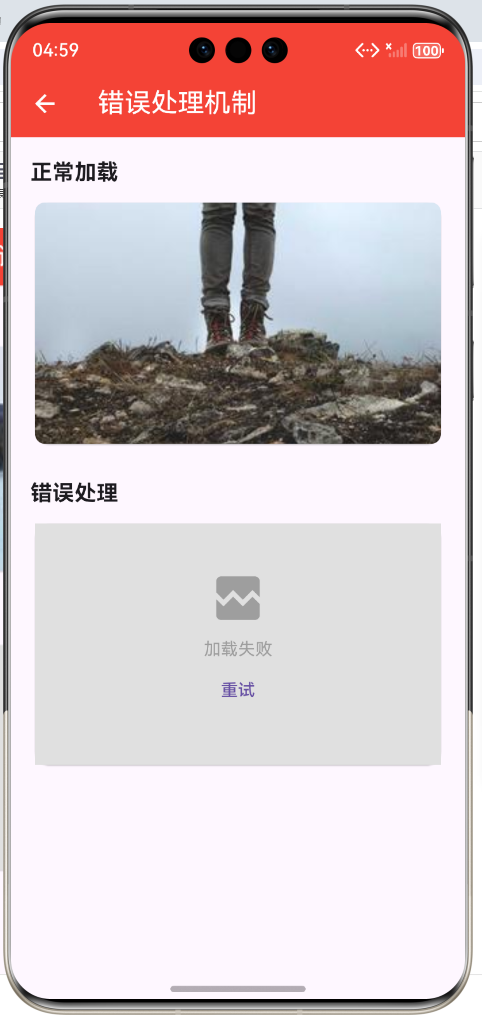
最基础的错误处理方式,通过Image组件的errorBuilder回调,可以在加载失败时自定义显示的Widget。这是最直接、最简单的错误处理方法,适用于大多数场景。
/// 基础错误处理组件
class BasicErrorImage extends StatelessWidget {
final String imageUrl;
final double? width;
final double? height;
final BoxFit fit;
const BasicErrorImage({
super.key,
required this.imageUrl,
this.width,
this.height,
this.fit = BoxFit.cover,
});
Widget build(BuildContext context) {
return Image.network(
imageUrl,
width: width,
height: height,
fit: fit,
errorBuilder: (context, error, stackTrace) {
return Container(
width: width,
height: height,
color: Colors.grey.shade300,
child: const Center(
child: Column(
mainAxisAlignment: MainAxisAlignment.center,
children: [
Icon(Icons.broken_image, color: Colors.grey, size: 48),
SizedBox(height: 8),
Text('加载失败', style: TextStyle(color: Colors.grey)),
],
),
),
);
},
);
}
}
方案2:结合loadingBuilder
同时处理加载中和错误状态,为用户提供完整的加载体验。在加载过程中显示进度提示,在加载失败时显示错误信息,这样可以让用户始终了解当前的状态。
/// 加载状态管理组件
class LoadingStateImage extends StatefulWidget {
final String imageUrl;
final double? width;
final double? height;
final BoxFit fit;
final Duration? timeout;
const LoadingStateImage({
super.key,
required this.imageUrl,
this.width,
this.height,
this.fit = BoxFit.cover,
this.timeout,
});
State<LoadingStateImage> createState() => _LoadingStateImageState();
}
class _LoadingStateImageState extends State<LoadingStateImage> {
ImageLoadState _state = ImageLoadState.loading;
double _progress = 0.0;
String? _errorMessage;
void initState() {
super.initState();
_loadImage();
}
Future<void> _loadImage() async {
if (mounted) {
setState(() {
_state = ImageLoadState.loading;
_progress = 0.0;
_errorMessage = null;
});
}
try {
final completer = Completer<void>();
final imageProvider = NetworkImage(widget.imageUrl);
imageProvider.resolve(const ImageConfiguration()).addListener(
ImageStreamListener(
(ImageInfo info, bool synchronousCall) {
if (mounted) {
setState(() {
_state = ImageLoadState.success;
_progress = 1.0;
});
completer.complete();
}
},
onChunk: (ImageChunkEvent event) {
if (mounted && event.expectedTotalBytes != null) {
setState(() {
_progress = event.cumulativeBytesLoaded /
event.expectedTotalBytes!;
});
}
},
onError: (dynamic error, StackTrace? stackTrace) {
completer.completeError(error, stackTrace);
},
),
);
if (widget.timeout != null) {
await completer.future.timeout(
widget.timeout!,
onTimeout: () => throw TimeoutException('加载超时'),
);
} else {
await completer.future;
}
if (mounted) {
setState(() {
_state = ImageLoadState.success;
});
}
} catch (e) {
if (mounted) {
setState(() {
_state = ImageLoadState.error;
_errorMessage = e.toString();
});
}
}
}
Widget build(BuildContext context) {
return SizedBox(
width: widget.width,
height: widget.height,
child: switch (_state) {
ImageLoadState.loading => _buildLoadingWidget(),
ImageLoadState.success => Image.network(
widget.imageUrl,
width: widget.width,
height: widget.height,
fit: widget.fit,
),
ImageLoadState.error => _buildErrorWidget(),
},
);
}
Widget _buildLoadingWidget() {
return Container(
color: Colors.grey.shade200,
child: Center(
child: Column(
mainAxisAlignment: MainAxisAlignment.center,
children: [
CircularProgressIndicator(value: _progress),
const SizedBox(height: 8),
Text('${(_progress * 100).toInt()}%',
style: const TextStyle(color: Colors.grey)),
],
),
),
);
}
Widget _buildErrorWidget() {
return Container(
color: Colors.grey.shade300,
child: Center(
child: Column(
mainAxisAlignment: MainAxisAlignment.center,
children: [
const Icon(Icons.error_outline, color: Colors.red, size: 48),
const SizedBox(height: 8),
const Text('加载失败', style: TextStyle(color: Colors.grey)),
if (_errorMessage != null) ...[
const SizedBox(height: 4),
Padding(
padding: const EdgeInsets.symmetric(horizontal: 16),
child: Text(
_errorMessage!,
style: const TextStyle(color: Colors.red, fontSize: 11),
textAlign: TextAlign.center,
maxLines: 2,
overflow: TextOverflow.ellipsis,
),
),
],
],
),
),
);
}
}
方案3:完整错误处理组件
创建一个封装良好的错误处理组件,集成超时控制、重试机制、错误分类等功能,为用户提供完整的图片加载体验。
/// 错误类型枚举
enum ImageErrorType {
  /// 网络相关错误
  network,
  /// 资源不存在
  notFound,
  /// 请求超时
  timeout,
  /// 格式错误
  format,
  /// 权限不足
  permission,
  /// 未知错误
  unknown,
}

/// 图片加载状态
enum ImageLoadState {
  loading,
  success,
  error,
}

/// 错误分类器
class ImageErrorClassifier {
  /// 分类错误
  static ImageErrorType classify(dynamic error) {
    if (error is SocketException) {
      return ImageErrorType.network;
    }

    if (error is TimeoutException) {
      return ImageErrorType.timeout;
    }

    if (error is HttpException) {
      final message = error.message.toLowerCase();
      if (message.contains('404')) {
        return ImageErrorType.notFound;
      }
      if (message.contains('401') || message.contains('403')) {
        return ImageErrorType.permission;
      }
      if (message.contains('5')) {
        return ImageErrorType.network; // 服务器错误视为网络问题
      }
    }

    if (error is FormatException) {
      return ImageErrorType.format;
    }

    final errorStr = error.toString().toLowerCase();
    if (errorStr.contains('format') || errorStr.contains('decode')) {
      return ImageErrorType.format;
    }
    if (errorStr.contains('timeout')) {
      return ImageErrorType.timeout;
    }

    return ImageErrorType.unknown;
  }

  /// 判断错误是否可重试
  static bool isRetryable(ImageErrorType type) {
    switch (type) {
      case ImageErrorType.network:
      case ImageErrorType.timeout:
      case ImageErrorType.permission:
        return true;
      case ImageErrorType.notFound:
      case ImageErrorType.format:
      case ImageErrorType.unknown:
        return false;
    }
  }

  /// 获取错误提示信息
  static String getErrorMessage(ImageErrorType type) {
    switch (type) {
      case ImageErrorType.network:
        return '网络连接失败,请检查网络设置';
      case ImageErrorType.notFound:
        return '图片资源不存在';
      case ImageErrorType.timeout:
        return '加载超时,请稍后重试';
      case ImageErrorType.format:
        return '图片格式不支持';
      case ImageErrorType.permission:
        return '没有访问权限';
      case ImageErrorType.unknown:
        return '加载失败,请重试';
    }
  }

  /// 获取错误图标
  static IconData getErrorIcon(ImageErrorType type) {
    switch (type) {
      case ImageErrorType.network:
        return Icons.wifi_off;
      case ImageErrorType.notFound:
        return Icons.search_off;
      case ImageErrorType.timeout:
        return Icons.access_time;
      case ImageErrorType.format:
        return Icons.broken_image;
      case ImageErrorType.permission:
        return Icons.lock;
      case ImageErrorType.unknown:
        return Icons.error;
    }
  }

  /// 获取错误颜色
  static Color getErrorColor(ImageErrorType type) {
    switch (type) {
      case ImageErrorType.network:
        return Colors.orange;
      case ImageErrorType.notFound:
        return Colors.blue;
      case ImageErrorType.timeout:
        return Colors.amber;
      case ImageErrorType.format:
        return Colors.purple;
      case ImageErrorType.permission:
        return Colors.red;
      case ImageErrorType.unknown:
        return Colors.grey;
    }
  }
}
方案2:结合loadingBuilder
同时处理加载中和错误状态:
Image.network(
  imageUrl,
  loadingBuilder: (context, child, loadingProgress) {
    if (loadingProgress == null) return child;

    return Container(
      color: Colors.grey.shade200,
      child: const Center(
        child: CircularProgressIndicator(),
      ),
    );
  },
  errorBuilder: (context, error, stackTrace) {
    return Container(
      color: Colors.grey.shade300,
      child: const Center(
        child: Column(
          mainAxisAlignment: MainAxisAlignment.center,
          children: [
            Icon(Icons.error_outline, color: Colors.red, size: 48),
            SizedBox(height: 8),
            Text('加载失败', style: TextStyle(color: Colors.grey)),
          ],
        ),
      ),
    );
  },
)
方案3:完整错误处理组件
创建一个封装良好的错误处理组件:
class ErrorHandledImage extends StatelessWidget {
final String imageUrl;
final Widget? placeholder;
final Widget? errorWidget;
final Duration? timeout;
final VoidCallback? onRetry;
const ErrorHandledImage({
super.key,
required this.imageUrl,
this.placeholder,
this.errorWidget,
this.timeout,
this.onRetry,
});
Widget build(BuildContext context) {
return FutureBuilder(
future: _loadImageWithTimeout(),
builder: (context, snapshot) {
if (snapshot.connectionState == ConnectionState.waiting) {
return placeholder ?? _defaultPlaceholder();
}
if (snapshot.hasError) {
return GestureDetector(
onTap: onRetry,
child: errorWidget ?? _defaultErrorWidget(),
);
}
return Image.network(
imageUrl,
errorBuilder: (context, error, stackTrace) {
return errorWidget ?? _defaultErrorWidget();
},
);
},
);
}
Future<void> _loadImageWithTimeout() async {
final imageProvider = NetworkImage(imageUrl);
final completer = Completer<void>();
imageProvider.resolve(const ImageConfiguration()).addListener(
ImageStreamListener(
(ImageInfo info, bool synchronousCall) {
completer.complete();
},
onError: (dynamic error, StackTrace? stackTrace) {
completer.completeError(error, stackTrace);
},
),
);
if (timeout != null) {
await completer.future.timeout(
timeout!,
onTimeout: () {
throw TimeoutException('Image load timeout');
},
);
} else {
await completer.future;
}
}
Widget _defaultPlaceholder() {
return Container(
color: Colors.grey.shade200,
child: const Center(
child: CircularProgressIndicator(),
),
);
}
Widget _defaultErrorWidget() {
return Container(
color: Colors.grey.shade300,
child: Center(
child: Column(
mainAxisAlignment: MainAxisAlignment.center,
children: [
const Icon(Icons.broken_image, color: Colors.grey, size: 48),
const SizedBox(height: 8),
const Text('加载失败', style: TextStyle(color: Colors.grey)),
if (onRetry != null)
TextButton(
onPressed: onRetry,
child: const Text('重试'),
),
],
),
),
);
}
}
方案4:智能重试管理
实现智能的重试机制,根据错误类型决定是否重试,使用指数退避策略避免雪崩效应,最终提升成功率。
/// 重试策略枚举
enum RetryStrategy {
  /// 固定延迟
  fixed,
  /// 线性增长
  linear,
  /// 指数退避(推荐)
  exponential,
}

/// 重试管理器
class ImageRetryManager {
  final int maxRetries;
  final RetryStrategy strategy;
  final Duration initialDelay;
  final Duration maxDelay;

  int _currentRetry = 0;

  ImageRetryManager({
    this.maxRetries = 3,
    this.strategy = RetryStrategy.exponential,
    this.initialDelay = const Duration(seconds: 1),
    this.maxDelay = const Duration(seconds: 30),
  });

  /// 计算重试延迟
  Duration calculateDelay(int retryCount) {
    Duration delay;

    switch (strategy) {
      case RetryStrategy.fixed:
        delay = initialDelay;
        break;
      case RetryStrategy.linear:
        delay = Duration(seconds: initialDelay.inSeconds * retryCount);
        break;
      case RetryStrategy.exponential:
        final seconds = initialDelay.inSeconds * (1 << (retryCount - 1));
        delay = Duration(seconds: seconds);
        break;
    }

    // 添加随机抖动
    final jitter = Duration(
      milliseconds: (delay.inMilliseconds * 0.1).toInt(),
    );
    final randomJitter = Duration(
      milliseconds: Random().nextInt(jitter.inMilliseconds),
    );

    // 确保不超过最大延迟
    final finalDelay = delay + randomJitter;
    return finalDelay > maxDelay ? maxDelay : finalDelay;
  }

  /// 判断是否应该重试
  bool shouldRetry(dynamic error) {
    if (_currentRetry >= maxRetries) {
      return false;
    }

    final errorType = ImageErrorClassifier.classify(error);
    return ImageErrorClassifier.isRetryable(errorType);
  }

  /// 执行重试
  Future<T> retry<T>(Future<T> Function() fn) async {
    Exception? lastError;

    while (_currentRetry < maxRetries) {
      try {
        final result = await fn();
        _currentRetry = 0; // 成功后重置计数器
        return result;
      } catch (e) {
        lastError = e is Exception ? e : Exception(e.toString());

        if (!shouldRetry(lastError)) {
          rethrow;
        }

        _currentRetry++;
        final delay = calculateDelay(_currentRetry);

        debugPrint('重试 $_currentRetry/$maxRetries, '
                  '${delay.inSeconds}秒后重试');

        await Future.delayed(delay);
      }
    }

    throw lastError ?? Exception('重试次数已用尽');
  }

  /// 重置重试计数
  void reset() {
    _currentRetry = 0;
  }

  /// 获取当前重试次数
  int get currentRetry => _currentRetry;
}
方案5:错误日志与监控
完善的错误日志记录和监控系统,帮助开发者快速定位和解决问题,持续改进应用的稳定性。
/// 错误日志级别
enum ErrorLogLevel {
  debug,
  info,
  warning,
  error,
  fatal,
}

/// 错误日志记录器
class ImageErrorLogger {
  static final ImageErrorLogger _instance = ImageErrorLogger._internal();
  factory ImageErrorLogger() => _instance;
  ImageErrorLogger._internal();

  final List<ErrorLogEntry> _logs = [];
  final int _maxLogs = 100;
  final Map<String, int> _errorCounts = {};

  /// 记录错误
  void log(
    String url,
    dynamic error,
    StackTrace? stackTrace, {
    ErrorLogLevel level = ErrorLogLevel.error,
    Map<String, dynamic>? metadata,
  }) {
    final errorType = ImageErrorClassifier.classify(error);
    final entry = ErrorLogEntry(
      timestamp: DateTime.now(),
      url: url,
      error: error.toString(),
      stackTrace: stackTrace?.toString(),
      errorType: errorType,
      level: level,
      metadata: metadata,
    );

    // 添加到日志列表
    _logs.add(entry);
    if (_logs.length > _maxLogs) {
      _logs.removeAt(0);
    }

    // 统计错误次数
    final errorKey = '${errorType.name}_${error.runtimeType}';
    _errorCounts[errorKey] = (_errorCounts[errorKey] ?? 0) + 1;

    // 根据级别输出日志
    _printLog(entry);

    // 关键错误上报
    if (level == ErrorLogLevel.fatal) {
      _reportToServer(entry);
    }
  }

  /// 输出日志
  void _printLog(ErrorLogEntry entry) {
    final timestamp = entry.timestamp.toIso8601String();
    final levelStr = entry.level.name.toUpperCase();
    final errorStr = '[${entry.errorType.name}] ${entry.error}';

    debugPrint('$timestamp [$levelStr] $errorStr');

    if (entry.stackTrace != null) {
      debugPrint('Stack trace:\n${entry.stackTrace}');
    }
  }

  /// 上报到服务器
  void _reportToServer(ErrorLogEntry entry) {
    // 实现远程日志上报逻辑
    // 例如: Firebase Crashlytics, Sentry等
    debugPrint('上报致命错误: ${entry.url}');
  }

  /// 获取所有日志
  List<ErrorLogEntry> getAllLogs() {
    return List.unmodifiable(_logs);
  }

  /// 获取错误统计
  Map<String, int> getErrorStats() {
    return Map.unmodifiable(_errorCounts);
  }

  /// 获取特定类型的错误
  List<ErrorLogEntry> getErrorsByType(ImageErrorType type) {
    return _logs.where((log) => log.errorType == type).toList();
  }

  /// 清空日志
  void clearLogs() {
    _logs.clear();
    _errorCounts.clear();
  }

  /// 导出日志
  String exportLogs() {
    final buffer = StringBuffer();
    buffer.writeln('=== 图片加载错误日志 ===');
    buffer.writeln('导出时间: ${DateTime.now().toIso8601String()}');
    buffer.writeln('总错误数: ${_logs.length}');
    buffer.writeln('');

    for (final log in _logs) {
      buffer.writeln('---');
      buffer.writeln('时间: ${log.timestamp.toIso8601String()}');
      buffer.writeln('URL: ${log.url}');
      buffer.writeln('类型: ${log.errorType.name}');
      buffer.writeln('级别: ${log.level.name}');
      buffer.writeln('错误: ${log.error}');
      if (log.stackTrace != null) {
        buffer.writeln('堆栈:\n${log.stackTrace}');
      }
      if (log.metadata != null) {
        buffer.writeln('元数据: ${log.metadata}');
      }
      buffer.writeln('');
    }

    buffer.writeln('=== 错误统计 ===');
    _errorCounts.forEach((key, count) {
      buffer.writeln('$key: $count 次');
    });

    return buffer.toString();
  }
}

/// 错误日志条目
class ErrorLogEntry {
  final DateTime timestamp;
  final String url;
  final String error;
  final String? stackTrace;
  final ImageErrorType errorType;
  final ErrorLogLevel level;
  final Map<String, dynamic>? metadata;

  ErrorLogEntry({
    required this.timestamp,
    required this.url,
    required this.error,
    this.stackTrace,
    required this.errorType,
    required this.level,
    this.metadata,
  });
}
方案6:网络状态感知
实时监听网络状态变化,根据网络情况调整加载策略,在无网络时提供清晰的提示。
/// 网络状态监听器
class NetworkAwareImageLoader extends StatefulWidget {
final String imageUrl;
final Widget? offlineWidget;
final Duration checkInterval;
const NetworkAwareImageLoader({
super.key,
required this.imageUrl,
this.offlineWidget,
this.checkInterval = const Duration(seconds: 5),
});
State<NetworkAwareImageLoader> createState() =>
_NetworkAwareImageLoaderState();
}
class _NetworkAwareImageLoaderState
extends State<NetworkAwareImageLoader> {
bool _isConnected = true;
StreamSubscription<ConnectivityResult>? _subscription;
void initState() {
super.initState();
_checkNetwork();
_listenNetwork();
}
void dispose() {
_subscription?.cancel();
super.dispose();
}
/// 检查网络连接
Future<void> _checkNetwork() async {
final connectivity = Connectivity();
final result = await connectivity.checkConnectivity();
final connected = result != ConnectivityResult.none;
if (mounted && _isConnected != connected) {
setState(() {
_isConnected = connected;
});
}
}
/// 监听网络变化
void _listenNetwork() {
final connectivity = Connectivity();
_subscription = connectivity.onConnectivityChanged.listen((result) {
final connected = result != ConnectivityResult.none;
if (mounted) {
setState(() {
_isConnected = connected;
});
}
});
}
Widget build(BuildContext context) {
if (!_isConnected) {
return widget.offlineWidget ?? _buildDefaultOfflineWidget();
}
return Image.network(
widget.imageUrl,
errorBuilder: (context, error, stackTrace) {
return _buildErrorWidget(error);
},
);
}
Widget _buildDefaultOfflineWidget() {
return Container(
color: Colors.grey.shade100,
child: Center(
child: Column(
mainAxisAlignment: MainAxisAlignment.center,
children: [
Icon(Icons.wifi_off, size: 64, color: Colors.grey.shade400),
const SizedBox(height: 16),
Text(
'无网络连接',
style: TextStyle(
fontSize: 16,
color: Colors.grey.shade600,
),
),
const SizedBox(height: 8),
Text(
'请检查网络设置后重试',
style: TextStyle(
fontSize: 14,
color: Colors.grey.shade500,
),
),
const SizedBox(height: 24),
ElevatedButton.icon(
onPressed: _checkNetwork,
icon: const Icon(Icons.refresh),
label: const Text('重新检测'),
),
],
),
),
);
}
Widget _buildErrorWidget(dynamic error) {
final errorType = ImageErrorClassifier.classify(error);
return Container(
color: Colors.grey.shade300,
child: Center(
child: Column(
mainAxisAlignment: MainAxisAlignment.center,
children: [
Icon(
ImageErrorClassifier.getErrorIcon(errorType),
size: 48,
color: ImageErrorClassifier.getErrorColor(errorType),
),
const SizedBox(height: 8),
Text(
ImageErrorClassifier.getErrorMessage(errorType),
style: const TextStyle(color: Colors.grey),
),
],
),
),
);
}
}
方案7:降级策略与容错
当图片加载失败时,提供合理的降级方案,确保用户始终能看到内容,提升应用的容错能力。
/// 图片降级策略
enum ImageFallbackStrategy {
/// 显示本地占位图
localPlaceholder,
/// 显示灰色背景
solidColor,
/// 显示模糊预览
blurPlaceholder,
/// 显示默认图片
defaultImage,
/// 不显示任何内容
empty,
}
/// 带降级策略的图片组件
class FallbackImage extends StatelessWidget {
final String imageUrl;
final ImageFallbackStrategy fallbackStrategy;
final String? placeholderAsset;
final Color? solidColor;
final String? blurPlaceholderUrl;
final String? defaultImageUrl;
const FallbackImage({
super.key,
required this.imageUrl,
this.fallbackStrategy = ImageFallbackStrategy.localPlaceholder,
this.placeholderAsset,
this.solidColor,
this.blurPlaceholderUrl,
this.defaultImageUrl,
});
Widget build(BuildContext context) {
return Image.network(
imageUrl,
errorBuilder: (context, error, stackTrace) {
return _buildFallbackWidget();
},
);
}
Widget _buildFallbackWidget() {
switch (fallbackStrategy) {
case ImageFallbackStrategy.localPlaceholder:
if (placeholderAsset != null) {
return Image.asset(placeholderAsset!);
}
return _buildDefaultPlaceholder();
case ImageFallbackStrategy.solidColor:
return Container(
color: solidColor ?? Colors.grey.shade200,
);
case ImageFallbackStrategy.blurPlaceholder:
if (blurPlaceholderUrl != null) {
return Stack(
children: [
Image.network(blurPlaceholderUrl!),
BackdropFilter(
filter: ImageFilter.blur(sigmaX: 10, sigmaY: 10),
child: Container(
color: Colors.white.withOpacity(0.1),
),
),
],
);
}
return _buildDefaultPlaceholder();
case ImageFallbackStrategy.defaultImage:
if (defaultImageUrl != null) {
return Image.network(defaultImageUrl!);
}
return _buildDefaultPlaceholder();
case ImageFallbackStrategy.empty:
return const SizedBox.shrink();
}
}
Widget _buildDefaultPlaceholder() {
return Container(
color: Colors.grey.shade200,
child: const Center(
child: Icon(Icons.image, color: Colors.grey, size: 48),
),
);
}
}
方案8:用户反馈与上报
提供错误反馈渠道,让用户可以报告问题,同时自动上报错误信息到服务器,帮助开发者快速定位问题。
/// 错误反馈管理器
class ErrorFeedbackManager {
static final ErrorFeedbackManager _instance =
ErrorFeedbackManager._internal();
factory ErrorFeedbackManager() => _instance;
ErrorFeedbackManager._internal();
/// 显示错误反馈对话框
Future<void> showFeedbackDialog(
BuildContext context, {
required String imageUrl,
required dynamic error,
required StackTrace? stackTrace,
}) async {
return showDialog(
context: context,
builder: (context) => _ErrorFeedbackDialog(
imageUrl: imageUrl,
error: error,
stackTrace: stackTrace,
),
);
}
/// 上报错误到服务器
Future<void> reportError({
required String imageUrl,
required dynamic error,
required StackTrace? stackTrace,
Map<String, dynamic>? metadata,
}) async {
final report = ErrorReport(
timestamp: DateTime.now(),
imageUrl: imageUrl,
error: error.toString(),
stackTrace: stackTrace?.toString(),
metadata: metadata,
deviceInfo: await _getDeviceInfo(),
);
// 发送到服务器
await _sendReport(report);
}
Future<void> _sendReport(ErrorReport report) async {
// 实现发送逻辑
debugPrint('上报错误报告: ${report.imageUrl}');
}
Future<Map<String, dynamic>> _getDeviceInfo() async {
return {
'platform': 'HarmonyOS',
'version': '1.0.0',
// 更多设备信息
};
}
}
/// 错误反馈对话框
class _ErrorFeedbackDialog extends StatelessWidget {
final String imageUrl;
final dynamic error;
final StackTrace? stackTrace;
const _ErrorFeedbackDialog({
required this.imageUrl,
required this.error,
required this.stackTrace,
});
Widget build(BuildContext context) {
return AlertDialog(
title: const Text('图片加载失败'),
content: SingleChildScrollView(
child: Column(
crossAxisAlignment: CrossAxisAlignment.start,
mainAxisSize: MainAxisSize.min,
children: [
const Text('错误信息:'),
const SizedBox(height: 4),
Text(
error.toString(),
style: const TextStyle(color: Colors.red),
),
const SizedBox(height: 12),
const Text('图片URL:'),
const SizedBox(height: 4),
Text(
imageUrl,
style: const TextStyle(fontSize: 12),
),
],
),
),
actions: [
TextButton(
onPressed: () => Navigator.pop(context),
child: const Text('取消'),
),
TextButton(
onPressed: () {
ErrorFeedbackManager().reportError(
imageUrl: imageUrl,
error: error,
stackTrace: stackTrace,
);
ScaffoldMessenger.of(context).showSnackBar(
const SnackBar(content: Text('已反馈错误')),
);
Navigator.pop(context);
},
child: const Text('反馈问题'),
),
TextButton(
onPressed: () => Navigator.pop(context),
child: const Text('重试'),
),
],
);
}
}
/// 错误报告
class ErrorReport {
final DateTime timestamp;
final String imageUrl;
final String error;
final String? stackTrace;
final Map<String, dynamic>? metadata;
final Map<String, dynamic>? deviceInfo;
ErrorReport({
required this.timestamp,
required this.imageUrl,
required this.error,
this.stackTrace,
this.metadata,
this.deviceInfo,
});
Map<String, dynamic> toJson() {
return {
'timestamp': timestamp.toIso8601String(),
'imageUrl': imageUrl,
'error': error,
'stackTrace': stackTrace,
'metadata': metadata,
'deviceInfo': deviceInfo,
};
}
}
使用示例
class MyPage extends StatelessWidget {
Widget build(BuildContext context) {
return Scaffold(
appBar: AppBar(
title: const Text('错误处理示例'),
backgroundColor: Colors.indigo,
foregroundColor: Colors.white,
),
body: ListView(
padding: const EdgeInsets.all(16),
children: [
const Text('基础错误处理', style: TextStyle(fontSize: 18)),
const SizedBox(height: 8),
SizedBox(
height: 200,
child: BasicErrorImage(
imageUrl: 'https://picsum.photos/400/300',
),
),
const SizedBox(height: 24),
const Text('加载状态管理', style: TextStyle(fontSize: 18)),
const SizedBox(height: 8),
SizedBox(
height: 200,
child: LoadingStateImage(
imageUrl: 'https://picsum.photos/400/300?slow',
timeout: const Duration(seconds: 3),
),
),
const SizedBox(height: 24),
const Text('网络感知加载', style: TextStyle(fontSize: 18)),
const SizedBox(height: 8),
SizedBox(
height: 200,
child: NetworkAwareImageLoader(
imageUrl: 'https://picsum.photos/400/300',
),
),
const SizedBox(height: 24),
const Text('降级策略', style: TextStyle(fontSize: 18)),
const SizedBox(height: 8),
SizedBox(
height: 200,
child: FallbackImage(
imageUrl: 'https://invalid-url.com/image.jpg',
fallbackStrategy: ImageFallbackStrategy.solidColor,
solidColor: Colors.blue.shade100,
),
),
],
),
);
}
}
最佳实践
- 分类处理:根据错误类型提供针对性的处理方案
- 友好的提示:提供清晰、易懂的错误信息
- 重试机制:对于可恢复的错误提供重试选项
- 超时设置:合理的超时时间,避免无限等待
- 网络感知:检测网络状态,提供离线提示
- 降级方案:失败时提供合理的替代内容
- 错误日志:记录详细的错误信息,便于排查
- 用户反馈:提供问题反馈渠道,持续改进
总结
完善的错误处理机制是构建健壮应用的基础。通过合理使用errorBuilder、设置超时、提供重试选项和记录日志,可以确保应用在各种异常情况下都能提供良好的用户体验。记住要考虑各种可能的错误场景,并为每种场景提供合适的处理方案,在功能和用户体验之间找到最佳平衡。
欢迎加入开源鸿蒙跨平台社区:https://openharmonycrossplatform.csdn.net

作为“人工智能6S店”的官方数字引擎,为AI开发者与企业提供一个覆盖软硬件全栈、一站式门户。
更多推荐

 20
20 0
0- 0



 已为社区贡献23条内容

所有评论(0)