
Flutter框架跨平台鸿蒙开发——节日祝福语APP的开发流程
摘要 本文介绍了使用Flutter框架开发跨平台节日祝福语APP的全流程,重点适配鸿蒙系统。应用提供节日分类浏览、祝福文案查看、复制分享等功能,采用Material Design风格UI。文章详细讲解了开发环境搭建、项目架构设计、核心功能实现,包括节日数据模型、服务类和主界面开发。项目采用分层架构,包含数据模型、业务逻辑和界面组件,通过Flutter的跨平台特性实现一次开发多端运行。文中提供了关键
·
🚀运行效果展示
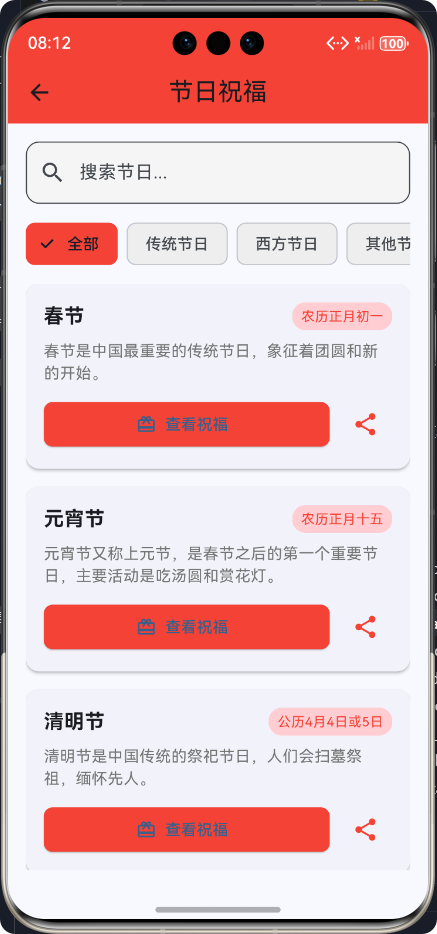
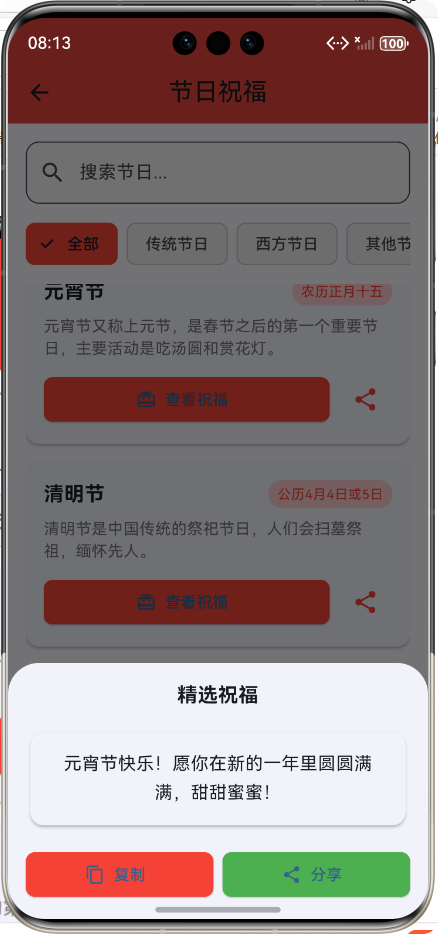
Flutter框架跨平台鸿蒙开发——节日祝福语APP的开发流程
📝 前言
随着移动互联网的快速发展,跨平台开发技术越来越受到开发者的青睐。Flutter作为Google推出的跨平台UI框架,以其高性能、高保真度和快速开发的特点,在移动开发领域占据了重要地位。而鸿蒙系统作为华为推出的全场景分布式操作系统,也在不断扩大其生态影响力。
本博客将详细介绍如何使用Flutter框架开发一款跨平台的节日祝福语APP,并适配鸿蒙系统。通过这个项目,我们将学习Flutter的核心开发流程、状态管理、UI设计以及跨平台适配的相关知识。
🎯 项目介绍
1. 应用概述
节日祝福语APP是一款为用户提供各种节日祝福文案的工具类应用,用户可以浏览不同类型的节日,查看节日详情和祝福文案,并支持复制和分享功能。
2. 核心功能
- 📅 节日列表展示:支持多种节日类型分类
- 🔍 节日搜索:支持关键词搜索节日
- 🏷️ 节日分类:传统节日、西方节日、其他节日
- 📝 祝福文案:每个节日提供精选祝福文案
- 📋 复制功能:支持一键复制祝福文案
- 📤 分享功能:支持分享祝福文案到其他应用
- 🎨 美观UI:采用现代化的Material Design风格
3. 技术栈
| 技术 | 版本 | 用途 |
|---|---|---|
| Flutter | 3.0+ | 跨平台UI框架 |
| Dart | 3.0+ | 开发语言 |
| HarmonyOS | 3.0+ | 目标平台 |
| Material Design | - | UI设计规范 |
🛠️ 开发环境搭建
1. Flutter环境安装
- 下载并安装Flutter SDK
- 配置Flutter环境变量
- 运行
flutter doctor检查环境
2. 鸿蒙开发环境搭建
- 安装DevEco Studio
- 配置鸿蒙SDK
- 安装Flutter HarmonyOS插件
- 创建Flutter HarmonyOS项目
3. 项目初始化
flutter create --template=app flutter_harmony_festival
cd flutter_harmony_festival
🏗️ 项目架构设计
1. 目录结构
lib/
├── festival_greeting/
│   ├── models/          # 数据模型
│   │   └── festival.dart
│   ├── services/        # 业务逻辑
│   │   └── festival_service.dart
│   └── screens/         # 页面组件
│       └── festival_greeting_screen.dart
├── screens/             # 主屏幕
│   └── home_screen.dart
└── main.dart            # 应用入口
2. 架构流程图
💡 核心功能实现
1. 节日数据模型
festival.dart
/// 节日模型类
class Festival {
  /// 节日名称
  final String name;

  /// 节日日期
  final String date;

  /// 节日类型:traditional(传统)、western(西方)、other(其他)
  final String type;

  /// 节日描述
  final String description;

  /// 节日祝福文案
  final String greeting;

  /// 构造函数
  const Festival({
    required this.name,
    required this.date,
    required this.type,
    required this.description,
    required this.greeting,
  });
}
2. 节日服务
festival_service.dart
import '../models/festival.dart';

/// 节日服务类,提供节日数据和相关功能
class FestivalService {
  /// 所有节日数据
  final List<Festival> _festivals = [
    // 传统节日
    Festival(
      name: '春节',
      date: '农历正月初一',
      type: 'traditional',
      description: '春节是中国最重要的传统节日,象征着团圆和新的开始。',
      greeting: '新年快乐!愿你在新的一年里身体健康,事业有成,家庭幸福!',
    ),
    // 其他节日数据...
  ];

  /// 获取节日列表
  /// [type] - 节日类型:all(全部)、traditional(传统)、western(西方)、other(其他)
  List<Festival> getFestivals(String type) {
    if (type == 'all') {
      return _festivals;
    }
    return _festivals.where((festival) => festival.type == type).toList();
  }

  /// 根据名称搜索节日
  /// [keyword] - 搜索关键词
  List<Festival> searchFestivals(String keyword) {
    if (keyword.isEmpty) {
      return _festivals;
    }
    return _festivals.where((festival) =>
      festival.name.contains(keyword) ||
      festival.description.contains(keyword)
    ).toList();
  }

  /// 获取随机节日祝福
  Festival getRandomFestival() {
    final randomIndex = DateTime.now().millisecond % _festivals.length;
    return _festivals[randomIndex];
  }
}
3. 节日祝福主屏幕
festival_greeting_screen.dart
import 'package:flutter/material.dart';
import '../models/festival.dart';
import '../services/festival_service.dart';
/// 节日祝福主屏幕
class FestivalGreetingScreen extends StatefulWidget {
/// 构造函数
const FestivalGreetingScreen({super.key});
State<FestivalGreetingScreen> createState() => _FestivalGreetingScreenState();
}
class _FestivalGreetingScreenState extends State<FestivalGreetingScreen> {
/// 节日服务实例
final FestivalService _festivalService = FestivalService();
/// 当前选中的节日类型
String _selectedFestivalType = 'all';
Widget build(BuildContext context) {
return Scaffold(
appBar: AppBar(
title: const Text('节日祝福'),
backgroundColor: Colors.red,
centerTitle: true,
elevation: 0,
),
body: SafeArea(
child: Padding(
padding: const EdgeInsets.all(16.0),
child: Column(
crossAxisAlignment: CrossAxisAlignment.stretch,
children: [
// 搜索和筛选区域
_buildSearchBar(),
const SizedBox(height: 16),
// 节日分类标签
_buildFestivalTypeTabs(),
const SizedBox(height: 16),
// 节日祝福列表
Expanded(
child: _buildFestivalList(),
),
],
),
),
),
);
}
// 其他方法实现...
}
4. 搜索和筛选功能
搜索栏实现
/// 构建搜索栏
Widget _buildSearchBar() {
  return TextField(
    decoration: InputDecoration(
      hintText: '搜索节日...',
      prefixIcon: const Icon(Icons.search),
      border: OutlineInputBorder(
        borderRadius: BorderRadius.circular(12),
      ),
      filled: true,
      fillColor: Colors.grey[100],
    ),
    onChanged: (value) {
      // 搜索逻辑实现
      setState(() {
        _searchKeyword = value;
      });
    },
  );
}
节日分类标签
/// 构建节日分类标签
Widget _buildFestivalTypeTabs() {
  final festivalTypes = ['all', 'traditional', 'western', 'other'];
  final typeLabels = {
    'all': '全部',
    'traditional': '传统节日',
    'western': '西方节日',
    'other': '其他节日',
  };

  return SizedBox(
    height: 40,
    child: ListView.builder(
      scrollDirection: Axis.horizontal,
      itemCount: festivalTypes.length,
      itemBuilder: (context, index) {
        final type = festivalTypes[index];
        final isSelected = _selectedFestivalType == type;

        return Padding(
          padding: const EdgeInsets.only(right: 8.0),
          child: ChoiceChip(
            label: Text(typeLabels[type]!),
            selected: isSelected,
            onSelected: (selected) {
              if (selected) {
                setState(() {
                  _selectedFestivalType = type;
                });
              }
            },
            selectedColor: Colors.red,
            backgroundColor: Colors.grey[200],
          ),
        );
      },
    ),
  );
}
5. 节日列表展示
/// 构建节日祝福列表
Widget _buildFestivalList() {
  List<Festival> festivals = _festivalService.getFestivals(_selectedFestivalType);
  if (_searchKeyword.isNotEmpty) {
    festivals = _festivalService.searchFestivals(_searchKeyword);
  }

  return ListView.builder(
    itemCount: festivals.length,
    itemBuilder: (context, index) {
      final festival = festivals[index];

      return Card(
        elevation: 2,
        shape: RoundedRectangleBorder(
          borderRadius: BorderRadius.circular(12),
        ),
        margin: const EdgeInsets.only(bottom: 16),
        child: InkWell(
          onTap: () {
            _showGreetingDetails(context, festival);
          },
          borderRadius: BorderRadius.circular(12),
          child: Padding(
            padding: const EdgeInsets.all(16.0),
            child: Column(
              crossAxisAlignment: CrossAxisAlignment.start,
              children: [
                Row(
                  mainAxisAlignment: MainAxisAlignment.spaceBetween,
                  children: [
                    Text(
                      festival.name,
                      style: const TextStyle(
                        fontSize: 18,
                        fontWeight: FontWeight.bold,
                      ),
                    ),
                    Container(
                      padding: const EdgeInsets.symmetric(horizontal: 8, vertical: 4),
                      decoration: BoxDecoration(
                        color: Colors.red[100],
                        borderRadius: BorderRadius.circular(12),
                      ),
                      child: Text(
                        festival.date,
                        style: const TextStyle(
                          fontSize: 12,
                          color: Colors.red,
                        ),
                      ),
                    ),
                  ],
                ),
                // 其他UI组件...
              ],
            ),
          ),
        ),
      );
    },
  );
}
6. 祝福消息展示和分享功能
祝福消息BottomSheet
/// 显示祝福消息
void _showGreetingMessage(BuildContext context, Festival festival) {
  showModalBottomSheet(
    context: context,
    builder: (context) {
      return Padding(
        padding: const EdgeInsets.all(16.0),
        child: Column(
          crossAxisAlignment: CrossAxisAlignment.stretch,
          mainAxisSize: MainAxisSize.min,
          children: [
            const Text(
              '精选祝福',
              style: TextStyle(
                fontSize: 18,
                fontWeight: FontWeight.bold,
              ),
              textAlign: TextAlign.center,
            ),
            const SizedBox(height: 16),
            Card(
              elevation: 2,
              shape: RoundedRectangleBorder(
                borderRadius: BorderRadius.circular(12),
              ),
              child: Padding(
                padding: const EdgeInsets.all(16.0),
                child: Text(
                  festival.greeting,
                  style: const TextStyle(
                    fontSize: 16,
                    height: 1.6,
                  ),
                  textAlign: TextAlign.center,
                ),
              ),
            ),
            const SizedBox(height: 16),
            Row(
              children: [
                Expanded(
                  child: ElevatedButton.icon(
                    onPressed: () {
                      _copyGreeting(festival.greeting);
                      Navigator.pop(context);
                    },
                    icon: const Icon(Icons.content_copy),
                    label: const Text('复制'),
                    style: ElevatedButton.styleFrom(
                      backgroundColor: Colors.red,
                      shape: RoundedRectangleBorder(
                        borderRadius: BorderRadius.circular(8),
                      ),
                    ),
                  ),
                ),
                const SizedBox(width: 8),
                Expanded(
                  child: ElevatedButton.icon(
                    onPressed: () {
                      _shareGreeting(festival);
                      Navigator.pop(context);
                    },
                    icon: const Icon(Icons.share),
                    label: const Text('分享'),
                    style: ElevatedButton.styleFrom(
                      backgroundColor: Colors.green,
                      shape: RoundedRectangleBorder(
                        borderRadius: BorderRadius.circular(8),
                      ),
                    ),
                  ),
                ),
              ],
            ),
          ],
        ),
      );
    },
  );
}
🔄 跨平台适配
1. 鸿蒙系统适配要点
- UI组件适配:确保Material Design组件在鸿蒙系统上正常显示
- 屏幕尺寸适配:针对鸿蒙设备的不同屏幕尺寸进行布局调整
- 系统权限适配:处理鸿蒙系统的权限请求
- 性能优化:针对鸿蒙系统进行性能优化
2. 适配代码示例
// 鸿蒙系统特有的适配代码
import 'dart:io' show Platform;

if (Platform.isAndroid) {
  // 鸿蒙系统适配逻辑
  // 例如:处理鸿蒙特有的权限请求
}
🧪 测试和调试
1. Flutter测试
# 单元测试
flutter test

# Widget测试
flutter test widget_test.dart

# 集成测试
flutter drive --driver=test_driver/integration_test.dart --target=integration_test/app_test.dart
2. 鸿蒙设备调试
- 连接鸿蒙设备
- 运行
flutter devices查看设备 - 运行
flutter run -d device_id在特定设备上调试 - 使用DevEco Studio进行调试
3. 常见问题及解决方案
| 问题 | 解决方案 |
|---|---|
| UI渲染溢出 | 使用Expanded、Flexible等组件进行适配 |
| 权限问题 | 正确配置AndroidManifest.xml和鸿蒙权限文件 |
| 性能问题 | 优化列表渲染,使用ListView.builder等懒加载组件 |
| 跨平台兼容性 | 使用Platform API进行平台判断和适配 |
🎉 总结
1. 项目收获
- 跨平台开发经验:掌握了Flutter框架的跨平台开发能力
- 鸿蒙系统适配:学习了鸿蒙系统的适配要点和最佳实践
- 应用架构设计:理解了现代移动应用的架构设计原则
- UI/UX设计:提升了移动端UI/UX设计能力
- 测试和调试:掌握了Flutter应用的测试和调试方法
2. 技术亮点
- 模块化设计:采用模块化设计,代码结构清晰,易于维护
- 响应式布局:适配不同屏幕尺寸的设备
- 高性能渲染:使用Flutter的高性能渲染引擎,保证应用流畅运行
- 现代化UI:采用Material Design设计规范,UI美观易用
- 完整的功能:包含搜索、筛选、分享等完整功能
3. 未来展望
- 增加更多节日数据:扩展节日数据库,包含更多国家和地区的节日
- 支持自定义祝福:允许用户自定义和保存祝福文案
- 添加节日提醒功能:在节日来临前提醒用户
- 支持多种语言:实现多语言支持,面向全球用户
- 优化跨平台体验:进一步优化在鸿蒙系统上的用户体验
📚 参考资料
欢迎加入开源鸿蒙跨平台社区:https://openharmonycrossplatform.csdn.net

作为“人工智能6S店”的官方数字引擎,为AI开发者与企业提供一个覆盖软硬件全栈、一站式门户。
更多推荐

 2
2 0
0- 0


 已为社区贡献10条内容

所有评论(0)