
Flutter框架跨平台鸿蒙开发——失物招领APP的开发流程
本文介绍了使用Flutter框架开发跨平台鸿蒙失物招领APP的全流程。文章首先分析了Flutter框架的优势及其对鸿蒙系统的良好支持,随后详细阐述了APP的功能设计和开发过程。核心内容包括数据模型设计、服务层实现以及页面开发,通过代码示例展示了失物信息管理、搜索筛选等关键功能的实现方法。开发流程采用模块化设计,从项目初始化到测试优化再到鸿蒙适配,形成完整闭环。该APP具备简洁直观的UI界面、流畅的
🚀运行效果展示
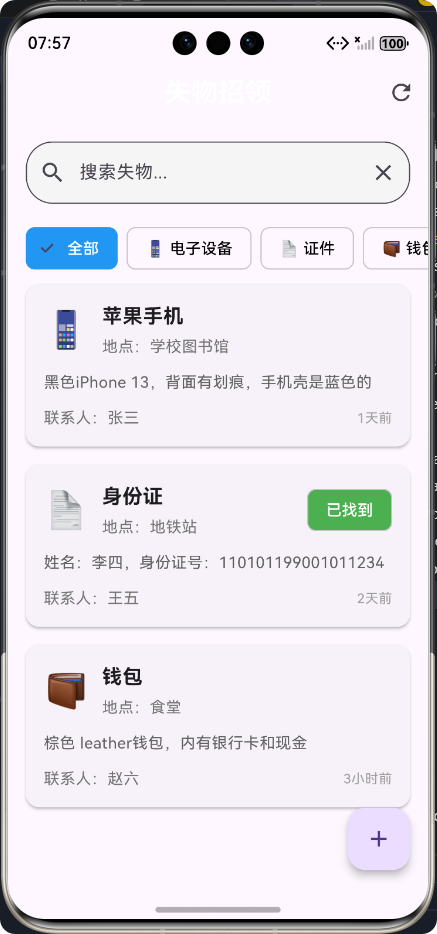
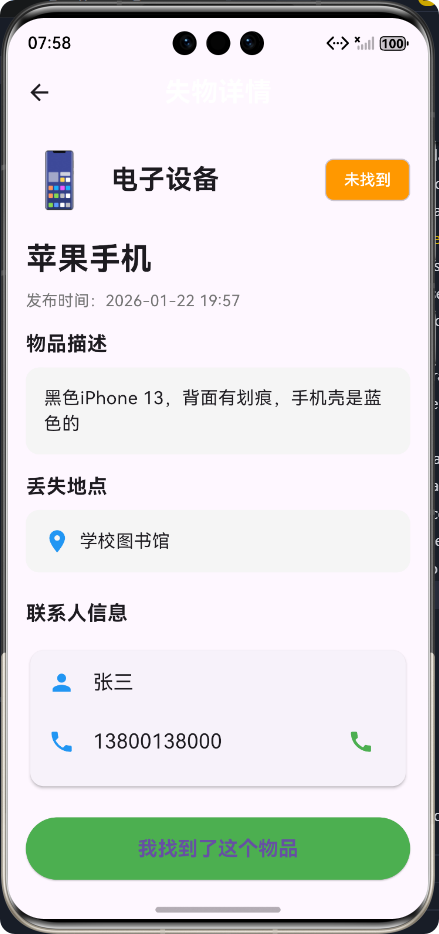
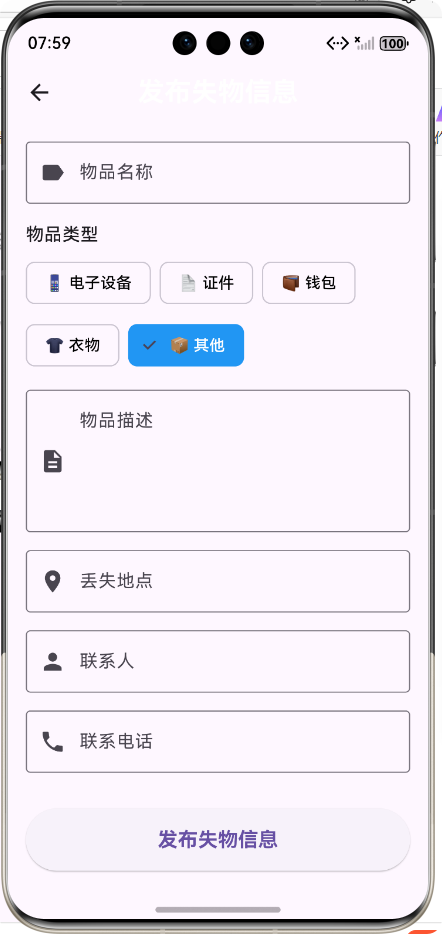
Flutter框架跨平台鸿蒙开发——失物招领APP的开发流程
🌟 前言
随着移动互联网的快速发展,跨平台开发框架已成为移动应用开发的重要趋势。Flutter作为谷歌推出的开源UI软件开发工具包,凭借其"一次编写,处处运行"的特性,受到了广大开发者的青睐。而鸿蒙系统作为华为自主研发的分布式操作系统,也在不断扩展其生态。本文将详细介绍如何使用Flutter框架开发一款跨平台的失物招领APP,并重点讲解其在鸿蒙系统上的适配与优化。
🎯 为什么选择Flutter开发鸿蒙应用?
- 跨平台能力强:一套代码可运行于Android、iOS、Web、桌面端及鸿蒙系统
- 高性能渲染:基于Skia图形引擎,实现接近原生应用的性能
- 丰富的组件库:提供大量精美的UI组件,快速构建高质量界面
- 热重载:支持实时预览代码修改,提高开发效率
- 良好的鸿蒙系统支持:Flutter已官方支持鸿蒙系统,开发体验流畅
📱 失物招领APP介绍
📋 功能概述
失物招领APP是一款帮助用户发布和查找失物信息的移动应用,主要功能包括:
- 🔍 浏览失物列表
- 📝 发布失物信息
- 🔎 搜索筛选失物
- 📞 联系失主
- ✅ 标记物品已找到
🎨 设计理念
- 简洁直观:采用清晰的信息层级,便于用户快速获取关键信息
- 友好交互:提供流畅的动画效果和反馈,增强用户体验
- 响应式设计:适配不同屏幕尺寸,确保在各种设备上都有良好表现
- 主题统一:使用蓝色作为主色调,传达信任和可靠的感觉
🔄 开发流程图
💻 核心功能实现及代码展示
1️⃣ 数据模型设计
数据模型是应用的基础,我们首先需要设计清晰的数据结构来表示失物信息。
/// 失物招领物品模型
class LostItem {
  /// 物品ID
  final String id;

  /// 物品名称
  final String name;

  /// 物品描述
  final String description;

  /// 物品图片URL
  final String? imageUrl;

  /// 丢失/捡到地点
  final String location;

  /// 丢失/捡到时间
  final DateTime date;

  /// 联系人
  final String contact;

  /// 联系电话
  final String phone;

  /// 物品类型
  final LostItemType type;

  /// 是否已找到
  final bool isFound;

  /// 构造函数
  const LostItem({
    required this.id,
    required this.name,
    required this.description,
    this.imageUrl,
    required this.location,
    required this.date,
    required this.contact,
    required this.phone,
    required this.type,
    required this.isFound,
  });
}

/// 失物类型枚举
enum LostItemType {
  /// 电子设备
  electronics,
  /// 证件
  documents,
  /// 钱包
  wallet,
  /// 衣物
  clothing,
  /// 其他
  other,
}

/// 失物类型扩展,提供类型名称和图标
extension LostItemTypeExtension on LostItemType {
  /// 获取类型名称
  String get name {
    switch (this) {
      case LostItemType.electronics:
        return '电子设备';
      case LostItemType.documents:
        return '证件';
      case LostItemType.wallet:
        return '钱包';
      case LostItemType.clothing:
        return '衣物';
      case LostItemType.other:
        return '其他';
    }
  }

  /// 获取类型图标
  String get icon {
    switch (this) {
      case LostItemType.electronics:
        return '📱';
      case LostItemType.documents:
        return '📄';
      case LostItemType.wallet:
        return '👛';
      case LostItemType.clothing:
        return '👕';
      case LostItemType.other:
        return '📦';
    }
  }
}
2️⃣ 服务层实现
服务层负责处理数据逻辑,包括数据的获取、存储、搜索和筛选等。
import '../models/lost_item_model.dart';

/// 失物招领服务类,用于管理失物信息
class LostItemService {
  /// 模拟失物数据列表
  static List<LostItem> _lostItems = [
    // 模拟数据...
  ];

  /// 获取所有失物信息
  static Future<List<LostItem>> getAllLostItems() async {
    // 模拟网络延迟
    await Future.delayed(const Duration(milliseconds: 300));
    return List.from(_lostItems);
  }

  /// 根据ID获取失物信息
  static Future<LostItem?> getLostItemById(String id) async {
    await Future.delayed(const Duration(milliseconds: 200));
    return _lostItems.firstWhere((item) => item.id == id);
  }

  /// 添加失物信息
  static Future<void> addLostItem(LostItem item) async {
    await Future.delayed(const Duration(milliseconds: 400));
    _lostItems.add(item);
  }

  /// 标记失物为已找到
  static Future<void> markAsFound(String id) async {
    await Future.delayed(const Duration(milliseconds: 250));
    // 标记逻辑...
  }

  /// 搜索失物
  static Future<List<LostItem>> searchLostItems(String keyword) async {
    await Future.delayed(const Duration(milliseconds: 300));
    return _lostItems.where((item) =>
      item.name.toLowerCase().contains(keyword.toLowerCase()) ||
      item.description.toLowerCase().contains(keyword.toLowerCase()) ||
      item.location.toLowerCase().contains(keyword.toLowerCase())
    ).toList();
  }
}
3️⃣ 页面开发
🏠 失物招领主页面
主页面是用户进入应用的第一个界面,需要展示失物列表、提供搜索和筛选功能。
class LostAndFoundScreen extends StatefulWidget {
const LostAndFoundScreen({super.key});
State<LostAndFoundScreen> createState() => _LostAndFoundScreenState();
}
class _LostAndFoundScreenState extends State<LostAndFoundScreen> {
/// 失物列表
List<LostItem> _lostItems = [];
/// 加载状态
bool _isLoading = true;
/// 搜索关键词
String _searchKeyword = '';
/// 筛选类型
LostItemType? _filterType;
void initState() {
super.initState();
_loadLostItems();
}
/// 加载失物列表
Future<void> _loadLostItems() async {
setState(() {
_isLoading = true;
});
try {
final items = await LostItemService.getAllLostItems();
setState(() {
_lostItems = items;
});
} catch (e) {
if (mounted) {
ScaffoldMessenger.of(context).showSnackBar(
const SnackBar(content: Text('加载失物信息失败')),
);
}
} finally {
setState(() {
_isLoading = false;
});
}
}
Widget build(BuildContext context) {
return Scaffold(
appBar: AppBar(
title: const Text('失物招领'),
actions: [
IconButton(
icon: const Icon(Icons.refresh),
onPressed: _loadLostItems,
tooltip: '刷新',
),
],
),
body: Column(
children: [
_buildSearchBar(),
_buildTypeFilter(),
Expanded(
child: _isLoading
? const Center(child: CircularProgressIndicator())
: _lostItems.isEmpty
? const Center(child: Text('没有找到相关失物信息'))
: ListView.builder(
itemCount: _lostItems.length,
itemBuilder: (context, index) {
return _buildLostItemCard(_lostItems[index]);
},
),
),
],
),
floatingActionButton: FloatingActionButton(
onPressed: () {
Navigator.push(
context,
MaterialPageRoute(builder: (context) => const PostLostItemScreen()),
).then((_) => _loadLostItems());
},
child: const Icon(Icons.add),
tooltip: '发布失物信息',
),
);
}
}
📋 失物详情页面
详情页面用于展示失物的详细信息,并提供联系失主和标记已找到的功能。
class LostItemDetailScreen extends StatefulWidget {
/// 失物信息
final LostItem item;
const LostItemDetailScreen({super.key, required this.item});
State<LostItemDetailScreen> createState() => _LostItemDetailScreenState();
}
class _LostItemDetailScreenState extends State<LostItemDetailScreen> {
/// 加载状态
bool _isLoading = false;
/// 标记失物为已找到
Future<void> _markAsFound() async {
setState(() {
_isLoading = true;
});
try {
await LostItemService.markAsFound(widget.item.id);
if (mounted) {
ScaffoldMessenger.of(context).showSnackBar(
const SnackBar(content: Text('已标记为找到')),
);
Navigator.pop(context);
}
} catch (e) {
if (mounted) {
ScaffoldMessenger.of(context).showSnackBar(
const SnackBar(content: Text('操作失败')),
);
}
} finally {
setState(() {
_isLoading = false;
});
}
}
Widget build(BuildContext context) {
return Scaffold(
appBar: AppBar(title: const Text('失物详情')),
body: SingleChildScrollView(
padding: const EdgeInsets.all(16.0),
child: Column(
crossAxisAlignment: CrossAxisAlignment.start,
children: [
// 物品类型和状态
Row(
mainAxisAlignment: MainAxisAlignment.spaceBetween,
children: [
Row(
children: [
Text(
widget.item.type.icon,
style: const TextStyle(fontSize: 48),
),
const SizedBox(width: 16),
Text(
widget.item.type.name,
style: const TextStyle(
fontSize: 24,
fontWeight: FontWeight.bold,
),
),
],
),
Chip(
label: Text(widget.item.isFound ? '已找到' : '未找到'),
backgroundColor: widget.item.isFound ? Colors.green : Colors.orange,
labelStyle: const TextStyle(color: Colors.white),
),
],
),
// 其他详情信息...
],
),
),
);
}
}
📝 发布失物信息页面
发布页面允许用户填写失物信息并提交。
class PostLostItemScreen extends StatefulWidget {
const PostLostItemScreen({super.key});
State<PostLostItemScreen> createState() => _PostLostItemScreenState();
}
class _PostLostItemScreenState extends State<PostLostItemScreen> {
/// 表单键
final _formKey = GlobalKey<FormState>();
/// 物品名称
final _nameController = TextEditingController();
/// 物品描述
final _descriptionController = TextEditingController();
/// 丢失地点
final _locationController = TextEditingController();
/// 联系人
final _contactController = TextEditingController();
/// 联系电话
final _phoneController = TextEditingController();
/// 物品类型
LostItemType _selectedType = LostItemType.other;
/// 加载状态
bool _isLoading = false;
void dispose() {
_nameController.dispose();
_descriptionController.dispose();
_locationController.dispose();
_contactController.dispose();
_phoneController.dispose();
super.dispose();
}
/// 发布失物信息
Future<void> _postLostItem() async {
if (!_formKey.currentState!.validate()) {
return;
}
setState(() {
_isLoading = true;
});
try {
final lostItem = LostItem(
id: DateTime.now().millisecondsSinceEpoch.toString(),
name: _nameController.text.trim(),
description: _descriptionController.text.trim(),
imageUrl: null,
location: _locationController.text.trim(),
date: DateTime.now(),
contact: _contactController.text.trim(),
phone: _phoneController.text.trim(),
type: _selectedType,
isFound: false,
);
await LostItemService.addLostItem(lostItem);
if (mounted) {
ScaffoldMessenger.of(context).showSnackBar(
const SnackBar(content: Text('发布成功')),
);
Navigator.pop(context);
}
} catch (e) {
if (mounted) {
ScaffoldMessenger.of(context).showSnackBar(
const SnackBar(content: Text('发布失败')),
);
}
} finally {
setState(() {
_isLoading = false;
});
}
}
Widget build(BuildContext context) {
return Scaffold(
appBar: AppBar(title: const Text('发布失物信息')),
body: SingleChildScrollView(
padding: const EdgeInsets.all(16.0),
child: Form(
key: _formKey,
child: Column(
crossAxisAlignment: CrossAxisAlignment.start,
children: [
// 表单字段...
],
),
),
),
);
}
}
4️⃣ 应用入口配置
最后,我们需要配置应用的入口文件,设置主题和首页。
import 'package:flutter/material.dart';
import 'screens/lost_and_found_screen.dart';
void main() {
runApp(const MyApp());
}
/// 应用根组件
class MyApp extends StatelessWidget {
/// 构造函数
const MyApp({super.key});
Widget build(BuildContext context) {
return MaterialApp(
title: '失物招领',
debugShowCheckedModeBanner: false,
theme: ThemeData(
// 设置主题色为蓝色,符合失物招领的主题
primarySwatch: Colors.blue,
// 其他主题配置...
),
home: const LostAndFoundScreen(),
);
}
}
🚀 鸿蒙系统适配与优化
1️⃣ 鸿蒙系统特性适配
- 分布式能力:利用Flutter的跨平台特性,结合鸿蒙系统的分布式能力,可以实现多设备间的数据共享
- 自适应布局:使用Flutter的响应式布局,确保应用在不同尺寸的鸿蒙设备上都能良好显示
- 性能优化:针对鸿蒙系统进行性能调优,减少内存占用,提高运行流畅度
2️⃣ 构建与运行
在鸿蒙系统上构建和运行Flutter应用非常简单,只需执行以下命令:
flutter run
Flutter会自动检测设备类型,并进行相应的构建和部署。
📊 开发过程中遇到的问题及解决方案
| 问题 | 解决方案 |
|---|---|
| 📱 不同设备屏幕尺寸适配 | 使用Flutter的响应式布局,结合MediaQuery和LayoutBuilder组件 |
| ⚡ 网络请求延迟 | 实现加载状态管理,添加加载动画和错误处理 |
| 🎨 UI风格统一 | 定义主题常量,使用统一的颜色、字体和间距 |
| 🔄 状态管理复杂 | 使用setState进行局部状态管理,简单高效 |
🎉 总结
通过本文的介绍,我们详细了解了如何使用Flutter框架开发一款跨平台的失物招领APP,并重点讲解了其在鸿蒙系统上的适配与优化。Flutter凭借其强大的跨平台能力和丰富的组件库,为开发者提供了高效、便捷的开发体验。
🔮 未来展望
- 增加图片上传功能:允许用户上传失物照片,提高信息的准确性
- 实现用户认证:添加登录注册功能,便于管理用户发布的信息
- 引入地图定位:结合地图服务,精确显示失物地点
- 添加消息推送:当有相关失物信息时,及时通知用户
- 支持多语言:适配不同地区用户的需求
📚 参考资料
欢迎加入开源鸿蒙跨平台社区:https://openharmonycrossplatform.csdn.net

作为“人工智能6S店”的官方数字引擎,为AI开发者与企业提供一个覆盖软硬件全栈、一站式门户。
更多推荐

 2
2 0
0- 0


 已为社区贡献10条内容

所有评论(0)