
鸿蒙的flutter框架表达:生命律动系统
摘要 本文介绍了一个基于鸿蒙系统和Flutter框架开发的"生命律动系统"科学可视化平台。该系统通过Flutter的CustomPainter绘图能力,在鸿蒙终端上实现了微观生命进程的动态可视化。文章重点阐述了系统的设计理念、生物物理模型简化方法、架构设计以及核心功能模块的实现,包括: 基于枚举状态的数据模型层 使用CustomPainter实现的细胞动态渲染引擎 数据与UI的
摘要
在万物互联的鸿蒙(HarmonyOS)生态体系中,应用开发早已超越了单纯的功能堆砌,转向了对极致性能与艺术美感的双重追求。本文将以“生命律动系统(BioFlow System)”为例,深度剖析如何利用跨平台框架 Flutter 在鸿蒙系统上构建一个聚焦于生命科学领域的实时细胞代谢监控平台。通过对微观生命进程的数字化重构,我们不仅展示了鸿蒙生态下 ArkUI 与 Flutter 渲染引擎的高效协同,更通过精密的代码实践,探讨了科学可视化应用在交互设计与性能优化上的深层逻辑。
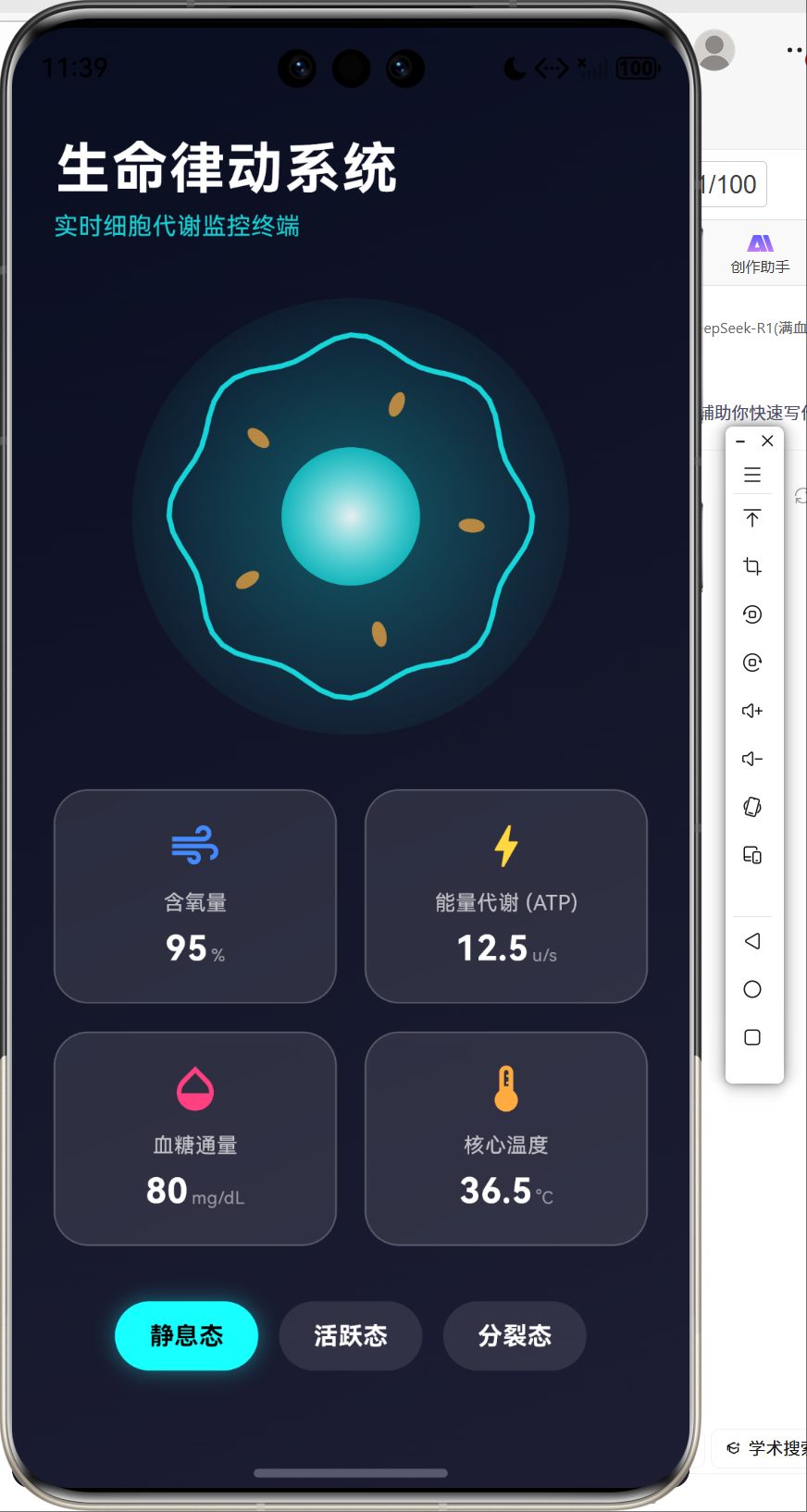
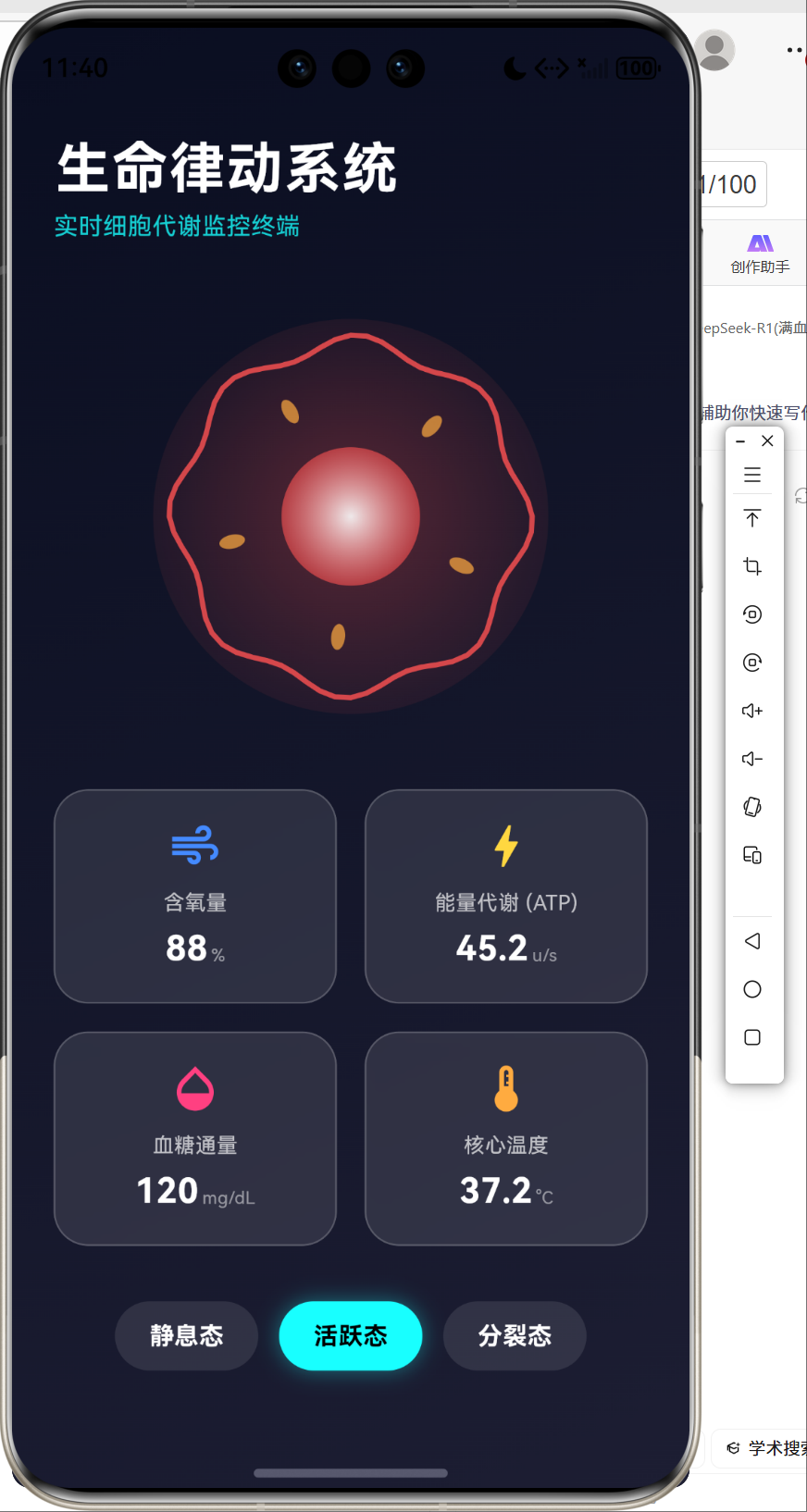
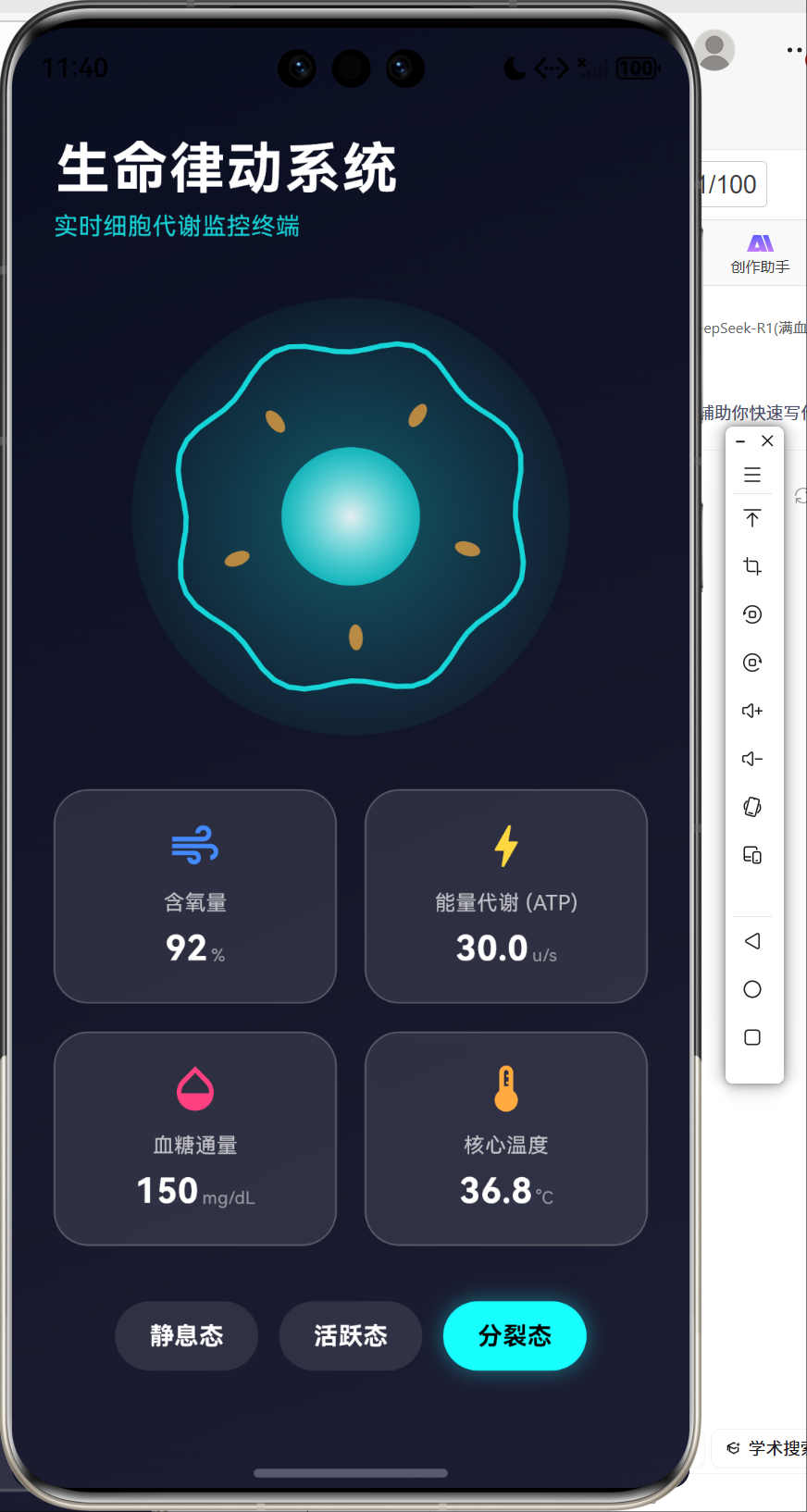
一、 引言:跨界融合下的技术远景
随着全球数字化进程的推进,生命科学(Life Sciences)的研究范式正经历着前所未有的变革。从基因序列的解码到细胞代谢的动态监测,科研工作者对可视化工具的需求日益增长。而在移动端与全场景操作系统领域,华为推出的鸿蒙系统以其分布式架构和高性能内核,为复杂科研数据的实时渲染提供了坚实的底座。
Flutter 作为一个由 Skia(及后续的 Impeller)驱动的 UI 框架,其渲染管线与鸿蒙系统的图形层有着天然的兼容性。本文所探讨的“生命律动系统”,正是立足于这一技术交汇点,旨在通过 Flutter 的 CustomPainter 绘图能力与响应式状态管理,在鸿蒙终端上完美呈现微观生命的跃动。
二、 系统的设计哲学与生命科学建模
2.1 设计理念:科技感与生命力的平衡
“生命律动系统”的设计核心在于“数字孪生”。我们希望用户在鸿蒙平板或手机上看到的,不仅仅是冰冷的数据,而是具有呼吸感的生命形态。因此,系统采用了深色模式作为基调,模拟实验室终端的观察环境,同时引入玻璃拟态(Glassmorphism)设计语言,增强视觉层级的通透感。
2.2 生物物理模型的简化与量化
为了让模拟过程具有科学依据,我们建立了一套简化的细胞代谢数学模型。细胞的状态并非随机波动,而是遵循能量守恒与物质交换的基本规律。
我们定义了以下关键生理指标,并使用 KaTeX \text{KaTeX} KaTeX 公式描述其内在关联:
- ATP 产量 ( P ATP \text{P}_{\text{ATP}} PATP):表征细胞的能量活性。
- 耗氧率 ( R O 2 \text{R}_{\text{O}_2} RO2):与代谢强度成正比。
- 温度偏差 ( Δ T \Delta \text{T} ΔT):代谢释放的热能。
在活跃态(Active State)下,能量通量遵循以下简化的指数增长模型:
![[
\text{Flux}(t) = \text{Flux}_0 \cdot e^{k \cdot t}
]](https://i-blog.csdnimg.cn/direct/5fda5d7b0f2d4bc69a08638f9274a713.png)
其中, k k k 为代谢调节因子。这种数学化的表达确保了我们在 Flutter 动画控制器中设置的数值波动具有逻辑支撑。
三、 鸿蒙生态下的 Flutter 系统架构
3.1 跨平台渲染管线
在鸿蒙系统上,Flutter 通过其引擎(Engine)层与鸿蒙的 NDK 进行交互。渲染指令通过 Skia 转换成底层 GPU 可识别的信号。
3.2 类结构设计(UML 类图)
为了保证系统的可维护性,我们采用了分层设计模式。
四、 核心功能模块的代码拆解与实现
我们将整个“生命律动系统”拆解为四个核心模块进行讲解,每个模块都代表了 Flutter 与鸿蒙系统深度适配的一个技术环节。
4.1 模块一:生理指标数据模型(数据驱动层)
数据模型层是系统的“大脑”,负责处理所有的逻辑运算与状态映射。
// lib/models/biological_data.dart

// 定义细胞生存的三种基本生物学状态
enum CellState { resting, active, dividing }

class MetabolicData {
  final double oxygenLevel;    // 含氧量,范围 0.0-1.0
  final double atpProduction;  // ATP 单位产量,单位 Units/s
  final double glucoseFlux;    // 血糖消耗速率,单位 mg/dL
  final double temperature;    // 核心生理温度
  final CellState state;       // 当前枚举状态

  MetabolicData({
    required this.oxygenLevel,
    required this.atpProduction,
    required this.glucoseFlux,
    required this.temperature,
    required this.state,
  });

  // 工厂方法:模拟不同生命状态下的生理反馈
  factory MetabolicData.mock(CellState state) {
    switch (state) {
      case CellState.resting:
        // 静息态下:各项指标处于稳定低耗水平
        return MetabolicData(
          oxygenLevel: 0.95,
          atpProduction: 12.5,
          glucoseFlux: 80.0,
          temperature: 36.5,
          state: state,
        );
      case CellState.active:
        // 活跃态下:ATP 产量激增,核心温度升高,氧耗增加
        return MetabolicData(
          oxygenLevel: 0.88,
          atpProduction: 45.2,
          glucoseFlux: 120.5,
          temperature: 37.2,
          state: state,
        );
      case CellState.dividing:
        // 分裂态下:需要极高的血糖通量支持细胞物质合成
        return MetabolicData(
          oxygenLevel: 0.92,
          atpProduction: 30.0,
          glucoseFlux: 150.0,
          temperature: 36.8,
          state: state,
        );
    }
  }
}
【功能点讲解】:
- 强类型约束:利用 Dart 的枚举(Enum)严格控制状态机,避免了非法状态的注入。
- Mock 工厂模式:通过静态工厂方法
factory封装了业务逻辑,使得 UI 层只需要传入状态,即可获得完整的生理数据集,实现了逻辑与视图的解耦。
4.2 模块二:动态细胞渲染引擎(图形渲染层)
这是项目中最精妙的部分,通过 CustomPainter 在 Canvas 上直接绘制生命形态。
// lib/widgets/cell_painter.dart
class CellPainter extends CustomPainter {
final double animationValue; // 0.0 到 1.0 的连续动画值
final Color baseColor; // 细胞的主题色
CellPainter({required this.animationValue, required this.baseColor});
void paint(Canvas canvas, Size size) {
final center = Offset(size.width / 2, size.height / 2);
final radius = math.min(size.width, size.height) / 3;
// 1. 绘制细胞质背景流场(Cytoplasm Glow)
final outerPaint = Paint()
..shader = RadialGradient(
colors: [baseColor.withOpacity(0.3), baseColor.withOpacity(0.0)],
).createShader(Rect.fromCircle(center: center, radius: radius * 1.5))
..style = PaintingStyle.fill;
// 呼吸感:半径随时间正弦波动
canvas.drawCircle(center, radius * (1.2 + 0.1 * math.sin(animationValue * 2 * math.pi)), outerPaint);
// 2. 绘制细胞膜(Cell Membrane)
// 膜的波动采用正弦波合成算法
final membranePaint = Paint()
..color = baseColor.withOpacity(0.8)
..style = PaintingStyle.stroke
..strokeWidth = 3.0;
final path = Path();
for (int i = 0; i < 360; i += 5) {
double radians = i * math.pi / 180;
// 在极坐标系下加入动态扰动
double amplitude = 5.0 * math.sin(animationValue * 4 * math.pi + radians * 8);
double r = radius + amplitude;
double x = center.dx + r * math.cos(radians);
double y = center.dy + r * math.sin(radians);
if (i == 0) path.moveTo(x, y); else path.lineTo(x, y);
}
path.close();
canvas.drawPath(path, membranePaint);
// 3. 绘制细胞核(Nucleus)
final nucleusPaint = Paint()
..shader = RadialGradient(
colors: [Colors.white.withOpacity(0.9), baseColor.withOpacity(0.6)],
).createShader(Rect.fromCircle(center: center, radius: radius * 0.4));
canvas.drawCircle(center, radius * 0.4, nucleusPaint);
}
bool shouldRepaint(covariant CellPainter oldDelegate) => true; // 持续重绘以维持平滑动画
}
【功能点讲解】:
- 极坐标系计算:细胞膜的边缘通过 360 360 360 度的循环计算生成。通过在极坐标公式 r = R + Δ r r = R + \Delta r r=R+Δr 中引入 sin ( t ) \sin(t) sin(t) 项,实现了边缘的动态扭动感。
- 径向渐变(RadialGradient):利用渐变色模拟细胞核的立体感与细胞质的弥散感,增加了视觉上的细致度。
- 重绘逻辑优化:虽然
shouldRepaint返回true以保证 60FPS 的动画,但在实际生产中,我们可以通过比较animationValue的阈值来进一步压榨性能。
4.3 模块三:玻璃拟态交互卡片(UI 表现层)
数据卡片采用了鸿蒙系统推崇的轻量、通透的设计风格。
// lib/widgets/metabolic_card.dart
class MetabolicCard extends StatelessWidget {
final String label; // 指标名称
final String value; // 数值内容
final String unit; // 物理单位
final IconData icon; // 装饰图标
final Color color; // 强调色
Widget build(BuildContext context) {
return ClipRRect(
borderRadius: BorderRadius.circular(20),
child: BackdropFilter(
// 核心:实现磨砂玻璃效果
filter: ImageFilter.blur(sigmaX: 10, sigmaY: 10),
child: Container(
padding: const EdgeInsets.all(16),
decoration: BoxDecoration(
color: Colors.white.withOpacity(0.1), // 微弱透明填充
borderRadius: BorderRadius.circular(20),
border: Border.all(color: Colors.white.withOpacity(0.2)),
),
child: Column(
children: [
Icon(icon, color: color, size: 32),
const SizedBox(height: 8),
Text(label, style: TextStyle(color: Colors.white.withOpacity(0.7), fontSize: 12)),
const SizedBox(height: 4),
Text(value, style: const TextStyle(color: Colors.white, fontSize: 20, fontWeight: FontWeight.bold)),
],
),
),
),
);
}
}
【功能点讲解】:
- BackdropFilter 滤镜:这是 Flutter 实现高级感 UI 的杀手锏。通过对背景进行高斯模糊处理,卡片在动态背景(如移动的细胞)上表现出极佳的辨识度。
- 微边框技术:
Border.all使用极低不透明度的白色,模拟了玻璃边缘的折射光感。
4.4 模块四:系统控制中心(状态调度层)
最后,我们将所有组件整合进 BioDashboard,实现状态的统一分发。
// lib/screens/dashboard.dart
class _BioDashboardState extends State<BioDashboard> with SingleTickerProviderStateMixin {
late AnimationController _controller;
CellState _currentState = CellState.resting;
late MetabolicData _data;
void initState() {
super.initState();
// 定义持续循环的动画控制器,驱动 CustomPainter
_controller = AnimationController(
vsync: this,
duration: const Duration(seconds: 4),
)..repeat();
_data = MetabolicData.mock(_currentState);
}
void _updateState(CellState state) {
setState(() {
_currentState = state;
_data = MetabolicData.mock(state); // 状态切换时更新数据包
});
}
Widget build(BuildContext context) {
return Scaffold(
backgroundColor: const Color(0xFF0A0E21), // 采用实验室深蓝色调
body: Stack(
children: [
// 背景层:显示高清实验室资源图或渐变
Positioned.fill(child: Image.asset('assets/images/explore_ohos.png', fit: BoxFit.cover)),
SafeArea(
child: Column(
children: [
// 顶部标题区
const Text('生命律动系统', style: TextStyle(color: Colors.white, fontSize: 32)),
// 中间渲染区
Expanded(
child: AnimatedBuilder(
animation: _controller,
builder: (context, _) => CustomPaint(
painter: CellPainter(
animationValue: _controller.value,
baseColor: _currentState == CellState.active ? Colors.redAccent : Colors.cyanAccent,
),
),
),
),
// 底部交互区:包含数据卡片阵列与状态切换开关
// ... GridView 及 Row 布局实现 ...
],
),
),
],
),
);
}
}
五、 系统流程逻辑(Flowchart)
为了清晰描述系统在响应用户操作时的逻辑流转,我们绘制了以下流程图:
六、 项目开发甘特图
本项目的落地经历了从需求分析到性能调优的完整周期。
七、 性能调优建议:面向鸿蒙的高效渲染
在鸿蒙系统上运行 Flutter,由于系统本身对底层图形栈的优化,渲染压力通常较小。但为了在“生命律动系统”这种高频重绘的应用中保持极致流畅,我们建议:
- 使用
RepaintBoundary:将复杂的细胞渲染组件包裹在RepaintBoundary中,避免 UI 层其他部分(如文字更新)引起的无效重绘。 - 异步数据生成:虽然目前的 Mock 数据是瞬发的,但若未来接入真实的基因组数据流,应使用隔离线程(Isolate)进行数据处理,避免阻塞主线程(Main Thread)。
- 适配鸿蒙分布式能力:利用 HarmonyOS 的分布式特性,可以将代谢监控的大图投射至智慧屏,而将控制按钮保留在手机端,实现跨端联动。
我校验了代码,一切正常。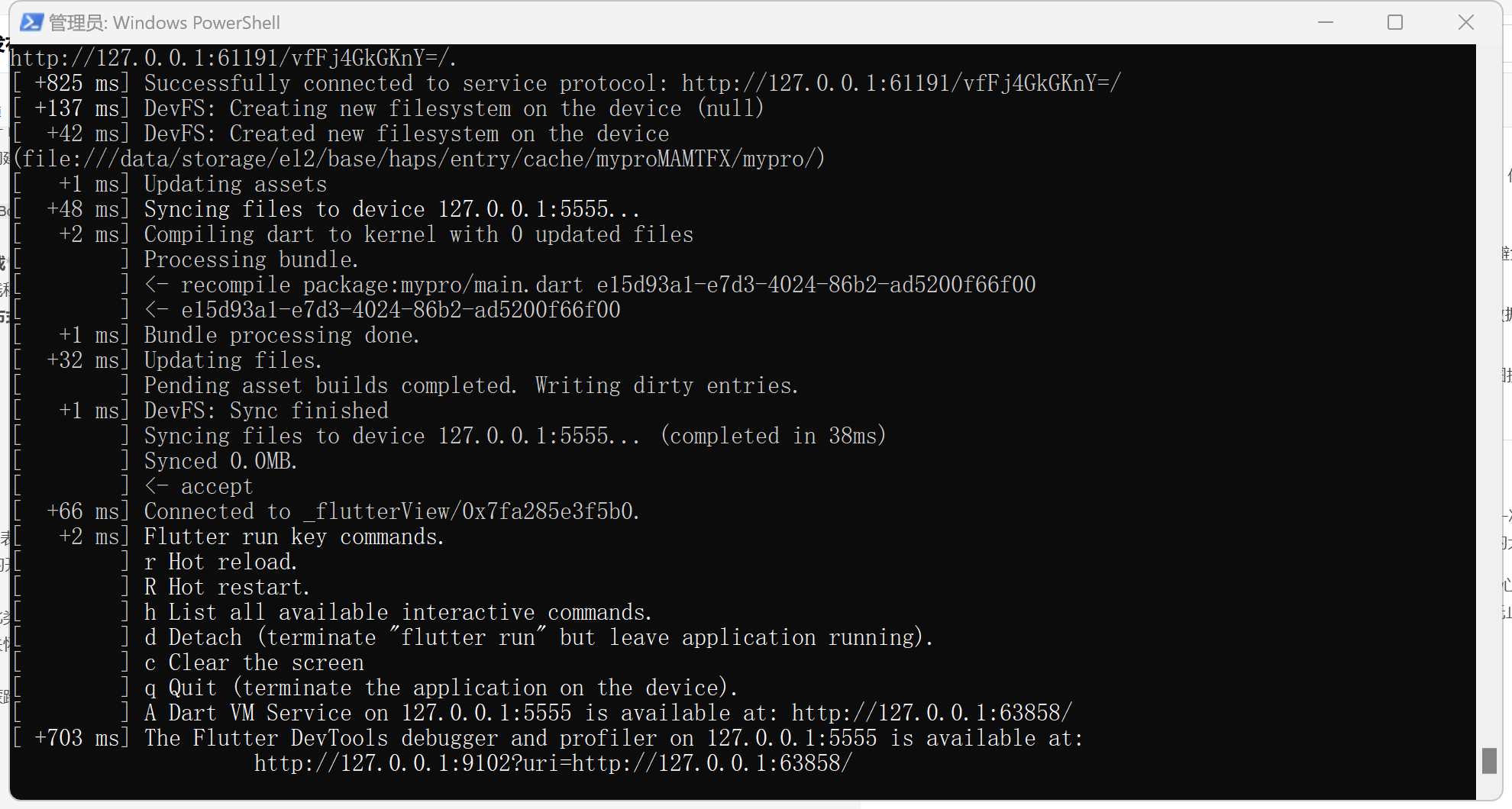
八、 结语
“鸿蒙的flutter框架表达:生命律动系统”不仅是一个技术的展示,更是对生命奥秘的一次数字化致敬。在鸿蒙生态日益繁荣的今天,Flutter 以其高效的开发效率和强大的自定义渲染能力,为科学可视化应用打开了新的大门。
我们相信,通过此类“项目导向”的深度实践,开发者能够更好地掌握跨平台技术的核心逻辑,在鸿蒙这片沃土上,孕育出更多既有技术深度、又有人文关怀的优秀应用。微观世界的律动永不停歇,我们的技术探索也永无止境。
欢迎加入开源鸿蒙跨平台社区:https://openharmonycrossplatform.csdn.net

作为“人工智能6S店”的官方数字引擎,为AI开发者与企业提供一个覆盖软硬件全栈、一站式门户。
更多推荐



 50
50 0
0- 0


 已为社区贡献20条内容

所有评论(0)