
Flutter 框架跨平台鸿蒙开发 - 学习打卡助手应用开发教程
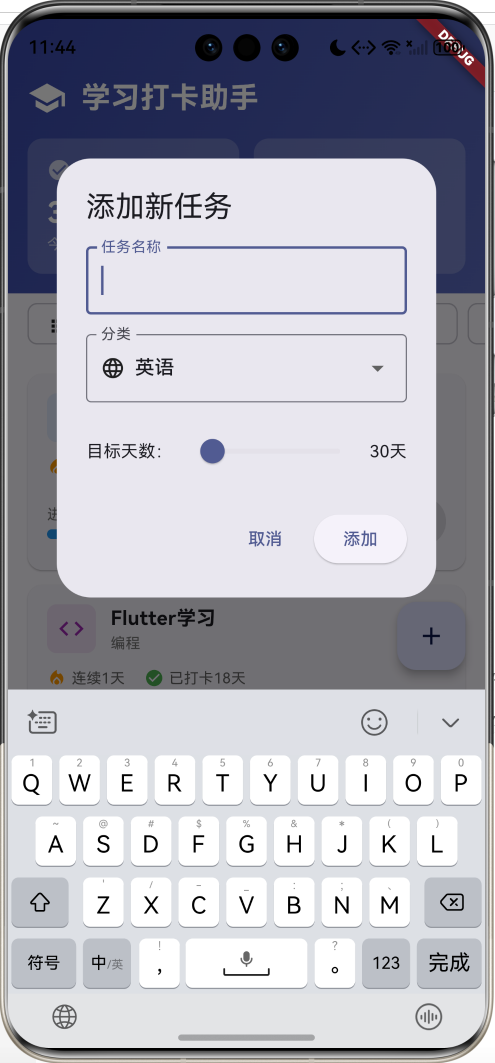
这是一款功能完整的学习打卡助手应用,帮助用户养成良好的学习习惯。应用采用Material Design 3设计风格,支持任务管理、打卡记录、统计分析、日历视图等功能,界面美观,操作简便。运行效果图StudyHomePageTasksPageStatisticsPageCalendarPageTaskDetailPageAddTaskDialogEditTaskDialogDeleteConfirm
Flutter学习打卡助手应用开发教程
项目简介
这是一款功能完整的学习打卡助手应用,帮助用户养成良好的学习习惯。应用采用Material Design 3设计风格,支持任务管理、打卡记录、统计分析、日历视图等功能,界面美观,操作简便。
运行效果图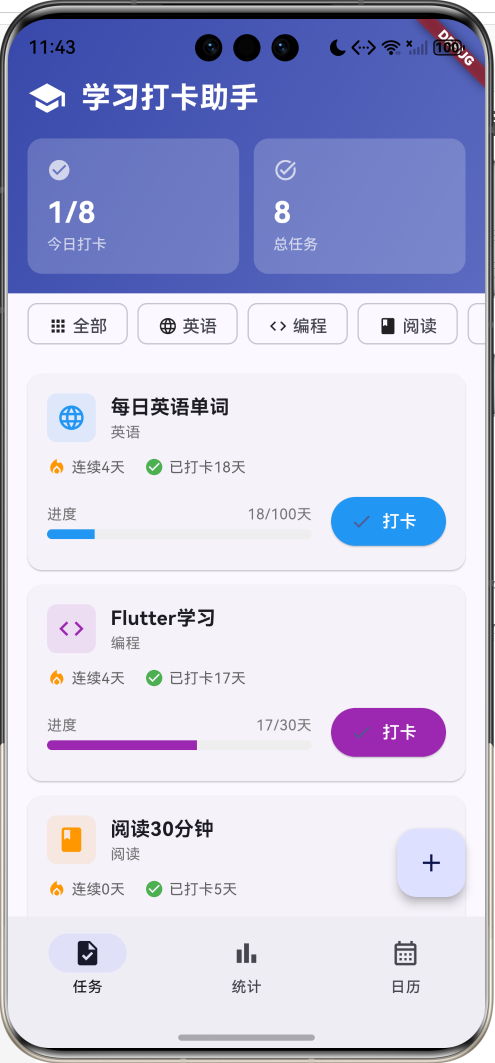
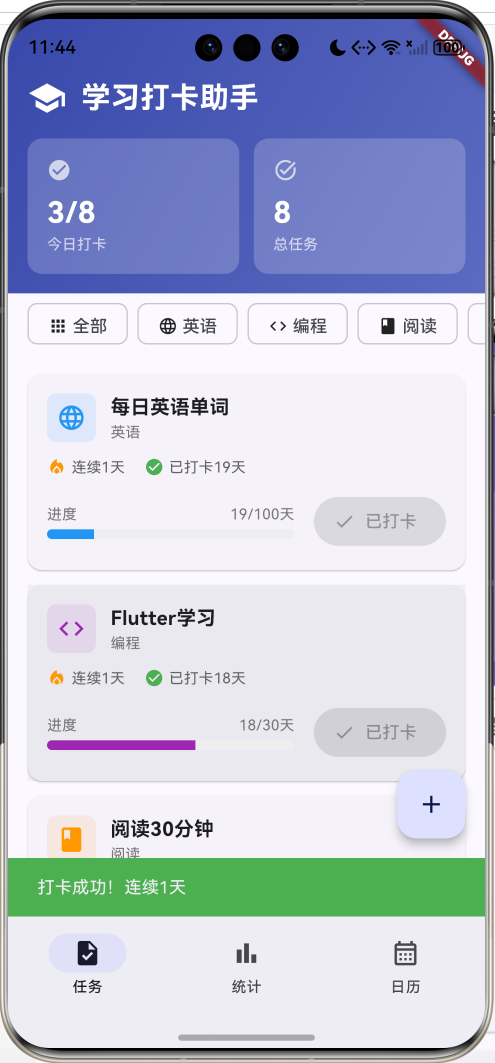
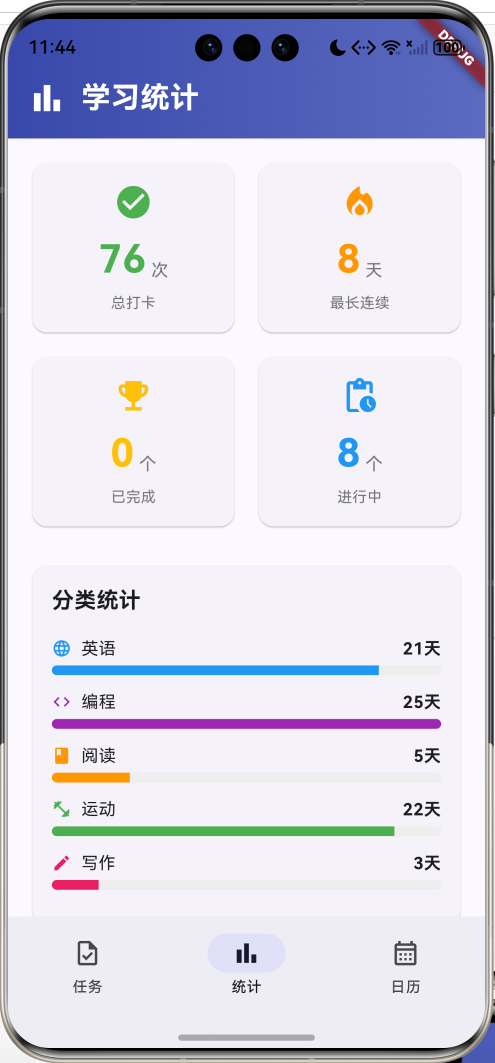
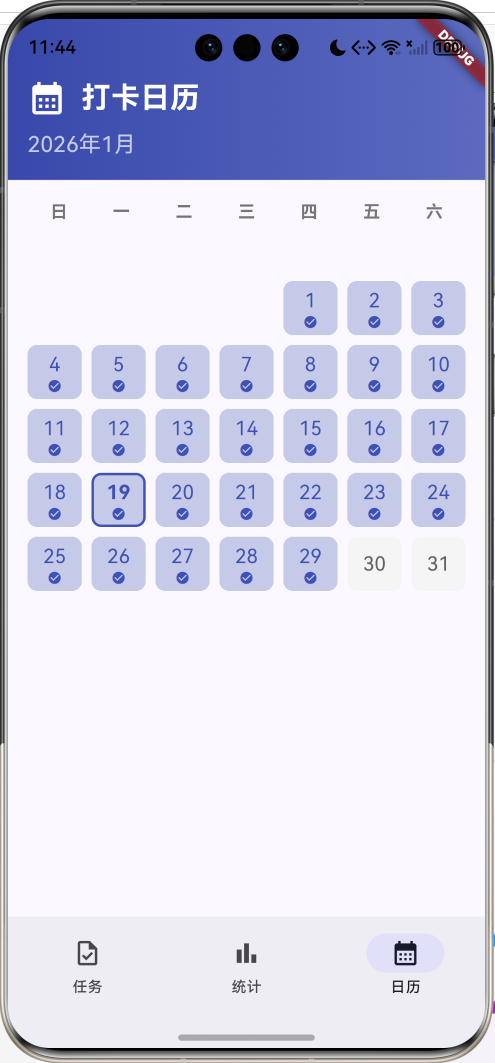
核心特性
- 任务管理:创建、编辑、删除学习任务
- 打卡功能:每日打卡,记录学习进度
- 连续打卡:自动计算连续打卡天数
- 进度追踪:可视化显示任务完成进度
- 分类管理:英语、编程、阅读、运动、写作五大分类
- 统计分析:总打卡次数、最长连续、完成任务数
- 日历视图:月历展示打卡记录
- 任务详情:查看详细的打卡历史
- 渐变设计:精美的渐变UI设计
技术栈
- Flutter 3.x
- Material Design 3
- 状态管理(setState)
- 日期时间处理
- 数据持久化(可扩展)
项目架构
数据模型设计
StudyTask(学习任务模型)
class StudyTask {
  final int id;                      // 任务ID
  String title;                      // 任务标题(可修改)
  final String category;             // 分类
  int targetDays;                    // 目标天数(可修改)
  int currentStreak;                 // 当前连续天数
  int totalDays;                     // 总打卡天数
  final DateTime startDate;          // 开始日期
  DateTime? lastCheckInDate;         // 最后打卡日期
  final List<DateTime> checkInDates; // 打卡日期列表
  bool isCompleted;                  // 是否完成

  bool get canCheckInToday;          // 今天是否可以打卡
  double get progress;               // 完成进度(0.0-1.0)
}
设计要点:
- ID用于唯一标识
- title和targetDays可修改(编辑功能)
- currentStreak自动计算连续天数
- checkInDates记录所有打卡日期
- canCheckInToday防止重复打卡
- progress计算完成百分比
任务分类
| 分类 | 图标 | 颜色 | 示例任务 |
|---|---|---|---|
| 英语 | language | 蓝色 | 每日英语单词、英语口语 |
| 编程 | code | 紫色 | Flutter学习、Python算法 |
| 阅读 | book | 橙色 | 阅读30分钟 |
| 运动 | fitness_center | 绿色 | 晨跑打卡、健身训练 |
| 写作 | edit | 粉色 | 写作练习 |
打卡状态判断
bool get canCheckInToday {
  if (lastCheckInDate == null) return true;
  final today = DateTime.now();
  return lastCheckInDate!.year != today.year ||
      lastCheckInDate!.month != today.month ||
      lastCheckInDate!.day != today.day;
}
逻辑说明:
- 从未打卡:可以打卡
- 最后打卡日期不是今天:可以打卡
- 最后打卡日期是今天:不可打卡
核心功能实现
1. 打卡功能
打卡是应用的核心功能,需要处理多个逻辑。
void _checkIn(StudyTask task) {
  // 检查今天是否已打卡
  if (!task.canCheckInToday) {
    ScaffoldMessenger.of(context).showSnackBar(
      const SnackBar(content: Text('今天已经打卡过了')),
    );
    return;
  }

  setState(() {
    final now = DateTime.now();
    // 添加打卡记录
    task.checkInDates.add(now);
    task.lastCheckInDate = now;
    task.totalDays++;

    // 计算连续天数
    if (task.lastCheckInDate != null) {
      final yesterday = now.subtract(const Duration(days: 1));
      final lastCheckIn = task.lastCheckInDate!;
      if (lastCheckIn.year == yesterday.year &&
          lastCheckIn.month == yesterday.month &&
          lastCheckIn.day == yesterday.day) {
        task.currentStreak++;  // 连续打卡
      } else {
        task.currentStreak = 1;  // 重新开始
      }
    } else {
      task.currentStreak = 1;
    }

    // 检查是否完成目标
    if (task.totalDays >= task.targetDays) {
      task.isCompleted = true;
    }
  });

  ScaffoldMessenger.of(context).showSnackBar(
    SnackBar(
      content: Text('打卡成功!连续${task.currentStreak}天'),
      backgroundColor: Colors.green,
    ),
  );
}
打卡逻辑:
- 检查今天是否已打卡
- 记录打卡时间
- 更新总天数
- 计算连续天数(昨天打卡则+1,否则重置为1)
- 检查是否达成目标
- 显示成功提示
2. 任务卡片设计
任务卡片展示任务的关键信息和操作按钮。
Widget _buildTaskCard(StudyTask task) {
  return Card(
    margin: const EdgeInsets.only(bottom: 12),
    child: InkWell(
      onTap: () {
        Navigator.push(
          context,
          MaterialPageRoute(
            builder: (context) => TaskDetailPage(task: task),
          ),
        );
      },
      child: Padding(
        padding: const EdgeInsets.all(16),
        child: Column(
          crossAxisAlignment: CrossAxisAlignment.start,
          children: [
            // 头部:图标、标题、完成标识
            Row(
              children: [
                Container(
                  padding: const EdgeInsets.all(8),
                  decoration: BoxDecoration(
                    color: _getCategoryColor(task.category).withValues(alpha: 0.1),
                    borderRadius: BorderRadius.circular(8),
                  ),
                  child: Icon(
                    _getCategoryIcon(task.category),
                    color: _getCategoryColor(task.category),
                    size: 24,
                  ),
                ),
                const SizedBox(width: 12),
                Expanded(
                  child: Column(
                    crossAxisAlignment: CrossAxisAlignment.start,
                    children: [
                      Text(task.title, style: TextStyle(fontWeight: FontWeight.bold)),
                      Text(task.category, style: TextStyle(color: Colors.grey)),
                    ],
                  ),
                ),
                if (task.isCompleted)
                  Container(
                    padding: EdgeInsets.symmetric(horizontal: 8, vertical: 4),
                    decoration: BoxDecoration(
                      color: Colors.green.shade50,
                      borderRadius: BorderRadius.circular(12),
                    ),
                    child: Text('已完成', style: TextStyle(color: Colors.green)),
                  ),
              ],
            ),
            // 统计信息
            Row(
              children: [
                Icon(Icons.local_fire_department, size: 16, color: Colors.orange),
                Text('连续${task.currentStreak}天'),
                Icon(Icons.check_circle, size: 16, color: Colors.green),
                Text('已打卡${task.totalDays}天'),
              ],
            ),
            // 进度条和打卡按钮
            Row(
              children: [
                Expanded(
                  child: LinearProgressIndicator(
                    value: task.progress.clamp(0.0, 1.0),
                    backgroundColor: Colors.grey.shade200,
                  ),
                ),
                ElevatedButton(
                  onPressed: task.canCheckInToday ? () => _checkIn(task) : null,
                  child: Text(task.canCheckInToday ? '打卡' : '已打卡'),
                ),
              ],
            ),
          ],
        ),
      ),
    ),
  );
}
3. 统计页面
统计页面展示学习数据的汇总分析。
Widget _buildStatisticsPage() {
  final totalCheckIns = _tasks.fold<int>(0, (sum, task) => sum + task.totalDays);
  final maxStreak = _tasks.fold<int>(0, (max, task) =>
      task.currentStreak > max ? task.currentStreak : max);
  final completedTasks = _tasks.where((t) => t.isCompleted).length;

  return Column(
    children: [
      // 头部
      Container(
        decoration: BoxDecoration(
          gradient: LinearGradient(
            colors: [Colors.indigo.shade600, Colors.indigo.shade400],
          ),
        ),
        child: Text('学习统计', style: TextStyle(color: Colors.white)),
      ),
      // 统计卡片
      Row(
        children: [
          _buildStatisticCard('总打卡', '$totalCheckIns', '次',
                             Icons.check_circle, Colors.green),
          _buildStatisticCard('最长连续', '$maxStreak', '天',
                             Icons.local_fire_department, Colors.orange),
        ],
      ),
      Row(
        children: [
          _buildStatisticCard('已完成', '$completedTasks', '个',
                             Icons.emoji_events, Colors.amber),
          _buildStatisticCard('进行中', '${_tasks.length - completedTasks}', '个',
                             Icons.pending_actions, Colors.blue),
        ],
      ),
      // 分类统计
      _buildCategoryStatistics(),
    ],
  );
}
统计指标:
- 总打卡:所有任务的打卡总次数
- 最长连续:所有任务中最长的连续天数
- 已完成:达成目标的任务数量
- 进行中:未完成的任务数量
4. 分类统计
展示各分类的打卡天数对比。
Widget _buildCategoryStatistics() {
  final categoryStats = <String, int>{};
  for (final task in _tasks) {
    categoryStats[task.category] =
        (categoryStats[task.category] ?? 0) + task.totalDays;
  }

  return Card(
    child: Column(
      children: [
        Text('分类统计', style: TextStyle(fontWeight: FontWeight.bold)),
        ...categoryStats.entries.map((entry) {
          final maxValue = categoryStats.values.reduce((a, b) => a > b ? a : b);
          final percentage = entry.value / maxValue;
          return Column(
            children: [
              Row(
                children: [
                  Icon(_getCategoryIcon(entry.key)),
                  Text(entry.key),
                  Spacer(),
                  Text('${entry.value}天'),
                ],
              ),
              LinearProgressIndicator(value: percentage),
            ],
          );
        }),
      ],
    ),
  );
}
5. 日历视图
月历展示打卡记录,直观显示学习轨迹。
Widget _buildCalendarPage() {
  final now = DateTime.now();
  final firstDayOfMonth = DateTime(now.year, now.month, 1);
  final daysInMonth = DateTime(now.year, now.month + 1, 0).day;
  final firstWeekday = firstDayOfMonth.weekday;

  return Column(
    children: [
      // 头部
      Container(
        decoration: BoxDecoration(
          gradient: LinearGradient(
            colors: [Colors.indigo.shade600, Colors.indigo.shade400],
          ),
        ),
        child: Column(
          children: [
            Text('打卡日历', style: TextStyle(color: Colors.white)),
            Text('${now.year}年${now.month}月',
                 style: TextStyle(color: Colors.white70)),
          ],
        ),
      ),
      // 星期标题
      Row(
        children: ['日', '一', '二', '三', '四', '五', '六'].map((day) {
          return SizedBox(
            width: 40,
            child: Center(child: Text(day)),
          );
        }).toList(),
      ),
      // 日期网格
      GridView.builder(
        gridDelegate: SliverGridDelegateWithFixedCrossAxisCount(
          crossAxisCount: 7,
          mainAxisSpacing: 8,
          crossAxisSpacing: 8,
        ),
        itemCount: daysInMonth + firstWeekday % 7,
        itemBuilder: (context, index) {
          if (index < firstWeekday % 7) {
            return SizedBox();  // 空白占位
          }

          final day = index - firstWeekday % 7 + 1;
          final date = DateTime(now.year, now.month, day);
          final hasCheckIn = _tasks.any((task) =>
            task.checkInDates.any((d) =>
              d.year == date.year &&
              d.month == date.month &&
              d.day == date.day
            )
          );
          final isToday = date.year == now.year &&
                          date.month == now.month &&
                          date.day == now.day;

          return Container(
            decoration: BoxDecoration(
              color: hasCheckIn ? Colors.indigo.shade100 : Colors.grey.shade100,
              borderRadius: BorderRadius.circular(8),
              border: isToday ? Border.all(color: Colors.indigo, width: 2) : null,
            ),
            child: Column(
              children: [
                Text('$day'),
                if (hasCheckIn) Icon(Icons.check_circle, size: 12),
              ],
            ),
          );
        },
      ),
    ],
  );
}
日历特点:
- 显示当前月份
- 有打卡的日期高亮显示
- 今天用边框标识
- 打卡日期显示勾选图标
6. 添加任务对话框
使用对话框创建新任务。
void _showAddTaskDialog() {
  final titleController = TextEditingController();
  String selectedCategory = '英语';
  int targetDays = 30;

  showDialog(
    context: context,
    builder: (context) {
      return StatefulBuilder(
        builder: (context, setDialogState) {
          return AlertDialog(
            title: Text('添加新任务'),
            content: SingleChildScrollView(
              child: Column(
                children: [
                  // 任务名称输入
                  TextField(
                    controller: titleController,
                    decoration: InputDecoration(
                      labelText: '任务名称',
                      border: OutlineInputBorder(),
                    ),
                  ),
                  // 分类选择
                  DropdownButtonFormField<String>(
                    value: selectedCategory,
                    decoration: InputDecoration(
                      labelText: '分类',
                      border: OutlineInputBorder(),
                    ),
                    items: ['英语', '编程', '阅读', '运动', '写作'].map((category) {
                      return DropdownMenuItem(
                        value: category,
                        child: Row(
                          children: [
                            Icon(_getCategoryIcon(category), size: 20),
                            Text(category),
                          ],
                        ),
                      );
                    }).toList(),
                    onChanged: (value) {
                      setDialogState(() {
                        selectedCategory = value!;
                      });
                    },
                  ),
                  // 目标天数滑块
                  Row(
                    children: [
                      Text('目标天数:'),
                      Expanded(
                        child: Slider(
                          value: targetDays.toDouble(),
                          min: 7,
                          max: 365,
                          divisions: 50,
                          label: '$targetDays天',
                          onChanged: (value) {
                            setDialogState(() {
                              targetDays = value.toInt();
                            });
                          },
                        ),
                      ),
                      Text('$targetDays天'),
                    ],
                  ),
                ],
              ),
            ),
            actions: [
              TextButton(
                onPressed: () => Navigator.pop(context),
                child: Text('取消'),
              ),
              ElevatedButton(
                onPressed: () {
                  if (titleController.text.isNotEmpty) {
                    setState(() {
                      _tasks.add(StudyTask(
                        id: _tasks.length + 1,
                        title: titleController.text,
                        category: selectedCategory,
                        targetDays: targetDays,
                        startDate: DateTime.now(),
                      ));
                    });
                    Navigator.pop(context);
                  }
                },
                child: Text('添加'),
              ),
            ],
          );
        },
      );
    },
  );
}
对话框特点:
- 使用StatefulBuilder实现对话框内状态更新
- 文本输入框输入任务名称
- 下拉菜单选择分类
- 滑块选择目标天数(7-365天)
7. 任务详情页面
展示任务的详细信息和打卡历史。
class TaskDetailPage extends StatefulWidget {
final StudyTask task;
Widget build(BuildContext context) {
return Scaffold(
appBar: AppBar(
title: Text('任务详情'),
actions: [
IconButton(icon: Icon(Icons.edit), onPressed: _editTask),
IconButton(icon: Icon(Icons.delete), onPressed: _deleteTask),
],
),
body: SingleChildScrollView(
child: Column(
children: [
_buildHeader(),
_buildProgressCard(),
_buildCheckInHistory(),
],
),
),
);
}
}
详情页头部:
Widget _buildHeader() {
  return Container(
    decoration: BoxDecoration(
      gradient: LinearGradient(
        colors: [
          _getCategoryColor(_task.category).withValues(alpha: 0.8),
          _getCategoryColor(_task.category),
        ],
      ),
    ),
    child: Column(
      children: [
        Icon(_getCategoryIcon(_task.category), size: 60, color: Colors.white),
        Text(_task.title, style: TextStyle(color: Colors.white, fontSize: 24)),
        Container(
          decoration: BoxDecoration(
            color: Colors.white.withValues(alpha: 0.2),
            borderRadius: BorderRadius.circular(16),
          ),
          child: Text(_task.category, style: TextStyle(color: Colors.white)),
        ),
      ],
    ),
  );
}
进度卡片:
Widget _buildProgressCard() {
  return Card(
    child: Column(
      children: [
        Text('学习进度', style: TextStyle(fontWeight: FontWeight.bold)),
        Row(
          children: [
            _buildStatItem('已打卡', '${_task.totalDays}天',
                          Icons.check_circle, Colors.green),
            _buildStatItem('连续', '${_task.currentStreak}天',
                          Icons.local_fire_department, Colors.orange),
            _buildStatItem('目标', '${_task.targetDays}天',
                          Icons.flag, Colors.blue),
          ],
        ),
        Row(
          children: [
            Text('完成度'),
            Text('${(_task.progress * 100).toStringAsFixed(1)}%'),
          ],
        ),
        LinearProgressIndicator(
          value: _task.progress.clamp(0.0, 1.0),
          minHeight: 12,
        ),
      ],
    ),
  );
}
打卡历史:
Widget _buildCheckInHistory() {
  final sortedDates = List<DateTime>.from(_task.checkInDates)
    ..sort((a, b) => b.compareTo(a));  // 降序排列

  return Card(
    child: Column(
      children: [
        Text('打卡历史', style: TextStyle(fontWeight: FontWeight.bold)),
        if (sortedDates.isEmpty)
          Text('还没有打卡记录')
        else
          ...sortedDates.take(10).map((date) {
            return ListTile(
              leading: Icon(Icons.check_circle),
              title: Text(_formatDate(date)),
              subtitle: Text(_formatTime(date)),
            );
          }),
      ],
    ),
  );
}
8. 编辑和删除功能
编辑任务:
void _editTask() {
  final titleController = TextEditingController(text: _task.title);
  int targetDays = _task.targetDays;

  showDialog(
    context: context,
    builder: (context) {
      return StatefulBuilder(
        builder: (context, setDialogState) {
          return AlertDialog(
            title: Text('编辑任务'),
            content: Column(
              children: [
                TextField(
                  controller: titleController,
                  decoration: InputDecoration(
                    labelText: '任务名称',
                    border: OutlineInputBorder(),
                  ),
                ),
                Row(
                  children: [
                    Text('目标天数:'),
                    Slider(
                      value: targetDays.toDouble(),
                      min: 7,
                      max: 365,
                      onChanged: (value) {
                        setDialogState(() {
                          targetDays = value.toInt();
                        });
                      },
                    ),
                    Text('$targetDays天'),
                  ],
                ),
              ],
            ),
            actions: [
              TextButton(
                onPressed: () => Navigator.pop(context),
                child: Text('取消'),
              ),
              ElevatedButton(
                onPressed: () {
                  setState(() {
                    _task.title = titleController.text;
                    _task.targetDays = targetDays;
                  });
                  Navigator.pop(context);
                },
                child: Text('保存'),
              ),
            ],
          );
        },
      );
    },
  );
}
删除任务:
void _deleteTask() {
  showDialog(
    context: context,
    builder: (context) {
      return AlertDialog(
        title: Text('删除任务'),
        content: Text('确定要删除这个任务吗?删除后无法恢复。'),
        actions: [
          TextButton(
            onPressed: () => Navigator.pop(context),
            child: Text('取消'),
          ),
          ElevatedButton(
            onPressed: () {
              Navigator.pop(context);
              Navigator.pop(context, true);  // 返回上一页
              ScaffoldMessenger.of(context).showSnackBar(
                SnackBar(content: Text('任务已删除'), backgroundColor: Colors.red),
              );
            },
            style: ElevatedButton.styleFrom(
              backgroundColor: Colors.red,
              foregroundColor: Colors.white,
            ),
            child: Text('删除'),
          ),
        ],
      );
    },
  );
}
UI组件设计
1. 渐变头部
Container(
  padding: const EdgeInsets.fromLTRB(16, 48, 16, 16),
  decoration: BoxDecoration(
    gradient: LinearGradient(
      colors: [Colors.indigo.shade600, Colors.indigo.shade400],
      begin: Alignment.topLeft,
      end: Alignment.bottomRight,
    ),
  ),
  child: Column(
    children: [
      Row(
        children: [
          Icon(Icons.school, color: Colors.white, size: 32),
          Text('学习打卡助手', style: TextStyle(color: Colors.white, fontSize: 24)),
        ],
      ),
      Row(
        children: [
          _buildStatCard('今日打卡', '$todayCheckIns/$totalTasks', Icons.check_circle),
          _buildStatCard('总任务', '$totalTasks', Icons.task_alt),
        ],
      ),
    ],
  ),
)
2. 统计卡片
Widget _buildStatCard(String label, String value, IconData icon) {
  return Container(
    padding: const EdgeInsets.all(16),
    decoration: BoxDecoration(
      color: Colors.white.withValues(alpha: 0.2),
      borderRadius: BorderRadius.circular(12),
    ),
    child: Column(
      children: [
        Icon(icon, color: Colors.white70, size: 20),
        Text(value, style: TextStyle(color: Colors.white, fontSize: 24)),
        Text(label, style: TextStyle(color: Colors.white70, fontSize: 12)),
      ],
    ),
  );
}
3. 分类筛选标签
Widget _buildCategoryFilter() {
  return Container(
    height: 50,
    child: ListView(
      scrollDirection: Axis.horizontal,
      children: [
        _buildCategoryChip('全部', Icons.apps),
        _buildCategoryChip('英语', Icons.language),
        _buildCategoryChip('编程', Icons.code),
        _buildCategoryChip('阅读', Icons.book),
        _buildCategoryChip('运动', Icons.fitness_center),
        _buildCategoryChip('写作', Icons.edit),
      ],
    ),
  );
}

Widget _buildCategoryChip(String label, IconData icon) {
  return Container(
    margin: const EdgeInsets.only(right: 8),
    child: FilterChip(
      label: Row(
        children: [
          Icon(icon, size: 16),
          Text(label),
        ],
      ),
      selected: false,
      onSelected: (selected) {},
    ),
  );
}
4. NavigationBar底部导航
NavigationBar(
  selectedIndex: _selectedIndex,
  onDestinationSelected: (index) {
    setState(() {
      _selectedIndex = index;
    });
  },
  destinations: const [
    NavigationDestination(
      icon: Icon(Icons.task_outlined),
      selectedIcon: Icon(Icons.task),
      label: '任务',
    ),
    NavigationDestination(
      icon: Icon(Icons.bar_chart_outlined),
      selectedIcon: Icon(Icons.bar_chart),
      label: '统计',
    ),
    NavigationDestination(
      icon: Icon(Icons.calendar_month_outlined),
      selectedIcon: Icon(Icons.calendar_month),
      label: '日历',
    ),
  ],
)
功能扩展建议
1. 数据持久化
使用shared_preferences或sqflite保存数据。
import 'package:shared_preferences/shared_preferences.dart';
import 'dart:convert';
class TaskStorage {
static const String _key = 'study_tasks';
// 保存任务列表
static Future<void> saveTasks(List<StudyTask> tasks) async {
final prefs = await SharedPreferences.getInstance();
final jsonList = tasks.map((task) => task.toJson()).toList();
await prefs.setString(_key, json.encode(jsonList));
}
// 加载任务列表
static Future<List<StudyTask>> loadTasks() async {
final prefs = await SharedPreferences.getInstance();
final jsonString = prefs.getString(_key);
if (jsonString == null) return [];
final List<dynamic> jsonList = json.decode(jsonString);
return jsonList.map((json) => StudyTask.fromJson(json)).toList();
}
}
// 在StudyTask类中添加序列化方法
class StudyTask {
// ... 现有代码 ...
Map<String, dynamic> toJson() {
return {
'id': id,
'title': title,
'category': category,
'targetDays': targetDays,
'currentStreak': currentStreak,
'totalDays': totalDays,
'startDate': startDate.toIso8601String(),
'lastCheckInDate': lastCheckInDate?.toIso8601String(),
'checkInDates': checkInDates.map((d) => d.toIso8601String()).toList(),
'isCompleted': isCompleted,
};
}
factory StudyTask.fromJson(Map<String, dynamic> json) {
return StudyTask(
id: json['id'],
title: json['title'],
category: json['category'],
targetDays: json['targetDays'],
currentStreak: json['currentStreak'],
totalDays: json['totalDays'],
startDate: DateTime.parse(json['startDate']),
lastCheckInDate: json['lastCheckInDate'] != null
? DateTime.parse(json['lastCheckInDate'])
: null,
checkInDates: (json['checkInDates'] as List)
.map((d) => DateTime.parse(d))
.toList(),
isCompleted: json['isCompleted'],
);
}
}
// 在_StudyHomePageState中使用
void initState() {
super.initState();
_loadTasks();
}
Future<void> _loadTasks() async {
final tasks = await TaskStorage.loadTasks();
setState(() {
_tasks = tasks;
});
}
void _saveTasks() {
TaskStorage.saveTasks(_tasks);
}
// 在每次修改任务后调用_saveTasks()
void _checkIn(StudyTask task) {
// ... 打卡逻辑 ...
_saveTasks();
}
2. 打卡提醒
使用flutter_local_notifications设置每日提醒。
import 'package:flutter_local_notifications/flutter_local_notifications.dart';
class NotificationService {
static final FlutterLocalNotificationsPlugin _notifications =
FlutterLocalNotificationsPlugin();
static Future<void> init() async {
const androidSettings = AndroidInitializationSettings('@mipmap/ic_launcher');
const iosSettings = DarwinInitializationSettings();
const settings = InitializationSettings(
android: androidSettings,
iOS: iosSettings,
);
await _notifications.initialize(settings);
}
static Future<void> scheduleDailyReminder({
required int hour,
required int minute,
}) async {
await _notifications.zonedSchedule(
0,
'学习打卡提醒',
'今天还没有打卡哦,快来完成你的学习任务吧!',
_nextInstanceOfTime(hour, minute),
const NotificationDetails(
android: AndroidNotificationDetails(
'daily_reminder',
'每日提醒',
importance: Importance.high,
priority: Priority.high,
),
),
androidScheduleMode: AndroidScheduleMode.exactAllowWhileIdle,
uiLocalNotificationDateInterpretation:
UILocalNotificationDateInterpretation.absoluteTime,
matchDateTimeComponents: DateTimeComponents.time,
);
}
static TZDateTime _nextInstanceOfTime(int hour, int minute) {
final now = TZDateTime.now(local);
var scheduledDate = TZDateTime(local, now.year, now.month, now.day, hour, minute);
if (scheduledDate.isBefore(now)) {
scheduledDate = scheduledDate.add(const Duration(days: 1));
}
return scheduledDate;
}
}
// 在设置页面添加提醒时间选择
class SettingsPage extends StatefulWidget {
State<SettingsPage> createState() => _SettingsPageState();
}
class _SettingsPageState extends State<SettingsPage> {
TimeOfDay _reminderTime = const TimeOfDay(hour: 20, minute: 0);
Widget build(BuildContext context) {
return Scaffold(
appBar: AppBar(title: const Text('设置')),
body: ListView(
children: [
ListTile(
leading: const Icon(Icons.notifications),
title: const Text('每日提醒'),
subtitle: Text('${_reminderTime.hour}:${_reminderTime.minute}'),
onTap: () async {
final time = await showTimePicker(
context: context,
initialTime: _reminderTime,
);
if (time != null) {
setState(() {
_reminderTime = time;
});
await NotificationService.scheduleDailyReminder(
hour: time.hour,
minute: time.minute,
);
}
},
),
],
),
);
}
}
3. 成就系统
添加成就徽章激励用户。
class Achievement {
final String id;
final String title;
final String description;
final IconData icon;
final Color color;
final bool Function(List<StudyTask> tasks) condition;
Achievement({
required this.id,
required this.title,
required this.description,
required this.icon,
required this.color,
required this.condition,
});
}
class AchievementService {
static final List<Achievement> achievements = [
Achievement(
id: 'first_checkin',
title: '初次打卡',
description: '完成第一次打卡',
icon: Icons.star,
color: Colors.amber,
condition: (tasks) => tasks.any((t) => t.totalDays >= 1),
),
Achievement(
id: 'week_streak',
title: '坚持一周',
description: '连续打卡7天',
icon: Icons.local_fire_department,
color: Colors.orange,
condition: (tasks) => tasks.any((t) => t.currentStreak >= 7),
),
Achievement(
id: 'month_streak',
title: '坚持一月',
description: '连续打卡30天',
icon: Icons.emoji_events,
color: Colors.purple,
condition: (tasks) => tasks.any((t) => t.currentStreak >= 30),
),
Achievement(
id: 'complete_task',
title: '完成目标',
description: '完成一个学习任务',
icon: Icons.check_circle,
color: Colors.green,
condition: (tasks) => tasks.any((t) => t.isCompleted),
),
Achievement(
id: 'complete_five',
title: '学习达人',
description: '完成5个学习任务',
icon: Icons.school,
color: Colors.blue,
condition: (tasks) => tasks.where((t) => t.isCompleted).length >= 5,
),
Achievement(
id: 'hundred_days',
title: '百日坚持',
description: '累计打卡100天',
icon: Icons.military_tech,
color: Colors.red,
condition: (tasks) =>
tasks.fold<int>(0, (sum, t) => sum + t.totalDays) >= 100,
),
];
static List<Achievement> getUnlockedAchievements(List<StudyTask> tasks) {
return achievements.where((a) => a.condition(tasks)).toList();
}
static List<Achievement> getLockedAchievements(List<StudyTask> tasks) {
return achievements.where((a) => !a.condition(tasks)).toList();
}
}
// 成就页面
class AchievementsPage extends StatelessWidget {
final List<StudyTask> tasks;
const AchievementsPage({required this.tasks});
Widget build(BuildContext context) {
final unlocked = AchievementService.getUnlockedAchievements(tasks);
final locked = AchievementService.getLockedAchievements(tasks);
return Scaffold(
appBar: AppBar(title: const Text('成就')),
body: ListView(
padding: const EdgeInsets.all(16),
children: [
Text('已解锁 (${unlocked.length}/${AchievementService.achievements.length})',
style: const TextStyle(fontSize: 18, fontWeight: FontWeight.bold)),
const SizedBox(height: 16),
...unlocked.map((achievement) => _buildAchievementCard(achievement, true)),
const SizedBox(height: 24),
const Text('未解锁', style: TextStyle(fontSize: 18, fontWeight: FontWeight.bold)),
const SizedBox(height: 16),
...locked.map((achievement) => _buildAchievementCard(achievement, false)),
],
),
);
}
Widget _buildAchievementCard(Achievement achievement, bool unlocked) {
return Card(
child: ListTile(
leading: Container(
padding: const EdgeInsets.all(12),
decoration: BoxDecoration(
color: unlocked
? achievement.color.withValues(alpha: 0.2)
: Colors.grey.shade200,
shape: BoxShape.circle,
),
child: Icon(
achievement.icon,
color: unlocked ? achievement.color : Colors.grey,
),
),
title: Text(
achievement.title,
style: TextStyle(
color: unlocked ? Colors.black : Colors.grey,
fontWeight: FontWeight.bold,
),
),
subtitle: Text(
achievement.description,
style: TextStyle(color: unlocked ? Colors.grey.shade700 : Colors.grey),
),
trailing: unlocked
? Icon(Icons.check_circle, color: achievement.color)
: Icon(Icons.lock, color: Colors.grey),
),
);
}
}
4. 数据导出
导出学习数据为CSV或JSON格式。
import 'dart:io';
import 'package:path_provider/path_provider.dart';
import 'package:share_plus/share_plus.dart';

class DataExporter {
  // 导出为CSV
  static Future<void> exportToCSV(List<StudyTask> tasks) async {
    final buffer = StringBuffer();
    buffer.writeln('任务名称,分类,目标天数,已打卡天数,连续天数,完成状态,开始日期');

    for (final task in tasks) {
      buffer.writeln(
        '${task.title},${task.category},${task.targetDays},'
        '${task.totalDays},${task.currentStreak},'
        '${task.isCompleted ? "已完成" : "进行中"},'
        '${task.startDate.toString().split(' ')[0]}'
      );
    }

    final directory = await getApplicationDocumentsDirectory();
    final file = File('${directory.path}/study_tasks_${DateTime.now().millisecondsSinceEpoch}.csv');
    await file.writeAsString(buffer.toString());

    await Share.shareXFiles([XFile(file.path)], text: '学习打卡数据');
  }

  // 导出为JSON
  static Future<void> exportToJSON(List<StudyTask> tasks) async {
    final jsonData = {
      'export_date': DateTime.now().toIso8601String(),
      'total_tasks': tasks.length,
      'completed_tasks': tasks.where((t) => t.isCompleted).length,
      'tasks': tasks.map((t) => t.toJson()).toList(),
    };

    final jsonString = const JsonEncoder.withIndent('  ').convert(jsonData);

    final directory = await getApplicationDocumentsDirectory();
    final file = File('${directory.path}/study_tasks_${DateTime.now().millisecondsSinceEpoch}.json');
    await file.writeAsString(jsonString);

    await Share.shareXFiles([XFile(file.path)], text: '学习打卡数据');
  }

  // 生成统计报告
  static Future<void> exportReport(List<StudyTask> tasks) async {
    final totalCheckIns = tasks.fold<int>(0, (sum, t) => sum + t.totalDays);
    final maxStreak = tasks.fold<int>(0, (max, t) =>
        t.currentStreak > max ? t.currentStreak : max);
    final completedTasks = tasks.where((t) => t.isCompleted).length;

    final buffer = StringBuffer();
    buffer.writeln('学习打卡统计报告');
    buffer.writeln('生成时间: ${DateTime.now()}');
    buffer.writeln('');
    buffer.writeln('总体统计:');
    buffer.writeln('- 总任务数: ${tasks.length}');
    buffer.writeln('- 已完成: $completedTasks');
    buffer.writeln('- 进行中: ${tasks.length - completedTasks}');
    buffer.writeln('- 总打卡次数: $totalCheckIns');
    buffer.writeln('- 最长连续: $maxStreak天');
    buffer.writeln('');
    buffer.writeln('任务详情:');

    for (final task in tasks) {
      buffer.writeln('');
      buffer.writeln('【${task.title}】');
      buffer.writeln('  分类: ${task.category}');
      buffer.writeln('  进度: ${task.totalDays}/${task.targetDays}天 (${(task.progress * 100).toStringAsFixed(1)}%)');
      buffer.writeln('  连续: ${task.currentStreak}天');
      buffer.writeln('  状态: ${task.isCompleted ? "已完成" : "进行中"}');
    }

    final directory = await getApplicationDocumentsDirectory();
    final file = File('${directory.path}/study_report_${DateTime.now().millisecondsSinceEpoch}.txt');
    await file.writeAsString(buffer.toString());

    await Share.shareXFiles([XFile(file.path)], text: '学习统计报告');
  }
}

// 在设置页面添加导出选项
ListTile(
  leading: const Icon(Icons.download),
  title: const Text('导出数据'),
  subtitle: const Text('导出为CSV或JSON格式'),
  onTap: () {
    showDialog(
      context: context,
      builder: (context) {
        return AlertDialog(
          title: const Text('选择导出格式'),
          content: Column(
            mainAxisSize: MainAxisSize.min,
            children: [
              ListTile(
                leading: const Icon(Icons.table_chart),
                title: const Text('CSV格式'),
                onTap: () {
                  Navigator.pop(context);
                  DataExporter.exportToCSV(_tasks);
                },
              ),
              ListTile(
                leading: const Icon(Icons.code),
                title: const Text('JSON格式'),
                onTap: () {
                  Navigator.pop(context);
                  DataExporter.exportToJSON(_tasks);
                },
              ),
              ListTile(
                leading: const Icon(Icons.description),
                title: const Text('统计报告'),
                onTap: () {
                  Navigator.pop(context);
                  DataExporter.exportReport(_tasks);
                },
              ),
            ],
          ),
        );
      },
    );
  },
),
5. 学习小组
创建学习小组,与好友一起打卡。
class StudyGroup {
final String id;
final String name;
final String description;
final List<String> memberIds;
final DateTime createdAt;
StudyGroup({
required this.id,
required this.name,
required this.description,
required this.memberIds,
required this.createdAt,
});
}
class GroupMember {
final String id;
final String name;
final String avatar;
final int totalCheckIns;
final int currentStreak;
GroupMember({
required this.id,
required this.name,
required this.avatar,
required this.totalCheckIns,
required this.currentStreak,
});
}
class StudyGroupPage extends StatefulWidget {
State<StudyGroupPage> createState() => _StudyGroupPageState();
}
class _StudyGroupPageState extends State<StudyGroupPage> {
List<StudyGroup> _groups = [];
Widget build(BuildContext context) {
return Scaffold(
appBar: AppBar(title: const Text('学习小组')),
body: ListView.builder(
itemCount: _groups.length,
itemBuilder: (context, index) {
final group = _groups[index];
return Card(
child: ListTile(
leading: CircleAvatar(
child: Text(group.name[0]),
),
title: Text(group.name),
subtitle: Text('${group.memberIds.length}名成员'),
trailing: const Icon(Icons.arrow_forward_ios),
onTap: () {
Navigator.push(
context,
MaterialPageRoute(
builder: (context) => GroupDetailPage(group: group),
),
);
},
),
);
},
),
floatingActionButton: FloatingActionButton(
onPressed: _createGroup,
child: const Icon(Icons.add),
),
);
}
void _createGroup() {
// 创建小组对话框
}
}
class GroupDetailPage extends StatelessWidget {
final StudyGroup group;
const GroupDetailPage({required this.group});
Widget build(BuildContext context) {
return Scaffold(
appBar: AppBar(title: Text(group.name)),
body: Column(
children: [
_buildGroupInfo(),
_buildMemberRanking(),
_buildGroupActivity(),
],
),
);
}
Widget _buildGroupInfo() {
return Card(
child: Padding(
padding: const EdgeInsets.all(16),
child: Column(
children: [
Text(group.name, style: const TextStyle(fontSize: 20, fontWeight: FontWeight.bold)),
const SizedBox(height: 8),
Text(group.description),
const SizedBox(height: 16),
Row(
mainAxisAlignment: MainAxisAlignment.spaceAround,
children: [
Column(
children: [
const Icon(Icons.people),
Text('${group.memberIds.length}'),
const Text('成员'),
],
),
Column(
children: [
const Icon(Icons.check_circle),
const Text('1234'),
const Text('总打卡'),
],
),
],
),
],
),
),
);
}
Widget _buildMemberRanking() {
// 成员排行榜
return Card(
child: Column(
children: [
const Text('成员排行', style: TextStyle(fontWeight: FontWeight.bold)),
// 排行榜列表
],
),
);
}
Widget _buildGroupActivity() {
// 小组动态
return Card(
child: Column(
children: [
const Text('小组动态', style: TextStyle(fontWeight: FontWeight.bold)),
// 动态列表
],
),
);
}
}
6. 学习笔记
为每次打卡添加学习笔记。
class CheckInNote {
final DateTime date;
final String content;
final List<String> tags;
final int mood; // 1-5星心情
CheckInNote({
required this.date,
required this.content,
required this.tags,
required this.mood,
});
}
// 在StudyTask中添加笔记列表
class StudyTask {
// ... 现有字段 ...
final List<CheckInNote> notes;
StudyTask({
// ... 现有参数 ...
List<CheckInNote>? notes,
}) : notes = notes ?? [];
}
// 打卡时添加笔记
void _checkInWithNote(StudyTask task) {
final noteController = TextEditingController();
int mood = 3;
showDialog(
context: context,
builder: (context) {
return StatefulBuilder(
builder: (context, setDialogState) {
return AlertDialog(
title: const Text('打卡笔记'),
content: SingleChildScrollView(
child: Column(
mainAxisSize: MainAxisSize.min,
children: [
TextField(
controller: noteController,
maxLines: 5,
decoration: const InputDecoration(
hintText: '记录今天的学习心得...',
border: OutlineInputBorder(),
),
),
const SizedBox(height: 16),
const Text('今天的心情'),
Row(
mainAxisAlignment: MainAxisAlignment.center,
children: List.generate(5, (index) {
return IconButton(
icon: Icon(
index < mood ? Icons.star : Icons.star_border,
color: Colors.amber,
),
onPressed: () {
setDialogState(() {
mood = index + 1;
});
},
);
}),
),
],
),
),
actions: [
TextButton(
onPressed: () => Navigator.pop(context),
child: const Text('取消'),
),
ElevatedButton(
onPressed: () {
setState(() {
final now = DateTime.now();
task.checkInDates.add(now);
task.lastCheckInDate = now;
task.totalDays++;
if (noteController.text.isNotEmpty) {
task.notes.add(CheckInNote(
date: now,
content: noteController.text,
tags: [],
mood: mood,
));
}
});
Navigator.pop(context);
ScaffoldMessenger.of(context).showSnackBar(
const SnackBar(content: Text('打卡成功'), backgroundColor: Colors.green),
);
},
child: const Text('打卡'),
),
],
);
},
);
},
);
}
// 笔记列表页面
class NotesPage extends StatelessWidget {
final StudyTask task;
const NotesPage({required this.task});
Widget build(BuildContext context) {
final sortedNotes = List<CheckInNote>.from(task.notes)
..sort((a, b) => b.date.compareTo(a.date));
return Scaffold(
appBar: AppBar(title: const Text('学习笔记')),
body: ListView.builder(
itemCount: sortedNotes.length,
itemBuilder: (context, index) {
final note = sortedNotes[index];
return Card(
margin: const EdgeInsets.all(8),
child: Padding(
padding: const EdgeInsets.all(16),
child: Column(
crossAxisAlignment: CrossAxisAlignment.start,
children: [
Row(
mainAxisAlignment: MainAxisAlignment.spaceBetween,
children: [
Text(
_formatDate(note.date),
style: const TextStyle(fontWeight: FontWeight.bold),
),
Row(
children: List.generate(5, (i) {
return Icon(
i < note.mood ? Icons.star : Icons.star_border,
size: 16,
color: Colors.amber,
);
}),
),
],
),
const SizedBox(height: 8),
Text(note.content),
],
),
),
);
},
),
);
}
String _formatDate(DateTime date) {
return '${date.year}年${date.month}月${date.day}日';
}
}
7. 数据可视化
使用fl_chart展示学习趋势。
import 'package:fl_chart/fl_chart.dart';
class StatisticsChartPage extends StatelessWidget {
final List<StudyTask> tasks;
const StatisticsChartPage({required this.tasks});
Widget build(BuildContext context) {
return Scaffold(
appBar: AppBar(title: const Text('数据分析')),
body: SingleChildScrollView(
padding: const EdgeInsets.all(16),
child: Column(
children: [
_buildWeeklyChart(),
const SizedBox(height: 24),
_buildCategoryPieChart(),
const SizedBox(height: 24),
_buildStreakLineChart(),
],
),
),
);
}
Widget _buildWeeklyChart() {
// 最近7天打卡统计
final now = DateTime.now();
final weekData = List.generate(7, (index) {
final date = now.subtract(Duration(days: 6 - index));
final count = tasks.fold<int>(0, (sum, task) {
return sum + task.checkInDates.where((d) =>
d.year == date.year &&
d.month == date.month &&
d.day == date.day
).length;
});
return count;
});
return Card(
child: Padding(
padding: const EdgeInsets.all(16),
child: Column(
crossAxisAlignment: CrossAxisAlignment.start,
children: [
const Text('最近7天打卡', style: TextStyle(fontWeight: FontWeight.bold)),
const SizedBox(height: 16),
SizedBox(
height: 200,
child: BarChart(
BarChartData(
alignment: BarChartAlignment.spaceAround,
maxY: weekData.reduce((a, b) => a > b ? a : b).toDouble() + 2,
barGroups: List.generate(7, (index) {
return BarChartGroupData(
x: index,
barRods: [
BarChartRodData(
toY: weekData[index].toDouble(),
color: Colors.indigo,
width: 20,
borderRadius: BorderRadius.circular(4),
),
],
);
}),
titlesData: FlTitlesData(
bottomTitles: AxisTitles(
sideTitles: SideTitles(
showTitles: true,
getTitlesWidget: (value, meta) {
const days = ['一', '二', '三', '四', '五', '六', '日'];
return Text(days[value.toInt()]);
},
),
),
leftTitles: AxisTitles(
sideTitles: SideTitles(showTitles: true),
),
topTitles: AxisTitles(sideTitles: SideTitles(showTitles: false)),
rightTitles: AxisTitles(sideTitles: SideTitles(showTitles: false)),
),
),
),
),
],
),
),
);
}
Widget _buildCategoryPieChart() {
// 分类占比饼图
final categoryStats = <String, int>{};
for (final task in tasks) {
categoryStats[task.category] =
(categoryStats[task.category] ?? 0) + task.totalDays;
}
return Card(
child: Padding(
padding: const EdgeInsets.all(16),
child: Column(
crossAxisAlignment: CrossAxisAlignment.start,
children: [
const Text('分类占比', style: TextStyle(fontWeight: FontWeight.bold)),
const SizedBox(height: 16),
SizedBox(
height: 200,
child: PieChart(
PieChartData(
sections: categoryStats.entries.map((entry) {
final total = categoryStats.values.reduce((a, b) => a + b);
final percentage = (entry.value / total * 100).toStringAsFixed(1);
return PieChartSectionData(
value: entry.value.toDouble(),
title: '${entry.key}\n$percentage%',
color: _getCategoryColor(entry.key),
radius: 80,
);
}).toList(),
),
),
),
],
),
),
);
}
Widget _buildStreakLineChart() {
// 连续打卡趋势折线图
return Card(
child: Padding(
padding: const EdgeInsets.all(16),
child: Column(
crossAxisAlignment: CrossAxisAlignment.start,
children: [
const Text('连续打卡趋势', style: TextStyle(fontWeight: FontWeight.bold)),
const SizedBox(height: 16),
SizedBox(
height: 200,
child: LineChart(
LineChartData(
lineBarsData: tasks.map((task) {
return LineChartBarData(
spots: List.generate(task.checkInDates.length, (index) {
return FlSpot(index.toDouble(), (index + 1).toDouble());
}),
isCurved: true,
color: _getCategoryColor(task.category),
barWidth: 2,
dotData: FlDotData(show: false),
);
}).toList(),
),
),
),
],
),
),
);
}
Color _getCategoryColor(String category) {
switch (category) {
case '英语': return Colors.blue;
case '编程': return Colors.purple;
case '阅读': return Colors.orange;
case '运动': return Colors.green;
case '写作': return Colors.pink;
default: return Colors.grey;
}
}
}
8. 番茄钟计时
集成番茄工作法计时器。
class PomodoroTimer extends StatefulWidget {
final StudyTask task;
const PomodoroTimer({required this.task});
State<PomodoroTimer> createState() => _PomodoroTimerState();
}
class _PomodoroTimerState extends State<PomodoroTimer> {
static const int workDuration = 25 * 60; // 25分钟
static const int breakDuration = 5 * 60; // 5分钟
int _remainingSeconds = workDuration;
bool _isWorking = true;
bool _isRunning = false;
Timer? _timer;
int _completedPomodoros = 0;
void dispose() {
_timer?.cancel();
super.dispose();
}
void _startTimer() {
setState(() {
_isRunning = true;
});
_timer = Timer.periodic(const Duration(seconds: 1), (timer) {
setState(() {
if (_remainingSeconds > 0) {
_remainingSeconds--;
} else {
_onTimerComplete();
}
});
});
}
void _pauseTimer() {
_timer?.cancel();
setState(() {
_isRunning = false;
});
}
void _resetTimer() {
_timer?.cancel();
setState(() {
_isRunning = false;
_remainingSeconds = _isWorking ? workDuration : breakDuration;
});
}
void _onTimerComplete() {
_timer?.cancel();
if (_isWorking) {
_completedPomodoros++;
// 播放提示音
ScaffoldMessenger.of(context).showSnackBar(
const SnackBar(
content: Text('工作时间结束,休息一下吧!'),
backgroundColor: Colors.green,
),
);
} else {
ScaffoldMessenger.of(context).showSnackBar(
const SnackBar(
content: Text('休息结束,继续加油!'),
backgroundColor: Colors.blue,
),
);
}
setState(() {
_isWorking = !_isWorking;
_remainingSeconds = _isWorking ? workDuration : breakDuration;
_isRunning = false;
});
}
Widget build(BuildContext context) {
final minutes = _remainingSeconds ~/ 60;
final seconds = _remainingSeconds % 60;
return Scaffold(
appBar: AppBar(title: Text(widget.task.title)),
body: Center(
child: Column(
mainAxisAlignment: MainAxisAlignment.center,
children: [
Text(
_isWorking ? '工作时间' : '休息时间',
style: TextStyle(
fontSize: 24,
color: _isWorking ? Colors.red : Colors.green,
fontWeight: FontWeight.bold,
),
),
const SizedBox(height: 32),
Container(
width: 250,
height: 250,
decoration: BoxDecoration(
shape: BoxShape.circle,
border: Border.all(
color: _isWorking ? Colors.red : Colors.green,
width: 8,
),
),
child: Center(
child: Text(
'${minutes.toString().padLeft(2, '0')}:${seconds.toString().padLeft(2, '0')}',
style: const TextStyle(
fontSize: 64,
fontWeight: FontWeight.bold,
),
),
),
),
const SizedBox(height: 32),
Row(
mainAxisAlignment: MainAxisAlignment.center,
children: [
ElevatedButton.icon(
onPressed: _isRunning ? _pauseTimer : _startTimer,
icon: Icon(_isRunning ? Icons.pause : Icons.play_arrow),
label: Text(_isRunning ? '暂停' : '开始'),
style: ElevatedButton.styleFrom(
padding: const EdgeInsets.symmetric(horizontal: 32, vertical: 16),
),
),
const SizedBox(width: 16),
ElevatedButton.icon(
onPressed: _resetTimer,
icon: const Icon(Icons.refresh),
label: const Text('重置'),
style: ElevatedButton.styleFrom(
padding: const EdgeInsets.symmetric(horizontal: 32, vertical: 16),
),
),
],
),
const SizedBox(height: 32),
Text(
'已完成 $_completedPomodoros 个番茄钟',
style: const TextStyle(fontSize: 18),
),
],
),
),
);
}
}
性能优化建议
1. 列表优化
使用ListView.builder而非ListView,避免一次性渲染所有任务。
// 好的做法
ListView.builder(
  itemCount: _tasks.length,
  itemBuilder: (context, index) {
    return _buildTaskCard(_tasks[index]);
  },
)

// 避免
ListView(
  children: _tasks.map((task) => _buildTaskCard(task)).toList(),
)
2. 状态管理优化
对于大型应用,考虑使用Provider或Riverpod进行状态管理。
import 'package:provider/provider.dart';
class TaskProvider extends ChangeNotifier {
List<StudyTask> _tasks = [];
List<StudyTask> get tasks => _tasks;
void addTask(StudyTask task) {
_tasks.add(task);
notifyListeners();
_saveTasks();
}
void checkIn(StudyTask task) {
// 打卡逻辑
notifyListeners();
_saveTasks();
}
Future<void> _saveTasks() async {
await TaskStorage.saveTasks(_tasks);
}
}
// 在main.dart中使用
void main() {
runApp(
ChangeNotifierProvider(
create: (context) => TaskProvider(),
child: const StudyCheckInApp(),
),
);
}
// 在Widget中使用
class _StudyHomePageState extends State<StudyHomePage> {
Widget build(BuildContext context) {
final taskProvider = Provider.of<TaskProvider>(context);
return ListView.builder(
itemCount: taskProvider.tasks.length,
itemBuilder: (context, index) {
return _buildTaskCard(taskProvider.tasks[index]);
},
);
}
}
3. 图片缓存
如果添加了用户头像等图片功能,使用cached_network_image。
import 'package:cached_network_image/cached_network_image.dart';

CachedNetworkImage(
  imageUrl: user.avatarUrl,
  placeholder: (context, url) => CircularProgressIndicator(),
  errorWidget: (context, url, error) => Icon(Icons.person),
)
4. 懒加载
对于打卡历史等长列表,实现分页加载。
class _TaskDetailPageState extends State<TaskDetailPage> {
final ScrollController _scrollController = ScrollController();
int _displayedNotes = 10;
void initState() {
super.initState();
_scrollController.addListener(_onScroll);
}
void _onScroll() {
if (_scrollController.position.pixels >=
_scrollController.position.maxScrollExtent * 0.9) {
setState(() {
_displayedNotes = min(_displayedNotes + 10, widget.task.notes.length);
});
}
}
Widget build(BuildContext context) {
final notes = widget.task.notes.take(_displayedNotes).toList();
return ListView.builder(
controller: _scrollController,
itemCount: notes.length,
itemBuilder: (context, index) {
return _buildNoteCard(notes[index]);
},
);
}
}
测试建议
1. 单元测试
测试核心业务逻辑。
import 'package:flutter_test/flutter_test.dart';

void main() {
  group('StudyTask Tests', () {
    test('canCheckInToday returns true for new task', () {
      final task = StudyTask(
        id: 1,
        title: '测试任务',
        category: '英语',
        targetDays: 30,
        startDate: DateTime.now(),
      );

      expect(task.canCheckInToday, true);
    });

    test('canCheckInToday returns false after check-in today', () {
      final task = StudyTask(
        id: 1,
        title: '测试任务',
        category: '英语',
        targetDays: 30,
        startDate: DateTime.now(),
        lastCheckInDate: DateTime.now(),
      );

      expect(task.canCheckInToday, false);
    });

    test('progress calculation is correct', () {
      final task = StudyTask(
        id: 1,
        title: '测试任务',
        category: '英语',
        targetDays: 100,
        totalDays: 50,
        startDate: DateTime.now(),
      );

      expect(task.progress, 0.5);
    });

    test('task is completed when reaching target', () {
      final task = StudyTask(
        id: 1,
        title: '测试任务',
        category: '英语',
        targetDays: 10,
        totalDays: 10,
        startDate: DateTime.now(),
        isCompleted: true,
      );

      expect(task.isCompleted, true);
    });
  });

  group('Check-in Logic Tests', () {
    test('consecutive check-in increases streak', () {
      final task = StudyTask(
        id: 1,
        title: '测试任务',
        category: '英语',
        targetDays: 30,
        startDate: DateTime.now().subtract(const Duration(days: 1)),
        lastCheckInDate: DateTime.now().subtract(const Duration(days: 1)),
        currentStreak: 1,
      );

      // 模拟今天打卡
      task.lastCheckInDate = DateTime.now();
      task.currentStreak++;

      expect(task.currentStreak, 2);
    });

    test('non-consecutive check-in resets streak', () {
      final task = StudyTask(
        id: 1,
        title: '测试任务',
        category: '英语',
        targetDays: 30,
        startDate: DateTime.now().subtract(const Duration(days: 5)),
        lastCheckInDate: DateTime.now().subtract(const Duration(days: 3)),
        currentStreak: 5,
      );

      // 模拟今天打卡(中间断了)
      task.lastCheckInDate = DateTime.now();
      task.currentStreak = 1;

      expect(task.currentStreak, 1);
    });
  });
}
2. Widget测试
测试UI组件。
import 'package:flutter_test/flutter_test.dart';
import 'package:flutter/material.dart';

void main() {
  testWidgets('Task card displays correct information', (tester) async {
    final task = StudyTask(
      id: 1,
      title: '测试任务',
      category: '英语',
      targetDays: 30,
      totalDays: 10,
      currentStreak: 5,
      startDate: DateTime.now(),
    );

    await tester.pumpWidget(
      MaterialApp(
        home: Scaffold(
          body: _buildTaskCard(task),
        ),
      ),
    );

    expect(find.text('测试任务'), findsOneWidget);
    expect(find.text('英语'), findsOneWidget);
    expect(find.text('连续5天'), findsOneWidget);
    expect(find.text('已打卡10天'), findsOneWidget);
  });

  testWidgets('Check-in button is disabled after check-in', (tester) async {
    final task = StudyTask(
      id: 1,
      title: '测试任务',
      category: '英语',
      targetDays: 30,
      startDate: DateTime.now(),
      lastCheckInDate: DateTime.now(),
    );

    await tester.pumpWidget(
      MaterialApp(
        home: Scaffold(
          body: _buildTaskCard(task),
        ),
      ),
    );

    final button = find.text('已打卡');
    expect(button, findsOneWidget);

    // 验证按钮是禁用状态
    final elevatedButton = tester.widget<ElevatedButton>(
      find.byType(ElevatedButton),
    );
    expect(elevatedButton.onPressed, null);
  });
}
3. 集成测试
测试完整的用户流程。
import 'package:flutter_test/flutter_test.dart';
import 'package:integration_test/integration_test.dart';

void main() {
  IntegrationTestWidgetsFlutterBinding.ensureInitialized();

  testWidgets('Complete check-in flow', (tester) async {
    await tester.pumpWidget(const StudyCheckInApp());

    // 等待应用加载
    await tester.pumpAndSettle();

    // 点击添加任务按钮
    await tester.tap(find.byIcon(Icons.add));
    await tester.pumpAndSettle();

    // 输入任务名称
    await tester.enterText(find.byType(TextField), '集成测试任务');

    // 点击添加按钮
    await tester.tap(find.text('添加'));
    await tester.pumpAndSettle();

    // 验证任务已添加
    expect(find.text('集成测试任务'), findsOneWidget);

    // 点击打卡按钮
    await tester.tap(find.text('打卡'));
    await tester.pumpAndSettle();

    // 验证打卡成功提示
    expect(find.text('打卡成功!连续1天'), findsOneWidget);

    // 验证按钮变为已打卡
    expect(find.text('已打卡'), findsOneWidget);
  });
}
部署指南
1. Android打包
# 生成签名密钥
keytool -genkey -v -keystore ~/key.jks -keyalg RSA -keysize 2048 -validity 10000 -alias key

# 配置android/key.properties
storePassword=<密码>
keyPassword=<密码>
keyAlias=key
storeFile=<密钥文件路径>

# 构建APK
flutter build apk --release

# 构建App Bundle(推荐用于Google Play)
flutter build appbundle --release
2. iOS打包
# 安装CocoaPods依赖
cd ios
pod install
cd ..

# 构建iOS应用
flutter build ios --release

# 在Xcode中打开项目进行签名和上传
open ios/Runner.xcworkspace
3. 应用图标
使用flutter_launcher_icons生成各平台图标。
# pubspec.yaml
dev_dependencies:
  flutter_launcher_icons: ^0.13.1

flutter_launcher_icons:
  android: true
  ios: true
  image_path: "assets/icon/app_icon.png"
  adaptive_icon_background: "#FFFFFF"
  adaptive_icon_foreground: "assets/icon/app_icon_foreground.png"
# 生成图标
flutter pub run flutter_launcher_icons
4. 应用名称
Android (android/app/src/main/AndroidManifest.xml):
<application
    android:label="学习打卡助手"
    ...>
iOS (ios/Runner/Info.plist):
<key>CFBundleName</key>
<string>学习打卡助手</string>
<key>CFBundleDisplayName</key>
<string>学习打卡</string>
5. 版本管理
在pubspec.yaml中管理版本号:
version: 1.0.0+1
# 格式:主版本.次版本.修订号+构建号
6. 混淆配置
Android (android/app/build.gradle):
buildTypes {
    release {
        signingConfig signingConfigs.release
        minifyEnabled true
        shrinkResources true
        proguardFiles getDefaultProguardFile('proguard-android.txt'), 'proguard-rules.pro'
    }
}
项目总结
技术亮点
- 完整的打卡系统:支持每日打卡、连续天数计算、防重复打卡
- 多维度统计:总打卡、最长连续、分类统计等多角度数据分析
- 日历视图:直观展示打卡记录,一目了然
- 任务管理:创建、编辑、删除任务,灵活管理学习计划
- 进度追踪:实时显示任务完成进度,激励持续学习
- 分类系统:五大学习分类,支持筛选和统计
- Material Design 3:采用最新设计规范,界面美观现代
- 渐变设计:精美的渐变UI,提升视觉体验
- 状态管理:合理的状态管理,保证数据一致性
- 可扩展性:预留扩展接口,易于添加新功能
学习收获
通过本项目,你将掌握:
- 日期时间处理:DateTime的使用、日期比较、日历生成
- 状态管理:setState的使用、数据流管理
- 列表操作:fold、where、map等高阶函数
- 对话框:AlertDialog、StatefulBuilder的使用
- 导航:页面跳转、参数传递、返回值处理
- UI设计:渐变、卡片、进度条、网格布局
- 数据持久化:本地存储方案(可扩展)
- 用户体验:防重复操作、即时反馈、空状态处理
应用场景
本应用适用于:
- 学生:记录每日学习任务,培养学习习惯
- 职场人士:技能提升打卡,持续自我成长
- 健身爱好者:运动打卡,坚持锻炼计划
- 语言学习者:每日练习打卡,提高语言能力
- 阅读爱好者:阅读打卡,养成阅读习惯
- 自律人群:任何需要坚持的习惯养成
后续优化方向
- 数据持久化:使用shared_preferences或sqflite保存数据
- 云端同步:支持多设备数据同步
- 社交功能:学习小组、好友互动、排行榜
- 成就系统:解锁成就徽章,增加趣味性
- 提醒功能:每日定时提醒打卡
- 数据分析:更丰富的图表和统计分析
- 学习笔记:记录每次学习的心得体会
- 番茄钟:集成番茄工作法计时器
- 数据导出:导出学习报告和数据
- 主题定制:支持多种主题和配色方案
最佳实践
- 代码组织:将大型Widget拆分为小组件,提高可维护性
- 命名规范:使用清晰的变量和函数命名
- 注释文档:为关键逻辑添加注释说明
- 错误处理:添加适当的错误处理和用户提示
- 性能优化:使用ListView.builder等优化列表性能
- 用户体验:提供即时反馈和友好的错误提示
- 测试覆盖:编写单元测试和Widget测试
- 版本管理:使用Git进行版本控制
本项目提供了完整的学习打卡功能,代码结构清晰,易于理解和扩展。你可以在此基础上添加更多功能,打造一款功能丰富的学习助手应用。通过持续打卡,帮助用户养成良好的学习习惯,实现自我提升的目标。
重要提示:本应用使用模拟数据演示功能,实际使用需要集成数据持久化方案。建议使用shared_preferences存储简单数据,或使用sqflite存储复杂数据结构。
欢迎加入开源鸿蒙跨平台社区:https://openharmonycrossplatform.csdn.net

作为“人工智能6S店”的官方数字引擎,为AI开发者与企业提供一个覆盖软硬件全栈、一站式门户。
更多推荐

 1
1 0
0- 0


 已为社区贡献10条内容

所有评论(0)