
Flutter 框架跨平台鸿蒙开发 - 脑筋急转弯应用开发教程
overrideString _selectedDifficulty = '简单';String _selectedCategory = '动物';SnackBar(content: Text('题目提交成功,审核通过后将展示')),@overrideappBar: AppBar(title: Text('创建题目')),TextField(labelText: '问题',),),TextFiel
Flutter脑筋急转弯应用开发教程
项目简介
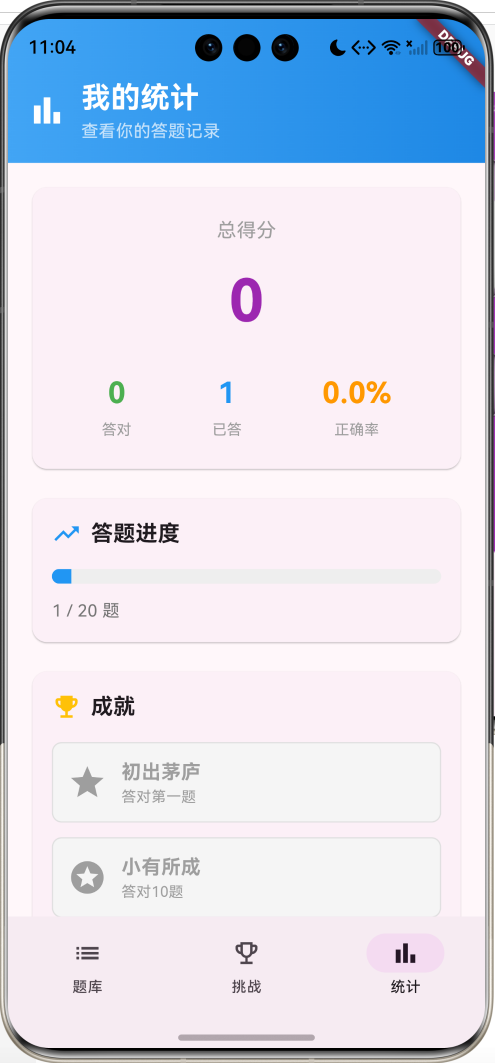
这是一款趣味问答应用,收录了20道精选脑筋急转弯题目,包含简单、中等、困难三个难度等级。应用提供题库浏览、答题模式、挑战模式、提示系统、计分统计等功能,界面设计精美,交互流畅。
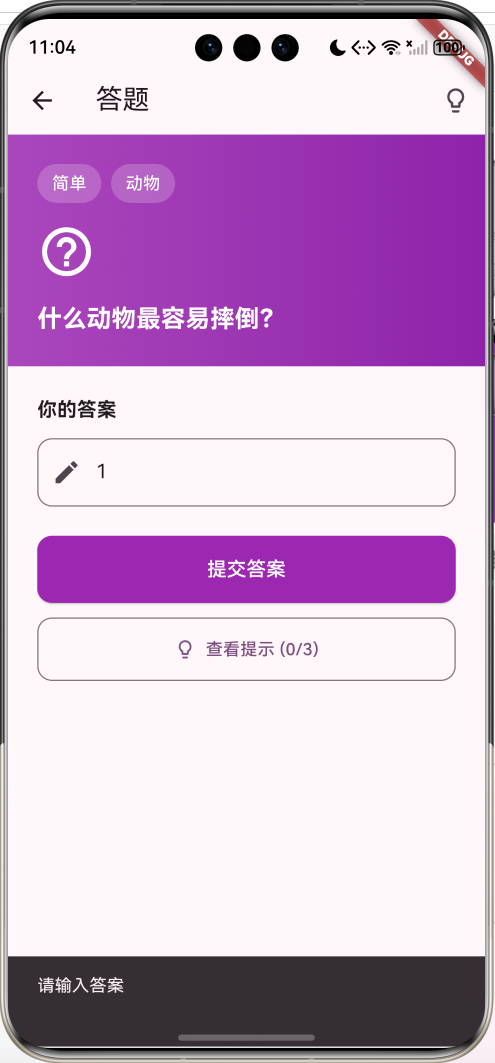
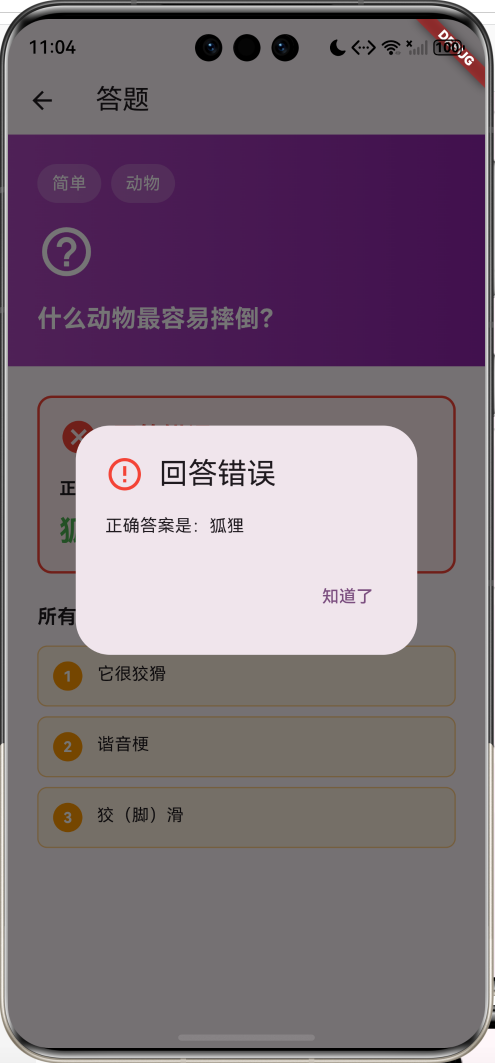
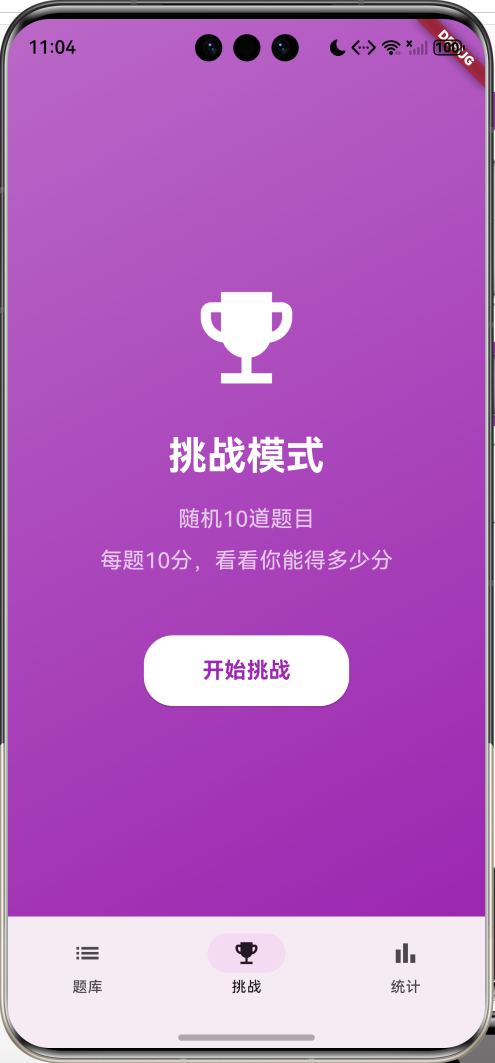
运行效果图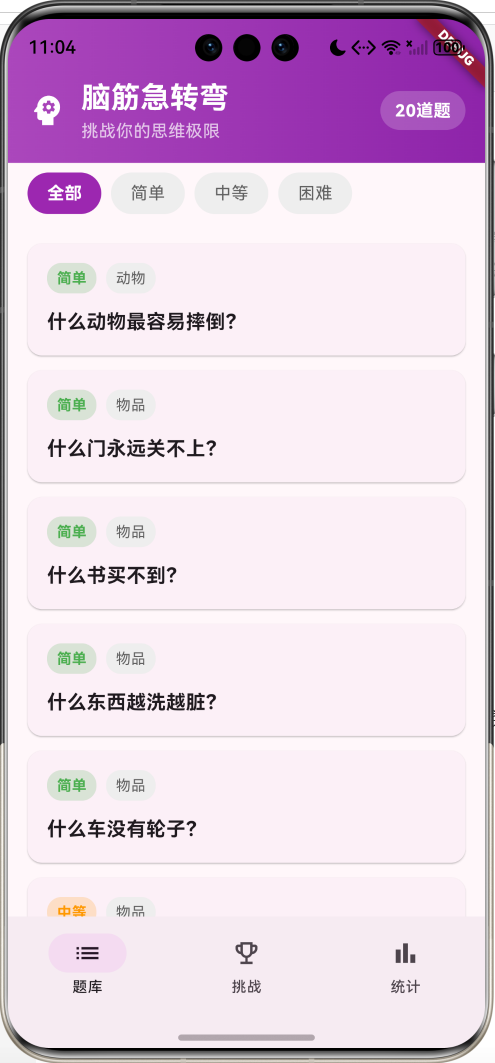
核心特性
- 题库浏览:20道精选题目,按难度分类
- 答题模式:输入答案,即时判断对错
- 提示系统:每题3个提示,逐步引导
- 挑战模式:随机10题,计时答题
- 计分统计:记录得分、正确率、答题进度
- 成就系统:解锁答题成就
- 难度分级:简单、中等、困难三个等级
- 分类标签:动物、物品、身体、自然等分类
技术栈
- Flutter 3.x
- Material Design 3
- 状态管理(setState)
- 对话框交互
- 列表过滤
项目架构
数据模型设计
Question(题目模型)
class Question {
  final int id;              // 题目ID
  final String question;     // 问题
  final String answer;       // 答案
  final String category;     // 分类
  final String difficulty;   // 难度
  final List<String> hints;  // 提示列表
  bool isAnswered;           // 是否已答
  bool isCorrect;            // 是否答对
}
设计要点:
- ID用于唯一标识
- 问题和答案分离
- 分类和难度用于筛选
- 提示列表支持多个提示
- 答题状态记录
难度等级
| 难度 | 颜色 | 描述 |
|---|---|---|
| 简单 | 绿色 | 容易想到的答案 |
| 中等 | 橙色 | 需要一定思考 |
| 困难 | 红色 | 需要转换思维 |
核心功能实现
1. 题目筛选
List<Question> get _filteredQuestions {
  if (_selectedDifficulty == '全部') {
    return widget.questions;
  }
  return widget.questions
      .where((q) => q.difficulty == _selectedDifficulty)
      .toList();
}
2. 答案判断
void _submitAnswer() {
  final userAnswer = _answerController.text.trim();

  setState(() {
    widget.question.isAnswered = true;
    widget.question.isCorrect =
        userAnswer.toLowerCase() == widget.question.answer.toLowerCase();
  });

  widget.onAnswered(widget.question.isCorrect);

  if (widget.question.isCorrect) {
    _showSuccessDialog();
  } else {
    _showFailDialog();
  }
}
3. 提示系统
void _showHint() {
  if (_currentHintIndex < widget.question.hints.length) {
    showDialog(
      context: context,
      builder: (context) => AlertDialog(
        title: Text('提示 ${_currentHintIndex + 1}'),
        content: Text(widget.question.hints[_currentHintIndex]),
        actions: [
          TextButton(
            onPressed: () {
              Navigator.pop(context);
              setState(() {
                _currentHintIndex++;
              });
            },
            child: Text('知道了'),
          ),
        ],
      ),
    );
  }
}
4. 挑战模式
void _startChallenge() {
  final random = Random();
  setState(() {
    _challengeQuestions = List.from(widget.questions)..shuffle(random);
    _challengeQuestions = _challengeQuestions.take(10).toList();
    _currentIndex = 0;
    _score = 0;
    _isStarted = true;
  });
}
5. 统计计算
final accuracy = answeredQuestions > 0
    ? (correctCount / answeredQuestions * 100).toStringAsFixed(1)
    : '0.0';

final progress = answeredQuestions / totalQuestions;
UI组件设计
1. 难度标签
Container(
  padding: EdgeInsets.symmetric(horizontal: 8, vertical: 4),
  decoration: BoxDecoration(
    color: _getDifficultyColor(difficulty).withValues(alpha: 0.2),
    borderRadius: BorderRadius.circular(12),
  ),
  child: Text(
    difficulty,
    style: TextStyle(
      color: _getDifficultyColor(difficulty),
      fontWeight: FontWeight.bold,
    ),
  ),
)
2. 答案输入框
TextField(
  controller: _answerController,
  decoration: InputDecoration(
    hintText: '请输入答案',
    border: OutlineInputBorder(
      borderRadius: BorderRadius.circular(12),
    ),
    prefixIcon: Icon(Icons.edit),
  ),
  onSubmitted: (_) => _submitAnswer(),
)
3. 成就卡片
Container(
  decoration: BoxDecoration(
    color: isUnlocked ? Colors.amber.withValues(alpha: 0.1) : Colors.grey.shade100,
    borderRadius: BorderRadius.circular(8),
    border: Border.all(
      color: isUnlocked ? Colors.amber : Colors.grey.shade300,
    ),
  ),
  child: Row(
    children: [
      Icon(icon, color: isUnlocked ? Colors.amber : Colors.grey),
      Text(title),
      if (isUnlocked) Icon(Icons.check_circle, color: Colors.green),
    ],
  ),
)
功能扩展建议
1. 接入题库API
使用网络API获取更多题目:
import 'package:http/http.dart' as http;
import 'dart:convert';

class QuestionService {
  static const String baseUrl = 'https://api.example.com/questions';

  Future<List<Question>> getQuestions({String? difficulty}) async {
    final url = difficulty != null
        ? '$baseUrl?difficulty=$difficulty'
        : baseUrl;

    final response = await http.get(Uri.parse(url));

    if (response.statusCode == 200) {
      final List<dynamic> data = json.decode(response.body);
      return data.map((json) => Question.fromJson(json)).toList();
    }
    throw Exception('获取题目失败');
  }

  Future<Question> getRandomQuestion() async {
    final response = await http.get(Uri.parse('$baseUrl/random'));

    if (response.statusCode == 200) {
      return Question.fromJson(json.decode(response.body));
    }
    throw Exception('获取随机题目失败');
  }
}
2. 数据持久化
使用SharedPreferences保存答题记录:
import 'package:shared_preferences/shared_preferences.dart';

class StorageService {
  static const String _answeredKey = 'answered_questions';
  static const String _scoreKey = 'total_score';

  Future<void> saveAnsweredQuestions(List<Question> questions) async {
    final prefs = await SharedPreferences.getInstance();
    final jsonList = questions.map((q) => q.toJson()).toList();
    await prefs.setString(_answeredKey, json.encode(jsonList));
  }

  Future<List<Question>> loadAnsweredQuestions() async {
    final prefs = await SharedPreferences.getInstance();
    final jsonStr = prefs.getString(_answeredKey);
    if (jsonStr == null) return [];

    final List<dynamic> jsonList = json.decode(jsonStr);
    return jsonList.map((json) => Question.fromJson(json)).toList();
  }

  Future<void> saveScore(int score) async {
    final prefs = await SharedPreferences.getInstance();
    await prefs.setInt(_scoreKey, score);
  }

  Future<int> loadScore() async {
    final prefs = await SharedPreferences.getInstance();
    return prefs.getInt(_scoreKey) ?? 0;
  }
}
3. 排行榜系统
添加全球排行榜功能:
class LeaderboardPage extends StatefulWidget {
State<LeaderboardPage> createState() => _LeaderboardPageState();
}
class _LeaderboardPageState extends State<LeaderboardPage> {
List<LeaderboardEntry> _entries = [];
void initState() {
super.initState();
_loadLeaderboard();
}
Future<void> _loadLeaderboard() async {
final response = await http.get(
Uri.parse('https://api.example.com/leaderboard'),
);
if (response.statusCode == 200) {
final List<dynamic> data = json.decode(response.body);
setState(() {
_entries = data.map((json) => LeaderboardEntry.fromJson(json)).toList();
});
}
}
Widget build(BuildContext context) {
return Scaffold(
appBar: AppBar(title: Text('排行榜')),
body: ListView.builder(
itemCount: _entries.length,
itemBuilder: (context, index) {
final entry = _entries[index];
return ListTile(
leading: _buildRankBadge(index + 1),
title: Text(entry.username),
subtitle: Text('正确率: ${entry.accuracy}%'),
trailing: Text('${entry.score}分'),
);
},
),
);
}
Widget _buildRankBadge(int rank) {
Color color;
if (rank == 1) color = Colors.amber;
else if (rank == 2) color = Colors.grey;
else if (rank == 3) color = Colors.brown;
else color = Colors.blue;
return Container(
width: 40,
height: 40,
decoration: BoxDecoration(
color: color,
shape: BoxShape.circle,
),
child: Center(
child: Text(
'$rank',
style: TextStyle(
color: Colors.white,
fontWeight: FontWeight.bold,
),
),
),
);
}
}
class LeaderboardEntry {
final String username;
final int score;
final double accuracy;
LeaderboardEntry({
required this.username,
required this.score,
required this.accuracy,
});
factory LeaderboardEntry.fromJson(Map<String, dynamic> json) {
return LeaderboardEntry(
username: json['username'],
score: json['score'],
accuracy: json['accuracy'],
);
}
}
4. 社交分享
使用share_plus包分享成绩:
dependencies:
  share_plus: ^7.2.2
import 'package:share_plus/share_plus.dart';

Future<void> shareScore(int score, int total, double accuracy) async {
  final text = '''
我在脑筋急转弯挑战中获得了 $score 分!
答对 ${(total * accuracy / 100).round()} / $total 题
正确率: ${accuracy.toStringAsFixed(1)}%

快来挑战吧!
  ''';

  await Share.share(text, subject: '脑筋急转弯挑战成绩');
}

// 在挑战完成后调用
void _onChallengeComplete() {
  showDialog(
    context: context,
    builder: (context) => AlertDialog(
      title: Text('挑战完成'),
      content: Column(
        mainAxisSize: MainAxisSize.min,
        children: [
          Text('得分: $_score'),
          Text('正确率: ${(_score / 10 * 100).toStringAsFixed(1)}%'),
        ],
      ),
      actions: [
        TextButton(
          onPressed: () {
            Navigator.pop(context);
            shareScore(_score, 10, _score / 10 * 100);
          },
          child: Text('分享'),
        ),
        TextButton(
          onPressed: () => Navigator.pop(context),
          child: Text('关闭'),
        ),
      ],
    ),
  );
}
5. 每日挑战
每天推荐一组题目:
class DailyChallengeService {
  Future<List<Question>> getDailyChallenge() async {
    final prefs = await SharedPreferences.getInstance();
    final today = DateTime.now().toString().substring(0, 10);
    final lastDate = prefs.getString('daily_challenge_date');

    if (lastDate == today) {
      // 返回今天已生成的挑战
      final questionsJson = prefs.getString('daily_challenge');
      if (questionsJson != null) {
        final List<dynamic> jsonList = json.decode(questionsJson);
        return jsonList.map((json) => Question.fromJson(json)).toList();
      }
    }

    // 生成新的每日挑战
    final response = await http.get(
      Uri.parse('https://api.example.com/daily-challenge'),
    );

    if (response.statusCode == 200) {
      final List<dynamic> data = json.decode(response.body);
      final questions = data.map((json) => Question.fromJson(json)).toList();

      await prefs.setString('daily_challenge_date', today);
      await prefs.setString('daily_challenge', json.encode(data));

      return questions;
    }

    throw Exception('获取每日挑战失败');
  }
}
6. 多人对战
实现实时对战功能:
class MultiplayerPage extends StatefulWidget {
State<MultiplayerPage> createState() => _MultiplayerPageState();
}
class _MultiplayerPageState extends State<MultiplayerPage> {
String _roomCode = '';
List<Player> _players = [];
Question? _currentQuestion;
Future<void> _createRoom() async {
final response = await http.post(
Uri.parse('https://api.example.com/rooms/create'),
);
if (response.statusCode == 200) {
final data = json.decode(response.body);
setState(() {
_roomCode = data['roomCode'];
});
}
}
Future<void> _joinRoom(String code) async {
final response = await http.post(
Uri.parse('https://api.example.com/rooms/join'),
body: json.encode({'roomCode': code}),
headers: {'Content-Type': 'application/json'},
);
if (response.statusCode == 200) {
setState(() {
_roomCode = code;
});
_listenToRoomUpdates();
}
}
void _listenToRoomUpdates() {
// 使用WebSocket或轮询监听房间更新
// 这里简化为轮询示例
Timer.periodic(Duration(seconds: 2), (timer) async {
final response = await http.get(
Uri.parse('https://api.example.com/rooms/$_roomCode'),
);
if (response.statusCode == 200) {
final data = json.decode(response.body);
setState(() {
_players = (data['players'] as List)
.map((p) => Player.fromJson(p))
.toList();
if (data['currentQuestion'] != null) {
_currentQuestion = Question.fromJson(data['currentQuestion']);
}
});
}
});
}
Widget build(BuildContext context) {
return Scaffold(
appBar: AppBar(title: Text('多人对战')),
body: _roomCode.isEmpty
? _buildLobby()
: _buildGameRoom(),
);
}
Widget _buildLobby() {
return Center(
child: Column(
mainAxisAlignment: MainAxisAlignment.center,
children: [
ElevatedButton(
onPressed: _createRoom,
child: Text('创建房间'),
),
SizedBox(height: 20),
TextField(
decoration: InputDecoration(
labelText: '输入房间号',
border: OutlineInputBorder(),
),
onSubmitted: _joinRoom,
),
],
),
);
}
Widget _buildGameRoom() {
return Column(
children: [
Text('房间号: $_roomCode'),
Text('玩家: ${_players.length}'),
Expanded(
child: ListView.builder(
itemCount: _players.length,
itemBuilder: (context, index) {
final player = _players[index];
return ListTile(
title: Text(player.name),
trailing: Text('${player.score}分'),
);
},
),
),
if (_currentQuestion != null)
QuestionCard(
question: _currentQuestion!,
onAnswer: _submitAnswer,
),
],
);
}
Future<void> _submitAnswer(String answer) async {
await http.post(
Uri.parse('https://api.example.com/rooms/$_roomCode/answer'),
body: json.encode({'answer': answer}),
headers: {'Content-Type': 'application/json'},
);
}
}
class Player {
final String name;
final int score;
Player({required this.name, required this.score});
factory Player.fromJson(Map<String, dynamic> json) {
return Player(
name: json['name'],
score: json['score'],
);
}
}
7. 自定义题目
允许用户创建和分享题目:
class CreateQuestionPage extends StatefulWidget {
State<CreateQuestionPage> createState() => _CreateQuestionPageState();
}
class _CreateQuestionPageState extends State<CreateQuestionPage> {
final _questionController = TextEditingController();
final _answerController = TextEditingController();
final List<TextEditingController> _hintControllers = [
TextEditingController(),
TextEditingController(),
TextEditingController(),
];
String _selectedDifficulty = '简单';
String _selectedCategory = '动物';
Future<void> _submitQuestion() async {
final question = {
'question': _questionController.text,
'answer': _answerController.text,
'hints': _hintControllers.map((c) => c.text).toList(),
'difficulty': _selectedDifficulty,
'category': _selectedCategory,
};
final response = await http.post(
Uri.parse('https://api.example.com/questions/submit'),
body: json.encode(question),
headers: {'Content-Type': 'application/json'},
);
if (response.statusCode == 200) {
ScaffoldMessenger.of(context).showSnackBar(
SnackBar(content: Text('题目提交成功,审核通过后将展示')),
);
Navigator.pop(context);
}
}
Widget build(BuildContext context) {
return Scaffold(
appBar: AppBar(title: Text('创建题目')),
body: SingleChildScrollView(
padding: EdgeInsets.all(16),
child: Column(
crossAxisAlignment: CrossAxisAlignment.start,
children: [
TextField(
controller: _questionController,
decoration: InputDecoration(
labelText: '问题',
border: OutlineInputBorder(),
),
maxLines: 3,
),
SizedBox(height: 16),
TextField(
controller: _answerController,
decoration: InputDecoration(
labelText: '答案',
border: OutlineInputBorder(),
),
),
SizedBox(height: 16),
Text('提示', style: TextStyle(fontWeight: FontWeight.bold)),
..._hintControllers.asMap().entries.map((entry) {
return Padding(
padding: EdgeInsets.only(top: 8),
child: TextField(
controller: entry.value,
decoration: InputDecoration(
labelText: '提示 ${entry.key + 1}',
border: OutlineInputBorder(),
),
),
);
}),
SizedBox(height: 16),
DropdownButtonFormField<String>(
value: _selectedDifficulty,
decoration: InputDecoration(
labelText: '难度',
border: OutlineInputBorder(),
),
items: ['简单', '中等', '困难'].map((d) {
return DropdownMenuItem(value: d, child: Text(d));
}).toList(),
onChanged: (value) {
setState(() {
_selectedDifficulty = value!;
});
},
),
SizedBox(height: 16),
DropdownButtonFormField<String>(
value: _selectedCategory,
decoration: InputDecoration(
labelText: '分类',
border: OutlineInputBorder(),
),
items: ['动物', '物品', '身体', '自然', '其他'].map((c) {
return DropdownMenuItem(value: c, child: Text(c));
}).toList(),
onChanged: (value) {
setState(() {
_selectedCategory = value!;
});
},
),
SizedBox(height: 24),
SizedBox(
width: double.infinity,
child: ElevatedButton(
onPressed: _submitQuestion,
child: Text('提交题目'),
),
),
],
),
),
);
}
}
8. 语音输入
使用speech_to_text实现语音答题:
dependencies:
  speech_to_text: ^6.6.0
import 'package:speech_to_text/speech_to_text.dart';
class VoiceInputButton extends StatefulWidget {
final Function(String) onResult;
const VoiceInputButton({required this.onResult});
State<VoiceInputButton> createState() => _VoiceInputButtonState();
}
class _VoiceInputButtonState extends State<VoiceInputButton> {
final SpeechToText _speech = SpeechToText();
bool _isListening = false;
Future<void> _startListening() async {
bool available = await _speech.initialize();
if (available) {
setState(() {
_isListening = true;
});
_speech.listen(
onResult: (result) {
if (result.finalResult) {
widget.onResult(result.recognizedWords);
setState(() {
_isListening = false;
});
}
},
);
}
}
void _stopListening() {
_speech.stop();
setState(() {
_isListening = false;
});
}
Widget build(BuildContext context) {
return IconButton(
icon: Icon(
_isListening ? Icons.mic : Icons.mic_none,
color: _isListening ? Colors.red : null,
),
onPressed: _isListening ? _stopListening : _startListening,
);
}
}
// 在答题页面使用
TextField(
controller: _answerController,
decoration: InputDecoration(
hintText: '请输入答案',
suffixIcon: VoiceInputButton(
onResult: (text) {
setState(() {
_answerController.text = text;
});
},
),
),
)
性能优化建议
1. 列表优化
使用ListView.builder按需构建:
ListView.builder(
  itemCount: _filteredQuestions.length,
  itemBuilder: (context, index) {
    return QuestionCard(question: _filteredQuestions[index]);
  },
)
2. 状态管理优化
对于大型应用,使用Provider:
class QuestionProvider extends ChangeNotifier {
  List<Question> _questions = [];
  String _selectedDifficulty = '全部';

  List<Question> get questions => _questions;
  String get selectedDifficulty => _selectedDifficulty;

  List<Question> get filteredQuestions {
    if (_selectedDifficulty == '全部') return _questions;
    return _questions.where((q) => q.difficulty == _selectedDifficulty).toList();
  }

  void setDifficulty(String difficulty) {
    _selectedDifficulty = difficulty;
    notifyListeners();
  }

  void answerQuestion(Question question, bool isCorrect) {
    question.isAnswered = true;
    question.isCorrect = isCorrect;
    notifyListeners();
  }
}
3. 图片缓存
如果添加图片功能,使用缓存:
import 'package:cached_network_image/cached_network_image.dart';

CachedNetworkImage(
  imageUrl: question.imageUrl,
  placeholder: (context, url) => CircularProgressIndicator(),
  errorWidget: (context, url, error) => Icon(Icons.error),
)
4. 懒加载
分页加载题目:
class _QuestionListPageState extends State<QuestionListPage> {
final ScrollController _scrollController = ScrollController();
int _currentPage = 1;
bool _isLoading = false;
void initState() {
super.initState();
_scrollController.addListener(_onScroll);
}
void _onScroll() {
if (_scrollController.position.pixels ==
_scrollController.position.maxScrollExtent) {
_loadMore();
}
}
Future<void> _loadMore() async {
if (_isLoading) return;
setState(() {
_isLoading = true;
});
final newQuestions = await QuestionService().getQuestions(
page: _currentPage + 1,
);
setState(() {
widget.questions.addAll(newQuestions);
_currentPage++;
_isLoading = false;
});
}
}
测试建议
1. 单元测试
测试答案判断逻辑:
void main() {
  group('答案判断测试', () {
    test('答案正确应返回true', () {
      final question = Question(
        id: 1,
        question: '什么东西越洗越脏?',
        answer: '水',
        category: '物品',
        difficulty: '简单',
        hints: [],
      );

      expect(checkAnswer(question, '水'), true);
      expect(checkAnswer(question, '水'), true); // 大小写不敏感
    });

    test('答案错误应返回false', () {
      final question = Question(
        id: 1,
        question: '什么东西越洗越脏?',
        answer: '水',
        category: '物品',
        difficulty: '简单',
        hints: [],
      );

      expect(checkAnswer(question, '肥皂'), false);
    });

    test('难度筛选测试', () {
      final questions = [
        Question(id: 1, question: 'Q1', answer: 'A1',
                 category: 'C1', difficulty: '简单', hints: []),
        Question(id: 2, question: 'Q2', answer: 'A2',
                 category: 'C2', difficulty: '中等', hints: []),
        Question(id: 3, question: 'Q3', answer: 'A3',
                 category: 'C3', difficulty: '简单', hints: []),
      ];

      final filtered = filterByDifficulty(questions, '简单');
      expect(filtered.length, 2);
      expect(filtered.every((q) => q.difficulty == '简单'), true);
    });
  });
}

bool checkAnswer(Question question, String userAnswer) {
  return userAnswer.toLowerCase() == question.answer.toLowerCase();
}

List<Question> filterByDifficulty(List<Question> questions, String difficulty) {
  if (difficulty == '全部') return questions;
  return questions.where((q) => q.difficulty == difficulty).toList();
}
2. Widget测试
测试UI组件:
void main() {
  testWidgets('题目卡片显示测试', (WidgetTester tester) async {
    final question = Question(
      id: 1,
      question: '什么东西越洗越脏?',
      answer: '水',
      category: '物品',
      difficulty: '简单',
      hints: ['想想日常生活', '清洁用品', '液体'],
    );

    await tester.pumpWidget(
      MaterialApp(
        home: Scaffold(
          body: QuestionCard(question: question),
        ),
      ),
    );

    expect(find.text('什么东西越洗越脏?'), findsOneWidget);
    expect(find.text('简单'), findsOneWidget);
    expect(find.text('物品'), findsOneWidget);
  });

  testWidgets('答案提交测试', (WidgetTester tester) async {
    final question = Question(
      id: 1,
      question: '什么东西越洗越脏?',
      answer: '水',
      category: '物品',
      difficulty: '简单',
      hints: [],
    );

    bool? result;

    await tester.pumpWidget(
      MaterialApp(
        home: Scaffold(
          body: QuestionDetailPage(
            question: question,
            onAnswered: (isCorrect) {
              result = isCorrect;
            },
          ),
        ),
      ),
    );

    // 输入答案
    await tester.enterText(find.byType(TextField), '水');
    await tester.tap(find.text('提交答案'));
    await tester.pumpAndSettle();

    expect(result, true);
    expect(find.text('回答正确'), findsOneWidget);
  });
}
3. 集成测试
测试完整流程:
void main() {
  IntegrationTestWidgetsFlutterBinding.ensureInitialized();

  testWidgets('完整答题流程', (WidgetTester tester) async {
    await tester.pumpWidget(MyApp());

    // 1. 验证初始显示
    expect(find.text('脑筋急转弯'), findsOneWidget);
    expect(find.text('题库'), findsOneWidget);

    // 2. 点击题目
    await tester.tap(find.byType(Card).first);
    await tester.pumpAndSettle();

    // 3. 查看提示
    await tester.tap(find.text('查看提示'));
    await tester.pumpAndSettle();
    expect(find.text('提示 1'), findsOneWidget);
    await tester.tap(find.text('知道了'));
    await tester.pumpAndSettle();

    // 4. 输入答案
    await tester.enterText(find.byType(TextField), '水');
    await tester.tap(find.text('提交答案'));
    await tester.pumpAndSettle();

    // 5. 验证结果
    expect(find.text('回答正确'), findsOneWidget);
    await tester.tap(find.text('继续'));
    await tester.pumpAndSettle();

    // 6. 切换到挑战模式
    await tester.tap(find.text('挑战'));
    await tester.pumpAndSettle();
    await tester.tap(find.text('开始挑战'));
    await tester.pumpAndSettle();

    // 7. 查看统计
    await tester.tap(find.text('统计'));
    await tester.pumpAndSettle();
    expect(find.text('答题统计'), findsOneWidget);
  });
}
部署发布
1. Android打包
# 生成签名密钥
keytool -genkey -v -keystore ~/brain-teaser-key.jks -keyalg RSA -keysize 2048 -validity 10000 -alias brainteaser

# 配置android/key.properties
storePassword=your_password
keyPassword=your_password
keyAlias=brainteaser
storeFile=/path/to/brain-teaser-key.jks

# 构建APK
flutter build apk --release

# 构建App Bundle
flutter build appbundle --release
2. iOS打包
# 安装依赖
cd ios && pod install

# 构建IPA
flutter build ipa --release
3. 应用配置
在pubspec.yaml中配置:
name: brain_teaser
description: 脑筋急转弯应用
version: 1.0.0+1

flutter:
  uses-material-design: true
在AndroidManifest.xml中配置:
<application
    android:label="脑筋急转弯"
    android:icon="@mipmap/ic_launcher">
项目总结
技术亮点
- 对话框交互:AlertDialog实现提示和结果展示
- 列表筛选:按难度过滤题目
- 随机算法:shuffle实现题目随机
- 状态管理:记录答题状态和得分
- 渐变设计:LinearGradient提升视觉效果
- 成就系统:激励用户完成挑战
- Material Design 3:使用最新的NavigationBar组件
- 答案验证:大小写不敏感的智能判断
学习收获
通过本项目,你将掌握:
- 对话框使用和交互设计
- 文本输入处理和验证
- 列表随机和筛选算法
- 状态管理基础
- 进度条展示技巧
- 成就系统设计思路
- 挑战模式实现
- 统计数据计算
应用场景
本应用适合以下场景:
- 休闲娱乐:随时随地动脑筋
- 亲子互动:家长和孩子一起答题
- 聚会游戏:朋友聚会时的互动游戏
- 思维训练:锻炼逻辑思维和创造力
- 学习案例:作为Flutter问答应用的学习项目
后续优化方向
- 网络题库:接入题库API获取更多题目
- 数据持久化:保存答题记录和成绩
- 排行榜:全球排行榜和好友排行
- 社交分享:分享成绩到社交平台
- 每日挑战:每天推荐新题目
- 多人对战:实时对战功能
- 自定义题目:用户创建和分享题目
- 语音输入:支持语音答题
代码规范
项目遵循以下规范:
- 使用const构造函数优化性能
- 组件拆分,职责单一
- 命名规范:驼峰命名法
- 注释清晰,代码可读性强
- 数据和UI分离
- 响应式布局设计
项目结构
lib/
├── main.dart                    # 主入口文件
├── models/                      # 数据模型(可扩展)
│   └── question.dart
├── pages/                       # 页面组件(可扩展)
│   ├── question_list_page.dart
│   ├── question_detail_page.dart
│   ├── challenge_page.dart
│   └── statistics_page.dart
├── widgets/                     # 自定义组件(可扩展)
│   ├── question_card.dart
│   ├── difficulty_chip.dart
│   └── achievement_card.dart
└── services/                    # 业务逻辑(可扩展)
    ├── question_service.dart
    ├── storage_service.dart
    └── leaderboard_service.dart
相关资源
推荐API:
- 脑筋急转弯API:https://api.apiopen.top/api/getJoke
- 随机题目API:https://v.api.aa1.cn/api/api-wenan-naojinjizhuanwan/index.php
推荐库:
http:网络请求share_plus:分享功能speech_to_text:语音输入provider:状态管理shared_preferences:本地存储
学习资源:
- Flutter官方文档:https://flutter.dev
- Material Design 3:https://m3.material.io
- Dart语言教程:https://dart.dev
题目扩展示例
可以添加更多有趣的题目:
final moreQuestions = [
  Question(
    id: 21,
    question: '什么门永远关不上?',
    answer: '球门',
    category: '物品',
    difficulty: '简单',
    hints: ['体育运动', '足球', '没有门板'],
  ),
  Question(
    id: 22,
    question: '什么东西有头无脚?',
    answer: '砖头',
    category: '物品',
    difficulty: '中等',
    hints: ['建筑材料', '方形的', '很硬'],
  ),
  Question(
    id: 23,
    question: '什么车寸步难行?',
    answer: '风车',
    category: '物品',
    difficulty: '中等',
    hints: ['不是交通工具', '利用自然力量', '转动的'],
  ),
  Question(
    id: 24,
    question: '什么书谁也没见过?',
    answer: '天书',
    category: '物品',
    difficulty: '困难',
    hints: ['传说中的', '神秘的', '成语'],
  ),
  Question(
    id: 25,
    question: '什么东西越热越爱出来?',
    answer: '汗',
    category: '身体',
    difficulty: '简单',
    hints: ['人体分泌物', '运动时会有', '液体'],
  ),
];
成就系统扩展
可以添加更多成就:
final achievements = [
  {
    'title': '初出茅庐',
    'desc': '答对第一题',
    'icon': Icons.star,
    'condition': (stats) => stats.correctCount >= 1,
  },
  {
    'title': '小试牛刀',
    'desc': '答对10题',
    'icon': Icons.emoji_events,
    'condition': (stats) => stats.correctCount >= 10,
  },
  {
    'title': '智慧之星',
    'desc': '答对20题',
    'icon': Icons.auto_awesome,
    'condition': (stats) => stats.correctCount >= 20,
  },
  {
    'title': '完美主义',
    'desc': '正确率达到100%',
    'icon': Icons.verified,
    'condition': (stats) => stats.accuracy == 100.0 && stats.answeredCount >= 5,
  },
  {
    'title': '挑战达人',
    'desc': '完成10次挑战',
    'icon': Icons.military_tech,
    'condition': (stats) => stats.challengeCount >= 10,
  },
  {
    'title': '不屈不挠',
    'desc': '连续答题50题',
    'icon': Icons.trending_up,
    'condition': (stats) => stats.answeredCount >= 50,
  },
];
难度平衡建议
题目难度分布建议:
| 难度 | 占比 | 题目数量(基于100题) |
|---|---|---|
| 简单 | 40% | 40题 |
| 中等 | 40% | 40题 |
| 困难 | 20% | 20题 |
难度设计原则:
- 简单:答案直观,稍加思考即可
- 中等:需要转换思维角度
- 困难:需要跳出常规思维
用户体验优化
-
答题反馈:
- 正确时显示绿色对勾和鼓励语
- 错误时显示红色叉号和正确答案
- 使用动画增强反馈效果
-
提示系统:
- 第一个提示:范围提示
- 第二个提示:特征提示
- 第三个提示:接近答案的提示
-
进度可视化:
- 使用进度条展示答题进度
- 使用饼图展示正确率
- 使用徽章展示成就
-
音效反馈(可选):
- 答对时播放成功音效
- 答错时播放失败音效
- 解锁成就时播放特殊音效
数据分析建议
可以收集以下数据用于优化:
class AnalyticsData {
  final int totalQuestions;           // 总题目数
  final int answeredQuestions;        // 已答题数
  final int correctAnswers;           // 正确答案数
  final Map<String, int> categoryStats; // 各分类统计
  final Map<String, double> difficultyAccuracy; // 各难度正确率
  final List<int> dailyAnswers;       // 每日答题数
  final double averageTime;           // 平均答题时间
  final List<String> favoriteCategories; // 最喜欢的分类
}
国际化支持
支持多语言:
// l10n/app_zh.arb
{
  "appTitle": "脑筋急转弯",
  "questionList": "题库",
  "challenge": "挑战",
  "statistics": "统计",
  "submitAnswer": "提交答案",
  "showHint": "查看提示",
  "correct": "回答正确",
  "incorrect": "回答错误"
}

// l10n/app_en.arb
{
  "appTitle": "Brain Teaser",
  "questionList": "Questions",
  "challenge": "Challenge",
  "statistics": "Statistics",
  "submitAnswer": "Submit",
  "showHint": "Show Hint",
  "correct": "Correct",
  "incorrect": "Incorrect"
}
本项目提供了完整的脑筋急转弯应用功能,代码结构清晰,易于扩展。你可以在此基础上添加更多功能,打造一款功能丰富的益智娱乐应用。题目内容可以根据需要替换或扩充,也可以接入真实的题库API获取海量题目。
欢迎加入开源鸿蒙跨平台社区:https://openharmonycrossplatform.csdn.net

作为“人工智能6S店”的官方数字引擎,为AI开发者与企业提供一个覆盖软硬件全栈、一站式门户。
更多推荐
 0
0 0
0- 0


 已为社区贡献10条内容

所有评论(0)