
Flutter框架跨平台鸿蒙开发——Pattern Matching模式匹配
Pattern Matching提供了一种声明式的方式来处理数据结构。fill:#333;important;important;fill:none;color:#333;color:#333;important;fill:none;fill:#333;height:1em;是否是否表达式匹配Pattern是否匹配?执行对应分支尝试下一分支还有分支?执行默认分支返回结果|| 特性 | 说明 ||
·
一、Pattern Matching概述
Pattern Matching提供了一种声明式的方式来处理数据结构。
|| 特性 | 说明 |
|------|------|
| 声明式 | 代码更清晰 |
| 类型安全 | 编译时检查 |
| 解构支持 | 同时匹配和提取 |
| 多层次 | 支持嵌套匹配 |
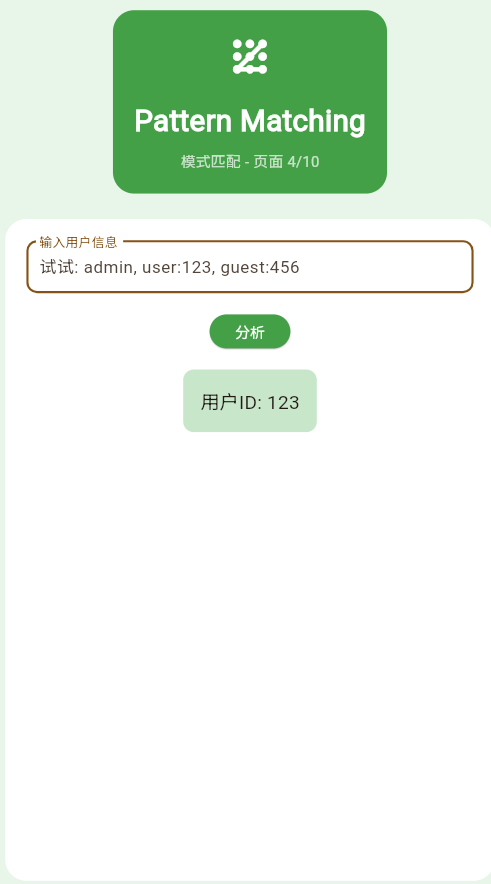
二、示例代码
class _Page04PatternDemo extends StatefulWidget {
const _Page04PatternDemo();
State<_Page04PatternDemo> createState() => _Page04PatternDemoState();
}
class _Page04PatternDemoState extends State<_Page04PatternDemo> {
String _input = 'user:123';
String _result = '';
void _analyzeInput() {
setState(() {
_result = _analyzeUserInput(_input);
});
}
String _analyzeUserInput(String input) {
switch (input) {
case 'admin':
return '管理员权限';
case final s when s.startsWith('user:'):
return '用户ID: ${s.split(':')[1]}';
case final s when s.startsWith('guest:'):
return '访客: ${s.split(':')[1]}';
case '':
return '空输入';
default:
return '未知输入';
}
}
Widget build(BuildContext context) {
return Container(
color: Colors.green.shade50,
padding: const EdgeInsets.all(20),
child: Column(
children: [
Container(
padding: const EdgeInsets.all(20),
decoration: BoxDecoration(
color: Colors.green.shade600,
borderRadius: BorderRadius.circular(20),
),
child: const Column(
children: [
Icon(Icons.pattern, size: 48, color: Colors.white),
SizedBox(height: 16),
Text(
'Pattern Matching',
style: TextStyle(fontSize: 28, fontWeight: FontWeight.bold, color: Colors.white),
),
SizedBox(height: 8),
Text('模式匹配 - 页面 4/5', style: TextStyle(color: Colors.white70)),
],
),
),
const SizedBox(height: 24),
Expanded(
child: Container(
padding: const EdgeInsets.all(20),
decoration: BoxDecoration(color: Colors.white, borderRadius: BorderRadius.circular(20)),
child: Column(
children: [
TextField(
decoration: InputDecoration(
labelText: '输入用户信息',
border: OutlineInputBorder(borderRadius: BorderRadius.circular(10)),
hintText: '试试: admin, user:123, guest:456',
),
onChanged: (value) => _input = value,
),
const SizedBox(height: 20),
ElevatedButton(
onPressed: _analyzeInput,
style: ElevatedButton.styleFrom(backgroundColor: Colors.green.shade600),
child: const Text('分析', style: TextStyle(color: Colors.white)),
),
const SizedBox(height: 20),
if (_result.isNotEmpty)
Container(
padding: const EdgeInsets.all(16),
decoration: BoxDecoration(
color: Colors.green.shade100,
borderRadius: BorderRadius.circular(10),
),
child: Text(_result, style: const TextStyle(fontSize: 18)),
),
],
),
),
),
],
),
);
}
}
三、匹配流程
四、Pattern类型
| Pattern | 说明 | 示例 |
|---|---|---|
| 常量模式 | 匹配固定值 | case 42: |
| 变量模式 | 匹配任意值并绑定 | case var x: |
| 通配符模式 | 匹配任意值不绑定 | case _: |
| 记录模式 | 解构Record | case (a, b): |
五、最佳实践
- ✅ 从具体到抽象排列case
- ✅ 使用守卫条件提高精度
- ✅ 充分利用解构
- ❌ 避免过度嵌套
欢迎加入开源鸿蒙跨平台社区:https://openharmonycrossplatform.csdn.net

作为“人工智能6S店”的官方数字引擎,为AI开发者与企业提供一个覆盖软硬件全栈、一站式门户。
更多推荐
 0
0 0
0- 0


 已为社区贡献5条内容

所有评论(0)