
Flutter 框架跨平台鸿蒙开发 - 数学练习应用开发教程
int?title: const Text('选择题目数量'),ListTile(title: const Text('10题'),),ListTile(title: const Text('20题'),),ListTile(title: const Text('50题'),),],),),if (count!Flutter基础组件和布局状态管理和数据持久化Timer计时功能实现随机算法应用数据统
Flutter数学练习应用开发教程
项目简介
数学练习是一款专为学生设计的口算训练应用,通过趣味化的练习方式帮助学生提高口算能力。应用支持加减乘除四则运算,提供多种难度级别,并配有计时挑战和详细的学习统计功能。
运行效果图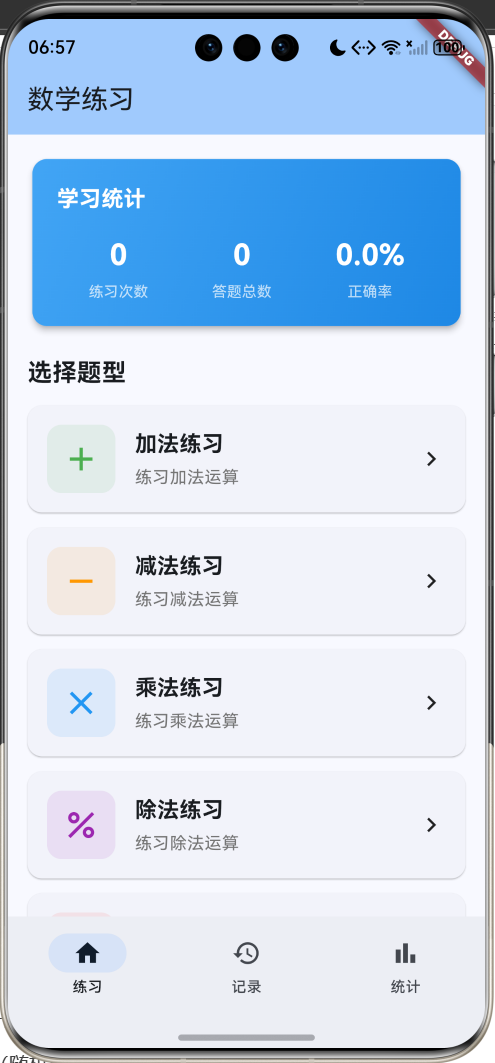
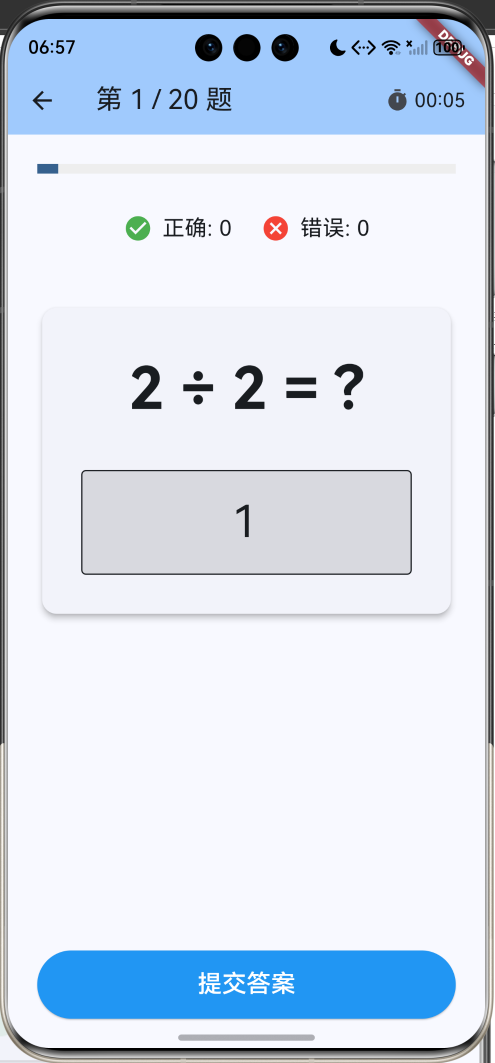
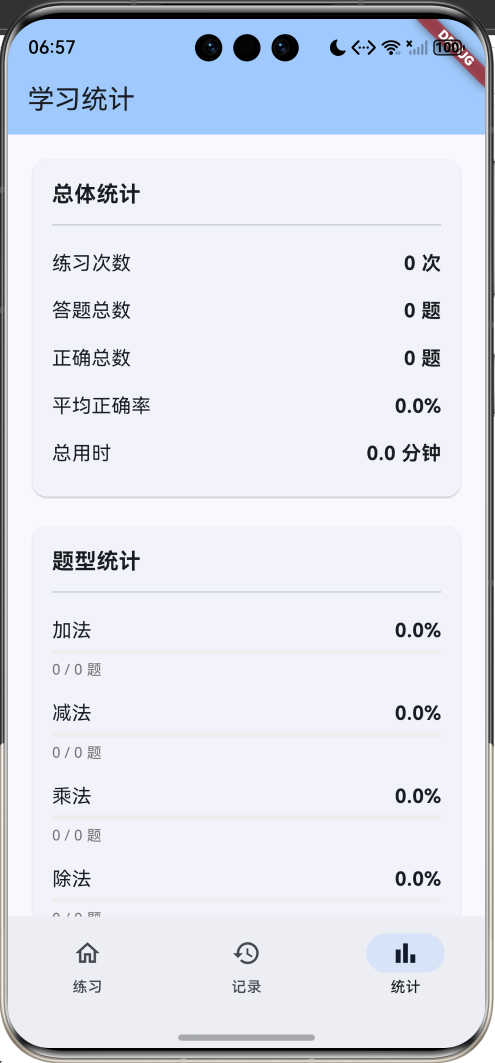
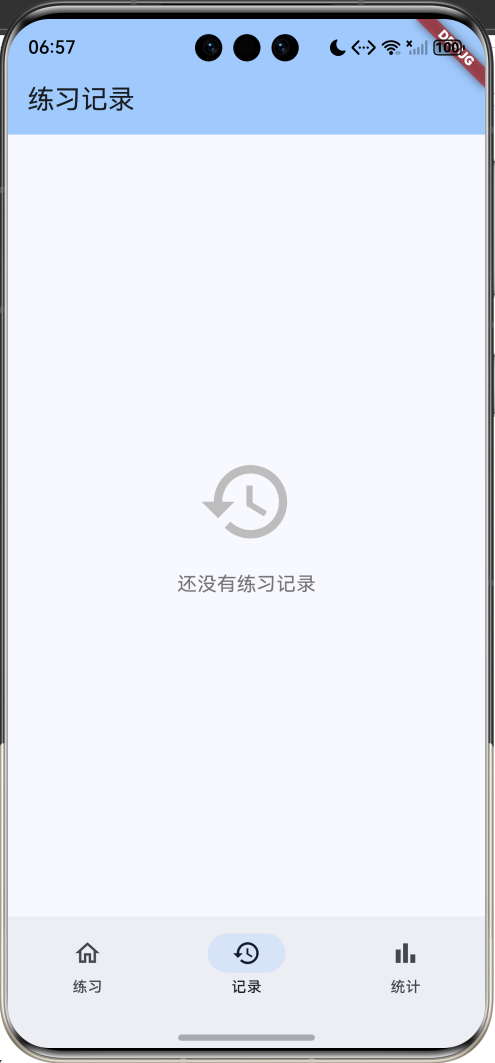
核心特性
- 多种题型:加法、减法、乘法、除法、混合运算
- 三档难度:简单(10以内)、中等(100以内)、困难(1000以内)
- 计时挑战:实时计时,培养快速反应能力
- 即时反馈:答题后立即显示正误,给出正确答案
- 练习记录:保存每次练习的详细数据
- 学习统计:多维度统计分析,了解学习进度
- 数据持久化:本地保存练习记录
技术栈
- Flutter 3.x
- Material Design 3
- SharedPreferences(数据持久化)
- Timer(计时功能)
- Random(随机题目生成)
数据模型设计
题目类型枚举
enum QuestionType {
  addition,      // 加法
  subtraction,   // 减法
  multiplication,// 乘法
  division,      // 除法
  mixed,         // 混合运算
}
难度级别枚举
enum DifficultyLevel {
  easy,    // 简单 (10以内)
  medium,  // 中等 (100以内)
  hard,    // 困难 (1000以内)
}
数学题目模型
class MathQuestion {
  final int num1;              // 第一个数字
  final int num2;              // 第二个数字
  final String operator;       // 运算符
  final int answer;            // 正确答案
  final QuestionType type;     // 题目类型

  String get question => '$num1 $operator $num2 = ?';
}
练习记录模型
class PracticeRecord {
  final DateTime date;                // 练习日期
  final QuestionType type;            // 题型
  final DifficultyLevel difficulty;   // 难度
  final int totalQuestions;           // 题目总数
  final int correctAnswers;           // 正确数量
  final int timeSpent;                // 用时(秒)

  double get accuracy => totalQuestions > 0
      ? (correctAnswers / totalQuestions * 100)
      : 0;
}
核心功能实现
1. 随机题目生成
根据题型和难度生成随机题目:
MathQuestion _generateQuestion() {
  final maxNum = widget.difficulty == DifficultyLevel.easy
      ? 10
      : widget.difficulty == DifficultyLevel.medium
          ? 100
          : 1000;

  QuestionType type = widget.type;
  if (widget.type == QuestionType.mixed) {
    type = QuestionType.values[_random.nextInt(4)];
  }

  int num1, num2, answer;
  String operator;

  switch (type) {
    case QuestionType.addition:
      num1 = _random.nextInt(maxNum);
      num2 = _random.nextInt(maxNum);
      answer = num1 + num2;
      operator = '+';
      break;
    case QuestionType.subtraction:
      num1 = _random.nextInt(maxNum);
      num2 = _random.nextInt(num1 + 1);  // 确保结果非负
      answer = num1 - num2;
      operator = '-';
      break;
    case QuestionType.multiplication:
      final maxMultiplier = widget.difficulty == DifficultyLevel.easy ? 10 : 20;
      num1 = _random.nextInt(maxMultiplier);
      num2 = _random.nextInt(maxMultiplier);
      answer = num1 * num2;
      operator = '×';
      break;
    case QuestionType.division:
      num2 = _random.nextInt(9) + 1;  // 除数1-9
      answer = _random.nextInt(maxNum ~/ num2);
      num1 = num2 * answer;  // 确保整除
      operator = '÷';
      break;
  }

  return MathQuestion(
    num1: num1,
    num2: num2,
    operator: operator,
    answer: answer,
    type: type,
  );
}
2. 计时功能
使用Timer实现秒表计时:
Timer? _timer;
int elapsedSeconds = 0;
void _startTimer() {
_timer = Timer.periodic(const Duration(seconds: 1), (timer) {
setState(() {
elapsedSeconds++;
});
});
}
String _formatTime(int seconds) {
final minutes = seconds ~/ 60;
final secs = seconds % 60;
return '${minutes.toString().padLeft(2, '0')}:${secs.toString().padLeft(2, '0')}';
}
void dispose() {
_timer?.cancel();
super.dispose();
}
3. 答案检查
检查用户答案并给出即时反馈:
void _checkAnswer() {
  if (_answerController.text.isEmpty) return;

  final userAnswer = int.tryParse(_answerController.text);
  if (userAnswer == null) return;

  setState(() {
    isAnswered = true;
    isCorrect = userAnswer == questions[currentIndex].answer;
    if (isCorrect) {
      correctCount++;
    }
  });

  // 延迟800ms后自动进入下一题
  Future.delayed(const Duration(milliseconds: 800), () {
    if (currentIndex < questions.length - 1) {
      setState(() {
        currentIndex++;
        isAnswered = false;
        isCorrect = false;
        _answerController.clear();
      });
    } else {
      _finishPractice();
    }
  });
}
4. 数据持久化
使用SharedPreferences保存练习记录:
Future<void> _loadRecords() async {
  final prefs = await SharedPreferences.getInstance();
  final recordsData = prefs.getStringList('practice_records') ?? [];
  setState(() {
    records = recordsData
        .map((json) => PracticeRecord.fromJson(jsonDecode(json)))
        .toList();
  });
}

Future<void> _saveRecords() async {
  final prefs = await SharedPreferences.getInstance();
  final recordsData = records.map((r) => jsonEncode(r.toJson())).toList();
  await prefs.setStringList('practice_records', recordsData);
}
UI组件设计
1. 首页欢迎卡片
显示学习统计概览:
Widget _buildWelcomeCard() {
  final totalPractices = records.length;
  final totalCorrect = records.fold<int>(0, (sum, r) => sum + r.correctAnswers);
  final totalQuestions = records.fold<int>(0, (sum, r) => sum + r.totalQuestions);
  final avgAccuracy = totalQuestions > 0 ? (totalCorrect / totalQuestions * 100) : 0;

  return Card(
    elevation: 4,
    child: Container(
      padding: const EdgeInsets.all(20),
      decoration: BoxDecoration(
        gradient: LinearGradient(
          colors: [Colors.blue.shade400, Colors.blue.shade600],
        ),
      ),
      child: Column(
        children: [
          const Text('学习统计', style: TextStyle(color: Colors.white)),
          Row(
            mainAxisAlignment: MainAxisAlignment.spaceAround,
            children: [
              _buildStatItem('练习次数', '$totalPractices'),
              _buildStatItem('答题总数', '$totalQuestions'),
              _buildStatItem('正确率', '${avgAccuracy.toStringAsFixed(1)}%'),
            ],
          ),
        ],
      ),
    ),
  );
}
2. 题型选择卡片
Widget _buildQuestionTypeCard(
  String title,
  String subtitle,
  IconData icon,
  Color color,
  QuestionType type,
) {
  return Card(
    child: InkWell(
      onTap: () => _showDifficultyDialog(type),
      child: Padding(
        padding: const EdgeInsets.all(16),
        child: Row(
          children: [
            Container(
              padding: const EdgeInsets.all(12),
              decoration: BoxDecoration(
                color: color.withOpacity(0.1),
                borderRadius: BorderRadius.circular(12),
              ),
              child: Icon(icon, color: color, size: 32),
            ),
            const SizedBox(width: 16),
            Expanded(
              child: Column(
                crossAxisAlignment: CrossAxisAlignment.start,
                children: [
                  Text(title, style: TextStyle(fontSize: 18, fontWeight: FontWeight.bold)),
                  Text(subtitle, style: TextStyle(color: Colors.grey.shade600)),
                ],
              ),
            ),
            const Icon(Icons.chevron_right),
          ],
        ),
      ),
    ),
  );
}
3. 练习页面
显示题目和答题界面:
Widget build(BuildContext context) {
  final question = questions[currentIndex];

  return Scaffold(
    appBar: AppBar(
      title: Text('第 ${currentIndex + 1} / $totalQuestions 题'),
      actions: [
        Center(
          child: Row(
            children: [
              const Icon(Icons.timer, size: 20),
              Text(_formatTime(elapsedSeconds)),
            ],
          ),
        ),
      ],
    ),
    body: Column(
      children: [
        // 进度条
        LinearProgressIndicator(
          value: (currentIndex + 1) / totalQuestions,
        ),

        // 正确率显示
        Row(
          children: [
            const Icon(Icons.check_circle, color: Colors.green),
            Text('正确: $correctCount'),
            const Icon(Icons.cancel, color: Colors.red),
            Text('错误: ${currentIndex - correctCount}'),
          ],
        ),

        // 题目显示
        Card(
          child: Column(
            children: [
              Text(
                question.question,
                style: TextStyle(fontSize: 48, fontWeight: FontWeight.bold),
              ),
              TextField(
                controller: _answerController,
                keyboardType: TextInputType.number,
                textAlign: TextAlign.center,
                style: TextStyle(fontSize: 36),
                decoration: InputDecoration(
                  hintText: '输入答案',
                  filled: true,
                  fillColor: isAnswered
                      ? (isCorrect ? Colors.green.shade50 : Colors.red.shade50)
                      : null,
                ),
                enabled: !isAnswered,
                onSubmitted: (_) => _checkAnswer(),
              ),
              if (isAnswered)
                Row(
                  children: [
                    Icon(isCorrect ? Icons.check_circle : Icons.cancel),
                    Text(isCorrect ? '回答正确!' : '正确答案: ${question.answer}'),
                  ],
                ),
            ],
          ),
        ),

        // 提交按钮
        ElevatedButton(
          onPressed: _checkAnswer,
          child: const Text('提交答案'),
        ),
      ],
    ),
  );
}
4. 结果页面
显示练习结果和统计:
Widget build(BuildContext context) {
  final accuracy = record.accuracy;
  final isPerfect = accuracy == 100;
  final isGood = accuracy >= 80;

  return Scaffold(
    body: Center(
      child: Column(
        mainAxisAlignment: MainAxisAlignment.center,
        children: [
          Icon(
            isPerfect ? Icons.emoji_events : isGood ? Icons.thumb_up : Icons.sentiment_satisfied,
            size: 100,
            color: isPerfect ? Colors.amber : isGood ? Colors.green : Colors.blue,
          ),
          Text(
            isPerfect ? '完美!' : isGood ? '很棒!' : '继续加油!',
            style: TextStyle(fontSize: 32, fontWeight: FontWeight.bold),
          ),
          Card(
            child: Column(
              children: [
                _buildResultRow('答题总数', '${record.totalQuestions} 题'),
                _buildResultRow('正确数量', '${record.correctAnswers} 题'),
                _buildResultRow('正确率', '${accuracy.toStringAsFixed(1)}%'),
                _buildResultRow('用时', '${record.timeSpent} 秒'),
              ],
            ),
          ),
          ElevatedButton(
            onPressed: () => Navigator.of(context).popUntil((route) => route.isFirst),
            child: const Text('返回首页'),
          ),
        ],
      ),
    ),
  );
}
应用架构
页面结构
数据流
统计功能实现
1. 总体统计
Widget _buildOverallStats() {
  final totalPractices = records.length;
  final totalQuestions = records.fold<int>(0, (sum, r) => sum + r.totalQuestions);
  final totalCorrect = records.fold<int>(0, (sum, r) => sum + r.correctAnswers);
  final totalTime = records.fold<int>(0, (sum, r) => sum + r.timeSpent);
  final avgAccuracy = totalQuestions > 0 ? (totalCorrect / totalQuestions * 100) : 0;

  return Card(
    child: Column(
      children: [
        const Text('总体统计'),
        _buildStatRow('练习次数', '$totalPractices 次'),
        _buildStatRow('答题总数', '$totalQuestions 题'),
        _buildStatRow('正确总数', '$totalCorrect 题'),
        _buildStatRow('平均正确率', '${avgAccuracy.toStringAsFixed(1)}%'),
        _buildStatRow('总用时', '${(totalTime / 60).toStringAsFixed(1)} 分钟'),
      ],
    ),
  );
}
2. 题型统计
按题型分类统计正确率:
Widget _buildTypeStats() {
  final typeStats = <QuestionType, Map<String, int>>{};

  for (var type in QuestionType.values) {
    final typeRecords = records.where((r) => r.type == type).toList();
    final total = typeRecords.fold<int>(0, (sum, r) => sum + r.totalQuestions);
    final correct = typeRecords.fold<int>(0, (sum, r) => sum + r.correctAnswers);

    typeStats[type] = {'total': total, 'correct': correct};
  }

  return Card(
    child: Column(
      children: QuestionType.values.map((type) {
        final stats = typeStats[type]!;
        final accuracy = stats['total']! > 0
            ? (stats['correct']! / stats['total']! * 100)
            : 0;

        return Column(
          children: [
            Row(
              children: [
                Text(typeNames[type]!),
                Text('${accuracy.toStringAsFixed(1)}%'),
              ],
            ),
            LinearProgressIndicator(value: accuracy / 100),
          ],
        );
      }).toList(),
    ),
  );
}
3. 难度统计
按难度级别统计正确率:
Widget _buildDifficultyStats() {
  final difficultyStats = <DifficultyLevel, Map<String, int>>{};

  for (var difficulty in DifficultyLevel.values) {
    final difficultyRecords = records.where((r) => r.difficulty == difficulty).toList();
    final total = difficultyRecords.fold<int>(0, (sum, r) => sum + r.totalQuestions);
    final correct = difficultyRecords.fold<int>(0, (sum, r) => sum + r.correctAnswers);

    difficultyStats[difficulty] = {'total': total, 'correct': correct};
  }

  return Card(
    child: Column(
      children: DifficultyLevel.values.map((difficulty) {
        final stats = difficultyStats[difficulty]!;
        final accuracy = stats['total']! > 0
            ? (stats['correct']! / stats['total']! * 100)
            : 0;

        return Column(
          children: [
            Row(
              children: [
                Text(difficultyNames[difficulty]!),
                Text('${accuracy.toStringAsFixed(1)}%'),
              ],
            ),
            LinearProgressIndicator(value: accuracy / 100),
          ],
        );
      }).toList(),
    ),
  );
}
功能扩展建议
1. 自定义题目数量
允许用户选择练习题目数量:
Future<void> _showQuestionCountDialog() async {
  int? count = await showDialog<int>(
    context: context,
    builder: (context) => AlertDialog(
      title: const Text('选择题目数量'),
      content: Column(
        mainAxisSize: MainAxisSize.min,
        children: [
          ListTile(
            title: const Text('10题'),
            onTap: () => Navigator.pop(context, 10),
          ),
          ListTile(
            title: const Text('20题'),
            onTap: () => Navigator.pop(context, 20),
          ),
          ListTile(
            title: const Text('50题'),
            onTap: () => Navigator.pop(context, 50),
          ),
        ],
      ),
    ),
  );

  if (count != null) {
    setState(() {
      totalQuestions = count;
    });
  }
}
2. 错题本功能
记录错题,支持重新练习:
class WrongQuestion {
  final MathQuestion question;
  final int userAnswer;
  final DateTime date;

  WrongQuestion({
    required this.question,
    required this.userAnswer,
    required this.date,
  });
}

List<WrongQuestion> wrongQuestions = [];

void _recordWrongQuestion(MathQuestion question, int userAnswer) {
  wrongQuestions.add(WrongQuestion(
    question: question,
    userAnswer: userAnswer,
    date: DateTime.now(),
  ));
  _saveWrongQuestions();
}

// 错题本页面
Widget _buildWrongQuestionsPage() {
  return Scaffold(
    appBar: AppBar(title: const Text('错题本')),
    body: ListView.builder(
      itemCount: wrongQuestions.length,
      itemBuilder: (context, index) {
        final wrong = wrongQuestions[index];
        return Card(
          child: ListTile(
            title: Text(wrong.question.question),
            subtitle: Text('你的答案: ${wrong.userAnswer} | 正确答案: ${wrong.question.answer}'),
            trailing: IconButton(
              icon: const Icon(Icons.replay),
              onPressed: () => _practiceWrongQuestion(wrong.question),
            ),
          ),
        );
      },
    ),
  );
}
3. 排行榜功能
添加本地排行榜,激励学习:
class LeaderboardEntry {
  final String name;
  final int score;
  final DateTime date;

  LeaderboardEntry({
    required this.name,
    required this.score,
    required this.date,
  });
}

int calculateScore(PracticeRecord record) {
  // 分数 = 正确数 * 10 - 用时(秒)
  return record.correctAnswers * 10 - record.timeSpent;
}

Widget _buildLeaderboard() {
  final entries = records.map((r) {
    return LeaderboardEntry(
      name: '我',
      score: calculateScore(r),
      date: r.date,
    );
  }).toList()
    ..sort((a, b) => b.score.compareTo(a.score));

  return ListView.builder(
    itemCount: entries.take(10).length,
    itemBuilder: (context, index) {
      final entry = entries[index];
      return ListTile(
        leading: CircleAvatar(child: Text('${index + 1}')),
        title: Text(entry.name),
        trailing: Text('${entry.score} 分'),
      );
    },
  );
}
4. 成就系统
添加成就徽章,增加趣味性:
enum Achievement {
  firstPractice,      // 首次练习
  perfect10,          // 10题全对
  perfect20,          // 20题全对
  speed30,            // 30秒内完成10题
  practice10Times,    // 练习10次
  practice50Times,    // 练习50次
  master100,          // 累计答对100题
  master1000,         // 累计答对1000题
}

class AchievementData {
  final Achievement achievement;
  final String title;
  final String description;
  final IconData icon;
  final Color color;
  bool isUnlocked;

  AchievementData({
    required this.achievement,
    required this.title,
    required this.description,
    required this.icon,
    required this.color,
    this.isUnlocked = false,
  });
}

void _checkAchievements(PracticeRecord record) {
  // 检查首次练习
  if (records.length == 1) {
    _unlockAchievement(Achievement.firstPractice);
  }

  // 检查全对成就
  if (record.accuracy == 100) {
    if (record.totalQuestions == 10) {
      _unlockAchievement(Achievement.perfect10);
    } else if (record.totalQuestions == 20) {
      _unlockAchievement(Achievement.perfect20);
    }
  }

  // 检查速度成就
  if (record.totalQuestions == 10 && record.timeSpent <= 30) {
    _unlockAchievement(Achievement.speed30);
  }

  // 检查练习次数
  if (records.length == 10) {
    _unlockAchievement(Achievement.practice10Times);
  } else if (records.length == 50) {
    _unlockAchievement(Achievement.practice50Times);
  }

  // 检查累计答对数
  final totalCorrect = records.fold<int>(0, (sum, r) => sum + r.correctAnswers);
  if (totalCorrect >= 100) {
    _unlockAchievement(Achievement.master100);
  }
  if (totalCorrect >= 1000) {
    _unlockAchievement(Achievement.master1000);
  }
}

void _unlockAchievement(Achievement achievement) {
  // 显示成就解锁动画
  showDialog(
    context: context,
    builder: (context) => AlertDialog(
      title: Row(
        children: [
          const Icon(Icons.emoji_events, color: Colors.amber, size: 32),
          const SizedBox(width: 8),
          const Text('成就解锁!'),
        ],
      ),
      content: Text(achievementData[achievement]!.title),
    ),
  );
}
5. 语音播报
添加语音播报题目功能:
// 使用 flutter_tts 包
import 'package:flutter_tts/flutter_tts.dart';

class MathSpeaker {
  final FlutterTts tts = FlutterTts();

  Future<void> init() async {
    await tts.setLanguage('zh-CN');
    await tts.setSpeechRate(0.5);
  }

  Future<void> speakQuestion(MathQuestion question) async {
    String text = '';

    switch (question.operator) {
      case '+':
        text = '${question.num1} 加 ${question.num2} 等于多少';
        break;
      case '-':
        text = '${question.num1} 减 ${question.num2} 等于多少';
        break;
      case '×':
        text = '${question.num1} 乘 ${question.num2} 等于多少';
        break;
      case '÷':
        text = '${question.num1} 除以 ${question.num2} 等于多少';
        break;
    }

    await tts.speak(text);
  }

  Future<void> speakResult(bool isCorrect) async {
    await tts.speak(isCorrect ? '回答正确' : '回答错误');
  }
}
6. 多人对战模式
添加双人对战功能:
class BattleMode extends StatefulWidget {
State<BattleMode> createState() => _BattleModeState();
}
class _BattleModeState extends State<BattleMode> {
int player1Score = 0;
int player2Score = 0;
int currentPlayer = 1;
void _checkAnswer(int playerAnswer) {
if (playerAnswer == currentQuestion.answer) {
setState(() {
if (currentPlayer == 1) {
player1Score++;
} else {
player2Score++;
}
});
}
// 切换玩家
setState(() {
currentPlayer = currentPlayer == 1 ? 2 : 1;
});
_nextQuestion();
}
Widget build(BuildContext context) {
return Scaffold(
appBar: AppBar(
title: Row(
mainAxisAlignment: MainAxisAlignment.spaceAround,
children: [
Text('玩家1: $player1Score'),
const Text('VS'),
Text('玩家2: $player2Score'),
],
),
),
body: Column(
children: [
Text('玩家${currentPlayer}回答'),
Text(currentQuestion.question),
TextField(
onSubmitted: (value) {
final answer = int.tryParse(value);
if (answer != null) {
_checkAnswer(answer);
}
},
),
],
),
);
}
}
7. 题目导出功能
导出题目为PDF或图片:
// 使用 pdf 包
import 'package:pdf/pdf.dart';
import 'package:pdf/widgets.dart' as pw;
import 'package:printing/printing.dart';

Future<void> exportQuestionsToPdf(List<MathQuestion> questions) async {
  final pdf = pw.Document();

  pdf.addPage(
    pw.Page(
      build: (context) {
        return pw.Column(
          crossAxisAlignment: pw.CrossAxisAlignment.start,
          children: [
            pw.Text('数学练习题', style: pw.TextStyle(fontSize: 24)),
            pw.SizedBox(height: 20),
            ...questions.asMap().entries.map((entry) {
              final index = entry.key;
              final question = entry.value;
              return pw.Padding(
                padding: const pw.EdgeInsets.only(bottom: 12),
                child: pw.Text('${index + 1}. ${question.question}'),
              );
            }),
          ],
        );
      },
    ),
  );

  await Printing.layoutPdf(
    onLayout: (format) async => pdf.save(),
  );
}
8. 自适应难度
根据用户表现自动调整难度:
class AdaptiveDifficulty {
  DifficultyLevel currentLevel = DifficultyLevel.easy;
  int consecutiveCorrect = 0;
  int consecutiveWrong = 0;

  void updateDifficulty(bool isCorrect) {
    if (isCorrect) {
      consecutiveCorrect++;
      consecutiveWrong = 0;

      // 连续5题正确,提升难度
      if (consecutiveCorrect >= 5) {
        if (currentLevel == DifficultyLevel.easy) {
          currentLevel = DifficultyLevel.medium;
        } else if (currentLevel == DifficultyLevel.medium) {
          currentLevel = DifficultyLevel.hard;
        }
        consecutiveCorrect = 0;
      }
    } else {
      consecutiveWrong++;
      consecutiveCorrect = 0;

      // 连续3题错误,降低难度
      if (consecutiveWrong >= 3) {
        if (currentLevel == DifficultyLevel.hard) {
          currentLevel = DifficultyLevel.medium;
        } else if (currentLevel == DifficultyLevel.medium) {
          currentLevel = DifficultyLevel.easy;
        }
        consecutiveWrong = 0;
      }
    }
  }
}
性能优化建议
1. 题目预生成
提前生成所有题目,避免答题时卡顿:
void initState() {
super.initState();
_generateAllQuestions();
_startTimer();
}
void _generateAllQuestions() {
questions.clear();
for (int i = 0; i < totalQuestions; i++) {
questions.add(_generateQuestion());
}
}
2. 使用const构造函数
对于不变的Widget使用const:
const Text('数学练习')
const Icon(Icons.timer)
const SizedBox(height: 16)
3. 避免不必要的重建
使用ValueNotifier或Provider管理状态:
class PracticeNotifier extends ChangeNotifier {
  int _currentIndex = 0;
  int _correctCount = 0;

  int get currentIndex => _currentIndex;
  int get correctCount => _correctCount;

  void nextQuestion() {
    _currentIndex++;
    notifyListeners();
  }

  void incrementCorrect() {
    _correctCount++;
    notifyListeners();
  }
}
测试建议
1. 单元测试
测试题目生成逻辑:
import 'package:flutter_test/flutter_test.dart';

void main() {
  group('Question Generation Tests', () {
    test('Addition generates correct answer', () {
      final question = MathQuestion(
        num1: 5,
        num2: 3,
        operator: '+',
        answer: 8,
        type: QuestionType.addition,
      );

      expect(question.answer, 8);
      expect(question.question, '5 + 3 = ?');
    });

    test('Subtraction result is non-negative', () {
      for (int i = 0; i < 100; i++) {
        final num1 = Random().nextInt(100);
        final num2 = Random().nextInt(num1 + 1);
        final answer = num1 - num2;

        expect(answer >= 0, true);
      }
    });

    test('Division result is integer', () {
      for (int i = 0; i < 100; i++) {
        final num2 = Random().nextInt(9) + 1;
        final answer = Random().nextInt(10);
        final num1 = num2 * answer;

        expect(num1 % num2, 0);
      }
    });
  });

  group('Record Tests', () {
    test('Accuracy calculation', () {
      final record = PracticeRecord(
        date: DateTime.now(),
        type: QuestionType.addition,
        difficulty: DifficultyLevel.easy,
        totalQuestions: 20,
        correctAnswers: 16,
        timeSpent: 120,
      );

      expect(record.accuracy, 80.0);
    });
  });
}
2. Widget测试
测试UI组件:
testWidgets('Practice page displays question', (WidgetTester tester) async {
  await tester.pumpWidget(
    MaterialApp(
      home: PracticePage(
        type: QuestionType.addition,
        difficulty: DifficultyLevel.easy,
        onComplete: (_) {},
      ),
    ),
  );

  expect(find.byType(TextField), findsOneWidget);
  expect(find.text('提交答案'), findsOneWidget);
});
部署发布
1. 版本管理
在pubspec.yaml中管理版本:
version: 1.0.0+1
2. 应用图标
使用flutter_launcher_icons生成图标:
dev_dependencies:
  flutter_launcher_icons: ^0.13.1

flutter_launcher_icons:
  android: true
  ios: true
  image_path: "assets/icon.png"
3. 打包发布
# Android
flutter build apk --release
flutter build appbundle --release

# iOS
flutter build ios --release
项目总结
通过开发这个数学练习应用,你将掌握:
- Flutter基础组件和布局
- 状态管理和数据持久化
- Timer计时功能实现
- 随机算法应用
- 数据统计和可视化
- 用户交互和反馈设计
这个应用不仅能帮助学生提高口算能力,还展示了Flutter在教育类应用开发中的强大能力。继续扩展功能,让学习变得更有趣!
欢迎加入开源鸿蒙跨平台社区:https://openharmonycrossplatform.csdn.net

作为“人工智能6S店”的官方数字引擎,为AI开发者与企业提供一个覆盖软硬件全栈、一站式门户。
更多推荐
 1
1 0
0- 0


 已为社区贡献10条内容

所有评论(0)