
Flutter框架跨平台鸿蒙开发——Records记录类型
Records是Dart 3引入的不可变数据类型,用于组合多个值。fill:#333;important;important;fill:none;color:#333;color:#333;important;fill:none;fill:#333;height:1em;包含包含包含Record字段1字段2字段N可命名位置访问/命名访问|| 特性 | 说明 || 不可变性 | 创建后不能修改 ||
·
一、Records概述
Records是Dart 3引入的不可变数据类型,用于组合多个值。
|| 特性 | 说明 |
|------|------|
| 不可变性 | 创建后不能修改 |
| 结构相等 | 值相等而非引用相等 |
| 命名字段 | 支持命名和位置字段 |
| 模式匹配 | 支持解构和匹配 |
二、示例代码
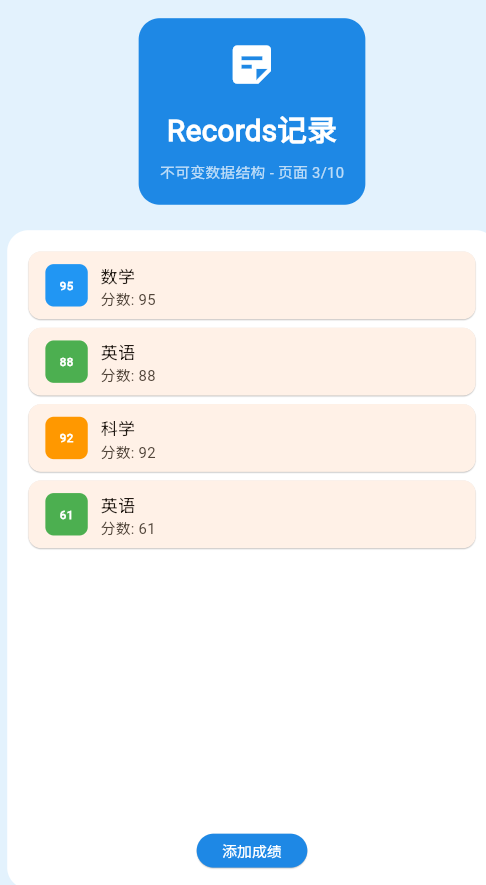
class _Page03RecordsDemo extends StatefulWidget {
const _Page03RecordsDemo();
State<_Page03RecordsDemo> createState() => _Page03RecordsDemoState();
}
class _Page03RecordsDemoState extends State<_Page03RecordsDemo> {
final List<({String name, int score, Color color})> _scores = [
(name: '数学', score: 95, color: Colors.blue),
(name: '英语', score: 88, color: Colors.green),
(name: '科学', score: 92, color: Colors.orange),
];
void _addRandomScore() {
final subjects = ['数学', '英语', '科学', '历史', '艺术'];
final colors = [Colors.blue, Colors.green, Colors.orange, Colors.purple, Colors.pink];
final random = DateTime.now().millisecond;
setState(() {
_scores.add((
name: subjects[random % subjects.length],
score: 60 + (random % 40),
color: colors[random % colors.length],
));
});
}
Widget build(BuildContext context) {
return Container(
color: Colors.blue.shade50,
padding: const EdgeInsets.all(20),
child: Column(
children: [
Container(
padding: const EdgeInsets.all(20),
decoration: BoxDecoration(
color: Colors.blue.shade600,
borderRadius: BorderRadius.circular(20),
),
child: const Column(
children: [
Icon(Icons.sticky_note_2, size: 48, color: Colors.white),
SizedBox(height: 16),
Text(
'Records记录',
style: TextStyle(fontSize: 28, fontWeight: FontWeight.bold, color: Colors.white),
),
SizedBox(height: 8),
Text('不可变数据结构 - 页面 3/5', style: TextStyle(color: Colors.white70)),
],
),
),
const SizedBox(height: 24),
Expanded(
child: Container(
padding: const EdgeInsets.all(20),
decoration: BoxDecoration(color: Colors.white, borderRadius: BorderRadius.circular(20)),
child: Column(
children: [
Expanded(
child: ListView.builder(
itemCount: _scores.length,
itemBuilder: (context, index) {
final score = _scores[index];
return Card(
margin: const EdgeInsets.only(bottom: 8),
child: ListTile(
leading: Container(
width: 40,
height: 40,
decoration: BoxDecoration(
color: score.color,
borderRadius: BorderRadius.circular(8),
),
child: Center(
child: Text(
score.score.toString(),
style: const TextStyle(color: Colors.white, fontWeight: FontWeight.bold),
),
),
),
title: Text(score.name),
subtitle: Text('分数: ${score.score}'),
),
);
},
),
),
ElevatedButton(
onPressed: _addRandomScore,
style: ElevatedButton.styleFrom(backgroundColor: Colors.blue.shade600),
child: const Text('添加成绩', style: TextStyle(color: Colors.white)),
),
],
),
),
),
],
),
);
}
}
三、Records优势
| 优势 | 说明 |
|---|---|
| 类型安全 | 编译时检查字段类型 |
| 不可变 | 避免意外的数据修改 |
| 轻量级 | 不需要定义完整类 |
| 解构支持 | 方便提取数据 |
四、应用场景
五、最佳实践
- ✅ 使用命名字段提高可读性
- ✅ 合理使用解构
- ✅ 保持Records简洁
- ❌ 避免嵌套过深
欢迎加入开源鸿蒙跨平台社区:https://openharmonycrossplatform.csdn.net

作为“人工智能6S店”的官方数字引擎,为AI开发者与企业提供一个覆盖软硬件全栈、一站式门户。
更多推荐
 0
0 0
0- 0



 已为社区贡献4条内容

所有评论(0)