
Flutter 框架跨平台鸿蒙开发 - 健身追踪应用开发教程
健身追踪是一款专业的运动记录和卡路里管理应用,帮助用户科学记录运动数据、追踪健身进度。本项目使用Flutter实现了完整的运动记录、数据统计、目标管理等功能,让健身变得更加有趣和高效。运行效果图字段说明:卡路里消耗参考值:字段说明:卡路里计算公式:状态管理状态变量说明:存储策略:存储键值:统计逻辑:筛选今日记录:计算总消耗:计算进度:时间复杂度:O(n),n为记录总数统计流程:日期生成:对话框特性
Flutter健身追踪应用开发教程
项目简介
健身追踪是一款专业的运动记录和卡路里管理应用,帮助用户科学记录运动数据、追踪健身进度。本项目使用Flutter实现了完整的运动记录、数据统计、目标管理等功能,让健身变得更加有趣和高效。
运行效果图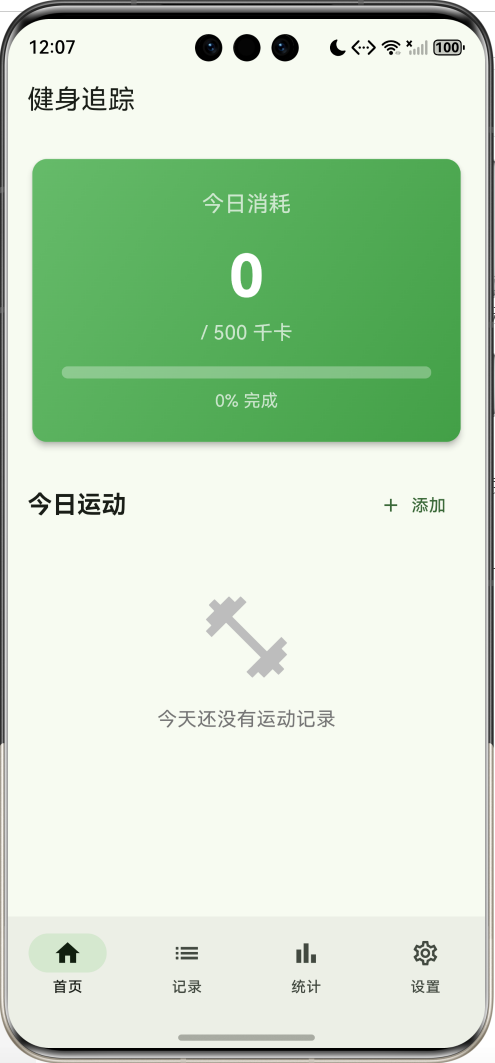

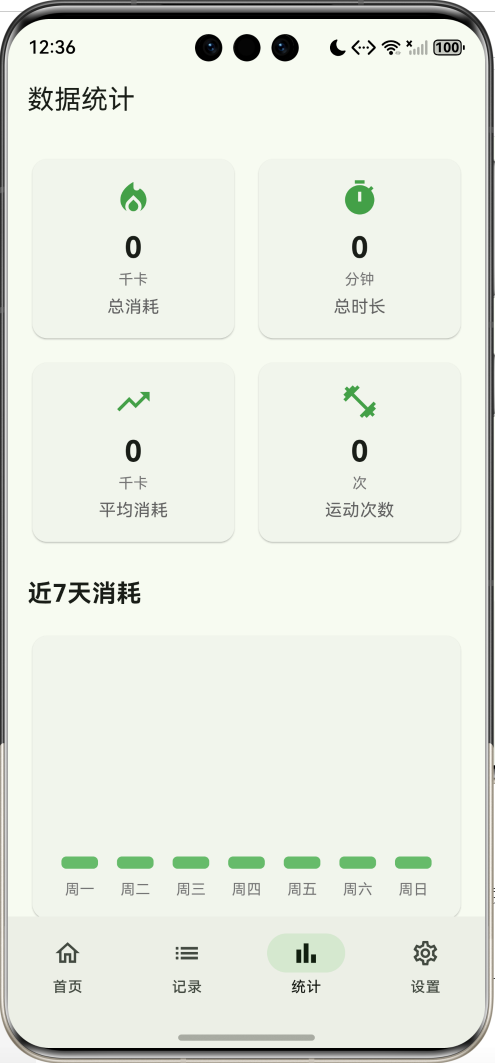
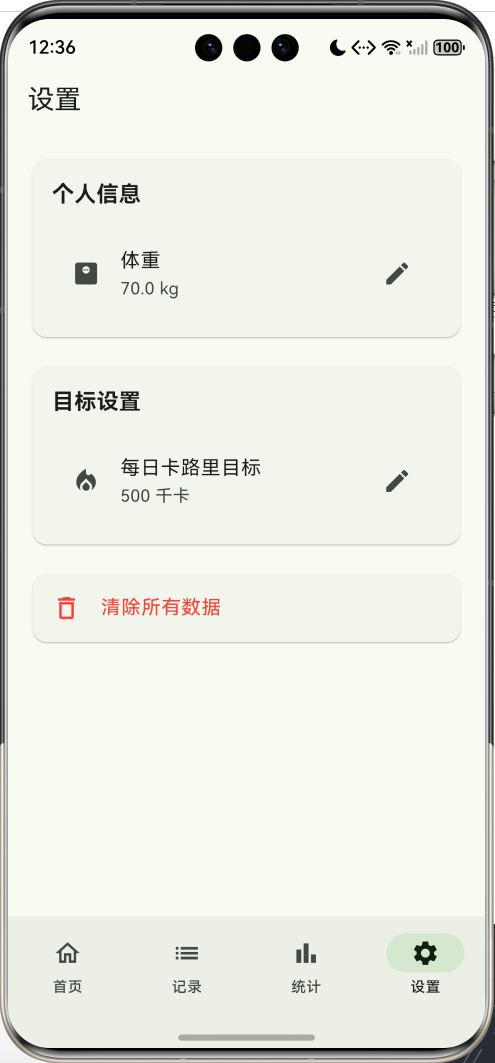
核心特性
- 卡路里追踪:实时显示今日消耗和目标进度
- 运动记录:支持10种常见运动类型
- 智能计算:根据运动类型和时长自动计算卡路里
- 数据统计:7天消耗趋势图表展示
- 目标管理:自定义每日卡路里目标
- 个人设置:体重管理和目标设置
- 数据持久化:本地存储所有运动记录
- 进度可视化:直观的进度条和图表
- 快速添加:简洁的运动添加流程
- 历史记录:完整的运动历史查看
技术架构
数据模型设计
运动类型模型
class Exercise {
  final String id;                    // 唯一标识
  final String name;                  // 运动名称
  final String category;              // 运动分类
  final double caloriesPerMinute;     // 每分钟消耗卡路里
  final String icon;                  // 图标
}
字段说明:
id:运动类型唯一标识符name:运动名称(如跑步、游泳)category:运动分类(有氧运动、力量训练等)caloriesPerMinute:每分钟消耗的卡路里数icon:运动图标emoji
卡路里消耗参考值:
| 运动类型 | 每分钟消耗 | 分类 |
|---|---|---|
| 跳绳 | 12.0 千卡 | 有氧运动 |
| 游泳 | 11.0 千卡 | 有氧运动 |
| 跑步 | 10.0 千卡 | 有氧运动 |
| 足球 | 9.5 千卡 | 球类运动 |
| 篮球 | 9.0 千卡 | 球类运动 |
| 爬山 | 8.5 千卡 | 户外运动 |
| 骑行 | 8.0 千卡 | 有氧运动 |
| 羽毛球 | 7.0 千卡 | 球类运动 |
| 力量训练 | 6.0 千卡 | 力量 |
| 瑜伽 | 3.0 千卡 | 柔韧性 |
运动记录模型
class WorkoutRecord {
  final String id;                // 记录ID
  final String exerciseId;        // 运动类型ID
  final String exerciseName;      // 运动名称
  final int duration;             // 时长(分钟)
  final double calories;          // 消耗卡路里
  final DateTime date;            // 记录时间
  final String? notes;            // 备注(可选)
}
字段说明:
id:记录唯一标识(使用时间戳)exerciseId:关联的运动类型IDexerciseName:运动名称(冗余存储,便于显示)duration:运动时长(分钟)calories:消耗的卡路里数date:记录创建时间notes:用户备注信息
卡路里计算公式:
消耗卡路里 = 运动类型每分钟消耗 × 运动时长
状态管理
class _FitnessHomePageState extends State<FitnessHomePage> {
  int _selectedIndex = 0;              // 当前选中的底部导航索引
  List<WorkoutRecord> records = [];    // 所有运动记录
  double dailyCalorieGoal = 500;       // 每日卡路里目标
  double weight = 70;                  // 用户体重
}
状态变量说明:
_selectedIndex:底部导航栏当前页面索引(0-3)records:所有运动记录列表dailyCalorieGoal:用户设定的每日卡路里消耗目标weight:用户体重(用于未来扩展BMI计算等)
核心功能实现
1. 数据持久化
Future<void> _loadData() async {
  final prefs = await SharedPreferences.getInstance();

  // 加载运动记录
  final recordsData = prefs.getStringList('workout_records') ?? [];
  setState(() {
    records = recordsData
        .map((json) => WorkoutRecord.fromJson(jsonDecode(json)))
        .toList();

    // 加载用户设置
    dailyCalorieGoal = prefs.getDouble('daily_calorie_goal') ?? 500;
    weight = prefs.getDouble('user_weight') ?? 70;
  });
}

Future<void> _saveRecords() async {
  final prefs = await SharedPreferences.getInstance();
  final recordsData = records.map((r) => jsonEncode(r.toJson())).toList();
  await prefs.setStringList('workout_records', recordsData);
}

Future<void> _saveSettings() async {
  final prefs = await SharedPreferences.getInstance();
  await prefs.setDouble('daily_calorie_goal', dailyCalorieGoal);
  await prefs.setDouble('user_weight', weight);
}
存储策略:
- 使用
SharedPreferences进行本地存储 - 运动记录序列化为JSON字符串列表
- 用户设置单独存储为double类型
- 应用启动时自动加载数据
- 数据变更时立即保存
存储键值:
workout_records:运动记录列表daily_calorie_goal:每日目标user_weight:用户体重
2. 今日数据统计
final today = DateTime.now();
final todayRecords = records.where((r) {
  return r.date.year == today.year &&
      r.date.month == today.month &&
      r.date.day == today.day;
}).toList();

final todayCalories = todayRecords.fold<double>(
  0,
  (sum, record) => sum + record.calories,
);

final progress = (todayCalories / dailyCalorieGoal).clamp(0.0, 1.0);
统计逻辑:
-
筛选今日记录:
- 比较年、月、日是否相同
- 使用
where方法过滤
-
计算总消耗:
- 使用
fold累加所有记录的卡路里 - 初始值为0
- 使用
-
计算进度:
- 进度 = 今日消耗 / 目标
- 使用
clamp限制在0-1之间
时间复杂度:O(n),n为记录总数
3. 7天数据统计
final last7Days = List.generate(7, (index) {
  return DateTime.now().subtract(Duration(days: 6 - index));
});

final dailyCalories = last7Days.map((date) {
  final dayRecords = records.where((r) {
    return r.date.year == date.year &&
        r.date.month == date.month &&
        r.date.day == date.day;
  });
  return dayRecords.fold<double>(0, (sum, r) => sum + r.calories);
}).toList();
统计流程:
- 生成最近7天的日期列表
- 对每一天筛选对应的记录
- 计算每天的总消耗
- 返回7个数值的列表
日期生成:
- 从6天前到今天
- 使用
subtract方法倒推日期
4. 添加运动记录
Future<void> _showAddWorkoutDialog() async {
  Exercise? selectedExercise;
  final durationController = TextEditingController();

  final result = await showDialog<WorkoutRecord>(
    context: context,
    builder: (context) => StatefulBuilder(
      builder: (context, setState) => AlertDialog(
        title: const Text('添加运动'),
        content: Column(
          children: [
            // 运动类型下拉选择
            DropdownButtonFormField<Exercise>(
              value: selectedExercise,
              items: _getExercises().map((exercise) {
                return DropdownMenuItem(
                  value: exercise,
                  child: Text(exercise.name),
                );
              }).toList(),
              onChanged: (value) {
                setState(() {
                  selectedExercise = value;
                });
              },
            ),
            // 时长输入
            TextField(
              controller: durationController,
              keyboardType: TextInputType.number,
              decoration: const InputDecoration(
                labelText: '时长 (分钟)',
              ),
            ),
            // 预计消耗显示
            if (selectedExercise != null && durationController.text.isNotEmpty)
              Text(
                '预计消耗: ${(selectedExercise!.caloriesPerMinute *
                    (int.tryParse(durationController.text) ?? 0)).toInt()} 千卡',
              ),
          ],
        ),
      ),
    ),
  );

  if (result != null) {
    _addRecord(result);
  }
}
对话框特性:
- 使用
StatefulBuilder实现对话框内状态更新 - 下拉选择运动类型
- 数字键盘输入时长
- 实时显示预计消耗
- 返回
WorkoutRecord对象
数据验证:
- 运动类型不能为空
- 时长必须为正整数
- 自动计算卡路里
5. 日期格式化
String _formatDate(DateTime date) {
  final now = DateTime.now();
  final today = DateTime(now.year, now.month, now.day);
  final yesterday = today.subtract(const Duration(days: 1));
  final dateOnly = DateTime(date.year, date.month, date.day);

  if (dateOnly == today) {
    return '今天 ${date.hour.toString().padLeft(2, '0')}:${date.minute.toString().padLeft(2, '0')}';
  } else if (dateOnly == yesterday) {
    return '昨天 ${date.hour.toString().padLeft(2, '0')}:${date.minute.toString().padLeft(2, '0')}';
  } else {
    return '${date.month}月${date.day}日 ${date.hour.toString().padLeft(2, '0')}:${date.minute.toString().padLeft(2, '0')}';
  }
}
格式化规则:
- 今天:显示"今天 HH:MM"
- 昨天:显示"昨天 HH:MM"
- 其他:显示"M月D日 HH:MM"
- 时间补零对齐
UI组件设计
1. 卡路里卡片
Widget _buildCalorieCard(double todayCalories, double progress) {
  return Card(
    elevation: 4,
    child: Container(
      padding: const EdgeInsets.all(24),
      decoration: BoxDecoration(
        gradient: LinearGradient(
          colors: [Colors.green.shade400, Colors.green.shade600],
          begin: Alignment.topLeft,
          end: Alignment.bottomRight,
        ),
        borderRadius: BorderRadius.circular(12),
      ),
      child: Column(
        children: [
          const Text('今日消耗', style: TextStyle(color: Colors.white70)),
          Text(
            '${todayCalories.toInt()}',
            style: const TextStyle(
              fontSize: 48,
              fontWeight: FontWeight.bold,
              color: Colors.white,
            ),
          ),
          Text('/ ${dailyCalorieGoal.toInt()} 千卡'),
          LinearProgressIndicator(
            value: progress,
            minHeight: 10,
            backgroundColor: Colors.white30,
            valueColor: const AlwaysStoppedAnimation<Color>(Colors.white),
          ),
          Text('${(progress * 100).toInt()}% 完成'),
        ],
      ),
    ),
  );
}
设计特点:
- 渐变绿色背景
- 大字号显示消耗数值
- 进度条可视化
- 百分比显示
- 圆角卡片阴影
视觉层次:
- 标题(今日消耗)
- 主数值(48号字体)
- 目标对比
- 进度条
- 完成百分比
2. 运动记录卡片
Widget _buildWorkoutCard(WorkoutRecord record) {
  return Card(
    margin: const EdgeInsets.only(bottom: 12),
    child: ListTile(
      leading: CircleAvatar(
        backgroundColor: Colors.green.shade100,
        child: Icon(Icons.fitness_center, color: Colors.green.shade700),
      ),
      title: Text(
        record.exerciseName,
        style: const TextStyle(fontWeight: FontWeight.bold),
      ),
      subtitle: Text('${record.duration}分钟 · ${record.calories.toInt()}千卡'),
      trailing: IconButton(
        icon: const Icon(Icons.delete_outline),
        onPressed: () => _deleteRecord(record.id),
      ),
    ),
  );
}
卡片结构:
- 左侧:圆形图标
- 中间:运动名称 + 时长和卡路里
- 右侧:删除按钮
交互功能:
- 点击删除按钮移除记录
- 卡片间距12像素
3. 统计卡片
Widget _buildStatCard(String label, String value, String unit, IconData icon) {
  return Card(
    child: Padding(
      padding: const EdgeInsets.all(16),
      child: Column(
        children: [
          Icon(icon, size: 32, color: Colors.green.shade600),
          const SizedBox(height: 8),
          Text(
            value,
            style: const TextStyle(
              fontSize: 24,
              fontWeight: FontWeight.bold,
            ),
          ),
          Text(unit, style: TextStyle(fontSize: 12, color: Colors.grey.shade600)),
          const SizedBox(height: 4),
          Text(label, style: TextStyle(fontSize: 14, color: Colors.grey.shade700)),
        ],
      ),
    ),
  );
}
统计卡片布局:
┌─────────────┐
│    图标     │
│   数值      │
│   单位      │
│   标签      │
└─────────────┘
使用场景:
- 总消耗
- 总时长
- 平均消耗
- 运动次数
4. 7天趋势图表
Widget _buildChart(List<DateTime> dates, List<double> calories) {
  final maxCalories = calories.isEmpty ? 100.0 :
      calories.reduce((a, b) => a > b ? a : b);

  return Card(
    child: Padding(
      padding: const EdgeInsets.all(16),
      child: SizedBox(
        height: 200,
        child: Row(
          crossAxisAlignment: CrossAxisAlignment.end,
          mainAxisAlignment: MainAxisAlignment.spaceAround,
          children: List.generate(7, (index) {
            final height = maxCalories > 0 ?
                (calories[index] / maxCalories * 150) : 0.0;
            return Column(
              mainAxisAlignment: MainAxisAlignment.end,
              children: [
                if (calories[index] > 0)
                  Text('${calories[index].toInt()}'),
                Container(
                  width: 30,
                  height: height.clamp(10.0, 150.0),
                  decoration: BoxDecoration(
                    color: Colors.green.shade400,
                    borderRadius: BorderRadius.circular(4),
                  ),
                ),
                Text(_getWeekday(dates[index])),
              ],
            );
          }),
        ),
      ),
    ),
  );
}
图表特性:
- 柱状图展示
- 自动缩放(基于最大值)
- 显示具体数值
- 星期标签
- 最小高度10像素
缩放算法:
柱高 = (当日消耗 / 最大消耗) × 150
5. 底部导航栏
NavigationBar(
  selectedIndex: _selectedIndex,
  onDestinationSelected: (index) {
    setState(() {
      _selectedIndex = index;
    });
  },
  destinations: const [
    NavigationDestination(
      icon: Icon(Icons.home_outlined),
      selectedIcon: Icon(Icons.home),
      label: '首页',
    ),
    NavigationDestination(
      icon: Icon(Icons.list_outlined),
      selectedIcon: Icon(Icons.list),
      label: '记录',
    ),
    NavigationDestination(
      icon: Icon(Icons.bar_chart_outlined),
      selectedIcon: Icon(Icons.bar_chart),
      label: '统计',
    ),
    NavigationDestination(
      icon: Icon(Icons.settings_outlined),
      selectedIcon: Icon(Icons.settings),
      label: '设置',
    ),
  ],
)
导航特性:
- Material 3设计风格
- 4个导航项
- 选中和未选中图标
- 自动高亮当前页
页面对应:
- 0:首页(今日运动)
- 1:记录(历史记录)
- 2:统计(数据分析)
- 3:设置(个人设置)
6. 设置页面
Widget _buildSettingsPage() {
  return Scaffold(
    appBar: AppBar(title: const Text('设置')),
    body: ListView(
      children: [
        Card(
          child: ListTile(
            leading: const Icon(Icons.monitor_weight),
            title: const Text('体重'),
            subtitle: Text('$weight kg'),
            trailing: const Icon(Icons.edit),
            onTap: () => _showWeightDialog(),
          ),
        ),
        Card(
          child: ListTile(
            leading: const Icon(Icons.local_fire_department),
            title: const Text('每日卡路里目标'),
            subtitle: Text('${dailyCalorieGoal.toInt()} 千卡'),
            trailing: const Icon(Icons.edit),
            onTap: () => _showCalorieGoalDialog(),
          ),
        ),
        Card(
          child: ListTile(
            leading: const Icon(Icons.delete_outline),
            title: const Text('清除所有数据'),
            textColor: Colors.red,
            onTap: () => _showClearDataDialog(),
          ),
        ),
      ],
    ),
  );
}
设置项:
-
体重设置:
- 显示当前体重
- 点击弹出输入对话框
- 数字键盘输入
-
目标设置:
- 显示当前目标
- 点击修改目标值
- 立即保存
-
数据清除:
- 红色警告样式
- 二次确认对话框
- 清除所有记录
功能扩展建议
1. GPS运动追踪
import 'package:geolocator/geolocator.dart';

class GPSTracker {
  List<Position> positions = [];
  double totalDistance = 0;

  Future<void> startTracking() async {
    final permission = await Geolocator.requestPermission();
    if (permission == LocationPermission.denied) return;

    Geolocator.getPositionStream(
      locationSettings: const LocationSettings(
        accuracy: LocationAccuracy.high,
        distanceFilter: 10,
      ),
    ).listen((Position position) {
      if (positions.isNotEmpty) {
        final lastPos = positions.last;
        final distance = Geolocator.distanceBetween(
          lastPos.latitude,
          lastPos.longitude,
          position.latitude,
          position.longitude,
        );
        totalDistance += distance;
      }
      positions.add(position);
    });
  }

  double getAverageSpeed() {
    if (positions.length < 2) return 0;
    final duration = positions.last.timestamp
        .difference(positions.first.timestamp)
        .inSeconds;
    return totalDistance / duration; // 米/秒
  }
}
GPS功能:
- 实时位置追踪
- 距离计算
- 速度统计
- 运动轨迹记录
2. 心率监测
import 'package:heart_rate_monitor/heart_rate_monitor.dart';

class HeartRateMonitor {
  int currentHeartRate = 0;
  List<int> heartRateHistory = [];

  Future<void> startMonitoring() async {
    HeartRateMonitor.start().listen((heartRate) {
      currentHeartRate = heartRate;
      heartRateHistory.add(heartRate);
    });
  }

  int getAverageHeartRate() {
    if (heartRateHistory.isEmpty) return 0;
    return heartRateHistory.reduce((a, b) => a + b) ~/
        heartRateHistory.length;
  }

  String getHeartRateZone() {
    if (currentHeartRate < 100) return '热身区';
    if (currentHeartRate < 120) return '燃脂区';
    if (currentHeartRate < 140) return '有氧区';
    if (currentHeartRate < 160) return '无氧区';
    return '极限区';
  }
}
心率功能:
- 实时心率监测
- 心率区间判断
- 平均心率计算
- 历史数据记录
3. 运动计划
class WorkoutPlan {
final String id;
final String name;
final List<PlannedExercise> exercises;
final int daysPerWeek;
final DateTime startDate;
WorkoutPlan({
required this.id,
required this.name,
required this.exercises,
required this.daysPerWeek,
required this.startDate,
});
}
class PlannedExercise {
final String exerciseId;
final int targetDuration;
final int targetCalories;
final String dayOfWeek;
PlannedExercise({
required this.exerciseId,
required this.targetDuration,
required this.targetCalories,
required this.dayOfWeek,
});
}
class WorkoutPlanWidget extends StatelessWidget {
final WorkoutPlan plan;
Widget build(BuildContext context) {
return Card(
child: ExpansionTile(
title: Text(plan.name),
subtitle: Text('每周${plan.daysPerWeek}天'),
children: plan.exercises.map((exercise) {
return ListTile(
title: Text(exercise.dayOfWeek),
subtitle: Text(
'${exercise.targetDuration}分钟 · 目标${exercise.targetCalories}千卡',
),
trailing: Checkbox(
value: false,
onChanged: (value) {
// 标记完成
},
),
);
}).toList(),
),
);
}
}
计划功能:
- 自定义运动计划
- 每周训练安排
- 目标设定
- 完成度追踪
4. 社交分享
import 'package:share_plus/share_plus.dart';

class WorkoutSharer {
  Future<void> shareWorkout(WorkoutRecord record) async {
    final text = '''
🏃 今日运动打卡
运动:${record.exerciseName}
时长:${record.duration}分钟
消耗:${record.calories.toInt()}千卡
日期:${_formatDate(record.date)}

#健身打卡 #运动记录
    ''';

    await Share.share(text);
  }

  Future<void> shareWeeklyStats(List<WorkoutRecord> weekRecords) async {
    final totalCalories = weekRecords.fold<double>(
      0,
      (sum, r) => sum + r.calories,
    );
    final totalDuration = weekRecords.fold<int>(
      0,
      (sum, r) => sum + r.duration,
    );

    final text = '''
📊 本周运动总结
运动次数:${weekRecords.length}次
总时长:$totalDuration分钟
总消耗:${totalCalories.toInt()}千卡

坚持就是胜利!💪
#健身周报 #运动打卡
    ''';

    await Share.share(text);
  }
}
分享功能:
- 单次运动分享
- 周报分享
- 文字格式化
- 社交媒体集成
5. 数据导出
import 'dart:io';
import 'package:path_provider/path_provider.dart';
import 'package:csv/csv.dart';

class DataExporter {
  Future<String> exportToCSV(List<WorkoutRecord> records) async {
    final rows = [
      ['日期', '运动', '时长(分钟)', '卡路里', '备注'],
      ...records.map((r) => [
        r.date.toIso8601String(),
        r.exerciseName,
        r.duration.toString(),
        r.calories.toString(),
        r.notes ?? '',
      ]),
    ];

    final csv = const ListToCsvConverter().convert(rows);

    final directory = await getApplicationDocumentsDirectory();
    final file = File('${directory.path}/workout_records.csv');
    await file.writeAsString(csv);

    return file.path;
  }

  Future<String> exportToJSON(List<WorkoutRecord> records) async {
    final json = jsonEncode({
      'exportDate': DateTime.now().toIso8601String(),
      'totalRecords': records.length,
      'records': records.map((r) => r.toJson()).toList(),
    });

    final directory = await getApplicationDocumentsDirectory();
    final file = File('${directory.path}/workout_records.json');
    await file.writeAsString(json);

    return file.path;
  }
}
导出格式:
- CSV格式(Excel兼容)
- JSON格式(数据交换)
- 包含所有字段
- 保存到文档目录
6. 成就系统
class Achievement {
  final String id;
  final String name;
  final String description;
  final String icon;
  final int targetValue;
  final String type; // 'calories', 'duration', 'count'

  Achievement({
    required this.id,
    required this.name,
    required this.description,
    required this.icon,
    required this.targetValue,
    required this.type,
  });
}

class AchievementManager {
  final List<Achievement> achievements = [
    Achievement(
      id: '1',
      name: '初出茅庐',
      description: '完成第1次运动',
      icon: '🌱',
      targetValue: 1,
      type: 'count',
    ),
    Achievement(
      id: '2',
      name: '燃脂达人',
      description: '累计消耗1000千卡',
      icon: '🔥',
      targetValue: 1000,
      type: 'calories',
    ),
    Achievement(
      id: '3',
      name: '时间管理大师',
      description: '累计运动100分钟',
      icon: '⏰',
      targetValue: 100,
      type: 'duration',
    ),
    Achievement(
      id: '4',
      name: '坚持不懈',
      description: '连续7天运动',
      icon: '💪',
      targetValue: 7,
      type: 'streak',
    ),
  ];

  List<String> checkAchievements(List<WorkoutRecord> records) {
    final unlocked = <String>[];

    for (final achievement in achievements) {
      if (achievement.type == 'count') {
        if (records.length >= achievement.targetValue) {
          unlocked.add(achievement.id);
        }
      } else if (achievement.type == 'calories') {
        final total = records.fold<double>(0, (sum, r) => sum + r.calories);
        if (total >= achievement.targetValue) {
          unlocked.add(achievement.id);
        }
      } else if (achievement.type == 'duration') {
        final total = records.fold<int>(0, (sum, r) => sum + r.duration);
        if (total >= achievement.targetValue) {
          unlocked.add(achievement.id);
        }
      }
    }

    return unlocked;
  }
}
成就类型:
- 运动次数成就
- 卡路里成就
- 时长成就
- 连续打卡成就
7. 体重追踪
class WeightRecord {
final DateTime date;
final double weight;
final double? bodyFat;
final double? muscleMass;
WeightRecord({
required this.date,
required this.weight,
this.bodyFat,
this.muscleMass,
});
double get bmi => weight / (1.75 * 1.75); // 假设身高1.75m
String get bmiCategory {
if (bmi < 18.5) return '偏瘦';
if (bmi < 24) return '正常';
if (bmi < 28) return '偏胖';
return '肥胖';
}
}
class WeightTracker extends StatelessWidget {
final List<WeightRecord> records;
Widget build(BuildContext context) {
return Column(
children: [
// 当前体重卡片
Card(
child: Padding(
padding: const EdgeInsets.all(16),
child: Column(
children: [
Text(
'${records.last.weight} kg',
style: const TextStyle(
fontSize: 48,
fontWeight: FontWeight.bold,
),
),
Text('BMI: ${records.last.bmi.toStringAsFixed(1)}'),
Text(records.last.bmiCategory),
],
),
),
),
// 体重趋势图
_buildWeightChart(records),
],
);
}
Widget _buildWeightChart(List<WeightRecord> records) {
// 绘制体重变化曲线图
return Container(
height: 200,
child: CustomPaint(
painter: WeightChartPainter(records),
),
);
}
}
体重功能:
- 体重记录
- BMI计算
- 体脂率追踪
- 趋势图表
8. 营养建议
class NutritionCalculator {
  final double weight;
  final String activityLevel;

  NutritionCalculator({
    required this.weight,
    required this.activityLevel,
  });

  double get bmr {
    // 基础代谢率(简化公式)
    return 10 * weight + 6.25 * 170 - 5 * 25 + 5;
  }

  double get tdee {
    // 总能量消耗
    final multipliers = {
      'sedentary': 1.2,
      'light': 1.375,
      'moderate': 1.55,
      'active': 1.725,
      'very_active': 1.9,
    };
    return bmr * (multipliers[activityLevel] ?? 1.2);
  }

  Map<String, double> getDailyNutrition() {
    return {
      'calories': tdee,
      'protein': weight * 1.6, // 克
      'carbs': tdee * 0.5 / 4, // 克
      'fat': tdee * 0.3 / 9, // 克
    };
  }

  String getRecommendation(double caloriesBurned) {
    final deficit = caloriesBurned;
    if (deficit > 500) {
      return '今天运动量很大,建议适当增加碳水摄入';
    } else if (deficit > 300) {
      return '运动量适中,保持当前饮食即可';
    } else {
      return '运动量较少,注意控制饮食';
    }
  }
}
营养功能:
- BMR计算
- TDEE计算
- 营养素建议
- 饮食建议
性能优化
1. 数据分页加载
class PaginatedRecordsList extends StatefulWidget {
State<PaginatedRecordsList> createState() => _PaginatedRecordsListState();
}
class _PaginatedRecordsListState extends State<PaginatedRecordsList> {
final ScrollController _scrollController = ScrollController();
List<WorkoutRecord> displayedRecords = [];
int currentPage = 0;
final int pageSize = 20;
void initState() {
super.initState();
_loadPage();
_scrollController.addListener(_onScroll);
}
void _loadPage() {
final start = currentPage * pageSize;
final end = (start + pageSize).clamp(0, allRecords.length);
setState(() {
displayedRecords.addAll(allRecords.sublist(start, end));
currentPage++;
});
}
void _onScroll() {
if (_scrollController.position.pixels ==
_scrollController.position.maxScrollExtent) {
_loadPage();
}
}
}
优化效果:
- 减少初始加载时间
- 降低内存占用
- 滚动加载更多
2. 图表缓存
class CachedChart extends StatefulWidget {
final List<double> data;
State<CachedChart> createState() => _CachedChartState();
}
class _CachedChartState extends State<CachedChart> {
ui.Image? cachedImage;
Future<void> _generateChart() async {
final recorder = ui.PictureRecorder();
final canvas = Canvas(recorder);
// 绘制图表
_drawChart(canvas, widget.data);
final picture = recorder.endRecording();
cachedImage = await picture.toImage(300, 200);
setState(() {});
}
Widget build(BuildContext context) {
if (cachedImage == null) {
_generateChart();
return CircularProgressIndicator();
}
return CustomPaint(
painter: CachedImagePainter(cachedImage!),
);
}
}
缓存策略:
- 图表预渲染
- 图片缓存
- 减少重绘
3. 数据索引
class RecordIndex {
  final Map<String, List<WorkoutRecord>> dateIndex = {};
  final Map<String, List<WorkoutRecord>> exerciseIndex = {};

  void buildIndex(List<WorkoutRecord> records) {
    dateIndex.clear();
    exerciseIndex.clear();

    for (final record in records) {
      // 日期索引
      final dateKey = '${record.date.year}-${record.date.month}-${record.date.day}';
      dateIndex.putIfAbsent(dateKey, () => []).add(record);

      // 运动类型索引
      exerciseIndex.putIfAbsent(record.exerciseId, () => []).add(record);
    }
  }

  List<WorkoutRecord> getRecordsByDate(DateTime date) {
    final key = '${date.year}-${date.month}-${date.day}';
    return dateIndex[key] ?? [];
  }

  List<WorkoutRecord> getRecordsByExercise(String exerciseId) {
    return exerciseIndex[exerciseId] ?? [];
  }
}
索引优化:
- 日期索引快速查询
- 运动类型索引
- O(1)查询复杂度
项目结构
lib/
├── main.dart
├── models/
│   ├── exercise.dart
│   ├── workout_record.dart
│   ├── weight_record.dart
│   └── achievement.dart
├── screens/
│   ├── home_page.dart
│   ├── records_page.dart
│   ├── stats_page.dart
│   └── settings_page.dart
├── widgets/
│   ├── calorie_card.dart
│   ├── workout_card.dart
│   ├── stat_card.dart
│   └── chart_widget.dart
├── services/
│   ├── storage_service.dart
│   ├── gps_tracker.dart
│   └── data_exporter.dart
└── utils/
    ├── constants.dart
    ├── date_formatter.dart
    └── calorie_calculator.dart
依赖包
dependencies:
  flutter:
    sdk: flutter
  shared_preferences: ^2.2.2      # 本地存储

  # 可选扩展
  geolocator: ^11.0.0             # GPS定位
  heart_rate_monitor: ^1.0.0      # 心率监测
  share_plus: ^7.2.2              # 社交分享
  path_provider: ^2.1.2           # 文件路径
  csv: ^6.0.0                     # CSV导出
  fl_chart: ^0.66.0               # 高级图表
  permission_handler: ^11.3.0     # 权限管理
数据流程图
状态管理流程
卡路里计算公式
基础公式
消耗卡路里=运动强度×时长×体重系数 \text{消耗卡路里} = \text{运动强度} \times \text{时长} \times \text{体重系数} 消耗卡路里=运动强度×时长×体重系数
体重系数
体重系数=用户体重70 \text{体重系数} = \frac{\text{用户体重}}{70} 体重系数=70用户体重
实际计算
double calculateCalories({
  required double caloriesPerMinute,
  required int duration,
  required double weight,
}) {
  final weightFactor = weight / 70.0;
  return caloriesPerMinute * duration * weightFactor;
}
示例:
- 体重:70kg
- 运动:跑步(10千卡/分钟)
- 时长:30分钟
- 消耗:10 × 30 × 1.0 = 300千卡
核心算法详解
1. 今日数据筛选算法
List<WorkoutRecord> getTodayRecords(List<WorkoutRecord> allRecords) {
  final now = DateTime.now();
  final today = DateTime(now.year, now.month, now.day);

  return allRecords.where((record) {
    final recordDate = DateTime(
      record.date.year,
      record.date.month,
      record.date.day,
    );
    return recordDate == today;
  }).toList();
}
时间复杂度:O(n)
空间复杂度:O(k),k为今日记录数
2. 7天统计算法
Map<DateTime, double> getLast7DaysCalories(List<WorkoutRecord> records) {
  final result = <DateTime, double>{};
  final now = DateTime.now();

  // 初始化7天数据
  for (int i = 6; i >= 0; i--) {
    final date = DateTime(now.year, now.month, now.day)
        .subtract(Duration(days: i));
    result[date] = 0;
  }

  // 累加每天的卡路里
  for (final record in records) {
    final dateKey = DateTime(
      record.date.year,
      record.date.month,
      record.date.day,
    );
    if (result.containsKey(dateKey)) {
      result[dateKey] = result[dateKey]! + record.calories;
    }
  }

  return result;
}
时间复杂度:O(n)
空间复杂度:O(7) = O(1)
3. 进度计算算法
double calculateProgress(double current, double target) {
  if (target <= 0) return 0;
  return (current / target).clamp(0.0, 1.0);
}

String getProgressText(double progress) {
  if (progress >= 1.0) return '目标已完成!';
  if (progress >= 0.8) return '即将完成';
  if (progress >= 0.5) return '进度过半';
  if (progress >= 0.3) return '继续加油';
  return '刚刚开始';
}
进度等级:
- 0-30%:刚刚开始
- 30-50%:继续加油
- 50-80%:进度过半
- 80-100%:即将完成
- 100%+:目标已完成
用户体验优化
1. 加载状态
class LoadingState extends StatelessWidget {
Widget build(BuildContext context) {
return Center(
child: Column(
mainAxisAlignment: MainAxisAlignment.center,
children: [
CircularProgressIndicator(),
SizedBox(height: 16),
Text('加载中...'),
],
),
);
}
}
2. 空状态
class EmptyState extends StatelessWidget {
final String message;
final IconData icon;
final VoidCallback? onAction;
final String? actionText;
Widget build(BuildContext context) {
return Center(
child: Column(
mainAxisAlignment: MainAxisAlignment.center,
children: [
Icon(icon, size: 80, color: Colors.grey.shade400),
SizedBox(height: 16),
Text(message, style: TextStyle(fontSize: 16)),
if (onAction != null && actionText != null)
Padding(
padding: const EdgeInsets.only(top: 16),
child: ElevatedButton(
onPressed: onAction,
child: Text(actionText!),
),
),
],
),
);
}
}
3. 错误处理
class ErrorHandler {
  static void handleError(BuildContext context, dynamic error) {
    String message = '操作失败';

    if (error is FormatException) {
      message = '数据格式错误';
    } else if (error is TimeoutException) {
      message = '操作超时';
    } else if (error is Exception) {
      message = error.toString();
    }

    ScaffoldMessenger.of(context).showSnackBar(
      SnackBar(
        content: Text(message),
        backgroundColor: Colors.red,
        action: SnackBarAction(
          label: '重试',
          textColor: Colors.white,
          onPressed: () {
            // 重试逻辑
          },
        ),
      ),
    );
  }
}
测试建议
1. 单元测试
import 'package:flutter_test/flutter_test.dart';

void main() {
  group('卡路里计算测试', () {
    test('基础计算', () {
      final calories = calculateCalories(
        caloriesPerMinute: 10,
        duration: 30,
        weight: 70,
      );
      expect(calories, 300);
    });

    test('体重系数', () {
      final calories = calculateCalories(
        caloriesPerMinute: 10,
        duration: 30,
        weight: 80,
      );
      expect(calories, closeTo(342.86, 0.01));
    });
  });

  group('日期格式化测试', () {
    test('今天', () {
      final now = DateTime.now();
      final formatted = formatDate(now);
      expect(formatted, contains('今天'));
    });

    test('昨天', () {
      final yesterday = DateTime.now().subtract(Duration(days: 1));
      final formatted = formatDate(yesterday);
      expect(formatted, contains('昨天'));
    });
  });
}
2. Widget测试
void main() {
  testWidgets('卡路里卡片显示测试', (WidgetTester tester) async {
    await tester.pumpWidget(
      MaterialApp(
        home: Scaffold(
          body: CalorieCard(
            todayCalories: 300,
            progress: 0.6,
            goal: 500,
          ),
        ),
      ),
    );

    expect(find.text('300'), findsOneWidget);
    expect(find.text('/ 500 千卡'), findsOneWidget);
    expect(find.text('60% 完成'), findsOneWidget);
  });
}
3. 集成测试
void main() {
  testWidgets('添加运动流程测试', (WidgetTester tester) async {
    await tester.pumpWidget(MyApp());

    // 点击添加按钮
    await tester.tap(find.text('添加'));
    await tester.pumpAndSettle();

    // 选择运动类型
    await tester.tap(find.text('跑步'));
    await tester.pumpAndSettle();

    // 输入时长
    await tester.enterText(find.byType(TextField), '30');
    await tester.pumpAndSettle();

    // 确认添加
    await tester.tap(find.text('确定'));
    await tester.pumpAndSettle();

    // 验证记录已添加
    expect(find.text('跑步'), findsWidgets);
    expect(find.text('30分钟'), findsOneWidget);
  });
}
常见问题解决
1. SharedPreferences数据丢失
问题:应用重启后数据丢失
解决方案:
// 确保数据保存完成
Future<void> saveData() async {
  final prefs = await SharedPreferences.getInstance();
  await prefs.setStringList('key', data);
  await prefs.reload(); // 重新加载确保保存成功
}
2. 日期比较错误
问题:今日数据筛选不准确
解决方案:
// 只比较日期部分,忽略时间
DateTime getDateOnly(DateTime dateTime) {
  return DateTime(dateTime.year, dateTime.month, dateTime.day);
}

bool isSameDay(DateTime date1, DateTime date2) {
  return getDateOnly(date1) == getDateOnly(date2);
}
3. 图表显示异常
问题:柱状图高度为0或超出范围
解决方案:
// 使用clamp限制范围
final height = (value / maxValue * maxHeight).clamp(minHeight, maxHeight);

// 处理空数据
final maxValue = values.isEmpty ? 100.0 : values.reduce(max);
4. 内存泄漏
问题:长时间使用后应用卡顿
解决方案:
void dispose() {
_scrollController.dispose();
_textController.dispose();
super.dispose();
}
最佳实践
1. 代码组织
// 将常量提取到单独文件
class AppConstants {
  static const double defaultWeight = 70.0;
  static const double defaultCalorieGoal = 500.0;
  static const int chartDays = 7;
  static const int pageSize = 20;
}

// 使用枚举管理状态
enum LoadingState {
  initial,
  loading,
  loaded,
  error,
}

// 使用扩展方法
extension DateTimeExtension on DateTime {
  bool isSameDay(DateTime other) {
    return year == other.year &&
           month == other.month &&
           day == other.day;
  }

  String toDisplayString() {
    return '$year-${month.toString().padLeft(2, '0')}-${day.toString().padLeft(2, '0')}';
  }
}
2. 性能优化
// 使用const构造函数
const Text('标题', style: TextStyle(fontSize: 18));
// 避免在build方法中创建对象
class MyWidget extends StatelessWidget {
static const textStyle = TextStyle(fontSize: 16);
Widget build(BuildContext context) {
return Text('内容', style: textStyle);
}
}
// 使用ListView.builder而不是ListView
ListView.builder(
itemCount: items.length,
itemBuilder: (context, index) => ItemWidget(items[index]),
)
3. 错误处理
// 使用try-catch包裹异步操作
Future<void> loadData() async {
  try {
    final prefs = await SharedPreferences.getInstance();
    final data = prefs.getStringList('key');
    // 处理数据
  } catch (e) {
    print('加载数据失败: $e');
    // 显示错误提示
  }
}

// 提供默认值
final weight = prefs.getDouble('weight') ?? 70.0;
4. 可维护性
// 使用命名参数
WorkoutRecord({
  required this.id,
  required this.exerciseName,
  required this.duration,
  required this.calories,
  required this.date,
  this.notes,
});

// 添加文档注释
/// 计算运动消耗的卡路里
///
/// [caloriesPerMinute] 每分钟消耗的卡路里
/// [duration] 运动时长(分钟)
/// [weight] 用户体重(千克)
///
/// 返回消耗的总卡路里数
double calculateCalories({
  required double caloriesPerMinute,
  required int duration,
  required double weight,
}) {
  return caloriesPerMinute * duration * (weight / 70.0);
}
总结
本项目实现了一个功能完整的健身追踪应用,涵盖以下核心技术:
- 数据模型:Exercise和WorkoutRecord模型设计
- 卡路里计算:基于运动类型和时长的智能计算
- 数据统计:今日数据、7天趋势、总体统计
- 数据持久化:SharedPreferences本地存储
- UI设计:卡片布局、图表展示、底部导航
- 交互体验:对话框、进度条、空状态处理
通过本教程,你可以学习到:
- 复杂数据模型的设计和序列化
- 日期时间的处理和格式化
- 数据统计和图表绘制
- 本地数据持久化方案
- Material 3设计规范应用
- 状态管理和UI更新
这个项目可以作为学习Flutter应用开发的实用案例,通过扩展GPS追踪、心率监测、社交分享等功能,可以打造更加专业的健身管理平台。
运动类型参考
| 运动类型 | 强度 | 每分钟消耗 | 适合人群 |
|---|---|---|---|
| 跳绳 | 高 | 12千卡 | 减脂人群 |
| 游泳 | 高 | 11千卡 | 全身锻炼 |
| 跑步 | 中高 | 10千卡 | 心肺训练 |
| 足球 | 中高 | 9.5千卡 | 团队运动 |
| 篮球 | 中高 | 9千卡 | 团队运动 |
| 爬山 | 中高 | 8.5千卡 | 户外爱好者 |
| 骑行 | 中 | 8千卡 | 有氧运动 |
| 羽毛球 | 中 | 7千卡 | 休闲运动 |
| 力量训练 | 中 | 6千卡 | 增肌人群 |
| 瑜伽 | 低 | 3千卡 | 柔韧性训练 |
健身建议
初学者
- 每周3-4次运动
- 每次30-45分钟
- 选择中低强度运动
- 循序渐进增加强度
进阶者
- 每周4-5次运动
- 每次45-60分钟
- 结合有氧和力量训练
- 注意休息和恢复
高级者
- 每周5-6次运动
- 每次60-90分钟
- 制定专业训练计划
- 关注营养和睡眠
注意事项:
- 运动前充分热身
- 运动后拉伸放松
- 及时补充水分
- 循序渐进,避免受伤
- 如有不适立即停止
欢迎加入开源鸿蒙跨平台社区:https://openharmonycrossplatform.csdn.net

作为“人工智能6S店”的官方数字引擎,为AI开发者与企业提供一个覆盖软硬件全栈、一站式门户。
更多推荐


 14
14 0
0- 0


 已为社区贡献8条内容

所有评论(0)