
Flutter 框架跨平台鸿蒙开发 - 打造经典俄罗斯方块游戏
Tetromino(shapes: [],碰撞检测:检查方块是否可以放置旋转系统:4个旋转状态的切换消行算法:检测并消除满行得分系统:根据消行数计算得分等级系统:随等级提升加快速度定时器:实现方块自动下落数据持久化:保存最高分记录通过本项目,你不仅学会了如何实现俄罗斯方块游戏,还掌握了Flutter中游戏开发的核心技术。这些知识可以应用到更多游戏开发场景。挑战高分,享受经典游戏的乐趣!
Flutter实战:打造经典俄罗斯方块游戏
前言
俄罗斯方块是一款风靡全球的经典益智游戏。本文将带你从零开始,使用Flutter开发一个功能完整的俄罗斯方块游戏,包含7种方块、旋转、消行、得分系统等功能。
应用特色
- 🎮 经典玩法:完整还原经典俄罗斯方块
- 🔷 7种方块:I、O、T、S、Z、J、L七种形状
- 🔄 旋转系统:支持方块旋转
- 💥 消行机制:自动消除满行
- 📊 得分系统:消行越多得分越高
- 🎯 等级系统:每10行升一级,速度加快
- 🏆 最高分:本地保存最高分记录
- ⏸️ 暂停功能:随时暂停/继续游戏
- 🎨 彩色方块:每种方块不同颜色
- 📱 触摸控制:按钮控制方块移动
效果展示
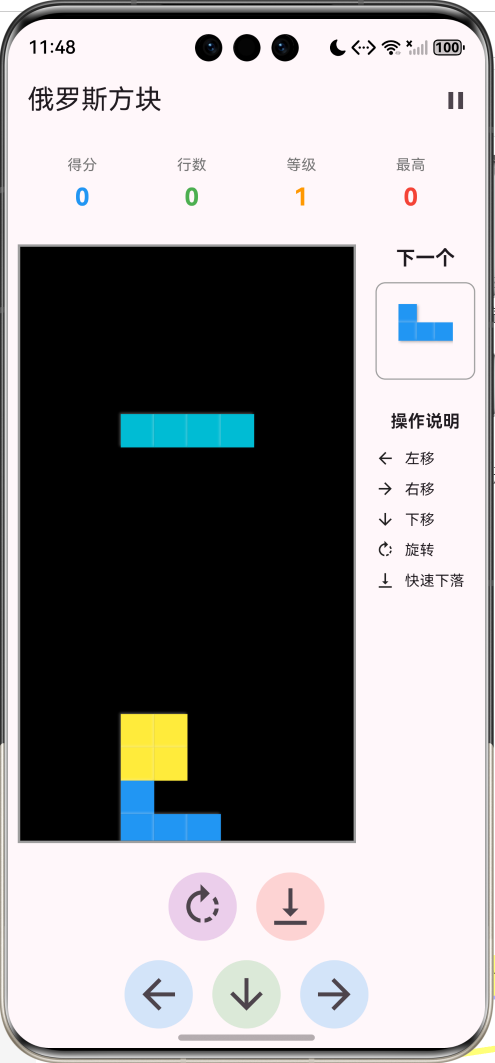
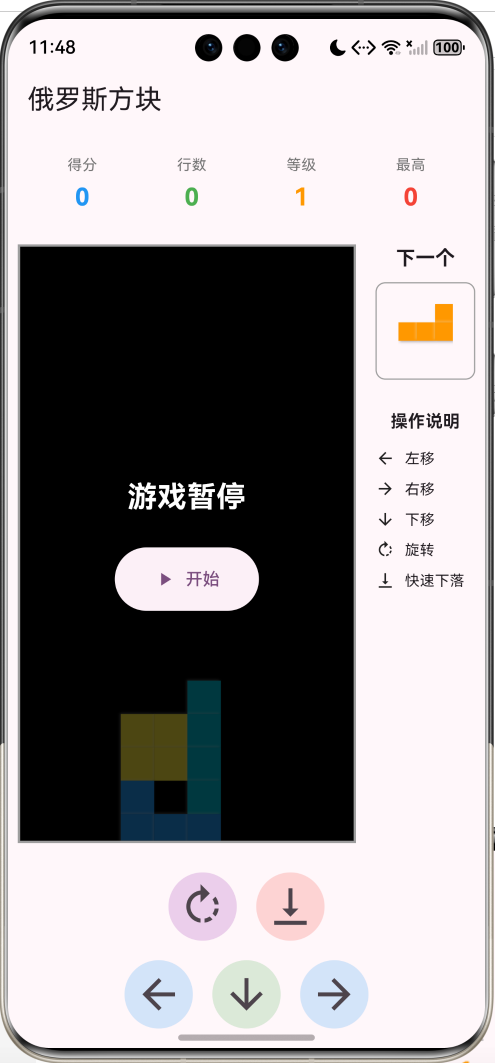
数据模型设计
1. 方块类型枚举
enum TetrominoType {
  I, O, T, S, Z, J, L
}
2. 方块模型
class Tetromino {
  final TetrominoType type;
  final Color color;
  final List<List<List<int>>> shapes; // 4个旋转状态

  const Tetromino({
    required this.type,
    required this.color,
    required this.shapes,
  });
}
3. 游戏状态
enum GameState {
  ready,     // 准备中
  playing,   // 游戏中
  paused,    // 暂停
  gameOver,  // 游戏结束
}
方块形状定义
I型方块(青色)
Tetromino(
  type: TetrominoType.I,
  color: Colors.cyan,
  shapes: [
    [[0, 0, 0, 0], [1, 1, 1, 1], [0, 0, 0, 0], [0, 0, 0, 0]],
    [[0, 0, 1, 0], [0, 0, 1, 0], [0, 0, 1, 0], [0, 0, 1, 0]],
    [[0, 0, 0, 0], [0, 0, 0, 0], [1, 1, 1, 1], [0, 0, 0, 0]],
    [[0, 1, 0, 0], [0, 1, 0, 0], [0, 1, 0, 0], [0, 1, 0, 0]],
  ],
)
O型方块(黄色)
Tetromino(
  type: TetrominoType.O,
  color: Colors.yellow,
  shapes: [
    [[1, 1], [1, 1]],
    [[1, 1], [1, 1]],
    [[1, 1], [1, 1]],
    [[1, 1], [1, 1]],
  ],
)
T型方块(紫色)
Tetromino(
  type: TetrominoType.T,
  color: Colors.purple,
  shapes: [
    [[0, 1, 0], [1, 1, 1], [0, 0, 0]],
    [[0, 1, 0], [0, 1, 1], [0, 1, 0]],
    [[0, 0, 0], [1, 1, 1], [0, 1, 0]],
    [[0, 1, 0], [1, 1, 0], [0, 1, 0]],
  ],
)
其他方块(S、Z、J、L)类似定义,每个方块有4个旋转状态。
核心算法实现
1. 碰撞检测
检查方块是否可以放置在指定位置:
bool _canPlace(int x, int y, int rotation) {
  if (_currentTetromino == null) return false;

  final shape = _currentTetromino!.shapes[rotation];
  for (int i = 0; i < shape.length; i++) {
    for (int j = 0; j < shape[i].length; j++) {
      if (shape[i][j] == 1) {
        final newX = x + j;
        final newY = y + i;

        // 检查边界
        if (newX < 0 || newX >= cols || newY >= rows) {
          return false;
        }

        // 检查是否与已有方块重叠
        if (newY >= 0 && _board[newY][newX] != null) {
          return false;
        }
      }
    }
  }
  return true;
}
检测逻辑:
- 遍历方块形状的每个格子
- 计算在棋盘上的实际位置
- 检查是否超出边界
- 检查是否与已有方块重叠
2. 方块移动
void _moveLeft() {
  if (_gameState != GameState.playing) return;
  if (_canPlace(_currentX - 1, _currentY, _currentRotation)) {
    setState(() {
      _currentX--;
    });
  }
}

void _moveRight() {
  if (_gameState != GameState.playing) return;
  if (_canPlace(_currentX + 1, _currentY, _currentRotation)) {
    setState(() {
      _currentX++;
    });
  }
}

void _moveDown() {
  if (_gameState != GameState.playing) return;

  if (_canPlace(_currentX, _currentY + 1, _currentRotation)) {
    setState(() {
      _currentY++;
    });
  } else {
    _lockTetromino();
    _clearLines();
    _spawnTetromino();
    setState(() {});
  }
}
3. 方块旋转
void _rotate() {
  if (_gameState != GameState.playing) return;

  final newRotation = (_currentRotation + 1) % 4;
  if (_canPlace(_currentX, _currentY, newRotation)) {
    setState(() {
      _currentRotation = newRotation;
    });
  }
}
旋转逻辑:
- 旋转状态循环:0 → 1 → 2 → 3 → 0
- 检查旋转后是否可以放置
- 如果不能旋转则保持原状态
4. 快速下落
void _hardDrop() {
  if (_gameState != GameState.playing) return;

  while (_canPlace(_currentX, _currentY + 1, _currentRotation)) {
    _currentY++;
  }
  _lockTetromino();
  _clearLines();
  _spawnTetromino();
  setState(() {});
}
5. 锁定方块
将当前方块固定到棋盘上:
void _lockTetromino() {
  if (_currentTetromino == null) return;

  final shape = _currentTetromino!.shapes[_currentRotation];
  for (int i = 0; i < shape.length; i++) {
    for (int j = 0; j < shape[i].length; j++) {
      if (shape[i][j] == 1) {
        final x = _currentX + j;
        final y = _currentY + i;
        if (y >= 0 && y < rows && x >= 0 && x < cols) {
          _board[y][x] = _currentTetromino!.color;
        }
      }
    }
  }
}
6. 消行算法
void _clearLines() {
  int linesCleared = 0;

  for (int i = rows - 1; i >= 0; i--) {
    if (_board[i].every((cell) => cell != null)) {
      _board.removeAt(i);
      _board.insert(0, List.generate(cols, (j) => null));
      linesCleared++;
      i++; // 重新检查当前行
    }
  }

  if (linesCleared > 0) {
    setState(() {
      _lines += linesCleared;
      // 得分规则:1行100分,2行300分,3行500分,4行800分
      switch (linesCleared) {
        case 1:
          _score += 100 * _level;
          break;
        case 2:
          _score += 300 * _level;
          break;
        case 3:
          _score += 500 * _level;
          break;
        case 4:
          _score += 800 * _level;
          break;
      }

      // 每10行升一级
      _level = (_lines ~/ 10) + 1;
      _speed = max(100, 800 - (_level - 1) * 50);
      _startTimer(); // 更新速度
    });
  }
}
消行逻辑:
- 从下往上检查每一行
- 如果一行全满,删除该行
- 在顶部插入新的空行
- 计算得分和等级
得分系统
得分规则
| 消行数 | 基础分 | 实际得分 |
|---|---|---|
| 1行 | 100 | 100 × 等级 |
| 2行 | 300 | 300 × 等级 |
| 3行 | 500 | 500 × 等级 |
| 4行 | 800 | 800 × 等级 |
等级系统
// 每10行升一级
_level = (_lines ~/ 10) + 1;

// 速度随等级加快
_speed = max(100, 800 - (_level - 1) * 50);
速度变化:
- 等级1:800ms
- 等级2:750ms
- 等级3:700ms
- …
- 最快:100ms
UI组件设计
1. 游戏棋盘
Widget _buildGameBoard() {
  return Container(
    margin: const EdgeInsets.all(8),
    decoration: BoxDecoration(
      border: Border.all(color: Colors.grey, width: 2),
      color: Colors.black,
    ),
    child: AspectRatio(
      aspectRatio: cols / rows,
      child: LayoutBuilder(
        builder: (context, constraints) {
          final cellSize = constraints.maxWidth / cols;
          return Stack(
            children: [
              // 已固定的方块
              ...List.generate(rows, (i) {
                return List.generate(cols, (j) {
                  if (_board[i][j] != null) {
                    return Positioned(
                      left: j * cellSize,
                      top: i * cellSize,
                      child: _buildCell(cellSize, _board[i][j]!),
                    );
                  }
                  return const SizedBox.shrink();
                });
              }).expand((x) => x),
              // 当前方块
              if (_currentTetromino != null && _gameState == GameState.playing)
                ..._buildCurrentTetromino(cellSize),
              // 游戏状态覆盖层
              if (_gameState != GameState.playing)
                _buildOverlay(),
            ],
          );
        },
      ),
    ),
  );
}
2. 方块单元格
带有3D效果的方块:
Widget _buildCell(double size, Color color) {
  return Container(
    width: size,
    height: size,
    margin: const EdgeInsets.all(0.5),
    decoration: BoxDecoration(
      color: color,
      border: Border.all(
        color: color.withOpacity(0.5),
        width: 1,
      ),
      boxShadow: [
        BoxShadow(
          color: Colors.white.withOpacity(0.3),
          offset: const Offset(-1, -1),
          blurRadius: 1,
        ),
        BoxShadow(
          color: Colors.black.withOpacity(0.3),
          offset: const Offset(1, 1),
          blurRadius: 1,
        ),
      ],
    ),
  );
}
3. 下一个方块预览
Widget _buildNextTetromino() {
  if (_nextTetromino == null) {
    return const SizedBox(height: 80);
  }

  final shape = _nextTetromino!.shapes[0];
  final cellSize = 15.0;

  return Container(
    height: 80,
    padding: const EdgeInsets.all(8),
    decoration: BoxDecoration(
      border: Border.all(color: Colors.grey),
      borderRadius: BorderRadius.circular(8),
    ),
    child: Center(
      child: SizedBox(
        width: shape[0].length * cellSize,
        height: shape.length * cellSize,
        child: Stack(
          children: List.generate(shape.length, (i) {
            return List.generate(shape[i].length, (j) {
              if (shape[i][j] == 1) {
                return Positioned(
                  left: j * cellSize,
                  top: i * cellSize,
                  child: _buildCell(cellSize, _nextTetromino!.color),
                );
              }
              return const SizedBox.shrink();
            });
          }).expand((x) => x).toList(),
        ),
      ),
    ),
  );
}
4. 控制按钮
Widget _buildControls() {
  return Container(
    padding: const EdgeInsets.all(16),
    child: Column(
      children: [
        Row(
          mainAxisAlignment: MainAxisAlignment.center,
          children: [
            IconButton(
              onPressed: _rotate,
              icon: const Icon(Icons.rotate_right),
              iconSize: 40,
              style: IconButton.styleFrom(
                backgroundColor: Colors.purple.withOpacity(0.2),
              ),
            ),
            const SizedBox(width: 16),
            IconButton(
              onPressed: _hardDrop,
              icon: const Icon(Icons.vertical_align_bottom),
              iconSize: 40,
              style: IconButton.styleFrom(
                backgroundColor: Colors.red.withOpacity(0.2),
              ),
            ),
          ],
        ),
        const SizedBox(height: 16),
        Row(
          mainAxisAlignment: MainAxisAlignment.center,
          children: [
            IconButton(
              onPressed: _moveLeft,
              icon: const Icon(Icons.arrow_back),
              iconSize: 40,
            ),
            IconButton(
              onPressed: _moveDown,
              icon: const Icon(Icons.arrow_downward),
              iconSize: 40,
            ),
            IconButton(
              onPressed: _moveRight,
              icon: const Icon(Icons.arrow_forward),
              iconSize: 40,
            ),
          ],
        ),
      ],
    ),
  );
}
技术要点详解
1. Timer定时器
使用Timer实现方块自动下落:
void _startTimer() {
  _gameTimer?.cancel();
  _gameTimer = Timer.periodic(Duration(milliseconds: _speed), (timer) {
    if (_gameState == GameState.playing) {
      _moveDown();
    }
  });
}
2. 随机方块生成
Tetromino _getRandomTetromino() {
  final random = Random();
  return Tetromino.all[random.nextInt(Tetromino.all.length)];
}
3. 数据持久化
保存最高分:
Future<void> _saveHighScore() async {
  if (_score > _highScore) {
    final prefs = await SharedPreferences.getInstance();
    await prefs.setInt('tetris_high_score', _score);
    setState(() {
      _highScore = _score;
    });
  }
}
4. AspectRatio布局
保持棋盘比例:
AspectRatio(
  aspectRatio: cols / rows,  // 10:20 = 1:2
  child: // 棋盘内容
)
游戏技巧
基本技巧
- 提前规划:看下一个方块,提前规划位置
- 留空间:为I型方块留出4格宽的空间
- 平整底部:尽量保持底部平整
- 快速下落:熟练使用快速下落功能
高级技巧
- T-Spin:利用T型方块的旋转特性
- 连消:连续消除多行获得更高分数
- 预判位置:提前判断方块的最佳位置
- 速度适应:随着等级提升适应更快的速度
功能扩展建议
1. 键盘控制
import 'package:flutter/services.dart';
class TetrisPage extends StatefulWidget {
Widget build(BuildContext context) {
return RawKeyboardListener(
focusNode: FocusNode(),
autofocus: true,
onKey: (event) {
if (event is RawKeyDownEvent) {
switch (event.logicalKey) {
case LogicalKeyboardKey.arrowLeft:
_moveLeft();
break;
case LogicalKeyboardKey.arrowRight:
_moveRight();
break;
case LogicalKeyboardKey.arrowDown:
_moveDown();
break;
case LogicalKeyboardKey.arrowUp:
_rotate();
break;
case LogicalKeyboardKey.space:
_hardDrop();
break;
}
}
},
child: // 游戏界面
);
}
}
2. 幽灵方块
显示方块将要落下的位置:
int _getGhostY() {
  int ghostY = _currentY;
  while (_canPlace(_currentX, ghostY + 1, _currentRotation)) {
    ghostY++;
  }
  return ghostY;
}

Widget _buildGhostTetromino(double cellSize) {
  final ghostY = _getGhostY();
  final shape = _currentTetromino!.shapes[_currentRotation];

  return Opacity(
    opacity: 0.3,
    child: // 绘制幽灵方块
  );
}
3. 暂存功能
暂存当前方块,与下一个方块交换:
Tetromino? _holdTetromino;
bool _canHold = true;

void _holdCurrentTetromino() {
  if (!_canHold) return;

  if (_holdTetromino == null) {
    _holdTetromino = _currentTetromino;
    _spawnTetromino();
  } else {
    final temp = _currentTetromino;
    _currentTetromino = _holdTetromino;
    _holdTetromino = temp;
    _currentRotation = 0;
    _currentX = cols ~/ 2 - 2;
    _currentY = 0;
  }

  _canHold = false;
}
4. 音效
import 'package:audioplayers/audioplayers.dart';

final AudioPlayer _audioPlayer = AudioPlayer();

void _playSound(String sound) {
  _audioPlayer.play(AssetSource('sounds/$sound.mp3'));
}

// 在相应事件中调用
void _clearLines() {
  // ...
  if (linesCleared > 0) {
    _playSound('clear');
  }
}

void _gameOver() {
  _playSound('gameover');
  // ...
}
5. 排行榜
class ScoreRecord {
  final int score;
  final int lines;
  final int level;
  final DateTime date;

  ScoreRecord({
    required this.score,
    required this.lines,
    required this.level,
    required this.date,
  });
}

List<ScoreRecord> _topScores = [];

Future<void> _saveScore() async {
  final record = ScoreRecord(
    score: _score,
    lines: _lines,
    level: _level,
    date: DateTime.now(),
  );

  _topScores.add(record);
  _topScores.sort((a, b) => b.score.compareTo(a.score));
  _topScores = _topScores.take(10).toList();

  final prefs = await SharedPreferences.getInstance();
  final json = jsonEncode(_topScores.map((r) => r.toJson()).toList());
  await prefs.setString('top_scores', json);
}
6. 难度选择
enum Difficulty {
  easy(1000),
  normal(800),
  hard(600),
  expert(400);

  final int initialSpeed;
  const Difficulty(this.initialSpeed);
}

Difficulty _difficulty = Difficulty.normal;

void _startGame() {
  _speed = _difficulty.initialSpeed;
  // ...
}
性能优化
1. 减少重绘
只在必要时调用setState:
void _moveLeft() {
  if (_canPlace(_currentX - 1, _currentY, _currentRotation)) {
    setState(() {
      _currentX--;
    });
  }
  // 如果不能移动,不调用setState
}
2. 使用const
对于不变的Widget使用const:
const Text('俄罗斯方块')
const SizedBox(height: 16)
3. 避免不必要的计算
缓存计算结果:
late final double _cellSize;
void didChangeDependencies() {
super.didChangeDependencies();
_cellSize = MediaQuery.of(context).size.width / cols;
}
常见问题解答
Q1: 为什么方块旋转时会卡住?
A: 需要实现"踢墙"机制,当旋转后位置不合法时,尝试向左右移动一格再旋转。
Q2: 如何实现更流畅的下落动画?
A: 可以使用AnimatedPositioned或Tween动画,在方块位置改变时添加过渡效果。
Q3: 游戏速度如何平衡?
A: 建议初始速度800ms,每级减少50ms,最快不低于100ms,保证可玩性。
项目结构
lib/
├── main.dart                    # 主程序入口
├── models/
│   ├── tetromino.dart          # 方块模型
│   ├── game_state.dart         # 游戏状态
│   └── score_record.dart       # 得分记录
├── screens/
│   ├── game_page.dart          # 游戏页面
│   └── leaderboard_page.dart   # 排行榜页面
├── widgets/
│   ├── game_board.dart         # 游戏棋盘
│   ├── next_preview.dart       # 下一个方块预览
│   ├── score_board.dart        # 得分板
│   └── control_buttons.dart    # 控制按钮
└── utils/
    ├── collision_detector.dart # 碰撞检测
    └── score_calculator.dart   # 得分计算
总结
本文实现了一个功能完整的俄罗斯方块游戏,涵盖了以下核心技术:
- 碰撞检测:检查方块是否可以放置
- 旋转系统:4个旋转状态的切换
- 消行算法:检测并消除满行
- 得分系统:根据消行数计算得分
- 等级系统:随等级提升加快速度
- 定时器:实现方块自动下落
- 数据持久化:保存最高分记录
通过本项目,你不仅学会了如何实现俄罗斯方块游戏,还掌握了Flutter中游戏开发的核心技术。这些知识可以应用到更多游戏开发场景。
挑战高分,享受经典游戏的乐趣!
欢迎加入开源鸿蒙跨平台社区:https://openharmonycrossplatform.csdn.net

作为“人工智能6S店”的官方数字引擎,为AI开发者与企业提供一个覆盖软硬件全栈、一站式门户。
更多推荐
 2
2 0
0- 0


 已为社区贡献4条内容

所有评论(0)