
Flutter 框架跨平台鸿蒙开发 - 打造习惯打卡应用,连续天数统计与热力图展示
连续天数算法:从最近打卡日向前遍历,遇到断档即停止日期处理:统一格式化为字符串,便于存储和比较热力图:使用Wrap+Container实现类GitHub贡献图:在BottomSheet中管理局部状态动画反馈:AnimatedContainer实现打卡动画习惯养成的关键在于坚持,这个应用通过连续天数、进度环、热力图等可视化手段,帮助用户直观感受自己的坚持成果,从而增强继续打卡的动力。欢迎加入开源鸿蒙
·
Flutter实战:打造习惯打卡应用,连续天数统计与热力图展示
养成一个好习惯需要21天,坚持一个好习惯需要90天。本文将用Flutter实现一款习惯打卡应用,支持多习惯管理、连续打卡统计、目标进度追踪和热力图展示。
运行效果图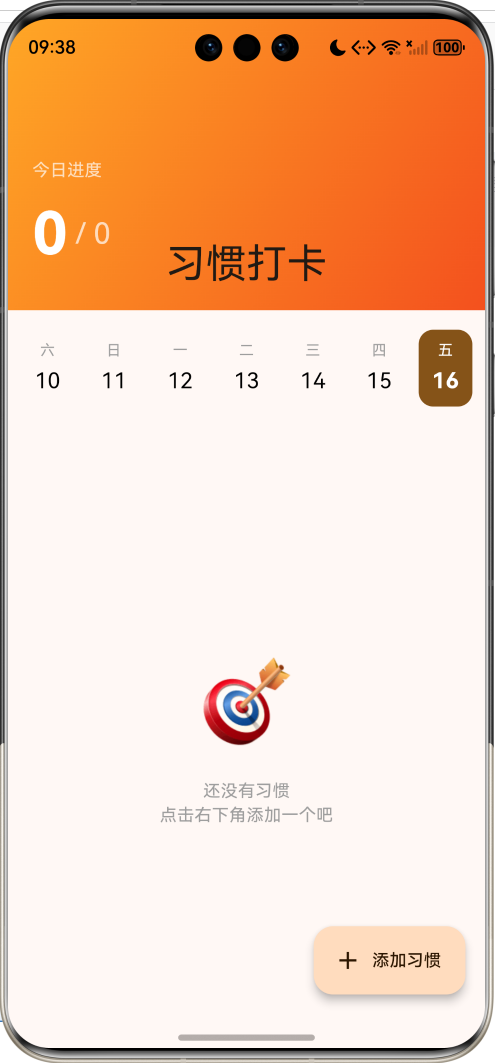
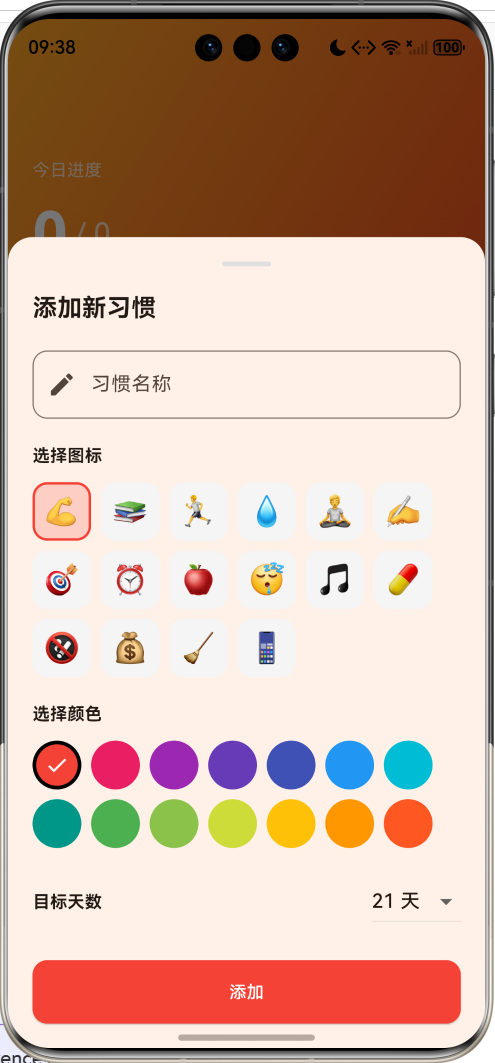
功能特性
- ✅ 多习惯管理:添加、编辑、删除多个习惯
- 🔥 连续打卡:自动计算连续打卡天数
- 🎯 目标追踪:设定目标天数,查看完成进度
- 📅 日期选择:查看和补打历史记录
- 📊 热力图:直观展示打卡记录
- 🎨 个性化:自定义图标和颜色
应用架构
数据模型
习惯模型
class Habit {
  final String id;
  String name;
  String icon;
  Color color;
  List<String> completedDates;  // 完成的日期列表 'yyyy-MM-dd'
  int targetDays;               // 目标天数
  DateTime createdAt;

  Habit({
    required this.id,
    required this.name,
    required this.icon,
    required this.color,
    List<String>? completedDates,
    this.targetDays = 21,
    DateTime? createdAt,
  })  : completedDates = completedDates ?? [],
        createdAt = createdAt ?? DateTime.now();
}
日期格式化
统一使用 yyyy-MM-dd 格式存储日期:
static String _dateToString(DateTime date) {
  return '${date.year}-${date.month.toString().padLeft(2, '0')}-${date.day.toString().padLeft(2, '0')}';
}
核心算法
连续打卡天数计算
连续天数的计算逻辑:从今天或昨天开始,向前检查每一天是否有打卡记录。
int get currentStreak {
  if (completedDates.isEmpty) return 0;

  // 按日期降序排序
  final sorted = List<String>.from(completedDates)..sort((a, b) => b.compareTo(a));
  final today = _dateToString(DateTime.now());
  final yesterday = _dateToString(DateTime.now().subtract(const Duration(days: 1)));

  // 如果最近一次打卡不是今天或昨天,连续天数为0
  if (sorted.first != today && sorted.first != yesterday) return 0;

  int streak = 0;
  DateTime checkDate = sorted.first == today
      ? DateTime.now()
      : DateTime.now().subtract(const Duration(days: 1));

  // 从最近打卡日向前检查
  for (int i = 0; i < sorted.length; i++) {
    final dateStr = _dateToString(checkDate.subtract(Duration(days: i)));
    if (sorted.contains(dateStr)) {
      streak++;
    } else {
      break;  // 断了就停止
    }
  }
  return streak;
}
完成率计算
完成率 = 打卡天数 / 创建以来的天数
完成率=打卡天数创建至今天数×100% 完成率 = \frac{打卡天数}{创建至今天数} \times 100\% 完成率=创建至今天数打卡天数×100%
double get completionRate {
  final daysSinceCreated = DateTime.now().difference(createdAt).inDays + 1;
  return totalDays / daysSinceCreated;
}
打卡/取消打卡
void _toggleHabit(Habit habit, DateTime date) {
  final dateStr = Habit._dateToString(date);
  setState(() {
    if (habit.completedDates.contains(dateStr)) {
      habit.completedDates.remove(dateStr);  // 取消打卡
    } else {
      habit.completedDates.add(dateStr);     // 打卡
    }
  });
  _saveHabits();
}
UI组件实现
日期选择器
显示最近7天,支持查看历史打卡记录:
Widget _buildDateSelector() {
  final today = DateTime.now();
  final dates = List.generate(7, (i) => today.subtract(Duration(days: 6 - i)));
  final weekdays = ['一', '二', '三', '四', '五', '六', '日'];

  return Row(
    mainAxisAlignment: MainAxisAlignment.spaceEvenly,
    children: dates.map((date) {
      final isSelected = _dateToString(date) == _dateToString(_selectedDate);
      final isToday = _dateToString(date) == _dateToString(today);

      return GestureDetector(
        onTap: () => setState(() => _selectedDate = date),
        child: AnimatedContainer(
          duration: const Duration(milliseconds: 200),
          width: 44,
          padding: const EdgeInsets.symmetric(vertical: 8),
          decoration: BoxDecoration(
            color: isSelected ? Theme.of(context).colorScheme.primary : Colors.transparent,
            borderRadius: BorderRadius.circular(12),
          ),
          child: Column(
            children: [
              Text(weekdays[date.weekday - 1],
                   style: TextStyle(color: isSelected ? Colors.white : Colors.grey)),
              Text('${date.day}',
                   style: TextStyle(
                     fontWeight: isToday ? FontWeight.bold : FontWeight.normal,
                     color: isSelected ? Colors.white : Colors.black,
                   )),
            ],
          ),
        ),
      );
    }).toList(),
  );
}
习惯卡片
包含打卡按钮、习惯信息和进度环:
Widget _buildHabitCard(Habit habit) {
  final isCompleted = habit.completedDates.contains(_dateToString(_selectedDate));

  return Card(
    child: Row(
      children: [
        // 打卡按钮
        GestureDetector(
          onTap: () => _toggleHabit(habit, _selectedDate),
          child: AnimatedContainer(
            duration: const Duration(milliseconds: 300),
            width: 56,
            height: 56,
            decoration: BoxDecoration(
              color: isCompleted ? habit.color : habit.color.withValues(alpha: 0.1),
              borderRadius: BorderRadius.circular(16),
            ),
            child: Center(
              child: isCompleted
                  ? const Icon(Icons.check, color: Colors.white)
                  : Text(habit.icon, style: const TextStyle(fontSize: 28)),
            ),
          ),
        ),
        // 习惯信息
        Expanded(
          child: Column(
            crossAxisAlignment: CrossAxisAlignment.start,
            children: [
              Text(habit.name, style: const TextStyle(fontWeight: FontWeight.w600)),
              Row(
                children: [
                  Icon(Icons.local_fire_department, color: Colors.orange),
                  Text('连续 ${habit.currentStreak} 天'),
                  Text('共 ${habit.totalDays} 天'),
                ],
              ),
            ],
          ),
        ),
        // 进度环
        CircularProgressIndicator(
          value: habit.totalDays / habit.targetDays,
          valueColor: AlwaysStoppedAnimation(habit.color),
        ),
      ],
    ),
  );
}
热力图
类似GitHub贡献图的打卡热力图:
Widget _buildCalendarHeatmap(Habit habit) {
  final today = DateTime.now();
  final startDate = DateTime(today.year, today.month - 2, 1);  // 最近3个月
  final days = today.difference(startDate).inDays + 1;

  return Wrap(
    spacing: 4,
    runSpacing: 4,
    children: List.generate(days, (i) {
      final date = startDate.add(Duration(days: i));
      final dateStr = Habit._dateToString(date);
      final isCompleted = habit.completedDates.contains(dateStr);
      final isToday = dateStr == Habit._dateToString(today);

      return Tooltip(
        message: '$dateStr ${isCompleted ? "✓" : ""}',
        child: Container(
          width: 16,
          height: 16,
          decoration: BoxDecoration(
            color: isCompleted ? habit.color : Colors.grey.shade200,
            borderRadius: BorderRadius.circular(3),
            border: isToday ? Border.all(color: Colors.black) : null,
          ),
        ),
      );
    }),
  );
}
添加/编辑习惯表单
支持自定义图标、颜色和目标天数:
void _showAddHabitDialog([Habit? editHabit]) {
  String selectedIcon = editHabit?.icon ?? HabitPresets.icons[0];
  Color selectedColor = editHabit?.color ?? HabitPresets.colors[0];
  int targetDays = editHabit?.targetDays ?? 21;

  showModalBottomSheet(
    context: context,
    builder: (context) {
      return StatefulBuilder(
        builder: (context, setModalState) {
          return Column(
            children: [
              // 习惯名称输入
              TextField(decoration: InputDecoration(labelText: '习惯名称')),

              // 图标选择
              Wrap(
                children: HabitPresets.icons.map((icon) {
                  return GestureDetector(
                    onTap: () => setModalState(() => selectedIcon = icon),
                    child: Container(
                      decoration: BoxDecoration(
                        color: selectedIcon == icon
                            ? selectedColor.withValues(alpha: 0.2)
                            : Colors.grey.shade100,
                        border: Border.all(
                          color: selectedIcon == icon ? selectedColor : Colors.transparent,
                        ),
                      ),
                      child: Text(icon),
                    ),
                  );
                }).toList(),
              ),

              // 颜色选择
              Wrap(
                children: HabitPresets.colors.map((color) {
                  return GestureDetector(
                    onTap: () => setModalState(() => selectedColor = color),
                    child: Container(
                      decoration: BoxDecoration(
                        color: color,
                        shape: BoxShape.circle,
                      ),
                      child: selectedColor == color
                          ? Icon(Icons.check, color: Colors.white)
                          : null,
                    ),
                  );
                }).toList(),
              ),

              // 目标天数
              DropdownButton<int>(
                value: targetDays,
                items: [7, 14, 21, 30, 60, 90, 100, 365].map((d) {
                  return DropdownMenuItem(value: d, child: Text('$d 天'));
                }).toList(),
                onChanged: (v) => setModalState(() => targetDays = v!),
              ),
            ],
          );
        },
      );
    },
  );
}
预设数据
图标预设
static const List<String> icons = [
  '💪', '📚', '🏃', '💧', '🧘', '✍️', '🎯', '⏰',
  '🍎', '😴', '🎵', '💊', '🚭', '💰', '🧹', '📱',
];
| 图标 | 适用习惯 |
|---|---|
| 💪 | 健身、锻炼 |
| 📚 | 阅读、学习 |
| 🏃 | 跑步、运动 |
| 💧 | 喝水 |
| 🧘 | 冥想、瑜伽 |
| ✍️ | 写作、日记 |
| 🎯 | 目标、计划 |
| ⏰ | 早起、作息 |
数据持久化
使用 SharedPreferences 存储习惯数据:
Future<void> _loadHabits() async {
  final prefs = await SharedPreferences.getInstance();
  final habitsJson = prefs.getString('habits');
  if (habitsJson != null) {
    final List<dynamic> list = jsonDecode(habitsJson);
    _habits = list.map((e) => Habit.fromJson(e)).toList();
  }
}

Future<void> _saveHabits() async {
  final prefs = await SharedPreferences.getInstance();
  await prefs.setString('habits', jsonEncode(_habits.map((e) => e.toJson()).toList()));
}
状态流程
扩展建议
- 提醒功能:设置每日打卡提醒
- 数据统计:周/月/年统计报表
- 成就系统:连续打卡奖章
- 社交分享:分享打卡成就
- 数据导出:导出打卡记录
- 云同步:多设备数据同步
项目结构
lib/
└── main.dart
    ├── Habit                 # 习惯模型
    ├── HabitPresets          # 预设图标/颜色
    └── HabitTrackerApp       # 主应用
        ├── _buildDateSelector()    # 日期选择器
        ├── _buildHabitCard()       # 习惯卡片
        ├── _showHabitDetail()      # 习惯详情
        ├── _buildCalendarHeatmap() # 热力图
        └── _showAddHabitDialog()   # 添加/编辑表单
总结
这个习惯打卡应用展示了几个实用的开发技巧:
- 连续天数算法:从最近打卡日向前遍历,遇到断档即停止
- 日期处理:统一格式化为字符串,便于存储和比较
- 热力图:使用Wrap+Container实现类GitHub贡献图
- StatefulBuilder:在BottomSheet中管理局部状态
- 动画反馈:AnimatedContainer实现打卡动画
习惯养成的关键在于坚持,这个应用通过连续天数、进度环、热力图等可视化手段,帮助用户直观感受自己的坚持成果,从而增强继续打卡的动力。
欢迎加入开源鸿蒙跨平台社区:https://openharmonycrossplatform.csdn.net

作为“人工智能6S店”的官方数字引擎,为AI开发者与企业提供一个覆盖软硬件全栈、一站式门户。
更多推荐
 1
1 0
0- 0


 已为社区贡献10条内容

所有评论(0)