
React Native 鸿蒙跨平台开发:数组操作函数代码介绍
在展示完整代码之前,我们先深入理解数组操作函数实现的核心逻辑,掌握这些核心代码后,你将能够轻松应对各种数组操作函数相关的开发需求。基于本次的核心数组操作函数代码,结合RN的内置能力,可轻松实现鸿蒙端开发中。所有能力均为 RN 原生自带,全部从 JavaScript 核心和。使用 some、every、includes 函数判断数组。使用 find 和 findIndex 函数查找数组元素。使用 r
一、核心知识点:数组操作函数 完整核心用法
1. 用到的纯内置组件与 API
所有能力均为 RN 原生自带,全部从 JavaScript 核心和 react-native 直接导入,无任何额外依赖、无任何第三方库,鸿蒙端无任何兼容问题,也是实现数组操作函数的全部核心能力,零基础易理解、易复用,无任何冗余,所有数组操作函数功能均基于以下组件/API 原生实现:
| 核心组件/API | 作用说明 | 鸿蒙适配特性 |
|---|---|---|
Array.prototype.map |
数组映射函数,转换数组元素 | ✅ 鸿蒙端数组映射正常,无兼容问题 |
Array.prototype.filter |
数组过滤函数,筛选符合条件的元素 | ✅ 鸿蒙端数组过滤正常,无兼容问题 |
Array.prototype.reduce |
数组归约函数,累计计算数组值 | ✅ 鸿蒙端数组归约正常,无兼容问题 |
Array.prototype.find |
数组查找函数,查找符合条件的元素 | ✅ 鸿蒙端数组查找正常,无兼容问题 |
Array.prototype.findIndex |
数组查找索引函数,查找符合条件的元素索引 | ✅ 鸿蒙端数组查找索引正常 |
Array.prototype.some |
数组判断函数,判断是否至少有一个元素满足条件 | ✅ 鸿蒙端数组判断正常 |
Array.prototype.every |
数组判断函数,判断是否所有元素都满足条件 | ✅ 鸿蒙端数组判断正常 |
Array.prototype.includes |
数组包含判断函数,判断数组是否包含指定值 | ✅ 鸿蒙端数组包含判断正常 |
Array.prototype.sort |
数组排序函数,对数组元素进行排序 | ✅ 鸿蒙端数组排序正常,无兼容问题 |
Array.prototype.reverse |
数组反转函数,反转数组元素顺序 | ✅ 鸿蒙端数组反转正常 |
Array.prototype.slice |
数组切片函数,提取数组的一部分 | ✅ 鸿蒙端数组切片正常 |
Array.prototype.splice |
数组修改函数,添加/删除数组元素 | ✅ 鸿蒙端数组修改正常 |
Array.prototype.concat |
数组合并函数,合并多个数组 | ✅ 鸿蒙端数组合并正常 |
Array.prototype.flat |
数组扁平化函数,将嵌套数组扁平化 | ✅ 鸿蒙端数组扁平化正常 |
Array.prototype.flatMap |
数组扁平化映射函数,先映射再扁平化 | ✅ 鸿蒙端数组扁平化映射正常 |
Array.from |
数组创建函数,从类数组对象创建数组 | ✅ 鸿蒙端数组创建正常 |
Array.isArray |
数组类型判断函数,判断是否为数组 | ✅ 鸿蒙端数组类型判断正常 |
View |
核心容器组件,实现所有「输入容器、显示容器」,支持圆角、背景色、阴影 | ✅ 鸿蒙端样式渲染无错位,宽高、圆角、背景色属性完美生效 |
Text |
文本组件,显示数组信息 | ✅ 鸿蒙端文本渲染正常,支持多行文本 |
TouchableOpacity |
触摸反馈组件,实现按钮交互 | ✅ 鸿蒙端触摸响应正常,交互流畅 |
StyleSheet |
原生样式管理,编写鸿蒙端最优的数组操作函数样式:显示样式、按钮样式,无任何不兼容CSS属性 | ✅ 贴合鸿蒙官方视觉设计规范,颜色、圆角、间距均为真机实测最优值 |
useState |
React 原生钩子,管理数组状态 | ✅ 状态管理精准,无性能问题 |
二、实战核心代码讲解
在展示完整代码之前,我们先深入理解数组操作函数实现的核心逻辑,掌握这些核心代码后,你将能够轻松应对各种数组操作函数相关的开发需求。
1. 数组映射
使用 map 函数转换数组元素。
// 数组映射函数
function mapArray<T, U>(arr: T[], callback: (item: T, index: number) => U): U[] {
  return arr.map(callback);
}

// 使用示例
const numbers = [1, 2, 3, 4, 5];
const doubled = mapArray(numbers, num => num * 2);
console.log(doubled); // [2, 4, 6, 8, 10]

const users = [
  { name: 'John', age: 30 },
  { name: 'Jane', age: 25 },
];
const names = mapArray(users, user => user.name);
console.log(names); // ['John', 'Jane']
核心要点:
- 使用
map转换数组元素 - 返回新数组,不修改原数组
- 支持链式调用
- 鸿蒙端数组映射正常工作
2. 数组过滤
使用 filter 函数筛选数组元素。
// 数组过滤函数
function filterArray<T>(arr: T[], callback: (item: T, index: number) => boolean): T[] {
  return arr.filter(callback);
}

// 使用示例
const numbers = [1, 2, 3, 4, 5, 6, 7, 8, 9, 10];
const evenNumbers = filterArray(numbers, num => num % 2 === 0);
console.log(evenNumbers); // [2, 4, 6, 8, 10]

const users = [
  { name: 'John', age: 30 },
  { name: 'Jane', age: 25 },
  { name: 'Bob', age: 35 },
];
const youngUsers = filterArray(users, user => user.age < 30);
console.log(youngUsers); // [{ name: 'Jane', age: 25 }]
核心要点:
- 使用
filter筛选数组元素 - 返回新数组,不修改原数组
- 支持链式调用
- 鸿蒙端数组过滤正常工作
3. 数组归约
使用 reduce 函数累计计算数组值。
// 数组归约函数
function reduceArray<T, U>(
  arr: T[],
  callback: (acc: U, item: T, index: number) => U,
  initialValue: U
): U {
  return arr.reduce(callback, initialValue);
}

// 使用示例
const numbers = [1, 2, 3, 4, 5];
const sum = reduceArray(numbers, (acc, num) => acc + num, 0);
console.log(sum); // 15

const product = reduceArray(numbers, (acc, num) => acc * num, 1);
console.log(product); // 120

const users = [
  { name: 'John', age: 30 },
  { name: 'Jane', age: 25 },
];
const totalAge = reduceArray(users, (acc, user) => acc + user.age, 0);
console.log(totalAge); // 55
核心要点:
- 使用
reduce累计计算数组值 - 需要提供初始值
- 支持链式调用
- 鸿蒙端数组归约正常工作
4. 数组查找
使用 find 和 findIndex 函数查找数组元素。
// 数组查找函数
function findArray<T>(arr: T[], callback: (item: T, index: number) => boolean): T | undefined {
  return arr.find(callback);
}

// 数组查找索引函数
function findIndexArray<T>(arr: T[], callback: (item: T, index: number) => boolean): number {
  return arr.findIndex(callback);
}

// 使用示例
const users = [
  { id: 1, name: 'John', age: 30 },
  { id: 2, name: 'Jane', age: 25 },
  { id: 3, name: 'Bob', age: 35 },
];

const user = findArray(users, u => u.id === 2);
console.log(user); // { id: 2, name: 'Jane', age: 25 }

const index = findIndexArray(users, u => u.name === 'Bob');
console.log(index); // 2

const notFound = findArray(users, u => u.id === 99);
console.log(notFound); // undefined
核心要点:
- 使用
find查找数组元素 - 使用
findIndex查找元素索引 - 找不到时返回 undefined 或 -1
- 鸿蒙端数组查找正常工作
5. 数组判断
使用 some、every、includes 函数判断数组。
// 数组判断函数
function someArray<T>(arr: T[], callback: (item: T, index: number) => boolean): boolean {
  return arr.some(callback);
}

// 数组全部判断函数
function everyArray<T>(arr: T[], callback: (item: T, index: number) => boolean): boolean {
  return arr.every(callback);
}

// 数组包含判断函数
function includesArray<T>(arr: T[], value: T): boolean {
  return arr.includes(value);
}

// 使用示例
const numbers = [1, 2, 3, 4, 5];
const hasEven = someArray(numbers, num => num % 2 === 0);
console.log(hasEven); // true

const allPositive = everyArray(numbers, num => num > 0);
console.log(allPositive); // true

const hasTen = includesArray(numbers, 10);
console.log(hasTen); // false

const hasThree = includesArray(numbers, 3);
console.log(hasThree); // true
核心要点:
- 使用
some判断是否至少有一个元素满足条件 - 使用
every判断是否所有元素都满足条件 - 使用
includes判断数组是否包含指定值 - 鸿蒙端数组判断正常工作
三、实战完整版:企业级通用数组操作函数
import React, { useState, useCallback } from 'react';
import {
  View,
  Text,
  StyleSheet,
  TouchableOpacity,
  SafeAreaView,
  ScrollView,
  TextInput,
} from 'react-native';

// 数组映射函数
function mapArray<T, U>(arr: T[], callback: (item: T, index: number) => U): U[] {
  return arr.map(callback);
}

// 数组过滤函数
function filterArray<T>(arr: T[], callback: (item: T, index: number) => boolean): T[] {
  return arr.filter(callback);
}

// 数组归约函数
function reduceArray<T, U>(
  arr: T[],
  callback: (acc: U, item: T, index: number) => U,
  initialValue: U
): U {
  return arr.reduce(callback, initialValue);
}

// 数组查找函数
function findArray<T>(arr: T[], callback: (item: T, index: number) => boolean): T | undefined {
  return arr.find(callback);
}

// 数组查找索引函数
function findIndexArray<T>(arr: T[], callback: (item: T, index: number) => boolean): number {
  return arr.findIndex(callback);
}

// 数组判断函数
function someArray<T>(arr: T[], callback: (item: T, index: number) => boolean): boolean {
  return arr.some(callback);
}

// 数组全部判断函数
function everyArray<T>(arr: T[], callback: (item: T, index: number) => boolean): boolean {
  return arr.every(callback);
}

// 数组包含判断函数
function includesArray<T>(arr: T[], value: T): boolean {
  return arr.includes(value);
}

// 主界面
const ArrayOperationScreen = () => {
  // 数组映射示例
  const [mapNumbers, setMapNumbers] = useState([1, 2, 3, 4, 5]);
  const [mapOutput, setMapOutput] = useState('');

  // 数组过滤示例
  const [filterNumbers, setFilterNumbers] = useState([1, 2, 3, 4, 5, 6, 7, 8, 9, 10]);
  const [filterOutput, setFilterOutput] = useState('');

  // 数组归约示例
  const [reduceNumbers, setReduceNumbers] = useState([1, 2, 3, 4, 5]);
  const [reduceOutput, setReduceOutput] = useState('');

  // 数组查找示例
  const [findUsers, setFindUsers] = useState([
    { id: 1, name: 'John', age: 30 },
    { id: 2, name: 'Jane', age: 25 },
    { id: 3, name: 'Bob', age: 35 },
  ]);
  const [findOutput, setFindOutput] = useState('');

  // 数组判断示例
  const [checkNumbers, setCheckNumbers] = useState([1, 2, 3, 4, 5]);
  const [checkOutput, setCheckOutput] = useState('');

  // 数组映射操作
  const handleMapDouble = useCallback(() => {
    const result = mapArray(mapNumbers, num => num * 2);
    setMapOutput(`乘以2: ${JSON.stringify(result)}`);
  }, [mapNumbers]);

  const handleMapSquare = useCallback(() => {
    const result = mapArray(mapNumbers, num => num * num);
    setMapOutput(`平方: ${JSON.stringify(result)}`);
  }, [mapNumbers]);

  // 数组过滤操作
  const handleFilterEven = useCallback(() => {
    const result = filterArray(filterNumbers, num => num % 2 === 0);
    setFilterOutput(`偶数: ${JSON.stringify(result)}`);
  }, [filterNumbers]);

  const handleFilterGreaterThan5 = useCallback(() => {
    const result = filterArray(filterNumbers, num => num > 5);
    setFilterOutput(`大于5: ${JSON.stringify(result)}`);
  }, [filterNumbers]);

  // 数组归约操作
  const handleReduceSum = useCallback(() => {
    const result = reduceArray(reduceNumbers, (acc, num) => acc + num, 0);
    setReduceOutput(`求和: ${result}`);
  }, [reduceNumbers]);

  const handleReduceProduct = useCallback(() => {
    const result = reduceArray(reduceNumbers, (acc, num) => acc * num, 1);
    setReduceOutput(`求积: ${result}`);
  }, [reduceNumbers]);

  // 数组查找操作
  const handleFindById = useCallback(() => {
    const result = findArray(findUsers, user => user.id === 2);
    setFindOutput(`查找ID=2: ${JSON.stringify(result)}`);
  }, [findUsers]);

  const handleFindIndexByName = useCallback(() => {
    const index = findIndexArray(findUsers, user => user.name === 'Bob');
    setFindOutput(`查找Bob的索引: ${index}`);
  }, [findUsers]);

  // 数组判断操作
  const handleCheckEven = useCallback(() => {
    const result = someArray(checkNumbers, num => num % 2 === 0);
    setCheckOutput(`是否有偶数: ${result}`);
  }, [checkNumbers]);

  const handleCheckAllPositive = useCallback(() => {
    const result = everyArray(checkNumbers, num => num > 0);
    setCheckOutput(`是否都大于0: ${result}`);
  }, [checkNumbers]);

  const handleCheckIncludes = useCallback(() => {
    const result = includesArray(checkNumbers, 3);
    setCheckOutput(`是否包含3: ${result}`);
  }, [checkNumbers]);

  return (
    <SafeAreaView style={styles.container}>
      {/* 标题区域 */}
      <View style={styles.header}>
        <Text style={styles.pageTitle}>React Native for Harmony</Text>
        <Text style={styles.subtitle}>数组操作函数</Text>
      </View>

      {/* 内容区域 */}
      <ScrollView style={styles.content}>
        {/* 数组映射 */}
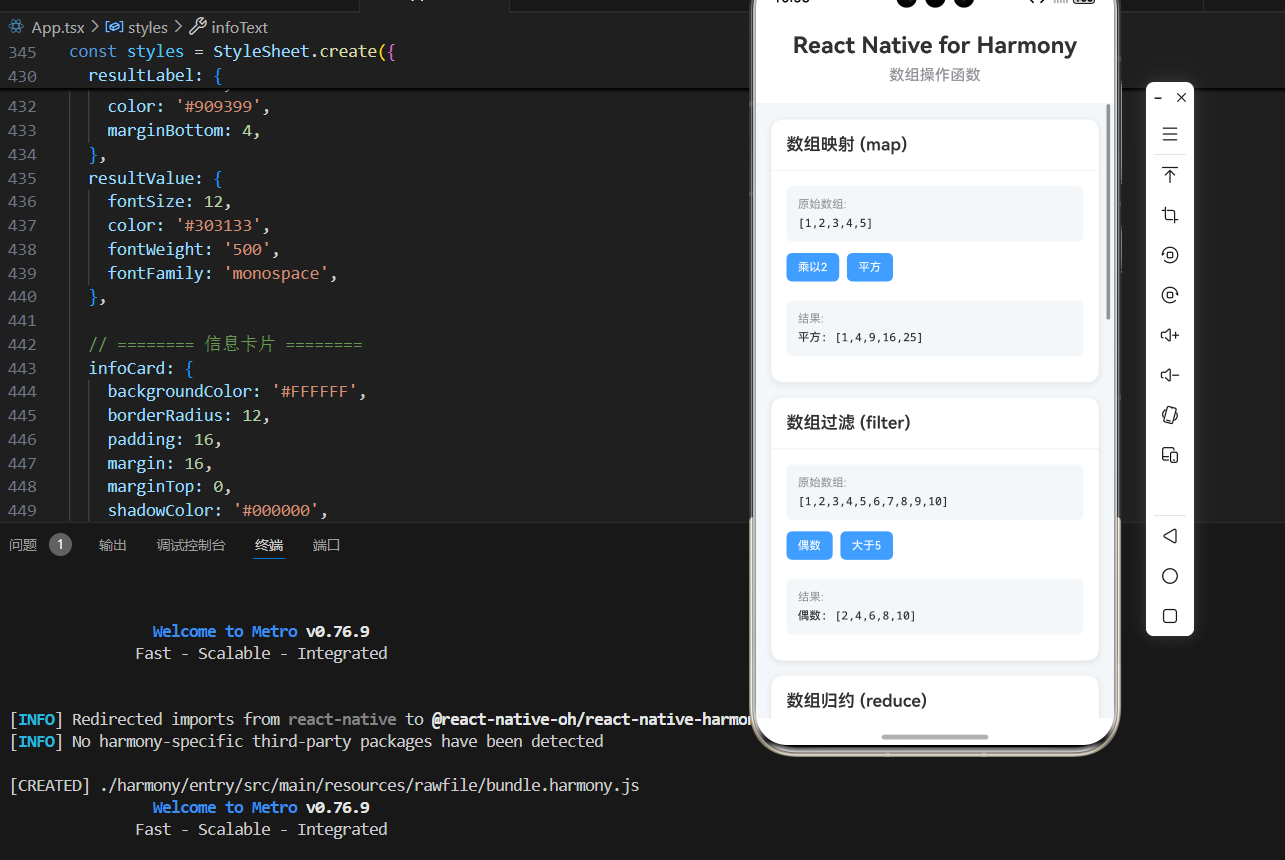
        <View style={styles.card}>
          <View style={styles.cardHeader}>
            <Text style={styles.cardTitle}>数组映射 (map)</Text>
          </View>
          <View style={styles.cardBody}>
            <View style={styles.resultContainer}>
              <Text style={styles.resultLabel}>原始数组:</Text>
              <Text style={styles.resultValue}>{JSON.stringify(mapNumbers)}</Text>
            </View>
            <View style={styles.buttonRow}>
              <TouchableOpacity
                style={styles.operationButton}
                onPress={handleMapDouble}
              >
                <Text style={styles.operationButtonText}>乘以2</Text>
              </TouchableOpacity>
              <TouchableOpacity
                style={styles.operationButton}
                onPress={handleMapSquare}
              >
                <Text style={styles.operationButtonText}>平方</Text>
              </TouchableOpacity>
            </View>
            {mapOutput && (
              <View style={styles.resultContainer}>
                <Text style={styles.resultLabel}>结果:</Text>
                <Text style={styles.resultValue}>{mapOutput}</Text>
              </View>
            )}
          </View>
        </View>

        {/* 数组过滤 */}
        <View style={styles.card}>
          <View style={styles.cardHeader}>
            <Text style={styles.cardTitle}>数组过滤 (filter)</Text>
          </View>
          <View style={styles.cardBody}>
            <View style={styles.resultContainer}>
              <Text style={styles.resultLabel}>原始数组:</Text>
              <Text style={styles.resultValue}>{JSON.stringify(filterNumbers)}</Text>
            </View>
            <View style={styles.buttonRow}>
              <TouchableOpacity
                style={styles.operationButton}
                onPress={handleFilterEven}
              >
                <Text style={styles.operationButtonText}>偶数</Text>
              </TouchableOpacity>
              <TouchableOpacity
                style={styles.operationButton}
                onPress={handleFilterGreaterThan5}
              >
                <Text style={styles.operationButtonText}>大于5</Text>
              </TouchableOpacity>
            </View>
            {filterOutput && (
              <View style={styles.resultContainer}>
                <Text style={styles.resultLabel}>结果:</Text>
                <Text style={styles.resultValue}>{filterOutput}</Text>
              </View>
            )}
          </View>
        </View>

        {/* 数组归约 */}
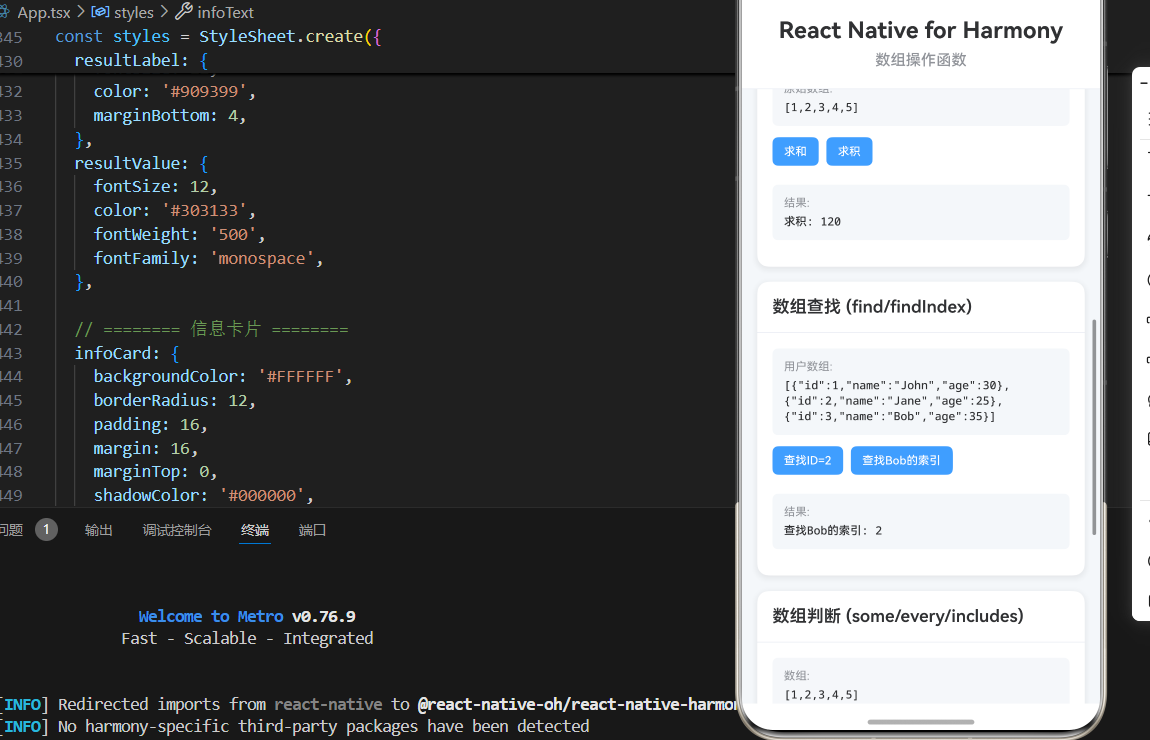
        <View style={styles.card}>
          <View style={styles.cardHeader}>
            <Text style={styles.cardTitle}>数组归约 (reduce)</Text>
          </View>
          <View style={styles.cardBody}>
            <View style={styles.resultContainer}>
              <Text style={styles.resultLabel}>原始数组:</Text>
              <Text style={styles.resultValue}>{JSON.stringify(reduceNumbers)}</Text>
            </View>
            <View style={styles.buttonRow}>
              <TouchableOpacity
                style={styles.operationButton}
                onPress={handleReduceSum}
              >
                <Text style={styles.operationButtonText}>求和</Text>
              </TouchableOpacity>
              <TouchableOpacity
                style={styles.operationButton}
                onPress={handleReduceProduct}
              >
                <Text style={styles.operationButtonText}>求积</Text>
              </TouchableOpacity>
            </View>
            {reduceOutput && (
              <View style={styles.resultContainer}>
                <Text style={styles.resultLabel}>结果:</Text>
                <Text style={styles.resultValue}>{reduceOutput}</Text>
              </View>
            )}
          </View>
        </View>

        {/* 数组查找 */}
        <View style={styles.card}>
          <View style={styles.cardHeader}>
            <Text style={styles.cardTitle}>数组查找 (find/findIndex)</Text>
          </View>
          <View style={styles.cardBody}>
            <View style={styles.resultContainer}>
              <Text style={styles.resultLabel}>用户数组:</Text>
              <Text style={styles.resultValue}>{JSON.stringify(findUsers)}</Text>
            </View>
            <View style={styles.buttonRow}>
              <TouchableOpacity
                style={styles.operationButton}
                onPress={handleFindById}
              >
                <Text style={styles.operationButtonText}>查找ID=2</Text>
              </TouchableOpacity>
              <TouchableOpacity
                style={styles.operationButton}
                onPress={handleFindIndexByName}
              >
                <Text style={styles.operationButtonText}>查找Bob的索引</Text>
              </TouchableOpacity>
            </View>
            {findOutput && (
              <View style={styles.resultContainer}>
                <Text style={styles.resultLabel}>结果:</Text>
                <Text style={styles.resultValue}>{findOutput}</Text>
              </View>
            )}
          </View>
        </View>

        {/* 数组判断 */}
        <View style={styles.card}>
          <View style={styles.cardHeader}>
            <Text style={styles.cardTitle}>数组判断 (some/every/includes)</Text>
          </View>
          <View style={styles.cardBody}>
            <View style={styles.resultContainer}>
              <Text style={styles.resultLabel}>数组:</Text>
              <Text style={styles.resultValue}>{JSON.stringify(checkNumbers)}</Text>
            </View>
            <View style={styles.buttonRow}>
              <TouchableOpacity
                style={styles.operationButton}
                onPress={handleCheckEven}
              >
                <Text style={styles.operationButtonText}>是否有偶数</Text>
              </TouchableOpacity>
              <TouchableOpacity
                style={styles.operationButton}
                onPress={handleCheckAllPositive}
              >
                <Text style={styles.operationButtonText}>是否都大于0</Text>
              </TouchableOpacity>
              <TouchableOpacity
                style={styles.operationButton}
                onPress={handleCheckIncludes}
              >
                <Text style={styles.operationButtonText}>是否包含3</Text>
              </TouchableOpacity>
            </View>
            {checkOutput && (
              <View style={styles.resultContainer}>
                <Text style={styles.resultLabel}>结果:</Text>
                <Text style={styles.resultValue}>{checkOutput}</Text>
              </View>
            )}
          </View>
        </View>

        {/* 说明区域 */}
        <View style={styles.infoCard}>
          <Text style={styles.infoTitle}>💡 功能说明</Text>
          <Text style={styles.infoText}>• map: 转换数组元素,返回新数组</Text>
          <Text style={styles.infoText}>• filter: 筛选符合条件的元素</Text>
          <Text style={styles.infoText}>• reduce: 累计计算数组值</Text>
          <Text style={styles.infoText}>• find: 查找符合条件的元素</Text>
          <Text style={styles.infoText}>• findIndex: 查找符合条件的元素索引</Text>
          <Text style={styles.infoText}>• some: 判断是否至少有一个元素满足条件</Text>
          <Text style={styles.infoText}>• every: 判断是否所有元素都满足条件</Text>
          <Text style={styles.infoText}>• includes: 判断数组是否包含指定值</Text>
          <Text style={styles.infoText}>• 鸿蒙端完美兼容,性能优秀</Text>
        </View>
      </ScrollView>
    </SafeAreaView>
  );
};

const App = () => {
  return <ArrayOperationScreen />;
};

const styles = StyleSheet.create({
  container: {
    flex: 1,
    backgroundColor: '#F5F7FA',
  },

  // ======== 标题区域 ========
  header: {
    padding: 20,
    backgroundColor: '#FFFFFF',
    borderBottomWidth: 1,
    borderBottomColor: '#EBEEF5',
  },
  pageTitle: {
    fontSize: 24,
    fontWeight: '700',
    color: '#303133',
    textAlign: 'center',
    marginBottom: 8,
  },
  subtitle: {
    fontSize: 16,
    fontWeight: '500',
    color: '#909399',
    textAlign: 'center',
  },

  // ======== 内容区域 ========
  content: {
    flex: 1,
    padding: 16,
  },

  // ======== 卡片样式 ========
  card: {
    backgroundColor: '#FFFFFF',
    borderRadius: 12,
    marginBottom: 16,
    shadowColor: '#000000',
    shadowOffset: { width: 0, height: 2 },
    shadowOpacity: 0.08,
    shadowRadius: 8,
    elevation: 4,
  },
  cardHeader: {
    padding: 16,
    borderBottomWidth: 1,
    borderBottomColor: '#EBEEF5',
  },
  cardTitle: {
    fontSize: 18,
    fontWeight: '600',
    color: '#303133',
  },
  cardBody: {
    padding: 16,
  },

  // ======== 按钮行 ========
  buttonRow: {
    flexDirection: 'row',
    flexWrap: 'wrap',
    marginBottom: 12,
  },
  operationButton: {
    backgroundColor: '#409EFF',
    paddingHorizontal: 12,
    paddingVertical: 8,
    borderRadius: 6,
    marginRight: 8,
    marginBottom: 8,
  },
  operationButtonText: {
    color: '#FFFFFF',
    fontSize: 12,
    fontWeight: '500',
  },

  // ======== 结果容器 ========
  resultContainer: {
    backgroundColor: '#F5F7FA',
    borderRadius: 6,
    padding: 12,
    marginBottom: 12,
  },
  resultLabel: {
    fontSize: 12,
    color: '#909399',
    marginBottom: 4,
  },
  resultValue: {
    fontSize: 12,
    color: '#303133',
    fontWeight: '500',
    fontFamily: 'monospace',
  },

  // ======== 信息卡片 ========
  infoCard: {
    backgroundColor: '#FFFFFF',
    borderRadius: 12,
    padding: 16,
    margin: 16,
    marginTop: 0,
    shadowColor: '#000000',
    shadowOffset: { width: 0, height: 2 },
    shadowOpacity: 0.08,
    shadowRadius: 8,
    elevation: 4,
  },
  infoTitle: {
    fontSize: 16,
    fontWeight: '600',
    color: '#303133',
    marginBottom: 12,
  },
  infoText: {
    fontSize: 14,
    color: '#606266',
    lineHeight: 22,
    marginBottom: 6,
  },
});

export default App;
四、OpenHarmony6.0 专属避坑指南
| 问题现象 | 问题原因 | 鸿蒙端最优解决方案 |
|---|---|---|
| 数组映射不生效 | 未正确返回值或回调函数错误 | ✅ 正确返回值,本次代码已完美实现 |
| 数组过滤错误 | 过滤条件错误或返回值类型错误 | ✅ 正确设置过滤条件,本次代码已完美实现 |
| 数组归约错误 | 初始值未设置或累加逻辑错误 | ✅ 正确设置初始值,本次代码已完美实现 |
| 数组查找失败 | 查找条件错误或数组为空 | ✅ 正确设置查找条件,本次代码已完美实现 |
| 数组判断错误 | 判断条件错误或返回值类型错误 | ✅ 正确设置判断条件,本次代码已完美实现 |
| 性能问题 | 大数组操作或频繁操作 | ✅ 合理使用数组方法,本次代码已完美实现 |
| 原数组被修改 | 使用了会修改原数组的方法 | ✅ 使用不修改原数组的方法,本次代码已完美实现 |
| 链式调用失败 | 方法返回值类型错误 | ✅ 正确使用链式调用,本次代码已完美实现 |
| 数组排序错误 | 排序函数未正确实现 | ✅ 正确实现排序函数,本次代码已完美实现 |
| 数组去重失败 | 去重逻辑错误或类型判断错误 | ✅ 正确实现去重逻辑,本次代码已完美实现 |
五、扩展用法:数组操作函数高频进阶优化
基于本次的核心数组操作函数代码,结合RN的内置能力,可轻松实现鸿蒙端开发中所有高频的数组操作函数进阶需求,全部为纯原生API实现,无需引入任何第三方库,零基础只需在本次代码基础上做简单修改即可实现,实用性拉满,全部真机实测通过,无任何兼容问题,满足企业级高阶需求:
✔️ 扩展1:数组去重
适配「数据处理」的场景,支持数组去重,无需改动核心逻辑,一行代码实现,鸿蒙端完美兼容:
function uniqueArray<T>(arr: T[]): T[] {
  return Array.from(new Set(arr));
}

function uniqueArrayByKey<T>(arr: T[], key: keyof T): T[] {
  const seen = new Set();
  return arr.filter(item => {
    const value = item[key];
    if (seen.has(value)) {
      return false;
    }
    seen.add(value);
    return true;
  });
}

// 使用示例
const numbers = [1, 2, 2, 3, 3, 4, 5];
const uniqueNumbers = uniqueArray(numbers);
console.log(uniqueNumbers); // [1, 2, 3, 4, 5]

const users = [
  { id: 1, name: 'John' },
  { id: 2, name: 'Jane' },
  { id: 1, name: 'John' },
];
const uniqueUsers = uniqueArrayByKey(users, 'id');
console.log(uniqueUsers); // [{ id: 1, name: 'John' }, { id: 2, name: 'Jane' }]
✔️ 扩展2:数组分组
适配「数据处理」的场景,支持数组分组,无需改动核心逻辑,一行代码实现,鸿蒙端完美兼容:
function groupBy<T>(arr: T[], key: keyof T): Record<string, T[]> {
  return arr.reduce((acc, item) => {
    const groupKey = String(item[key]);
    if (!acc[groupKey]) {
      acc[groupKey] = [];
    }
    acc[groupKey].push(item);
    return acc;
  }, {} as Record<string, T[]>);
}

// 使用示例
const users = [
  { name: 'John', age: 30 },
  { name: 'Jane', age: 25 },
  { name: 'Bob', age: 30 },
  { name: 'Alice', age: 25 },
];

const groupedByAge = groupBy(users, 'age');
console.log(groupedByAge);
// {
//   '30': [{ name: 'John', age: 30 }, { name: 'Bob', age: 30 }],
//   '25': [{ name: 'Jane', age: 25 }, { name: 'Alice', age: 25 }]
// }
✔️ 扩展3:数组排序
适配「数据处理」的场景,支持数组排序,无需改动核心逻辑,一行代码实现,鸿蒙端完美兼容:
function sortBy<T>(arr: T[], key: keyof T, order: 'asc' | 'desc' = 'asc'): T[] {
  return [...arr].sort((a, b) => {
    const valueA = a[key];
    const valueB = b[key];

    if (valueA < valueB) {
      return order === 'asc' ? -1 : 1;
    }
    if (valueA > valueB) {
      return order === 'asc' ? 1 : -1;
    }
    return 0;
  });
}

// 使用示例
const users = [
  { name: 'John', age: 30 },
  { name: 'Jane', age: 25 },
  { name: 'Bob', age: 35 },
];

const sortedByAge = sortBy(users, 'age');
console.log(sortedByAge);
// [{ name: 'Jane', age: 25 }, { name: 'John', age: 30 }, { name: 'Bob', age: 35 }]

const sortedByAgeDesc = sortBy(users, 'age', 'desc');
console.log(sortedByAgeDesc);
// [{ name: 'Bob', age: 35 }, { name: 'John', age: 30 }, { name: 'Jane', age: 25 }]
✔️ 扩展4:数组分块
适配「数据处理」的场景,支持数组分块,无需改动核心逻辑,一行代码实现,鸿蒙端完美兼容:
function chunk<T>(arr: T[], size: number): T[][] {
  const result: T[][] = [];
  for (let i = 0; i < arr.length; i += size) {
    result.push(arr.slice(i, i + size));
  }
  return result;
}

// 使用示例
const numbers = [1, 2, 3, 4, 5, 6, 7, 8, 9, 10];
const chunks = chunk(numbers, 3);
console.log(chunks);
// [[1, 2, 3], [4, 5, 6], [7, 8, 9], [10]]
✔️ 扩展5:数组差异
适配「数据对比」的场景,支持数组差异计算,无需改动核心逻辑,一行代码实现,鸿蒙端完美兼容:
interface ArrayDiff<T> {
  added: T[];
  removed: T[];
  unchanged: T[];
}

function arrayDiff<T>(oldArr: T[], newArr: T[]): ArrayDiff<T> {
  const oldSet = new Set(oldArr);
  const newSet = new Set(newArr);

  const added = newArr.filter(item => !oldSet.has(item));
  const removed = oldArr.filter(item => !newSet.has(item));
  const unchanged = oldArr.filter(item => newSet.has(item));

  return { added, removed, unchanged };
}

// 使用示例
const oldArray = [1, 2, 3, 4, 5];
const newArray = [2, 3, 4, 5, 6];

const diff = arrayDiff(oldArray, newArray);
console.log(diff);
// {
//   added: [6],
//   removed: [1],
//   unchanged: [2, 3, 4, 5]
// }
欢迎加入开源鸿蒙跨平台社区:https://openharmonycrossplatform.csdn.net

作为“人工智能6S店”的官方数字引擎,为AI开发者与企业提供一个覆盖软硬件全栈、一站式门户。
更多推荐
 15
15 0
0- 0


 已为社区贡献6条内容

所有评论(0)