
Flutter 框架跨平台鸿蒙开发 - 打造时钟、番茄钟、倒计时三合一应用
阶段时长说明🎯 工作25分钟专注工作,不受打扰☕ 短休息5分钟每个番茄后休息🌴 长休息15分钟每4个番茄后长休息:绘制模拟时钟表盘和指针角度计算:时针/分针/秒针的角度公式Timer定时器:周期性更新和生命周期管理状态机:番茄钟的工作/休息状态切换:滚轮式时间选择器:进度环显示时间管理是一个永恒的话题,希望这个应用能帮助你更好地掌控时间!欢迎加入开源鸿蒙跨平台社区:https://openha
·
⏰ Flutter + HarmonyOS 实战:打造时钟、番茄钟、倒计时三合一应用
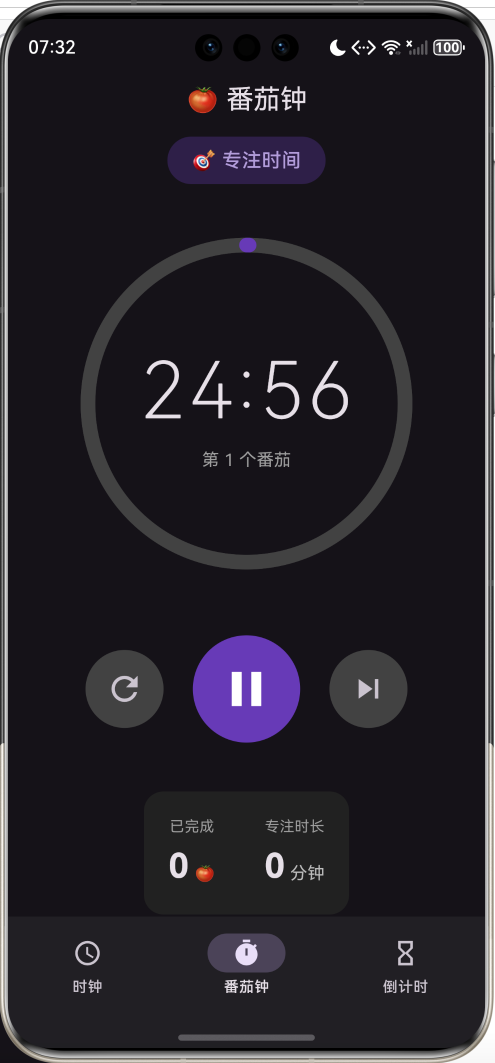
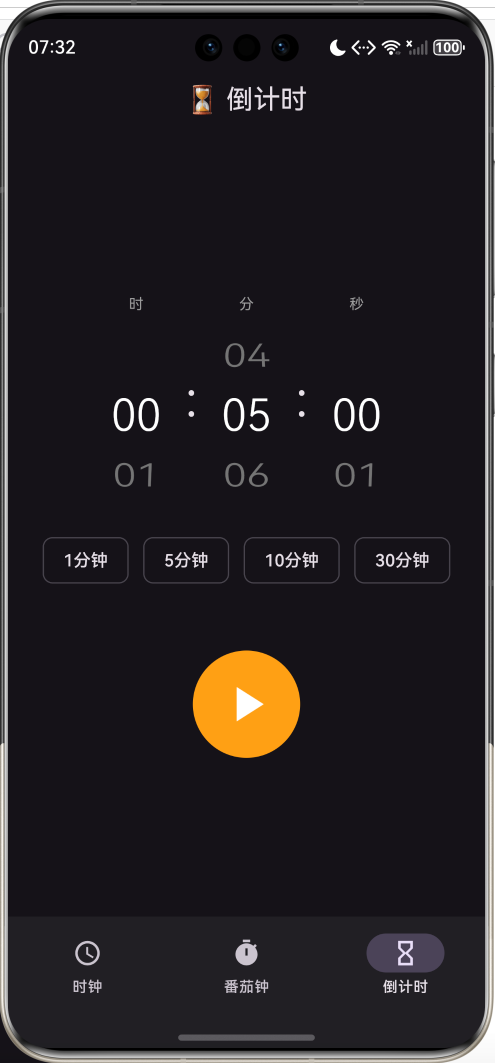
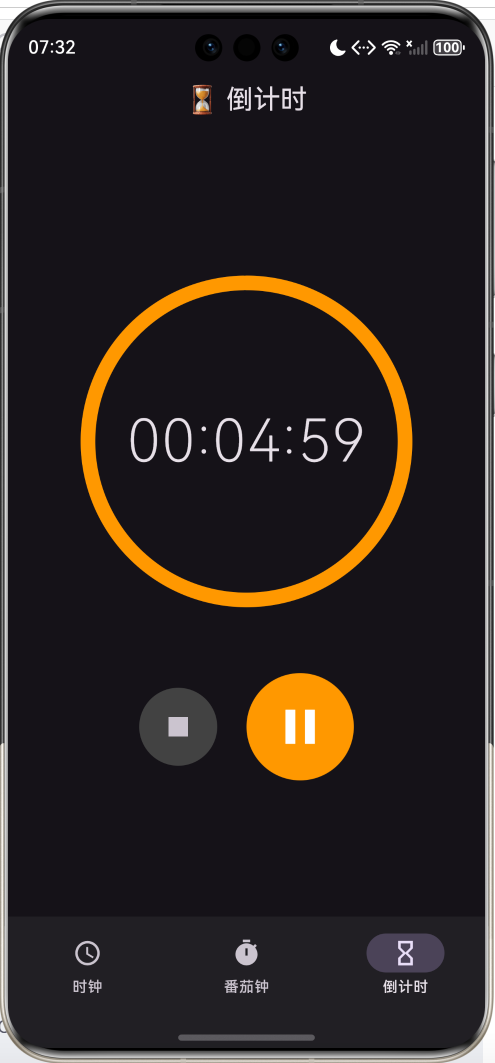
运行效果图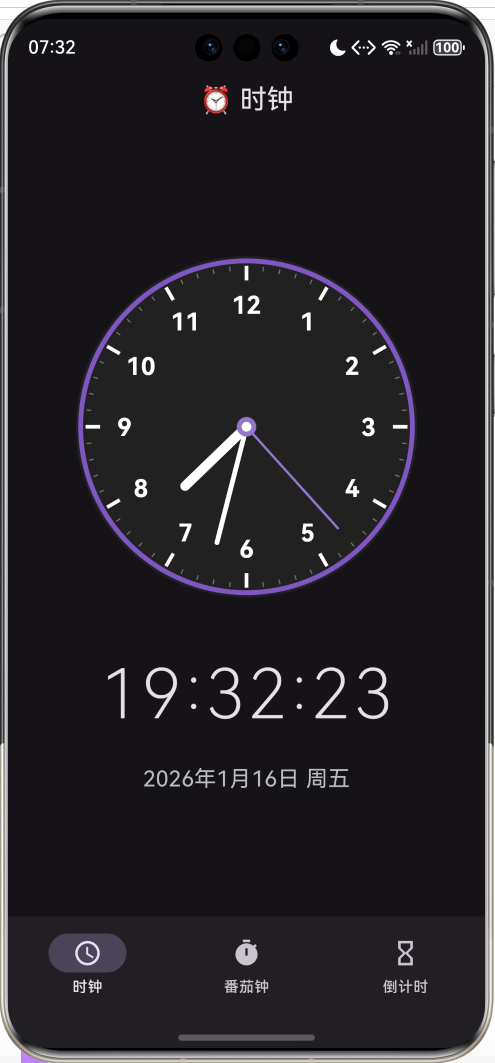
📋 文章导读
| 章节 | 内容概要 | 预计阅读 |
|---|---|---|
| 一 | 应用功能设计与架构 | 3分钟 |
| 二 | 模拟时钟绘制详解 | 12分钟 |
| 三 | 番茄钟功能实现 | 10分钟 |
| 四 | 倒计时器实现 | 8分钟 |
| 五 | 定时器与状态管理 | 5分钟 |
| 六 | 完整源码与运行 | 3分钟 |
💡 写在前面:时间管理是现代人的必备技能,而一款好用的时钟应用能帮助我们更好地掌控时间。本文将带你用Flutter开发一款集时钟、番茄钟、倒计时于一体的应用,重点讲解CustomPainter绘制模拟时钟、Timer定时器使用等核心技术。
一、应用设计
1.1 功能模块
1.2 页面结构
| 页面 | 功能 | 核心技术 |
|---|---|---|
| 时钟页 | 显示当前时间 | CustomPainter |
| 番茄钟页 | 专注计时 | Timer + 状态机 |
| 倒计时页 | 自定义倒计时 | ListWheelScrollView |
1.3 番茄工作法介绍
番茄工作法是一种时间管理方法,核心规则:
| 阶段 | 时长 | 说明 |
|---|---|---|
| 🎯 工作 | 25分钟 | 专注工作,不受打扰 |
| ☕ 短休息 | 5分钟 | 每个番茄后休息 |
| 🌴 长休息 | 15分钟 | 每4个番茄后长休息 |
二、模拟时钟绘制
2.1 CustomPainter 基础
Flutter使用 CustomPainter 进行自定义绘制:
class AnalogClockPainter extends CustomPainter {
final DateTime time;
AnalogClockPainter(this.time);
void paint(Canvas canvas, Size size) {
// 在这里绘制
}
bool shouldRepaint(covariant AnalogClockPainter oldDelegate) {
return oldDelegate.time != time; // 时间变化时重绘
}
}
// 使用
CustomPaint(
painter: AnalogClockPainter(DateTime.now()),
size: Size(280, 280),
)
2.2 时钟绘制步骤
2.3 绘制表盘
void paint(Canvas canvas, Size size) {
  final center = Offset(size.width / 2, size.height / 2);
  final radius = size.width / 2;

  // 1. 绘制背景圆
  canvas.drawCircle(
    center,
    radius,
    Paint()
      ..color = Colors.grey.shade900
      ..style = PaintingStyle.fill,
  );

  // 2. 绘制边框
  canvas.drawCircle(
    center,
    radius - 4,
    Paint()
      ..color = Colors.deepPurple
      ..style = PaintingStyle.stroke
      ..strokeWidth = 4,
  );
}
2.4 绘制刻度
60个刻度,每5个为小时刻度(粗),其余为分钟刻度(细):
for (int i = 0; i < 60; i++) {
  final angle = i * 6 * pi / 180;  // 每个刻度6度
  final isHour = i % 5 == 0;       // 是否是小时刻度

  final startRadius = radius - (isHour ? 20 : 12);
  final endRadius = radius - 8;

  canvas.drawLine(
    Offset(
      center.dx + startRadius * sin(angle),
      center.dy - startRadius * cos(angle),
    ),
    Offset(
      center.dx + endRadius * sin(angle),
      center.dy - endRadius * cos(angle),
    ),
    Paint()
      ..color = isHour ? Colors.white : Colors.grey
      ..strokeWidth = isHour ? 3 : 1,
  );
}
2.5 角度计算公式
时钟指针角度计算:
| 指针 | 角度公式 | 说明 |
|---|---|---|
| 时针 | (hmod 12+m/60)×30°(h \mod 12 + m/60) \times 30°(hmod12+m/60)×30° | 每小时30度,分钟影响微调 |
| 分针 | (m+s/60)×6°(m + s/60) \times 6°(m+s/60)×6° | 每分钟6度 |
| 秒针 | s×6°s \times 6°s×6° | 每秒6度 |
// 时针角度
final hourAngle = (time.hour % 12 + time.minute / 60) * 30;

// 分针角度
final minuteAngle = (time.minute + time.second / 60) * 6;

// 秒针角度
final secondAngle = time.second * 6;
2.6 绘制指针
void _drawHand(
  Canvas canvas,
  Offset center,
  double angle,    // 角度(度)
  double length,   // 长度
  double width,    // 宽度
  Color color,
) {
  final rad = angle * pi / 180;  // 转换为弧度

  canvas.drawLine(
    center,
    Offset(
      center.dx + length * sin(rad),
      center.dy - length * cos(rad),
    ),
    Paint()
      ..color = color
      ..strokeWidth = width
      ..strokeCap = StrokeCap.round,
    );
}

// 绘制三根指针
_drawHand(canvas, center, hourAngle, radius * 0.5, 8, Colors.white);   // 时针
_drawHand(canvas, center, minuteAngle, radius * 0.7, 4, Colors.white); // 分针
_drawHand(canvas, center, secondAngle, radius * 0.8, 2, Colors.purple); // 秒针
2.7 坐标系说明
Canvas坐标系与数学坐标系不同:
数学坐标系:          Canvas坐标系:
    y↑                  ┌─────→ x
     │                  │
     │                  │
─────┼────→ x           ↓ y
     │
因此计算时需要注意:
- X方向:
sin(angle) - Y方向:
-cos(angle)(取负号)
三、番茄钟实现
3.1 状态设计
// 配置常量
static const int workDuration = 25;    // 工作时长(分钟)
static const int shortBreak = 5;       // 短休息
static const int longBreak = 15;       // 长休息

// 状态变量
Timer? _timer;
int _remainingSeconds = workDuration * 60;
bool _isRunning = false;
bool _isWorkTime = true;
int _completedPomodoros = 0;
3.2 状态流转图
3.3 定时器控制
void _startTimer() {
  _timer = Timer.periodic(const Duration(seconds: 1), (_) {
    setState(() {
      if (_remainingSeconds > 0) {
        _remainingSeconds--;
      } else {
        _onTimerComplete();
      }
    });
  });
  setState(() => _isRunning = true);
}

void _pauseTimer() {
  _timer?.cancel();
  setState(() => _isRunning = false);
}

void _resetTimer() {
  _timer?.cancel();
  setState(() {
    _remainingSeconds = _totalSeconds;
    _isRunning = false;
  });
}
3.4 阶段切换逻辑
void _onTimerComplete() {
  _timer?.cancel();

  setState(() {
    _isRunning = false;

    if (_isWorkTime) {
      // 工作结束 → 进入休息
      _completedPomodoros++;
      _isWorkTime = false;

      // 每4个番茄后长休息
      _remainingSeconds = _completedPomodoros % 4 == 0
          ? longBreak * 60
          : shortBreak * 60;
    } else {
      // 休息结束 → 进入工作
      _isWorkTime = true;
      _remainingSeconds = workDuration * 60;
    }
  });

  // 提示用户
  ScaffoldMessenger.of(context).showSnackBar(
    SnackBar(content: Text(_isWorkTime ? '休息结束,开始工作!' : '工作完成,休息一下!')),
  );
}
3.5 进度环显示
// 计算进度
final progress = 1 - (_remainingSeconds / _totalSeconds);

// 进度环
CircularProgressIndicator(
  value: progress,
  strokeWidth: 12,
  backgroundColor: Colors.grey.shade800,
  color: _isWorkTime ? Colors.deepPurple : Colors.green,
  strokeCap: StrokeCap.round,
)
四、倒计时器实现
4.1 时间选择器
使用 ListWheelScrollView 实现滚轮选择:
Widget _buildTimeWheel(String label, int value, int max, ValueChanged<int> onChanged) {
  return Column(
    children: [
      Text(label),
      SizedBox(
        width: 80,
        height: 150,
        child: ListWheelScrollView.useDelegate(
          itemExtent: 50,              // 每项高度
          perspective: 0.005,          // 3D透视效果
          diameterRatio: 1.5,          // 圆柱直径比
          physics: const FixedExtentScrollPhysics(),
          controller: FixedExtentScrollController(initialItem: value),
          onSelectedItemChanged: onChanged,
          childDelegate: ListWheelChildBuilderDelegate(
            childCount: max,
            builder: (context, index) {
              return Center(
                child: Text(
                  index.toString().padLeft(2, '0'),
                  style: TextStyle(fontSize: 36),
                ),
              );
            },
          ),
        ),
      ),
    ],
  );
}
4.2 快捷预设按钮
final presets = [
  {'label': '1分钟', 'seconds': 60},
  {'label': '5分钟', 'seconds': 300},
  {'label': '10分钟', 'seconds': 600},
  {'label': '30分钟', 'seconds': 1800},
];

Wrap(
  spacing: 12,
  children: presets.map((preset) {
    return ActionChip(
      label: Text(preset['label'] as String),
      onPressed: () {
        final secs = preset['seconds'] as int;
        setState(() {
          _hours = secs ~/ 3600;
          _minutes = (secs % 3600) ~/ 60;
          _seconds = secs % 60;
        });
      },
    );
  }).toList(),
)
4.3 时间格式化
String _formatTime(int totalSeconds) {
  final h = (totalSeconds ~/ 3600).toString().padLeft(2, '0');
  final m = ((totalSeconds % 3600) ~/ 60).toString().padLeft(2, '0');
  final s = (totalSeconds % 60).toString().padLeft(2, '0');
  return '$h:$m:$s';
}
五、定时器与状态管理
5.1 Timer 使用要点
| 方法 | 说明 |
|---|---|
Timer.periodic(duration, callback) |
创建周期性定时器 |
timer.cancel() |
取消定时器 |
Timer(duration, callback) |
创建一次性定时器 |
5.2 生命周期管理
class _MyPageState extends State<MyPage> {
Timer? _timer;
void initState() {
super.initState();
// 启动定时器
_timer = Timer.periodic(Duration(seconds: 1), (_) {
setState(() { /* 更新状态 */ });
});
}
void dispose() {
// 必须取消定时器,防止内存泄漏
_timer?.cancel();
super.dispose();
}
}
5.3 状态更新优化
// shouldRepaint 优化重绘
bool shouldRepaint(covariant AnalogClockPainter oldDelegate) {
// 只有时间变化时才重绘
return oldDelegate.time.second != time.second;
}
六、完整源码与运行
6.1 项目结构
flutter_clock/
├── lib/
│   └── main.dart       # 时钟应用代码(约500行)
├── ohos/               # 鸿蒙平台配置
├── pubspec.yaml        # 依赖配置
└── README.md           # 项目说明
6.2 运行命令
# 获取依赖
flutter pub get

# 运行应用
flutter run

# 运行到鸿蒙设备
flutter run -d ohos
6.3 功能清单
| 功能 | 状态 | 说明 |
|---|---|---|
| 模拟时钟 | ✅ | CustomPainter绘制 |
| 数字时钟 | ✅ | 时:分:秒 |
| 日期显示 | ✅ | 年月日+星期 |
| 番茄钟 | ✅ | 25/5/15分钟 |
| 工作/休息切换 | ✅ | 自动切换 |
| 番茄统计 | ✅ | 完成数+时长 |
| 倒计时 | ✅ | 自定义时间 |
| 滚轮选择器 | ✅ | 时/分/秒 |
| 快捷预设 | ✅ | 1/5/10/30分钟 |
| 进度环 | ✅ | 可视化进度 |
| 底部导航 | ✅ | 三页面切换 |
七、扩展方向
7.1 功能扩展
7.2 闹钟实现思路
// 使用 flutter_local_notifications 包
await flutterLocalNotificationsPlugin.zonedSchedule(
  0,
  '闹钟',
  '起床啦!',
  scheduledTime,
  notificationDetails,
  androidScheduleMode: AndroidScheduleMode.exactAllowWhileIdle,
  uiLocalNotificationDateInterpretation:
      UILocalNotificationDateInterpretation.absoluteTime,
);
八、常见问题
Q1: 为什么时钟不够流畅?默认每秒更新一次,如果想要更流畅的秒针动画,可以:
- 提高更新频率(如每100ms)
- 使用
AnimationController实现平滑动画
// 更高频率更新
Timer.periodic(Duration(milliseconds: 100), (_) {
  setState(() => _now = DateTime.now());
});
是的,Flutter应用进入后台后Timer会暂停。解决方案:
- 记录开始时间,恢复时计算剩余时间
- 使用后台服务(需要原生代码)
- 使用本地通知在指定时间提醒
// 振动
import 'package:vibration/vibration.dart';
Vibration.vibrate(duration: 500);

// 声音
import 'package:audioplayers/audioplayers.dart';
final player = AudioPlayer();
await player.play(AssetSource('alarm.mp3'));
九、总结
本文实现了一款集时钟、番茄钟、倒计时于一体的时间管理应用,核心技术点包括:
- CustomPainter:绘制模拟时钟表盘和指针
- 角度计算:时针/分针/秒针的角度公式
- Timer定时器:周期性更新和生命周期管理
- 状态机:番茄钟的工作/休息状态切换
- ListWheelScrollView:滚轮式时间选择器
- CircularProgressIndicator:进度环显示
时间管理是一个永恒的话题,希望这个应用能帮助你更好地掌控时间!
欢迎加入开源鸿蒙跨平台社区:https://openharmonycrossplatform.csdn.net

作为“人工智能6S店”的官方数字引擎,为AI开发者与企业提供一个覆盖软硬件全栈、一站式门户。
更多推荐

 11
11 0
0- 0



 已为社区贡献9条内容

所有评论(0)