
Flutter跨平台开发实战:为鸿蒙应用构建高效物流跟踪组件
通过本文的实践,我们完成了一个完整的 Flutter 物流跟踪组件的开发,并针对 OpenHarmony 平台进行了特别优化。数据模型设计:既要满足业务需求,也要考虑跨平台数据交换组件架构:模块化设计,便于维护和扩展平台适配:针对 OpenHarmony 的网络、存储、UI 渲染特性进行优化性能优化:图片缓存、动画优化、内存管理测试策略:确保跨平台一致性Flutter 在 OpenHarmony
引言
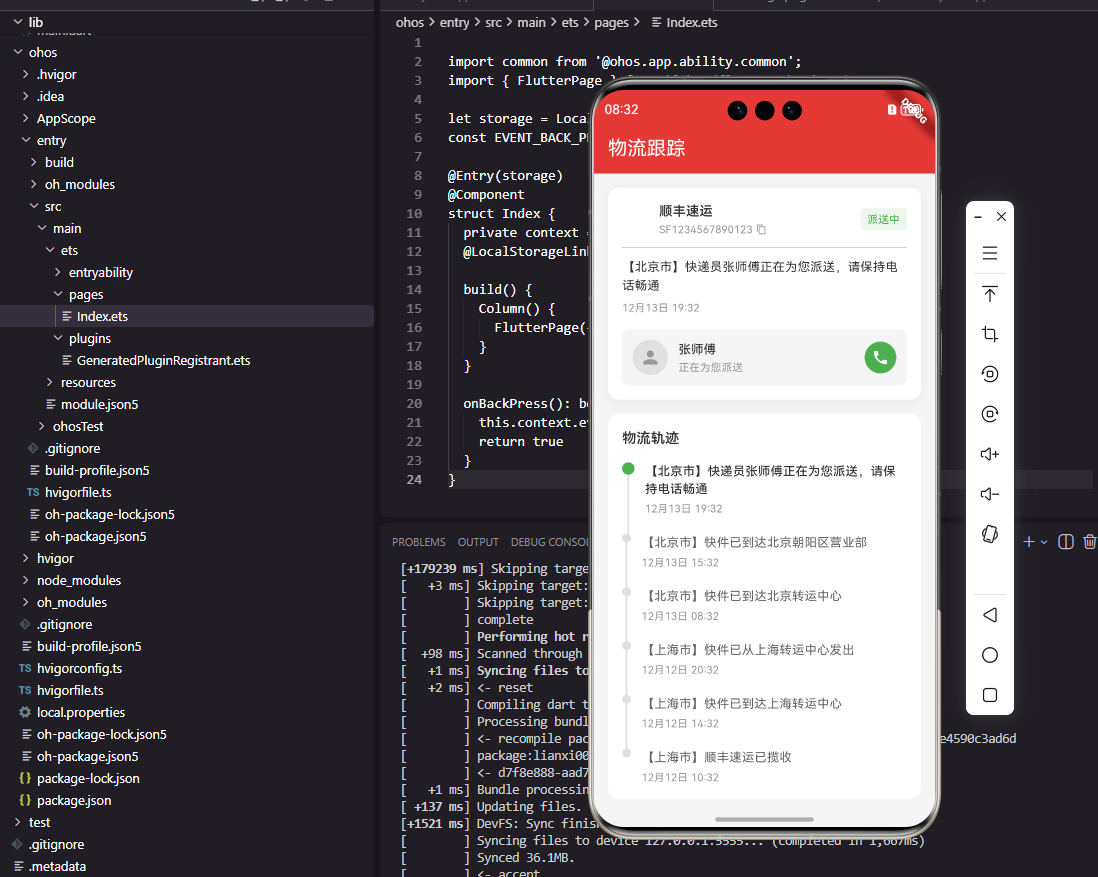
随着 Flutter 在跨平台开发领域的不断成熟,越来越多的开发者开始尝试使用 Flutter 为 OpenHarmony 系统开发应用。电商应用中的物流跟踪功能是一个典型场景,它要求界面流畅、数据实时,同时要能良好适配不同设备的屏幕尺寸。本文将详细介绍如何使用 Flutter 开发一个完整的物流跟踪组件,并针对 OpenHarmony 平台进行特别优化。
一、物流数据模型的设计与跨平台考量
在开始构建 UI 之前,我们需要先设计合适的数据模型。一个良好的数据模型应该既能满足业务需求,又要考虑跨平台数据交换的便捷性。
class LogisticsInfo {
  final String trackingNo;        // 快递单号
  final String companyName;       // 快递公司名称
  final String companyLogo;       // 公司Logo URL
  final LogisticsStatus status;   // 当前状态
  final String? courierName;      // 快递员姓名
  final String? courierPhone;     // 快递员电话
  final List<LogisticsTrace> traces; // 物流轨迹列表
  final DateTime? estimatedDelivery; // 预计送达时间

  const LogisticsInfo({
    required this.trackingNo,
    required this.companyName,
    required this.companyLogo,
    required this.status,
    this.courierName,
    this.courierPhone,
    required this.traces,
    this.estimatedDelivery,
  });
}
在 OpenHarmony 上运行 Flutter 应用时,需要特别注意网络请求返回的数据格式。OpenHarmony 的网络 API 与 Android/iOS 略有差异,建议使用 dio 库并进行统一封装:
class LogisticsApiService {
  final Dio _dio = Dio();

  Future<LogisticsInfo> fetchLogisticsInfo(String orderId) async {
    try {
      // 针对OpenHarmony平台的适配处理
      final response = await _dio.get(
        'https://api.example.com/logistics/$orderId',
        options: Options(
          // OpenHarmony可能需要特定的headers
          headers: _getPlatformSpecificHeaders(),
        ),
      );

      // 数据解析
      return LogisticsInfo.fromJson(response.data);
    } on DioException catch (e) {
      // 统一错误处理
      throw LogisticsException(
        '获取物流信息失败: ${e.message}',
        code: e.response?.statusCode,
      );
    }
  }

  Map<String, String> _getPlatformSpecificHeaders() {
    // 根据不同平台添加特定headers
    if (Platform.isOpenHarmony) {
      return {
        'User-Agent': 'Flutter-OpenHarmony-Client/1.0',
        'X-Platform': 'OpenHarmony',
      };
    }
    return {};
  }
}
二、物流跟踪组件的核心架构
物流跟踪界面通常由多个组件构成,我们需要合理组织这些组件的关系。下图展示了物流跟踪组件的整体架构:
2.1 物流状态卡片组件
状态卡片是物流跟踪的核心组件,它需要清晰展示当前状态和关键信息:
class LogisticsStatusCard extends StatelessWidget {
final LogisticsInfo logistics;
final VoidCallback? onCallCourier;
final VoidCallback? onViewDetails;
const LogisticsStatusCard({
super.key,
required this.logistics,
this.onCallCourier,
this.onViewDetails,
});
Widget build(BuildContext context) {
return Card(
margin: const EdgeInsets.all(16),
elevation: 4,
shape: RoundedRectangleBorder(
borderRadius: BorderRadius.circular(12),
),
child: Padding(
padding: const EdgeInsets.all(16),
child: Column(
crossAxisAlignment: CrossAxisAlignment.start,
children: [
// 头部信息:快递公司+单号
_buildHeaderSection(),
const Divider(height: 24),
// 最新物流状态
_buildLatestStatus(),
// 预计送达时间(如果有)
if (logistics.estimatedDelivery != null)
_buildDeliveryEstimation(),
// 快递员信息(仅派送中状态显示)
if (logistics.status == LogisticsStatus.delivering)
_buildCourierSection(),
// 操作按钮
_buildActionButtons(),
],
),
),
);
}
}
在 OpenHarmony 平台上,卡片阴影效果可能需要特别处理。OpenHarmony 的渲染引擎在某些设备上对阴影的支持略有不同,建议使用 PhysicalModel 作为后备方案:
Widget _buildCardWrapper(List<Widget> children) {
  // 检测是否为OpenHarmony平台
  if (Platform.isOpenHarmony) {
    // 在OpenHarmony上使用PhysicalModel获得更一致的阴影效果
    return PhysicalModel(
      color: Colors.white,
      elevation: 4,
      borderRadius: BorderRadius.circular(12),
      child: Padding(
        padding: const EdgeInsets.all(16),
        child: Column(
          crossAxisAlignment: CrossAxisAlignment.start,
          children: children,
        ),
      ),
    );
  }

  // 其他平台使用Card
  return Card(
    elevation: 4,
    shape: RoundedRectangleBorder(
      borderRadius: BorderRadius.circular(12),
    ),
    child: Padding(
      padding: const EdgeInsets.all(16),
      child: Column(
        crossAxisAlignment: CrossAxisAlignment.start,
        children: children,
      ),
    ),
  );
}
2.2 物流轨迹时间线组件
物流轨迹时间线是展示包裹流转历史的核心组件。我们需要设计一个清晰的时间轴,突出显示当前节点:
class LogisticsTimeline extends StatelessWidget {
final List<LogisticsTrace> traces;
final bool showAll;
const LogisticsTimeline({
super.key,
required this.traces,
this.showAll = false,
});
Widget build(BuildContext context) {
// 控制显示的数量,避免界面过长
final displayTraces = showAll
? traces
: traces.take(3).toList();
return Container(
padding: const EdgeInsets.symmetric(horizontal: 16, vertical: 8),
child: Column(
crossAxisAlignment: CrossAxisAlignment.start,
children: [
const Padding(
padding: EdgeInsets.only(bottom: 16),
child: Text(
'物流轨迹',
style: TextStyle(
fontSize: 18,
fontWeight: FontWeight.bold,
),
),
),
ListView.separated(
shrinkWrap: true,
physics: const NeverScrollableScrollPhysics(),
itemCount: displayTraces.length,
separatorBuilder: (context, index) => const SizedBox(height: 8),
itemBuilder: (context, index) {
return _buildTimelineItem(
displayTraces[index],
index == 0, // 第一个节点是当前节点
index,
);
},
),
// 显示更多/收起按钮
if (traces.length > 3 && !showAll)
_buildViewMoreButton(),
],
),
);
}
}
三、OpenHarmony平台特定适配与优化
3.1 网络请求优化
OpenHarmony 平台的网络环境可能与其他平台有所不同,特别是在弱网环境下。我们需要对网络请求进行特别优化:
class OpenHarmonyHttpClient {
  final Dio _dio;

  OpenHarmonyHttpClient()
      : _dio = Dio(BaseOptions(
          connectTimeout: const Duration(seconds: 10),
          receiveTimeout: const Duration(seconds: 15),
        )) {
    // OpenHarmony特定配置
    _setupForOpenHarmony();
  }

  void _setupForOpenHarmony() {
    // 添加OpenHarmony平台拦截器
    _dio.interceptors.add(InterceptorsWrapper(
      onRequest: (options, handler) {
        // 在OpenHarmony上,可能需要额外的安全头
        options.headers.addAll({
          'X-OpenHarmony-Version': _getOpenHarmonyVersion(),
          'X-Device-Model': _getDeviceModel(),
        });
        return handler.next(options);
      },
      onResponse: (response, handler) {
        // 处理OpenHarmony特定的响应格式
        return handler.next(response);
      },
      onError: (error, handler) {
        // OpenHarmony网络错误特殊处理
        if (error.type == DioExceptionType.connectionError) {
          // 处理连接错误
        }
        return handler.next(error);
      },
    ));
  }
}
3.2 本地存储适配
物流信息需要本地缓存以减少网络请求。在 OpenHarmony 上,我们可以使用 shared_preferences 包,但需要注意权限配置:
class LogisticsCacheManager {
  final SharedPreferences _prefs;

  LogisticsCacheManager(this._prefs);

  Future<void> cacheLogisticsInfo(
    String orderId,
    LogisticsInfo info
  ) async {
    try {
      final jsonStr = jsonEncode(info.toJson());
      await _prefs.setString('logistics_$orderId', jsonStr);

      // 在OpenHarmony上,可能需要额外同步到系统级存储
      if (Platform.isOpenHarmony) {
        await _syncToSystemStorage(orderId, jsonStr);
      }
    } catch (e) {
      debugPrint('缓存物流信息失败: $e');
    }
  }

  Future<LogisticsInfo?> getCachedLogisticsInfo(String orderId) async {
    try {
      final jsonStr = _prefs.getString('logistics_$orderId');
      if (jsonStr == null) return null;

      final jsonMap = jsonDecode(jsonStr) as Map<String, dynamic>;
      return LogisticsInfo.fromJson(jsonMap);
    } catch (e) {
      debugPrint('读取缓存物流信息失败: $e');
      return null;
    }
  }
}
四、物流跟踪组件的状态管理与数据流
物流数据的状态管理对于应用性能至关重要。下图展示了物流数据在应用中的流动过程:
这种数据流设计确保了即使在网络状况不佳的情况下,用户仍然可以查看之前的物流信息,同时后台会尝试更新数据。
五、性能优化与最佳实践
5.1 图片加载优化
物流组件中需要加载快递公司 Logo,在 OpenHarmony 平台上需要对图片加载进行特别优化:
Widget _buildCompanyLogo(String logoUrl) {
  return SizedBox(
    width: 40,
    height: 40,
    child: CachedNetworkImage(
      imageUrl: logoUrl,
      placeholder: (context, url) => Container(
        color: Colors.grey[200],
        alignment: Alignment.center,
        child: const CircularProgressIndicator(strokeWidth: 2),
      ),
      errorWidget: (context, url, error) => Container(
        color: Colors.grey[200],
        alignment: Alignment.center,
        child: const Icon(Icons.local_shipping, size: 24),
      ),
      // OpenHarmony平台特定的图片解码配置
      imageBuilder: (context, imageProvider) {
        if (Platform.isOpenHarmony) {
          // 使用更适合OpenHarmony的图片渲染配置
          return Image(
            image: imageProvider,
            fit: BoxFit.contain,
            filterQuality: FilterQuality.medium,
          );
        }
        return Image(image: imageProvider);
      },
    ),
  );
}
5.2 动画与交云优化
物流状态变化时,适当的动画可以提升用户体验。在 OpenHarmony 上实现平滑动画:
class StatusUpdateAnimation extends StatefulWidget {
final LogisticsStatus oldStatus;
final LogisticsStatus newStatus;
final Widget child;
const StatusUpdateAnimation({
super.key,
required this.oldStatus,
required this.newStatus,
required this.child,
});
State<StatusUpdateAnimation> createState() => _StatusUpdateAnimationState();
}
class _StatusUpdateAnimationState extends State<StatusUpdateAnimation>
with SingleTickerProviderStateMixin {
late AnimationController _controller;
late Animation<double> _animation;
void initState() {
super.initState();
_controller = AnimationController(
duration: const Duration(milliseconds: 500),
vsync: this,
);
_animation = Tween<double>(begin: 0, end: 1).animate(
CurvedAnimation(
parent: _controller,
curve: Curves.easeInOut,
),
);
// 仅在状态变化时运行动画
if (widget.oldStatus != widget.newStatus) {
_controller.forward();
}
}
Widget build(BuildContext context) {
return AnimatedBuilder(
animation: _animation,
builder: (context, child) {
return Transform.translate(
offset: Offset(0, (1 - _animation.value) * 10),
child: Opacity(
opacity: _animation.value,
child: child,
),
);
},
child: widget.child,
);
}
void dispose() {
_controller.dispose();
super.dispose();
}
}
六、测试与调试
在 OpenHarmony 平台上测试 Flutter 物流组件时,需要特别注意以下几点:
- 网络环境模拟:OpenHarmony 模拟器与实际设备的网络行为可能不同
- 内存使用:监控物流图片加载时的内存占用
- 滚动性能:长物流轨迹列表的滚动流畅性测试
- 跨平台一致性:确保在不同平台上 UI 表现一致
void testLogisticsComponent() {
  testWidgets('物流组件在OpenHarmony上正常渲染', (WidgetTester tester) async {
    // 准备测试数据
    final testLogisticsInfo = LogisticsInfo(
      trackingNo: 'SF1234567890',
      companyName: '顺丰速运',
      companyLogo: 'https://example.com/sf-logo.png',
      status: LogisticsStatus.delivering,
      courierName: '张师傅',
      courierPhone: '13800138000',
      traces: [
        LogisticsTrace(
          content: '快件已到达【深圳转运中心】',
          time: DateTime.now().subtract(const Duration(hours: 2)),
          location: '深圳',
        ),
      ],
    );

    // 渲染组件
    await tester.pumpWidget(
      MaterialApp(
        home: Scaffold(
          body: LogisticsStatusCard(
            logistics: testLogisticsInfo,
            onCallCourier: () {},
          ),
        ),
      ),
    );

    // 验证关键元素存在
    expect(find.text('顺丰速运'), findsOneWidget);
    expect(find.text('SF1234567890'), findsOneWidget);
    expect(find.text('派送中'), findsOneWidget);
    expect(find.byIcon(Icons.phone), findsOneWidget);
  });
}
总结
通过本文的实践,我们完成了一个完整的 Flutter 物流跟踪组件的开发,并针对 OpenHarmony 平台进行了特别优化。关键点包括:
- 数据模型设计:既要满足业务需求,也要考虑跨平台数据交换
- 组件架构:模块化设计,便于维护和扩展
- 平台适配:针对 OpenHarmony 的网络、存储、UI 渲染特性进行优化
- 性能优化:图片缓存、动画优化、内存管理
- 测试策略:确保跨平台一致性
Flutter 在 OpenHarmony 上的开发体验总体良好,大部分代码可以跨平台复用,只需在特定区域进行平台适配。随着 OpenHarmony 生态的不断发展,Flutter 在该平台上的支持也会越来越完善,为开发者提供更多可能性。
欢迎大家加入开源鸿蒙跨平台开发者社区,一起探索更多鸿蒙跨平台开发技术!

作为“人工智能6S店”的官方数字引擎,为AI开发者与企业提供一个覆盖软硬件全栈、一站式门户。
更多推荐


 17
17 0
0- 0


 已为社区贡献31条内容

所有评论(0)