
Flutter跨平台开发适配鸿蒙:本地数据存储实战指南
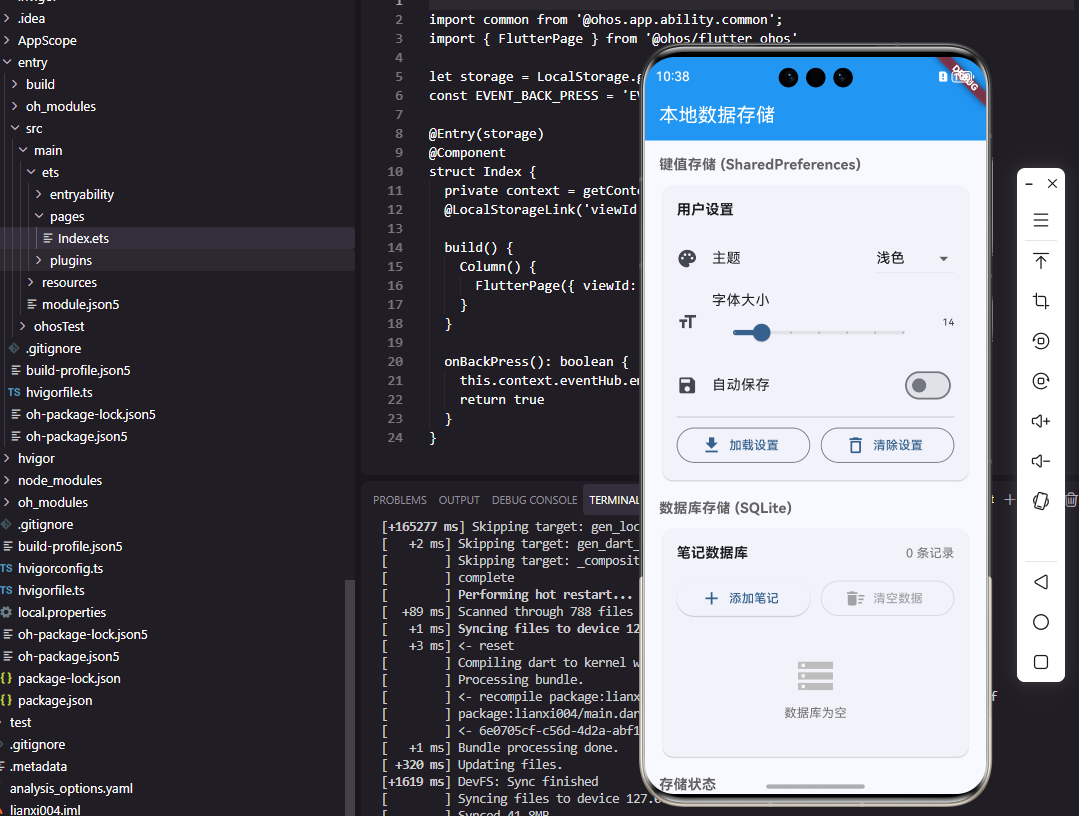
将 Flutter 应用的本地数据存储适配到 OpenHarmony 平台,需要深入理解两个平台的存储机制和差异。保持代码一致性:使用相同的 Flutter API 访问不同平台的存储充分利用 OpenHarmony 特性:如安全存储、性能优化等确保数据兼容性:实现平滑的数据迁移和版本升级随着 OpenHarmony 生态的不断完善,Flutter 对鸿蒙平台的支持也将更加成熟。未来我们可以期待更
引言
在Flutter应用向OpenHarmony平台迁移的过程中,数据存储层的适配是关键一环,正确的实现方式能让你的应用在鸿蒙生态中稳定运行。
在 Flutter 开发中,当我们计划将应用适配到 OpenHarmony 平台时,本地数据存储的实现方式成为一项关键技术挑战。不同的平台有着各自的原生存储机制,如何在保证 Flutter 跨平台特性的同时,充分利用 OpenHarmony 的存储能力?
本文将带你深入实战,探索在 OpenHarmony 上实现 Flutter 应用本地数据存储的完整方案。
1 Flutter存储机制在OpenHarmony上的适配
Flutter 应用通常使用 shared_preferences 和 sqflite 这两个主流插件处理本地数据存储。在 Android 和 iOS 平台上,它们分别调用平台的原生存储 API。但当目标平台变为 OpenHarmony 时,我们需要理解这些插件在鸿蒙上的工作方式。
1.1 SharedPreferences在鸿蒙的底层实现
在 OpenHarmony 上,shared_preferences 插件实际上是通过 FFI(Foreign Function Interface)调用了鸿蒙的 Preferences 模块。这个适配层是由开源鸿蒙跨平台社区维护的,它确保了 API 的一致性。
// Flutter中的使用方式保持不变
import 'package:shared_preferences/shared_preferences.dart';

Future<void> saveUserPreferences() async {
  final prefs = await SharedPreferences.getInstance();

  // 这些操作在OpenHarmony上会转换为Preferences API调用
  await prefs.setString('username', '鸿蒙开发者');
  await prefs.setInt('user_id', 1001);
  await prefs.setBool('is_first_launch', false);

  print('偏好设置已保存到OpenHarmony Preferences');
}
关键点解释:
getInstance()方法在 OpenHarmony 上会初始化一个连接到鸿蒙 Preferences 存储的连接- 所有数据操作都是异步的,这与在 Android/iOS 上的行为一致
- 在鸿蒙平台上,数据最终会被存储在
/data/app/.../preferences目录下
读取数据时,需要考虑 OpenHarmony 平台可能存在的细微差异:
Future<Map<String, dynamic>> loadPreferences() async {
  try {
    final prefs = await SharedPreferences.getInstance();

    return {
      'username': prefs.getString('username') ?? '默认用户',
      'user_id': prefs.getInt('user_id') ?? 0,
      'is_first_launch': prefs.getBool('is_first_launch') ?? true,
      // OpenHarmony特有:获取存储位置信息
      'storage_path': prefs.getString('storage_path') ?? '鸿蒙存储路径'
    };
  } catch (e) {
    // 处理OpenHarmony平台特定的异常
    print('在OpenHarmony上读取偏好设置失败: $e');
    return getDefaultPreferences();
  }
}
1.2 SQLite数据库的跨平台适配
对于更复杂的数据存储需求,sqflite 插件在 OpenHarmony 上的实现更加复杂。它需要将 SQLite 操作转换为对鸿蒙关系型数据库(relationalStore)的调用。
import 'package:sqflite/sqflite.dart';

Future<Database> initNotesDatabase() async {
  // 在OpenHarmony上,这会创建或打开一个基于relationalStore的数据库
  return await openDatabase(
    'notes_oh.db', // 数据库文件名
    version: 2, // 版本号用于迁移控制
    onCreate: (Database db, int version) async {
      // 创建笔记表
      await db.execute('''
        CREATE TABLE notes(
          id INTEGER PRIMARY KEY AUTOINCREMENT,
          title TEXT NOT NULL,
          content TEXT,
          created_time INTEGER,
          updated_time INTEGER,
          is_pinned INTEGER DEFAULT 0
        )
      ''');

      // 为查询效率创建索引
      await db.execute(
          'CREATE INDEX idx_notes_created ON notes(created_time)');

      print('在OpenHarmony上成功创建数据库表');
    },
    onUpgrade: (Database db, int oldVersion, int newVersion) async {
      // 处理OpenHarmony平台上的数据库迁移
      if (oldVersion < 2) {
        await db.execute('ALTER TABLE notes ADD COLUMN is_pinned INTEGER DEFAULT 0');
      }
    },
  );
}
下面通过一个流程图来展示 Flutter 数据存储操作在 OpenHarmony 平台上的完整调用流程:
2 关键API使用场景及注意事项
2.1 Preferences存储的最佳实践
在 OpenHarmony 上使用 Preferences 存储时,有几点需要特别注意:
Future<void> saveAppSettings() async {
  final prefs = await SharedPreferences.getInstance();

  // 1. 批量操作减少IO次数
  await prefs.setString('app_theme', 'dark');
  await prefs.setInt('font_size', 16);
  await prefs.setBool('notification_enabled', true);

  // 2. 重要数据需要立即持久化
  await prefs.setString('user_token', 'secure_token_12345');
  // 在OpenHarmony上,强制立即写入磁盘
  await prefs.commit(); // 注意:这个方法在标准shared_preferences中不存在

  // 3. 处理存储空间不足的情况
  try {
    await prefs.setString('large_data', '非常长的字符串数据...');
  } catch (e) {
    if (e.toString().contains('磁盘空间不足')) {
      // OpenHarmony特有的异常处理
      print('OpenHarmony存储空间不足,清理缓存数据');
      await cleanupCache();
    }
  }
}
2.2 关系型数据库的OpenHarmony适配
OpenHarmony 的关系型数据库与标准 SQLite 有细微差异,需要在代码中做相应适配:
class NoteDao {
  final Database db;

  NoteDao(this.db);

  Future<int> insertNote(Note note) async {
    // OpenHarmony对日期时间的处理
    final now = DateTime.now().millisecondsSinceEpoch;

    final id = await db.insert(
      'notes',
      {
        'title': note.title,
        'content': note.content,
        'created_time': now,
        'updated_time': now,
        'is_pinned': note.isPinned ? 1 : 0,
      },
      conflictAlgorithm: ConflictAlgorithm.replace,
    );

    return id;
  }

  Future<List<Note>> queryNotes({String? keyword, bool? pinned}) async {
    // 构建OpenHarmony兼容的查询
    String where = '1=1';
    List<dynamic> whereArgs = [];

    if (keyword != null && keyword.isNotEmpty) {
      // OpenHarmony的LIKE查询可能需要不同处理
      where += ' AND (title LIKE ? OR content LIKE ?)';
      whereArgs.add('%$keyword%');
      whereArgs.add('%$keyword%');
    }

    if (pinned != null) {
      where += ' AND is_pinned = ?';
      whereArgs.add(pinned ? 1 : 0);
    }

    final List<Map<String, dynamic>> maps = await db.query(
      'notes',
      where: where,
      whereArgs: whereArgs,
      orderBy: 'is_pinned DESC, updated_time DESC',
    );

    return List.generate(maps.length, (i) {
      return Note.fromMap(maps[i]);
    });
  }
}
3 跨平台兼容性处理策略
在实际开发中,保持 Flutter 应用在多个平台(包括 OpenHarmony)上的行为一致是重要挑战。以下是针对数据存储层的兼容性处理方案:
3.1 统一的数据访问层
创建一个平台无关的数据访问层,封装平台特定实现:
abstract class StorageService {
Future<void> saveString(String key, String value);
Future<String?> getString(String key);
Future<void> saveInt(String key, int value);
Future<int?> getInt(String key);
// ... 其他方法
}
// OpenHarmony平台的具体实现
class OhStorageService implements StorageService {
final SharedPreferences _prefs;
OhStorageService(this._prefs);
Future<void> saveString(String key, String value) async {
await _prefs.setString(key, value);
// OpenHarmony特有:记录存储日志
await _logStorageOperation(key, 'string');
}
Future<String?> getString(String key) async {
final value = _prefs.getString(key);
// OpenHarmony特有:监控读取频率
await _monitorAccessFrequency(key);
return value;
}
// OpenHarmony特有的辅助方法
Future<void> _logStorageOperation(String key, String type) async {
// 实现OpenHarmony平台上的操作日志
}
Future<void> _monitorAccessFrequency(String key) async {
// 实现访问频率监控
}
}
3.2 数据迁移与兼容性保证
当应用从其他平台迁移到 OpenHarmony,或者 OpenHarmony 版本更新时,数据迁移是关键:
Future<void> migrateToOpenHarmony() async {
  // 检查是否已经迁移过
  final prefs = await SharedPreferences.getInstance();
  final bool migrated = prefs.getBool('migrated_to_oh') ?? false;

  if (!migrated) {
    print('开始向OpenHarmony迁移数据...');

    try {
      // 步骤1:导出旧平台数据
      final oldData = await _exportLegacyData();

      // 步骤2:转换数据格式以适应OpenHarmony
      final ohData = await _convertForOpenHarmony(oldData);

      // 步骤3:导入到OpenHarmony存储
      await _importToOpenHarmony(ohData);

      // 步骤4:标记迁移完成
      await prefs.setBool('migrated_to_oh', true);

      print('数据迁移到OpenHarmony完成');
    } catch (e) {
      print('迁移到OpenHarmony失败: $e');
      // 回滚策略
      await _rollbackMigration();
    }
  }
}
4 性能优化与调试技巧
在 OpenHarmony 平台上优化 Flutter 存储性能:
4.1 批量操作与事务管理
Future<void> batchInsertNotes(List<Note> notes) async {
  final Database db = await database;

  // 使用批处理提高性能
  final Batch batch = db.batch();

  for (final note in notes) {
    batch.insert('notes', note.toMap());
  }

  await batch.commit();

  // OpenHarmony特有:优化存储空间
  await db.execute('VACUUM');
}

// 监控OpenHarmony存储性能
Future<void> monitorStoragePerformance() async {
  final Database db = await database;

  // 获取数据库大小(OpenHarmony特有方法)
  final List<Map<String, dynamic>> sizeInfo = await db.rawQuery(
    "SELECT page_count * page_size as size FROM pragma_page_info()"
  );

  final int dbSize = sizeInfo.first['size'] ?? 0;
  print('OpenHarmony数据库大小: ${dbSize ~/ 1024}KB');

  // 检查是否需要优化
  if (dbSize > 10 * 1024 * 1024) { // 大于10MB
    await db.execute('PRAGMA optimize');
    print('已执行OpenHarmony数据库优化');
  }
}
4.2 调试与故障排除
开发过程中,针对 OpenHarmony 平台的调试技巧:
// 添加OpenHarmony平台特定的调试信息
void debugStorageInfo() async {
  if (Platform.isOpenHarmony) {
    final prefs = await SharedPreferences.getInstance();

    // 获取所有键(调试用)
    final Set<String> keys = prefs.getKeys();
    print('OpenHarmony Preferences键数量: ${keys.length}');

    // 检查存储健康状态
    try {
      // 测试写入
      await prefs.setString('health_check', DateTime.now().toString());
      await prefs.remove('health_check');
      print('OpenHarmony存储健康检查通过');
    } catch (e) {
      print('OpenHarmony存储异常: $e');
      // 触发恢复机制
      await recoverStorage();
    }
  }
}
总结与展望
将 Flutter 应用的本地数据存储适配到 OpenHarmony 平台,需要深入理解两个平台的存储机制和差异。通过本文介绍的实践方案,你可以:
- 保持代码一致性:使用相同的 Flutter API 访问不同平台的存储
- 充分利用 OpenHarmony 特性:如安全存储、性能优化等
- 确保数据兼容性:实现平滑的数据迁移和版本升级
随着 OpenHarmony 生态的不断完善,Flutter 对鸿蒙平台的支持也将更加成熟。未来我们可以期待更统一的存储 API 和更高效的性能表现。
对于正在开发或维护 Flutter 应用的开发者来说,现在开始适配 OpenHarmony 是一个明智的选择。这不仅能扩展应用的用户基础,还能提前积累跨鸿蒙平台开发的经验,为未来的技术演进做好准备。
欢迎大家加入开源鸿蒙跨平台开发者社区,一起探索更多鸿蒙跨平台开发技术!

作为“人工智能6S店”的官方数字引擎,为AI开发者与企业提供一个覆盖软硬件全栈、一站式门户。
更多推荐

 5
5 0
0- 0


 已为社区贡献28条内容

所有评论(0)