
PaddleOCR模型之昇腾部署
在使用飞桨OCR模型推理功能时候,主要涉及PaddlePaddle,PaddleCustomDevice,PaddleOCR,PaddleX,Paddle Inference组件。当然并不是所有的组件需要同时部署同时使用,因为飞桨提供了多套部署方案。接下来我们就这些组件进行描述和功能分类。飞桨主框架,将框架的基础接口和基础功能定义清楚,提供训练和推理的基础能力,以及业务中的动态和静态图的模式,参考
作者:昇腾实战派
一、PaddlePaddle(飞桨)技术入门
参考开源文档
部署&&快速开始:
https://www.paddleocr.ai/latest/quick_start.html
飞桨官方昇腾推理参考链接:
飞桨OCR推理应用技术简介
在使用飞桨OCR模型推理功能时候,主要涉及PaddlePaddle,PaddleCustomDevice,PaddleOCR,PaddleX,Paddle Inference组件。当然并不是所有的组件需要同时部署同时使用,因为飞桨提供了多套部署方案。接下来我们就这些组件进行描述和功能分类。
PaddlePaddle:飞桨主框架,将框架的基础接口和基础功能定义清楚,提供训练和推理的基础能力,以及业务中的动态和静态图的模式,参考PyTorch。
PaddleCustomDevice:飞桨提供的硬件接入模块/平台。过去使用Built-in方法接入,由于侵入式的方式定制化搞,Cmake编译过程繁琐(paddle1.4.0以前接入)。当前提供了统一的Plugin的方法,抽象为统一接口,由第三方硬件厂家自定义kernel的接口接入。参考:https://github.com/PaddlePaddle/PaddleCustomDevice/blob/develop/backends/npu/README_cn.md
PaddleOCR:毋庸置疑,飞桨的看家算法,OCR系列模型。
PaddleX:飞桨提供的套件,类似工具链。主要包括对外提供简化API接口、简易部署,对内调度多种推理加速(灵活调度onnxruntime, TensorRT等方法)的能力。
Paddle Inference:飞桨的推理平台,提供所有飞桨支持模型的推理接口。类似套件。
飞桨关系图

二、适配前要
背景
在近期项目中,我们面临高并发文档处理业务需求,需在昇腾千卡资源池上部署OCR模型(基于飞桨OCRv5-server版),预计支持用户量达10万+。多个业务单元相继提出PP-OCR适配需求,为提升昇腾生态影响力及交付效率,我们开展了全量适配解析,旨在为开发者提供可复用的技术思路。
适配难点
- 飞桨框架调优路径相对不明确,团队对飞桨优化经验有限,导致初始部署效率偏低。
- 飞桨推理加速依赖特定硬件生态,我们通过转向昇腾离线推理优化规避兼容性限制。
- OCR识别模块(Rec)涉及动态shape,需针对性处理以保障推理稳定性。
解决方案
- 采用昇腾OM推理路线,将飞桨框架调优转向昇腾离线优化,显著提升推理效率。
- 针对动态shape问题,实施静态化处理(如固定输入尺寸)与动态适配策略(如分段处理),确保模型稳定运行。
- 选择支持OM推理的PaddleX方案,简化部署流程,实现模型快速适配与性能优化。
三、推理部署
目标:
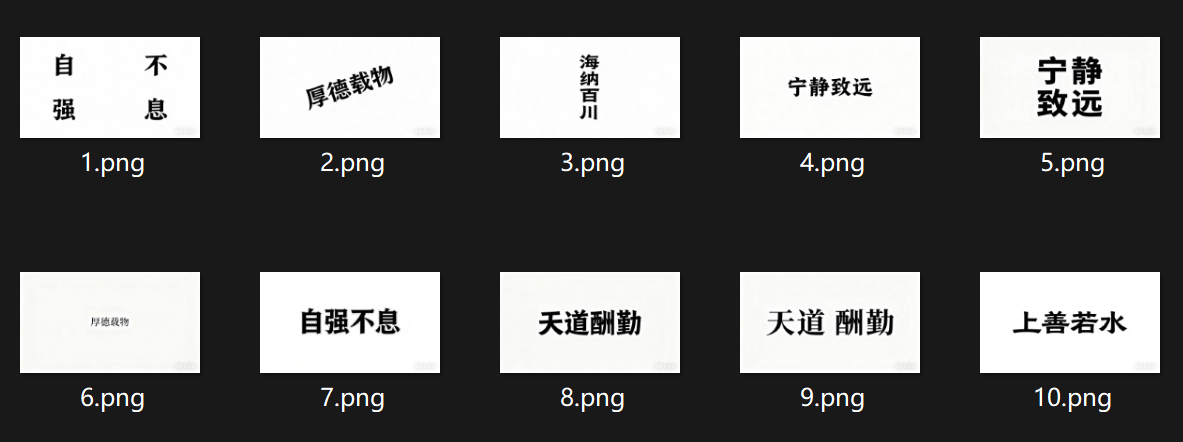
使用十张图片为实例,使用pp-ocrv5-server进行推理,精度符合要求,性能对标A100:
共处理 10 张图片:[8.png, 10.png, 3.png, 4.png, 7.png, 6.png, 5.png, 1.png, 9.png, 2.png]
每张图片推理时间: ['2.4222', '0.3217', '0.3193', '0.3271', '0.3034', '0.3195', '0.3491', '0.3583', '0.3128', '0.3062']
平均推理时间: 0.5340 秒
最长推理时间: 2.4222 秒
最短推理时间: 0.3034 秒
推理方案1 - PaddleOCR
环境搭建
本环境搭建方法是基于Padhttps://i-blog.csdnimg.cn/devpress/blog/95e153f838524ebe82d1fdd6ca515cca.png "#left")
dleOCR接口调用,因为PaddleOCR依赖PaddleCPU和PaddleNPU,所以需要进行框架编译安装。
paddle安装(2种方法可选)
方法1--编译安装
安装参考:https://github.com/PaddlePaddle/PaddleCustomDevice/blob/develop/backends/npu/README_cn.md
拉取镜像与新建容器:
docker pull ccr-2vdh3abv-pub.cnc.bj.baidubce.com/device/paddle-npu:cann800-ubuntu20-npu-910b-base-aarch64-gcc84
docker run -it --name wcy_ppocr_3 -v $(pwd):/work \
    --privileged --network=host --shm-size=128G -w=/work \
    -v /usr/local/Ascend/driver:/usr/local/Ascend/driver \
    -v /usr/local/bin/npu-smi:/usr/local/bin/npu-smi \
    -v /usr/local/dcmi:/usr/local/dcmi \
    -e ASCEND_RT_VISIBLE_DEVICES="0,1,2,3,4,5,6,7" \
    a13e8772f9df /bin/bash
方法2--使用whl包安装
在上面两个地址中找到需要的包的版本,下载到本地,xftp传到服务器上
pip install paddlepaddle-3.0.0.dev20250527-cp39-cp39-linux_aarch64.whl
pip install paddle_custom_npu-3.0.0.dev20250527-cp39-cp39-linux_aarch64.whl
安装其他依赖
# CANN-8.0.0 对 numpy 和 opencv 部分版本不支持,建议安装指定版本
python -m pip install numpy==1.26.4
python -m pip install opencv-python==3.4.18.65

source /usr/local/Ascend/ascend-toolkit/set_env.sh
export LD_PRELOAD=/usr/lib/aarch64-linux-gnu/libgomp.so.1.0.0:$LD_PRELOAD
安装验证测试
python -c "import paddle; paddle.utils.run_check()"

执行推理
测试十张图片的demo
from paddleocr import PaddleOCR
# 初始化OCR模型
ocr_model = PaddleOCR(device=“npu:0")
# 通过from PIL import Image加载图片
image = Image.open(str(image_path)).convert('RGB')
img_array = np.array(image)
# 循环载入10张图片,推理并计时
start_time = time.time()
predict_result = ocr_model.predict(img_array)
end_time = time.time()
测试结果
==================================================
共处理 10 张图片:[2.png, 1.png, 10.png, 3.png, 5.png, 7.png, 8.png, 4.png, 6.png, 9.png]
每张图片推理时间: ['17.7093', '3.8061', '0.5734', '0.5779', '3.5471', '0.6304', '0.6638', '0.6857', '1.5316', '0.6152']
平均推理时间: 3.0341 秒
最长推理时间: 17.7093 秒
最短推理时间: 0.5734 秒
==================================================
推理方法2 - PaddleX
PaddleX专门用于推理加速的工具,自身集成了数据预处理,动态和静态切换,底层灵活调度Paddle Inference和Paddle Onnxruntime,不依赖于PaddleNPU和PaddleOCR,对于推理部署而言,更推荐该方法。
环境搭建
git clone https://github.com/PaddlePaddle/PaddleX.git
cd PaddleX
pip install -e ".[base]"
git clone太慢,尝试导入到gitee后从gitee下载 => 安装好
git clone 显著提速,解决Github代码拉取速度缓慢问题[通俗易懂]
获取权重文件
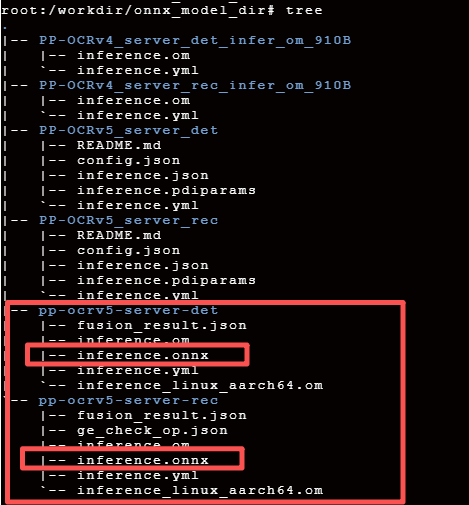
MindScope PP-OCRv5-server,本地路径结构如下:
权重转换
# 对detect模型做转换
atc --model=inference.onnx --framework=5 --output=inference --soc_version=Ascend910B2 --input_shape "x:1,3,544,960" --precision_mode_v2=origin
# 对rec模型进行转换
atc --model=inference.onnx --framework=5 --output=inference --soc_version=Ascend910B2 --input_shape "x:1,3,32~2048,32~2048" --precision_mode_v2=origin
已完成格式转换,生成的om模型在容器的${home}/PP-OCRv5_server_det_onnx和${home}/PP-OCRv5_server_rec_onnx路径下
参数说明:
--input_shape "x:1,3,544,960" 在detect模型转换中该参数设置是因为客户的图片均为2730 x 1535大小,经过比例缩放后变成960 x 544,在实际使用中,可以根据真实的场景选择paddleX中对detect部分resize选择对应方法。
--input_shape "x:1,3,32~2048,32~2048" 在rec模型中该参数设置是因为识别模型的输入是由detect的输出提供,对于一个图片识别的框数量是变化的,shape也是变化的,因此,这里需要用动态shape,且更符合业务。
--precision_mode_v2=origin 使用onnx模型原始的精度类型
执行推理
测试十张图片的demo
import os
import time
import numpy as np
import argparse
from PIL import Image
from pathlib import Path
from paddlex import create_pipeline

# 硬编码图片文件夹路径
IMAGE_FOLDER_PATH = "/workdir/scripts/figures"  # 请替换为实际图片文件夹路径

# 支持的图片文件扩展名
SUPPORTED_EXTENSIONS = ('.jpg', '.jpeg', '.png', '.bmp', '.gif', '.tiff')

def extract_ocr_results(predict_result: dict):
    """提取并简化OCR识别结果"""
    if not predict_result or len(predict_result) == 0:
        return []

    predict_result = predict_result[0]
    rec_texts = predict_result.get('rec_texts', [])
    print(f"识别文本: {rec_texts}")
    rec_scores = predict_result.get('rec_scores', [])
    print(f"识别分数: {rec_scores}")
    rec_polys = predict_result.get('rec_polys', [])
    # print(f"识别坐标: {rec_polys}")

    extracted = []
    for text, score, poly in zip(rec_texts, rec_scores, rec_polys):
        extracted.append({
            "text": text,
            "score": float(score),
            "polygon": poly.tolist() if hasattr(poly, 'tolist') else poly
        })
    return extracted


def load_image(image_path):
    """加载图片并返回PIL Image对象"""
    try:
        return Image.open(str(image_path)).convert('RGB')
    except Exception as e:
        print(f"加载图片 {image_path} 出错: {str(e)}")
        return None


def get_image_files(folder_path, max_count=10):
    """获取文件夹中的图片文件,最多返回max_count个"""
    folder = Path(folder_path)
    if not folder.exists() or not folder.is_dir():
        raise Exception(f"文件夹不存在或不是目录: {folder_path}")

    image_files = []
    # 遍历文件夹中的所有文件
    for file in folder.iterdir():
        if file.is_file() and file.suffix.lower() in SUPPORTED_EXTENSIONS:
            image_files.append(file)
            # 达到最大数量则停止
            if len(image_files) >= max_count:
                break

    return image_files


def main():
    parser = argparse.ArgumentParser()
    args = parser.parse_args()

    # 初始化OCR模型(移除use_gpu参数,依赖环境变量控制GPU)
    print("初始化OCR模型...")
    print("已通过环境变量指定使用0号NPU")
    pipeline = create_pipeline(pipeline="/workdir/scripts/OCR.yaml", use_hpip=True)

    # 获取图片文件列表(最多10张)
    print(f"从文件夹 {IMAGE_FOLDER_PATH} 加载图片...")
    try:
        image_files = get_image_files(IMAGE_FOLDER_PATH, max_count=10)
        if not image_files:
            print("未找到任何图片文件")
            return

        print(f"找到 {len(image_files)} 张图片,开始OCR推理...")

        # 存储每张图片的推理时间
        inference_times = []

        # 遍历图片进行推理
        for i, image_path in enumerate(image_files, 1):
            print("image_path:", image_path)
            print(f"\n处理第 {i} 张图片: {image_path.name}")

            # 加载图片
            image = load_image(image_path)
            if image is None:
                continue

            # 转换为numpy数组
            img_array = np.array(image)

            # 推理并计时
            start_time = time.perf_counter()
            predict_result = pipeline.predict(
                input=img_array,
                use_doc_orientation_classify=False,
                use_doc_unwarping=False,
                use_textline_orientation=False,
            )
            end_time = time.perf_counter()

            # 处理结果
            res = []
            for result in predict_result:
                res.append(result)
            simplified_result = extract_ocr_results(res)
            print(f"识别到 {len(simplified_result)} 个文本区域")

            # 计算耗时
            elapsed = end_time - start_time
            inference_times.append(elapsed)

            print(f"推理完成,耗时: {elapsed*1000:.4f} ms")

        # 计算并显示统计结果
        if inference_times:
            print("\n" + "=" * 50)
            print(f"共处理 {len(inference_times)} 张图片")
            print(f"每张图片推理时间: {[f'{t*1000:.4f}' for t in inference_times]}")
            print(f"平均推理时间: {sum(inference_times)*1000 / len(inference_times):.4f} ms")
            print(f"最长推理时间: {max(inference_times)*1000:.4f} ms")
            print(f"最短推理时间: {min(inference_times)*1000:.4f} ms")
            print("=" * 50)
        else:
            print("没有成功处理任何图片")

    except Exception as e:
        print(f"发生错误: {str(e)}")
        return


if __name__ == "__main__":
    main()
配合的OCR.yaml文件
TextDetection:
    module_name: text_detection
    model_name: PP-OCRv5_server_det
    model_dir: /workdir/models/PP-OCRv5_server_det_onnx
    limit_side_len: 960
    limit_type: max
    max_side_limit: 4000
    thresh: 0.3
    box_thresh: 0.6
    unclip_ratio: 1.5
    hpi_config:
        auto_config: False
        backend: om
        device_type: npu
    input_shape: [3, 544, 960]
TextRecognition:
    module_name: text_recognition
    model_name: PP-OCRv5_server_rec
    model_dir: /workdir/models/PP-OCRv5_server_rec_onnx
    batch_size: 1
    score_thresh: 0.0
    hpi_config:
        auto_config: False
        backend: om
        device_type: npu
测试结果
==================================================
共处理 10 张图片: [1.png, 10.png, 2.png, 3.png, 4.png, 5.png, 6.png, 7.png, 8.png, 9.png]
每张图片推理时间: ['0.0180', '0.0175', '0.0178', '0.0206', '0.0207', '0.0192', '0.0202', '0.0230', '0.0202', '0.0222']
平均推理时间: 0.0199 ms
最长推理时间: 0.0230 ms
最短推理时间: 0.0175 ms
==================================================

作为“人工智能6S店”的官方数字引擎,为AI开发者与企业提供一个覆盖软硬件全栈、一站式门户。
更多推荐



 10
10 0
0- 0


 已为社区贡献1条内容

所有评论(0)