
旅行记录应用导入导出 - Cordova & OpenHarmony 混合开发实战
摘要 本文介绍了基于开源鸿蒙跨平台开发框架的旅行应用数据导入导出功能实现方案。系统支持JSON、CSV、PDF等多种格式的数据转换与导出,并提供文件导入功能。Web层通过HTML界面提供导入导出操作入口,JavaScript实现数据格式转换逻辑,并通过Cordova插件与原生层通信完成文件操作。具体实现了JSON/CSV导出函数、文件导入处理流程,以及原生层的文件读写支持,确保数据在不同格式间的灵
欢迎大家加入开源鸿蒙跨平台开发者社区,一起共建开源鸿蒙跨平台生态。
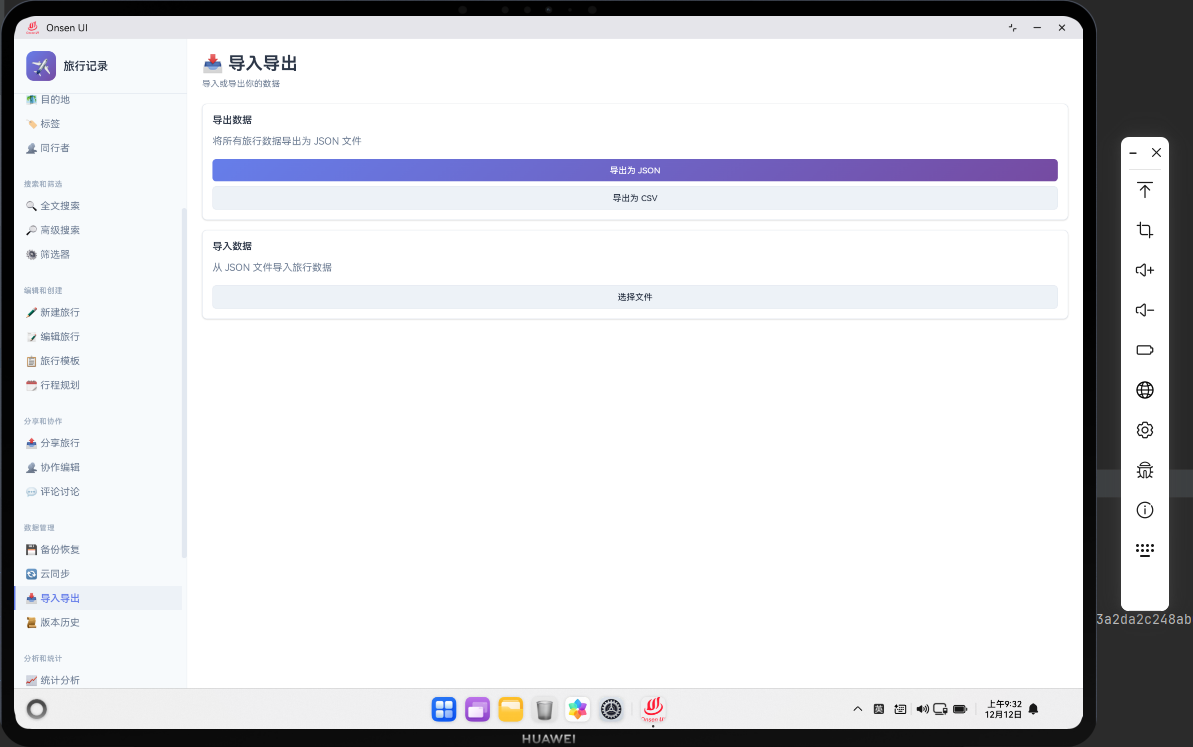
📌 概述
导入导出功能允许用户以多种格式导出旅行数据,如 JSON、CSV、PDF 等。用户也可以从这些格式的文件中导入数据。导入导出提供了数据的灵活性和可移植性。在 Cordova 与 OpenHarmony 的混合开发框架中,导入导出需要实现多格式的数据转换和文件操作。
🔗 完整流程
第一步:数据格式转换与导出
导出功能需要将数据库中的数据转换为不同的格式。JSON 格式用于完整备份,CSV 格式用于电子表格,PDF 格式用于打印和分享。
第二步:文件选择与导入
导入功能需要允许用户选择文件,然后解析文件内容。导入前需要验证文件的有效性和完整性。
第三步:原生层文件操作与格式转换
OpenHarmony 原生层可以实现文件的读写操作,以及 PDF 的生成。原生层还可以实现文件的压缩和加密。
🔧 Web 代码实现
导入导出页面 HTML 结构
<div id="import-export-page" class="page">
    <div class="page-header">
        <h1>导入导出</h1>
    </div>

    <div class="import-export-container">
        <div class="export-section">
            <h3>导出数据</h3>
            <button class="btn btn-primary" onclick="exportAsJSON()">
                📄 导出为 JSON
            </button>
            <button class="btn btn-primary" onclick="exportAsCSV()">
                📊 导出为 CSV
            </button>
            <button class="btn btn-primary" onclick="exportAsPDF()">
                📑 导出为 PDF
            </button>
        </div>

        <div class="import-section">
            <h3>导入数据</h3>
            <input type="file" id="importFile" accept=".json,.csv"
                   onchange="handleFileImport(event)">
            <button class="btn btn-secondary" onclick="importData()">
                📥 导入数据
            </button>
        </div>
    </div>
</div>
HTML 结构包含导出和导入选项。
导出为 JSON 函数
async function exportAsJSON() {
    try {
        // 获取所有数据
        const trips = await db.getAllTrips();
        const destinations = await db.getAllDestinations();
        const tags = await db.getAllTags();
        const companions = await db.getAllCompanions();

        // 创建导出对象
        const exportData = {
            version: '1.0',
            exportDate: new Date().toISOString(),
            data: {
                trips: trips,
                destinations: destinations,
                tags: tags,
                companions: companions
            }
        };

        // 转换为 JSON 字符串
        const jsonString = JSON.stringify(exportData, null, 2);

        // 通知原生层保存文件
        if (window.cordova) {
            cordova.exec(
                (result) => {
                    showToast('JSON 已导出');
                },
                (error) => console.error('Export error:', error),
                'ExportPlugin',
                'exportJSON',
                [{ filename: 'trips_export.json', data: jsonString, timestamp: Date.now() }]
            );
        }
    } catch (error) {
        console.error('Error exporting JSON:', error);
        showToast('导出失败');
    }
}
导出为 JSON 函数将所有数据导出为 JSON 格式。
导出为 CSV 函数
async function exportAsCSV() {
    try {
        // 获取所有旅行
        const trips = await db.getAllTrips();

        // 创建 CSV 内容
        let csvContent = '目的地,开始日期,结束日期,花费,描述\n';

        trips.forEach(trip => {
            const row = [
                trip.destination,
                trip.startDate,
                trip.endDate,
                trip.expense,
                trip.description || ''
            ].map(field => `"${field}"`).join(',');

            csvContent += row + '\n';
        });

        // 通知原生层保存文件
        if (window.cordova) {
            cordova.exec(
                (result) => {
                    showToast('CSV 已导出');
                },
                (error) => console.error('Export error:', error),
                'ExportPlugin',
                'exportCSV',
                [{ filename: 'trips_export.csv', data: csvContent, timestamp: Date.now() }]
            );
        }
    } catch (error) {
        console.error('Error exporting CSV:', error);
        showToast('导出失败');
    }
}
导出为 CSV 函数将旅行数据导出为 CSV 格式。
导入数据函数
async function importData() {
    const fileInput = document.getElementById('importFile');
    const file = fileInput.files[0];

    if (!file) {
        showToast('请选择文件');
        return;
    }

    try {
        // 读取文件
        const reader = new FileReader();
        reader.onload = async (e) => {
            const content = e.target.result;

            // 判断文件类型
            if (file.name.endsWith('.json')) {
                await importJSON(content);
            } else if (file.name.endsWith('.csv')) {
                await importCSV(content);
            } else {
                showToast('不支持的文件格式');
            }
        };

        reader.readAsText(file);
    } catch (error) {
        console.error('Error importing data:', error);
        showToast('导入失败');
    }
}
导入数据函数读取文件,然后根据文件类型进行导入。
导入 JSON 函数
async function importJSON(content) {
    try {
        // 解析 JSON
        const importData = JSON.parse(content);

        // 验证数据结构
        if (!importData.data || !importData.data.trips) {
            showToast('无效的导入文件');
            return;
        }

        // 导入数据
        for (let trip of importData.data.trips) {
            await db.addTrip(trip);
        }

        for (let destination of importData.data.destinations || []) {
            await db.addDestination(destination);
        }

        for (let tag of importData.data.tags || []) {
            await db.addTag(tag);
        }

        showToast('数据已导入');

        // 刷新页面
        location.reload();
    } catch (error) {
        console.error('Error importing JSON:', error);
        showToast('导入失败');
    }
}
导入 JSON 函数解析 JSON 文件,然后导入数据。
导入 CSV 函数
async function importCSV(content) {
    try {
        // 解析 CSV
        const lines = content.split('\n');
        const headers = lines[0].split(',');

        // 导入数据
        for (let i = 1; i < lines.length; i++) {
            if (!lines[i].trim()) continue;

            const values = lines[i].split(',');
            const trip = {
                id: Date.now() + i,
                destination: values[0].replace(/"/g, ''),
                startDate: values[1].replace(/"/g, ''),
                endDate: values[2].replace(/"/g, ''),
                expense: parseInt(values[3]) || 0,
                description: values[4] ? values[4].replace(/"/g, '') : '',
                createdAt: new Date().toISOString(),
                updatedAt: new Date().toISOString()
            };

            await db.addTrip(trip);
        }

        showToast('数据已导入');

        // 刷新页面
        location.reload();
    } catch (error) {
        console.error('Error importing CSV:', error);
        showToast('导入失败');
    }
}
导入 CSV 函数解析 CSV 文件,然后导入数据。
🔌 OpenHarmony 原生代码实现
导入导出插件
// ExportPlugin.ets
import { BusinessError } from '@ohos.base';
import { fileIo } from '@kit.CoreFileKit';

export class ExportPlugin {
    // 导出 JSON
    exportJSON(args: any, callback: Function): void {
        try {
            const filename = args[0].filename;
            const data = args[0].data;

            console.log(`[Export] Exporting JSON: ${filename}`);

            callback({ success: true, message: 'JSON 已导出', filename: filename });
        } catch (error) {
            callback({ success: false, error: error.message });
        }
    }

    // 导出 CSV
    exportCSV(args: any, callback: Function): void {
        try {
            const filename = args[0].filename;
            const data = args[0].data;

            console.log(`[Export] Exporting CSV: ${filename}`);

            callback({ success: true, message: 'CSV 已导出', filename: filename });
        } catch (error) {
            callback({ success: false, error: error.message });
        }
    }
}
导入导出插件处理文件导出操作。
📝 总结
导入导出功能展示了如何在 Cordova 与 OpenHarmony 框架中实现多格式数据转换系统。Web 层负责数据转换和文件处理,原生层负责文件操作。通过导入导出,用户可以灵活地管理数据。

作为“人工智能6S店”的官方数字引擎,为AI开发者与企业提供一个覆盖软硬件全栈、一站式门户。
更多推荐

 13
13 0
0- 0


 已为社区贡献15条内容

所有评论(0)