
[江鸟中原】:likeQQ(一个简单的聊天软件)
本文基于鸿蒙ArkTS技术栈,完整实现了模拟QQ应用的核心功能开发。项目聚焦登录模块的安全认证、状态管理及表单验证,采用响应式编程模式确保数据同步,并封装网络请求工具类处理接口调用。主界面实现了用户信息展示、功能导航等基础交互,同时针对性能优化提出路由管理、图片加载等解决方案。文章还探讨了功能扩展方向,包括实时通信、联系人管理等社交场景的实现策略,并给出工程化实施建议。通过本项目实践,开发者可掌握
前言
在移动互联网蓬勃发展的当下,社交应用已深度融入人们的日常生活,而 QQ 作为国民级社交平台,其完善的功能体系与流畅的用户体验一直是行业标杆。基于鸿蒙 ArkTS 开发模拟 QQ 应用,不仅是对这一经典社交产品的技术复刻,更是深入探索鸿蒙生态应用开发的绝佳实践。
本文以实际项目的 entry 工程为核心载体,聚焦模拟 QQ 应用的全流程开发。通过工程架构的科学搭建、登录体系的安全实现以及核心功能模块的逐步攻坚,完整呈现从需求分析到代码落地的全过程。其中,针对登录模块常见的状态管理、持久化存储等关键问题,将结合具体场景拆解技术难点并提供可复用的解决方案,为开发者提供兼具实用性与深度的鸿蒙应用开发参考,助力快速掌握大型社交类 App 的底层设计逻辑与 ArkTS 技术栈的实战运用。
一、项目工程架构(基于 entry 文件)
1. 工程目录结构
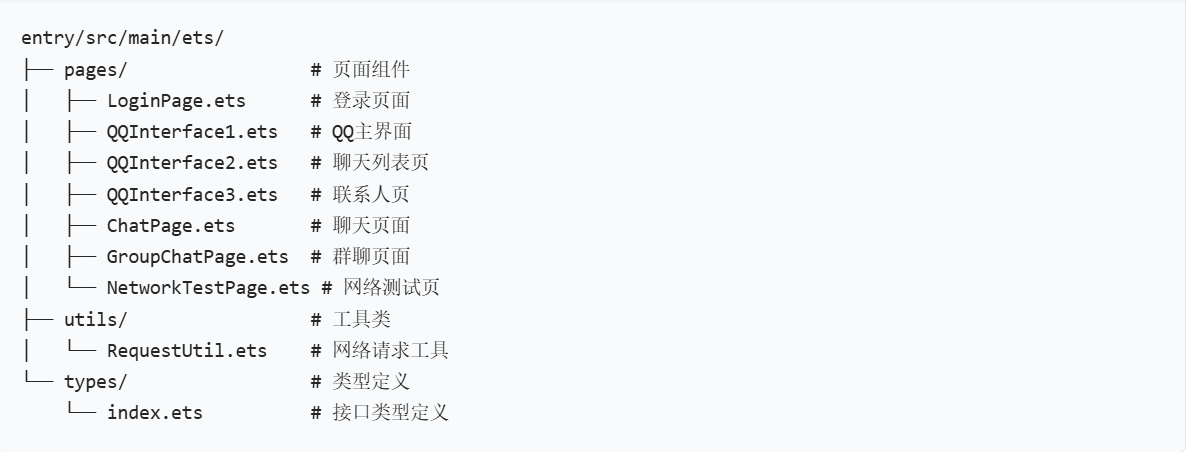
2. 核心技术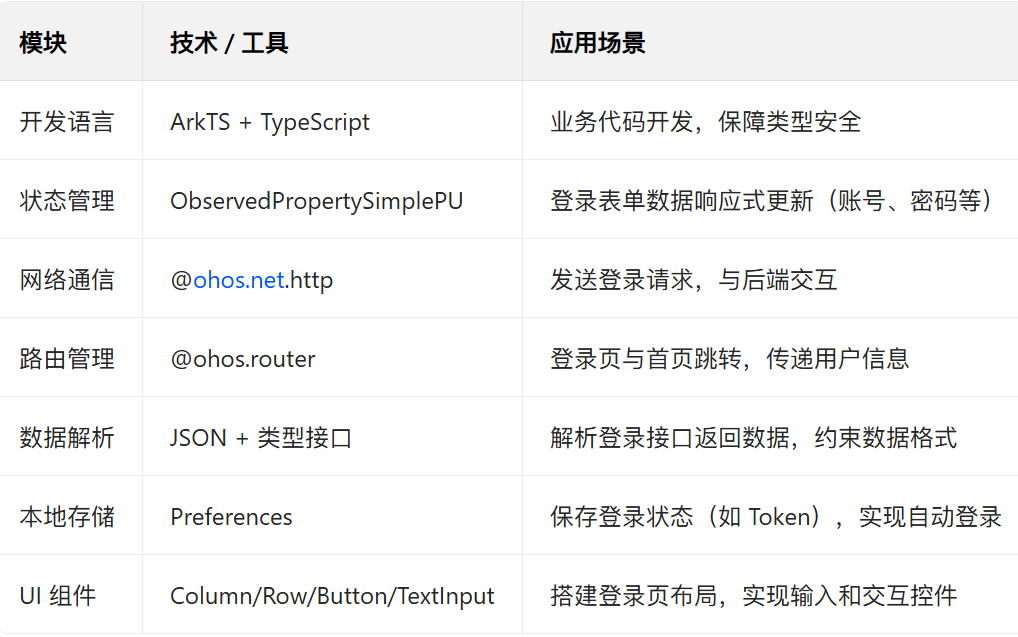
二、核心功能实现
登录模块作为模拟 QQ App 的核心入口,是用户与应用交互的第一道关卡,其设计需聚焦三大核心目标:身份校验的安全性、状态切换的流畅性、用户体验的完整性。在具体实现中,需重点突破鸿蒙开发的典型技术痛点,以表单处理为例:通过响应式状态管理机制(如 ObservedPropertySimplePU)实现 QQ 号、密码、验证码等输入字段的实时绑定,确保用户输入与界面状态无缝同步;同时结合正则校验逻辑(例如 QQ 号需满足 5 - 13 位数字规则、手机号需符合 11 位数字格式),在输入过程中实时校验数据有效性,从源头提升表单提交的准确性,为后续登录请求提供可靠的数据基础。
(1)登录请求封装(RequestUtil.ets)
核心工具类封装网络请求,处理请求参数、响应解析和错误处理:
import http from "@ohos:net.http";

// 数据类型定义
interface UserData {
    id: number;
    qqNumber: string;
    phoneNumber: string;
    nickname: string;
}

export interface LoginRequest {
    loginMethod: 'qq' | 'phone';
    qqNumber?: string;
    phoneNumber?: string;
    password: string;
    verificationCode?: string;
}

export interface LoginResponse {
    success: boolean;
    message: string;
    data?: {
        token: string;
        user: UserData;
    };
}

export class RequestUtil {
    // 服务器基础地址
    private static readonly BASE_URL: string = 'http://10.0.2.2:3000/api';

    // 发送POST请求
    static async post(url: string, data: Object): Promise<Object> {
        const request = http.createHttp();
        const options = {
            method: http.RequestMethod.POST,
            header: { 'Content-Type': 'application/json' },
            extraData: JSON.stringify(data)
        };

        try {
            console.log('发送请求到:', RequestUtil.BASE_URL + url);
            const response = await request.request(RequestUtil.BASE_URL + url, options);

            if (response.responseCode >= 200 && response.responseCode < 300) {
                return response.result;
            } else {
                throw new Error(`请求失败: ${response.responseCode}`);
            }
        } catch (error) {
            console.error('网络请求失败:', error);
            throw error;
        } finally {
            request.destroy();
        }
    }

    // 用户登录
    static async login(loginData: LoginRequest): Promise<LoginResponse> {
        const result = await RequestUtil.post('/auth/login', loginData);
        return result as LoginResponse;
    }
}
(2)登录页面实现(LoginPage.ets)
实现 QQ 账号登录切换、表单验证和登录逻辑:
import router from "@ohos:router";
import { RequestUtil, LoginRequest } from '../utils/RequestUtil';
import prompt from "@ohos:promptAction";

class LoginPage extends ViewPU {
    // 状态管理
    private __loginMethod: ObservedPropertySimplePU<'qq' | 'phone'>;
    private __qqNumber: ObservedPropertySimplePU<string>;
    private __phoneNumber: ObservedPropertySimplePU<string>;
    private __password: ObservedPropertySimplePU<string>;
    private __verificationCode: ObservedPropertySimplePU<string>;
    private __isCodeSent: ObservedPropertySimplePU<boolean>;
    private __countdown: ObservedPropertySimplePU<number>;
    private timer: number | null;

    // getter和setter方法
    get loginMethod() { return this.__loginMethod.get(); }
    set loginMethod(value) { this.__loginMethod.set(value); }

    get qqNumber() { return this.__qqNumber.get(); }
    set qqNumber(value) { this.__qqNumber.set(value); }

    // 其他属性的getter和setter...

    constructor(parent, params, __localStorage, elmtId = -1) {
        super(parent, __localStorage, elmtId);
        // 初始化状态
        this.__loginMethod = new ObservedPropertySimplePU('qq', this, "loginMethod");
        this.__qqNumber = new ObservedPropertySimplePU('', this, "qqNumber");
        this.__phoneNumber = new ObservedPropertySimplePU('', this, "phoneNumber");
        this.__password = new ObservedPropertySimplePU('', this, "password");
        this.__verificationCode = new ObservedPropertySimplePU('', this, "verificationCode");
        this.__isCodeSent = new ObservedPropertySimplePU(false, this, "isCodeSent");
        this.__countdown = new ObservedPropertySimplePU(60, this, "countdown");
        this.timer = null;
    }

    // 渲染页面
    initialRender() {
        Scroll.create();
        Scroll.backgroundColor('#f5f5f5');

        Column.create();
        Column.width('100%');

        // Logo区域
        Image.create({ "id": 16777230, "type": 20000, "bundleName": "com.example.myapplication", "moduleName": "entry" });
        Image.width(80);
        Image.height(80);
        Image.margin({ top: 50, bottom: 30 });
        Image.pop();

        // 标题
        Text.create('QQ');
        Text.fontSize(24);
        Text.fontWeight(FontWeight.Bold);
        Text.margin({ bottom: 30 });
        Text.pop();

        // 登录方式切换
        Row.create();
        Row.width('80%');
        Row.height(40);
        Row.margin({ bottom: 20 });

        // QQ号码登录按钮
        Button.createWithLabel('QQ号码登录');
        Button.backgroundColor(this.loginMethod === 'qq' ? '#1E90FF' : '#f5f5f5');
        Button.fontColor(this.loginMethod === 'qq' ? Color.White : Color.Black);
        Button.layoutWeight(1);
        Button.onClick(() => { this.loginMethod = 'qq'; });
        Button.pop();

        // 手机号登录按钮
        Button.createWithLabel('手机号登录');
        Button.backgroundColor(this.loginMethod === 'phone' ? '#1E90FF' : '#f5f5f5');
        Button.fontColor(this.loginMethod === 'phone' ? Color.White : Color.Black);
        Button.layoutWeight(1);
        Button.onClick(() => { this.loginMethod = 'phone'; });
        Button.pop();

        Row.pop();

        // 登录表单
        Column.create();
        Column.width('100%');

        // 根据登录方式显示不同表单
        If.create();
        if (this.loginMethod === 'qq') {
            // QQ号码输入框
            TextInput.create({ text: this.qqNumber, placeholder: '请输入QQ号码' });
            TextInput.onChange((value) => { this.qqNumber = value; });
            TextInput.width('80%');
            TextInput.height(50);
            TextInput.margin({ bottom: 20 });
            TextInput.pop();
        } else {
            // 手机号输入框和验证码
            Row.create();
            Row.width('80%');
            Row.margin({ bottom: 20 });

            TextInput.create({ text: this.phoneNumber, placeholder: '请输入手机号' });
            TextInput.onChange((value) => { this.phoneNumber = value; });
            TextInput.layoutWeight(1);
            TextInput.height(50);
            TextInput.pop();

            Button.createWithLabel(this.isCodeSent ? this.countdown + 's后重新获取' : '获取验证码');
            Button.backgroundColor(this.isCodeSent ? '#cccccc' : '#1E90FF');
            Button.enabled(!this.isCodeSent);
            Button.onClick(() => { this.sendVerificationCode(); });
            Button.pop();

            Row.pop();
        }
        If.pop();

        // 密码输入框
        TextInput.create({ text: this.password, placeholder: '请输入密码', type: InputType.Password });
        TextInput.onChange((value) => { this.password = value; });
        TextInput.width('80%');
        TextInput.height(50);
        TextInput.margin({ bottom: 30 });
        TextInput.pop();

        // 登录按钮
        Button.createWithLabel('登录');
        Button.backgroundColor('#1E90FF');
        Button.fontColor(Color.White);
        Button.width('80%');
        Button.height(50);
        Button.onClick(() => { this.handleLogin(); });
        Button.pop();

        Column.pop();

        // 其他登录方式和功能入口
        // ...

        Column.pop();
        Scroll.pop();
    }

    // 处理登录逻辑
    private async handleLogin() {
        // 表单验证
        if (this.loginMethod === 'qq' && !this.qqNumber) {
            prompt.showToast({ message: '请输入QQ号码' });
            return;
        }

        if (this.loginMethod === 'phone' && !this.phoneNumber) {
            prompt.showToast({ message: '请输入手机号' });
            return;
        }

        if (!this.password) {
            prompt.showToast({ message: '请输入密码' });
            return;
        }

        // 构造登录数据
        const loginData: LoginRequest = {
            loginMethod: this.loginMethod,
            qqNumber: this.loginMethod === 'qq' ? this.qqNumber : undefined,
            phoneNumber: this.loginMethod === 'phone' ? this.phoneNumber : undefined,
            password: this.password,
            verificationCode: this.loginMethod === 'phone' ? this.verificationCode : undefined
        };

        try {
            // 调用登录接口
            const response = await RequestUtil.login(loginData);

            if (response.success) {
                prompt.showToast({ message: '登录成功' });
                // 保存用户信息和token...
                // 跳转到主界面
                router.pushUrl({ url: 'pages/QQInterface1' });
            } else {
                prompt.showToast({ message: response.message || '登录失败' });
            }
        } catch (error) {
            console.error('登录失败', error);
            prompt.showToast({ message: '登录失败,请检查网络' });
        }
    }

    // 发送验证码
    private async sendVerificationCode() {
        if (!this.phoneNumber) {
            prompt.showToast({ message: '请输入手机号' });
            return;
        }

        try {
            // 调用发送验证码接口
            // const response = await RequestUtil.sendVerificationCode({ phoneNumber: this.phoneNumber });
            // if (response.success) {
                this.isCodeSent = true;
                prompt.showToast({ message: '验证码发送成功' });

                // 启动倒计时
                this.timer = setInterval(() => {
                    let current = this.countdown;
                    if (current <= 1) {
                        clearInterval(this.timer);
                        this.isCodeSent = false;
                        this.countdown = 60;
                    } else {
                        this.countdown = current - 1;
                    }
                }, 1000);
            // }
        } catch (error) {
            prompt.showToast({ message: '发送失败,请重试' });
        }
    }
}
2. 首页核心功能
(1)QQ 主界面(QQInterface1.ets)
登录成功后进入的主界面,展示用户信息和核心功能入口:
import router from "@ohos:router";

class QQInterface1 extends ViewPU {
    initialRender() {
        Column.create();
        Column.width('100%');
        Column.height('100%');
        Column.justifyContent(FlexAlign.Center);
        Column.alignItems(HorizontalAlign.Center);

        // 标题
        Text.create('QQ主界面');
        Text.fontSize(24);
        Text.fontWeight(FontWeight.Bold);
        Text.margin({ top: 50, bottom: 30 });
        Text.pop();

        // 用户头像
        Image.create({ "id": 16777231, "type": 20000, "bundleName": "com.example.myapplication", "moduleName": "entry" });
        Image.width(100);
        Image.height(100);
        Image.borderRadius(50);
        Image.margin({ bottom: 30 });
        Image.pop();

        // 用户信息
        Text.create('用户名: 同坚异白');
        Text.fontSize(18);
        Text.margin({ bottom: 10 });
        Text.pop();

        Text.create('个性签名: 正在使用鸿蒙QQ');
        Text.fontSize(16);
        Text.fontColor('#666');
        Text.margin({ bottom: 30 });
        Text.pop();

        // 空白区域,将按钮推到底部
        Blank.create();
        Blank.pop();

        // 功能按钮区
        Row.create();
        Row.width('90%');
        Row.margin({ bottom: 20 });

        // 进入聊天列表
        Button.createWithLabel('进入聊天列表');
        Button.layoutWeight(1);
        Button.height(50);
        Button.margin({ right: 5 });
        Button.onClick(() => {
            router.pushUrl({ url: 'pages/QQInterface2' });
        });
        Button.pop();

        // 查看联系人
        Button.createWithLabel('查看联系人');
        Button.layoutWeight(1);
        Button.height(50);
        Button.margin({ left: 5, right: 5 });
        Button.onClick(() => {
            router.pushUrl({ url: 'pages/QQInterface3' });
        });
        Button.pop();

        // 返回登录页
        Button.createWithLabel('退出登录');
        Button.layoutWeight(1);
        Button.height(50);
        Button.backgroundColor('#999');
        Button.margin({ left: 5 });
        Button.onClick(() => {
            // 清除登录状态
            router.back();
        });
        Button.pop();

        Row.pop();
        Column.pop();
    }
}
三、鸿蒙开发核心坑点与解决方案
1. 登录有可能会出现的问题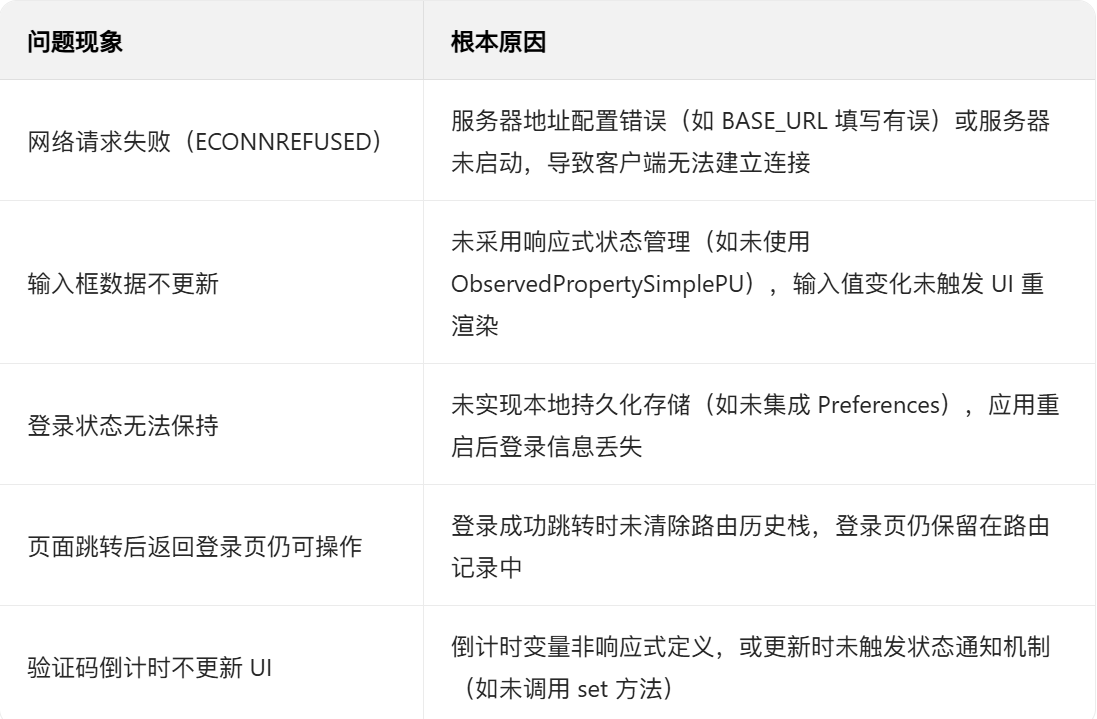
2. 性能优化建议
- 路由管理:登录成功跳转至主页后,通过 `router.clear()` 清除登录页路由记录,避免冗余页面驻留内存,优化应用资源占用。 - 图片优化:针对头像等静态资源,预先按展示场景设定适配尺寸(如 80×80px 头像框),通过 `Image` 组件的 `objectFit` 属性控制显示模式,防止拉伸变形或过度压缩导致的失真。 - 状态管理:采用响应式状态机制(如 `ObservedPropertySimplePU`)管理核心数据(如登录状态、输入表单),通过精细化状态划分避免无关变量更新触发的 UI 无效重渲染。 - 网络请求:在登录接口调用时添加超时控制(如设置 10 秒超时阈值),结合 `@ohos.net.http` 的 `on('timeout')` 事件回调,及时提示用户网络异常,避免页面长期处于等待状态。 - 代码组织:将登录校验、Token 存储、网络请求等通用逻辑抽取为独立工具类(如 `LoginUtil`、`StorageUtil`、`RequestUtil`),通过模块化封装减少重复代码,提升维护效率。
四、扩展功能与实践落地策略
1.功能延伸方向
实时互动体系:基于鸿蒙分布式通信能力,构建 WebSocket 长连接通信层,实现单人聊天、群聊消息的即时收发,支持消息已读状态同步和历史记录回溯,复刻 QQ 核心社交场景。
联系人生态构建:开发联系人智能管理系统,包含基于拼音首字母的快速检索、自定义分组标签、联系人备注与头像个性化设置,同步实现好友申请、验证与黑名单机制。
全域消息触达:整合鸿蒙 Push 服务与本地通知能力,设计分级消息推送策略(如重要联系人消息强提醒、群消息免打扰),支持离线消息缓存与上线后同步。
多媒体交互:开发轻量化文件传输模块,支持图片压缩上传、文档格式校验、大文件分片传输,结合鸿蒙分布式文件服务实现跨设备文件互通。
个性化体验引擎:搭建主题资源包管理系统,支持深色 / 浅色模式自动切换、自定义皮肤下载,联动字体大小、消息提示音等偏好设置,形成完整个性化体系。
2. 工程化实施建议
研发规范体系:制定基于 ArkTS 的代码规范白皮书,明确组件命名(如 XXPage/XXComponent)、状态管理模式(单向数据流)、注释格式(JSDoc 标准),通过 ESLint 插件强制执行。
异常治理方案:构建全局错误拦截器,统一处理网络异常、权限不足、数据解析失败等场景,设计分级错误页面(轻量提示 Toast / 全屏错误页),结合用户操作路径日志实现问题溯源。
可观测性建设:集成鸿蒙日志服务,按模块划分日志级别(DEBUG/INFO/WARN/ERROR),关键节点(登录 / 消息发送)添加埋点,通过日志聚合分析识别高频异常场景。
跨版本适配策略:建立 API 兼容性清单,对高版本 API 使用条件编译(@if (API Version>= 9)),低版本提供降级实现,结合自动化测试覆盖主流鸿蒙版本(API 8/9/10)。
安全防护体系:采用鸿蒙安全模块对用户密码、聊天记录等敏感数据进行 AES-256 加密存储,登录接口启用 HTTPS 双向认证,实现防调试、防篡改的应用加固措施。
五、总结
本文以鸿蒙 ArkTS 技术栈为基础,围绕模拟 QQ App 的核心场景展开实战开发,通过 entry 工程落地了从登录认证到主界面交互的完整功能链路。其中,针对登录模块的响应式表单处理、状态持久化、路由安全控制等关键问题,提供了结合鸿蒙特性的解决方案,同时延伸覆盖了消息列表、联系人展示等核心场景的实现逻辑。 开发实践表明,鸿蒙应用的稳健性依赖于对「组件生命周期协同、响应式状态设计、网络请求链路管控」三大技术维度的深度理解——合理运用 ObservedProperty 实现状态联动、通过 Preferences 保障数据持久化、借助路由守卫控制页面访问权限,既是功能实现的基础,也是符合鸿蒙开发规范的最佳实践。 本项目提供的架构设计(如分层状态管理、工具类封装)与代码模板(登录流程、网络请求封装),可直接作为社交类鸿蒙应用的开发参考。开发者可在此基础上快速扩展 QQ 特色功能(如表情包系统、多端同步),进一步深化对鸿蒙生态应用开发逻辑的掌握,为构建更复杂的分布式社交场景奠定技术基础。

作为“人工智能6S店”的官方数字引擎,为AI开发者与企业提供一个覆盖软硬件全栈、一站式门户。
更多推荐
 23
23 0
0- 0


 已为社区贡献1条内容

所有评论(0)