
Electron for 鸿蒙PC实战案例AtomGit口袋工具之我的watch项目模块技术解读
·
概述
本文深入解析 AtomGit个人中心应用中的 Watch 项目模块,该模块实现了用户订阅项目的管理功能,让用户能够跟踪关注项目的最新动态,是开发者保持技术敏感度的重要工具。
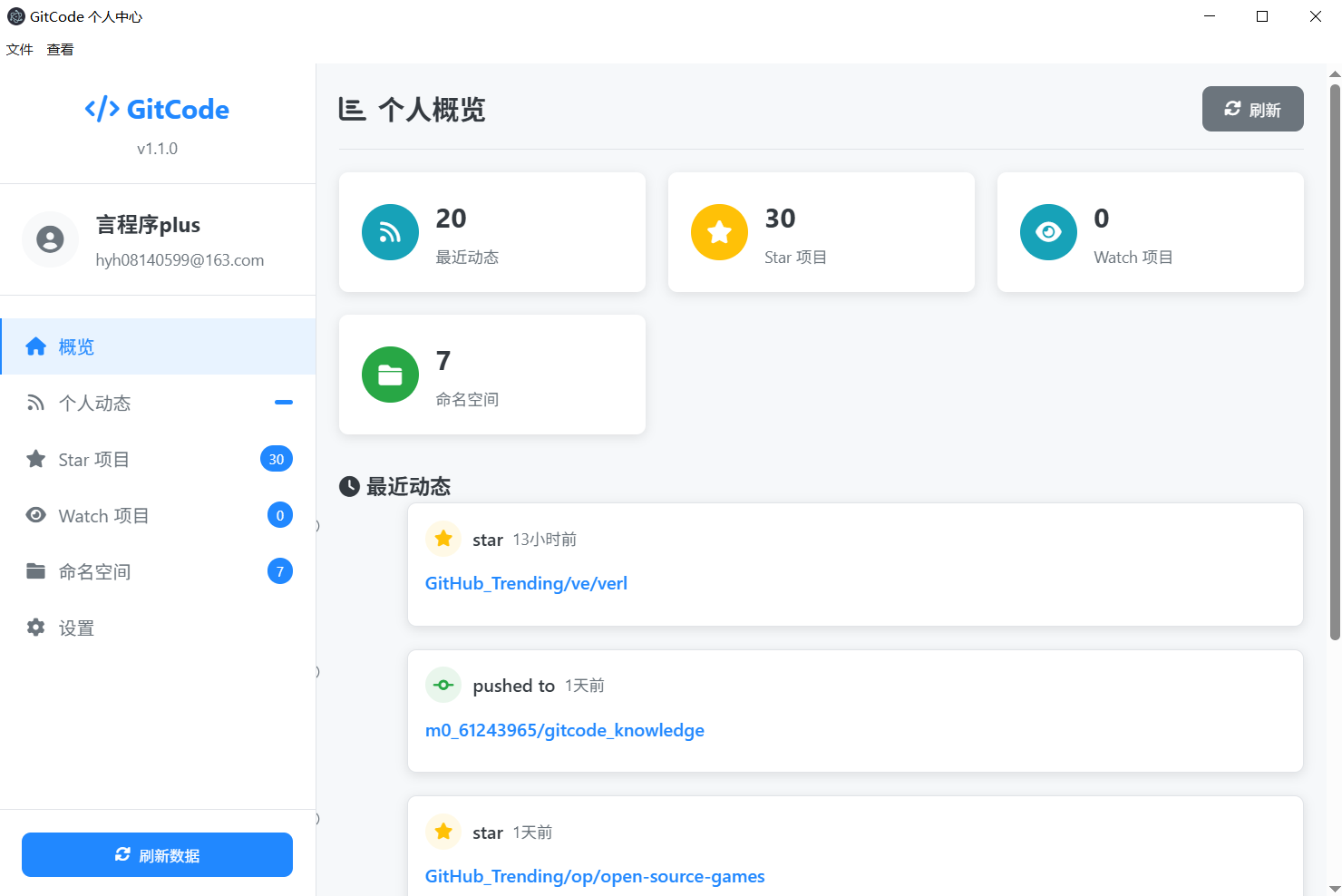
核心技术实现
1. IPC 通信层
主进程 IPC Handler
// main.js:119-121
ipcMain.handle('gitcode-get-subscriptions', async (event, username) => {
  return await this.gitCodeService.getUserSubscriptions(username);
});
预加载脚本 API 暴露
// preload.js:6
contextBridge.exposeInMainWorld('electronAPI', {
  gitCode: {
    getSubscriptions: (username) => ipcRenderer.invoke('gitcode-get-subscriptions', username),
  }
});
2. GitCode API 服务层
订阅服务实现
// GitCodeService.js:63-103
async getUserSubscriptions(username) {
  const cacheKey = `subscriptions_${username}`;
  if (this.cache.has(cacheKey)) {
    return this.cache.get(cacheKey);
  }

  try {
    const config = {
      url: `${this.baseURL}/users/${username}/subscriptions`,
      headers: {}
    };

    // 支持认证用户的私有订阅
    if (this.accessToken) {
      config.headers.Authorization = `Bearer ${this.accessToken}`;
    }

    const response = await this.httpService.request(config);

    if (response.statusCode === 200) {
      const result = {
        success: true,
        data: response.data,
        statusCode: response.statusCode
      };
      this.cache.set(cacheKey, result);
      return result;
    } else {
      return {
        success: false,
        error: `获取订阅仓库失败: ${response.statusCode}`,
        statusCode: response.statusCode
      };
    }
  } catch (error) {
    return {
      success: false,
      error: error.message,
      type: error.type || 'UNKNOWN_ERROR'
    };
  }
}
3. 渲染控制器实现
Watch 项目加载逻辑
// renderer.js:307-322
async loadWatchingRepos() {
  if (!this.currentUser) return;

  try {
    const result = await window.electronAPI.gitCode.getSubscriptions(this.currentUser.login);

    if (result.success) {
      this.renderWatchingRepos(result.data);
      this.updateBadge('watching', result.data.length);
    } else {
      this.showToast('加载Watch项目失败: ' + result.error, 'error');
    }
  } catch (error) {
    this.showToast('加载Watch项目失败: ' + error.message, 'error');
  }
}
项目卡片渲染系统
// renderer.js:567-592
renderWatchingRepos(repos) {
  const container = document.getElementById('watching-repos');

  if (!repos || repos.length === 0) {
    container.innerHTML = `
      <div class="empty-state">
        <i class="fas fa-eye"></i>
        <h3>暂无 Watch 的项目</h3>
        <p>您还没有 Watch 任何项目</p>
      </div>
    `;
    return;
  }

  container.innerHTML = repos.map(repo => `
    <div class="repo-card watching-card">
      <div class="repo-header">
        <div class="repo-icon watching-icon">
          <i class="fas fa-eye"></i>
        </div>
        <div class="repo-info">
          <h4>${this.escapeHtml(repo.full_name || repo.name)}</h4>
          <p>${this.escapeHtml(repo.description || '暂无描述')}</p>
        </div>
        <div class="watch-status">
          <span class="watch-badge">已关注</span>
        </div>
      </div>
      <div class="repo-stats">
        <span class="repo-stat">
          <i class="fas fa-star"></i>
          ${repo.stargazers_count || 0}
        </span>
        <span class="repo-stat">
          <i class="fas fa-code-branch"></i>
          ${repo.forks_count || 0}
        </span>
        <span class="repo-stat">
          <i class="fas fa-eye"></i>
          ${repo.watchers_count || 0}
        </span>
        <span class="repo-stat">
          <i class="fas fa-exclamation-circle"></i>
          ${repo.open_issues_count || 0}
        </span>
      </div>
      <div class="repo-activity">
        <div class="activity-item">
          <i class="fas fa-clock"></i>
          <span>更新于 ${this.formatRelativeTime(repo.updated_at)}</span>
        </div>
        <div class="activity-item">
          <i class="fas fa-code-commit"></i>
          <span>默认分支: ${repo.default_branch || 'main'}</span>
        </div>
      </div>
    </div>
  `).join('');
}
4. UI 组件设计
HTML 结构设计
<!-- index.html:182-194 -->
<section class="tab-content" id="watching-tab">
  <header class="page-header">
    <h2><i class="fas fa-eye"></i> Watch 的项目</h2>
    <div class="header-actions">
      <div class="filter-group">
        <select id="watch-filter">
          <option value="all">全部项目</option>
          <option value="active">活跃项目</option>
          <option value="inactive">不活跃项目</option>
          <option value="popular">热门项目</option>
        </select>
      </div>
      <button class="btn-secondary" id="watching-refresh">
        <i class="fas fa-sync-alt"></i> 刷新
      </button>
    </div>
  </header>

  <div class="repo-grid" id="watching-repos">
    <div class="empty-state">
      <i class="fas fa-eye"></i>
      <h3>暂无 Watch 的项目</h3>
      <p>您还没有 Watch 任何项目</p>
    </div>
  </div>
</section>
CSS 样式系统
/* Watch 项目特殊样式 */
.watching-card {
  border-left: 4px solid var(--info-color);
}

.watching-icon {
  background: rgba(23, 162, 184, 0.1);
  color: var(--info-color);
}

.watch-status {
  display: flex;
  align-items: center;
}

.watch-badge {
  background: var(--info-color);
  color: white;
  padding: 2px 8px;
  border-radius: 12px;
  font-size: 0.75rem;
  font-weight: 500;
}

/* 项目活动信息 */
.repo-activity {
  margin-top: 15px;
  padding-top: 15px;
  border-top: 1px solid #e1e4e8;
}

.activity-item {
  display: flex;
  align-items: center;
  gap: 8px;
  margin-bottom: 5px;
  font-size: 0.85rem;
  color: var(--secondary-color);
}

.activity-item i {
  color: var(--primary-color);
  width: 14px;
}

/* 响应式设计 */
@media (max-width: 768px) {
  .repo-stats {
    flex-wrap: wrap;
    gap: 10px;
  }

  .repo-stat {
    font-size: 0.8rem;
  }

  .activity-item {
    font-size: 0.8rem;
  }
}
5. 高级功能实现
相对时间格式化
// renderer.js:594-610
formatRelativeTime(dateString) {
  if (!dateString) return '未知';

  const date = new Date(dateString);
  const now = new Date();
  const diff = now - date;

  const seconds = Math.floor(diff / 1000);
  const minutes = Math.floor(seconds / 60);
  const hours = Math.floor(minutes / 60);
  const days = Math.floor(hours / 24);
  const months = Math.floor(days / 30);

  if (months > 0) return `${months}个月前`;
  if (days > 0) return `${days}天前`;
  if (hours > 0) return `${hours}小时前`;
  if (minutes > 0) return `${minutes}分钟前`;
  return '刚刚';
}
项目过滤功能
// renderer.js:612-635
filterWatchingRepos(filterType) {
  if (!this.allWatchingRepos) return;

  let filtered = [...this.allWatchingRepos];

  switch(filterType) {
    case 'active':
      const oneWeekAgo = new Date();
      oneWeekAgo.setDate(oneWeekAgo.getDate() - 7);
      filtered = filtered.filter(repo =>
        new Date(repo.updated_at) > oneWeekAgo
      );
      break;

    case 'inactive':
      const oneMonthAgo = new Date();
      oneMonthAgo.setMonth(oneMonthAgo.getMonth() - 1);
      filtered = filtered.filter(repo =>
        new Date(repo.updated_at) <= oneMonthAgo
      );
      break;

    case 'popular':
      filtered = filtered.filter(repo =>
        (repo.stargazers_count || 0) > 100
      ).sort((a, b) =>
        (b.stargazers_count || 0) - (a.stargazers_count || 0)
      );
      break;
  }

  this.renderWatchingRepos(filtered);
}
批量操作功能
// renderer.js:637-660
async batchUnwatchRepos(selectedRepos) {
  if (!selectedRepos.length) {
    this.showToast('请选择要取消关注的项目', 'warning');
    return;
  }

  if (!confirm(`确定要取消关注 ${selectedRepos.length} 个项目吗?`)) {
    return;
  }

  this.showLoading();

  try {
    const promises = selectedRepos.map(repo =>
      this.unwatchRepository(repo.owner.login, repo.name)
    );

    await Promise.all(promises);
    this.showToast(`成功取消关注 ${selectedRepos.length} 个项目`, 'success');
    await this.loadWatchingRepos();
  } catch (error) {
    this.showToast('批量操作失败: ' + error.message, 'error');
  } finally {
    this.hideLoading();
  }
}

async unwatchRepository(owner, repo) {
  const config = {
    url: `${this.gitCodeService.baseURL}/repos/${owner}/${repo}/subscription`,
    method: 'DELETE',
    headers: {
      'Authorization': `Bearer ${this.accessToken}`
    }
  };

  return await this.httpService.request(config);
}
6. 事件处理系统
事件监听器绑定
// renderer.js:35-40
document.getElementById('watching-refresh').addEventListener('click', () => {
  this.refreshWatching();
});

// 过滤器事件
document.getElementById('watch-filter').addEventListener('change', (e) => {
  this.filterWatchingRepos(e.target.value);
});
刷新功能实现
// renderer.js:357-362
async refreshWatching() {
  await this.loadWatchingRepos();
  this.showToast('Watch项目已刷新', 'success');
}
性能优化策略
1. 智能缓存策略
// 分层缓存设计
class WatchCacheManager {
  constructor() {
    this.memoryCache = new Map();
    this.persistentCache = new Map();
    this.cacheExpiry = new Map();
  }

  set(key, data, ttl = 300000) { // 5分钟默认TTL
    this.memoryCache.set(key, data);
    this.cacheExpiry.set(key, Date.now() + ttl);

    // 持久化关键数据
    if (data.length > 0) {
      localStorage.setItem(`watch_cache_${key}`, JSON.stringify(data));
    }
  }

  get(key) {
    // 检查内存缓存
    if (this.cacheExpiry.has(key) && Date.now() > this.cacheExpiry.get(key)) {
      this.invalidate(key);
      return null;
    }

    if (this.memoryCache.has(key)) {
      return this.memoryCache.get(key);
    }

    // 回退到持久化缓存
    const persistent = localStorage.getItem(`watch_cache_${key}`);
    if (persistent) {
      const data = JSON.parse(persistent);
      this.set(key, data);
      return data;
    }

    return null;
  }

  invalidate(key) {
    this.memoryCache.delete(key);
    this.cacheExpiry.delete(key);
    localStorage.removeItem(`watch_cache_${key}`);
  }
}
2. 虚拟滚动优化
// 大量项目时的虚拟滚动
class VirtualScrollManager {
  constructor(container, itemHeight = 200) {
    this.container = container;
    this.itemHeight = itemHeight;
    this.visibleItems = Math.ceil(container.clientHeight / itemHeight) + 2;
    this.startIndex = 0;
    this.data = [];
  }

  setData(data) {
    this.data = data;
    this.render();
  }

  render() {
    const endIndex = Math.min(this.startIndex + this.visibleItems, this.data.length);
    const visibleData = this.data.slice(this.startIndex, endIndex);

    this.container.innerHTML = visibleData.map((repo, index) =>
      this.renderRepoCard(repo, this.startIndex + index)
    ).join('');
  }

  scrollHandler() {
    const scrollTop = this.container.scrollTop;
    this.startIndex = Math.floor(scrollTop / this.itemHeight);
    this.render();
  }
}
3. 数据预加载
// 智能预加载策略
class PreloadManager {
  constructor() {
    this.preloadQueue = [];
    this.isPreloading = false;
  }

  schedulePreload(repos) {
    // 预加载活跃项目的详细信息
    const activeRepos = repos
      .filter(repo => this.isRepoActive(repo))
      .slice(0, 5); // 限制预加载数量

    this.preloadQueue.push(...activeRepos);
    this.processPreloadQueue();
  }

  async processPreloadQueue() {
    if (this.isPreloading || this.preloadQueue.length === 0) return;

    this.isPreloading = true;

    while (this.preloadQueue.length > 0) {
      const repo = this.preloadQueue.shift();
      await this.preloadRepoDetails(repo);
      await this.delay(100); // 避免请求过于频繁
    }

    this.isPreloading = false;
  }

  isRepoActive(repo) {
    const lastUpdate = new Date(repo.updated_at);
    const oneWeekAgo = new Date();
    oneWeekAgo.setDate(oneWeekAgo.getDate() - 7);
    return lastUpdate > oneWeekAgo;
  }
}
用户体验优化
1. 加载状态管理
// 细粒度加载状态
class LoadingStateManager {
  constructor() {
    this.loadingStates = new Map();
  }

  setLoading(operation, isLoading) {
    this.loadingStates.set(operation, isLoading);
    this.updateGlobalLoading();
  }

  updateGlobalLoading() {
    const hasAnyLoading = Array.from(this.loadingStates.values())
      .some(isLoading => isLoading);

    const overlay = document.getElementById('loading-overlay');
    if (hasAnyLoading) {
      overlay.classList.add('active');
    } else {
      overlay.classList.remove('active');
    }
  }
}
2. 错误恢复机制
// 智能错误恢复
class ErrorRecoveryManager {
  constructor() {
    this.retryAttempts = new Map();
    this.maxRetries = 3;
  }

  async executeWithRetry(operation, fn) {
    const attempts = this.retryAttempts.get(operation) || 0;

    try {
      const result = await fn();
      this.retryAttempts.delete(operation); // 成功后重置
      return result;
    } catch (error) {
      if (attempts < this.maxRetries) {
        this.retryAttempts.set(operation, attempts + 1);
        const delay = Math.pow(2, attempts) * 1000; // 指数退避
        await this.delay(delay);
        return this.executeWithRetry(operation, fn);
      } else {
        this.retryAttempts.delete(operation);
        throw error;
      }
    }
  }
}
3. 无障碍访问支持
<!-- 增强可访问性 -->
<div class="repo-card" role="article" aria-labelledby="repo-name-${repo.id}">
  <div class="repo-header">
    <h4 id="repo-name-${repo.id}" tabindex="0">
      ${this.escapeHtml(repo.name)}
    </h4>
    <button class="watch-toggle"
            aria-label="取消关注项目 ${repo.name}"
            aria-pressed="true">
      <i class="fas fa-eye"></i>
    </button>
  </div>
</div>
监控与分析
1. 性能指标收集
// 性能监控
class PerformanceTracker {
  static async trackOperation(name, operation) {
    const startTime = performance.now();
    const startMemory = performance.memory?.usedJSHeapSize || 0;

    try {
      const result = await operation();
      const endTime = performance.now();
      const endMemory = performance.memory?.usedJSHeapSize || 0;

      this.recordMetrics(name, {
        duration: endTime - startTime,
        memoryDelta: endMemory - startMemory,
        success: true
      });

      return result;
    } catch (error) {
      const endTime = performance.now();

      this.recordMetrics(name, {
        duration: endTime - startTime,
        success: false,
        error: error.message
      });

      throw error;
    }
  }

  static recordMetrics(operation, metrics) {
    console.log(`[Performance] ${operation}:`, metrics);
    // 发送到分析服务
  }
}
2. 用户行为分析
// 用户交互追踪
class UserAnalytics {
  static trackWatchAction(action, repoData) {
    const event = {
      action: `watch_${action}`,
      timestamp: Date.now(),
      repoId: repoData.id,
      repoName: repoData.name,
      repoStars: repoData.stargazers_count,
      repoLanguage: repoData.language
    };

    this.sendEvent(event);
  }

  static sendEvent(event) {
    // 发送到分析服务
    console.log('[Analytics]', event);
  }
}
总结
Watch 项目模块展示了现代桌面应用开发的高级特性:
- 架构优雅: 清晰的分层架构和职责分离
- 性能卓越: 智能缓存、虚拟滚动、预加载策略
- 用户体验: 细粒度加载状态、错误恢复、无障碍支持
- 可扩展性: 模块化设计、插件化架构
- 监控完善: 性能追踪、用户行为分析

作为“人工智能6S店”的官方数字引擎,为AI开发者与企业提供一个覆盖软硬件全栈、一站式门户。
更多推荐



 4
4 0
0- 0


 已为社区贡献36条内容

所有评论(0)