
【江鸟中原】鸿蒙失物招领应用
随着移动互联网技术的快速发展,失物招领已成为人们日常生活中的重要需求。传统的失物招领方式主要依靠公告栏、广播等线下渠道,存在信息传播范围有限、时效性差、管理困难等问题。为了解决这些问题,本项目基于华为鸿蒙操作系统开发了一款失物招领应用,旨在为大家提供一个便捷、高效的失物招领平台。该应用采用现代化的移动应用开发技术,支持用户注册登录、发布寻物启事和失物招领信息、搜索浏览、个人信息管理等功能。通过本地
1、项目背景
随着移动互联网技术的快速发展,失物招领已成为人们日常生活中的重要需求。传统的失物招领方式主要依靠公告栏、广播等线下渠道,存在信息传播范围有限、时效性差、管理困难等问题。为了解决这些问题,本项目基于华为鸿蒙操作系统开发了一款失物招领应用,旨在为大家提供一个便捷、高效的失物招领平台。
该应用采用现代化的移动应用开发技术,支持用户注册登录、发布寻物启事和失物招领信息、搜索浏览、个人信息管理等功能。通过本地数据库存储和优雅的用户界面设计,为用户提供流畅的使用体验。
2、项目介绍
2.1 基础功能
- 用户注册:支持用户名、邮箱、手机号注册,包含密码确认和格式验证
- 用户登录:支持用户名密码登录,包含登录状态持久化
- 个人信息管理:查看和管理个人资料
2.2 核心功能
- 发布寻物启事:用户可发布丢失物品信息,包含标题、描述、分类、地点、联系方式
- 发布失物招领:用户可发布捡到物品信息,包含详细信息
- 物品分类管理:支持电子产品、证件文件、服装配饰、书籍文具、钥匙、包类、其他等分类
- 信息浏览:按类型筛选查看(全部 / 寻物 / 招领)
- 搜索功能:支持关键词搜索物品信息
- 信息管理:用户可编辑、删除自己发布的信息
3、项目总体方案
3.1 技术架构
本项目采用分层架构设计,主要包含以下层次:
3.1.1 表现层(Presentation Layer)
- 页面组件:SplashPage、LoginPage、RegisterPage、MainPage
- 功能组件:HomePage、PublishPage、ProfilePage、EditItemPage
- 通用组件:DeleteConfirmDialog
3.1.2 业务逻辑层(Business Logic Layer)
- 用户服务:UserService - 处理用户注册、登录、验证等业务逻辑
- 数据库管理:DatabaseManager - 封装数据库操作
3.1.3 数据访问层(Data Access Layer)
- 关系型数据库:使用鸿蒙 relationalStore 进行本地数据存储
- 数据模型:User、LostItem、ServiceResult 等实体类
3.1.4 基础设施层(Infrastructure Layer)
- 系统服务:preferences 用于用户状态持久化
- 路由管理:router 用于页面导航
3.2 设计模式
3.2.1 单例模式
- DatabaseManager 和 UserService 采用单例模式,确保全局唯一实例
- 便于数据共享和状态管理
3.2.2 MVC 模式
- Model:数据模型类(User、LostItem 等)
- View:页面和组件(HomePage、PublishPage 等)
- Controller:服务类(UserService、DatabaseManager)
3.2.3 组件化设计
- 将功能模块拆分为独立组件,提高代码复用性
- 便于维护和扩展
3.3 开发环境
- 开发工具: DevEco Studio 4.0+
- 开发语言: ArkTS(TypeScript 的超集)
- UI 框架: ArkUI
- 数据库: 鸿蒙关系型数据库(relationalStore)
- 版本控制: Git
4、功能设计
4.1 用户认证模块
4.1.1 注册功能
- 输入验证:用户名(3-20 字符)、密码(6-20 字符)、邮箱格式、手机号格式
- 密码确认:两次密码输入一致性检查
- 用户名唯一性检查
- 注册成功后自动跳转登录页面
4.1.2 登录功能
- 用户名密码验证
- 登录状态持久化存储
- 自动登录功能
- 登录失败错误提示
4.2 失物招领核心模块
4.2.1 信息发布
- 发布类型选择:寻物启事 / 失物招领
- 物品信息录入:标题、详细描述、分类、地点、联系方式
- 表单验证:必填项检查、格式验证
- 发布成功反馈
4.2.2 信息浏览
- 列表展示:卡片式布局展示物品信息
- 分类筛选:全部 / 寻物启事 / 失物招领
- 搜索功能:支持标题、描述、地点、分类关键词搜索
- 时间显示:相对时间格式(几分钟前、几小时前等)
4.2.3 信息管理
- 编辑功能:用户可编辑自己发布的信息
- 删除功能:用户可删除自己发布的信息
- 权限控制:仅物品发布者可进行编辑删除操作
4.3 个人中心模块
4.3.1 个人信息
- 用户资料展示:用户名、邮箱、手机号
- 统计信息:发布数量、成功匹配数量
- 个人发布列表:查看和管理个人发布的信息
4.3.2 系统功能
- 设置选项:主题切换、通知设置等
- 退出登录:清除登录状态
5、数据库设计
5.1 数据库表结构
|
表名 |
字段名 |
数据类型 |
约束 |
说明 |
|
users |
id |
INTEGER |
PRIMARY KEY AUTOINCREMENT |
用户 ID |
|
username |
TEXT |
UNIQUE NOT NULL |
用户名 |
|
|
password |
TEXT |
NOT NULL |
密码(加密) |
|
|
|
TEXT |
NOT NULL |
邮箱 |
|
|
phone |
TEXT |
NOT NULL |
手机号 |
|
|
avatar |
TEXT |
头像路径 |
||
|
create_time |
TEXT |
NOT NULL |
创建时间 |
|
|
update_time |
TEXT |
NOT NULL |
更新时间 |
|
|
lost_items |
id |
INTEGER |
PRIMARY KEY AUTOINCREMENT |
物品 ID |
|
title |
TEXT |
NOT NULL |
物品标题 |
|
|
description |
TEXT |
NOT NULL |
详细描述 |
|
|
category |
TEXT |
NOT NULL |
物品分类 |
|
|
location |
TEXT |
NOT NULL |
相关地点 |
|
|
contact_info |
TEXT |
NOT NULL |
联系方式 |
|
|
images |
TEXT |
图片信息(JSON 格式) |
||
|
status |
INTEGER |
NOT NULL |
状态(0: 寻物 1: 招领 2: 已匹配) |
|
|
user_id |
INTEGER |
NOT NULL |
发布用户 ID |
|
|
create_time |
TEXT |
NOT NULL |
创建时间 |
|
|
update_time |
TEXT |
NOT NULL |
更新时间 |
5.2 数据关系
- users 表与 lost_items 表为一对多关系
- 通过 user_id 外键关联
- 支持级联删除(用户删除时删除相关物品信息)
5.3 索引设计
- users 表:username 字段建立唯一索引
- lost_items 表:user_id、status、create_time 字段建立索引
- 支持高效的用户查询和物品筛选
6、界面
6.1 主要界面
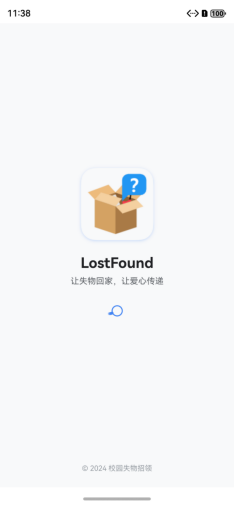
6.1.1 启动页(SplashPage)
- 应用 Logo 展示
- 品牌信息介绍
- 自动跳转逻辑
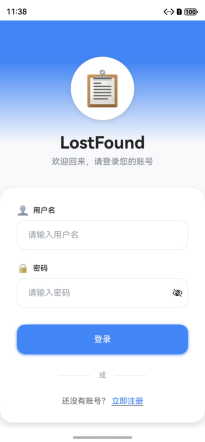
6.1.2 登录页(LoginPage)
- 简洁的登录表单
- 渐变背景设计
- 注册链接跳转
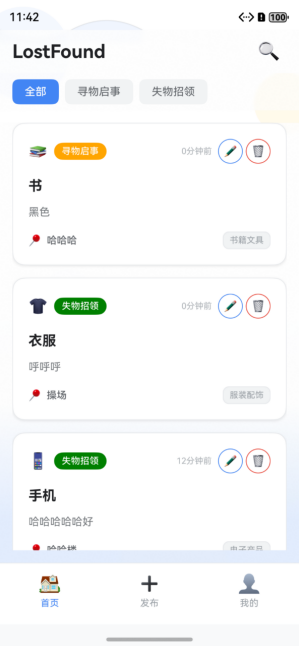
6.1.3 主页面(MainPage)
- 底部导航栏:首页、发布、我的
- 页面切换动画
- 登录状态检查
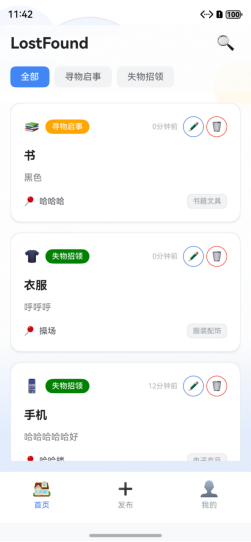
6.1.4 首页(HomePage)
- 搜索功能入口
- 分类筛选标签
- 物品信息卡片列表
- 空状态和加载状态
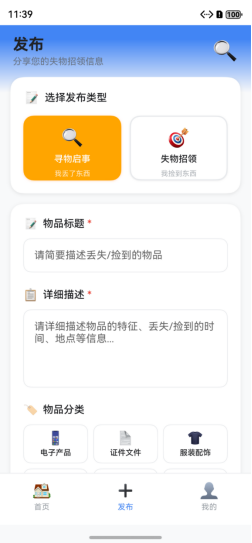
6.1.5 发布页(PublishPage)
- 发布类型选择
- 表单输入区域
- 分类选择网格
- 发布按钮和验证
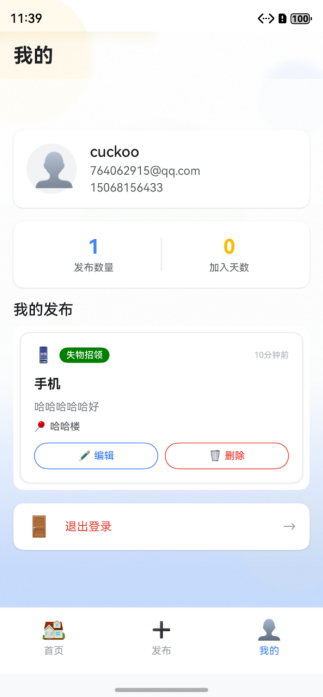
6.1.6 个人中心(ProfilePage)
- 用户信息展示
- 统计数据显示
- 个人发布列表
- 设置和退出功能
7、功能实现
7.1 数据库管理实现
// DatabaseManager.ets - 数据库管理器核心代码
export class DatabaseManager {
  private rdbStore: relationalStore.RdbStore | null = null;
  private static instance: DatabaseManager;
  public static getInstance(): DatabaseManager {
    if (!DatabaseManager.instance) {
      DatabaseManager.instance = new DatabaseManager();
    }
    return DatabaseManager.instance;
  }
  // 初始化数据库
  async initDatabase(context: Context): Promise<void> {
    const config: relationalStore.StoreConfig = {
      name: 'LostFoundDB.db',
      securityLevel: relationalStore.SecurityLevel.S1
    };
    try {
      this.rdbStore = await relationalStore.getRdbStore(context, config);
      await this.createTables();
    } catch (error) {
      console.error('初始化数据库失败:', error);
      throw new Error('初始化数据库失败');
    }
  }
  // 创建数据表
  private async createTables(): Promise<void> {
    const createUserTable = `
      CREATE TABLE IF NOT EXISTS users (
        id INTEGER PRIMARY KEY AUTOINCREMENT,
        username TEXT UNIQUE NOT NULL,
        password TEXT NOT NULL,
        email TEXT NOT NULL,
        phone TEXT NOT NULL,
        avatar TEXT,
        create_time TEXT NOT NULL,
        update_time TEXT NOT NULL
      )
    `;
    const createItemsTable = `
      CREATE TABLE IF NOT EXISTS lost_items (
        id INTEGER PRIMARY KEY AUTOINCREMENT,
        title TEXT NOT NULL,
        description TEXT NOT NULL,
        category TEXT NOT NULL,
        location TEXT NOT NULL,
        contact_info TEXT NOT NULL,
        images TEXT,
        status INTEGER NOT NULL,
        user_id INTEGER NOT NULL,
        create_time TEXT NOT NULL,
        update_time TEXT NOT NULL,
        FOREIGN KEY (user_id) REFERENCES users (id)
      )
    `;
    await this.rdbStore.executeSql(createUserTable);
    await this.rdbStore.executeSql(createItemsTable);
  }
  // 搜索功能实现
  async searchLostItems(keyword: string, status?: number): Promise<LostItem[]> {
    const predicates = new relationalStore.RdbPredicates('lost_items');
    if (status !== undefined) {
      predicates.equalTo('status', status);
    }
    const searchKeyword = `%${keyword.trim()}%`;
    predicates.and();
    predicates.beginWrap();
    predicates.like('title', searchKeyword);
    predicates.or().like('description', searchKeyword);
    predicates.or().like('location', searchKeyword);
    predicates.or().like('contact_info', searchKeyword);
    predicates.or().like('category', searchKeyword);
    predicates.endWrap();
    predicates.orderByDesc('create_time');
    const resultSet = await this.rdbStore.query(predicates);
    const items: LostItem[] = [];
    // 处理查询结果...
    return items;
  }
}
7.2 用户服务实现
// UserService.ets - 用户服务核心代码
export class UserService {
  private static instance: UserService;
  private currentUser: User | null = null;
  private preferences: preferences.Preferences | null = null;
  // 用户注册
  async register(registerInfo: RegisterInfo): Promise<ServiceResult> {
    try {
      // 验证输入
      const validation = this.validateRegisterInfo(registerInfo);
      if (!validation.valid) {
        return { success: false, message: validation.message };
      }
      // 检查用户名是否已存在
      const existingUser = await DatabaseManager.getInstance().getUserByUsername(registerInfo.username);
      if (existingUser) {
        return { success: false, message: '用户名已存在' };
      }
      // 创建新用户
      const newUser = new User(
        registerInfo.username,
        this.hashPassword(registerInfo.password),
        registerInfo.email,
        registerInfo.phone
      );
      const userId = await DatabaseManager.getInstance().insertUser(newUser);
      newUser.id = userId;
      return { success: true, message: '注册成功' };
    } catch (error) {
      console.error('注册失败:', error);
      return { success: false, message: '注册失败,请稍后重试' };
    }
  }
  // 用户登录
  async login(loginInfo: LoginInfo): Promise<LoginResult> {
    try {
      if (!loginInfo.username || !loginInfo.password) {
        return { success: false, message: '请输入用户名和密码' };
      }
      const user = await DatabaseManager.getInstance().getUserByUsername(loginInfo.username);
      if (!user) {
        return { success: false, message: '用户不存在' };
      }
      if (user.password !== this.hashPassword(loginInfo.password)) {
        return { success: false, message: '密码错误' };
      }
      // 保存登录状态
      this.currentUser = user;
      if (this.preferences) {
        await this.preferences.put('current_user', user.username);
        await this.preferences.flush();
      }
      return { success: true, message: '登录成功', user: user };
    } catch (error) {
      console.error('登录失败:', error);
      return { success: false, message: '登录失败,请稍后重试' };
    }
  }
  // 密码哈希
  private hashPassword(password: string): string {
    return password + '_hashed';
  }
}
7.3 首页组件实现
// HomePage.ets - 首页组件核心代码
@Component
export struct HomePage {
  @State lostItems: LostItem[] = [];
  @State foundItems: LostItem[] = [];
  @State currentCategory: number = 0;
  @State searchKeyword: string = '';
  @State searchResults: LostItem[] = [];
  @State hasSearched: boolean = false;
  // 构建物品卡片
  @Builder
  buildItemCard(item: LostItem) {
    Column() {
      // 顶部信息栏
      Row() {
        Row({ space: 8 }) {
          Text(this.getCategoryIcon(item.category))
            .fontSize(20)
            .fontColor($r('app.color.primary_color'))
          Text(item.status === ItemStatus.LOST ? '寻物启事' : '失物招领')
            .fontSize(12)
            .fontColor($r('app.color.surface_color'))
            .fontWeight(FontWeight.Medium)
            .padding({ left: 10, right: 10, top: 4, bottom: 4 })
            .backgroundColor(item.status === ItemStatus.LOST ? Color.Orange : Color.Green)
            .borderRadius(12)
        }
        .alignItems(VerticalAlign.Center)
        Blank()
        Row({ space: 8 }) {
          Text(this.formatTime(item.createTime || ''))
            .fontSize(11)
            .fontColor($r('app.color.text_hint'))
          if (this.isCurrentUserItem(item)) {
            Row({ space: 4 }) {
              Button() {
                Text('✏️').fontSize(14).fontColor($r('app.color.primary_color'))
              }
              .width(32).height(32)
              .backgroundColor($r('app.color.surface_color'))
              .borderRadius(16)
              .border({ width: 1, color: $r('app.color.primary_color') })
              .onClick(() => {
                this.editItemId = item.id || 0;
                this.showEditPage = true;
              })
              Button() {
                Text('��️').fontSize(14).fontColor($r('app.color.error_color'))
              }
              .width(32).height(32)
              .backgroundColor($r('app.color.surface_color'))
              .borderRadius(16)
              .border({ width: 1, color: $r('app.color.error_color') })
              .onClick(() => {
                this.deleteItemId = item.id || 0;
                this.deleteItemTitle = item.title;
                this.showDeleteDialog = true;
              })
            }
          }
        }
        .alignItems(VerticalAlign.Center)
      }
      .width('100%').margin({ bottom: 16 })
      // 主要内容区域
      Column({ space: 12 }) {
        Text(item.title)
          .fontSize(18)
          .fontColor($r('app.color.text_primary'))
          .fontWeight(FontWeight.Bold)
          .maxLines(2)
          .textOverflow({ overflow: TextOverflow.Ellipsis })
        Text(item.description)
          .fontSize(14)
          .fontColor($r('app.color.text_secondary'))
          .maxLines(3)
          .textOverflow({ overflow: TextOverflow.Ellipsis })
          .opacity(0.85)
      }
      .alignItems(HorizontalAlign.Start)
      .width('100%')
      // 底部信息栏
      Row() {
        Row({ space: 6 }) {
          Text('��').fontSize(14).fontColor($r('app.color.accent_color'))
          Text(item.location)
            .fontSize(13)
            .fontColor($r('app.color.text_secondary'))
            .fontWeight(FontWeight.Medium)
            .maxLines(1)
            .textOverflow({ overflow: TextOverflow.Ellipsis })
            .layoutWeight(1)
        }
        .alignItems(VerticalAlign.Center)
        .layoutWeight(1)
        Text(item.category)
          .fontSize(11)
          .fontColor($r('app.color.text_hint'))
          .padding({ left: 8, right: 8, top: 4, bottom: 4 })
          .backgroundColor($r('app.color.input_background'))
          .borderRadius(8)
          .border({ width: 1, color: $r('app.color.divider_color') })
      }
      .width('100%')
      .margin({ top: 16 })
      .alignItems(VerticalAlign.Center)
    }
    .width('100%')
    .padding(20)
    .backgroundColor($r('app.color.card_background'))
    .borderRadius(16)
    .shadow({
      radius: 8,
      color: '#15000000',
      offsetX: 0,
      offsetY: 4
    })
    .border({ width: 1, color: $r('app.color.divider_color') })
  }
  // 搜索功能
  private async performSearch() {
    this.isSearching = true;
    try {
      const keyword = this.searchKeyword.trim();
      let status: number | undefined;
      if (this.currentCategory === 1) {
        status = ItemStatus.LOST;
      } else if (this.currentCategory === 2) {
        status = ItemStatus.FOUND;
      }
      this.searchResults = await DatabaseManager.getInstance().searchLostItems(keyword, status);
      this.hasSearched = true;
    } catch (error) {
      console.error('搜索失败:', error);
      this.searchResults = [];
      this.hasSearched = true;
    } finally {
      this.isSearching = false;
    }
  }
}
7.4 发布页面实现
// PublishPage.ets - 发布页面核心代码
@Component
export struct PublishPage {
  @State title: string = '';
  @State description: string = '';
  @State location: string = '';
  @State contactInfo: string = '';
  @State selectedCategory: ItemCategory = ItemCategory.OTHERS;
  @State selectedStatus: ItemStatus = ItemStatus.LOST;
  @State isLoading: boolean = false;
  @State errorMessage: string = '';
  // 处理发布
  private async handlePublish() {
    // 验证输入
    if (!this.title.trim()) {
      this.errorMessage = '请输入物品标题';
      return;
    }
    if (!this.description.trim()) {
      this.errorMessage = '请输入详细描述';
      return;
    }
    if (!this.location.trim()) {
      this.errorMessage = '请输入相关地点';
      return;
    }
    if (!this.contactInfo.trim()) {
      this.errorMessage = '请输入联系方式';
      return;
    }
    // 检查登录状态
    const currentUser = UserService.getInstance().getCurrentUser();
    if (!currentUser || !currentUser.id) {
      this.errorMessage = '请先登录';
      return;
    }
    this.isLoading = true;
    this.errorMessage = '';
    try {
      const item = new LostItem(
        this.title.trim(),
        this.description.trim(),
        this.selectedCategory,
        this.location.trim(),
        this.contactInfo.trim(),
        this.selectedStatus,
        currentUser.id
      );
      await DatabaseManager.getInstance().insertLostItem(item);
      this.resetForm();
      if (this.onPublishSuccess) {
        this.onPublishSuccess();
      }
    } catch (error) {
      console.error('发布失败:', error);
      this.errorMessage = '发布失败,请稍后重试';
    } finally {
      this.isLoading = false;
    }
  }
  // 构建发布类型选择
  @Builder
  buildTypeSelectionCard() {
    Column({ space: 16 }) {
      Row() {
        Text('��').fontSize(20).margin({ right: 8 })
        Text('选择发布类型')
          .fontSize(16)
          .fontColor($r('app.color.text_primary'))
          .fontWeight(FontWeight.Medium)
      }
      .alignItems(VerticalAlign.Center)
      .alignSelf(ItemAlign.Start)
      Row({ space: 12 }) {
        // 寻物启事
        Column({ space: 8 }) {
          Text('��')
            .fontSize(28)
            .fontColor(this.selectedStatus === ItemStatus.LOST ? $r('app.color.surface_color') : Color.Orange)
          Text('寻物启事')
            .fontSize(14)
            .fontColor(this.selectedStatus === ItemStatus.LOST ? $r('app.color.surface_color') : $r('app.color.text_primary'))
            .fontWeight(FontWeight.Medium)
          Text('我丢了东西')
            .fontSize(11)
            .fontColor(this.selectedStatus === ItemStatus.LOST ? $r('app.color.surface_color') : $r('app.color.text_hint'))
            .opacity(0.8)
        }
        .width('48%')
        .height(100)
        .padding(16)
        .backgroundColor(this.selectedStatus === ItemStatus.LOST ? Color.Orange : $r('app.color.surface_color'))
        .borderRadius(16)
        .border({
          width: 2,
          color: this.selectedStatus === ItemStatus.LOST ? Color.Orange : $r('app.color.divider_color')
        })
        .justifyContent(FlexAlign.Center)
        .alignItems(HorizontalAlign.Center)
        .onClick(() => {
          this.selectedStatus = ItemStatus.LOST;
        })
        // 失物招领
        Column({ space: 8 }) {
          Text('��')
            .fontSize(28)
            .fontColor(this.selectedStatus === ItemStatus.FOUND ? $r('app.color.surface_color') : Color.Green)
          Text('失物招领')
            .fontSize(14)
            .fontColor(this.selectedStatus === ItemStatus.FOUND ? $r('app.color.surface_color') : $r('app.color.text_primary'))
            .fontWeight(FontWeight.Medium)
          Text('我捡到东西')
            .fontSize(11)
            .fontColor(this.selectedStatus === ItemStatus.FOUND ? $r('app.color.surface_color') : $r('app.color.text_hint'))
            .opacity(0.8)
        }
        .width('48%')
        .height(100)
        .padding(16)
        .backgroundColor(this.selectedStatus === ItemStatus.FOUND ? Color.Green : $r('app.color.surface_color'))
        .borderRadius(16)
        .border({
          width: 2,
          color: this.selectedStatus === ItemStatus.FOUND ? Color.Green : $r('app.color.divider_color')
        })
        .justifyContent(FlexAlign.Center)
        .alignItems(HorizontalAlign.Center)
        .onClick(() => {
          this.selectedStatus = ItemStatus.FOUND;
        })
      }
      .width('100%')
      .justifyContent(FlexAlign.SpaceBetween)
    }
    .width('100%')
    .padding(20)
    .backgroundColor($r('app.color.card_background'))
    .borderRadius(20)
    .shadow({
      radius: 12,
      color: '#15000000',
      offsetX: 0,
      offsetY: 4
    })
    .margin({ bottom: 16 })
  }
}
作为“人工智能6S店”的官方数字引擎,为AI开发者与企业提供一个覆盖软硬件全栈、一站式门户。
更多推荐
 8
8 0
0- 0


 已为社区贡献1条内容

所有评论(0)