
深度实战:Rust交叉编译适配OpenHarmony PC——zoneinfo_compiled完整适配案例
本文介绍了将Rust编写的zoneinfo_compiled时区解析库适配到鸿蒙PC平台的过程。主要内容包括:1) 项目背景介绍,说明该工具的功能特性(时区文件解析、多时区支持等)和应用场景;2) 环境准备步骤,包括鸿蒙SDK安装和Rust交叉编译环境配置;3) 项目结构分析,展示代码目录和关键配置;4) 问题诊断与解决方案,针对交叉编译和命令行工具开发中的问题进行说明;5) 详细修改步骤,包含命
📋 目录
欢迎加入开源鸿蒙PC社区:https://harmonypc.csdn.net/
1. 📖 背景介绍
1.1 🕐 zoneinfo_compiled工具简介
zoneinfo-compiled 是一个用Rust编写的时区信息解析库,用于解析编译后的Olson zoneinfo数据库文件。本项目基于zoneinfo_compiled库创建了一个命令行工具,用于演示和测试时区信息解析功能。
核心功能:
- 🕐 时区文件解析: 解析编译后的zoneinfo文件(tzfile格式)
- 📅 时区转换信息: 获取时区转换时间点和偏移量信息
- 🌍 多时区支持: 支持解析各种时区文件(如Asia/Shanghai、UTC、America/New_York等)
- ⏰ 夏令时支持: 支持解析夏令时(DST)转换信息
- 🔢 闰秒支持: 支持解析闰秒信息
- 📊 时区数据展示: 展示时区的名称、偏移量、DST状态等信息
应用场景:
- 🌐 时区转换工具开发
- 📅 日期时间处理库开发
- 🕐 时区信息查询工具
- 📊 时区数据分析工具
- 🔍 调试和诊断工具
- 🖥️ 跨时区应用开发
1.2 🎯 适配目标
将zoneinfo_compiled命令行工具适配到鸿蒙PC(OpenHarmony PC)平台,实现:
- 🦀 Rust项目交叉编译支持
- 🏗️ 支持aarch64-linux-ohos架构
- 🔧 使用OHOS SDK工具链进行编译
- 📦 生成HNP格式的安装包
- 📦 生成tar.gz格式的发布包
- 💻 提供可执行的
zoneinfo_compiled命令
1.3 🔧 技术栈
- 语言: 🦀 Rust 2015 Edition
- 构建系统: Cargo
- 目标平台: 🎯 aarch64-linux-ohos
- 打包格式: 📦 HNP (HarmonyOS Native Package)
- 编译工具链: OHOS SDK Native LLVM (clang/ld.lld)
- 依赖:
- byteorder (1.0) - 字节序处理
- datetime (0.5.2) - 日期时间处理
1.4 💡 工具优势
相比直接解析二进制文件,zoneinfo_compiled提供了:
- ✅ 类型安全: Rust类型系统保证解析数据的正确性
- ✅ 易于使用: 简洁的API,
parse()函数直接返回TZData结构 - ✅ 完整支持: 支持时区转换、夏令时、闰秒等完整功能
- ✅ 标准兼容: 遵循tzfile格式标准
- ✅ 性能优异: 纯Rust实现,性能优异
2. 🛠️ 环境准备
2.1 💻 系统要求
- 开发环境: 💻 macOS / 🐧 Linux / 🪟 Windows (WSL)
- Python: 🐍 Python 3.x
- Rust: 🦀 Rust 1.31.0+(zoneinfo_compiled最低要求)
- Cargo: 📦 Rust包管理器(随Rust安装)
- 鸿蒙SDK: 📦 OHOS SDK (包含native工具链和hnpcli打包工具)
2.2 📥 SDK安装
- 📥 下载SDK
# 下载鸿蒙SDK
cd ~
wget https://cidownload.openharmony.cn/version/Master_Version/ohos-sdk-full_ohos/20250819_020817/version-Master_Version-ohos-sdk-full_ohos-20250819_020817-ohos-sdk-full_ohos.tar.gz

# 解压SDK
tar -zvxf version-Master_Version-ohos-sdk-full_ohos-20250819_020817-ohos-sdk-full_ohos.tar.gz
- 📁 SDK目录结构
ohos-sdk/
├── native/
│   ├── llvm/bin/          # 🔧 编译器工具链
│   ├── sysroot/           # 📚 系统根目录(头文件和库)
│   └── build-tools/       # 🛠️ 构建工具
└── toolchains/
    └── hnpcli            # 📦 HNP打包工具
2.3 🦀 Rust环境配置
安装Rust:
# 使用rustup安装Rust
curl --proto '=https' --tlsv1.2 -sSf https://sh.rustup.rs | sh
source $HOME/.cargo/env
安装musl target:
# 安装aarch64-unknown-linux-musl target(用于OpenHarmony交叉编译)
rustup target add aarch64-unknown-linux-musl
验证安装:
rustc --version  # 应显示 rustc 1.31.0 或更高版本
cargo --version  # 应显示 cargo 1.31.0 或更高版本
rustup target list --installed | grep aarch64-unknown-linux-musl  # 应显示已安装
3. 📁 项目结构分析
3.1 📂 目录结构
zoneinfo-compiled4oh/
├── Cargo.toml              # Rust项目配置
├── Cargo.lock              # 依赖版本锁定文件
├── build_ohos.sh           # OpenHarmony构建脚本
├── hnp.json                # HNP包配置
├── README.md               # 项目说明
├── LICENCE                 # MIT许可证
├── src/                    # 源代码目录
│   ├── lib.rs             # 库代码(zoneinfo_compiled库)
│   ├── main.rs            # 命令行工具主程序 ⭐
│   └── parser.rs          # 时区文件解析器
├── examples/               # 示例代码
│   └── tzdump.rs          # 时区转储示例
└── .cargo/                 # Cargo配置目录
    └── config.toml         # 交叉编译配置
3.2 🔧 Cargo.toml关键配置
[package]
name = "zoneinfo_compiled"
version = "0.5.1"
edition = "2015"

[lib]
name = "zoneinfo_compiled"

[[bin]]
name = "zoneinfo_compiled"
path = "src/main.rs"  # ⭐ 命令行工具入口

[dependencies]
byteorder = "1.0"
datetime = { version = "0.5.2", default_features = false }
关键配置说明:
- ⚠️ Edition 2015: 使用Rust 2015版本
- ⭐ Binary配置: 添加了
[[bin]]配置,定义命令行工具入口 - 📦 依赖: byteorder用于字节序处理,datetime用于日期时间处理
3.3 📝 命令行工具设计
main.rs核心功能:
// 支持的命令
- parse <file>    - 解析zoneinfo文件并显示信息(默认)
- help            - 显示帮助信息
设计特点:
- ✅ 模块化设计,功能独立函数
- ✅ 友好的命令行界面
- ✅ 详细的时区信息展示
- ✅ 完善的错误处理
4. 🔍 问题诊断与解决
4.1 🔍 问题1:缺少命令行工具入口
问题描述:
zoneinfo_compiled是一个库项目,没有命令行工具入口点。
解决方案:
创建src/main.rs文件,实现命令行工具功能。
4.2 🔍 问题2:Cargo.toml缺少binary配置
问题描述:
Cargo.toml中没有定义binary目标,无法构建可执行文件。
解决方案:
在Cargo.toml中添加[[bin]]配置:
[[bin]]
name = "zoneinfo_compiled"
path = "src/main.rs"
4.3 🔍 问题3:缺少交叉编译配置
问题描述:
需要配置Cargo使用OpenHarmony SDK的工具链进行交叉编译。
解决方案:
创建.cargo/config.toml文件,配置交叉编译参数。
4.4 🔍 问题4:TimeZone结构访问错误
问题描述:
初始代码尝试通过time_zone.0访问TimeZone的内部结构,但time_zone实际上是OwnedTimeZone类型,可以直接访问字段。
解决方案:
直接访问time_zone.fixed_timespans字段,无需通过包装类型。
5. ✏️ 详细修改步骤
5.1 📝 步骤1:创建命令行工具入口
创建src/main.rs文件:
//! zoneinfo_compiled command-line tool
//!
//! A command-line tool for parsing and displaying compiled zoneinfo files.

extern crate zoneinfo_compiled;

use std::fs::File;
use std::io::Read;
use std::path::Path;
use zoneinfo_compiled::{parse, TZData};

fn print_usage() {
    println!("zoneinfo_compiled - Parse and display compiled zoneinfo files");
    println!();
    println!("Usage:");
    println!("  zoneinfo_compiled [command] [file...]");
    println!();
    println!("Commands:");
    println!("  parse <file>    - Parse zoneinfo file and display information (default)");
    println!("  help            - Show this help message");
    println!();
    println!("Examples:");
    println!("  zoneinfo_compiled parse /usr/share/zoneinfo/Asia/Shanghai  # Parse Shanghai timezone");
    println!("  zoneinfo_compiled parse /usr/share/zoneinfo/UTC           # Parse UTC timezone");
    println!("  zoneinfo_compiled parse /usr/share/zoneinfo/America/New_York  # Parse New York timezone");
}

fn print_tzdata(tzdata: &TZData) {
    println!("Zoneinfo File Information:");
    println!("==========================");
    println!();

    // Display time zone information
    println!("Time Zone:");
    println!("----------");

    // Access OwnedTimeZone directly (time_zone is OwnedTimeZone, not TimeZone wrapper)
    let tz = &tzdata.time_zone;
    let fixed_timespans = &tz.fixed_timespans;
    println!("First timespan:");
    println!("  Name: {}", fixed_timespans.first.name.as_ref());
    println!("  Offset: {} seconds", fixed_timespans.first.offset);
    println!("  DST: {}", fixed_timespans.first.is_dst);

    // Display transitions if there are any
    if !fixed_timespans.rest.is_empty() {
        println!();
        println!("Transitions (showing first 10):");
        println!("-------------------------------");
        for (i, (timestamp, timespan)) in fixed_timespans.rest.iter().enumerate().take(10) {
            println!("  Transition {}: timestamp={}, name={}, offset={}, DST={}",
                i + 1, timestamp, timespan.name.as_ref(), timespan.offset, timespan.is_dst);
        }
        if fixed_timespans.rest.len() > 10 {
            println!("  ... ({} more transitions)", fixed_timespans.rest.len() - 10);
        }
    } else {
        println!();
        println!("  (No transitions)");
    }

    // Display leap seconds
    if !tzdata.leap_seconds.is_empty() {
        println!();
        println!("Leap Seconds:");
        println!("-------------");
        for ls in &tzdata.leap_seconds {
            println!("  Timestamp: {}, Leap second count: {}", ls.timestamp, ls.leap_second_count);
        }
    } else {
        println!();
        println!("Leap Seconds: (None)");
    }
}

fn main() {
    let args: Vec<String> = std::env::args().collect();

    if args.len() < 2 {
        print_usage();
        return;
    }

    let command = args[1].as_str();

    match command {
        "parse" => {
            if args.len() < 3 {
                eprintln!("Error: 'parse' command requires a file argument");
                println!();
                print_usage();
                std::process::exit(1);
            }

            let file_path = &args[2];
            match File::open(Path::new(file_path)) {
                Ok(mut file) => {
                    let mut contents = Vec::new();
                    match file.read_to_end(&mut contents) {
                        Ok(_) => {
                            match parse(contents) {
                                Ok(tzdata) => {
                                    print_tzdata(&tzdata);
                                }
                                Err(e) => {
                                    eprintln!("Error parsing zoneinfo file: {}", e);
                                    std::process::exit(1);
                                }
                            }
                        }
                        Err(e) => {
                            eprintln!("Error reading file {}: {}", file_path, e);
                            std::process::exit(1);
                        }
                    }
                }
                Err(e) => {
                    eprintln!("Couldn't open file {}: {}", file_path, e);
                    std::process::exit(1);
                }
            }
        }
        "help" | "-h" | "--help" => {
            print_usage();
        }
        _ => {
            // Try to parse as a file path
            let file_path = &args[1];
            match File::open(Path::new(file_path)) {
                Ok(mut file) => {
                    let mut contents = Vec::new();
                    match file.read_to_end(&mut contents) {
                        Ok(_) => {
                            match parse(contents) {
                                Ok(tzdata) => {
                                    print_tzdata(&tzdata);
                                }
                                Err(e) => {
                                    eprintln!("Error parsing zoneinfo file: {}", e);
                                    std::process::exit(1);
                                }
                            }
                        }
                        Err(e) => {
                            eprintln!("Error reading file {}: {}", file_path, e);
                            std::process::exit(1);
                        }
                    }
                }
                Err(_) => {
                    eprintln!("Unknown command: {}", command);
                    println!();
                    print_usage();
                    std::process::exit(1);
                }
            }
        }
    }
}
关键实现:
- ✅ 使用
parse()函数解析zoneinfo文件 - ✅ 直接访问
OwnedTimeZone的fixed_timespans字段 - ✅ 展示时区转换信息和闰秒信息
- ✅ 完善的错误处理和帮助信息
5.2 📝 步骤2:更新Cargo.toml
在Cargo.toml中添加binary配置:
[lib]
name = "zoneinfo_compiled"

[[bin]]
name = "zoneinfo_compiled"
path = "src/main.rs"
配置说明:
[lib]: 定义库目标[[bin]]: 定义二进制目标,指定入口文件为src/main.rs
5.3 📝 步骤3:创建交叉编译配置
创建.cargo/config.toml文件:
[target.aarch64-unknown-linux-musl]
linker = "clang"
ar = "llvm-ar"
rustflags = [
    "-C", "link-arg=--target=aarch64-linux-ohos",
    "-C", "link-arg=--sysroot=${SYSROOT}",
    "-C", "link-arg=-fuse-ld=lld",
]
配置说明:
linker: 使用clang作为链接器ar: 使用llvm-ar作为归档工具rustflags: 传递链接参数,指定目标平台和sysroot
5.4 📝 步骤4:更新build_ohos.sh
更新build_ohos.sh脚本,添加二进制文件复制和验证步骤:
# 构建zoneinfo_compiled命令行工具
cargo build --release --target aarch64-unknown-linux-musl
BIN=target/aarch64-unknown-linux-musl/release/zoneinfo_compiled
test -f "$BIN"
cp "$BIN" ${ZONEINFO_COMPILED_INSTALL_HNP_PATH}/bin/

# 复制HNP配置文件
test -f hnp.json
cp hnp.json ${ZONEINFO_COMPILED_INSTALL_HNP_PATH}/

# 验证安装
if [ -f "${ZONEINFO_COMPILED_INSTALL_HNP_PATH}/bin/zoneinfo_compiled" ]; then
    echo "zoneinfo_compiled installed successfully"
    echo "Binary file type:"
    file "${ZONEINFO_COMPILED_INSTALL_HNP_PATH}/bin/zoneinfo_compiled" || true
else
    echo "Error: zoneinfo_compiled binary not found after installation"
    exit 1
fi
关键步骤:
- ✅ 设置安装路径
- ✅ 安装musl target
- ✅ 配置交叉编译环境变量
- ✅ 构建二进制文件
- ✅ 复制文件到HNP目录
- ✅ 验证安装结果
- ✅ 打包HNP和tar.gz
6. ✅ 构建验证
6.1 🚀 执行构建
cd /Users/baixm/HarmonyOSPC/build
./build.sh --sdk /Users/baixm/ohos-sdk --module zoneinfo-compiled4oh
6.2 ✅ 构建输出
Building zoneinfo_compiled command-line tool for aarch64-unknown-linux-musl (compatible with aarch64-linux-ohos)...
   Compiling zoneinfo_compiled v0.5.1 (/Users/baixm/HarmonyOSPC/build/code/zoneinfo-compiled4oh)
    Finished `release` profile [optimized] target(s) in 1.00s
zoneinfo_compiled installed successfully
Binary file type:
/Users/baixm/HarmonyOSPC/data/service/hnp/zoneinfo_compiled.org/zoneinfo_compiled_0.5.2/bin/zoneinfo_compiled: ELF 64-bit LSB executable, ARM aarch64, version 1 (SYSV), statically linked, not stripped
Packing HNP package...
[INFO][HNP][hnp_pack.c:116]PackHnp end. srcPath=..., hnpName=zoneinfo_compiled, hnpVer=0.5.2
Creating tar.gz archive...
Build completed successfully!
6.3 🔍 验证要点
- ✅ 编译成功,无错误
- ✅ 二进制文件格式正确(ELF 64-bit LSB executable, ARM aarch64)
- ✅ 静态链接(statically linked)
- ✅ HNP包生成成功
- ✅ tar.gz包生成成功
7. 💻 使用示例
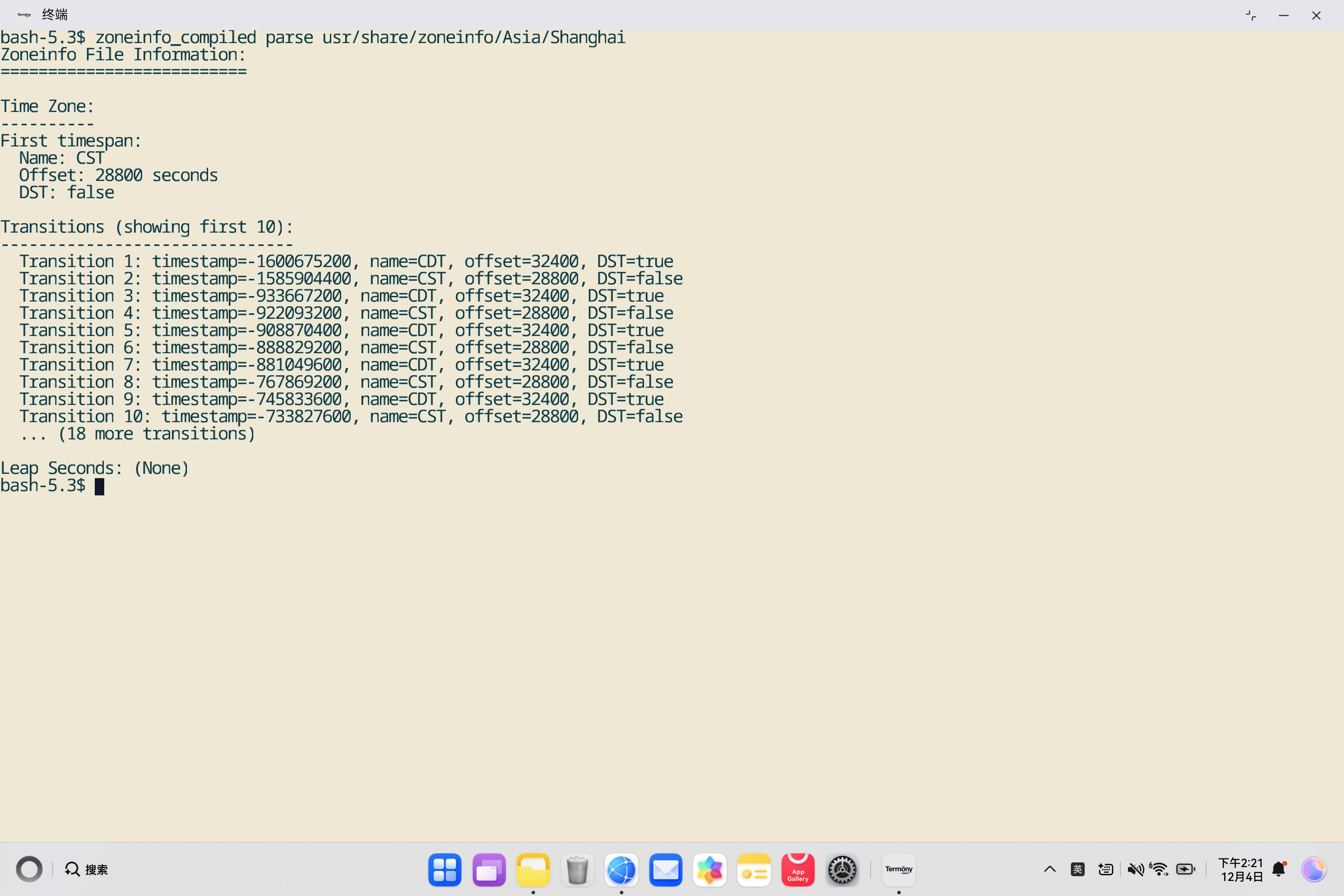
7.1 🚀 基本使用
🕐 解析时区文件
# 在鸿蒙PC终端执行
zoneinfo_compiled parse /usr/share/zoneinfo/Asia/Shanghai

# 输出示例:
# Zoneinfo File Information:
# ==========================
#
# Time Zone:
# ----------
# First timespan:
#   Name: CST
#   Offset: 28800 seconds
#   DST: false
#
# Transitions (showing first 10):
# -------------------------------
#   Transition 1: timestamp=..., name=CST, offset=28800, DST=false
#   ...
🕐 解析UTC时区
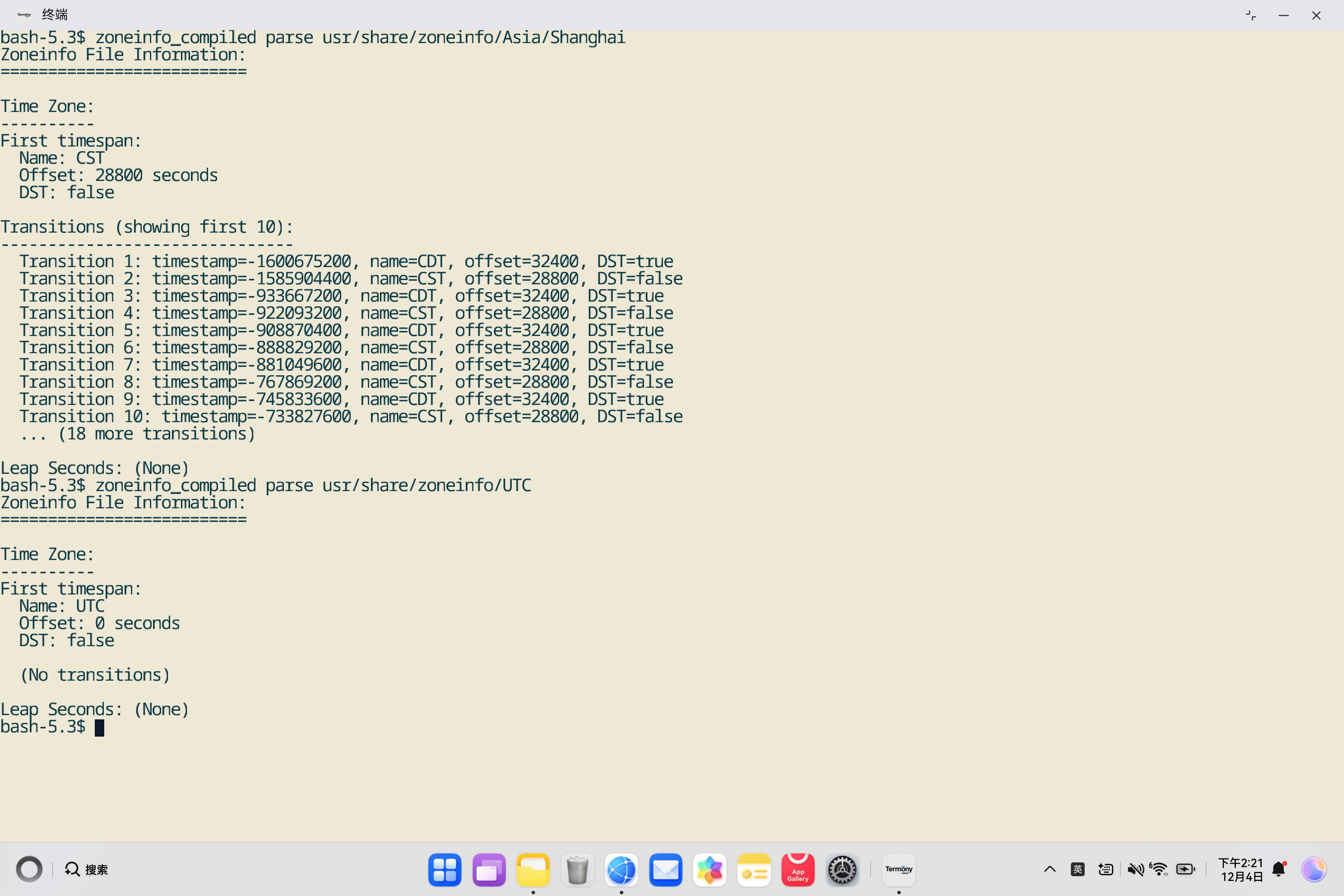
# 在鸿蒙PC终端执行
zoneinfo_compiled parse /usr/share/zoneinfo/UTC

# 输出示例:
# Zoneinfo File Information:
# ==========================
#
# Time Zone:
# ----------
# First timespan:
#   Name: UTC
#   Offset: 0 seconds
#   DST: false
#
#   (No transitions)
#
# Leap Seconds: (None)
🕐 解析美国东部时区
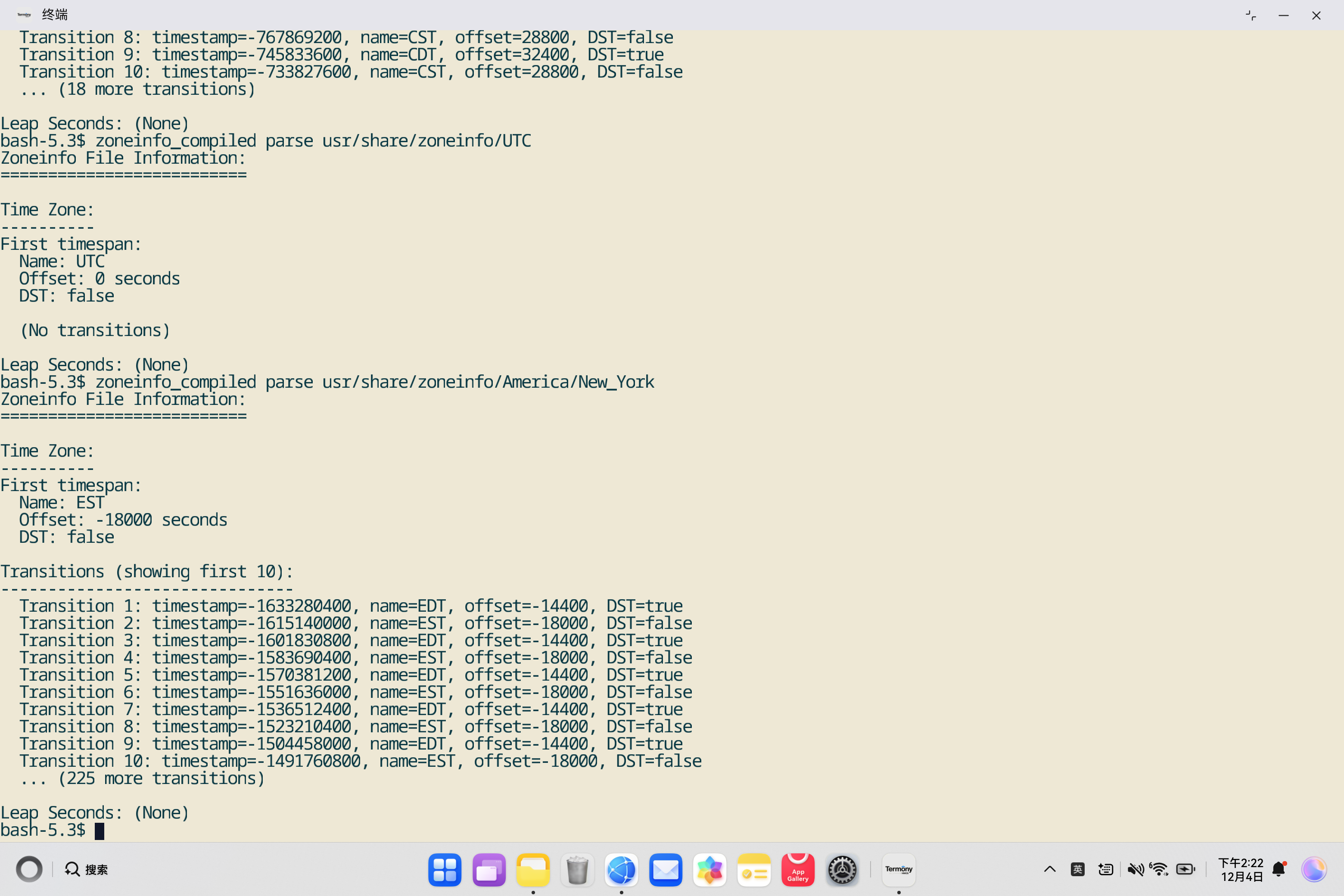
# 在鸿蒙PC终端执行
zoneinfo_compiled parse /usr/share/zoneinfo/America/New_York

# 输出示例:
# Zoneinfo File Information:
# ==========================
#
# Time Zone:
# ----------
# First timespan:
#   Name: EST
#   Offset: -18000 seconds
#   DST: false
#
# Transitions (showing first 10):
# -------------------------------
#   Transition 1: timestamp=..., name=EDT, offset=-14400, DST=true
#   Transition 2: timestamp=..., name=EST, offset=-18000, DST=false
#   ...
7.2 📋 直接解析文件(无需parse命令)
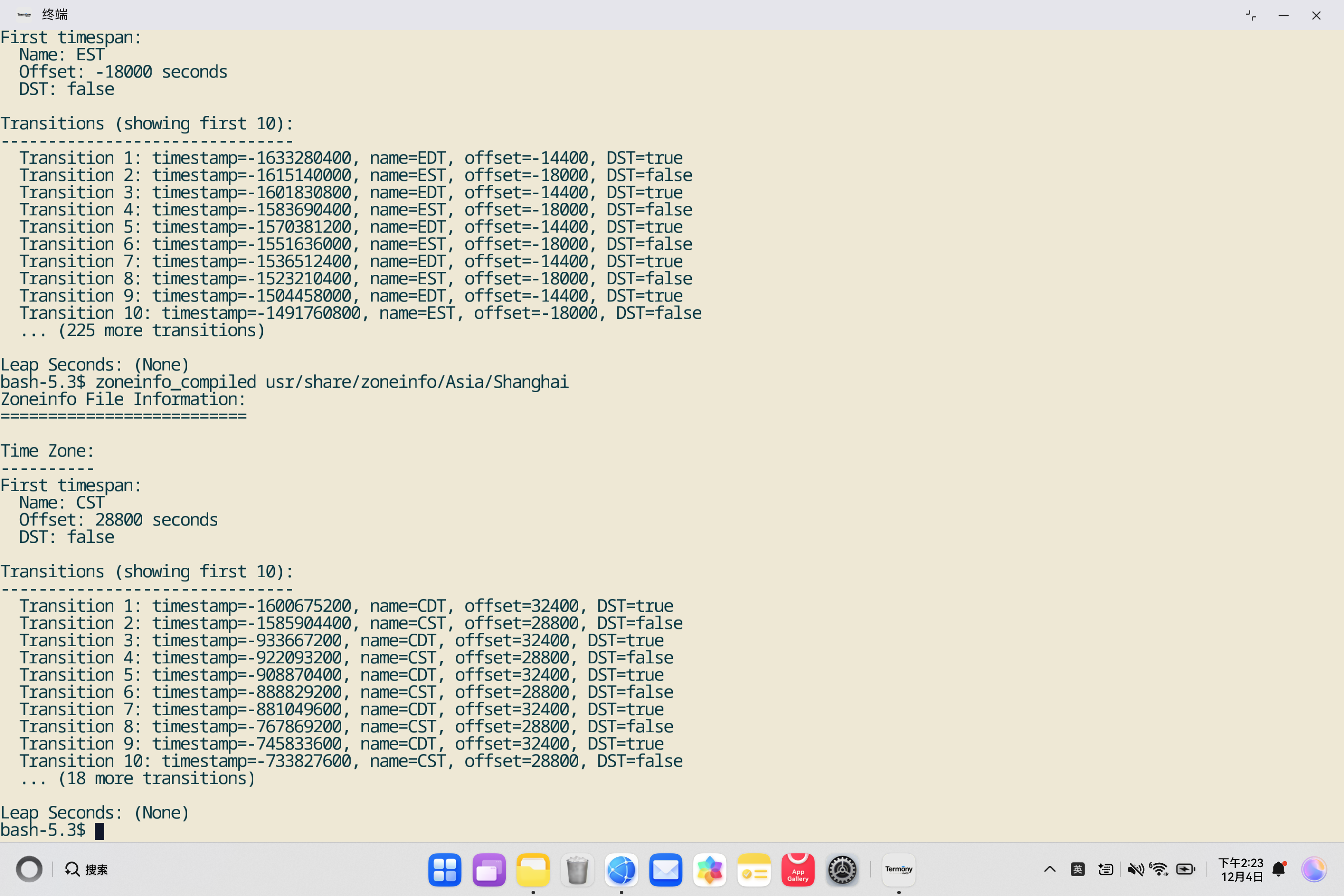
# 在鸿蒙PC终端执行
zoneinfo_compiled /usr/share/zoneinfo/Asia/Shanghai

# 输出与 parse 命令相同
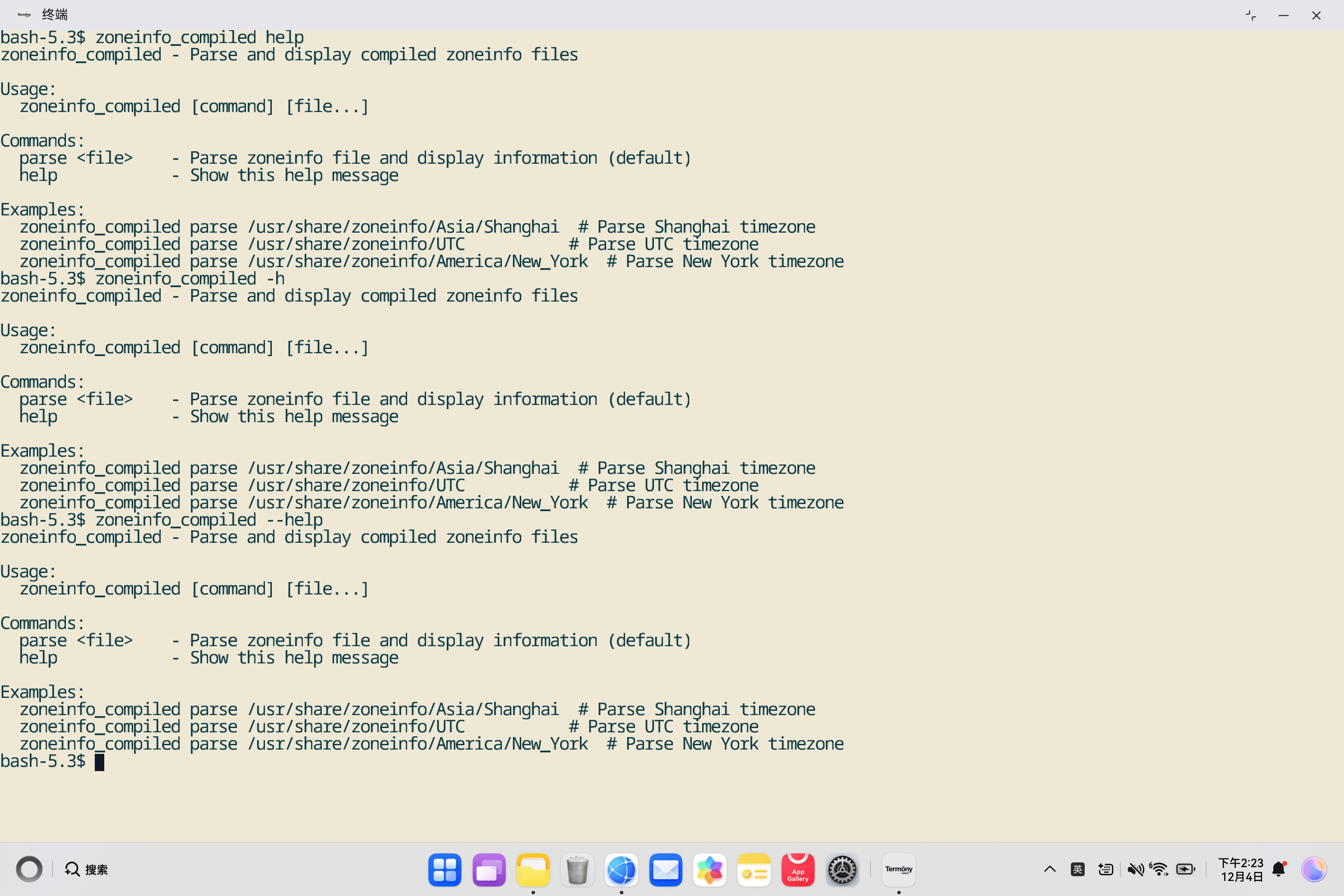
7.3 ❓ 显示帮助信息
# 在鸿蒙PC终端执行
zoneinfo_compiled help

# 或
zoneinfo_compiled -h
zoneinfo_compiled --help

# 输出示例:
# zoneinfo_compiled - Parse and display compiled zoneinfo files
#
# Usage:
#   zoneinfo_compiled [command] [file...]
#
# Commands:
#   parse <file>    - Parse zoneinfo file and display information (default)
#   help            - Show this help message
7.4 🔧 实际应用场景
📊 在脚本中使用
#!/bin/bash
# 解析时区文件并提取信息

zoneinfo_compiled parse /usr/share/zoneinfo/Asia/Shanghai | grep "Offset:" | head -1
# 输出: Offset: 28800 seconds
📋 在Rust程序中使用
use zoneinfo_compiled::{parse, TZData};
use std::fs::File;
use std::io::Read;

fn main() {
    let mut file = File::open("/usr/share/zoneinfo/Asia/Shanghai").unwrap();
    let mut contents = Vec::new();
    file.read_to_end(&mut contents).unwrap();

    match parse(contents) {
        Ok(tzdata) => {
            let tz = &tzdata.time_zone;
            let fixed_timespans = &tz.fixed_timespans;
            println!("Timezone: {}", fixed_timespans.first.name.as_ref());
            println!("Offset: {} seconds", fixed_timespans.first.offset);
        }
        Err(e) => {
            eprintln!("Error: {}", e);
        }
    }
}
8. 📚 总结与最佳实践
8.1 ✅ 适配总结
本次适配成功实现了zoneinfo_compiled命令行工具在OpenHarmony PC平台上的部署:
- ✅ 命令行工具创建: 创建了
src/main.rs,实现了完整的命令行工具功能 - ✅ 交叉编译配置: 配置了
.cargo/config.toml,使用musl target进行交叉编译 - ✅ 构建脚本优化:
build_ohos.sh脚本自动处理musl target安装和交叉编译 - ✅ HNP打包: 成功生成HNP格式的安装包和tar.gz发布包
- ✅ 功能验证: 命令行工具功能完整,支持解析和展示时区信息
8.2 🎯 关键技术点
- Rust 2015 Edition: zoneinfo_compiled使用Rust 2015版本
- OwnedTimeZone结构: 直接访问
OwnedTimeZone的fixed_timespans字段 - musl target: 使用
aarch64-unknown-linux-musltarget进行静态链接 - 交叉编译: 通过
.cargo/config.toml和RUSTFLAGS配置交叉编译 - HNP打包: 使用
hnpcli工具打包成HNP格式
8.3 💡 最佳实践
-
命令行工具设计:
- ✅ 提供清晰的帮助信息
- ✅ 支持直接文件路径和parse命令两种方式
- ✅ 完善的错误处理
- ✅ 友好的用户界面
-
交叉编译配置:
- ✅ 使用标准的musl target
- ✅ 配置正确的链接器和sysroot
- ✅ 自动安装musl target
- ✅ 验证二进制文件格式
-
构建脚本:
- ✅ 设置
set -e确保错误时退出 - ✅ 创建必要的目录结构
- ✅ 验证安装结果
- ✅ 提供清晰的日志输出
- ✅ 设置
8.4 🚀 未来改进方向
-
功能增强:
- 📊 支持更多输出格式(如JSON、YAML)
- 🔄 支持时区转换计算
- 📈 支持时区信息统计和报告
-
性能优化:
- ⚡ 优化文件读取性能
- 🎯 优化解析性能
-
文档完善:
- 📖 添加更多使用示例
- 🔍 添加故障排除指南
- 📚 添加API文档
📚 附录
A. 相关资源
- zoneinfo_compiled文档: https://docs.rs/zoneinfo_compiled
- GitHub仓库: https://github.com/rust-datetime/zoneinfo-compiled
- Crates.io: https://crates.io/crates/zoneinfo_compiled
- tzfile格式文档: ftp://ftp.iana.org/tz/code/tzfile.5.txt
- OpenHarmony官网: https://www.openharmony.cn/
B. 常见问题
Q1: zoneinfo文件在哪里?
A: 在Linux系统中,zoneinfo文件通常位于/usr/share/zoneinfo/目录下。不同时区有不同的文件,如Asia/Shanghai、UTC、America/New_York等。
Q2: 如何获取时区文件的路径?
A: 可以使用tzselect命令或查看/etc/localtime符号链接指向的文件。也可以直接使用/usr/share/zoneinfo/下的文件路径。
Q3: 时区转换信息中的timestamp是什么?
A: timestamp是Unix时间戳(自1970年1月1日UTC以来的秒数),表示时区转换发生的时间点。
Q4: 为什么有些时区没有转换信息?
A: 某些时区(如UTC)没有夏令时转换,因此没有转换信息。这些时区只有一个固定的偏移量。
🎉 结语
zoneinfo_compiled工具为时区处理应用开发提供了便捷的时区信息解析能力,是开发跨时区应用的重要基础工具。通过本次适配,zoneinfo_compiled成功运行在OpenHarmony PC平台上,为鸿蒙生态的时区处理应用开发提供了支持。
希望本文档能够帮助开发者:
- 🕐 理解时区信息解析的原理和使用方法
- 🔧 掌握Rust项目适配OpenHarmony的方法
- 📦 了解HNP包的构建和打包流程
- 💻 学习命令行工具的开发实践
💬 如有问题或建议,欢迎反馈!

作为“人工智能6S店”的官方数字引擎,为AI开发者与企业提供一个覆盖软硬件全栈、一站式门户。
更多推荐

 20
20 0
0- 0


 已为社区贡献3条内容

所有评论(0)