
【江鸟中原】HarmonyOS 应用开发——吞噬小游戏(鸿蒙版)开发
本文介绍了基于鸿蒙ArkUI框架开发的"吞噬"小游戏。游戏模拟弱肉强食生态系统,玩家通过操控球体吞噬目标成长。文章详细解析了四个核心模块:(1)基于触摸和孢子发射的双重操控系统;(2)多角色碰撞吞噬机制;(3)分离式玩家状态管理系统;(4)配置驱动的三级难度系统。项目验证了鸿蒙框架在游戏开发中的可行性,展示了从底层算法到UI设计的完整技术实践,为鸿蒙游戏开发提供了典型案例。
【陈规出品】
目录
前言
在学习完"鸿蒙移动应用开发"课程后,我受到一本小说的启发,决定开发一个模仿球球大作战的小游戏。经过几个月的尝试,我终于开发出了这款名为“吞噬”的小游戏。在此次尝试中我深入理解了游戏开发的完整流程,也验证了鸿蒙ArkUI框架在实际游戏开发中的强大能力。本文我将详细解析游戏四个核心功能模块:玩家操控系统、多角色碰撞吞噬玩法、玩家状态管理系统和游戏难度管理系统的实现原理与技术细节。
一、游戏概述
游戏的核心理念是模拟一个"弱肉强食"的生态系统:在游戏中玩家将扮演一个球体,通过吞噬比自己小的球体来成长,在这个过程中要避免被比自己大的球体吞噬。在游戏中我添加了刺球作为中立生物,提高游戏的可玩性和难度,同时刺球具有基本的人工智能行为,来增加游戏的随机性。
二、玩家操控系统的实现
玩家操控系统是游戏交互体验的核心,我设计了基于触摸移动和孢子发射的双重控制系统。触摸移动控制充分利用了移动设备的触摸屏特性,玩家通过手指在屏幕上滑动来操控球体移动孢子发射机制则为游戏增添了策略深度。当玩家球体成长到一定大小时,可以通过牺牲部分体积来发射孢子。 在代码实现上,通过计算玩家最后触摸位置与球体中心的向量来确定发射方向,并赋予孢子初始速度,确保它们不会被立即吞噬。这种设计既增加了游戏的策略性,也提升了玩家的操作体验。整个操控系统的设计遵循了"简单易学,难以精通"的原则,新手玩家可以快速上手,而熟练玩家则能发掘出更深层次的操作技巧。实现代码如下:
 // 触摸移动控制的核心实现
  onTouchMove(event: TouchEvent): void {
    // 游戏状态验证
    if (this.gameOver || this.gameWon || this.showDifficultyDialog || !this.gameStarted) {
      return;
    }
    // 获取触摸点坐标
    const touch = event.touches[0];
    this.lastTouchX = touch.x;
    this.lastTouchY = touch.y;
    // 应用缓动算法实现平滑移动
    this.playerBall.x += (touch.x - this.playerBall.x) * 0.2;
    this.playerBall.y += (touch.y - this.playerBall.y) * 0.2;
  }
  // 孢子发射的核心逻辑
  shootSpore() {
    // 发射条件验证
    if (this.gameOver || this.gameWon || this.playerBall.radius <= 12 ||
    this.showDifficultyDialog || !this.gameStarted) {
      return;
    }
    const now = this.gameTimer;
    if (now - this.lastSporeTime < 10) {
      return;
    }
    // 发射方向计算
    const dx = this.lastTouchX - this.playerBall.x;
    const dy = this.lastTouchY - this.playerBall.y;
    const dist = Math.sqrt(dx * dx + dy * dy);
    const vx = dist > 0 ? dx / dist * 4 : Math.cos(Math.random() * 2 * Math.PI) * 4;
    const vy = dist > 0 ? dy / dist * 4 : Math.sin(Math.random() * 2 * Math.PI) * 4;
    // 资源消耗计算(与难度相关)
    const cost = 2 + (this.selectedDifficulty.level - 1) * 0.5;
    this.playerBall.radius -= cost;
    // 孢子对象创建
    this.sporeBalls.push(new Spore(this.playerBall.x, this.playerBall.y, vx, vy, 20));
    this.lastSporeTime = now;
    // 状态更新
    this.updateDisplayValues();
  }
三、多角色碰撞吞噬系统的实现
碰撞吞噬是游戏的核心玩法,我构建了一个基于圆形几何的碰撞检测体系。游戏中存在三种主要球体:玩家球、NPC球和刺球,它们之间的碰撞规则各不相同,玩家可以吞噬比自己小的NPC球来增长体积和获得分数,但如果遇到比自己大的NPC球,会被对方吞噬导致游戏失败。实现代码如下:
  // 玩家与NPC碰撞检测
  private checkPlayerNpcCollisions() {
    const difficulty = this.selectedDifficulty.level;
    const growthRate = 0.15 - (difficulty - 1) * 0.02;
    const sizeAdvantage = 1.1 + (difficulty - 1) * 0.05;
    let uiUpdated = false;
    this.npcBalls = this.npcBalls.filter(npc => {
      const distance = this.calculateDistance(this.playerBall, npc);
      // 碰撞检测条件
      if (distance < this.playerBall.radius + npc.radius) {
        // 玩家吞噬NPC
        if (this.playerBall.radius > npc.radius * sizeAdvantage) {
          this.playerBall.radius += npc.radius * growthRate;
          this.score += Math.floor(npc.radius);
          uiUpdated = true;
          return false;// 移除被吞噬的NPC
          // NPC伤害玩家
        } else if (this.playerBall.radius < npc.radius * (0.9 - (difficulty - 1) * 0.05)) {
          this.playerBall.radius -= npc.radius * (0.05 + (difficulty - 1) * 0.01);
          uiUpdated = true;
        }
      }
      return true;
    });
其中刺球作为特殊存在,有着独特的碰撞规则,玩家需要比刺球大一定比例才能安全吞噬,否则会受到伤害并被击退。这种高风险高回报的机制增加了游戏的策略深度,玩家在面对刺球时需要仔细权衡风险和收益。实现代码如下:
  // 刺球碰撞处理
  private checkPlayerSpikyCollisions() {
    const difficulty = this.selectedDifficulty.level;
    let uiUpdated = false;

    this.spikyBalls = this.spikyBalls.filter(spiky => {
      const distance = this.calculateDistance(this.playerBall, spiky);
      if (distance < this.playerBall.radius + spiky.radius) {
        const requiredSizeRatio = 1.3 + (difficulty - 1) * 0.1;
        // 安全吞噬条件
        if (this.playerBall.radius > spiky.radius * requiredSizeRatio) {
          const penalty = 0.2 + (difficulty - 1) * 0.05;
          this.playerBall.radius -= spiky.radius * penalty;
          this.score += Math.floor(spiky.radius) * 5;
          uiUpdated = true;
          return false;
        }
        // 致命碰撞
          else if (this.playerBall.radius <= spiky.radius) {
          this.gameOver = true;
          uiUpdated = true;
        }
        // 伤害碰撞
          else {
          this.handleSpikyDamage(spiky);
          uiUpdated = true;
        }
      }
      return true;
    });
  }
  // 刺球碰撞效果
  private handleSpikyDamage(spiky: SpikyBall) {
    const difficulty = this.selectedDifficulty.level;
    const damage = 0.1 + (difficulty - 1) * 0.02;
    // 体积减少
    this.playerBall.radius -= spiky.radius * damage;
    // 击退效果
    const angle = Math.atan2(this.playerBall.y - spiky.y, this.playerBall.x - spiky.x);
    const pushForce = 8 + difficulty * 1.2;
    this.playerBall.x += Math.cos(angle) * pushForce;
    this.playerBall.y += Math.sin(angle) * pushForce;
  }
四、玩家状态管理系统的实现
玩家状态管理系统负责实时追踪和更新游戏中的所有关键信息,包括玩家的得分、体积、剩余NPC数量等。为了实现高效的状态管理,我设计了分离式的状态架构,将游戏逻辑状态与UI显示状态解耦。游戏逻辑状态在后台持续更新,负责处理所有的游戏规则计算和对象状态变更。而UI显示状态则专门用于界面展示,只在需要时从逻辑状态同步更新。
  @State playerBall: Ball = new Ball(300, 200, 15, GAME_CONFIG.PLAYER_COLOR, 0, 0, true);
  @State score: number = 0;
  @State displayScore: number = 0;
  @State displayPlayerSize: number = 15;
  @State displayNpcCount: number = 0;
  @State displaySpikyCount: number = 0;
状态更新机制采用了增量更新策略,只有当数值实际发生变化时才触发UI更新。例如,当玩家吞噬一个NPC球时,得分和体积都会增加,系统会立即检测到这些变化,并更新对应的显示变量。这种设计大大减少了不必要的渲染开销,提升了游戏性能。为了避免UI更新对游戏循环造成干扰,我使用了专门的状态变量来存储显示值,这些变量与游戏逻辑状态保持同步,但更新时机由系统智能控制。实现代码如下:
  // 玩家状态更新的核心方法
  private updateDisplayValues() {
    const newScore = this.score;
    const newSize = Math.floor(this.playerBall.radius);
    const newNpcCount = this.npcBalls.length;
    const newSpikyCount = this.spikyBalls.length;
    // 只在值变化时更新,减少不必要的渲染
    if (this.displayScore !== newScore) {
      this.displayScore = newScore;
    }
    if (this.displayPlayerSize !== newSize) {
      this.displayPlayerSize = newSize;
    }
    if (this.displayNpcCount !== newNpcCount) {
      this.displayNpcCount = newNpcCount;
    }
    if (this.displaySpikyCount !== newSpikyCount) {
      this.displaySpikyCount = newSpikyCount;
    }
  }
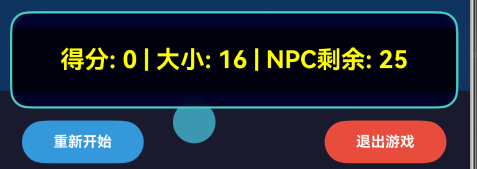
在UI实现上,我创建了一个清晰的状态显示界面,使用醒目的颜色和合适的字体大小来展示关键信息。界面采用了半透明背景和模糊效果,确保了信息的可读性同时不遮挡游戏画面。状态信息以简洁明了的方式呈现,包括当前得分、玩家体积、剩余NPC数量和刺球数量等关键数据。这些信息的实时更新让玩家能够随时了解游戏进展,做出明智的决策。实现代码如下:
@Builder
buildGameStatus() {
  Column() {
    Stack() {
      Column() {
        Text(`得分: ${this.displayScore} | 大小: ${this.displayPlayerSize} | NPC剩余: ${this.displayNpcCount}`)
          .fontSize(20)
          .fontColor(Color.Yellow)
          .fontWeight(FontWeight.Bold)  // 添加粗体
          .backgroundColor('rgba(0, 0, 0, 0.7)')
          .padding({ top: 15, bottom: 15, left: 10, right: 10 })  // 调整内边距
          .borderRadius(5)
          .textAlign(TextAlign.Center)  // 水平居中
          .width('100%')  // 设置宽度为100%
          .shadow({  // 添加阴影增强可读性
            radius: 3,
            color: Color.Black,
            offsetX: 1,
            offsetY: 1
          })
      }
      .width('100%')
      .height(80)
      .backgroundColor('rgba(0, 0, 40, 0.9)')
      .backdropBlur(15)
      .borderRadius(15)
      .border({ width: 2, color: '#4ECDC4', style: BorderStyle.Solid })  // 指定边框样式
      .justifyContent(FlexAlign.Center)  // 垂直居中
    }
    .width('95%')
    .margin({ top: 5 })

    // 控制按钮行
    Row() {
      Button('重新开始')
        .onClick(() => this.restartGame())
        .width(100)
        .height(35)
        .backgroundColor('#3498DB')
        .fontColor(Color.White)
        .fontSize(12)
        .fontWeight(FontWeight.Bold)
        .borderRadius(20)

      Blank().layoutWeight(1)

      Button('退出游戏')
        .onClick(() => this.showExitConfirmDialog())
        .width(100)
        .height(35)
        .backgroundColor('#E74C3C')
        .fontColor(Color.White)
        .fontSize(12)
        .fontWeight(FontWeight.Bold)
        .borderRadius(20)
    }
    .width('95%')
    .margin({ top: 10 })
    .padding({ left: 10, right: 10 })
  }
  .width('100%')
  .margin({ top: 10 })
  .alignItems(HorizontalAlign.Center)
}
实际展示如下图所示:
五、游戏难度管理系统的实现
为了提供丰富的游戏体验,我设计了一个完整的难度管理系统,包含普通、困难和地狱三个难度级别。每个难度级别都有一组精心调整的参数配置,这些配置涵盖了从初始条件到胜利条件的所有方面。在普通难度下,玩家有较大的初始体积,NPC数量较少,刺球威胁较小,适合新手玩家快速上手。而在困难难度中,NPC数量增加,AI行为更加积极,玩家需要更谨慎地规划行动。难度系统的核心是一个结构化的配置对象,它包含了影响游戏体验的所有参数。我使用了TypeScript接口来定义这个数据结构,确保类型安全和代码可维护性。实现代码如下:
// 难度配置
interface DifficultyConfig {
  name: string;                    // 难度名称
  level: number;                   // 难度等级
  playerStartSize: number;         // 玩家初始大小
  npcCount: number;                // NPC球数量
  spikyCount: number;              // 刺球数量
  npcMinSize: number;              // NPC最小大小
  npcMaxSize: number;              // NPC最大大小
  spikyBaseSize: number;           // 刺球基础大小
  npcSizeBonus: number;            // NPC大小加成
  npcSpeedBonus: number;           // NPC速度加成
  spikySizeBonus: number;          // 刺球大小加成
  spikySpeedBonus: number;         // 刺球速度加成
  chaseProbability: number;        // 追逐概率
  fleeProbability: number;         // 逃跑概率
  winThreshold: number;            // 胜利阈值
  color: string;                   // 难度颜色标识
}
地狱难度则为寻求挑战的玩家提供了极致的体验,NPC数量大幅增加,刺球更具威胁性,胜利条件也更加苛刻,考验玩家的操作技巧和策略规划能力。难度系统的实现采用了配置驱动的设计模式,所有难度参数都定义在统一的数据结构中。这种设计使得调整游戏平衡性变得简单直观,开发者只需修改配置文件中的数值,而无需深入游戏逻辑代码。实现代码如下:
  {
    name: '地狱',
    level: 3,
    playerStartSize: 15,
    npcCount: 70,
    spikyCount: 6,
    npcMinSize: 7,
    npcMaxSize: 20,
    spikyBaseSize: 16,
    npcSizeBonus: 4,
    npcSpeedBonus: 0.4,
    spikySizeBonus: 2,
    spikySpeedBonus: 0,
    chaseProbability: 0.02,
    fleeProbability: 0.015,
    winThreshold: 130,
    color: '#C0392B'
  }
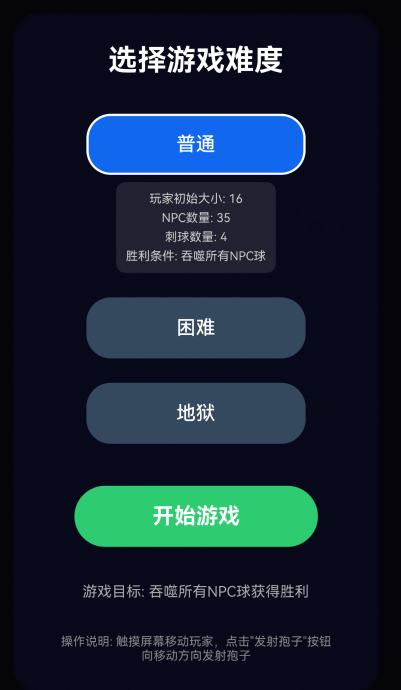
难度选择界面设计注重用户体验,通过视觉反馈帮助玩家做出明智选择。每个难度选项都有独特的颜色标识,选中时会显示详细的参数信息,包括玩家初始大小、NPC数量、刺球数量和胜利条件等。这种透明化的设计让玩家在开始游戏前就能了解不同难度的特点。开始游戏按钮采用醒目的绿色,与难度选项形成视觉对比,引导玩家完成选择流程。实现代码如下:
  // 难度选择界面的构建器实现
  @Builder
  buildDifficultyDialog() {
    Column().width('100%').height('100%').backgroundColor('rgba(0, 0, 0, 0.8)')
    Column({ space: 20 }) {
      Text('选择游戏难度')
        .fontSize(24)
        .fontColor(Color.White)
        .fontWeight(FontWeight.Bold)
        .margin({ bottom: 10 })
      // 遍历所有难度配置,创建选择按钮
      ForEach(DIFFICULTY_CONFIGS, (difficulty: DifficultyConfig) => {
        Column({ space: 6 }) {
          Button(difficulty.name)
            .onClick(() => this.selectDifficulty(difficulty))
            .width(180)
            .height(50)
            .backgroundColor(this.selectedDifficulty.level === difficulty.level ? difficulty.color : '#34495E')
            .fontColor(Color.White)
            .fontSize(16)
            .fontWeight(FontWeight.Medium)
            .borderRadius(25)
            .border({
              width: this.selectedDifficulty.level === difficulty.level ? 2 : 0,
              color: Color.White
            })
          // 显示当前选中难度的详细参数
          if (this.selectedDifficulty.level === difficulty.level) {
            Column({ space: 4 }) {
              Text(`玩家初始大小: ${difficulty.playerStartSize}`)
                .fontSize(10).fontColor('#CCCCCC')
              Text(`NPC数量: ${difficulty.npcCount}`)
                .fontSize(10).fontColor('#CCCCCC')
              Text(`刺球数量: ${difficulty.spikyCount}`)
                .fontSize(10).fontColor('#CCCCCC')
              Text(`胜利条件: 吞噬所有NPC球`)
                .fontSize(10).fontColor('#CCCCCC')
            }
            .padding(8)
            .backgroundColor('rgba(255, 255, 255, 0.1)')
            .borderRadius(8)
          }
        }.alignItems(HorizontalAlign.Center)
      })
      Button('开始游戏')
        .onClick(() => this.startGame())
        .width(200)
        .height(50)
        .backgroundColor('#2ECC71')
        .fontColor(Color.White)
        .fontSize(18)
        .fontWeight(FontWeight.Bold)
        .borderRadius(25)
        .margin({ top: 15 })
      Text('游戏目标: 吞噬所有NPC球获得胜利')
        .fontSize(12)
        .fontColor('#AAAAAA')
        .textAlign(TextAlign.Center)
        .margin({ top: 10 })
        .width('80%')
      Text('操作说明: 触摸屏幕移动玩家,点击"发射孢子"按钮向移动方向发射孢子')
        .fontSize(10)
        .fontColor('#888888')
        .textAlign(TextAlign.Center)
        .margin({ top: 8 })
        .width('90%')
    }
    .width(300)
    .padding(25)
    .backgroundColor('rgba(10, 10, 30, 0.95)')
    .backdropBlur(25)
    .borderRadius(20)
    .alignItems(HorizontalAlign.Center)
    .position({ x: '50%', y: '20%' })
    .translate({ x: -150, y: -50 })
  }
实际展示如下图所示:
六、项目总结
本项目成功验证了鸿蒙ArkUI框架在游戏开发中的完整可行性。通过实践,构建了涵盖游戏循环、物理模拟、状态管理与UI渲染的全链路技术方案。ArkUI的声明式开发与TypeScript强类型系统提升了开发效率与代码可靠性,结合鸿蒙的性能优化,确保了游戏流畅运行。项目采用的模块化架构与配置驱动的难度系统,显著提升了代码可维护性与游戏设计的灵活性。实践证明,鸿蒙系统为高效、可靠的游戏开发提供了强大支持。

作为“人工智能6S店”的官方数字引擎,为AI开发者与企业提供一个覆盖软硬件全栈、一站式门户。
更多推荐

 27
27 0
0- 0


 已为社区贡献1条内容

所有评论(0)