
分类管理功能Cordova与OpenHarmony混合开发实战
摘要:本文介绍了开源鸿蒙跨平台开发者社区中的分类管理模块实现方案。该模块采用Cordova与OpenHarmony混合开发框架,提供分类的增删改查功能。系统通过IndexedDB数据库存储分类数据,包含分类ID、名称、描述和使用次数等信息。前端采用表格展示分类列表,支持搜索和排序功能,并通过模态框实现分类编辑界面。文章详细说明了数据加载流程、UI渲染逻辑以及HTML结构和JavaScript实现代
欢迎大家加入开源鸿蒙跨平台开发者社区,一起共建开源鸿蒙跨平台生态。
📌 概述
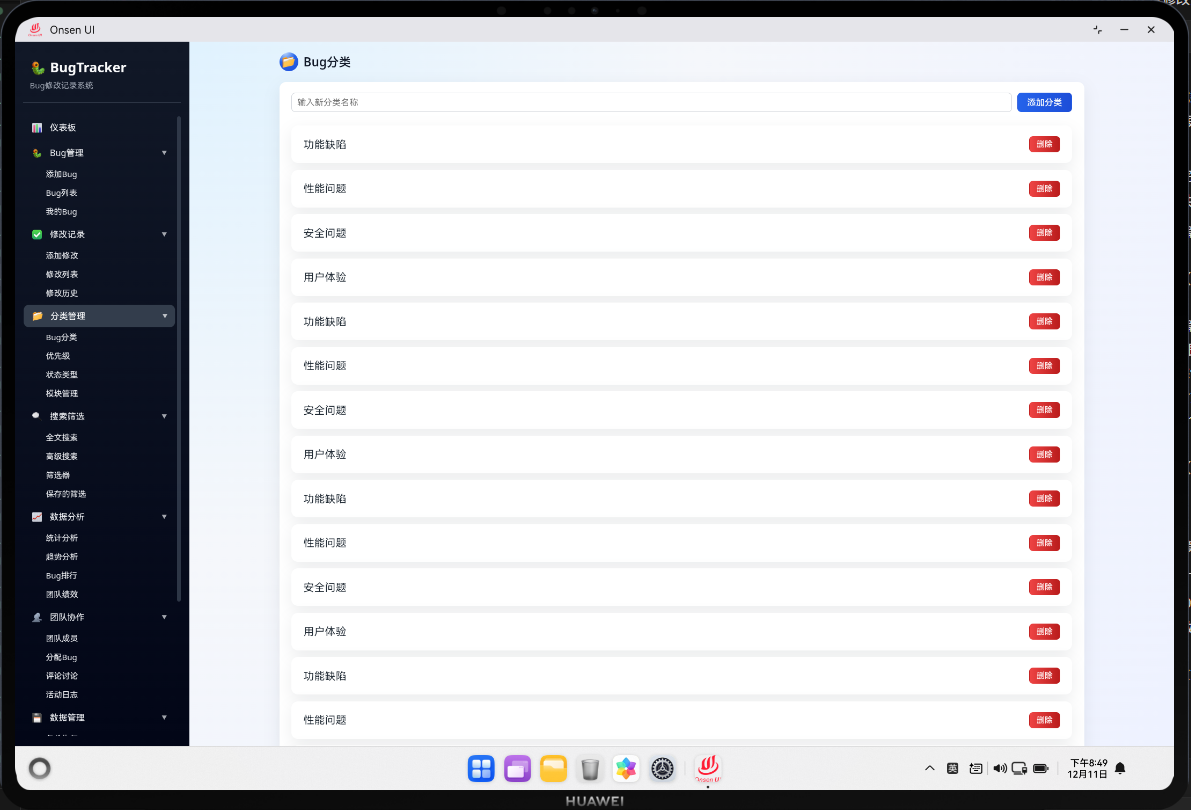
分类管理模块允许用户创建、编辑和删除Bug的分类。在Cordova与OpenHarmony混合开发框架下,这个模块提供了一个完整的分类管理界面,用户可以在其中进行分类的各种操作。分类管理功能的设计目标是让用户能够灵活地组织和管理Bug,提高工作效率。
分类管理模块采用了表格和模态框的设计,用户可以在表格中查看所有分类,通过点击按钮打开模态框进行编辑或添加新分类。
🔗 完整流程
第一步:分类数据加载
当用户打开分类管理页面时,系统首先从IndexedDB数据库中加载所有分类数据。系统会查询categories表,获取所有分类记录,然后将其显示在表格中。
分类数据加载包括分类ID、分类名称、分类描述、使用次数等信息。系统还会计算每个分类被使用的次数,以便用户了解分类的使用情况。
第二步:分类显示与操作
系统会将加载的分类数据渲染到表格中,每个分类占一行。用户可以在表格中看到分类的详细信息,并通过操作按钮进行编辑或删除操作。
表格还支持搜索和排序功能,用户可以快速找到需要的分类。
第三步:分类编辑与保存
当用户点击编辑按钮时,系统会打开一个模态框,显示分类的详细信息。用户可以在模态框中修改分类的名称和描述,然后点击保存按钮保存修改。
当用户点击添加按钮时,系统会打开一个空的模态框,用户可以输入新分类的名称和描述,然后点击保存按钮创建新分类。
🔧 Web代码实现
HTML结构
<div id="category-page" class="page">
  <div class="page-header">
    <h1 class="page-title">分类管理</h1>
    <div class="header-actions">
      <input
        type="text"
        id="category-search"
        class="search-input"
        placeholder="搜索分类..."
      />
      <button class="btn btn-primary" onclick="categoryModule.openAddModal()">
        新增分类
      </button>
    </div>
  </div>

  <div class="page-content">
    <div class="categories-table">
      <div class="table-header">
        <div class="table-cell col-id">ID</div>
        <div class="table-cell col-name">分类名称</div>
        <div class="table-cell col-description">描述</div>
        <div class="table-cell col-count">使用次数</div>
        <div class="table-cell col-actions">操作</div>
      </div>
      <div id="categories-list" class="table-body">
        <!-- 动态生成的分类项目 -->
      </div>
    </div>
  </div>
</div>

<!-- 分类编辑模态框 -->
<div id="category-modal" class="modal" style="display: none;">
  <div class="modal-content">
    <div class="modal-header">
      <h2 id="modal-title">新增分类</h2>
      <button class="modal-close" onclick="categoryModule.closeModal()">×</button>
    </div>

    <div class="modal-body">
      <form id="category-form">
        <div class="form-group">
          <label for="category-name" class="form-label">分类名称 <span class="required">*</span></label>
          <input
            type="text"
            id="category-name"
            class="form-input"
            placeholder="请输入分类名称"
            maxlength="50"
            required
          />
          <div class="form-error" id="name-error"></div>
        </div>

        <div class="form-group">
          <label for="category-description" class="form-label">描述</label>
          <textarea
            id="category-description"
            class="form-textarea"
            placeholder="请输入分类描述"
            rows="4"
          ></textarea>
        </div>
      </form>
    </div>

    <div class="modal-footer">
      <button class="btn btn-default" onclick="categoryModule.closeModal()">取消</button>
      <button class="btn btn-primary" onclick="categoryModule.saveCategory()">保存</button>
    </div>
  </div>
</div>
HTML结构包含了分类列表表格和编辑模态框。表格显示所有分类,模态框用于添加或编辑分类。
JavaScript逻辑
// 分类管理模块
class CategoryModule {
  constructor() {
    this.categories = [];
    this.currentEditingId = null;
    this.init();
  }

  async init() {
    await this.loadCategories();
    this.bindEvents();
  }

  async loadCategories() {
    try {
      // 从数据库加载分类
      this.categories = await db.getAllCategories();

      // 计算每个分类的使用次数
      for (let category of this.categories) {
        const count = await db.getBugCountByCategory(category.id);
        category.count = count;
      }

      // 渲染分类列表
      this.renderCategories();

    } catch (error) {
      console.error('加载分类失败:', error);
      utils.showError('加载分类失败');
    }
  }

  renderCategories(filtered = null) {
    const data = filtered || this.categories;
    const html = data.map(category => `
      <div class="table-row">
        <div class="table-cell col-id">${category.id}</div>
        <div class="table-cell col-name">${utils.escapeHtml(category.name)}</div>
        <div class="table-cell col-description">${utils.escapeHtml(category.description || '')}</div>
        <div class="table-cell col-count">${category.count || 0}</div>
        <div class="table-cell col-actions">
          <button class="action-btn" onclick="categoryModule.openEditModal(${category.id})">编辑</button>
          <button class="action-btn" onclick="categoryModule.deleteCategory(${category.id})">删除</button>
        </div>
      </div>
    `).join('');

    document.getElementById('categories-list').innerHTML = html || '<p>暂无分类</p>';
  }

  bindEvents() {
    // 搜索事件
    const searchInput = document.getElementById('category-search');
    searchInput.addEventListener('input', utils.debounce(() => {
      const keyword = searchInput.value.toLowerCase();
      const filtered = this.categories.filter(cat =>
        cat.name.toLowerCase().includes(keyword) ||
        (cat.description && cat.description.toLowerCase().includes(keyword))
      );
      this.renderCategories(filtered);
    }, 300));
  }

  openAddModal() {
    this.currentEditingId = null;
    document.getElementById('modal-title').textContent = '新增分类';
    document.getElementById('category-name').value = '';
    document.getElementById('category-description').value = '';
    document.getElementById('category-modal').style.display = 'flex';
  }

  async openEditModal(categoryId) {
    const category = this.categories.find(c => c.id === categoryId);
    if (!category) return;

    this.currentEditingId = categoryId;
    document.getElementById('modal-title').textContent = '编辑分类';
    document.getElementById('category-name').value = category.name;
    document.getElementById('category-description').value = category.description || '';
    document.getElementById('category-modal').style.display = 'flex';
  }

  closeModal() {
    document.getElementById('category-modal').style.display = 'none';
    this.currentEditingId = null;
  }

  async saveCategory() {
    const name = document.getElementById('category-name').value.trim();
    const description = document.getElementById('category-description').value.trim();

    if (!name) {
      document.getElementById('name-error').textContent = '分类名称不能为空';
      return;
    }

    try {
      if (this.currentEditingId) {
        // 更新分类
        await db.updateCategory(this.currentEditingId, { name, description });
        utils.showSuccess('分类已更新');
      } else {
        // 添加新分类
        await db.addCategory({ name, description });
        utils.showSuccess('分类已添加');
      }

      this.closeModal();
      await this.loadCategories();

    } catch (error) {
      console.error('保存分类失败:', error);
      utils.showError('保存分类失败');
    }
  }

  async deleteCategory(categoryId) {
    const category = this.categories.find(c => c.id === categoryId);
    if (!category) return;

    if (category.count > 0) {
      utils.showWarning('该分类已被使用,无法删除');
      return;
    }

    if (confirm(`确定要删除分类"${category.name}"吗?`)) {
      try {
        await db.deleteCategory(categoryId);
        utils.showSuccess('分类已删除');
        await this.loadCategories();
      } catch (error) {
        console.error('删除分类失败:', error);
        utils.showError('删除分类失败');
      }
    }
  }
}

// 初始化分类管理模块
const categoryModule = new CategoryModule();
JavaScript代码实现了完整的分类管理功能,包括加载、搜索、添加、编辑和删除分类。代码采用了类的方式组织,提高了可维护性。
CSS样式
/* 表格样式 */
.categories-table {
  border: 1px solid #ddd;
  border-radius: 4px;
  overflow: hidden;
}

.table-header {
  display: grid;
  grid-template-columns: 60px 150px 1fr 100px 150px;
  background: #f5f7fa;
  font-weight: 500;
  border-bottom: 1px solid #ddd;
}

.table-body {
  display: flex;
  flex-direction: column;
}

.table-row {
  display: grid;
  grid-template-columns: 60px 150px 1fr 100px 150px;
  padding: 12px;
  border-bottom: 1px solid #eee;
  transition: background-color 0.2s;
}

.table-row:hover {
  background-color: #f5f7fa;
}

.table-cell {
  display: flex;
  align-items: center;
  overflow: hidden;
  text-overflow: ellipsis;
  white-space: nowrap;
}

/* 模态框样式 */
.modal {
  display: none;
  position: fixed;
  top: 0;
  left: 0;
  right: 0;
  bottom: 0;
  background: rgba(0, 0, 0, 0.5);
  align-items: center;
  justify-content: center;
  z-index: 1000;
}

.modal-content {
  background: white;
  border-radius: 4px;
  width: 90%;
  max-width: 500px;
  box-shadow: 0 4px 16px rgba(0, 0, 0, 0.15);
}

.modal-header {
  display: flex;
  justify-content: space-between;
  align-items: center;
  padding: 20px;
  border-bottom: 1px solid #ddd;
}

.modal-header h2 {
  margin: 0;
  font-size: 16px;
}

.modal-close {
  background: none;
  border: none;
  font-size: 24px;
  cursor: pointer;
  color: #999;
}

.modal-body {
  padding: 20px;
}

.modal-footer {
  display: flex;
  justify-content: flex-end;
  gap: 10px;
  padding: 20px;
  border-top: 1px solid #ddd;
}
🔌 OpenHarmony原生代码
// entry/src/main/ets/plugins/CategoryPlugin.ets
import { hilog } from '@kit.PerformanceAnalysisKit';
import { relationalStore } from '@kit.ArkData';

const TAG: string = '[CategoryPlugin]';
const DOMAIN: number = 0xFF00;

export class CategoryPlugin {
  static async getCategories(success: Function, error: Function): Promise<void> {
    try {
      const categories = [
        { id: 1, name: '功能缺陷', description: '功能不符合需求' },
        { id: 2, name: '性能问题', description: '性能不达标' },
        { id: 3, name: '界面问题', description: '界面显示异常' }
      ];

      hilog.info(DOMAIN, TAG, `获取分类成功: ${categories.length}个`);
      success(categories);
    } catch (err) {
      hilog.error(DOMAIN, TAG, `获取分类失败: ${err}`);
      error('获取分类失败');
    }
  }

  static async saveCategory(success: Function, error: Function, args: any[]): Promise<void> {
    try {
      const category = args[0];

      // 保存分类到数据库
      hilog.info(DOMAIN, TAG, `分类已保存: ${category.name}`);
      success('分类已保存');
    } catch (err) {
      hilog.error(DOMAIN, TAG, `保存分类失败: ${err}`);
      error('保存分类失败');
    }
  }
}
Web-Native通信
// 分类通信类
class CategoryBridge {
  static getCategories() {
    return new Promise((resolve, reject) => {
      if (window.cordova) {
        cordova.exec(
          (categories) => {
            console.log('获取分类:', categories);
            resolve(categories);
          },
          (error) => {
            console.error('获取分类失败:', error);
            reject(error);
          },
          'CategoryPlugin',
          'getCategories',
          []
        );
      } else {
        reject('Cordova未加载');
      }
    });
  }

  static saveCategory(category) {
    return new Promise((resolve, reject) => {
      if (window.cordova) {
        cordova.exec(
          (result) => {
            console.log('分类已保存:', result);
            resolve(result);
          },
          (error) => {
            console.error('保存分类失败:', error);
            reject(error);
          },
          'CategoryPlugin',
          'saveCategory',
          [category]
        );
      } else {
        reject('Cordova未加载');
      }
    });
  }
}
📝 总结
分类管理模块是BugTracker Pro应用中用于组织和管理Bug分类的重要功能。在Cordova与OpenHarmony混合开发框架下,它提供了完整的分类管理界面和功能。通过灵活的分类管理,用户可以更好地组织Bug,提高工作效率。
模块采用了模块化的设计,各个功能都是独立的,易于维护和扩展。通过Cordova插件与原生代码的交互,我们可以实现更高效的数据管理。这充分展示了混合开发框架的优势。

作为“人工智能6S店”的官方数字引擎,为AI开发者与企业提供一个覆盖软硬件全栈、一站式门户。
更多推荐


 23
23 0
0- 0


 已为社区贡献5条内容

所有评论(0)