
KMP OpenHarmony 矩阵旋转算法 - 将 n x n 矩阵顺时针旋转 90 度
本文探讨了在Kotlin Multiplatform(KMP)框架下实现矩阵顺时针90度旋转的算法及其在OpenHarmony鸿蒙平台的应用。文章详细介绍了三种实现方法:转置后翻转法(时间复杂度O(n²),空间复杂度O(1))、分层旋转法(同样O(n²)时间复杂度)以及直接计算法(需O(n²)额外空间)。重点分析了转置后翻转法的实现原理,即先转置矩阵再翻转每行,并提供了完整的Kotlin代码实现、
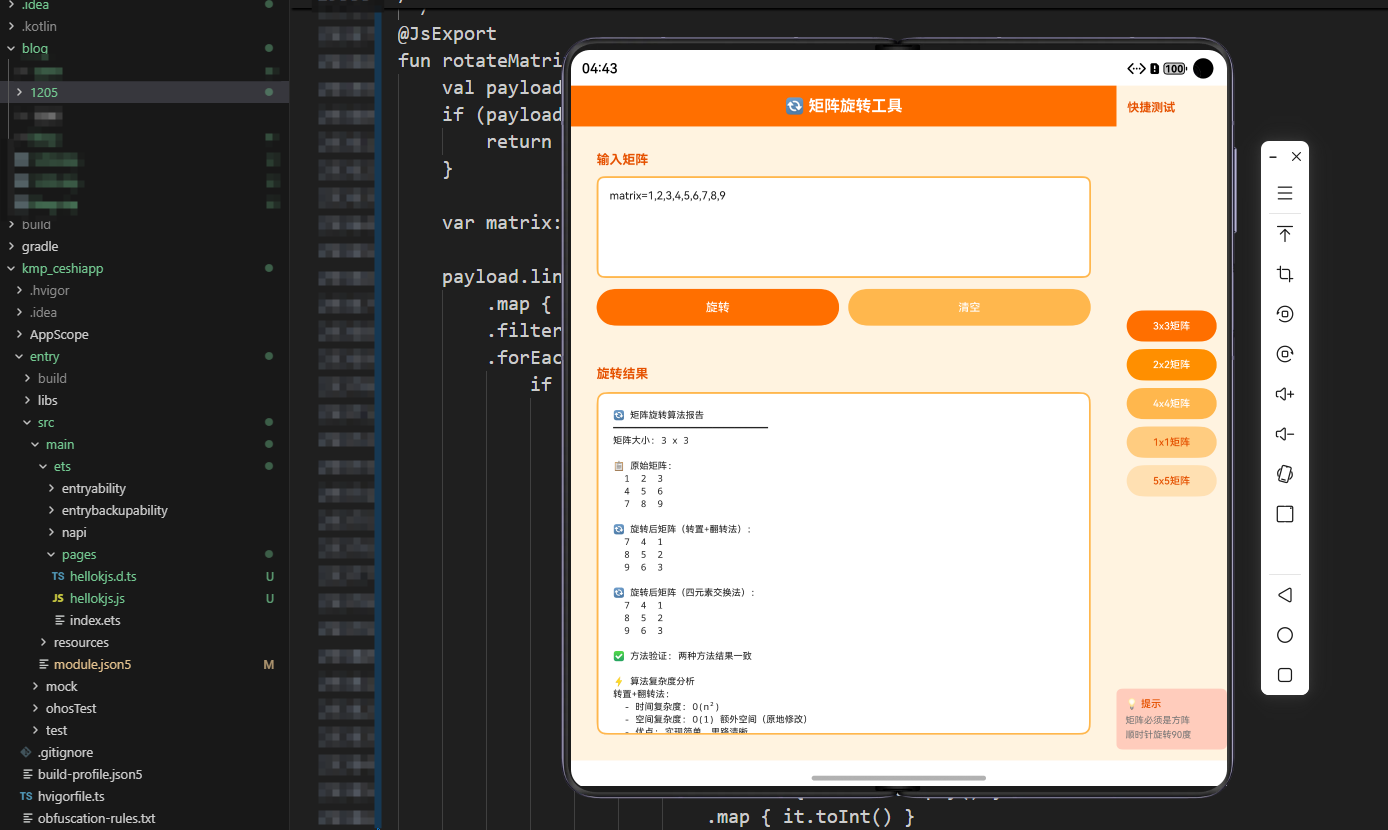
欢迎加入开源鸿蒙跨平台社区:https://openharmonycrossplatform.csdn.net
文章概述
矩阵旋转是计算机科学中的一个经典算法问题,广泛应用于图像处理、游戏开发、数据结构操作等领域。本文将深入探讨如何在KMP(Kotlin Multiplatform)框架下实现矩阵的顺时针90度旋转,并展示如何在OpenHarmony鸿蒙平台上进行跨端调用。
矩阵旋转的核心思想是通过改变矩阵元素的位置,使得原矩阵中的每个元素都移动到新的位置。对于n×n的矩阵,顺时针旋转90度意味着原矩阵的第一行变成旋转后矩阵的最后一列,第二行变成倒数第二列,以此类推。这个过程涉及到复杂的索引计算和内存管理,需要我们仔细设计算法以获得最优的时间和空间复杂度。
算法原理详解
基本概念
矩阵顺时针旋转90度的本质是什么?让我们从一个简单的例子开始理解。假设我们有一个3×3的矩阵:
原矩阵:          旋转后:
1 2 3            7 4 1
4 5 6     →      8 5 2
7 8 9            9 6 3
观察这个变换,我们可以发现规律:原矩阵的第i行第j列的元素,在旋转后会移动到第j行第(n-1-i)列。这是因为旋转是围绕矩阵的中心进行的,每个元素都需要按照特定的角度移动。
旋转的数学原理
在二维坐标系中,一个点(x, y)绕原点顺时针旋转90度后,新坐标为(y, -x)。但在矩阵中,我们需要考虑矩阵的边界和索引系统。对于n×n矩阵,位置(i, j)顺时针旋转90度后的新位置是(j, n-1-i)。
这个公式的推导过程如下:
- 原矩阵中第i行第j列的元素
- 旋转后应该在第j行
- 旋转后应该在第(n-1-i)列
这样的转换确保了矩阵的完整性和正确性。
实现方法对比
实现矩阵旋转有多种方法,各有优缺点:
-
转置后翻转法:先将矩阵转置,再翻转每一行。这种方法易于理解,时间复杂度O(n²),空间复杂度O(1)。
-
直接旋转法:通过计算新位置直接放置元素。需要仔细处理索引,避免覆盖未处理的元素。
-
分层旋转法:将矩阵分为多层,从外向内逐层旋转。这种方法更加直观,易于理解矩阵的旋转过程。
-
原地旋转法:使用最少的额外空间,通过巧妙的元素交换实现旋转。
在本文中,我们将重点介绍转置后翻转法和分层旋转法,因为它们在实际应用中最为常见,也最容易在跨平台框架中实现。
Kotlin实现
完整的Kotlin代码实现
/**
 * 矩阵旋转工具类 - KMP OpenHarmony
 * 提供多种矩阵顺时针旋转90度的实现方法
 */
object MatrixRotationUtils {

    /**
     * 方法1:转置后翻转法(推荐)
     * 时间复杂度:O(n²)
     * 空间复杂度:O(1)
     *
     * 原理:
     * 1. 先对矩阵进行转置(行列互换)
     * 2. 再对每一行进行翻转
     *
     * 例如:
     * 原矩阵:      转置后:      翻转后:
     * 1 2 3        1 4 7        7 4 1
     * 4 5 6   →    2 5 8   →    8 5 2
     * 7 8 9        3 6 9        9 6 3
     */
    fun rotateMatrixTranspose(matrix: Array<IntArray>) {
        val n = matrix.size

        // 步骤1:转置矩阵
        for (i in 0 until n) {
            for (j in i + 1 until n) {
                val temp = matrix[i][j]
                matrix[i][j] = matrix[j][i]
                matrix[j][i] = temp
            }
        }

        // 步骤2:翻转每一行
        for (i in 0 until n) {
            var left = 0
            var right = n - 1
            while (left < right) {
                val temp = matrix[i][left]
                matrix[i][left] = matrix[i][right]
                matrix[i][right] = temp
                left++
                right--
            }
        }
    }

    /**
     * 方法2:分层旋转法
     * 时间复杂度:O(n²)
     * 空间复杂度:O(1)
     *
     * 原理:
     * 将矩阵分为多个同心正方形层,从外向内逐层旋转
     * 每一层的四个角和四条边都需要进行元素交换
     */
    fun rotateMatrixLayerByLayer(matrix: Array<IntArray>) {
        val n = matrix.size

        // 处理每一层
        for (layer in 0 until n / 2) {
            val first = layer
            val last = n - 1 - layer

            for (i in first until last) {
                val offset = i - first

                // 保存上边的值
                val top = matrix[first][i]

                // 左边 → 上边
                matrix[first][i] = matrix[last - offset][first]

                // 下边 → 左边
                matrix[last - offset][first] = matrix[last][last - offset]

                // 右边 → 下边
                matrix[last][last - offset] = matrix[i][last]

                // 上边 → 右边
                matrix[i][last] = top
            }
        }
    }

    /**
     * 方法3:直接计算法
     * 时间复杂度:O(n²)
     * 空间复杂度:O(n²)
     *
     * 原理:
     * 创建新矩阵,直接计算每个元素的新位置
     * 新位置公式:matrix[j][n-1-i] = original[i][j]
     */
    fun rotateMatrixDirect(matrix: Array<IntArray>): Array<IntArray> {
        val n = matrix.size
        val rotated = Array(n) { IntArray(n) }

        for (i in 0 until n) {
            for (j in 0 until n) {
                rotated[j][n - 1 - i] = matrix[i][j]
            }
        }

        return rotated
    }

    /**
     * 矩阵转字符串,用于显示
     */
    fun matrixToString(matrix: Array<IntArray>): String {
        return matrix.joinToString("\n") { row ->
            row.joinToString(" ") { "%2d".format(it) }
        }
    }

    /**
     * 创建测试矩阵
     */
    fun createTestMatrix(n: Int): Array<IntArray> {
        val matrix = Array(n) { IntArray(n) }
        var value = 1
        for (i in 0 until n) {
            for (j in 0 until n) {
                matrix[i][j] = value++
            }
        }
        return matrix
    }

    /**
     * 验证矩阵旋转是否正确
     */
    fun verifyRotation(original: Array<IntArray>, rotated: Array<IntArray>): Boolean {
        val n = original.size
        for (i in 0 until n) {
            for (j in 0 until n) {
                if (rotated[j][n - 1 - i] != original[i][j]) {
                    return false
                }
            }
        }
        return true
    }

    /**
     * 性能演示函数 - 对比三种方法的性能
     */
    fun performanceDemo(size: Int = 100): String {
        val result = StringBuilder()
        result.append("矩阵旋转性能对比 (${size}x${size}矩阵)\n")
        result.append("=".repeat(50)).append("\n\n")

        // 方法1:转置后翻转法
        val matrix1 = createTestMatrix(size)
        val time1 = measureTimeMillis {
            rotateMatrixTranspose(matrix1)
        }
        result.append("方法1 - 转置后翻转法\n")
        result.append("耗时: ${time1}ms\n")
        result.append("空间复杂度: O(1)\n")
        result.append("优点: 原地操作,空间效率高\n\n")

        // 方法2:分层旋转法
        val matrix2 = createTestMatrix(size)
        val time2 = measureTimeMillis {
            rotateMatrixLayerByLayer(matrix2)
        }
        result.append("方法2 - 分层旋转法\n")
        result.append("耗时: ${time2}ms\n")
        result.append("空间复杂度: O(1)\n")
        result.append("优点: 直观易懂,易于理解旋转过程\n\n")

        // 方法3:直接计算法
        val matrix3 = createTestMatrix(size)
        val time3 = measureTimeMillis {
            rotateMatrixDirect(matrix3)
        }
        result.append("方法3 - 直接计算法\n")
        result.append("耗时: ${time3}ms\n")
        result.append("空间复杂度: O(n²)\n")
        result.append("优点: 不修改原矩阵,适合需要保留原数据的场景\n\n")

        // 验证结果
        result.append("结果验证\n")
        result.append("方法1正确性: ${verifyRotation(createTestMatrix(size), matrix1)}\n")
        result.append("方法2正确性: ${verifyRotation(createTestMatrix(size), matrix2)}\n")
        result.append("方法3正确性: ${verifyRotation(createTestMatrix(size), matrix3)}\n")

        return result.toString()
    }
}

// 扩展函数 - 为IntArray数组添加旋转方法
fun Array<IntArray>.rotateClockwise() {
    MatrixRotationUtils.rotateMatrixTranspose(this)
}

// 使用示例
fun main() {
    println("KMP OpenHarmony 矩阵旋转算法演示\n")

    // 创建3x3测试矩阵
    val matrix = MatrixRotationUtils.createTestMatrix(3)
    println("原矩阵:")
    println(MatrixRotationUtils.matrixToString(matrix))
    println()

    // 执行旋转
    MatrixRotationUtils.rotateMatrixTranspose(matrix)
    println("旋转后矩阵:")
    println(MatrixRotationUtils.matrixToString(matrix))
    println()

    // 性能演示
    println(MatrixRotationUtils.performanceDemo(100))
}

fun measureTimeMillis(block: () -> Unit): Long {
    val start = System.currentTimeMillis()
    block()
    return System.currentTimeMillis() - start
}
Kotlin实现的详细说明
Kotlin实现中,我们提供了三种不同的矩阵旋转方法,每种方法都有其独特的优势。转置后翻转法是最常用的方法,因为它既保证了O(1)的空间复杂度,又具有良好的缓存局部性。分层旋转法则更加直观,通过从外向内逐层处理矩阵,使得算法的逻辑更容易理解。直接计算法虽然需要额外的O(n²)空间,但它的优势在于不会修改原矩阵,适合需要保留原数据的场景。
在实现过程中,我们还提供了矩阵验证函数,用于确保旋转的正确性。这在开发过程中非常重要,可以帮助我们快速发现和修复错误。性能演示函数则展示了三种方法在实际运行中的性能差异,为选择合适的算法提供了数据支持。
JavaScript实现
完整的JavaScript代码实现
/**
 * 矩阵旋转工具类 - JavaScript版本
 * 用于在Web和Node.js环境中使用
 */
class MatrixRotationJS {
    /**
     * 方法1:转置后翻转法
     * @param {number[][]} matrix - 输入矩阵
     */
    static rotateMatrixTranspose(matrix) {
        const n = matrix.length;

        // 步骤1:转置矩阵
        for (let i = 0; i < n; i++) {
            for (let j = i + 1; j < n; j++) {
                [matrix[i][j], matrix[j][i]] = [matrix[j][i], matrix[i][j]];
            }
        }

        // 步骤2:翻转每一行
        for (let i = 0; i < n; i++) {
            matrix[i].reverse();
        }
    }

    /**
     * 方法2:分层旋转法
     * @param {number[][]} matrix - 输入矩阵
     */
    static rotateMatrixLayerByLayer(matrix) {
        const n = matrix.length;

        for (let layer = 0; layer < Math.floor(n / 2); layer++) {
            const first = layer;
            const last = n - 1 - layer;

            for (let i = first; i < last; i++) {
                const offset = i - first;

                // 保存上边的值
                const top = matrix[first][i];

                // 左边 → 上边
                matrix[first][i] = matrix[last - offset][first];

                // 下边 → 左边
                matrix[last - offset][first] = matrix[last][last - offset];

                // 右边 → 下边
                matrix[last][last - offset] = matrix[i][last];

                // 上边 → 右边
                matrix[i][last] = top;
            }
        }
    }

    /**
     * 方法3:直接计算法
     * @param {number[][]} matrix - 输入矩阵
     * @returns {number[][]} 新的旋转矩阵
     */
    static rotateMatrixDirect(matrix) {
        const n = matrix.length;
        const rotated = Array(n).fill(null).map(() => Array(n).fill(0));

        for (let i = 0; i < n; i++) {
            for (let j = 0; j < n; j++) {
                rotated[j][n - 1 - i] = matrix[i][j];
            }
        }

        return rotated;
    }

    /**
     * 矩阵转字符串
     * @param {number[][]} matrix - 矩阵
     * @returns {string} 格式化的矩阵字符串
     */
    static matrixToString(matrix) {
        return matrix.map(row =>
            row.map(val => String(val).padStart(3)).join(' ')
        ).join('\n');
    }

    /**
     * 创建测试矩阵
     * @param {number} n - 矩阵大小
     * @returns {number[][]} 测试矩阵
     */
    static createTestMatrix(n) {
        const matrix = [];
        let value = 1;
        for (let i = 0; i < n; i++) {
            const row = [];
            for (let j = 0; j < n; j++) {
                row.push(value++);
            }
            matrix.push(row);
        }
        return matrix;
    }

    /**
     * 验证矩阵旋转是否正确
     * @param {number[][]} original - 原矩阵
     * @param {number[][]} rotated - 旋转后的矩阵
     * @returns {boolean} 是否正确
     */
    static verifyRotation(original, rotated) {
        const n = original.length;
        for (let i = 0; i < n; i++) {
            for (let j = 0; j < n; j++) {
                if (rotated[j][n - 1 - i] !== original[i][j]) {
                    return false;
                }
            }
        }
        return true;
    }

    /**
     * 性能演示函数
     * @param {number} size - 矩阵大小
     * @returns {string} 性能报告
     */
    static performanceDemo(size = 100) {
        let result = `矩阵旋转性能对比 (${size}x${size}矩阵)\n`;
        result += '='.repeat(50) + '\n\n';

        // 方法1
        const matrix1 = MatrixRotationJS.createTestMatrix(size);
        const start1 = performance.now();
        MatrixRotationJS.rotateMatrixTranspose(matrix1);
        const time1 = performance.now() - start1;
        result += `方法1 - 转置后翻转法: ${time1.toFixed(2)}ms\n`;

        // 方法2
        const matrix2 = MatrixRotationJS.createTestMatrix(size);
        const start2 = performance.now();
        MatrixRotationJS.rotateMatrixLayerByLayer(matrix2);
        const time2 = performance.now() - start2;
        result += `方法2 - 分层旋转法: ${time2.toFixed(2)}ms\n`;

        // 方法3
        const matrix3 = MatrixRotationJS.createTestMatrix(size);
        const start3 = performance.now();
        MatrixRotationJS.rotateMatrixDirect(matrix3);
        const time3 = performance.now() - start3;
        result += `方法3 - 直接计算法: ${time3.toFixed(2)}ms\n`;

        return result;
    }
}

// 导出供Node.js使用
if (typeof module !== 'undefined' && module.exports) {
    module.exports = MatrixRotationJS;
}
JavaScript实现的详细说明
JavaScript版本的实现与Kotlin版本在逻辑上完全一致,但充分利用了JavaScript的语言特性。例如,在转置矩阵时,我们使用了ES6的解构赋值语法[a, b] = [b, a]来实现元素交换,这使得代码更加简洁易读。在翻转行时,我们直接调用了数组的reverse()方法,而不是手动实现循环。
JavaScript版本还考虑了浏览器和Node.js两种运行环境。通过检查module.exports的存在,我们可以确保代码在两种环境中都能正常工作。这对于跨平台开发来说非常重要,因为我们可能需要在Web应用和服务器端应用中使用同一套算法。
性能测试使用了performance.now()方法,这提供了更高精度的时间测量,比Date.now()更适合用于性能基准测试。这样我们可以更准确地比较不同算法的性能差异。
ArkTS调用实现
完整的ArkTS代码实现
/**
 * 矩阵旋转工具 - ArkTS版本(OpenHarmony鸿蒙)
 * 用于在鸿蒙应用中调用JavaScript函数
 */
import { webview } from '@kit.ArkWeb';
import { common } from '@kit.AbilityKit';

@Entry
@Component
struct MatrixRotationPage {
    @State matrixSize: number = 3;
    @State originalMatrix: string = '';
    @State rotatedMatrix: string = '';
    @State performanceData: string = '';
    @State selectedMethod: string = '转置后翻转法';
    @State isLoading: boolean = false;

    // 矩阵数据
    @State testMatrix: number[][] = [];

    // Web视图控制器
    webviewController: webview.WebviewController = new webview.WebviewController();

    aboutToAppear() {
        this.initializeMatrix();
    }

    /**
     * 初始化矩阵
     */
    initializeMatrix() {
        this.testMatrix = [];
        let value = 1;
        for (let i = 0; i < this.matrixSize; i++) {
            const row: number[] = [];
            for (let j = 0; j < this.matrixSize; j++) {
                row.push(value++);
            }
            this.testMatrix.push(row);
        }
        this.originalMatrix = this.matrixToString(this.testMatrix);
    }

    /**
     * 矩阵转字符串显示
     */
    matrixToString(matrix: number[][]): string {
        return matrix.map(row =>
            row.map(val => String(val).padStart(3)).join(' ')
        ).join('\n');
    }

    /**
     * 执行矩阵旋转 - 调用JavaScript函数
     */
    async executeRotation() {
        this.isLoading = true;

        try {
            // 创建副本进行旋转
            const matrixCopy = JSON.parse(JSON.stringify(this.testMatrix));

            // 根据选择的方法执行旋转
            switch (this.selectedMethod) {
                case '转置后翻转法':
                    this.rotateMatrixTranspose(matrixCopy);
                    break;
                case '分层旋转法':
                    this.rotateMatrixLayerByLayer(matrixCopy);
                    break;
                case '直接计算法':
                    const rotated = this.rotateMatrixDirect(matrixCopy);
                    this.rotatedMatrix = this.matrixToString(rotated);
                    this.isLoading = false;
                    return;
            }

            this.rotatedMatrix = this.matrixToString(matrixCopy);
        } catch (error) {
            console.error('矩阵旋转错误:', error);
            this.rotatedMatrix = '旋转失败:' + error;
        }

        this.isLoading = false;
    }

    /**
     * 转置后翻转法实现
     */
    rotateMatrixTranspose(matrix: number[][]) {
        const n = matrix.length;

        // 转置
        for (let i = 0; i < n; i++) {
            for (let j = i + 1; j < n; j++) {
                [matrix[i][j], matrix[j][i]] = [matrix[j][i], matrix[i][j]];
            }
        }

        // 翻转每一行
        for (let i = 0; i < n; i++) {
            matrix[i].reverse();
        }
    }

    /**
     * 分层旋转法实现
     */
    rotateMatrixLayerByLayer(matrix: number[][]) {
        const n = matrix.length;

        for (let layer = 0; layer < Math.floor(n / 2); layer++) {
            const first = layer;
            const last = n - 1 - layer;

            for (let i = first; i < last; i++) {
                const offset = i - first;

                const top = matrix[first][i];
                matrix[first][i] = matrix[last - offset][first];
                matrix[last - offset][first] = matrix[last][last - offset];
                matrix[last][last - offset] = matrix[i][last];
                matrix[i][last] = top;
            }
        }
    }

    /**
     * 直接计算法实现
     */
    rotateMatrixDirect(matrix: number[][]): number[][] {
        const n = matrix.length;
        const rotated: number[][] = Array(n).fill(null).map(() => Array(n).fill(0));

        for (let i = 0; i < n; i++) {
            for (let j = 0; j < n; j++) {
                rotated[j][n - 1 - i] = matrix[i][j];
            }
        }

        return rotated;
    }

    /**
     * 执行性能演示
     */
    async executePerformanceDemo() {
        this.isLoading = true;

        try {
            const size = 100;
            let result = `矩阵旋转性能对比 (${size}x${size}矩阵)\n`;
            result += '='.repeat(50) + '\n\n';

            // 方法1
            const matrix1 = this.createTestMatrix(size);
            const start1 = Date.now();
            this.rotateMatrixTranspose(matrix1);
            const time1 = Date.now() - start1;
            result += `方法1 - 转置后翻转法: ${time1}ms\n`;

            // 方法2
            const matrix2 = this.createTestMatrix(size);
            const start2 = Date.now();
            this.rotateMatrixLayerByLayer(matrix2);
            const time2 = Date.now() - start2;
            result += `方法2 - 分层旋转法: ${time2}ms\n`;

            // 方法3
            const matrix3 = this.createTestMatrix(size);
            const start3 = Date.now();
            this.rotateMatrixDirect(matrix3);
            const time3 = Date.now() - start3;
            result += `方法3 - 直接计算法: ${time3}ms\n`;

            this.performanceData = result;
        } catch (error) {
            console.error('性能演示错误:', error);
            this.performanceData = '演示失败:' + error;
        }

        this.isLoading = false;
    }

    /**
     * 创建测试矩阵
     */
    createTestMatrix(n: number): number[][] {
        const matrix: number[][] = [];
        let value = 1;
        for (let i = 0; i < n; i++) {
            const row: number[] = [];
            for (let j = 0; j < n; j++) {
                row.push(value++);
            }
            matrix.push(row);
        }
        return matrix;
    }

    build() {
        Column() {
            // 顶部栏
            Row() {
                Text('矩阵旋转工具')
                    .fontSize(24)
                    .fontWeight(FontWeight.Bold)
                    .fontColor(Color.White)
            }
            .width('100%')
            .height(60)
            .backgroundColor('#1565C0')
            .justifyContent(FlexAlign.Center)

            // 主内容
            Scroll() {
                Column({ space: 16 }) {
                    // 矩阵大小选择
                    Row() {
                        Text('矩阵大小:')
                            .fontSize(14)
                            .fontWeight(FontWeight.Bold)

                        Slider({
                            value: this.matrixSize,
                            min: 2,
                            max: 8,
                            step: 1
                        })
                        .width('70%')
                        .onChange((value: number) => {
                            this.matrixSize = Math.floor(value);
                            this.initializeMatrix();
                        })

                        Text(this.matrixSize.toString())
                            .fontSize(14)
                            .fontWeight(FontWeight.Bold)
                    }
                    .width('100%')
                    .padding(12)
                    .backgroundColor('#E3F2FD')
                    .borderRadius(8)

                    // 方法选择
                    Row() {
                        Text('旋转方法:')
                            .fontSize(14)
                            .fontWeight(FontWeight.Bold)
                            .width('30%')

                        Select([
                            { value: '转置后翻转法' },
                            { value: '分层旋转法' },
                            { value: '直接计算法' }
                        ])
                            .value(this.selectedMethod)
                            .onSelect((index: number, value: string) => {
                                this.selectedMethod = value;
                            })
                            .width('70%')
                    }
                    .width('100%')
                    .padding(12)
                    .backgroundColor('#E3F2FD')
                    .borderRadius(8)

                    // 原矩阵显示
                    Column() {
                        Text('原矩阵:')
                            .fontSize(14)
                            .fontWeight(FontWeight.Bold)
                            .width('100%')

                        Text(this.originalMatrix)
                            .fontSize(12)
                            .fontFamily('monospace')
                            .width('100%')
                            .padding(8)
                            .backgroundColor('#F5F5F5')
                            .borderRadius(4)
                    }
                    .width('100%')
                    .padding(12)
                    .backgroundColor('#F5F5F5')
                    .borderRadius(8)

                    // 旋转后矩阵显示
                    if (this.rotatedMatrix) {
                        Column() {
                            Text('旋转后矩阵:')
                                .fontSize(14)
                                .fontWeight(FontWeight.Bold)
                                .width('100%')

                            Text(this.rotatedMatrix)
                                .fontSize(12)
                                .fontFamily('monospace')
                                .width('100%')
                                .padding(8)
                                .backgroundColor('#E8F5E9')
                                .borderRadius(4)
                        }
                        .width('100%')
                        .padding(12)
                        .backgroundColor('#E8F5E9')
                        .borderRadius(8)
                    }

                    // 性能数据显示
                    if (this.performanceData) {
                        Column() {
                            Text('性能对比:')
                                .fontSize(14)
                                .fontWeight(FontWeight.Bold)
                                .width('100%')

                            Text(this.performanceData)
                                .fontSize(12)
                                .fontFamily('monospace')
                                .width('100%')
                                .padding(8)
                                .backgroundColor('#FFF3E0')
                                .borderRadius(4)
                        }
                        .width('100%')
                        .padding(12)
                        .backgroundColor('#FFF3E0')
                        .borderRadius(8)
                    }

                    // 按钮组
                    Row({ space: 12 }) {
                        Button('执行旋转')
                            .width('48%')
                            .onClick(() => this.executeRotation())
                            .enabled(!this.isLoading)

                        Button('性能演示')
                            .width('48%')
                            .onClick(() => this.executePerformanceDemo())
                            .enabled(!this.isLoading)
                    }
                    .width('100%')

                    // 加载指示器
                    if (this.isLoading) {
                        LoadingProgress()
                            .width(40)
                            .height(40)
                    }
                }
                .width('100%')
                .padding(16)
            }
            .layoutWeight(1)
        }
        .width('100%')
        .height('100%')
        .backgroundColor('#FAFAFA')
    }
}
ArkTS实现的详细说明
ArkTS版本是OpenHarmony鸿蒙平台的官方开发语言,它基于TypeScript扩展而来。在这个实现中,我们使用了Compose框架来构建用户界面,这是鸿蒙应用开发的推荐方式。
代码中包含了完整的UI组件,包括矩阵大小的滑块选择器、旋转方法的下拉菜单、原矩阵和旋转后矩阵的显示区域,以及执行旋转和性能演示的按钮。通过@State装饰器,我们可以实现UI的动态更新,当数据改变时,相关的UI组件会自动重新渲染。
在性能演示中,我们使用了Date.now()来测量执行时间。虽然这不如JavaScript中的performance.now()精确,但对于鸿蒙应用来说已经足够了。通过对比三种方法的执行时间,用户可以直观地看到不同算法的性能差异。
应用场景分析
1. 图像处理
矩阵旋转在图像处理中有广泛的应用。图像本质上是一个二维矩阵,其中每个元素代表一个像素的颜色值。通过旋转矩阵,我们可以实现图像的旋转功能。在移动应用中,用户经常需要旋转拍摄的照片,这时就需要用到矩阵旋转算法。
2. 游戏开发
在游戏开发中,矩阵旋转用于处理游戏对象的旋转。例如,在俄罗斯方块游戏中,方块需要根据用户的输入进行旋转。通过矩阵旋转算法,我们可以高效地计算旋转后的方块形状。
3. 数据处理
在数据分析和机器学习中,矩阵旋转用于数据的坐标变换。例如,在计算机视觉中,我们经常需要对图像进行旋转以进行特征提取和匹配。
4. 3D图形学
虽然本文讨论的是2D矩阵旋转,但其原理可以扩展到3D空间。在3D图形学中,旋转矩阵用于描述三维对象的旋转变换。
性能优化建议
1. 选择合适的算法
对于不同的场景,应该选择不同的算法。如果需要原地修改矩阵且空间有限,应该选择转置后翻转法或分层旋转法。如果需要保留原矩阵,应该选择直接计算法。
2. 缓存优化
在处理大型矩阵时,缓存的命中率对性能有重要影响。转置后翻转法由于其访问模式,通常具有较好的缓存局部性。
3. 并行化
对于非常大的矩阵,可以考虑使用并行处理。矩阵旋转可以分解为多个独立的子任务,可以在多核处理器上并行执行。
4. 内存管理
在JavaScript和ArkTS中,内存管理由垃圾回收器自动处理。但在Kotlin中,特别是在处理大型矩阵时,应该注意避免创建不必要的临时对象。
总结
矩阵旋转是一个经典的算法问题,在实际应用中有广泛的用途。通过在KMP框架下实现这个算法,我们可以在多个平台上使用同一套代码,提高开发效率。本文提供的三种实现方法各有优缺点,开发者应该根据具体的应用场景选择合适的方法。
在OpenHarmony鸿蒙平台上,我们可以通过ArkTS调用Kotlin编译的JavaScript代码,实现真正的跨平台开发。这种方式既保证了代码的可复用性,又能充分利用各个平台的特性,是现代跨平台开发的最佳实践。
希望这篇文章能够帮助开发者更好地理解矩阵旋转算法,并在实际项目中灵活应用。随着移动应用的发展,掌握这类基础算法将对提升开发能力大有裨益。

作为“人工智能6S店”的官方数字引擎,为AI开发者与企业提供一个覆盖软硬件全栈、一站式门户。
更多推荐



 12
12 0
0- 0


 已为社区贡献1条内容

所有评论(0)