
React Native鸿蒙跨平台开发bug解决:Invariant Violation: View config getter callback for component ‘path
React Native开发中遇到"Invariant Violation"错误通常由组件命名不规范引起。摘要指出:1)组件名首字母必须大写(如Path而非path);2)需正确注册react-native-svg组件;3)应验证依赖安装和组件导出。解决方案包括修正命名规范、检查组件注册、重启开发服务器,并提供了正确组件定义示例代码。该错误还可能出现在将React Native
Invariant Violation: View config getter callback for component 'path' must be a
function (received 'undefined').Make sure to start component names with a capital letter.
This error is located at: in path in svg
in RCTView in Unknown inr
in RCTView in Unknown in RCTView in Unknown in RCTView in Unknown in RCTView in Unknown
in RCTScrollContentView in RCTScrollView in w
in ScrollView in Unknown in RCTView in Unknown in RCTView in Unknown
in l,js engine:hermes
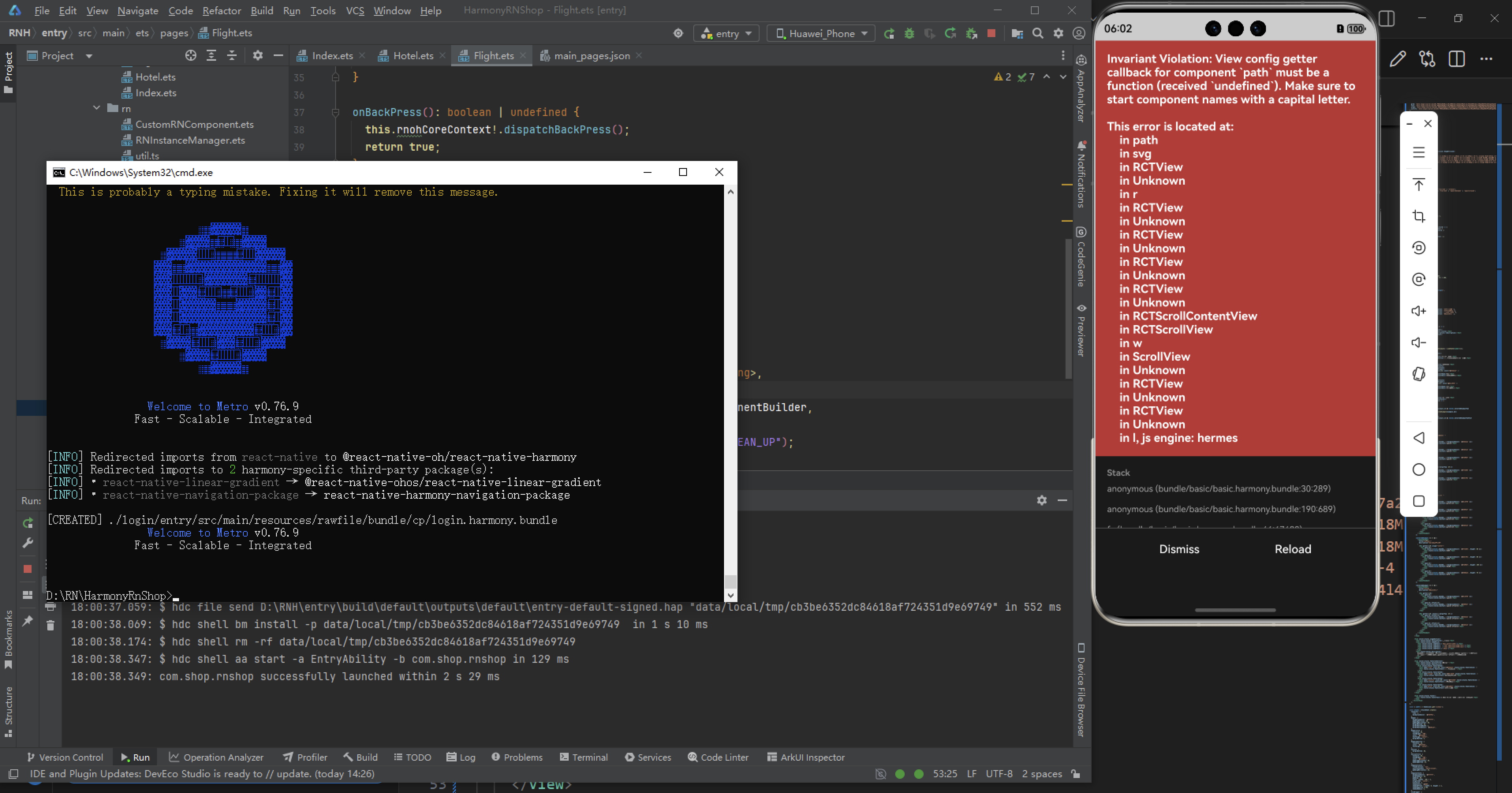
在React Native中遇到“Invariant Violation: View config getter callback for component ‘path’ must be a function”这个错误通常是因为你在使用<View>组件时尝试设置了一个不存在的属性或者属性名不正确。在React Native中,<View>组件是用来创建视图的基本组件,它不支持所有可能的属性,因为它是一个非常基础的组件。
常见原因和解决方法
-
错误的属性名或拼写错误:
确保你使用的属性名是<View>组件支持的。如果你尝试设置如path这样的属性,这通常不是一个标准的<View>属性。例如,如果你想设置一个背景图片,应该使用style属性结合ImageBackground组件或者使用backgroundColor在style中设置颜色。<View style={{ backgroundColor: 'blue' }}> {/* 内容 */} </View>或者使用图片背景:
import { ImageBackground } from 'react-native'; <ImageBackground source={require('./path/to/image.jpg')} style={{ width: '100%', height: '100%' }}> {/* 内容 */} </ImageBackground> -
使用了错误的组件:
如果你确实需要在某个视图上应用路径(例如SVG路径),你应该使用<Svg>和相关的SVG元素(如<Path>),而不是直接在<View>上使用。import { Svg, Path } from 'react-native-svg'; <Svg width={200} height={200}> <Path d="M10 10 H 90 V 90 H 10 L 10 10" fill="transparent" stroke="black" /> </Svg> -
自定义组件问题:
如果你有一个自定义组件并期望它接收一个名为path的属性,确保该属性在自定义组件的props中正确定义。例如:function MyComponent(props) { return <View>{props.path}</View>; // 这里应该处理或传递path属性,例如作为子元素或样式等 }
总结
- 检查并确保你使用的属性名是正确的,并且适用于当前的组件。
- 如果你需要特定的功能(如路径或背景图片),考虑使用合适的组件或库(如
ImageBackground或react-native-svg)。 - 对于自定义组件,确保在组件定义中正确处理所有传入的props。
通过这些步骤,你应该能够解决遇到的“Invariant Violation”错误。如果问题仍然存在,检查你的代码是否有其他语法或逻辑错误,或者查看相关的文档和社区支持以获取更多帮助。
根据错误信息 Invariant Violation: View config getter callback for component ‘path’ must be a function (received ‘undefined’),结合搜索结果分析,问题核心在于组件命名和注册不规范。以下是解决方案:
错误原因
- 组件名首字母未大写:React Native 要求组件名必须以大写字母开头(如 Path 而非 path)。
- 组件未正确注册:react-native-svg 组件需正确配置 viewConfig。
解决方案
修正组件命名:
将组件名改为大写字母开头(如 Path):
// 错误示例
const path = () => <View>...</View>;
// 正确示例
const Path = () => <View>...</View>;
检查组件注册:
确保在组件文件中正确导出组件(如 export default Path)。
在 AppRegistry.registerComponent 中使用正确组件名(如 AppRegistry.registerComponent(‘MyApp’, () => Path))。
验证依赖:
确保 react-native-svg 已正确安装并配置:
npm install react-native-svg
验证步骤
重启开发服务器:
npx react-native start --reset-cache
检查组件树:使用 react-native-debugger 检查组件层级是否正确。
示例代码
// 正确的组件定义
import React from 'react';
import { View } from 'react-native';

const Path = () => {
  return (
    <View>
      {/* 组件内容 */}
    </View>
  );
};

export default Path;
通过以上步骤,应能解决 View config getter callback 错误。若问题持续,检查是否有其他组件未正确注册或依赖冲突。
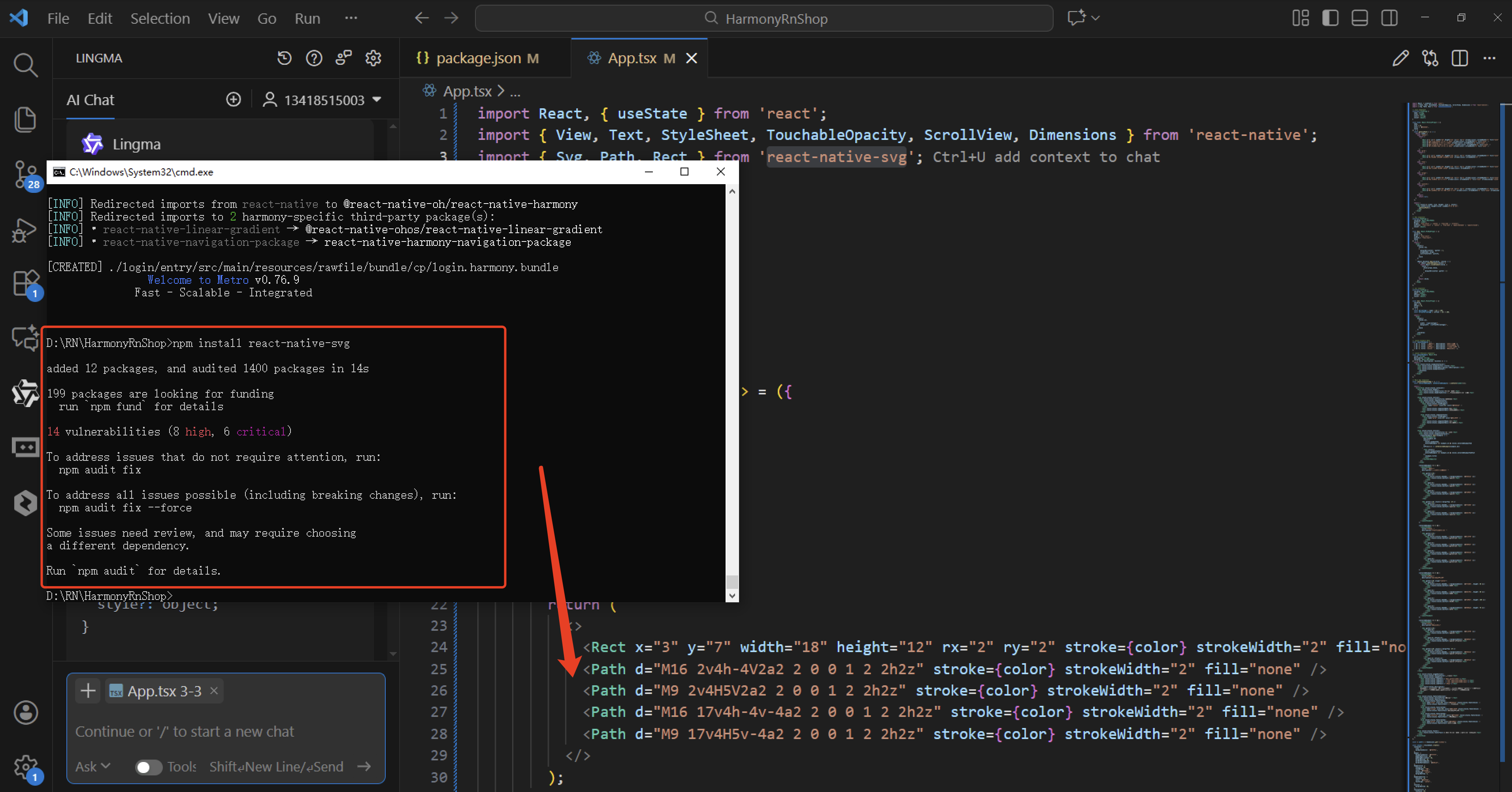
打包
接下来通过打包命令npn run harmony将reactNative的代码打包成为bundle,这样可以进行在开源鸿蒙OpenHarmony中进行使用。


作为“人工智能6S店”的官方数字引擎,为AI开发者与企业提供一个覆盖软硬件全栈、一站式门户。
更多推荐


 5
5 0
0- 0


 已为社区贡献5条内容

所有评论(0)