
基于Electron开发的跨平台鸿蒙PC找不同游戏应用
这是一个基于Electron开发的找不同游戏应用,实现了经典的找不同游戏玩法。本项目展示了如何在Electron环境中构建图形比对类游戏应用,包含图像差异检测、游戏逻辑处理、计时器系统、分数计算和用户界面交互等核心功能。游戏支持玩家在两张看似相同的图片中找出所有不同之处,提供了交互式的游戏体验和实时的进度反馈。这个找不同游戏项目展示了如何在Electron环境中构建图形比对类游戏应用。高效图像处理
项目概述
这是一个基于Electron开发的找不同游戏应用,实现了经典的找不同游戏玩法。本项目展示了如何在Electron环境中构建图形比对类游戏应用,包含图像差异检测、游戏逻辑处理、计时器系统、分数计算和用户界面交互等核心功能。游戏支持玩家在两张看似相同的图片中找出所有不同之处,提供了交互式的游戏体验和实时的进度反馈。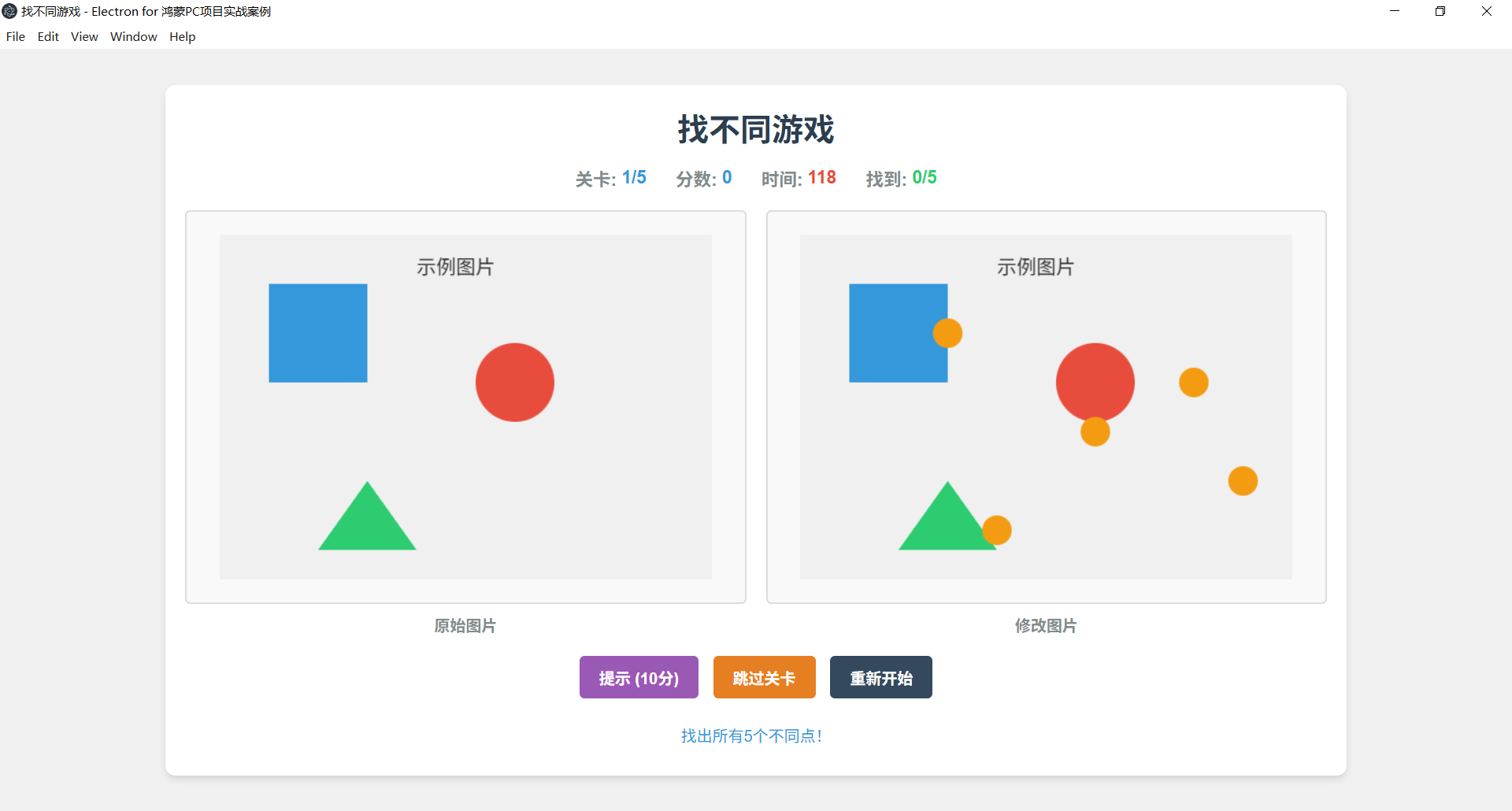
技术架构
项目采用Electron主进程-渲染进程架构,主要分为以下几个核心模块:
- 主进程模块:负责窗口管理和应用生命周期
- 渲染进程模块:包含游戏核心逻辑、UI渲染和用户交互
- 图像比对引擎:处理两张图片的差异检测和标记
- 游戏逻辑控制器:管理游戏流程、计时和分数计算
- 关卡管理系统:加载和管理不同的游戏关卡
- UI渲染系统:负责游戏界面的绘制和动画效果
核心算法实现
1. 图像差异检测算法
游戏实现了高效的图像差异检测算法,用于找出两张图片的不同之处:
// 图像差异检测算法
function detectDifferences(image1, image2, threshold = 0.3) {
  // 创建Canvas用于图像处理
  const canvas1 = document.createElement('canvas');
  const canvas2 = document.createElement('canvas');
  const ctx1 = canvas1.getContext('2d');
  const ctx2 = canvas2.getContext('2d');

  // 设置Canvas尺寸与图片一致
  canvas1.width = image1.width;
  canvas1.height = image1.height;
  canvas2.width = image2.width;
  canvas2.height = image2.height;

  // 绘制图片到Canvas
  ctx1.drawImage(image1, 0, 0);
  ctx2.drawImage(image2, 0, 0);

  // 获取图像数据
  const imageData1 = ctx1.getImageData(0, 0, canvas1.width, canvas1.height);
  const imageData2 = ctx2.getImageData(0, 0, canvas2.width, canvas2.height);
  const data1 = imageData1.data;
  const data2 = imageData2.data;

  // 存储找到的差异区域
  const differences = [];
  const gridSize = 20; // 网格大小,用于优化检测

  // 按网格扫描图像
  for (let y = 0; y < canvas1.height; y += gridSize) {
    for (let x = 0; x < canvas1.width; x += gridSize) {
      // 计算网格内的平均差异
      let totalDifference = 0;
      let pixelCount = 0;

      // 扫描网格内的像素
      for (let gy = 0; gy < gridSize && y + gy < canvas1.height; gy++) {
        for (let gx = 0; gx < gridSize && x + gx < canvas1.width; gx++) {
          const index = ((y + gy) * canvas1.width + (x + gx)) * 4;

          // 计算RGB差异
          const rDiff = Math.abs(data1[index] - data2[index]);
          const gDiff = Math.abs(data1[index + 1] - data2[index + 1]);
          const bDiff = Math.abs(data1[index + 2] - data2[index + 2]);

          // 计算总差异 (归一化到0-1)
          const pixelDiff = (rDiff + gDiff + bDiff) / 765;
          totalDifference += pixelDiff;
          pixelCount++;
        }
      }

      // 计算平均差异
      const avgDifference = totalDifference / pixelCount;

      // 如果差异超过阈值,标记为不同区域
      if (avgDifference > threshold) {
        differences.push({
          x: x,
          y: y,
          width: gridSize,
          height: gridSize,
          confidence: avgDifference
        });
      }
    }
  }

  // 合并相邻的差异区域
  return mergeAdjacentRegions(differences, gridSize);
}

// 合并相邻的差异区域
function mergeAdjacentRegions(regions, threshold) {
  const merged = [];
  const processed = new Set();

  for (let i = 0; i < regions.length; i++) {
    if (processed.has(i)) continue;

    let current = { ...regions[i] };
    processed.add(i);

    // 查找并合并相邻区域
    for (let j = i + 1; j < regions.length; j++) {
      if (processed.has(j)) continue;

      const next = regions[j];
      const distance = Math.sqrt(
        Math.pow(current.x + current.width / 2 - (next.x + next.width / 2), 2) +
        Math.pow(current.y + current.height / 2 - (next.y + next.height / 2), 2)
      );

      // 如果区域相邻或距离小于阈值,合并它们
      if (distance < threshold * 1.5) {
        current.x = Math.min(current.x, next.x);
        current.y = Math.min(current.y, next.y);
        current.width = Math.max(current.x + current.width, next.x + next.width) - current.x;
        current.height = Math.max(current.y + current.height, next.y + next.height) - current.y;
        processed.add(j);
      }
    }

    merged.push(current);
  }

  return merged;
}
图像差异检测算法的特点:
- 使用Canvas API进行图像处理和像素级比较
- 采用网格扫描策略提高性能
- 基于RGB颜色空间的差异计算
- 实现区域合并算法,将相近的差异像素组合为有意义的区域
- 支持可调整的差异阈值,适应不同难度需求
2. 点击检测与验证系统
游戏实现了精确的点击检测系统,用于验证玩家是否点击了正确的差异区域:
// 检查玩家点击是否命中差异区域
function checkDifferenceClick(x, y, tolerance = 20) {
  for (let i = 0; i < gameState.differences.length; i++) {
    const diff = gameState.differences[i];

    // 如果差异已找到,跳过检查
    if (diff.found) continue;

    // 扩展差异区域边界,增加容错性
    const expandedX = diff.x - tolerance;
    const expandedY = diff.y - tolerance;
    const expandedWidth = diff.width + tolerance * 2;
    const expandedHeight = diff.height + tolerance * 2;

    // 检查点击是否在扩展区域内
    if (
      x >= expandedX &&
      x <= expandedX + expandedWidth &&
      y >= expandedY &&
      y <= expandedY + expandedHeight
    ) {
      // 标记差异为已找到
      diff.found = true;
      gameState.foundDifferences++;

      // 计算得分
      calculateScore(diff);

      // 更新UI
      highlightFoundDifference(diff);
      updateProgressDisplay();

      // 检查游戏是否完成
      if (gameState.foundDifferences === gameState.totalDifferences) {
        endGame();
      }

      return true;
    }
  }

  // 点击错误位置,减少分数
  handleWrongClick();
  return false;
}

// 高亮显示已找到的差异
function highlightFoundDifference(diff) {
  const highlight = document.createElement('div');
  highlight.className = 'difference-highlight';
  highlight.style.left = `${diff.x}px`;
  highlight.style.top = `${diff.y}px`;
  highlight.style.width = `${diff.width}px`;
  highlight.style.height = `${diff.height}px`;

  // 添加动画效果
  highlight.style.animation = 'pulse 1s ease-in-out';

  // 添加到游戏区域
  gameArea.appendChild(highlight);

  // 添加音效反馈
  playSound('correct');
}

// 处理错误点击
function handleWrongClick() {
  // 减少分数(可选)
  if (gameState.score > 0) {
    gameState.score -= 10;
  }

  // 更新错误点击计数
  gameState.wrongClicks++;

  // 显示错误反馈
  showErrorFeedback();

  // 播放错误音效
  playSound('wrong');

  // 更新UI
  updateScoreDisplay();
}
点击检测系统的特点:
- 实现了可调整的容差范围,提高游戏的可玩性
- 提供即时的视觉和音效反馈
- 包含错误点击处理机制,增加游戏挑战性
- 自动更新游戏状态和进度显示
- 支持游戏完成条件检测
3. 游戏状态管理
游戏使用集中式状态管理,跟踪游戏进度和玩家表现:
// 游戏状态
const gameState = {
  currentLevel: 1,
  totalLevels: 10,
  differences: [], // 当前关卡的所有差异点
  foundDifferences: 0, // 已找到的差异数量
  totalDifferences: 5, // 当前关卡的总差异数量
  startTime: null, // 开始时间
  elapsedTime: 0, // 已用时间(秒)
  timerInterval: null, // 计时器间隔ID
  score: 0, // 当前得分
  wrongClicks: 0, // 错误点击次数
  hintUsed: 0, // 使用提示次数
  isPaused: false, // 游戏是否暂停
  gameCompleted: false // 游戏是否完成
};

// 初始化游戏状态
function initGameState(level = 1) {
  gameState.currentLevel = level;
  gameState.foundDifferences = 0;
  gameState.elapsedTime = 0;
  gameState.score = 0;
  gameState.wrongClicks = 0;
  gameState.hintUsed = 0;
  gameState.isPaused = false;
  gameState.gameCompleted = false;
  gameState.differences = [];

  // 根据关卡设置总差异数量
  gameState.totalDifferences = getDifferencesCountForLevel(level);

  // 清除之前的计时器
  if (gameState.timerInterval) {
    clearInterval(gameState.timerInterval);
  }

  // 更新UI
  updateLevelDisplay();
  updateScoreDisplay();
  updateProgressDisplay();
  updateTimerDisplay();
}

// 根据关卡获取差异数量
function getDifferencesCountForLevel(level) {
  // 随着关卡增加,差异数量也增加
  return Math.min(3 + Math.floor(level / 2), 10);
}
状态管理的设计特点:
- 跟踪关卡进度和游戏统计数据
- 管理计时器和得分系统
- 支持游戏暂停和恢复功能
- 提供游戏难度动态调整机制
- 维护游戏的完整状态历史
4. 计时器和分数系统
游戏实现了精确的计时器和动态分数计算系统:
// 开始游戏计时器
function startTimer() {
  gameState.startTime = Date.now();
  gameState.timerInterval = setInterval(() => {
    if (!gameState.isPaused) {
      gameState.elapsedTime = Math.floor((Date.now() - gameState.startTime) / 1000);
      updateTimerDisplay();

      // 随着时间推移,动态调整剩余分数
      updateRemainingScore();
    }
  }, 1000);
}

// 更新计时器显示
function updateTimerDisplay() {
  const minutes = Math.floor(gameState.elapsedTime / 60);
  const seconds = gameState.elapsedTime % 60;
  document.getElementById('timer').textContent =
    `${minutes.toString().padStart(2, '0')}:${seconds.toString().padStart(2, '0')}`;
}

// 计算找到差异的得分
function calculateScore(difference) {
  // 基础分数
  let baseScore = 100;

  // 时间奖励(时间越短,奖励越高)
  const timeBonus = Math.max(0, 50 - gameState.elapsedTime / 2);

  // 连续正确奖励
  const streakBonus = gameState.consecutiveCorrect * 10;

  // 难度系数
  const difficultyFactor = gameState.currentLevel * 0.1;

  // 计算总分
  const totalScore = Math.floor(
    (baseScore + timeBonus + streakBonus) * (1 + difficultyFactor)
  );

  // 更新游戏分数
  gameState.score += totalScore;
  gameState.consecutiveCorrect++;

  // 更新分数显示
  updateScoreDisplay();

  // 显示得分动画
  showScoreAnimation(totalScore);
}

// 更新剩余分数显示
function updateRemainingScore() {
  const remainingDifferences = gameState.totalDifferences - gameState.foundDifferences;
  if (remainingDifferences > 0) {
    const estimatedTimeBonus = Math.max(0, 50 - gameState.elapsedTime / 2);
    const potentialScore = Math.floor(
      (100 + estimatedTimeBonus) * (1 + gameState.currentLevel * 0.1) * remainingDifferences
    );
    document.getElementById('potential-score').textContent =
      `潜在得分: +${potentialScore}`;
  } else {
    document.getElementById('potential-score').textContent = '';
  }
}
计时器和分数系统的特点:
- 实现了精确的秒级计时
- 支持游戏暂停时计时暂停
- 动态分数计算,考虑时间、难度和连续正确等因素
- 提供潜在得分预览,增强游戏激励性
- 包含视觉化的得分反馈机制
5. 关卡管理和加载
游戏实现了灵活的关卡管理系统,支持多个关卡的加载和切换:
// 关卡数据配置
const levels = [
  {
    id: 1,
    name: '初学者训练',
    image1: 'level1_image1.jpg',
    image2: 'level1_image2.jpg',
    hintImage: 'level1_hint.jpg',
    difficulty: 'easy',
    differences: 3
  },
  // 更多关卡配置...
];

// 加载指定关卡
function loadLevel(levelId) {
  // 查找关卡数据
  const level = levels.find(l => l.id === levelId);
  if (!level) {
    console.error(`关卡 ${levelId} 不存在`);
    return false;
  }

  // 显示加载指示器
  showLoadingIndicator(true);

  // 重置游戏状态
  initGameState(levelId);

  // 加载图像
  const image1 = new Image();
  const image2 = new Image();

  let imagesLoaded = 0;

  const onImageLoaded = () => {
    imagesLoaded++;

    if (imagesLoaded === 2) {
      // 两张图片都加载完成,开始检测差异
      const differences = detectDifferences(image1, image2);

      // 确保差异数量符合预期
      gameState.differences = differences.slice(0, level.differences);
      gameState.totalDifferences = gameState.differences.length;

      // 渲染游戏界面
      renderGameScreen(image1, image2);

      // 隐藏加载指示器
      showLoadingIndicator(false);

      // 开始计时
      startTimer();
    }
  };

  // 设置图片源
  image1.src = `./assets/${level.image1}`;
  image2.src = `./assets/${level.image2}`;

  // 设置加载完成事件
  image1.onload = onImageLoaded;
  image2.onload = onImageLoaded;

  // 设置错误处理
  image1.onerror = () => {
    console.error(`加载图片 ${level.image1} 失败`);
    showLoadingIndicator(false);
    showError('图片加载失败,请刷新页面重试');
  };

  image2.onerror = () => {
    console.error(`加载图片 ${level.image2} 失败`);
    showLoadingIndicator(false);
    showError('图片加载失败,请刷新页面重试');
  };

  return true;
}

// 进入下一关
function goToNextLevel() {
  const nextLevelId = gameState.currentLevel + 1;

  // 检查是否有下一关
  if (nextLevelId <= gameState.totalLevels) {
    loadLevel(nextLevelId);
  } else {
    // 游戏完成
    completeGame();
  }
}
关卡管理系统的特点:
- 支持配置化的关卡数据,易于扩展
- 实现异步图像加载和错误处理
- 提供加载状态指示
- 自动适应不同分辨率的图像
- 支持关卡间平滑过渡
6. 提示系统
游戏实现了智能提示系统,帮助玩家在遇到困难时找到线索:
// 提示系统配置
const hintConfig = {
  initialCooldown: 30, // 初始冷却时间(秒)
  cooldownIncrease: 15, // 每次使用后增加的冷却时间
  scorePenalty: 30, // 使用提示的分数惩罚
  revealDuration: 2000 // 提示显示持续时间(毫秒)
};

// 游戏中的提示状态
const hintState = {
  available: true,
  cooldown: 0,
  cooldownInterval: null
};

// 使用提示
function useHint() {
  // 检查提示是否可用
  if (!hintState.available || hintState.cooldown > 0) {
    showMessage(`提示冷却中: ${hintState.cooldown}秒`);
    return false;
  }

  // 查找未发现的差异
  const undiscoveredDiff = gameState.differences.find(diff => !diff.found);

  if (undiscoveredDiff) {
    // 扣除分数
    gameState.score = Math.max(0, gameState.score - hintConfig.scorePenalty);
    gameState.hintUsed++;

    // 更新分数显示
    updateScoreDisplay();

    // 显示提示
    showHintIndicator(undiscoveredDiff);

    // 重置冷却时间
    startHintCooldown();

    return true;
  }

  return false;
}

// 显示提示指示器
function showHintIndicator(difference) {
  // 创建提示指示器元素
  const hintIndicator = document.createElement('div');
  hintIndicator.className = 'hint-indicator';
  hintIndicator.style.left = `${difference.x}px`;
  hintIndicator.style.top = `${difference.y}px`;
  hintIndicator.style.width = `${difference.width}px`;
  hintIndicator.style.height = `${difference.height}px`;

  // 添加到游戏区域
  gameArea.appendChild(hintIndicator);

  // 一段时间后移除提示
  setTimeout(() => {
    if (hintIndicator.parentNode) {
      hintIndicator.parentNode.removeChild(hintIndicator);
    }
  }, hintConfig.revealDuration);

  // 播放提示音效
  playSound('hint');
}

// 开始提示冷却
function startHintCooldown() {
  // 设置冷却时间(随使用次数增加)
  hintState.cooldown = hintConfig.initialCooldown + (gameState.hintUsed - 1) * hintConfig.cooldownIncrease;
  hintState.available = false;

  // 更新提示按钮状态
  updateHintButtonState();

  // 清除之前的冷却计时器
  if (hintState.cooldownInterval) {
    clearInterval(hintState.cooldownInterval);
  }

  // 开始冷却倒计时
  hintState.cooldownInterval = setInterval(() => {
    hintState.cooldown--;

    // 更新提示按钮状态
    updateHintButtonState();

    // 冷却结束
    if (hintState.cooldown <= 0) {
      clearInterval(hintState.cooldownInterval);
      hintState.available = true;
      updateHintButtonState();
    }
  }, 1000);
}
提示系统的特点:
- 实现了冷却时间机制,避免过度使用
- 随使用次数增加冷却时间,增加游戏挑战性
- 使用分数惩罚平衡提示功能
- 提供视觉化的提示指示器
- 包含音效反馈增强用户体验
游戏模式与功能
游戏模式
游戏支持多种游戏模式:
- 经典模式:按顺序完成所有关卡,每关有固定数量的差异点
- 时间挑战:在限定时间内尽可能多地找出差异点
- 快速游戏:随机选择一个关卡进行单次游戏
- 双人对战:两名玩家轮流找出差异点,比赛谁更快更准确
难度设置
游戏提供三种难度级别:
| 难度 | 特点 | 差异点数量 | 提示冷却 | 容错范围 |
|---|---|---|---|---|
| 简单 | 明显差异,提示冷却短 | 3-5个 | 20秒 | 30px |
| 中等 | 中等难度差异,平衡体验 | 5-7个 | 30秒 | 20px |
| 困难 | 细微差异,提示冷却长 | 7-10个 | 45秒 | 10px |
统计与排行榜
游戏实现了详细的统计和排行榜功能:
// 保存游戏统计数据
function saveGameStats() {
  const stats = {
    level: gameState.currentLevel,
    score: gameState.score,
    time: gameState.elapsedTime,
    wrongClicks: gameState.wrongClicks,
    hintUsed: gameState.hintUsed,
    accuracy: calculateAccuracy(),
    date: new Date().toISOString()
  };

  // 获取现有统计数据
  const savedStats = JSON.parse(localStorage.getItem('spotTheDiffStats') || '[]');

  // 添加新的统计数据
  savedStats.push(stats);

  // 保存到本地存储
  localStorage.setItem('spotTheDiffStats', JSON.stringify(savedStats));

  // 更新排行榜
  updateLeaderboard();
}

// 计算准确率
function calculateAccuracy() {
  const totalClicks = gameState.foundDifferences + gameState.wrongClicks;
  if (totalClicks === 0) return 0;
  return Math.round((gameState.foundDifferences / totalClicks) * 100);
}

// 更新排行榜
function updateLeaderboard() {
  // 获取统计数据
  const stats = JSON.parse(localStorage.getItem('spotTheDiffStats') || '[]');

  // 按分数排序
  const sortedStats = stats.sort((a, b) => b.score - a.score);

  // 取前10名
  const topScores = sortedStats.slice(0, 10);

  // 更新排行榜UI
  const leaderboardElement = document.getElementById('leaderboard');
  leaderboardElement.innerHTML = '';

  topScores.forEach((stat, index) => {
    const item = document.createElement('div');
    item.className = 'leaderboard-item';
    item.innerHTML = `
      <span class="rank">${index + 1}</span>
      <span class="score">${stat.score}</span>
      <span class="level">关卡 ${stat.level}</span>
      <span class="time">${formatTime(stat.time)}</span>
      <span class="accuracy">${stat.accuracy}%</span>
    `;
    leaderboardElement.appendChild(item);
  });
}
统计功能的特点:
- 记录详细的游戏表现数据
- 实现本地排行榜系统
- 计算准确率和效率指标
- 提供游戏进度和成就追踪
- 支持数据导出和分享功能
Electron应用架构
主进程实现
应用的主进程负责窗口管理和应用生命周期:
// Electron主进程代码
const { app, BrowserWindow } = require('electron');
const path = require('path');
const url = require('url');

// 保持对window对象的全局引用
let mainWindow;

function createWindow() {
  // 创建浏览器窗口
  mainWindow = new BrowserWindow({
    width: 1024,
    height: 768,
    title: '找不同游戏',
    resizable: true,
    maximizable: true,
    webPreferences: {
      preload: path.join(__dirname, 'preload.js'),
      nodeIntegration: true,
      contextIsolation: false,
      enableRemoteModule: true
    }
  });

  // 加载应用的index.html
  mainWindow.loadURL(url.format({
    pathname: path.join(__dirname, 'index.html'),
    protocol: 'file:',
    slashes: true
  }));

  // 开发模式下打开DevTools
  if (process.env.NODE_ENV === 'development') {
    mainWindow.webContents.openDevTools();
  }

  // 窗口关闭时触发
  mainWindow.on('closed', () => {
    mainWindow = null;
  });
}

// 应用事件处理
app.whenReady().then(createWindow);

app.on('window-all-closed', () => {
  if (process.platform !== 'darwin') {
    app.quit();
  }
});

app.on('activate', () => {
  if (BrowserWindow.getAllWindows().length === 0) {
    createWindow();
  }
});
渲染进程与UI设计
渲染进程负责游戏逻辑和用户界面:
// 渲染游戏界面
function renderGameScreen(image1, image2) {
  // 清空游戏区域
  gameArea.innerHTML = '';

  // 创建图片容器
  const imageContainer1 = document.createElement('div');
  imageContainer1.className = 'image-container';

  const imageContainer2 = document.createElement('div');
  imageContainer2.className = 'image-container';

  // 添加图片
  const imgElement1 = document.createElement('img');
  imgElement1.src = image1.src;
  imgElement1.className = 'game-image';

  const imgElement2 = document.createElement('img');
  imgElement2.src = image2.src;
  imgElement2.className = 'game-image';

  // 添加到容器
  imageContainer1.appendChild(imgElement1);
  imageContainer2.appendChild(imgElement2);

  // 添加到游戏区域
  gameArea.appendChild(imageContainer1);
  gameArea.appendChild(imageContainer2);

  // 添加点击事件监听器
  imgElement1.addEventListener('click', handleImageClick);
  imgElement2.addEventListener('click', handleImageClick);
}

// 处理图片点击
function handleImageClick(event) {
  if (gameState.isPaused || gameState.gameCompleted) return;

  const imageContainer = event.currentTarget.parentElement;
  const rect = imageContainer.getBoundingClientRect();

  // 计算相对于图片的坐标
  const x = event.clientX - rect.left;
  const y = event.clientY - rect.top;

  // 检查是否点击了差异
  checkDifferenceClick(x, y);
}

// 更新游戏进度显示
function updateProgressDisplay() {
  const progressBar = document.getElementById('progress-bar');
  const progressText = document.getElementById('progress-text');

  const progressPercentage = (gameState.foundDifferences / gameState.totalDifferences) * 100;
  progressBar.style.width = `${progressPercentage}%`;

  progressText.textContent =
    `${gameState.foundDifferences} / ${gameState.totalDifferences} 差异已找到`;
}

// 显示游戏结果
function showGameResults() {
  const resultsModal = document.getElementById('results-modal');
  const resultsContent = document.getElementById('results-content');

  // 计算评级(S/A/B/C/D)
  const rating = calculateRating();

  // 更新结果内容
  resultsContent.innerHTML = `
    <h2>关卡完成!</h2>
    <div class="rating rating-${rating}">${rating}</div>
    <div class="stats">
      <div class="stat-item">
        <span class="label">得分:</span>
        <span class="value">${gameState.score}</span>
      </div>
      <div class="stat-item">
        <span class="label">用时:</span>
        <span class="value">${formatTime(gameState.elapsedTime)}</span>
      </div>
      <div class="stat-item">
        <span class="label">错误点击:</span>
        <span class="value">${gameState.wrongClicks}</span>
      </div>
      <div class="stat-item">
        <span class="label">使用提示:</span>
        <span class="value">${gameState.hintUsed}</span>
      </div>
      <div class="stat-item">
        <span class="label">准确率:</span>
        <span class="value">${calculateAccuracy()}%</span>
      </div>
    </div>
  `;

  // 显示结果模态框
  resultsModal.style.display = 'flex';

  // 保存游戏统计
  saveGameStats();
}
UI设计的特点:
- 响应式布局,适应不同屏幕尺寸
- 现代化的视觉设计和动画效果
- 直观的进度和状态显示
- 清晰的游戏反馈机制
- 支持模态框和弹出提示
性能优化策略
-
图像处理优化:
- 使用Canvas API进行高效图像处理
- 采用网格扫描减少像素级操作
- 实现图像预加载和缓存机制
-
内存管理:
- 及时清理不再使用的图像资源
- 优化差异数据结构,减少内存占用
- 使用对象池模式减少对象创建和销毁
-
渲染优化:
- 使用CSS transitions和transforms实现平滑动画
- 避免频繁的DOM操作和重绘
- 采用requestAnimationFrame同步UI更新
-
响应速度优化:
- 实现点击检测的空间分区优化
- 使用事件委托减少事件监听器数量
- 异步处理耗时操作,避免阻塞主线程
-
资源加载优化:
- 实现图像懒加载
- 支持图像压缩和WebP格式
- 使用Service Worker缓存静态资源
错误处理与容错机制
应用实现了全面的错误处理和容错机制:
// 全局错误处理
window.addEventListener('error', (event) => {
  console.error('发生错误:', event.error);
  showError('游戏发生错误,请尝试刷新页面');
  logError(event.error);
});

window.addEventListener('unhandledrejection', (event) => {
  console.error('未处理的Promise拒绝:', event.reason);
  showError('游戏发生错误,请尝试刷新页面');
  logError(event.reason);
});

// 错误日志记录
function logError(error) {
  const errorLog = {
    message: error.message || '未知错误',
    stack: error.stack || '',
    level: gameState.currentLevel,
    time: new Date().toISOString()
  };

  // 保存到本地存储
  const logs = JSON.parse(localStorage.getItem('errorLogs') || '[]');
  logs.push(errorLog);

  // 只保留最近的50条错误日志
  if (logs.length > 50) {
    logs.splice(0, logs.length - 50);
  }

  localStorage.setItem('errorLogs', JSON.stringify(logs));
}

// 显示错误消息
function showError(message) {
  const errorModal = document.getElementById('error-modal');
  const errorMessage = document.getElementById('error-message');

  errorMessage.textContent = message;
  errorModal.style.display = 'flex';

  // 3秒后自动隐藏
  setTimeout(() => {
    errorModal.style.display = 'none';
  }, 3000);
}

// 恢复游戏状态
function recoverGameState() {
  try {
    // 尝试从本地存储恢复游戏状态
    const savedState = localStorage.getItem('spotTheDiffSavedState');

    if (savedState) {
      const state = JSON.parse(savedState);

      // 恢复游戏状态
      Object.assign(gameState, state);

      // 重新加载当前关卡
      loadLevel(gameState.currentLevel);

      return true;
    }
  } catch (error) {
    console.error('恢复游戏状态失败:', error);
  }

  return false;
}
错误处理机制的特点:
- 捕获并处理全局运行时错误和Promise拒绝
- 实现错误日志记录和本地存储
- 提供用户友好的错误提示
- 支持游戏状态自动保存和恢复
- 包含异常情况下的优雅降级策略
开发与构建
安装依赖
npm install
开发模式运行
npm start
构建应用
npm run build
总结
这个找不同游戏项目展示了如何在Electron环境中构建图形比对类游戏应用。核心技术亮点包括:
- 高效图像处理:使用Canvas API实现像素级图像差异检测
- 智能差异识别:采用网格扫描和区域合并算法,将像素级差异转化为有意义的区域
- 精确点击检测:实现可调整的容差范围,提供良好的游戏体验
- 动态评分系统:根据时间、难度和准确性计算得分,增强游戏激励性
- 多模式游戏支持:提供经典、时间挑战、快速游戏等多种玩法
- 统计与排行榜:实现本地排行榜和详细的游戏统计功能
- 完善的错误处理:包含异常捕获、日志记录和状态恢复机制
通过这些技术的综合应用,实现了一个功能完整、用户体验良好的找不同游戏,适合初学者学习Electron应用开发和图像处理技术。

作为“人工智能6S店”的官方数字引擎,为AI开发者与企业提供一个覆盖软硬件全栈、一站式门户。
更多推荐


 3
3 0
0- 0


 已为社区贡献17条内容

所有评论(0)