
鸿蒙 Flutter 状态管理进阶:Riverpod/Bloc 在大型项目中的最佳实践
摘要: 本文探讨鸿蒙Flutter大型项目的状态管理方案,针对多端适配、原生交互等痛点,提出基于Riverpod/Bloc的解决方案。核心内容包括: 选型对比:Riverpod轻量灵活,适合模块化开发;Bloc结构化强,适合复杂业务逻辑,两者均支持鸿蒙多端状态同步与原生能力集成。 架构设计:分层实现UI层、状态层(Riverpod/Bloc)、数据层(Repository+鸿蒙DataStore)
一、引言:鸿蒙 Flutter 开发的状态管理痛点与解决方案
1.1 鸿蒙生态下 Flutter 开发的特殊性
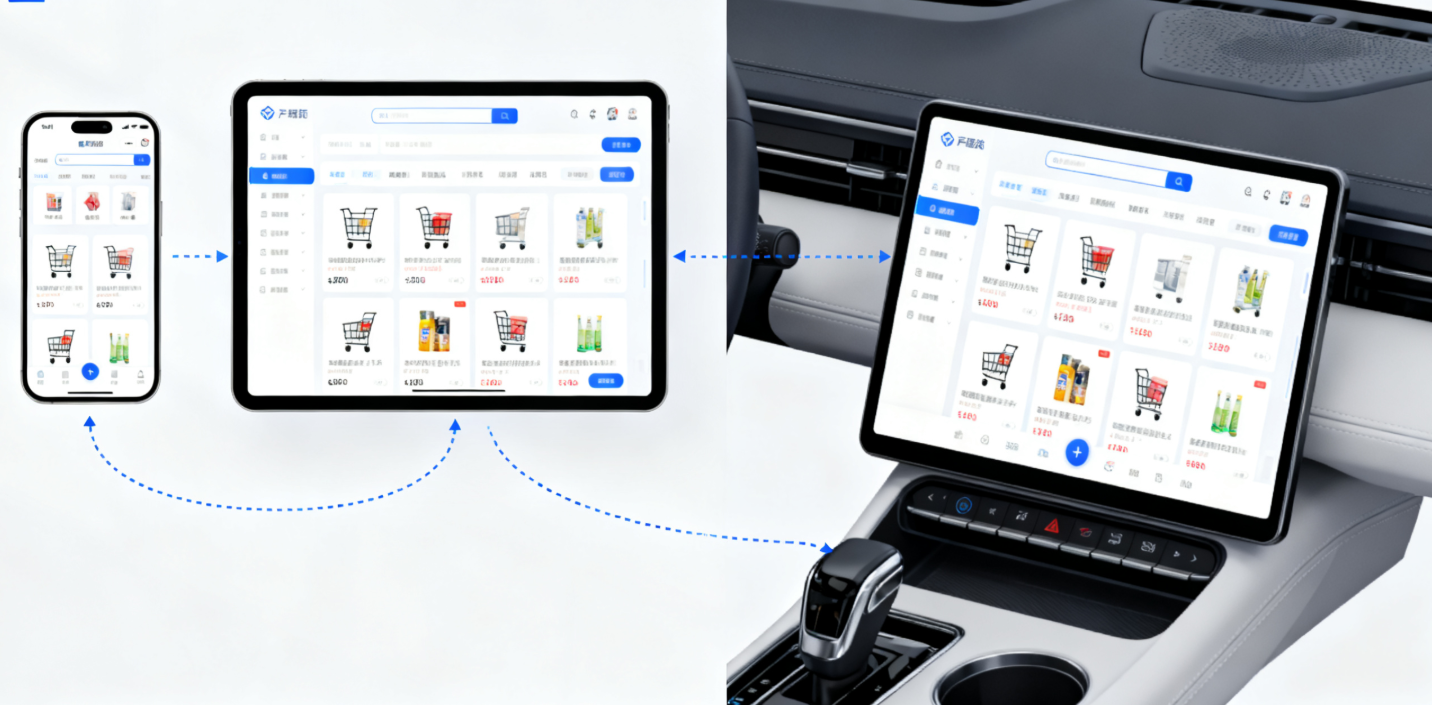
随着鸿蒙 OS(HarmonyOS)生态的持续扩张,Flutter 作为跨平台开发框架的核心优势愈发凸显 —— 通过鸿蒙化Flutter技术(如 HarmonyOS Connect、Flutter HMS Core 插件),开发者可快速实现 "一次开发、多端部署"(手机、平板、手表、车机等鸿蒙设备)。但在大型项目中(如电商 APP、企业级应用),状态管理始终是技术难点:
- 鸿蒙设备多端适配导致状态共享复杂(如手机端的用户登录状态需同步到车机端);
- Flutter 与鸿蒙原生能力交互频繁(如调用鸿蒙数据管理服务、硬件能力),状态流转易混乱;
- 大型项目模块拆分细(UI 层、业务层、数据层),状态传递链路长;
- 鸿蒙 Ability 生命周期与 Flutter Widget 生命周期差异,易引发内存泄漏或状态不一致。
1.2 为何选择 Riverpod/Bloc?
在 Flutter 状态管理方案中,Provider、Riverpod、Bloc、GetX 等各有优劣。针对鸿蒙大型项目的需求,Riverpod 和 Bloc 成为最优解的核心原因:
| 特性 | Riverpod | Bloc | 鸿蒙项目适配优势 |
|---|---|---|---|
| 依赖注入 | 编译时安全,无 Context 依赖 | 显式依赖传递 | 适配鸿蒙多 Ability 间的状态共享 |
| 状态可测试性 | 纯 Dart 实现,易 Mock 测试 | 事件 - 状态分离,逻辑可单独测试 | 符合大型项目测试规范 |
| 复杂度控制 | 轻量灵活,支持局部状态管理 | 结构化强,适合复杂业务逻辑 | 适配不同模块的复杂度需求 |
| 鸿蒙生态兼容性 | 支持与鸿蒙数据持久化服务集成 | 可通过 EventBus 对接鸿蒙原生事件 | 减少跨平台开发的适配成本 |
1.3 本文核心价值
本文将聚焦鸿蒙 Flutter 大型项目的实际场景,从 "理论 + 实战" 角度深入讲解:
- Riverpod/Bloc 的核心原理与鸿蒙生态适配要点;
- 大型项目的状态管理架构设计(模块化、分层设计);
- 关键场景最佳实践(登录状态同步、多端数据共享、离线缓存等);
- 性能优化与问题排查技巧;
- 完整实战案例(鸿蒙 Flutter 电商 APP 状态管理实现)。
相关链接:
二、基础铺垫:Riverpod/Bloc 核心原理与鸿蒙适配
2.1 Riverpod 核心原理与鸿蒙适配
2.1.1 Riverpod 核心概念
Riverpod 是 Provider 的升级版,解决了 Provider 依赖 Context、状态不可变等问题,核心概念包括:
- Provider:状态生产者,支持多种类型(StateProvider、FutureProvider、StreamProvider 等);
- Consumer:状态消费者,通过
ref.watch()监听状态变化; - ProviderScope:状态容器,必须在应用根节点包裹。
2.1.2 Riverpod 鸿蒙适配要点
在鸿蒙 Flutter 项目中使用 Riverpod,需重点关注以下适配点:
-
ProviderScope 与鸿蒙 Ability 生命周期对齐鸿蒙 Ability 的生命周期(onCreate→onActive→onInactive→onDestroy)与 Flutter App 的生命周期不同,需确保 ProviderScope 随 Ability 创建而初始化,随 Ability 销毁而释放资源:
dart
// 鸿蒙Flutter Ability中初始化Riverpod import 'package:flutter/material.dart'; import 'package:flutter_riverpod/flutter_riverpod.dart'; import 'package:harmonyos_flutter/harmonyos_flutter.dart'; class MyHarmonyAbility extends HarmonyOSAbility { @override Widget build(BuildContext context) { // 包裹ProviderScope,确保状态与Ability生命周期一致 return ProviderScope( child: MaterialApp( home: MyHomePage(), ), ); } @override void onDestroy() { super.onDestroy(); // 手动释放资源(如取消Stream订阅) ref.read(disposablesProvider).dispose(); } } // 定义可释放资源的Provider final disposablesProvider = Provider<Disposables>((ref) { final streamSubscription = someStream.listen((data) {}); // 当Provider被销毁时取消订阅 ref.onDispose(() { streamSubscription.cancel(); }); return Disposables(streamSubscription); }); class Disposables { final StreamSubscription subscription; Disposables(this.subscription); void dispose() => subscription.cancel(); } -
与鸿蒙数据持久化服务集成鸿蒙提供了数据持久化服务(如 Preferences、DataStore),可通过 Riverpod 的 FutureProvider 实现数据的读写:
dart
// 集成鸿蒙Preferences的Riverpod Provider
import 'package:harmonyos_preferences/harmonyos_preferences.dart';

// 初始化鸿蒙Preferences
final preferencesProvider = FutureProvider<HarmonyPreferences>((ref) async {
  final preferences = await HarmonyPreferences.getInstance();
  return preferences;
});

// 用户登录状态Provider(持久化到鸿蒙Preferences)
final userLoginProvider = StateNotifierProvider<UserLoginNotifier, bool>((ref) {
  final preferences = ref.watch(preferencesProvider).value;
  return UserLoginNotifier(preferences);
});

class UserLoginNotifier extends StateNotifier<bool> {
  final HarmonyPreferences? _preferences;
  static const _loginKey = 'is_login';

  UserLoginNotifier(this._preferences) : super(false) {
    // 从鸿蒙Preferences读取初始状态
    _initLoginState();
  }

  Future<void> _initLoginState() async {
    if (_preferences != null) {
      final isLogin = await _preferences!.getBool(_loginKey) ?? false;
      state = isLogin;
    }
  }

  Future<void> login() async {
    state = true;
    // 持久化到鸿蒙Preferences
    await _preferences?.putBool(_loginKey, true);
  }

  Future<void> logout() async {
    state = false;
    await _preferences?.putBool(_loginKey, false);
  }
}
2.1.3 Riverpod 常用 Provider 类型在鸿蒙项目中的应用
| Provider 类型 | 适用场景 | 鸿蒙项目示例 |
|---|---|---|
| StateProvider | 简单状态管理(如开关、计数器) | 控制鸿蒙设备亮度、音量 |
| FutureProvider | 异步数据请求(如接口调用) | 调用鸿蒙 HMS Core 接口获取用户信息 |
| StreamProvider | 流式数据处理(如实时消息) | 监听鸿蒙设备传感器数据 |
| FamilyProvider | 带参数的状态管理 | 根据设备 ID 获取不同设备的状态 |
示例:使用 StreamProvider 监听鸿蒙设备传感器数据
dart
// 监听鸿蒙加速度传感器数据
import 'package:harmonyos_sensors/harmonyos_sensors.dart';

// 初始化传感器
final sensorProvider = FutureProvider<AccelerometerSensor>((ref) async {
  final sensor = AccelerometerSensor();
  await sensor.initialize();
  ref.onDispose(() {
    sensor.dispose();
  });
  return sensor;
});

// 流式获取传感器数据
final accelerometerDataProvider = StreamProvider<AccelerometerData>((ref) {
  final sensor = ref.watch(sensorProvider).value;
  if (sensor == null) {
    return Stream.error('Sensor not initialized');
  }
  return sensor.dataStream;
});

// 消费者Widget
class SensorWidget extends ConsumerWidget {
  @override
  Widget build(BuildContext context, WidgetRef ref) {
    final sensorData = ref.watch(accelerometerDataProvider);
    return sensorData.when(
      loading: () => Text('加载中...'),
      error: (e, s) => Text('错误:$e'),
      data: (data) => Text(
        'X: ${data.x}\nY: ${data.y}\nZ: ${data.z}',
        style: Theme.of(context).textTheme.bodyLarge,
      ),
    );
  }
}
2.2 Bloc 核心原理与鸿蒙适配
2.2.1 Bloc 核心概念
Bloc(Business Logic Component)是基于事件驱动的状态管理框架,核心概念包括:
- Event:事件(如按钮点击、数据加载完成);
- State:状态(如加载中、加载成功、加载失败);
- Bloc:核心逻辑处理单元,接收 Event,输出 State;
- BlocProvider:Bloc 的提供者,用于在 Widget 树中共享 Bloc;
- BlocBuilder:状态消费者,根据 State 构建 Widget。
2.2.2 Bloc 鸿蒙适配要点
-
Bloc 与鸿蒙 Ability 生命周期协同需确保 Bloc 的初始化和销毁与鸿蒙 Ability 的生命周期一致,避免内存泄漏:
dart
// 鸿蒙Flutter Ability中使用Bloc import 'package:flutter/material.dart'; import 'package:flutter_bloc/flutter_bloc.dart'; import 'package:harmonyos_flutter/harmonyos_flutter.dart'; class MyHarmonyAbility extends HarmonyOSAbility { late UserBloc _userBloc; @override void onCreate() { super.onCreate(); // 初始化Bloc _userBloc = UserBloc(); } @override Widget build(BuildContext context) { return BlocProvider( create: (context) => _userBloc, child: MaterialApp( home: UserProfilePage(), ), ); } @override void onDestroy() { super.onDestroy(); // 销毁Bloc,释放资源 _userBloc.close(); } } -
鸿蒙原生事件与 Bloc Event 的映射鸿蒙原生事件(如 Ability 间通信、系统广播)可映射为 Bloc Event,实现跨层级状态流转:
dart
// 鸿蒙原生事件转Bloc Event
import 'package:flutter_bloc/flutter_bloc.dart';
import 'package:harmonyos_broadcast/harmonyos_broadcast.dart';

// 定义Bloc Event
abstract class UserEvent {}
class UserLoginEvent extends UserEvent {
  final String token;
  UserLoginEvent(this.token);
}
class UserLogoutEvent extends UserEvent {}

// 定义Bloc State
abstract class UserState {}
class UserInitialState extends UserState {}
class UserLoggedInState extends UserState {
  final String token;
  UserLoggedInState(this.token);
}
class UserLoggedOutState extends UserState {}

// 实现Bloc
class UserBloc extends Bloc<UserEvent, UserState> {
  late BroadcastReceiver _broadcastReceiver;

  UserBloc() : super(UserInitialState()) {
    // 注册鸿蒙系统广播(如用户登录状态变化广播)
    _registerHarmonyBroadcast();

    on<UserLoginEvent>((event, emit) {
      emit(UserLoggedInState(event.token));
    });

    on<UserLogoutEvent>((event, emit) {
      emit(UserLoggedOutState());
    });
  }

  // 注册鸿蒙广播
  void _registerHarmonyBroadcast() {
    _broadcastReceiver = BroadcastReceiver((context, intent) {
      final action = intent.action;
      if (action == 'com.harmonyos.user.LOGIN') {
        final token = intent.getStringExtra('token');
        add(UserLoginEvent(token!));
      } else if (action == 'com.harmonyos.user.LOGOUT') {
        add(UserLogoutEvent());
      }
    });
    HarmonyOSBroadcast.registerReceiver(
      _broadcastReceiver,
      IntentFilter()
        ..addAction('com.harmonyos.user.LOGIN')
        ..addAction('com.harmonyos.user.LOGOUT'),
    );
  }

  @override
  Future<void> close() {
    // 取消广播注册
    HarmonyOSBroadcast.unregisterReceiver(_broadcastReceiver);
    return super.close();
  }
}
2.2.3 Bloc 状态流转在鸿蒙多端适配中的应用
鸿蒙多端设备(手机、平板、车机)的 UI 布局不同,但业务逻辑一致,可通过 Bloc 分离 UI 与业务逻辑,实现多端复用:
dart
// 多端共用的Bloc逻辑
class ProductBloc extends Bloc<ProductEvent, ProductState> {
  final ProductRepository repository;

  ProductBloc(this.repository) : super(ProductLoadingState()) {
    on<FetchProductsEvent>((event, emit) async {
      emit(ProductLoadingState());
      try {
        final products = await repository.getProducts(event.categoryId);
        emit(ProductLoadedState(products));
      } catch (e) {
        emit(ProductErrorState(e.toString()));
      }
    });
  }
}

// 手机端UI
class PhoneProductList extends BlocBuilder<ProductBloc, ProductState> {
  @override
  Widget build(BuildContext context, ProductState state) {
    if (state is ProductLoadedState) {
      return ListView.builder(
        itemCount: state.products.length,
        itemBuilder: (context, index) => PhoneProductItem(state.products[index]),
      );
    }
    // 其他状态处理...
  }
}

// 平板端UI
class TabletProductList extends BlocBuilder<ProductBloc, ProductState> {
  @override
  Widget build(BuildContext context, ProductState state) {
    if (state is ProductLoadedState) {
      return GridView.count(
        crossAxisCount: 2,
        children: state.products.map((product) => TabletProductItem(product)).toList(),
      );
    }
    // 其他状态处理...
  }
}
相关链接:

三、大型项目状态管理架构设计:模块化与分层
3.1 架构设计原则
鸿蒙 Flutter 大型项目的状态管理架构需遵循以下原则:
- 单一职责:状态管理只负责状态的生产、消费和流转,不包含业务逻辑;
- 模块化:按业务模块拆分状态(如用户模块、商品模块、订单模块);
- 分层设计:分离 UI 层、状态层、数据层,降低耦合;
- 可测试性:状态逻辑可单独测试,不依赖 UI 和原生能力;
- 多端复用:状态层和数据层可在鸿蒙多端设备中复用。
3.2 整体架构图
plaintext
鸿蒙Flutter大型项目架构
┌─────────────────────────────────────────────────────────┐
│ UI层(鸿蒙多端UI)                                       │
│ ├─ 手机端UI(Widget)                                    │
│ ├─ 平板端UI(Widget)                                    │
│ └─ 车机端UI(Widget)                                    │
├─────────────────────────────────────────────────────────┤
│ 状态层(Riverpod/Bloc)                                  │
│ ├─ 模块1状态(UserBloc/UserProvider)                     │
│ ├─ 模块2状态(ProductBloc/ProductProvider)               │
│ └─ 全局状态(AppBloc/AppProvider)                        │
├─────────────────────────────────────────────────────────┤
│ 数据层                                                   │
│ ├─ 仓库(Repository):封装数据请求逻辑                   │
│ ├─ 数据源(DataSource):                                │
│ │  ├─ 远程数据源(HMS Core API、后端接口)                │
│ │  └─ 本地数据源(鸿蒙Preferences、DataStore)             │
│ └─ 模型(Model):数据实体类                              │
├─────────────────────────────────────────────────────────┤
│ 基础层                                                   │
│ ├─ 鸿蒙原生能力封装(传感器、广播、数据持久化)           │
│ ├─ 工具类(网络、日志、加密)                             │
│ └─ 常量(接口地址、配置参数)                             │
└─────────────────────────────────────────────────────────┘
3.3 模块化状态管理实现
3.3.1 模块划分
以鸿蒙 Flutter 电商 APP 为例,按业务模块划分状态:
- 全局模块:APP 配置、用户登录状态、主题设置;
- 商品模块:商品列表、商品详情、购物车;
- 订单模块:订单列表、订单详情、支付状态;
- 个人中心模块:用户信息、地址管理、收藏夹。
3.3.2 Riverpod 模块化实现
使用ProviderFamily和ScopedProvider实现模块化,避免状态污染:
dart
// 全局模块 - 用户状态
final userProvider = StateNotifierProvider<UserNotifier, User?>((ref) {
  final userRepository = ref.watch(userRepositoryProvider);
  return UserNotifier(userRepository);
});

// 商品模块 - 商品列表状态(带分类ID参数)
final productListProvider = FutureProvider.family<List<Product>, String>((ref, categoryId) {
  final productRepository = ref.watch(productRepositoryProvider);
  return productRepository.getProductsByCategory(categoryId);
});

// 商品模块 - 购物车状态
final cartProvider = StateNotifierProvider<CartNotifier, List<CartItem>>((ref) {
  final cartRepository = ref.watch(cartRepositoryProvider);
  return CartNotifier(cartRepository);
});

// 模块间状态依赖(购物车状态依赖用户状态)
class CartNotifier extends StateNotifier<List<CartItem>> {
  final CartRepository _repository;
  late final StreamSubscription _userSubscription;

  CartNotifier(this._repository) : super([]) {
    // 监听用户登录状态变化,加载对应用户的购物车
    _userSubscription = ref.listen<User?>(userProvider, (previous, current) {
      if (current != null) {
        _loadCart(current.id);
      } else {
        state = [];
      }
    });
  }

  Future<void> _loadCart(String userId) async {
    final cartItems = await _repository.getCartItems(userId);
    state = cartItems;
  }

  @override
  void dispose() {
    _userSubscription.cancel();
    super.dispose();
  }
}
3.3.3 Bloc 模块化实现
每个模块独立创建 Bloc,通过BlocProvider在模块入口注入:
dart
// 订单模块 - OrderBloc
class OrderBloc extends Bloc<OrderEvent, OrderState> {
  final OrderRepository repository;

  OrderBloc(this.repository) : super(OrderInitialState()) {
    on<FetchOrdersEvent>((event, emit) async {
      emit(OrderLoadingState());
      try {
        final orders = await repository.getOrders(event.userId);
        emit(OrderLoadedState(orders));
      } catch (e) {
        emit(OrderErrorState(e.toString()));
      }
    });
    on<CancelOrderEvent>((event, emit) async {
      // 取消订单逻辑
    });
  }
}

// 订单模块入口Widget
class OrderModule extends StatelessWidget {
  final String userId;

  const OrderModule({super.key, required this.userId});

  @override
  Widget build(BuildContext context) {
    return BlocProvider(
      create: (context) => OrderBloc(
        OrderRepository(
          RemoteDataSource(),
          LocalDataSource(),
        ),
      )..add(FetchOrdersEvent(userId)),
      child: OrderListPage(),
    );
  }
}

// 订单列表UI
class OrderListPage extends BlocBuilder<OrderBloc, OrderState> {
  @override
  Widget build(BuildContext context, OrderState state) {
    if (state is OrderLoadedState) {
      return ListView.builder(
        itemCount: state.orders.length,
        itemBuilder: (context, index) => OrderItem(state.orders[index]),
      );
    } else if (state is OrderLoadingState) {
      return const Center(child: CircularProgressIndicator());
    } else if (state is OrderErrorState) {
      return Center(child: Text(state.message));
    }
    return const SizedBox.shrink();
  }
}
3.4 分层设计实现
3.4.1 数据层实现
数据层负责数据的获取和存储,通过 Repository 封装,对外提供统一接口:
dart
// 数据模型
class Product {
  final String id;
  final String name;
  final double price;
  final String imageUrl;

  Product({
    required this.id,
    required this.name,
    required this.price,
    required this.imageUrl,
  });

  // 从JSON转换
  factory Product.fromJson(Map<String, dynamic> json) {
    return Product(
      id: json['id'],
      name: json['name'],
      price: json['price'].toDouble(),
      imageUrl: json['imageUrl'],
    );
  }
}

// 远程数据源
class ProductRemoteDataSource {
  // 调用鸿蒙HMS Core API或后端接口
  Future<List<Product>> getProductsByCategory(String categoryId) async {
    final response = await HarmonyOSHttpClient.get(
      'https://api.harmonyos-ecommerce.com/products',
      queryParameters: {'categoryId': categoryId},
    );
    final List<dynamic> data = response.data;
    return data.map((json) => Product.fromJson(json)).toList();
  }
}

// 本地数据源
class ProductLocalDataSource {
  final HarmonyPreferences _preferences;
  static const _cacheKey = 'product_cache_';

  ProductLocalDataSource(this._preferences);

  // 缓存商品列表
  Future<void> cacheProducts(String categoryId, List<Product> products) async {
    final jsonList = products.map((product) => product.toJson()).toList();
    await _preferences.putString(_cacheKey + categoryId, json.encode(jsonList));
  }

  // 获取缓存的商品列表
  Future<List<Product>?> getCachedProducts(String categoryId) async {
    final jsonString = await _preferences.getString(_cacheKey + categoryId);
    if (jsonString == null) return null;
    final List<dynamic> jsonList = json.decode(jsonString);
    return jsonList.map((json) => Product.fromJson(json)).toList();
  }
}

// Repository封装
final productRepositoryProvider = Provider<ProductRepository>((ref) {
  final remoteDataSource = ProductRemoteDataSource();
  final localDataSource = ProductLocalDataSource(
    ref.watch(preferencesProvider).value!,
  );
  return ProductRepository(remoteDataSource, localDataSource);
});

class ProductRepository {
  final ProductRemoteDataSource _remoteDataSource;
  final ProductLocalDataSource _localDataSource;

  ProductRepository(this._remoteDataSource, this._localDataSource);

  Future<List<Product>> getProductsByCategory(String categoryId) async {
    try {
      // 先从本地缓存获取
      final cachedProducts = await _localDataSource.getCachedProducts(categoryId);
      if (cachedProducts != null) {
        return cachedProducts;
      }
      // 缓存未命中,从远程获取
      final products = await _remoteDataSource.getProductsByCategory(categoryId);
      // 缓存到本地
      await _localDataSource.cacheProducts(categoryId, products);
      return products;
    } catch (e) {
      throw Exception('获取商品列表失败:$e');
    }
  }
}
3.4.2 状态层与数据层交互
状态层通过依赖注入获取 Repository,调用其方法获取数据,避免直接依赖数据源:
dart
// Riverpod与Repository交互
final productListProvider = FutureProvider.family<List<Product>, String>((ref, categoryId) {
  final repository = ref.watch(productRepositoryProvider);
  return repository.getProductsByCategory(categoryId);
});

// Bloc与Repository交互
class ProductBloc extends Bloc<ProductEvent, ProductState> {
  final ProductRepository repository;

  ProductBloc(this.repository) : super(ProductInitialState()) {
    on<FetchProductsEvent>((event, emit) async {
      emit(ProductLoadingState());
      try {
        final products = await repository.getProductsByCategory(event.categoryId);
        emit(ProductLoadedState(products));
      } catch (e) {
        emit(ProductErrorState(e.toString()));
      }
    });
  }
}
相关链接:
四、关键场景最佳实践
4.1 全局状态管理(用户登录状态同步)
4.1.1 需求分析
- 用户登录状态需在所有模块共享(商品模块、订单模块、个人中心模块);
- 登录状态变化时,所有依赖该状态的 UI 需实时更新;
- 登录状态需持久化到鸿蒙 Preferences,应用重启后自动恢复;
- 支持多端同步(如手机端登录后,车机端自动同步登录状态)。
4.1.2 Riverpod 实现方案
dart
// 1. 定义用户模型
class User {
  final String id;
  final String name;
  final String token;

  User({required this.id, required this.name, required this.token});

  // 序列化,用于持久化
  Map<String, dynamic> toJson() => {
        'id': id,
        'name': name,
        'token': token,
      };

  // 反序列化
  factory User.fromJson(Map<String, dynamic> json) => User(
        id: json['id'],
        name: json['name'],
        token: json['token'],
      );
}

// 2. 定义用户状态Notifier
final userNotifierProvider = StateNotifierProvider<UserNotifier, User?>((ref) {
  final repository = ref.watch(userRepositoryProvider);
  final preferences = ref.watch(preferencesProvider).value;
  return UserNotifier(repository, preferences);
});

class UserNotifier extends StateNotifier<User?> {
  final UserRepository _repository;
  final HarmonyPreferences? _preferences;
  static const _userKey = 'current_user';

  UserNotifier(this._repository, this._preferences) : super(null) {
    // 初始化时从本地加载用户状态
    _loadUserFromLocal();
  }

  // 从鸿蒙Preferences加载用户
  Future<void> _loadUserFromLocal() async {
    if (_preferences == null) return;
    final userJson = await _preferences!.getString(_userKey);
    if (userJson != null) {
      state = User.fromJson(json.decode(userJson));
      // 同步到鸿蒙其他设备(通过HMS Core账号同步)
      await _syncUserToOtherDevices(state!);
    }
  }

  // 登录
  Future<void> login(String username, String password) async {
    final user = await _repository.login(username, password);
    state = user;
    // 持久化到本地
    await _preferences?.putString(_userKey, json.encode(user.toJson()));
    // 同步到其他设备
    await _syncUserToOtherDevices(user);
  }

  // 登出
  Future<void> logout() async {
    await _repository.logout(state!.token);
    state = null;
    // 清除本地缓存
    await _preferences?.remove(_userKey);
    // 同步到其他设备
    await _syncUserToOtherDevices(null);
  }

  // 同步用户状态到鸿蒙其他设备(通过HMS Core Account API)
  Future<void> _syncUserToOtherDevices(User? user) async {
    try {
      final accountApi = HarmonyOSAccountApi();
      if (user != null) {
        await accountApi.setAccountExtraInfo('user_info', json.encode(user.toJson()));
      } else {
        await accountApi.removeAccountExtraInfo('user_info');
      }
    } catch (e) {
      debugPrint('同步用户状态失败:$e');
    }
  }
}

// 3. 全局使用登录状态
class HomePage extends ConsumerWidget {
  @override
  Widget build(BuildContext context, WidgetRef ref) {
    final user = ref.watch(userNotifierProvider);
    return Scaffold(
      appBar: AppBar(title: const Text('鸿蒙电商APP')),
      body: Center(
        child: user == null
            ? ElevatedButton(
                onPressed: () => Navigator.pushNamed(context, '/login'),
                child: const Text('登录'),
              )
            : Column(
                mainAxisAlignment: MainAxisAlignment.center,
                children: [
                  Text('欢迎回来,${user.name}!'),
                  ElevatedButton(
                    onPressed: () => ref.read(userNotifierProvider.notifier).logout(),
                    child: const Text('登出'),
                  ),
                ],
              ),
      ),
    );
  }
}
4.1.3 Bloc 实现方案
dart
// 1. 定义Event和State
abstract class UserEvent {}
class LoginEvent extends UserEvent {
  final String username;
  final String password;
  LoginEvent(this.username, this.password);
}
class LogoutEvent extends UserEvent {}
class LoadUserEvent extends UserEvent {}

abstract class UserState {}
class UserInitialState extends UserState {}
class UserLoadingState extends UserState {}
class UserLoggedInState extends UserState {
  final User user;
  UserLoggedInState(this.user);
}
class UserLoggedOutState extends UserState {}
class UserErrorState extends UserState {
  final String message;
  UserErrorState(this.message);
}

// 2. 实现UserBloc
class UserBloc extends Bloc<UserEvent, UserState> {
  final UserRepository _repository;
  final HarmonyPreferences? _preferences;
  static const _userKey = 'current_user';

  UserBloc(this._repository, this._preferences) : super(UserInitialState()) {
    on<LoadUserEvent>((event, emit) async {
      emit(UserLoadingState());
      try {
        final userJson = await _preferences?.getString(_userKey);
        if (userJson != null) {
          final user = User.fromJson(json.decode(userJson));
          await _syncUserToOtherDevices(user);
          emit(UserLoggedInState(user));
        } else {
          emit(UserLoggedOutState());
        }
      } catch (e) {
        emit(UserErrorState(e.toString()));
      }
    });

    on<LoginEvent>((event, emit) async {
      emit(UserLoadingState());
      try {
        final user = await _repository.login(event.username, event.password);
        await _preferences?.putString(_userKey, json.encode(user.toJson()));
        await _syncUserToOtherDevices(user);
        emit(UserLoggedInState(user));
      } catch (e) {
        emit(UserErrorState(e.toString()));
      }
    });

    on<LogoutEvent>((event, emit) async {
      emit(UserLoadingState());
      try {
        final currentState = state;
        if (currentState is UserLoggedInState) {
          await _repository.logout(currentState.user.token);
        }
        await _preferences?.remove(_userKey);
        await _syncUserToOtherDevices(null);
        emit(UserLoggedOutState());
      } catch (e) {
        emit(UserErrorState(e.toString()));
      }
    });
  }

  Future<void> _syncUserToOtherDevices(User? user) async {
    // 与Riverpod实现一致
  }
}

// 3. 全局使用Bloc
class AppRoot extends StatelessWidget {
  @override
  Widget build(BuildContext context) {
    return BlocProvider(
      create: (context) => UserBloc(
        UserRepository(),
        HarmonyPreferences.getInstance().then((value) => value),
      )..add(LoadUserEvent()),
      child: MaterialApp(
        routes: {
          '/': (context) => HomePage(),
          '/login': (context) => LoginPage(),
        },
      ),
    );
  }
}

class HomePage extends BlocBuilder<UserBloc, UserState> {
  @override
  Widget build(BuildContext context, UserState state) {
    if (state is UserLoadingState) {
      return const Center(child: CircularProgressIndicator());
    } else if (state is UserLoggedInState) {
      return Scaffold(
        body: Center(child: Text('欢迎回来,${state.user.name}!')),
      );
    } else if (state is UserLoggedOutState) {
      return Scaffold(
        body: Center(
          child: ElevatedButton(
            onPressed: () => Navigator.pushNamed(context, '/login'),
            child: const Text('登录'),
          ),
        ),
      );
    } else if (state is UserErrorState) {
      return Center(child: Text('错误:${state.message}'));
    } else {
      return const SizedBox.shrink();
    }
  }
}
4.2 多端数据共享(购物车同步)
4.2.1 需求分析
- 购物车数据需在鸿蒙多端设备(手机、平板、车机)间同步;
- 支持离线添加商品,联网后自动同步;
- 购物车状态实时更新(添加、删除、修改数量)。
4.2.2 实现方案(Riverpod + 鸿蒙 DataStore)
鸿蒙 DataStore 是分布式数据存储服务,支持多端数据同步,结合 Riverpod 实现购物车同步:
dart
// 1. 购物车商品模型
class CartItem {
  final String productId;
  final String name;
  final double price;
  final int quantity;

  CartItem({
    required this.productId,
    required this.name,
    required this.price,
    required this.quantity,
  });

  CartItem copyWith({int? quantity}) {
    return CartItem(
      productId: productId,
      name: name,
      price: price,
      quantity: quantity ?? this.quantity,
    );
  }

  Map<String, dynamic> toJson() => {
        'productId': productId,
        'name': name,
        'price': price,
        'quantity': quantity,
      };

  factory CartItem.fromJson(Map<String, dynamic> json) => CartItem(
        productId: json['productId'],
        name: json['name'],
        price: json['price'].toDouble(),
        quantity: json['quantity'],
      );
}

// 2. 初始化鸿蒙DataStore
final dataStoreProvider = FutureProvider<HarmonyDataStore>((ref) async {
  final dataStore = await HarmonyDataStore.getInstance(
    storeName: 'cart_store',
    securityLevel: SecurityLevel.S1, // 安全级别
  );
  return dataStore;
});

// 3. 购物车Repository(集成DataStore)
final cartRepositoryProvider = Provider<CartRepository>((ref) {
  final dataStore = ref.watch(dataStoreProvider).value;
  final networkInfo = ref.watch(networkInfoProvider);
  return CartRepository(dataStore, networkInfo);
});

class CartRepository {
  final HarmonyDataStore? _dataStore;
  final NetworkInfo _networkInfo;
  static const _cartKey = 'cart_items';

  CartRepository(this._dataStore, this._networkInfo);

  // 从DataStore获取购物车数据
  Future<List<CartItem>> getCartItems() async {
    if (_dataStore == null) return [];
    final jsonString = await _dataStore!.getString(_cartKey);
    if (jsonString == null) return [];
    final List<dynamic> jsonList = json.decode(jsonString);
    return jsonList.map((json) => CartItem.fromJson(json)).toList();
  }

  // 保存购物车数据到DataStore(自动同步多端)
  Future<void> saveCartItems(List<CartItem> items) async {
    if (_dataStore == null) return;
    final jsonString = json.encode(items.map((item) => item.toJson()).toList());
    await _dataStore!.putString(_cartKey, jsonString);

    // 联网时同步到服务器
    final isConnected = await _networkInfo.isConnected;
    if (isConnected) {
      await _syncToServer(items);
    }
  }

  // 同步到服务器
  Future<void> _syncToServer(List<CartItem> items) async {
    // 调用后端接口同步购物车
  }
}

// 4. 购物车Riverpod状态
final cartProvider = StateNotifierProvider<CartNotifier, List<CartItem>>((ref) {
  final repository = ref.watch(cartRepositoryProvider);
  return CartNotifier(repository);
});

class CartNotifier extends StateNotifier<List<CartItem>> {
  final CartRepository _repository;
  late final StreamSubscription _networkSubscription;

  CartNotifier(this._repository) : super([]) {
    // 初始化加载购物车数据
    _loadCartItems();

    // 监听网络状态,联网后同步
    _networkSubscription = _repository._networkInfo.onConnectivityChanged.listen((isConnected) {
      if (isConnected) {
        _repository._syncToServer(state);
      }
    });
  }

  Future<void> _loadCartItems() async {
    final items = await _repository.getCartItems();
    state = items;
  }

  // 添加商品到购物车
  void addItem(CartItem item) {
    final index = state.indexWhere((i) => i.productId == item.productId);
    if (index != -1) {
      // 商品已存在,更新数量
      final updatedItems = List<CartItem>.from(state);
      updatedItems[index] = updatedItems[index].copyWith(
        quantity: updatedItems[index].quantity + item.quantity,
      );
      state = updatedItems;
    } else {
      // 新增商品
      state = [...state, item];
    }
    // 保存到DataStore
    _repository.saveCartItems(state);
  }

  // 删除购物车商品
  void removeItem(String productId) {
    state = state.where((item) => item.productId != productId).toList();
    _repository.saveCartItems(state);
  }

  @override
  void dispose() {
    _networkSubscription.cancel();
    super.dispose();
  }
}
4.3 性能优化(状态防抖、缓存策略)
4.3.1 Riverpod 状态防抖
在搜索功能等场景中,需避免频繁触发状态更新,可使用Debouncer实现防抖:
dart
// 防抖工具类
class Debouncer {
  final Duration duration;
  Timer? _timer;

  Debouncer({required this.duration});

  void run(VoidCallback action) {
    _timer?.cancel();
    _timer = Timer(duration, action);
  }

  void dispose() => _timer?.cancel();
}

// 搜索状态Provider
final searchQueryProvider = StateProvider<String>((ref) => '');
final searchResultsProvider = FutureProvider<List<Product>>((ref) async {
  final query = ref.watch(searchQueryProvider);
  final debouncer = Debouncer(duration: const Duration(milliseconds: 300));
  // 使用防抖
  await Future.delayed(debouncer.duration);
  if (query.isEmpty) return [];
  final repository = ref.watch(productRepositoryProvider);
  return repository.searchProducts(query);
});

// 搜索UI
class SearchPage extends ConsumerStatefulWidget {
  @override
  ConsumerState<SearchPage> createState() => _SearchPageState();
}

class _SearchPageState extends ConsumerState<SearchPage> {
  final _debouncer = Debouncer(duration: const Duration(milliseconds: 300));

  @override
  void dispose() {
    _debouncer.dispose();
    super.dispose();
  }

  @override
  Widget build(BuildContext context) {
    final searchResults = ref.watch(searchResultsProvider);
    return Scaffold(
      appBar: AppBar(
        title: TextField(
          decoration: const InputDecoration(hintText: '搜索商品...'),
          onChanged: (value) {
            // 防抖后更新搜索关键词
            _debouncer.run(() {
              ref.read(searchQueryProvider.notifier).state = value;
            });
          },
        ),
      ),
      body: searchResults.when(
        loading: () => const Center(child: CircularProgressIndicator()),
        error: (e, s) => Center(child: Text('搜索失败:$e')),
        data: (products) => ListView.builder(
          itemCount: products.length,
          itemBuilder: (context, index) => ProductItem(products[index]),
        ),
      ),
    );
  }
}
4.3.2 Bloc 缓存策略
使用BlocCache缓存状态,避免重复请求:
dart
// 缓存工具类
class BlocCache<T> {
  final Duration expirationDuration;
  T? _data;
  DateTime? _cachedAt;

  BlocCache({required this.expirationDuration});

  bool get isExpired => _cachedAt == null ||
      DateTime.now().difference(_cachedAt!) > expirationDuration;

  T? get data => isExpired ? null : _data;

  void setData(T data) {
    _data = data;
    _cachedAt = DateTime.now();
  }

  void clear() {
    _data = null;
    _cachedAt = null;
  }
}

// 带缓存的ProductBloc
class ProductBloc extends Bloc<ProductEvent, ProductState> {
  final ProductRepository repository;
  final BlocCache<List<Product>> _cache;

  ProductBloc(this.repository)
      : _cache = BlocCache(expirationDuration: const Duration(minutes: 10)),
        super(ProductInitialState()) {
    on<FetchProductsEvent>((event, emit) async {
      // 检查缓存
      final cachedData = _cache.data;
      if (cachedData != null) {
        emit(ProductLoadedState(cachedData));
        return;
      }

      emit(ProductLoadingState());
      try {
        final products = await repository.getProductsByCategory(event.categoryId);
        _cache.setData(products); // 缓存数据
        emit(ProductLoadedState(products));
      } catch (e) {
        emit(ProductErrorState(e.toString()));
      }
    });

    on<ClearProductCacheEvent>((event, emit) {
      _cache.clear();
    });
  }
}
相关链接:
五、实战案例:鸿蒙 Flutter 电商 APP 状态管理完整实现
5.1 项目结构
plaintext
harmonyos_flutter_ecommerce/
├── lib/
│   ├── app/
│   │   ├── app.dart          # 应用入口
│   │   └── routes.dart       # 路由配置
│   ├── core/
│   │   ├── constants/        # 常量定义
│   │   ├── models/           # 数据模型
│   │   ├── network/          # 网络请求
│   │   ├── storage/          # 存储封装(鸿蒙Preferences/DataStore)
│   │   └── utils/            # 工具类
│   ├── features/
│   │   ├── auth/             # 登录模块
│   │   │   ├── bloc/         # Bloc状态管理
│   │   │   ├── data/         # 数据层
│   │   │   ├── presentation/ # UI层
│   │   │   └── auth.dart     # 模块入口
│   │   ├── products/         # 商品模块
│   │   │   ├── provider/     # Riverpod状态管理
│   │   │   ├── data/
│   │   │   ├── presentation/
│   │   │   └── products.dart
│   │   ├── cart/             # 购物车模块
│   │   └── profile/          # 个人中心模块
│   └── harmonyos/            # 鸿蒙原生能力封装
└── pubspec.yaml
5.2 核心代码实现
5.2.1 应用入口
dart
// lib/app/app.dart
import 'package:flutter/material.dart';
import 'package:flutter_riverpod/flutter_riverpod.dart';
import 'package:flutter_bloc/flutter_bloc.dart';
import 'package:harmonyos_flutter/harmonyos_flutter.dart';
import 'routes.dart';
import 'features/auth/bloc/user_bloc.dart';
import 'features/products/provider/product_providers.dart';
import 'core/storage/harmony_storage.dart';

class MyHarmonyEcommerceApp extends HarmonyOSAbility {
  @override
  Widget build(BuildContext context) {
    return FutureBuilder(
      future: HarmonyStorage.initialize(), // 初始化鸿蒙存储
      builder: (context, snapshot) {
        if (snapshot.connectionState == ConnectionState.done) {
          return MultiBlocProvider(
            providers: [
              BlocProvider(
                create: (context) => UserBloc(
                  UserRepository(
                    RemoteDataSource(),
                    LocalDataSource(HarmonyStorage.preferences),
                  ),
                  HarmonyStorage.preferences,
                )..add(LoadUserEvent()),
              ),
            ],
            child: ProviderScope(
              child: MaterialApp(
                title: '鸿蒙Flutter电商APP',
                theme: ThemeData(primarySwatch: Colors.blue),
                initialRoute: '/',
                routes: appRoutes,
              ),
            ),
          );
        }
        return const Center(child: CircularProgressIndicator());
      },
    );
  }
}
5.2.2 商品列表页面(Riverpod 实现)
dart
// lib/features/products/presentation/product_list_page.dart
import 'package:flutter/material.dart';
import 'package:flutter_riverpod/flutter_riverpod.dart';
import 'package:harmonyos_flutter/harmonyos_flutter.dart';
import '../provider/product_providers.dart';
import '../data/models/product.dart';
import 'product_item.dart';

class ProductListPage extends ConsumerWidget {
  final String categoryId;

  const ProductListPage({super.key, required this.categoryId});

  @override
  Widget build(BuildContext context, WidgetRef ref) {
    final productList = ref.watch(productListProvider(categoryId));
    final cartNotifier = ref.read(cartProvider.notifier);

    return Scaffold(
      appBar: AppBar(
        title: const Text('商品列表'),
        actions: [
          IconButton(
            icon: const Icon(Icons.shopping_cart),
            onPressed: () => Navigator.pushNamed(context, '/cart'),
          ),
        ],
      ),
      body: productList.when(
        loading: () => const Center(child: CircularProgressIndicator()),
        error: (e, s) => Center(
          child: Column(
            mainAxisAlignment: MainAxisAlignment.center,
            children: [
              Text('加载失败:$e'),
              ElevatedButton(
                onPressed: () => ref.invalidate(productListProvider(categoryId)),
                child: const Text('重试'),
              ),
            ],
          ),
        ),
        data: (products) => ListView.builder(
          itemCount: products.length,
          itemBuilder: (context, index) {
            final product = products[index];
            return ProductItem(
              product: product,
              onAddToCart: () {
                cartNotifier.addItem(
                  CartItem(
                    productId: product.id,
                    name: product.name,
                    price: product.price,
                    quantity: 1,
                  ),
                );
                // 显示鸿蒙原生Toast
                HarmonyOSToast.showText('已添加到购物车');
              },
            );
          },
        ),
      ),
    );
  }
}
5.2.3 购物车页面(Riverpod 实现)
dart
// lib/features/cart/presentation/cart_page.dart
import 'package:flutter/material.dart';
import 'package:flutter_riverpod/flutter_riverpod.dart';
import '../provider/cart_providers.dart';
import 'cart_item.dart';

class CartPage extends ConsumerWidget {
  @override
  Widget build(BuildContext context, WidgetRef ref) {
    final cartItems = ref.watch(cartProvider);
    final cartNotifier = ref.read(cartProvider.notifier);

    // 计算总价
    final totalPrice = cartItems.fold(
      0.0,
      (sum, item) => sum + (item.price * item.quantity),
    );

    return Scaffold(
      appBar: AppBar(title: const Text('购物车')),
      body: cartItems.isEmpty
          ? const Center(child: Text('购物车为空'))
          : Column(
              children: [
                Expanded(
                  child: ListView.builder(
                    itemCount: cartItems.length,
                    itemBuilder: (context, index) {
                      final item = cartItems[index];
                      return CartItemWidget(
                        item: item,
                        onQuantityChanged: (quantity) {
                          cartNotifier.updateQuantity(item.productId, quantity);
                        },
                        onRemove: () {
                          cartNotifier.removeItem(item.productId);
                        },
                      );
                    },
                  ),
                ),
                // 底部结算栏
                Container(
                  padding: const EdgeInsets.all(16),
                  decoration: BoxDecoration(
                    border: Border(top: BorderSide(color: Colors.grey[300]!)),
                  ),
                  child: Row(
                    mainAxisAlignment: MainAxisAlignment.spaceBetween,
                    children: [
                      Text(
                        '总价:¥${totalPrice.toStringAsFixed(2)}',
                        style: const TextStyle(
                          fontSize: 18,
                          fontWeight: FontWeight.bold,
                        ),
                      ),
                      ElevatedButton(
                        onPressed: () => Navigator.pushNamed(context, '/checkout'),
                        child: const Text('去结算'),
                      ),
                    ],
                  ),
                ),
              ],
            ),
    );
  }
}
5.3 测试与调试
5.3.1 Riverpod 状态测试
dart
// 测试ProductListProvider
import 'package:flutter_test/flutter_test.dart';
import 'package:riverpod/riverpod.dart';
import 'package:mockito/mockito.dart';
import '../features/products/provider/product_providers.dart';
import '../features/products/data/repositories/product_repository.dart';
import '../features/products/data/models/product.dart';

class MockProductRepository extends Mock implements ProductRepository {}

void main() {
  late ProviderContainer container;
  late MockProductRepository mockRepository;

  setUp(() {
    mockRepository = MockProductRepository();
    container = ProviderContainer(
      overrides: [
        productRepositoryProvider.overrideWithValue(mockRepository),
      ],
    );
  });

  tearDown(() {
    container.dispose();
  });

  test('ProductListProvider returns products on success', () async {
    // 模拟Repository返回数据
    final mockProducts = [
      Product(id: '1', name: '测试商品', price: 99.9, imageUrl: 'test.jpg'),
    ];
    when(mockRepository.getProductsByCategory('1')).thenAnswer(
      (_) async => mockProducts,
    );

    // 监听Provider
    final productList = container.read(productListProvider('1').future);

    // 验证结果
    expect(await productList, equals(mockProducts));
    verify(mockRepository.getProductsByCategory('1')).called(1);
  });
}
5.3.2 鸿蒙设备调试工具
- 鸿蒙 DevEco Studio:提供 Flutter 代码调试、UI 布局预览、性能分析功能;
- Riverpod DevTools:通过
flutter_riverpod/dev_tools插件,可视化查看状态流转; - 鸿蒙系统日志:通过
HarmonyOSLog类打印状态变化日志,便于问题排查:dart
import 'package:harmonyos_log/harmonyos_log.dart';

class UserNotifier extends StateNotifier<User?> {
  // ...
  Future<void> login(String username, String password) async {
    HarmonyOSLog.info('开始登录,用户名:$username');
    try {
      final user = await _repository.login(username, password);
      state = user;
      HarmonyOSLog.info('登录成功,用户ID:${user.id}');
    } catch (e) {
      HarmonyOSLog.error('登录失败:$e');
      rethrow;
    }
  }
}
相关链接:
六、总结与展望
6.1 总结
本文围绕鸿蒙 Flutter 大型项目的状态管理需求,深入讲解了 Riverpod 和 Bloc 的核心原理、鸿蒙生态适配要点、架构设计原则以及关键场景最佳实践,主要结论如下:
- 选型建议:
- 小型模块、简单状态管理优先选择 Riverpod,开发效率高、学习成本低;
- 复杂业务逻辑、需要严格状态流转的模块优先选择 Bloc,可维护性强、可测试性高。
- 架构设计:采用 "UI 层 - 状态层 - 数据层 - 基础层" 的分层架构,结合模块化设计,实现状态的隔离与复用;
- 鸿蒙适配:重点关注状态容器与 Ability 生命周期对齐、原生能力集成(数据持久化、广播、传感器)、多端数据同步;
- 性能优化:通过防抖、缓存、状态拆分等手段,提升应用响应速度和用户体验。
6.2 展望
随着鸿蒙 OS 4.0 + 和 Flutter 3.0 + 的持续迭代,鸿蒙 Flutter 状态管理将迎来更多新特性:
- 鸿蒙原生状态管理融合:未来鸿蒙可能提供更完善的跨端状态同步能力,与 Riverpod/Bloc 深度集成;
- AI 辅助状态管理:通过 AI 工具自动生成状态管理代码、优化状态流转逻辑;
- 低代码平台支持:鸿蒙低代码平台将支持 Riverpod/Bloc 状态管理配置,降低开发门槛。
6.3 学习资源推荐

作为“人工智能6S店”的官方数字引擎,为AI开发者与企业提供一个覆盖软硬件全栈、一站式门户。
更多推荐

 8
8 0
0- 0


 已为社区贡献14条内容

所有评论(0)