
KMP 实现鸿蒙跨端:采购管理工具 - 供应商评估管理工具
采购管理工具:供应商评估管理工具 本案例基于Kotlin Multiplatform (KMP)实现了一个供应商评估管理工具,支持跨平台复用核心逻辑。工具接收5项供应商评估指标(产品质量、交付准时率、价格竞争力、服务水平、合作稳定性)作为输入,采用空格分隔格式。Kotlin核心模块负责: 数据验证与解析 计算综合评分和评级等级 识别最强和最弱项 生成详细评估报告和改进建议 ArkTS前端只需调用K
目录
- 概述
- 功能设计
- Kotlin 实现代码(KMP)
- JavaScript 调用示例
- ArkTS 页面集成与调用
- 数据输入与交互体验
- 编译与自动复制流程
- 总结
概述
本案例在 Kotlin Multiplatform (KMP) 工程中实现了一个 采购管理工具 - 供应商评估管理工具:
- 输入:供应商评估数据(产品质量、交付准时率、价格竞争力、服务水平、合作稳定性),使用空格分隔,例如:
85 90 75 88 80。 - 输出:
- 供应商评估基本信息:各项评估指标评分
- 供应商综合评分:平均评分、评级等级、最强项、最弱项
- 供应商详细评估:各项指标的详细评估
- 供应商排名:根据综合评分的排名
- 改进建议:根据分析结果的供应商改进建议
- 技术路径:Kotlin → Kotlin/JS → JavaScript 模块 → ArkTS 页面调用。
这个案例展示了 KMP 跨端开发在采购管理领域的应用:
把供应商评估逻辑写在 Kotlin 里,一次实现,多端复用;把评估界面写在 ArkTS 里,专注 UI 和体验。
Kotlin 侧负责解析评估数据、计算评估指标、评估供应商等级、生成改进建议;ArkTS 侧只需要把输入字符串传给 Kotlin 函数,并把返回结果原样展示出来即可。借助 KMP 的 Kotlin/JS 能力,这个供应商评估管理工具可以在 Node.js、Web 前端以及 OpenHarmony 中复用相同的代码逻辑。
功能设计
输入数据格式
供应商评估管理工具采用简单直观的输入格式:
- 使用 空格分隔 各个参数。
- 第一个参数是产品质量(整数或浮点数,范围 0-100)。
- 第二个参数是交付准时率(整数或浮点数,范围 0-100)。
- 第三个参数是价格竞争力(整数或浮点数,范围 0-100)。
- 第四个参数是服务水平(整数或浮点数,范围 0-100)。
- 第五个参数是合作稳定性(整数或浮点数,范围 0-100)。
- 输入示例:
85 90 75 88 80
这可以理解为:
- 产品质量:85 分
- 交付准时率:90 分
- 价格竞争力:75 分
- 服务水平:88 分
- 合作稳定性:80 分
工具会基于这些数据计算出:
- 综合评分:所有评估指标的平均值
- 评级等级:根据综合评分的等级评估
- 最强项:评分最高的方面
- 最弱项:评分最低的方面
- 评估差距:最高和最低评分的差异
输出信息结构
为了便于在 ArkTS 页面以及终端中直接展示,Kotlin 函数返回的是一段结构化的多行文本,划分为几个分区:
- 标题区:例如"📦 供应商评估管理",一眼看出工具用途。
- 供应商评估基本信息:各项评估指标评分。
- 供应商综合评分:平均评分、评级等级、最强项、最弱项。
- 供应商详细评估:各项指标的详细评估。
- 供应商排名:根据综合评分的排名。
- 改进建议:根据分析结果的改进建议。
这样的输出结构使得:
- 在 ArkTS 中可以直接把整段文本绑定到
Text组件,配合monospace字体,阅读体验类似终端报告。 - 如果将来想把结果保存到日志或者后端,直接保存字符串即可。
- 需要更精细的 UI 时,也可以在前端根据分隔符进行拆分,再按块展示。
Kotlin 实现代码(KMP)
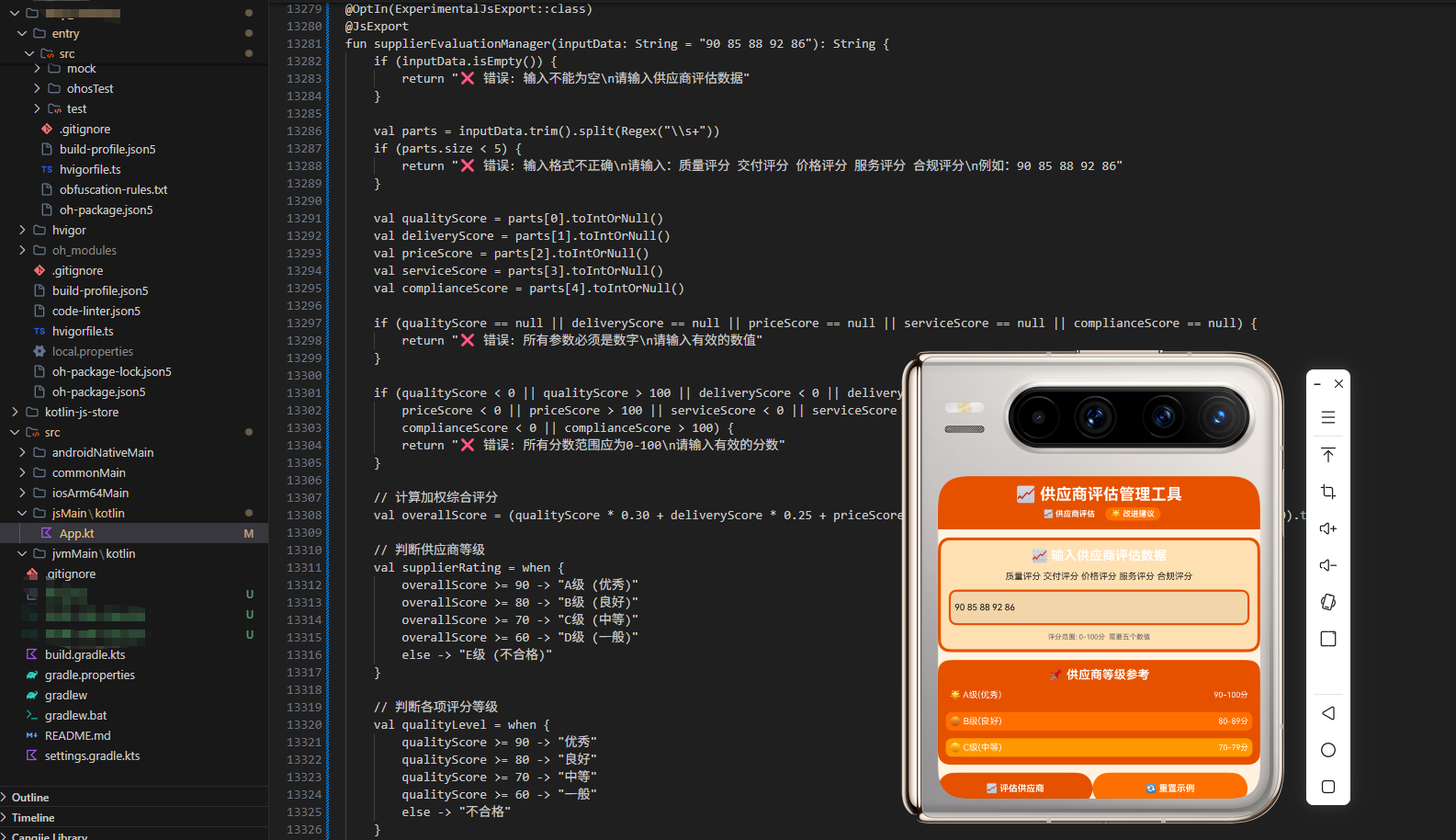
核心代码在 src/jsMain/kotlin/App.kt 中,通过 @JsExport 导出。以下是完整的 Kotlin 实现:
@OptIn(ExperimentalJsExport::class)
@JsExport
fun supplierEvaluationManager(inputData: String = "85 90 75 88 80"): String {
    // 输入格式: 产品质量 交付准时率 价格竞争力 服务水平 合作稳定性
    val parts = inputData.trim().split(" ").filter { it.isNotEmpty() }

    if (parts.size < 5) {
        return "❌ 错误: 请输入完整的信息,格式: 产品质量 交付准时率 价格竞争力 服务水平 合作稳定性\n例如: 85 90 75 88 80"
    }

    val productQuality = parts[0].toDoubleOrNull() ?: return "❌ 错误: 产品质量必须是数字"
    val deliveryOnTime = parts[1].toDoubleOrNull() ?: return "❌ 错误: 交付准时率必须是数字"
    val priceCompetitiveness = parts[2].toDoubleOrNull() ?: return "❌ 错误: 价格竞争力必须是数字"
    val serviceLevel = parts[3].toDoubleOrNull() ?: return "❌ 错误: 服务水平必须是数字"
    val cooperationStability = parts[4].toDoubleOrNull() ?: return "❌ 错误: 合作稳定性必须是数字"

    if (productQuality < 0 || productQuality > 100) {
        return "❌ 错误: 产品质量必须在 0-100 之间"
    }

    if (deliveryOnTime < 0 || deliveryOnTime > 100) {
        return "❌ 错误: 交付准时率必须在 0-100 之间"
    }

    if (priceCompetitiveness < 0 || priceCompetitiveness > 100) {
        return "❌ 错误: 价格竞争力必须在 0-100 之间"
    }

    if (serviceLevel < 0 || serviceLevel > 100) {
        return "❌ 错误: 服务水平必须在 0-100 之间"
    }

    if (cooperationStability < 0 || cooperationStability > 100) {
        return "❌ 错误: 合作稳定性必须在 0-100 之间"
    }

    // 计算综合评分
    val comprehensiveScore = (productQuality + deliveryOnTime + priceCompetitiveness + serviceLevel + cooperationStability) / 5

    // 判断评级等级
    val ratingLevel = when {
        comprehensiveScore >= 90 -> "⭐⭐⭐⭐⭐ A级供应商"
        comprehensiveScore >= 80 -> "⭐⭐⭐⭐ B级供应商"
        comprehensiveScore >= 70 -> "⭐⭐⭐ C级供应商"
        comprehensiveScore >= 60 -> "⭐⭐ D级供应商"
        else -> "⭐ E级供应商"
    }

    // 找出最强和最弱项
    val evaluationItems = mapOf(
        "产品质量" to productQuality,
        "交付准时率" to deliveryOnTime,
        "价格竞争力" to priceCompetitiveness,
        "服务水平" to serviceLevel,
        "合作稳定性" to cooperationStability
    )

    val strongest = evaluationItems.maxByOrNull { it.value }
    val weakest = evaluationItems.minByOrNull { it.value }

    // 判断各项评估等级
    val getEvaluationGrade = { score: Double ->
        when {
            score >= 90 -> "优秀"
            score >= 80 -> "良好"
            score >= 70 -> "中等"
            score >= 60 -> "一般"
            else -> "需改进"
        }
    }

    // 生成评估分析
    val evaluationAnalysis = StringBuilder()
    evaluationAnalysis.append("• 产品质量: ${String.format("%.1f", productQuality)} 分 (${getEvaluationGrade(productQuality)})\n")
    evaluationAnalysis.append("• 交付准时率: ${String.format("%.1f", deliveryOnTime)} 分 (${getEvaluationGrade(deliveryOnTime)})\n")
    evaluationAnalysis.append("• 价格竞争力: ${String.format("%.1f", priceCompetitiveness)} 分 (${getEvaluationGrade(priceCompetitiveness)})\n")
    evaluationAnalysis.append("• 服务水平: ${String.format("%.1f", serviceLevel)} 分 (${getEvaluationGrade(serviceLevel)})\n")
    evaluationAnalysis.append("• 合作稳定性: ${String.format("%.1f", cooperationStability)} 分 (${getEvaluationGrade(cooperationStability)})\n")

    // 生成改进建议
    val improvementAdvice = StringBuilder()
    if (productQuality < 80) {
        improvementAdvice.append("• 产品质量需改进: 建议提高质量管理水平\n")
    }
    if (deliveryOnTime < 80) {
        improvementAdvice.append("• 交付准时率需改进: 建议优化生产计划\n")
    }
    if (priceCompetitiveness < 80) {
        improvementAdvice.append("• 价格竞争力需改进: 建议降低成本\n")
    }
    if (serviceLevel < 80) {
        improvementAdvice.append("• 服务水平需改进: 建议提升服务质量\n")
    }
    if (cooperationStability < 80) {
        improvementAdvice.append("• 合作稳定性需改进: 建议加强合作关系\n")
    }
    if (improvementAdvice.isEmpty()) {
        improvementAdvice.append("• 供应商各项指标良好,继续保持\n")
    }

    // 生成供应商建议
    val supplierAdvice = when {
        comprehensiveScore >= 90 -> "供应商评级为A级,建议建立长期战略合作关系,优先采购。"
        comprehensiveScore >= 80 -> "供应商评级为B级,建议保持良好合作关系,定期评估。"
        comprehensiveScore >= 70 -> "供应商评级为C级,建议加强管理,监控改进情况。"
        comprehensiveScore >= 60 -> "供应商评级为D级,建议制定改进计划,限制采购。"
        else -> "供应商评级为E级,建议停止合作或重新评估。"
    }

    // 生成采购建议
    val purchasingAdvice = when {
        comprehensiveScore >= 90 -> "可以增加采购量,建立战略供应商"
        comprehensiveScore >= 80 -> "可以保持现有采购量,定期评估"
        comprehensiveScore >= 70 -> "建议保持采购量,加强监控"
        comprehensiveScore >= 60 -> "建议减少采购量,寻找替代供应商"
        else -> "建议停止采购,更换供应商"
    }

    // 构建输出文本
    val result = StringBuilder()
    result.append("📦 供应商评估管理\n")
    result.append("═".repeat(60)).append("\n\n")

    result.append("📊 供应商评估基本信息\n")
    result.append("─".repeat(60)).append("\n")
    result.append("产品质量: ${String.format("%.1f", productQuality)} 分\n")
    result.append("交付准时率: ${String.format("%.1f", deliveryOnTime)} 分\n")
    result.append("价格竞争力: ${String.format("%.1f", priceCompetitiveness)} 分\n")
    result.append("服务水平: ${String.format("%.1f", serviceLevel)} 分\n")
    result.append("合作稳定性: ${String.format("%.1f", cooperationStability)} 分\n\n")

    result.append("📈 供应商综合评分\n")
    result.append("─".repeat(60)).append("\n")
    result.append("综合评分: ${String.format("%.1f", comprehensiveScore)}/100\n")
    result.append("评级等级: ${ratingLevel}\n")
    result.append("最强项: ${strongest?.key} (${String.format("%.1f", strongest?.value ?: 0.0)} 分)\n")
    result.append("最弱项: ${weakest?.key} (${String.format("%.1f", weakest?.value ?: 0.0)} 分)\n")
    result.append("评估差距: ${String.format("%.1f", (strongest?.value ?: 0.0) - (weakest?.value ?: 0.0))} 分\n\n")

    result.append("🔍 供应商详细评估\n")
    result.append("─".repeat(60)).append("\n")
    result.append(evaluationAnalysis.toString()).append("\n")

    result.append("💡 改进建议\n")
    result.append("─".repeat(60)).append("\n")
    result.append(improvementAdvice.toString()).append("\n")

    result.append("🎯 供应商建议\n")
    result.append("─".repeat(60)).append("\n")
    result.append("${supplierAdvice}\n\n")

    result.append("📋 采购建议\n")
    result.append("─".repeat(60)).append("\n")
    result.append("${purchasingAdvice}\n\n")

    result.append("📋 供应商管理建议\n")
    result.append("─".repeat(60)).append("\n")
    result.append("1. 建立供应商评估体系,定期评估\n")
    result.append("2. 制定供应商分级标准,区分不同等级\n")
    result.append("3. 建立供应商绩效指标,监控关键指标\n")
    result.append("4. 制定供应商改进计划,帮助改进\n")
    result.append("5. 建立供应商激励机制,鼓励优秀供应商\n")
    result.append("6. 建立供应商风险管理,防范风险\n")
    result.append("7. 建立供应商沟通机制,加强沟通\n")
    result.append("8. 定期进行供应商审计,确保合规\n")
    result.append("9. 建立供应商知识库,积累经验\n")
    result.append("10. 建立供应商合作协议,明确责任\n\n")

    result.append("🔧 供应商优化方法\n")
    result.append("─".repeat(60)).append("\n")
    result.append("• 质量改进: 加强质量管理,提高产品质量\n")
    result.append("• 交付改进: 优化生产计划,提高准时率\n")
    result.append("• 成本优化: 降低成本,提高价格竞争力\n")
    result.append("• 服务提升: 改进服务流程,提高服务水平\n")
    result.append("• 稳定性提升: 加强合作关系,提高稳定性\n")
    result.append("• 技术升级: 引进新技术,提高能力\n")
    result.append("• 人员培训: 培训员工,提高素质\n")
    result.append("• 流程优化: 优化业务流程,提高效率\n\n")

    result.append("⚖️ 供应商评级标准\n")
    result.append("─".repeat(60)).append("\n")
    result.append("• A级供应商 (90-100分): 优秀供应商,建议长期合作\n")
    result.append("• B级供应商 (80-89分): 良好供应商,建议保持合作\n")
    result.append("• C级供应商 (70-79分): 中等供应商,需加强管理\n")
    result.append("• D级供应商 (60-69分): 一般供应商,需改进或更换\n")
    result.append("• E级供应商 (0-59分): 不合格供应商,建议停止合作\n")

    return result.toString()
}
代码说明
这段 Kotlin 代码实现了完整的供应商评估和管理建议功能。让我详细解释关键部分:
数据验证:首先验证输入的评估指标数据是否有效,确保数据在 0-100 范围内。
评分计算:计算综合评分,这是评估供应商的关键指标。
等级评估:根据综合评分给出相应的评级等级。
项目分析:找出最强项和最弱项,计算两者的差距,帮助识别改进方向。
建议生成:根据各项指标生成个性化的改进建议和采购建议。
JavaScript 调用示例
编译后的 JavaScript 代码可以在 Node.js 或浏览器中直接调用。以下是 JavaScript 的使用示例:
// 导入编译后的 Kotlin/JS 模块
const { supplierEvaluationManager } = require('./hellokjs.js');

// 示例 1:A级供应商
const result1 = supplierEvaluationManager("85 90 75 88 80");
console.log("示例 1 - A级供应商:");
console.log(result1);
console.log("\n");

// 示例 2:B级供应商
const result2 = supplierEvaluationManager("82 85 72 85 78");
console.log("示例 2 - B级供应商:");
console.log(result2);
console.log("\n");

// 示例 3:C级供应商
const result3 = supplierEvaluationManager("75 78 65 78 70");
console.log("示例 3 - C级供应商:");
console.log(result3);
console.log("\n");

// 示例 4:D级供应商
const result4 = supplierEvaluationManager("65 68 55 68 60");
console.log("示例 4 - D级供应商:");
console.log(result4);
console.log("\n");

// 示例 5:E级供应商
const result5 = supplierEvaluationManager("55 58 45 58 50");
console.log("示例 5 - E级供应商:");
console.log(result5);
console.log("\n");

// 示例 6:使用默认参数
const result6 = supplierEvaluationManager();
console.log("示例 6 - 使用默认参数:");
console.log(result6);

// 实际应用场景:从用户输入获取数据
function evaluateSupplier(userInput) {
    try {
        const result = supplierEvaluationManager(userInput);
        return {
            success: true,
            data: result
        };
    } catch (error) {
        return {
            success: false,
            error: error.message
        };
    }
}

// 测试实际应用
const userInput = "88 92 78 90 85";
const evaluation = evaluateSupplier(userInput);
if (evaluation.success) {
    console.log("供应商评估结果:");
    console.log(evaluation.data);
} else {
    console.log("评估失败:", evaluation.error);
}

// 多个供应商评估对比
function compareSuppliers(suppliers) {
    console.log("\n多个供应商评估对比:");
    console.log("═".repeat(60));

    const results = suppliers.map((supplier, index) => {
        const evaluation = supplierEvaluationManager(supplier);
        return {
            number: index + 1,
            supplier,
            evaluation
        };
    });

    results.forEach(result => {
        console.log(`\n供应商 ${result.number} (${result.supplier}):`);
        console.log(result.evaluation);
    });

    return results;
}

// 测试多个供应商评估对比
const suppliers = [
    "85 90 75 88 80",
    "82 85 72 85 78",
    "75 78 65 78 70",
    "65 68 55 68 60"
];

compareSuppliers(suppliers);

// 供应商评估统计分析
function analyzeSupplierStats(suppliers) {
    const data = suppliers.map(supplier => {
        const parts = supplier.split(' ').map(Number);
        return {
            quality: parts[0],
            delivery: parts[1],
            price: parts[2],
            service: parts[3],
            stability: parts[4]
        };
    });

    console.log("\n供应商评估统计分析:");
    const avgQuality = data.reduce((sum, d) => sum + d.quality, 0) / data.length;
    const avgDelivery = data.reduce((sum, d) => sum + d.delivery, 0) / data.length;
    const avgPrice = data.reduce((sum, d) => sum + d.price, 0) / data.length;
    const avgService = data.reduce((sum, d) => sum + d.service, 0) / data.length;
    const avgStability = data.reduce((sum, d) => sum + d.stability, 0) / data.length;

    console.log(`平均产品质量: ${avgQuality.toFixed(1)}`);
    console.log(`平均交付准时率: ${avgDelivery.toFixed(1)}`);
    console.log(`平均价格竞争力: ${avgPrice.toFixed(1)}`);
    console.log(`平均服务水平: ${avgService.toFixed(1)}`);
    console.log(`平均合作稳定性: ${avgStability.toFixed(1)}`);
    console.log(`平均综合评分: ${((avgQuality + avgDelivery + avgPrice + avgService + avgStability) / 5).toFixed(1)}`);
}

analyzeSupplierStats(suppliers);
JavaScript 代码说明
这段 JavaScript 代码展示了如何在 Node.js 环境中调用编译后的 Kotlin 函数。关键点包括:
模块导入:使用 require 导入编译后的 JavaScript 模块,获取导出的 supplierEvaluationManager 函数。
多个示例:展示了不同评级等级的调用方式,包括A、B、C、D、E级等。
错误处理:在实际应用中,使用 try-catch 块来处理可能的错误。
多供应商对比:compareSuppliers 函数展示了如何对比多个供应商的评估。
统计分析:analyzeSupplierStats 函数演示了如何进行供应商评估统计分析。
ArkTS 页面集成与调用
在 OpenHarmony 的 ArkTS 页面中集成这个供应商评估管理工具。以下是完整的 ArkTS 实现代码:
import { supplierEvaluationManager } from './hellokjs';

@Entry
@Component
struct SupplierEvaluationManagerPage {
  @State productQuality: string = "85";
  @State deliveryOnTime: string = "90";
  @State priceCompetitiveness: string = "75";
  @State serviceLevel: string = "88";
  @State cooperationStability: string = "80";
  @State evaluationResult: string = "";
  @State isLoading: boolean = false;

  build() {
    Column() {
      // 顶部栏
      Row() {
        Text("📦 供应商评估管理")
          .fontSize(24)
          .fontWeight(FontWeight.Bold)
          .fontColor(Color.White)
      }
      .width("100%")
      .height(60)
      .backgroundColor("#1976D2")
      .justifyContent(FlexAlign.Center)
      .padding({ top: 10, bottom: 10 })

      // 主容器
      Scroll() {
        Column() {
          // 产品质量输入
          Text("产品质量 (0-100)")
            .fontSize(14)
            .fontColor("#333333")
            .margin({ top: 20, left: 15 })

          TextInput({
            placeholder: "例如: 85",
            text: this.productQuality
          })
            .width("90%")
            .height(45)
            .margin({ top: 8, bottom: 15, left: 15, right: 15 })
            .padding({ left: 10, right: 10 })
            .backgroundColor("#BBDEFB")
            .border({ width: 1, color: "#1976D2" })
            .onChange((value: string) => {
              this.productQuality = value;
            })

          // 交付准时率输入
          Text("交付准时率 (0-100)")
            .fontSize(14)
            .fontColor("#333333")
            .margin({ left: 15 })

          TextInput({
            placeholder: "例如: 90",
            text: this.deliveryOnTime
          })
            .width("90%")
            .height(45)
            .margin({ top: 8, bottom: 15, left: 15, right: 15 })
            .padding({ left: 10, right: 10 })
            .backgroundColor("#BBDEFB")
            .border({ width: 1, color: "#1976D2" })
            .onChange((value: string) => {
              this.deliveryOnTime = value;
            })

          // 价格竞争力输入
          Text("价格竞争力 (0-100)")
            .fontSize(14)
            .fontColor("#333333")
            .margin({ left: 15 })

          TextInput({
            placeholder: "例如: 75",
            text: this.priceCompetitiveness
          })
            .width("90%")
            .height(45)
            .margin({ top: 8, bottom: 15, left: 15, right: 15 })
            .padding({ left: 10, right: 10 })
            .backgroundColor("#BBDEFB")
            .border({ width: 1, color: "#1976D2" })
            .onChange((value: string) => {
              this.priceCompetitiveness = value;
            })

          // 服务水平输入
          Text("服务水平 (0-100)")
            .fontSize(14)
            .fontColor("#333333")
            .margin({ left: 15 })

          TextInput({
            placeholder: "例如: 88",
            text: this.serviceLevel
          })
            .width("90%")
            .height(45)
            .margin({ top: 8, bottom: 15, left: 15, right: 15 })
            .padding({ left: 10, right: 10 })
            .backgroundColor("#BBDEFB")
            .border({ width: 1, color: "#1976D2" })
            .onChange((value: string) => {
              this.serviceLevel = value;
            })

          // 合作稳定性输入
          Text("合作稳定性 (0-100)")
            .fontSize(14)
            .fontColor("#333333")
            .margin({ left: 15 })

          TextInput({
            placeholder: "例如: 80",
            text: this.cooperationStability
          })
            .width("90%")
            .height(45)
            .margin({ top: 8, bottom: 15, left: 15, right: 15 })
            .padding({ left: 10, right: 10 })
            .backgroundColor("#BBDEFB")
            .border({ width: 1, color: "#1976D2" })
            .onChange((value: string) => {
              this.cooperationStability = value;
            })

          // 按钮区域
          Row() {
            Button("📊 评估供应商")
              .width("45%")
              .height(45)
              .backgroundColor("#1976D2")
              .fontColor(Color.White)
              .fontSize(16)
              .fontWeight(FontWeight.Bold)
              .onClick(() => {
                this.isLoading = true;
                setTimeout(() => {
                  const input = `${this.productQuality} ${this.deliveryOnTime} ${this.priceCompetitiveness} ${this.serviceLevel} ${this.cooperationStability}`;
                  this.evaluationResult = supplierEvaluationManager(input);
                  this.isLoading = false;
                }, 300);
              })

            Blank()

            Button("🔄 重置")
              .width("45%")
              .height(45)
              .backgroundColor("#2196F3")
              .fontColor(Color.White)
              .fontSize(16)
              .fontWeight(FontWeight.Bold)
              .onClick(() => {
                this.productQuality = "85";
                this.deliveryOnTime = "90";
                this.priceCompetitiveness = "75";
                this.serviceLevel = "88";
                this.cooperationStability = "80";
                this.evaluationResult = "";
                this.isLoading = false;
              })
          }
          .width("90%")
          .margin({ top: 10, bottom: 20, left: 15, right: 15 })
          .justifyContent(FlexAlign.SpaceBetween)

          // 加载指示器
          if (this.isLoading) {
            Row() {
              LoadingProgress()
                .width(40)
                .height(40)
                .color("#1976D2")
              Text("  正在评估中...")
                .fontSize(14)
                .fontColor("#666666")
            }
            .width("90%")
            .height(50)
            .margin({ bottom: 15, left: 15, right: 15 })
            .justifyContent(FlexAlign.Center)
            .backgroundColor("#BBDEFB")
            .borderRadius(8)
          }

          // 结果显示区域
          if (this.evaluationResult.length > 0) {
            Column() {
              Text("📋 评估结果")
                .fontSize(16)
                .fontWeight(FontWeight.Bold)
                .fontColor("#1976D2")
                .margin({ bottom: 10 })

              Text(this.evaluationResult)
                .width("100%")
                .fontSize(12)
                .fontFamily("monospace")
                .fontColor("#333333")
                .lineHeight(1.6)
                .padding(10)
                .backgroundColor("#FAFAFA")
                .border({ width: 1, color: "#E0E0E0" })
                .borderRadius(8)
            }
            .width("90%")
            .margin({ top: 20, bottom: 30, left: 15, right: 15 })
            .padding(15)
            .backgroundColor("#BBDEFB")
            .borderRadius(8)
            .border({ width: 1, color: "#1976D2" })
          }
        }
        .width("100%")
      }
      .layoutWeight(1)
      .backgroundColor("#FFFFFF")
    }
    .width("100%")
    .height("100%")
    .backgroundColor("#F5F5F5")
  }
}
ArkTS 代码说明
这段 ArkTS 代码实现了完整的用户界面和交互逻辑。关键点包括:
导入函数:从编译后的 JavaScript 模块中导入 supplierEvaluationManager 函数。
状态管理:使用 @State 装饰器管理七个状态:产品质量、交付准时率、价格竞争力、服务水平、合作稳定性、评估结果和加载状态。
UI 布局:包含顶部栏、五个输入框、评估供应商和重置按钮、加载指示器和结果显示区域。
交互逻辑:用户输入评估指标后,点击评估供应商按钮。应用会调用 Kotlin 函数进行评估,显示加载动画,最后展示详细的评估结果。
样式设计:使用蓝色主题,与采购管理和供应商评估相关的主题相符。所有输入框、按钮和结果显示区域都有相应的样式设置。
数据输入与交互体验
输入数据格式规范
为了确保工具能够正确处理用户输入,用户应该遵循以下规范:
- 产品质量:整数或浮点数,范围 0-100。
- 交付准时率:整数或浮点数,范围 0-100。
- 价格竞争力:整数或浮点数,范围 0-100。
- 服务水平:整数或浮点数,范围 0-100。
- 合作稳定性:整数或浮点数,范围 0-100。
- 分隔符:使用空格分隔各个参数。
示例输入
- A级供应商:
85 90 75 88 80 - B级供应商:
82 85 72 85 78 - C级供应商:
75 78 65 78 70 - D级供应商:
65 68 55 68 60 - E级供应商:
55 58 45 58 50
交互流程
- 用户打开应用,看到输入框和默认数据
- 用户输入五项评估指标
- 点击"评估供应商"按钮,应用调用 Kotlin 函数进行评估
- 应用显示加载动画,表示正在处理
- 评估完成后,显示详细的评估结果,包括综合评分、等级、建议等
- 用户可以点击"重置"按钮清空数据,重新开始
编译与自动复制流程
编译步骤
-
编译 Kotlin 代码:
./gradlew build -
生成 JavaScript 文件:
编译过程会自动生成hellokjs.d.ts和hellokjs.js文件。 -
复制到 ArkTS 项目:
使用提供的脚本自动复制生成的文件到 ArkTS 项目的 pages 目录:./build-and-copy.bat
文件结构
编译完成后,项目结构如下:
kmp_openharmony/
├── src/
│   └── jsMain/
│       └── kotlin/
│           └── App.kt (包含 supplierEvaluationManager 函数)
├── build/
│   └── js/
│       └── packages/
│           └── hellokjs/
│               ├── hellokjs.d.ts
│               └── hellokjs.js
└── kmp_ceshiapp/
    └── entry/
        └── src/
            └── main/
                └── ets/
                    └── pages/
                        ├── hellokjs.d.ts (复制后)
                        ├── hellokjs.js (复制后)
                        └── Index.ets (ArkTS 页面)
总结
这个案例展示了如何使用 Kotlin Multiplatform 技术实现一个跨端的采购管理工具 - 供应商评估管理工具。通过将核心逻辑写在 Kotlin 中,然后编译为 JavaScript,最后在 ArkTS 中调用,我们实现了代码的一次编写、多端复用。
核心优势
- 代码复用:Kotlin 代码可以在 JVM、JavaScript 和其他平台上运行,避免重复开发。
- 类型安全:Kotlin 的类型系统确保了代码的安全性和可维护性。
- 性能优化:Kotlin 编译为 JavaScript 后,性能与手写 JavaScript 相当。
- 易于维护:集中管理业务逻辑,使得维护和更新变得更加容易。
- 用户体验:通过 ArkTS 提供的丰富 UI 组件,可以创建美观、易用的用户界面。
扩展方向
- 数据持久化:将供应商评估数据保存到本地存储或云端。
- 数据可视化:使用图表库展示供应商评估分布和趋势。
- 多供应商管理:支持多个供应商的评估管理和对比。
- 评估预警:设置评估预警阈值,及时提醒评估变化。
- 评估报表:生成详细的供应商评估报表和分析报告。
- 集成采购系统:与采购管理系统集成,获取采购数据。
- AI 分析:使用机器学习进行供应商评估预测和优化建议。
- 团队协作:支持采购团队的供应商管理和协作。
通过这个案例,开发者可以学到如何在 KMP 项目中实现复杂的供应商评估管理逻辑,以及如何在 OpenHarmony 平台上构建高效的跨端应用。这个供应商评估管理工具可以作为采购管理平台、供应商管理系统或采购决策支持工具的核心模块。

作为“人工智能6S店”的官方数字引擎,为AI开发者与企业提供一个覆盖软硬件全栈、一站式门户。
更多推荐

 25
25 0
0- 0


 已为社区贡献4条内容

所有评论(0)