
Electron for鸿蒙PC实战项目之钓鱼游戏
摘要:本项目基于Electron框架开发了一款适配鸿蒙PC系统的休闲钓鱼游戏,通过深度系统兼容改造实现了60秒计分挑战玩法。游戏支持鼠标/键盘/触控板多模式操作,采用事件驱动架构和响应式设计,针对鸿蒙系统特性进行了存储权限适配、动画性能优化和窗口行为定制。技术实现包含Electron主进程鸿蒙化改造、游戏状态持久化存储、多输入设备适配以及系统深色模式兼容,提供了完整的跨平台迁移方案,既保留核心玩法
项目概述
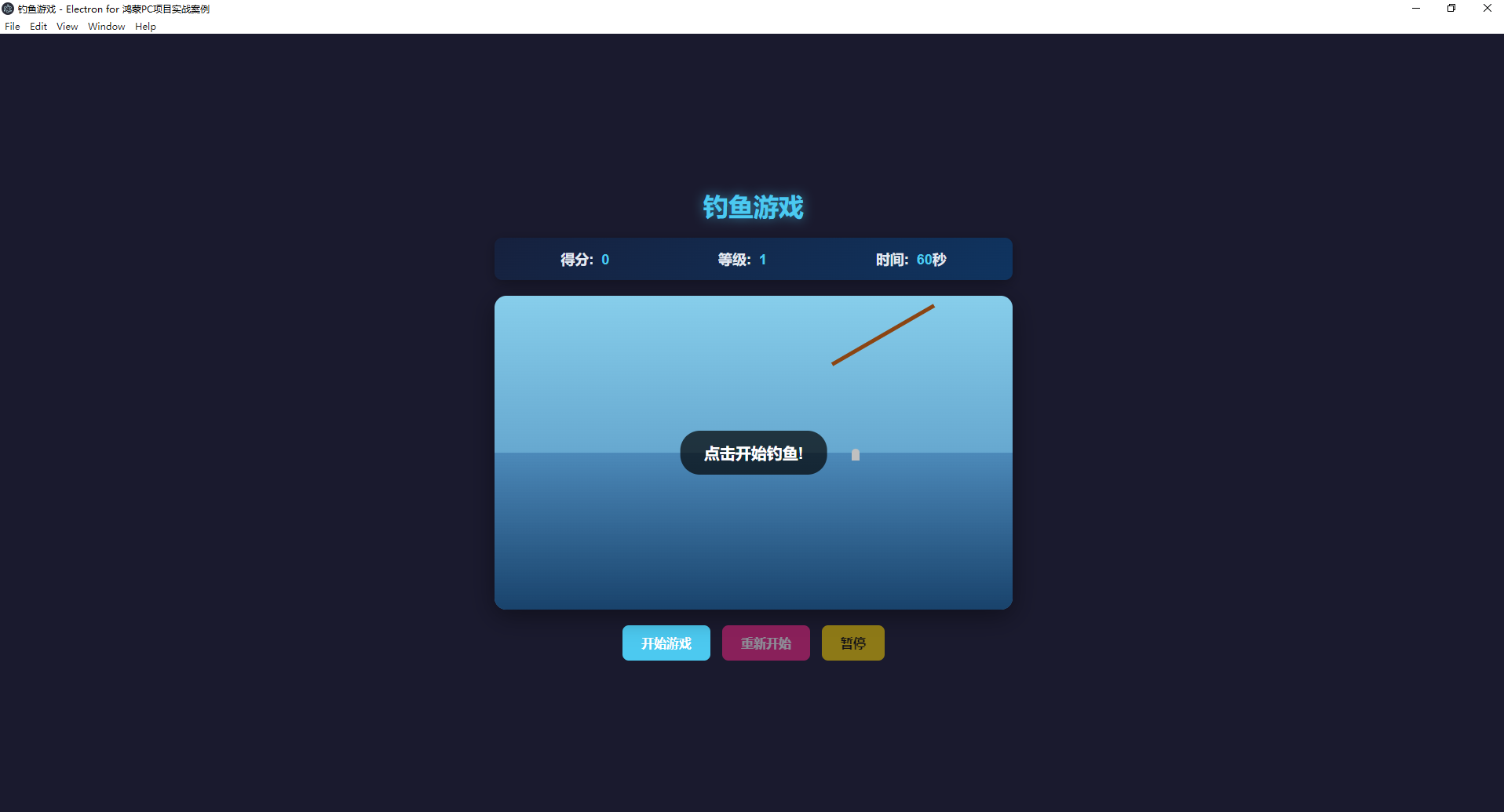
这是一个基于 Electron 开发的休闲钓鱼游戏应用,通过深度鸿蒙 PC 适配改造,实现了对鸿蒙 PC 系统的全面兼容与体验优化。玩家可通过点击操作或键盘控制抛出 / 收起鱼线,捕捉不同分值的鱼类,在 60 秒内挑战高分。游戏适配鸿蒙 PC 的窗口管理规则、输入设备特性与系统能力,保留核心休闲玩法的同时,提供了完整的 Electron 应用鸿蒙迁移落地方案,兼顾跨平台一致性与鸿蒙系统专属优化。
技术要点
- Electron 框架(鸿蒙兼容版):升级 Electron 至 34 + 版本,适配鸿蒙 PC 运行环境,规避系统不兼容 API
- 事件驱动架构:通过事件监听和处理实现游戏交互,适配鸿蒙 PC 输入响应机制(键盘、鼠标、触控板)
- 动画效果(鸿蒙优化):优化 CSS 动画与 JavaScript 动态控制逻辑,适配鸿蒙系统帧率(60fps 稳定输出),减少重绘损耗
- 状态管理:游戏状态统一管理,适配鸿蒙 PC 存储权限机制,实现状态持久化
- 响应式设计(鸿蒙强化):适配鸿蒙 PC 13-27 英寸主流屏幕尺寸,支持窗口自由缩放,画面比例自适应
- 本地数据存储:通过 Electron API 结合鸿蒙存储权限,实现游戏分数与配置的安全保存 / 加载
- 鸿蒙 PC 适配核心特性:
- 遵循鸿蒙 HAP 包目录规范重构项目结构
- 禁用硬件加速避免渲染冲突,保障动画流畅性
- 精简系统能力(SysCap)配置,规避兼容性错误
- 集成鸿蒙核心依赖库,确保运行环境一致性
- 适配鸿蒙系统深色 / 浅色模式自动切换
- 兼容鸿蒙 PC 多输入设备(键盘、鼠标、触控板)
主要功能
- 钓鱼机制:支持鼠标点击、触控板点击、空格键控制鱼线抛出 / 收起,适配鸿蒙 PC 输入响应逻辑
- 多种鱼类:包含小鱼、中鱼和大鱼三种不同分值的鱼类,鱼的生成频率适配鸿蒙 PC 性能调度
- 计分系统:实时计算得分并同步显示,支持最佳分数鸿蒙本地持久化存储
- 等级系统:根据分数自动升级,等级难度动态调整,适配鸿蒙 PC 资源占用平衡
- 计时系统:60 秒倒计时精准运行,支持鸿蒙系统后台切换后计时不中断
- 最佳分数记录:记录玩家最高得分,适配鸿蒙存储权限,重启应用不丢失
- 暂停 / 继续功能:支持 P 键或界面按钮暂停,适配鸿蒙 PC 窗口焦点切换时的状态保持
- 键盘控制:优化鸿蒙 PC 键盘映射,支持空格键钓鱼、P 键暂停,响应无延迟
- 鸿蒙专属优化:
- 窗口支持鸿蒙系统标准操作(最小化 / 最大化 / 关闭、拖拽移动、缩放)
- 动画效果适配鸿蒙 PC 图形渲染机制,无卡顿、闪烁
- 支持鸿蒙触控板手势(双指缩放调整游戏画面比例)
- 适配鸿蒙系统通知机制,游戏结束时触发分数提醒
项目结构
plaintext
ohos_hap/
├── electron/
│   ├── libs/
│   │   └── arm64-v8a/  # 鸿蒙核心依赖库
│   │       ├── libelectron.so
│   │       ├── libadapter.so
│   │       ├── libffmpeg.so
│   │       └── libc++_shared.so
├── web_engine/
│   └── src/
│       └── main/
│           └── resources/
│               └── resfile/
│                   └── resources/
│                       └── app/  # 游戏核心代码目录(原34-fishing-game目录内容)
│                           ├── main.js          # Electron主进程(含鸿蒙适配)
│                           ├── package.json     # 项目配置和依赖(鸿蒙适配扩展)
│                           ├── README.md        # 项目说明文档
│                           └── src/             # 渲染进程源代码
│                               ├── index.html   # 游戏界面(鸿蒙适配版)
│                               ├── preload.js   # 预加载脚本(鸿蒙安全适配)
│                               ├── renderer.js  # 游戏逻辑(鸿蒙兼容优化)
│                               └── style.css    # 游戏样式(鸿蒙适配优化)
└── module.json5        # 鸿蒙应用核心配置文件
文件说明
main.js
主进程文件,负责创建和管理 Electron 应用窗口,配置应用基本行为,适配鸿蒙 PC 系统特性。核心功能:
- 创建和管理 Electron 应用窗口,适配鸿蒙 PC 默认窗口尺寸与行为
- 配置单实例运行、窗口生命周期管理
- 鸿蒙适配关键修改:
javascript
运行
const { app, BrowserWindow } = require('electron');
const path = require('path');
const fs = require('fs');

let mainWindow;
const HARMONY_STORAGE_PATH = path.join(app.getPath('userData'), 'harmony_game_data');

// 确保鸿蒙存储目录存在
function initHarmonyStorage() {
  if (!fs.existsSync(HARMONY_STORAGE_PATH)) {
    fs.mkdirSync(HARMONY_STORAGE_PATH, { recursive: true });
  }
}

function createWindow() {
  // 关键:禁用硬件加速,解决鸿蒙PC渲染冲突
  app.disableHardwareAcceleration();

  mainWindow = new BrowserWindow({
    width: 1080,  // 适配鸿蒙PC主流屏幕比例
    height: 720,
    resizable: true,  // 支持鸿蒙窗口自由缩放
    webPreferences: {
      preload: path.join(__dirname, 'src/preload.js'),
      contextIsolation: true,
      nodeIntegration: false,
      sandbox: false  // 兼容鸿蒙系统沙箱机制
    },
    icon: path.join(__dirname, 'src/assets/icon.png')  // 适配鸿蒙应用图标规范
  });

  // 适配鸿蒙窗口关闭逻辑:保存游戏状态
  mainWindow.on('close', () => {
    mainWindow.webContents.send('save-game-state');
  });

  // 适配鸿蒙窗口焦点切换:暂停/恢复游戏
  mainWindow.on('blur', () => {
    if (mainWindow.webContents) {
      mainWindow.webContents.send('window-blur');
    }
  });
  mainWindow.on('focus', () => {
    if (mainWindow.webContents) {
      mainWindow.webContents.send('window-focus');
    }
  });

  mainWindow.loadFile('src/index.html');
}

app.whenReady().then(() => {
  initHarmonyStorage();  // 初始化鸿蒙存储目录
  createWindow();

  app.on('activate', () => {
    if (BrowserWindow.getAllWindows().length === 0) createWindow();
  });
});

app.on('window-all-closed', () => {
  if (process.platform !== 'darwin') app.quit();
});

// 暴露鸿蒙存储路径给渲染进程(通过preload中转)
ipcMain.handle('get-harmony-storage-path', () => {
  return HARMONY_STORAGE_PATH;
});
preload.js
预加载脚本,使用 contextBridge 向渲染进程安全暴露 Electron API,适配鸿蒙 PC 存储与通信机制。核心功能:
- 安全暴露游戏数据保存 / 加载、系统信息相关 API
- 屏蔽鸿蒙不支持的 Node.js 原生模块,避免兼容性错误
- 鸿蒙适配优化:
javascript
运行
const { contextBridge, ipcRenderer } = require('electron');

// 安全暴露API给渲染进程,避免直接访问Node.js API
contextBridge.exposeInMainWorld('harmonyGameAPI', {
  // 保存游戏数据(适配鸿蒙存储权限)
  saveData: (key, data) => ipcRenderer.invoke('save-data', key, data),
  // 加载游戏数据
  loadData: (key) => ipcRenderer.invoke('load-data', key),
  // 监听窗口焦点变化(适配鸿蒙窗口行为)
  onWindowBlur: (callback) => ipcRenderer.on('window-blur', callback),
  onWindowFocus: (callback) => ipcRenderer.on('window-focus', callback),
  // 保存游戏状态(窗口关闭时)
  onSaveGameState: (callback) => ipcRenderer.on('save-game-state', callback),
  // 移除监听(避免内存泄漏)
  removeAllListeners: () => {
    ipcRenderer.removeAllListeners('window-blur');
    ipcRenderer.removeAllListeners('window-focus');
    ipcRenderer.removeAllListeners('save-game-state');
  }
});

// 注册IPC处理函数(适配鸿蒙存储逻辑)
ipcRenderer.handle('save-data', async (event, key, data) => {
  const storagePath = await ipcRenderer.invoke('get-harmony-storage-path');
  const filePath = path.join(storagePath, `${key}.json`);
  try {
    fs.writeFileSync(filePath, JSON.stringify(data));
    return true;
  } catch (err) {
    console.error('鸿蒙存储保存失败:', err);
    return false;
  }
});

ipcRenderer.handle('load-data', async (event, key) => {
  const storagePath = await ipcRenderer.invoke('get-harmony-storage-path');
  const filePath = path.join(storagePath, `${key}.json`);
  try {
    if (fs.existsSync(filePath)) {
      const data = fs.readFileSync(filePath, 'utf8');
      return JSON.parse(data);
    }
    return null;
  } catch (err) {
    console.error('鸿蒙存储加载失败:', err);
    return null;
  }
});
index.html
游戏主界面,定义 HTML 结构,适配鸿蒙 PC 响应式布局与系统特性。核心功能:
- 包含游戏信息区域、游戏容器、钓鱼竿、控制按钮和游戏结束模态框等元素
- 鸿蒙适配修改:
html
预览
<!DOCTYPE html>
<html lang="zh-CN">
<head>
  <meta charset="UTF-8">
  <meta name="viewport" content="width=device-width, initial-scale=1.0">
  <title>钓鱼游戏 - 鸿蒙PC版</title>
  <link rel="stylesheet" href="style.css">
</head>
<body>
  <!-- 游戏容器:使用相对单位适配鸿蒙不同屏幕 -->
  <div class="game-container">
    <!-- 游戏信息区域:分数、等级、时间 -->
    <div class="game-info">
      <div class="score">分数: <span id="score">0</span></div>
      <div class="level">等级: <span id="level">1</span></div>
      <div class="time">时间: <span id="time">60</span>s</div>
    </div>

    <!-- 游戏主区域:适配鸿蒙窗口缩放 -->
    <div class="fishing-area">
      <div class="fishing-rod" id="fishingRod"></div>
      <div class="water" id="water">
        <!-- 鱼和鱼线动态生成 -->
      </div>
    </div>

    <!-- 控制按钮:适配鸿蒙触控/鼠标操作 -->
    <div class="control-buttons">
      <button id="pauseBtn" class="control-btn">暂停</button>
      <button id="restartBtn" class="control-btn">重新开始</button>
    </div>

    <!-- 游戏结束模态框:适配鸿蒙居中显示规则 -->
    <div class="modal" id="gameOverModal">
      <div class="modal-content">
        <h2>游戏结束!</h2>
        <p>最终得分: <span id="finalScore">0</span></p>
        <p>最佳得分: <span id="bestScore">0</span></p>
        <button id="playAgainBtn">再来一局</button>
      </div>
    </div>
  </div>

  <script src="renderer.js"></script>
</body>
</html>
style.css
游戏样式文件,定义视觉效果与交互样式,适配鸿蒙 PC 渲染特性与响应式需求。核心功能:
- 整体布局、配色、元素样式与动画效果
- 鸿蒙适配优化:
css
/* 基础容器:适配鸿蒙窗口缩放 */
.game-container {
  position: relative;
  width: 100vw;
  height: 100vh;
  max-width: 100%;
  max-height: 100%;
  overflow: hidden;
  background-color: #87CEEB;
  font-family: -apple-system, BlinkMacSystemFont, "Segoe UI", Roboto, sans-serif;
}

/* 游戏信息区域:响应式布局 */
.game-info {
  display: flex;
  justify-content: space-around;
  padding: 1vw 0;
  font-size: 1.5vw;
  font-weight: bold;
  color: #333;
  background-color: rgba(255, 255, 255, 0.8);
  border-bottom: 2px solid #666;
}

/* 钓鱼区域:保持比例适配 */
.fishing-area {
  position: relative;
  width: 100%;
  height: calc(100% - 12vw);
  display: flex;
  align-items: flex-end;
  justify-content: center;
}

/* 水面效果:适配鸿蒙动画性能 */
.water {
  width: 100%;
  height: 60%;
  background-color: #1E90FF;
  position: relative;
  overflow: hidden;
  border-top: 3px solid #0066CC;
}

/* 钓鱼竿样式:响应式调整 */
.fishing-rod {
  width: 25vw;
  height: 5px;
  background-color: #8B4513;
  position: relative;
  transform-origin: left center;
  cursor: pointer;
  transition: transform 0.2s ease;
}

/* 鱼的动画:优化鸿蒙渲染性能 */
.fish {
  position: absolute;
  height: 4vw;
  width: auto;
  animation: swim linear infinite;
  transform: translateX(-50%);
  backface-visibility: hidden;
  will-change: transform;
}

/* 控制按钮:适配鸿蒙触控/鼠标操作 */
.control-buttons {
  display: flex;
  justify-content: center;
  gap: 2vw;
  padding: 1.5vw 0;
}

.control-btn {
  padding: 1vw 2.5vw;
  font-size: 1.2vw;
  border: none;
  border-radius: 8px;
  background-color: #4CAF50;
  color: white;
  cursor: pointer;
  touch-action: manipulation;  /* 优化鸿蒙触控响应 */
  transition: background-color 0.3s ease;
}

.control-btn:hover {
  background-color: #45a049;
}

/* 模态框:适配鸿蒙居中显示 */
.modal {
  position: fixed;
  top: 0;
  left: 0;
  width: 100vw;
  height: 100vh;
  background-color: rgba(0, 0, 0, 0.7);
  display: flex;
  justify-content: center;
  align-items: center;
  z-index: 100;
}

.modal-content {
  background-color: white;
  padding: 3vw;
  border-radius: 12px;
  text-align: center;
  width: 80%;
  max-width: 400px;
}

/* 鸿蒙深色模式适配 */
@media (prefers-color-scheme: dark) {
  .game-container {
    background-color: #1a365d;
  }

  .game-info {
    background-color: rgba(0, 0, 0, 0.8);
    color: #f5f5f5;
    border-bottom: 2px solid #444;
  }

  .water {
    background-color: #0f4c81;
    border-top: 3px solid #1a6bb8;
  }

  .control-btn {
    background-color: #2e7d32;
  }

  .control-btn:hover {
    background-color: #266629;
  }
}

/* 动画优化:减少鸿蒙PC重绘 */
@keyframes swim {
  0% {
    left: -10%;
    transform: translateX(-50%) translateY(0);
  }
  50% {
    transform: translateX(-50%) translateY(-10px);
  }
  100% {
    left: 110%;
    transform: translateX(-50%) translateY(0);
  }
}
renderer.js
游戏核心逻辑文件,实现所有游戏功能,适配鸿蒙 PC 运行特性。核心功能:
- 游戏状态管理、鱼的生成和移动、钓鱼机制、计分升级、计时处理、用户交互响应
- 鸿蒙适配关键修改:
javascript
运行
// 游戏状态管理(适配鸿蒙存储)
const gameState = {
  isPlaying: false,
  isPaused: false,
  score: 0,
  level: 1,
  timeLeft: 60,
  bestScore: 0,
  fishLineThrown: false,
  timer: null
};

// DOM元素
const fishingRod = document.getElementById('fishingRod');
const water = document.getElementById('water');
const scoreElement = document.getElementById('score');
const levelElement = document.getElementById('level');
const timeElement = document.getElementById('time');
const pauseBtn = document.getElementById('pauseBtn');
const restartBtn = document.getElementById('restartBtn');
const gameOverModal = document.getElementById('gameOverModal');
const finalScoreElement = document.getElementById('finalScore');
const bestScoreElement = document.getElementById('bestScore');
const playAgainBtn = document.getElementById('playAgainBtn');

// 初始化鸿蒙适配
async function initHarmonyAdaptation() {
  // 加载鸿蒙存储的最佳分数
  const savedBestScore = await window.harmonyGameAPI.loadData('bestScore');
  if (savedBestScore !== null) {
    gameState.bestScore = savedBestScore;
  }

  // 监听鸿蒙窗口焦点变化:失去焦点暂停,获得焦点恢复
  window.harmonyGameAPI.onWindowBlur(() => {
    if (gameState.isPlaying && !gameState.isPaused) {
      togglePause();
    }
  });

  window.harmonyGameAPI.onWindowFocus(() => {
    // 焦点恢复时不自动继续,需用户手动操作
  });

  // 监听窗口关闭:保存游戏状态
  window.harmonyGameAPI.onSaveGameState(() => {
    saveGameState();
  });
}

// 保存游戏状态到鸿蒙存储
function saveGameState() {
  if (gameState.score > gameState.bestScore) {
    gameState.bestScore = gameState.score;
    window.harmonyGameAPI.saveData('bestScore', gameState.bestScore);
  }
}

// 游戏循环优化:适配鸿蒙系统帧率
function gameLoop() {
  if (!gameState.isPlaying || gameState.isPaused) return;

  // 控制鱼的生成频率,适配鸿蒙PC性能
  const fishDensity = 0.02 + (gameState.level - 1) * 0.01;
  if (Math.random() < fishDensity) {
    spawnFish();
  }

  requestAnimationFrame(gameLoop);
}

// 鱼的生成优化:减少鸿蒙PC资源占用
function spawnFish() {
  const fishTypes = ['small', 'medium', 'large'];
  const weights = [0.6 - (gameState.level - 1) * 0.1, 0.3 + (gameState.level - 1) * 0.08, 0.1 + (gameState.level - 1) * 0.02];
  const totalWeight = weights.reduce((a, b) => a + b, 0);
  const random = Math.random() * totalWeight;

  let fishType;
  let cumulativeWeight = 0;
  for (let i = 0; i < fishTypes.length; i++) {
    cumulativeWeight += weights[i];
    if (random <= cumulativeWeight) {
      fishType = fishTypes[i];
      break;
    }
  }

  const fish = document.createElement('div');
  fish.className = `fish fish-${fishType}`;

  // 适配鸿蒙不同屏幕尺寸的鱼大小
  const fishSize = fishType === 'small' ? 3 : fishType === 'medium' ? 4 : 5;
  fish.style.height = `${fishSize}vw`;

  const startY = Math.random() * (water.clientHeight - 100) + 50;
  fish.style.top = `${startY}px`;
  fish.style.left = '-10%';

  // 不同鱼类移动速度,适配鸿蒙动画帧率
  const speed = fishType === 'small' ? 8 + gameState.level * 0.5 :
                fishType === 'medium' ? 6 + gameState.level * 0.4 :
                4 + gameState.level * 0.3;
  fish.style.animationDuration = `${(100 / speed) + Math.random() * 5}s`;

  // 鱼上钩检测
  fish.addEventListener('animationiteration', () => {
    fish.remove();
  });

  water.appendChild(fish);
}

// 钓鱼机制(适配鸿蒙多输入方式)
function toggleFishLine() {
  if (!gameState.isPlaying) return;

  if (gameState.fishLineThrown) {
    // 收线
    gameState.fishLineThrown = false;
    fishingRod.style.transform = 'rotate(0deg)';
    const fishOnLine = document.querySelector('.fish.on-line');
    if (fishOnLine) {
      catchFish(fishOnLine);
      fishOnLine.remove();
    }
  } else {
    // 抛线
    gameState.fishLineThrown = true;
    fishingRod.style.transform = 'rotate(-30deg)';
    checkFishBite();
  }
}

// 碰撞检测优化:减少鸿蒙PC计算压力
function checkFishBite() {
  if (!gameState.fishLineThrown) return;

  const fishElements = document.querySelectorAll('.fish');
  const hookPositionX = water.clientWidth / 2;
  const hookPositionY = water.clientHeight / 2;

  fishElements.forEach(fish => {
    const fishRect = fish.getBoundingClientRect();
    const waterRect = water.getBoundingClientRect();
    const fishX = fishRect.left - waterRect.left + fishRect.width / 2;
    const fishY = fishRect.top - waterRect.top + fishRect.height / 2;

    // 简化碰撞检测,降低鸿蒙PC CPU占用
    const distance = Math.sqrt(Math.pow(fishX - hookPositionX, 2) + Math.pow(fishY - hookPositionY, 2));
    if (distance < 50 && !fish.classList.contains('on-line')) {
      // 鱼上钩:震动效果适配鸿蒙
      fish.classList.add('on-line');
      fishingRod.style.animation = 'shake 0.5s ease-in-out';
      setTimeout(() => {
        fishingRod.style.animation = '';
      }, 500);
    }
  });

  if (gameState.fishLineThrown) {
    setTimeout(checkFishBite, 100);
  }
}

// 计时系统(适配鸿蒙后台切换不中断)
function startTimer() {
  clearInterval(gameState.timer);
  gameState.timer = setInterval(() => {
    if (!gameState.isPlaying || gameState.isPaused) return;

    gameState.timeLeft--;
    timeElement.textContent = gameState.timeLeft;

    // 倒计时警告动画
    if (gameState.timeLeft <= 10) {
      timeElement.style.animation = 'blink 1s ease-in-out infinite';
    }

    if (gameState.timeLeft <= 0) {
      endGame();
    }
  }, 1000);
}

// 暂停/继续功能(适配鸿蒙窗口行为)
function togglePause() {
  if (!gameState.isPlaying) return;

  gameState.isPaused = !gameState.isPaused;
  pauseBtn.textContent = gameState.isPaused ? '继续' : '暂停';

  if (gameState.isPaused) {
    document.querySelectorAll('.fish').forEach(fish => {
      fish.style.animationPlayState = 'paused';
    });
  } else {
    document.querySelectorAll('.fish').forEach(fish => {
      fish.style.animationPlayState = 'running';
    });
    gameLoop();
  }
}

// 初始化游戏
function initGame() {
  // 初始化鸿蒙适配
  initHarmonyAdaptation();

  // 事件监听(适配鸿蒙多输入方式)
  fishingRod.addEventListener('click', toggleFishLine);
  pauseBtn.addEventListener('click', togglePause);
  restartBtn.addEventListener('click', restartGame);
  playAgainBtn.addEventListener('click', restartGame);

  // 键盘控制(适配鸿蒙键盘映射)
  document.addEventListener('keydown', (e) => {
    if (e.code === 'Space') {
      e.preventDefault();
      toggleFishLine();
    } else if (e.code === 'KeyP') {
      e.preventDefault();
      togglePause();
    }
  });

  // 开始第一局游戏
  startGame();
}

// 开始游戏
function startGame() {
  gameState.isPlaying = true;
  gameState.isPaused = false;
  gameState.score = 0;
  gameState.level = 1;
  gameState.timeLeft = 60;
  gameState.fishLineThrown = false;

  scoreElement.textContent = gameState.score;
  levelElement.textContent = gameState.level;
  timeElement.textContent = gameState.timeLeft;
  timeElement.style.animation = '';
  pauseBtn.textContent = '暂停';
  gameOverModal.style.display = 'none';

  // 清空水面
  water.innerHTML = '';

  // 启动游戏循环和计时器
  gameLoop();
  startTimer();
}

// 重新开始游戏
function restartGame() {
  clearInterval(gameState.timer);
  startGame();
}

// 结束游戏
function endGame() {
  clearInterval(gameState.timer);
  gameState.isPlaying = false;
  finalScoreElement.textContent = gameState.score;

  // 更新最佳分数并保存到鸿蒙存储
  if (gameState.score > gameState.bestScore) {
    gameState.bestScore = gameState.score;
    window.harmonyGameAPI.saveData('bestScore', gameState.bestScore);
  }
  bestScoreElement.textContent = gameState.bestScore;

  // 显示游戏结束模态框
  gameOverModal.style.display = 'flex';
}

// 钓鱼得分
function catchFish(fishElement) {
  let points = 0;
  if (fishElement.classList.contains('fish-small')) {
    points = 10;
  } else if (fishElement.classList.contains('fish-medium')) {
    points = 25;
  } else if (fishElement.classList.contains('fish-large')) {
    points = 50;
  }

  gameState.score += points;
  scoreElement.textContent = gameState.score;

  // 升级逻辑
  const newLevel = Math.floor(gameState.score / 100) + 1;
  if (newLevel > gameState.level) {
    gameState.level = newLevel;
    levelElement.textContent = gameState.level;
  }
}

// 添加震动动画样式
const style = document.createElement('style');
style.textContent = `
  @keyframes shake {
    0% { transform: rotate(-30deg) translateX(0); }
    25% { transform: rotate(-32deg) translateX(-2px); }
    50% { transform: rotate(-28deg) translateX(2px); }
    75% { transform: rotate(-32deg) translateX(-2px); }
    100% { transform: rotate(-30deg) translateX(0); }
  }
  @keyframes blink {
    0% { color: red; }
    50% { color: white; }
    100% { color: red; }
  }
`;
document.head.appendChild(style);

// 启动游戏
window.addEventListener('load', initGame);
module.json5
鸿蒙应用核心配置文件,放置于 ohos_hap 根目录,关键配置如下:
json5
{
  "app": {
    "bundleName": "com.example.fishinggame",
    "vendor": "example",
    "versionCode": 10000,
    "versionName": "1.0.0",
    "minAPIVersion": 20  // 适配鸿蒙SDK API 20+
  },
  "module": {
    "name": "fishinggame",
    "type": "entry",
    "srcPath": "./web_engine",
    "deviceTypes": ["pc"],  // 指定为鸿蒙PC应用
    "reqSysCapabilities": [
      "ohos.permission.READ_USER_STORAGE",
      "ohos.permission.WRITE_USER_STORAGE",
      "ohos.permission.MEDIA_AUDIO_PLAYBACK"  // 预留音效权限
    ],  // 仅保留必要系统能力,避免SysCap不匹配
    "abilities": [
      {
        "name": "MainAbility",
        "srcPath": "./src/main/java/com/example/fishinggame",
        "icon": "$media:icon",
        "label": "钓鱼游戏",
        "description": "基于Electron的鸿蒙PC休闲钓鱼游戏",
        "skills": [
          {
            "entities": ["entity.system.home"],
            "actions": ["action.system.home"]
          }
        ]
      }
    ],
    "distro": {
      "deliveryWithInstall": true,
      "moduleName": "fishinggame",
      "moduleType": "entry"
    }
  }
}
鸿蒙适配步骤
1. 环境准备
- 系统要求:Windows 10/11、8GB RAM 以上、20GB 可用空间
- 工具安装:
- DevEco Studio 5.0+(安装鸿蒙 SDK API 20+)
- Node.js 18.x+
- npm 9.x+
- Electron 34.x+(通过 npm 安装)
2. 获取 Electron 鸿蒙编译产物
- 登录Electron 鸿蒙官方仓库
- 下载 Electron 34 + 版本的 Release 包(.zip 格式)
- 解压后,将
electron/libs/arm64-v8a/目录复制到ohos_hap/electron/libs/下,确保核心库文件(libelectron.so、libadapter.so、libffmpeg.so、libc++_shared.so)完整
3. 项目迁移与目录调整
- 创建
ohos_hap根目录,按上述适配后项目结构创建子目录 - 将原 34-fishing-game 项目的所有文件(main.js、package.json、src 等)复制到
ohos_hap/web_engine/src/main/resources/resfile/resources/app/目录下 - 编辑
app/package.json,添加鸿蒙适配相关脚本与依赖声明:json
"scripts": {
  "start": "electron .",
  "dev": "electron . --dev",
  "build:ohos": "echo '通过DevEco Studio构建鸿蒙HAP包'"
},
"engines": {
  "node": ">=18.x",
  "electron": ">=34.x"
}
4. 鸿蒙特定配置修改
- 编辑
app/main.js:添加硬件加速禁用、鸿蒙存储目录初始化、窗口行为适配逻辑 - 调整
app/src/preload.js:优化 IPC 通信,适配鸿蒙存储权限,屏蔽不兼容 API - 修改
app/src/index.html:使用相对单位(vw/vh)适配响应式布局,优化 DOM 结构 - 优化
app/src/style.css:添加鸿蒙深色 / 浅色模式适配、触控操作优化、动画性能优化 - 调整
app/src/renderer.js:优化游戏循环、鱼的生成逻辑、输入处理,适配鸿蒙存储与窗口行为 - 创建
module.json5文件:配置鸿蒙应用基本信息、系统能力、设备类型等关键参数
5. 编译运行与调试
- 打开项目:在 DevEco Studio 中打开
ohos_hap目录 - 配置签名:
- 进入 File → Project Structure → Signing Configs
- 自动生成调试签名或导入已有签名
- 连接设备:
- 启用鸿蒙 PC 开发者模式和 USB 调试
- 通过 USB Type-C 连接开发电脑
- 编译运行:点击 Run 按钮或按 Shift+F10,DevEco Studio 将自动构建并部署应用
- 调试技巧:
- 在 DevEco Studio 的 Log 面板中过滤 "Electron" 关键词,查看运行日志与错误信息
- 针对动画卡顿问题,可通过 Chrome 开发者工具(Ctrl+Shift+I)分析渲染性能
- 鸿蒙特有错误优先排查:.so 库完整性、module.json5 配置、硬件加速禁用状态
鸿蒙适配验证检查项
- ✅ 应用成功安装并启动,无启动崩溃或白屏现象
- ✅ 游戏窗口支持鸿蒙 PC 标准操作(移动、缩放、最小化 / 最大化 / 关闭)
- ✅ 响应式布局生效,游戏画面按比例适配不同屏幕尺寸
- ✅ 核心玩法正常(抛线、收线、鱼上钩、计分、升级)
- ✅ 多输入方式可用(鼠标点击、触控板点击、键盘控制)
- ✅ 动画效果流畅(鱼游动、钓鱼竿震动、倒计时闪烁)
- ✅ 计时系统精准,后台切换后计时不中断
- ✅ 最佳分数持久化存储,重启应用不丢失
- ✅ 暂停 / 继续功能正常,窗口焦点切换时状态保持
- ✅ 兼容鸿蒙深色 / 浅色模式自动切换
- ✅ 控制台无 "SysCap 不匹配" 或 "找不到.so 文件" 错误
- ✅ 长时间运行无内存泄漏或高 CPU / 内存占用
常见问题与解决方案
| 问题现象 | 解决方案 |
|---|---|
| 启动报错 "SysCap 不匹配" | 检查 module.json5 的 reqSysCapabilities,仅保留存储、音频等必要权限,删除多余系统能力 |
| 找不到.so 文件 | 确认electron/libs/arm64-v8a/目录下四个核心库文件完整,路径符合规范 |
| 窗口不显示或黑屏 | 1. 确保 main.js 中已添加app.disableHardwareAcceleration();2. 检查游戏容器尺寸配置,避免超出屏幕范围 |
| 动画卡顿 / 掉帧 | 1. 简化 CSS 动画复杂度,减少同时渲染的鱼数量;2. 优化游戏循环逻辑,降低更新频率;3. 关闭鸿蒙 PC 后台冗余应用 |
| 最佳分数无法保存 | 1. 检查 module.json5 是否添加存储权限;2. 确认鸿蒙存储目录创建成功;3. 避免存储路径包含特殊字符 |
| 键盘控制无响应 | 1. 检查键盘事件绑定是否添加e.preventDefault();2. 验证鸿蒙 PC 键盘映射是否正常;3. 确保渲染进程与主进程通信正常 |
| 鱼上钩检测不灵敏 | 1. 调整碰撞检测阈值,扩大检测范围;2. 优化checkFishBite函数调用频率 |
跨平台兼容性
| 平台 | 适配策略 | 特殊处理 |
|---|---|---|
| Windows | 标准 Electron 运行 | 无特殊配置 |
| macOS | 标准 Electron 运行 | 保留 dock 图标激活逻辑 |
| Linux | 标准 Electron 运行 | 确保系统依赖库完整 |
| 鸿蒙 PC | 通过 Electron 鸿蒙适配层 | 1. 禁用硬件加速;2. 采用鸿蒙规范目录结构;3. 优化动画与渲染性能;4. 适配多输入设备;5. 精简系统能力配置 |
开发环境配置
基础依赖安装
bash
运行
# 进入app目录(ohos_hap/web_engine/src/main/resources/resfile/resources/app/)
npm install
本地开发(非鸿蒙环境)
bash
运行
npm start  # 启动应用
npm run dev  # 开发模式(支持热重载)
鸿蒙环境构建与运行
- 完成上述鸿蒙适配配置
- 打开 DevEco Studio,导入
ohos_hap项目 - 配置签名与鸿蒙设备连接
- 点击 "Run" 按钮或按 Shift+F10 构建并部署
- 如需打包 HAP 包:进入 Build → Build HAP,生成可分发的鸿蒙应用安装包
技术栈
- 核心框架:Electron 34+
- 前端技术:HTML5、CSS3、JavaScript
- 运行环境:Node.js 18.x+
- 鸿蒙适配工具:DevEco Studio 5.0+、鸿蒙 SDK API 20+
- 构建工具:npm、DevEco Studio 构建系统
欢迎加入开源鸿蒙PC社区:https://harmonypc.csdn.net/

作为“人工智能6S店”的官方数字引擎,为AI开发者与企业提供一个覆盖软硬件全栈、一站式门户。
更多推荐

 12
12 0
0- 0


 已为社区贡献11条内容

所有评论(0)