
《鸿蒙装饰器V2全解:从@ComponentV2到持久化存储的状态管理与组件开发实战》
本文介绍了ArkUI V2版本中的核心装饰器:1.@ComponentV2装饰自定义组件;2.@Local装饰内部可变的组件状态;3.@ObservedV2/@Trace监测嵌套对象变化;4.@Param父到子单项数据传递;5.@Once解决@Param修改限制;6.@Event实现子到父通信;7.@Provider/@Consumer跨组件数据共享;8.@Monitor监听状态变化;9.@Com
装饰器
1. @ComponentV2
作用:@ComponentV2装饰器用于装饰自定义组件
@ComponentV2 // 装饰器
struct Index { // struct声明的数据结构
  build() { // build定义的UI
  }
}
2. @Local
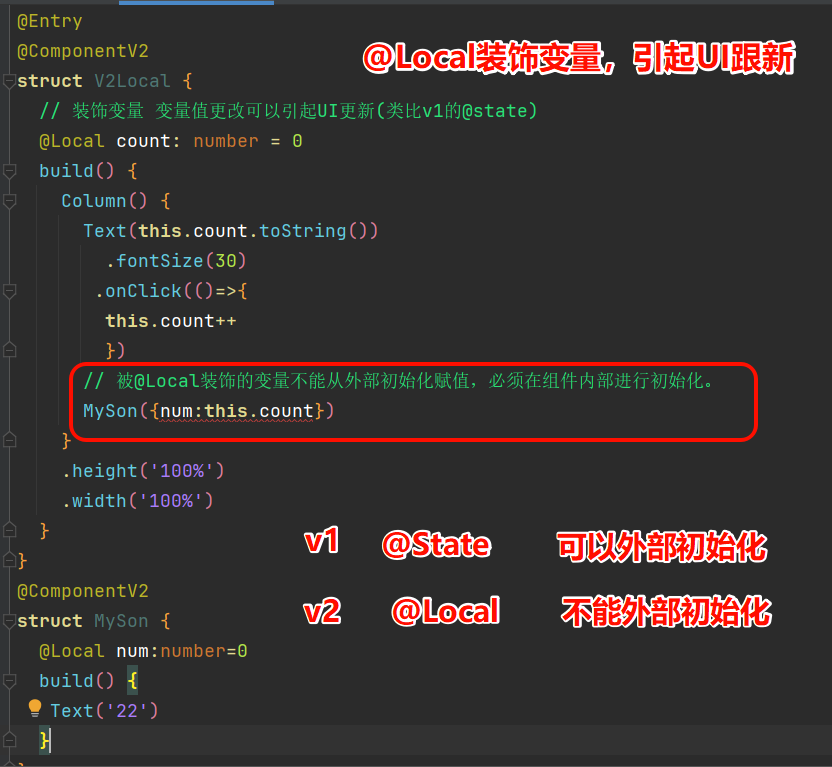
作用:@Local装饰器装饰变量
特点:
- 只能在组件内部初始化,外部没法弄
- 变量变了,用它的组件会跟着刷新
- 若是类对象,只有整体赋值时能被观察到;改类里的成员属性,得靠@ObservedV2和@Trace才能监测到
@Entry
@ComponentV2
struct Index {
  // @Local 变量名: 类型 = 值;
  build() {
      Column(){  }
    .width('100%')
    .height('100%')
  }
} 
@Entry
@ComponentV2
struct V2Local {
  // 装饰变量 变量值更改可以引起UI更新(类比v1的@state)
  @Local count: number = 0
  build() {
    Column() {
      Text(this.count.toString())
        .fontSize(30)
       .onClick(()=>{
        this.count++
        })
      // 被@Local装饰的变量不能从外部初始化赋值,必须在组件内部进行初始化。
      // MySon({num:this.count})
    }
    .height('100%')
    .width('100%')
  }
}
@ComponentV2
struct MySon {
  @Local num:number=0
  build() {
   Text('22')
  }
}
3. @ObservedV2 / @Trace
作用:@ObservedV2和@Trace提供了对嵌套类对象属性变化直接观测的能力
特点:
- @ObservedV2和@Trace得一起用,单独用没用;
- 类里的属性没被@Trace标过,在UI里改了也看不出来,刷新不了;
- 用了这两个装饰器的类,得用new创建实例,才能监测到变化。
// 装饰类
@ObservedV2
class Person {
  // 装饰属性
  @Trace age: number = 100;
}
@Entry
@ComponentV2
struct Index {
  // 实例化
  @Local age: Person = new Person();

  build() {
    Column() {

    }
    .width('100%')
    .height('100%')
  }
}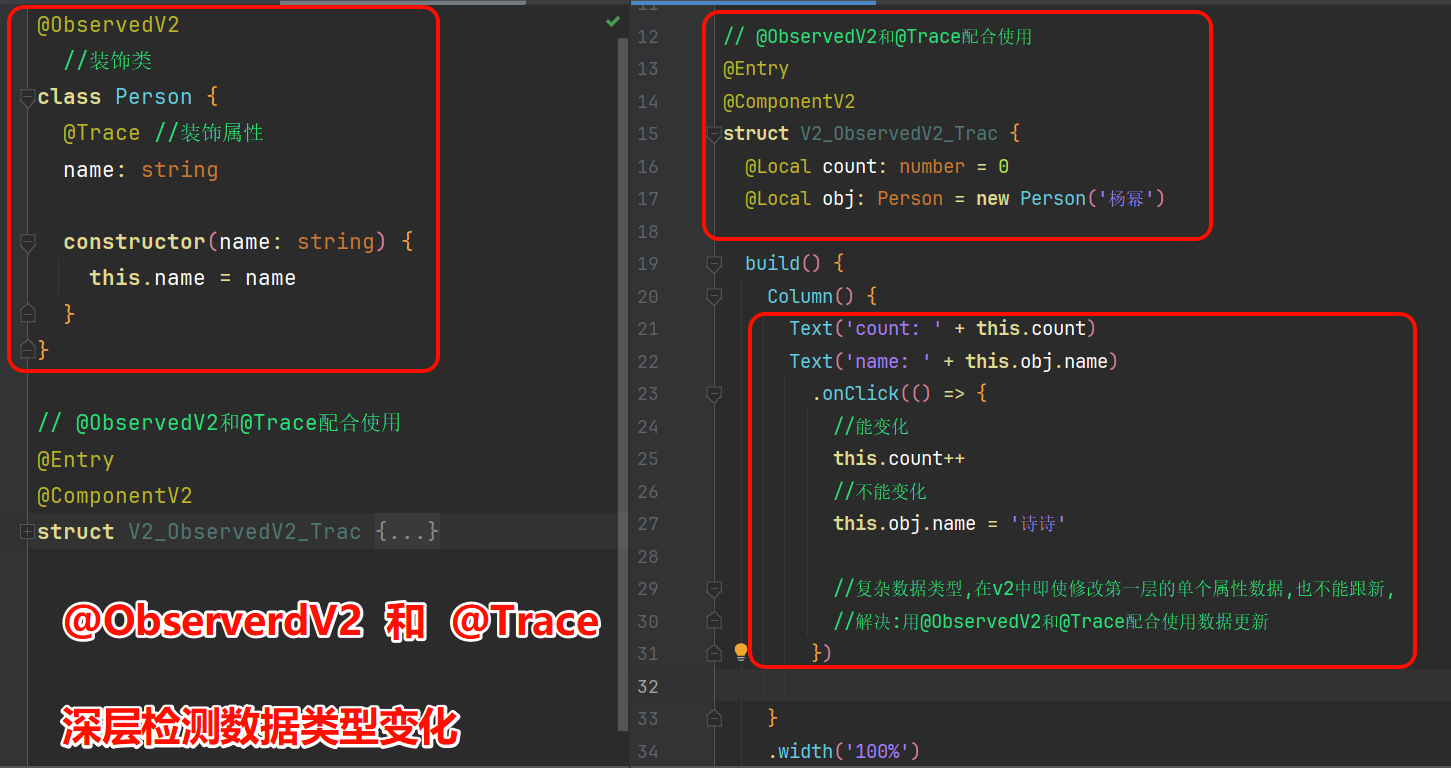
@ObservedV2
  //装饰类
class Person {
  @Trace //装饰属性
  name: string

  constructor(name: string) {
    this.name = name
  }
}

// @ObservedV2和@Trace配合使用
@Entry
@ComponentV2
struct V2_ObservedV2_Trac {
  @Local count: number = 0
  @Local obj: Person = new Person('杨幂')

  build() {
    Column() {
      Text('count: ' + this.count)
      Text('name: ' + this.obj.name)
        .onClick(() => {
          //能变化
          this.count++
          //不能变化
          this.obj.name = '诗诗'

          //复杂数据类型,在v2中即使修改第一层的单个属性数据,也不能跟新,
          //解决:用@ObservedV2和@Trace配合使用数据更新
        })

    }
    .width('100%')
    .height('100%')
  }
}
4. @Param
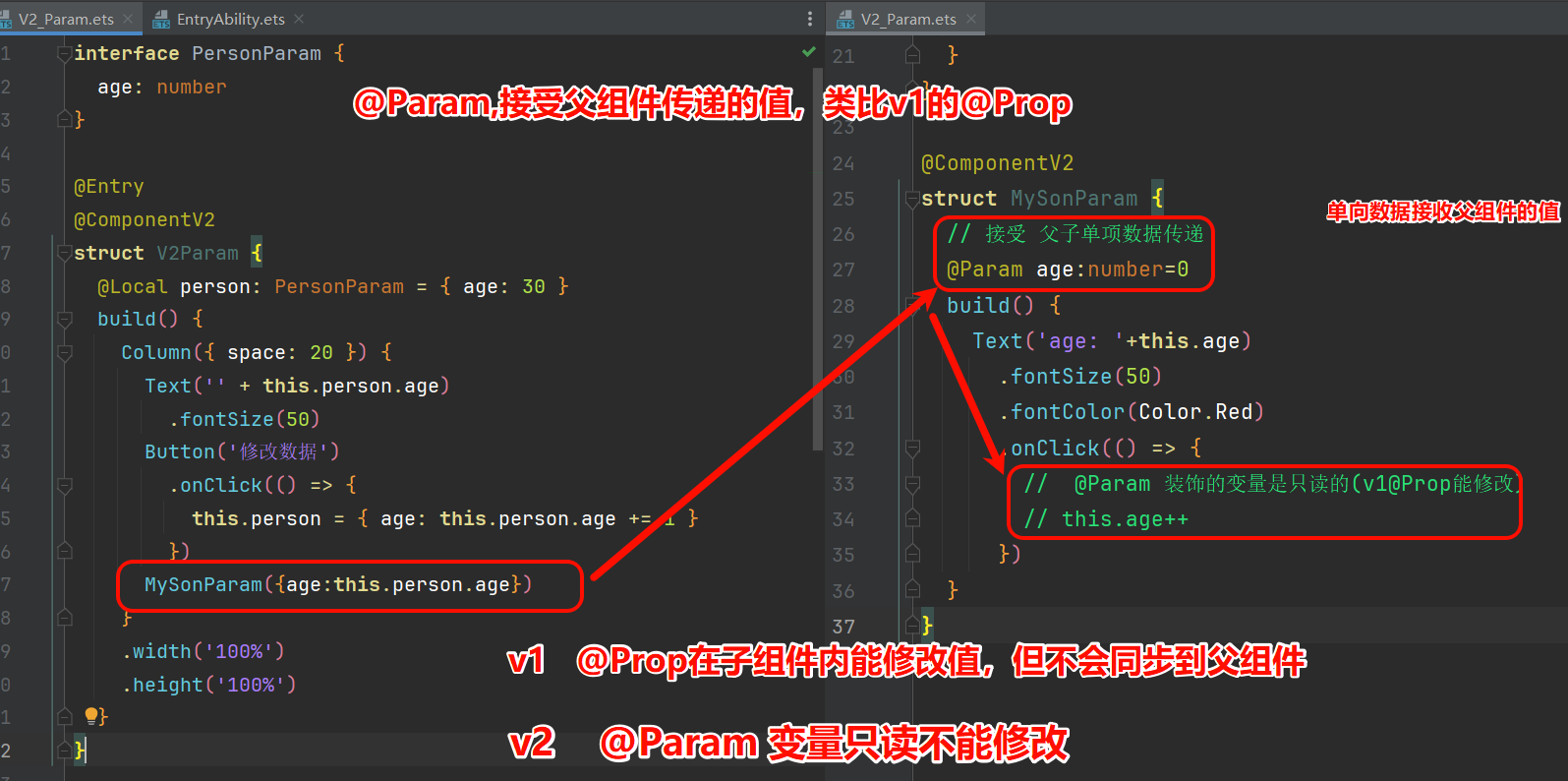
作用:@Param接受父组件传递数据,单项数据同步父组件
特点:
- 可以在本地初始化,但组件内部不能直接修改它本身
- 能从外部传入(初始化组件时)
- 若数据源是状态变量,数据源变了,它也会跟着变
interface PersonParam {
  age: number
}

@Entry
@ComponentV2
struct V2Param {
  @Local person: PersonParam = { age: 30 }
  build() {
    Column({ space: 20 }) {
      Text('' + this.person.age)
        .fontSize(50)
      Button('修改数据')
        .onClick(() => {
          this.person = { age: this.person.age += 1 }
        })
      MySonParam({age:this.person.age})
    }
    .width('100%')
    .height('100%')
  }
}

@ComponentV2
struct MySonParam {
  // 接受 父子单项数据传递
  @Param age:number=0
  build() {
    Text('age: '+this.age)
      .fontSize(50)
      .fontColor(Color.Red)
      .onClick(() => {
        //  @Param 装饰的变量是只读的(v1@Prop能修改)
        // this.age++
      })
  }
}
5. @Once
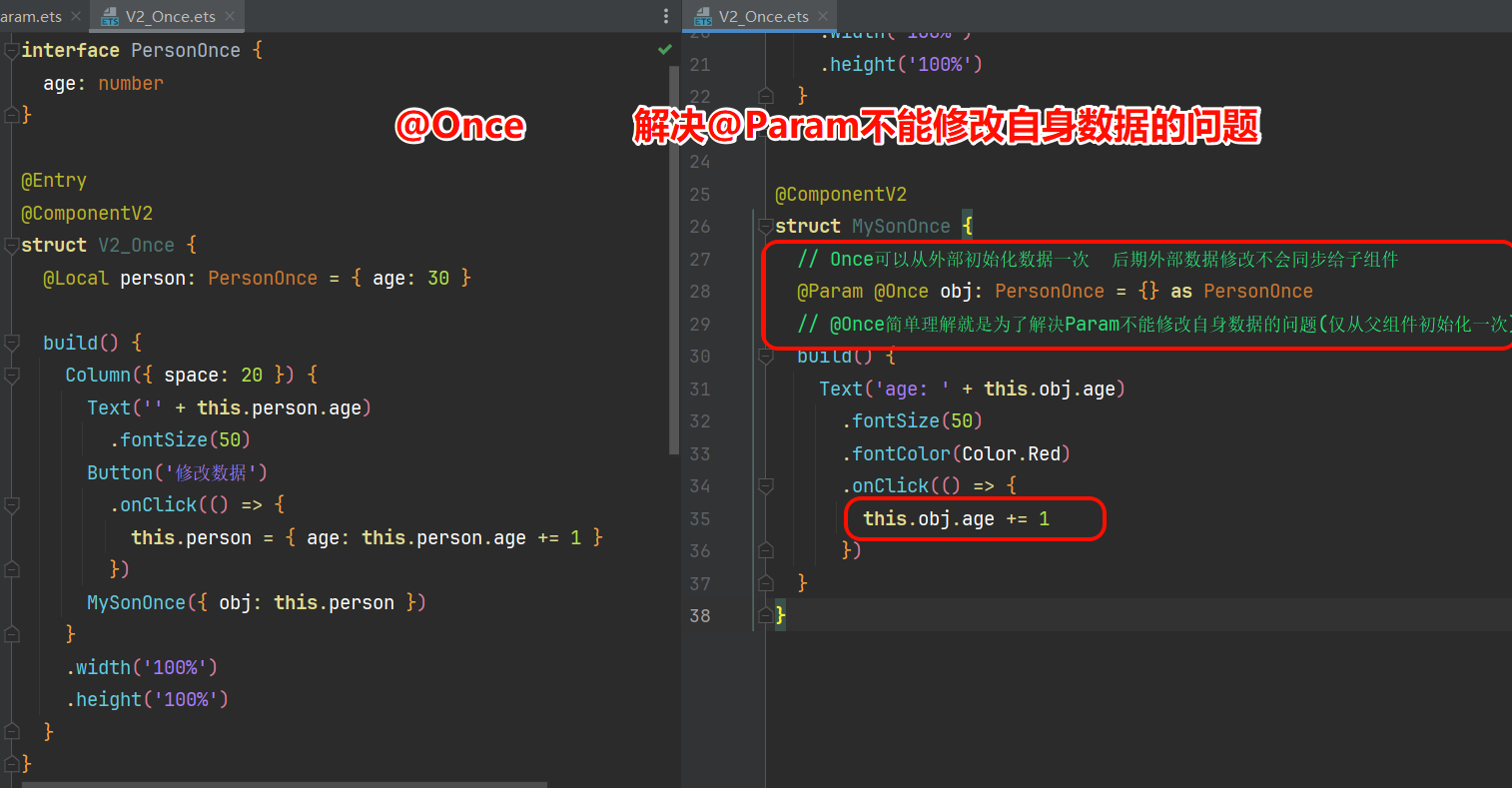
作用:@Once解决Param不能修改自身数据的问题(仅从父组件初始化一次)
特点:
- 只在初始化时接受外部值,之后数据源再变,子组件也不会同步
- 必须和@Param一起用,不能单独用或配别的
- 和@Param搭配时,能在本地修改@Param变量的值
@ComponentV2
struct MyComponent {
 // @Param @Once 变量名: 类型 = 值;
}
interface PersonOnce {
  age: number
}

@Entry
@ComponentV2
struct V2_Once {
  @Local person: PersonOnce = { age: 30 }

  build() {
    Column({ space: 20 }) {
      Text('' + this.person.age)
        .fontSize(50)
      Button('修改数据')
        .onClick(() => {
          this.person = { age: this.person.age += 1 }
        })
      MySonOnce({ obj: this.person })
    }
    .width('100%')
    .height('100%')
  }
}

@ComponentV2
struct MySonOnce {
  // Once可以从外部初始化数据一次  后期外部数据修改不会同步给子组件
  @Param @Once obj: PersonOnce = {} as PersonOnce
  // @Once简单理解就是为了解决Param不能修改自身数据的问题(仅从父组件初始化一次)
  build() {
    Text('age: ' + this.obj.age)
      .fontSize(50)
      .fontColor(Color.Red)
      .onClick(() => {
        this.obj.age += 1
      })
  }
}
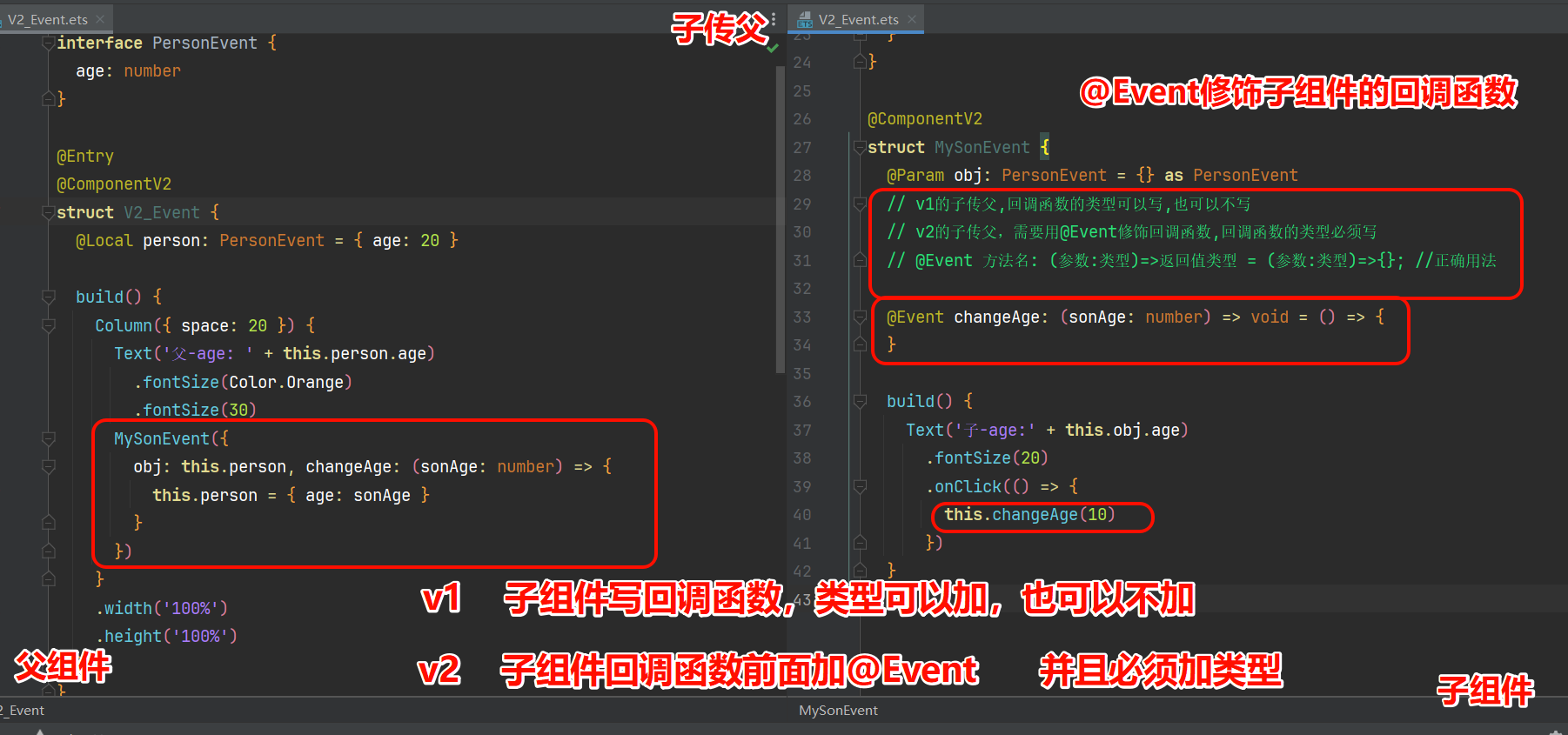
6. @Event
作用:实现子组件向父组件要求更新@Param装饰变量的能力, 实现子父的数据传递
特点:
- 只能用在被@ComponentV2装饰的自定义组件里
- 只装饰方法,装饰其他类型变量没用
- 被修饰的方法必须加类型
@ComponentV2
struct Index {
  @Event 方法名: (参数:类型)=>返回值类型 = (参数:类型)=>{}; //正确用法
}
7. @Provider / @Consumer
作用:@Provider和@Consumer用于跨组件层级数据双向同步
特点:
- @Provider和@Consumer装饰数据类型需要一致
- @Consumer 可以本地初始化(v1不可以初始化)
// 父组件
// 别名可省略 有别名  用别名找  没有别名用变量名  小括号不能省略哪怕不写东西
@Provider(别名) 变量名 : 类型 = 值

// 子组件
@Consumer(别名) 变量名 : 类型 = 值
// 写法 1:通过相同的变量名绑定
@Provide a: number = 0;
@Consume a: number;

// 写法 2通过相同的变量别名绑定
@Provide b: number = 0;
@Consume('b') c: number;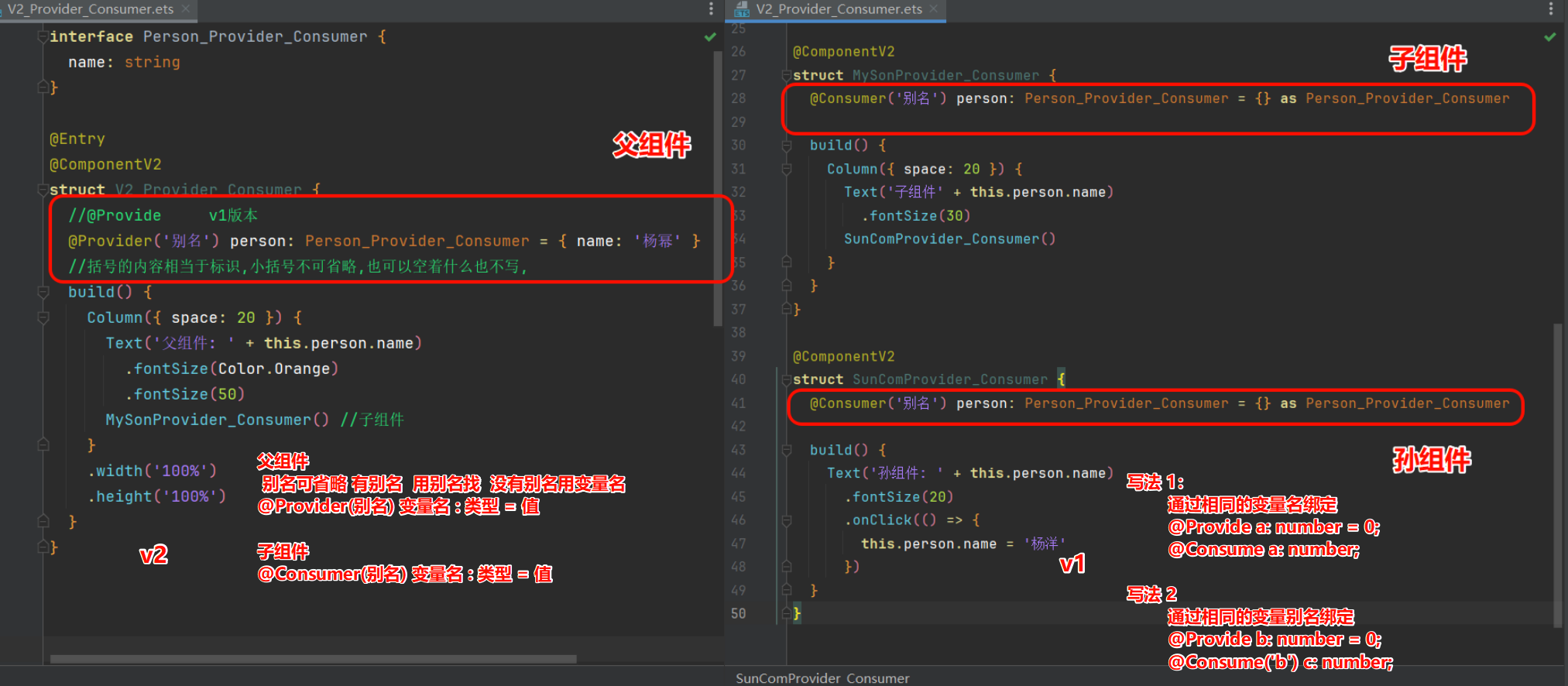
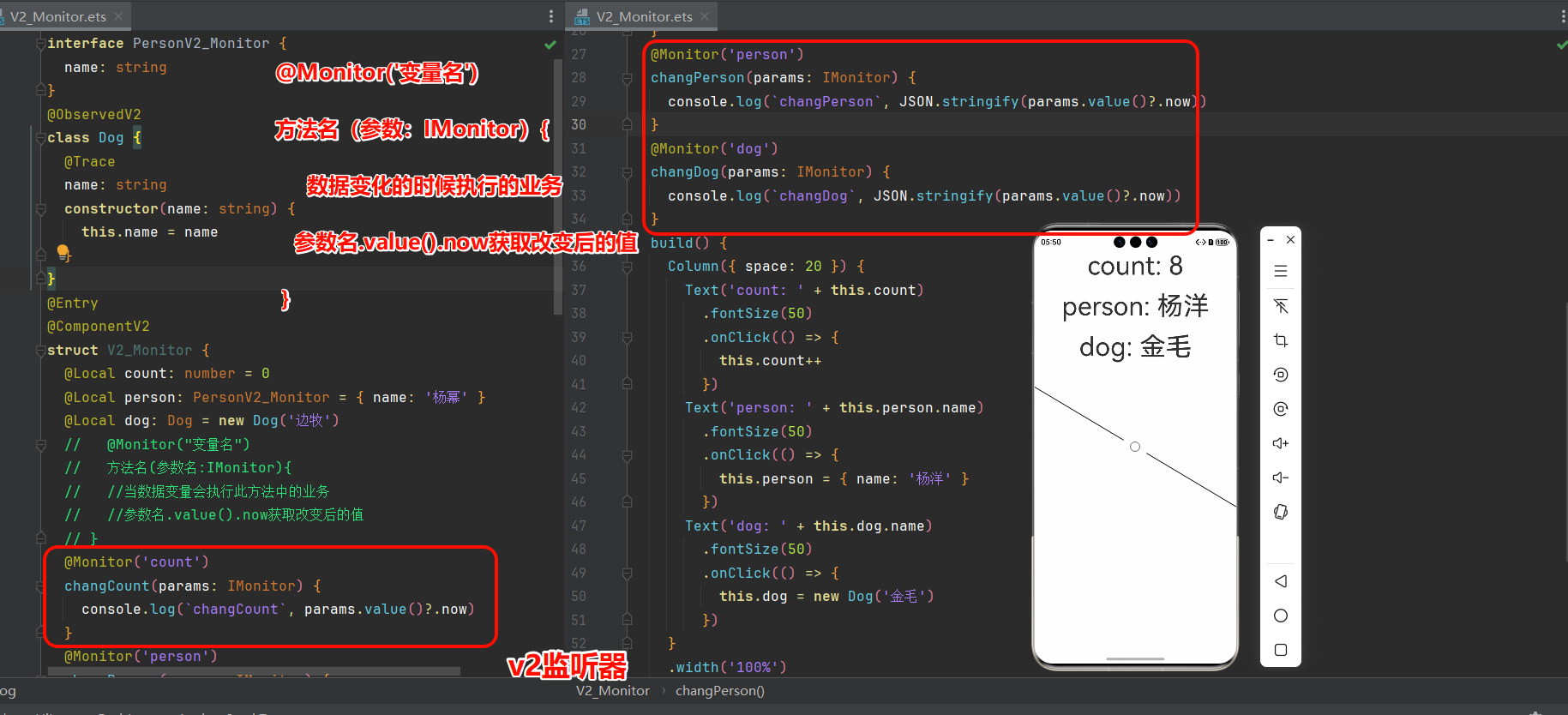
8. @Monitor
作用:@Monitor 对状态变量进行监听
特点:
- @Monitor仅用于@ComponentV2装饰的自定义组件里,
- 只监听@Local、@Param、@Provider、@Consumer、@Computed修饰的变量,其他变量不被监听。
@ComponentV2
struct Index {
  @Local message: string = "Hello World";
  @Monitor("变量名")
  方法名(参数名: IMonitor) {
    // 当数据变量会执行此方法中的业务
    // 参数名.value().now  获取改变后的值
  }
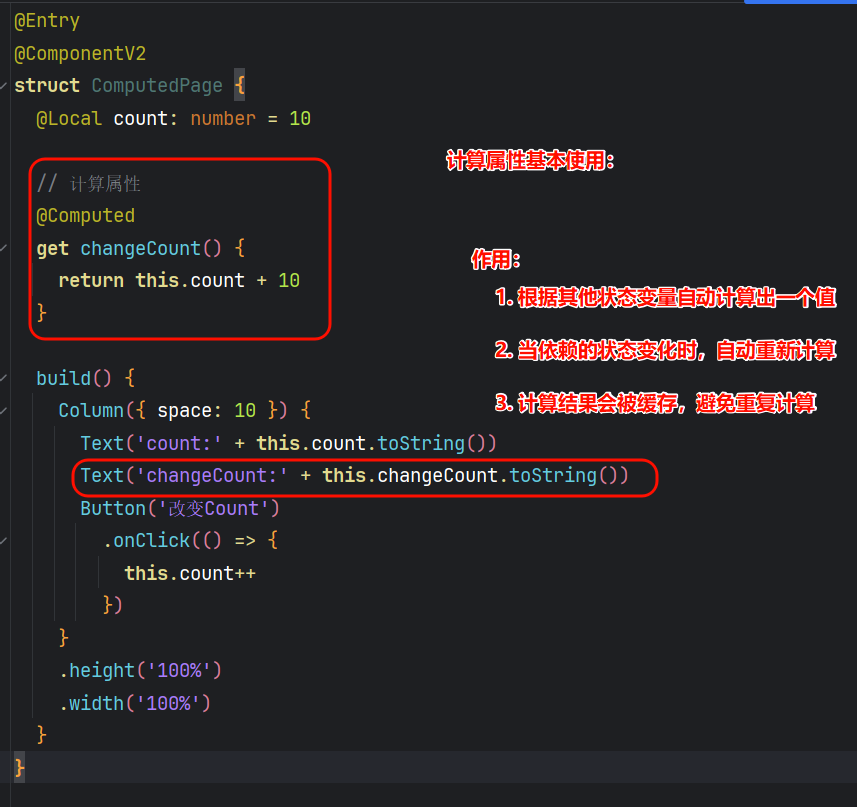
9. @Computed计算属性
@Computed是鸿蒙ArkUI框架中的一个装饰器,用于声明一个计算属性。它的作用是:
- 根据其他状态变量自动计算出一个值
- 当依赖的状态变化时,自动重新计算
- 计算结果会被缓存,避免重复计算
@Computed
get 方法名() {
// 内容
}
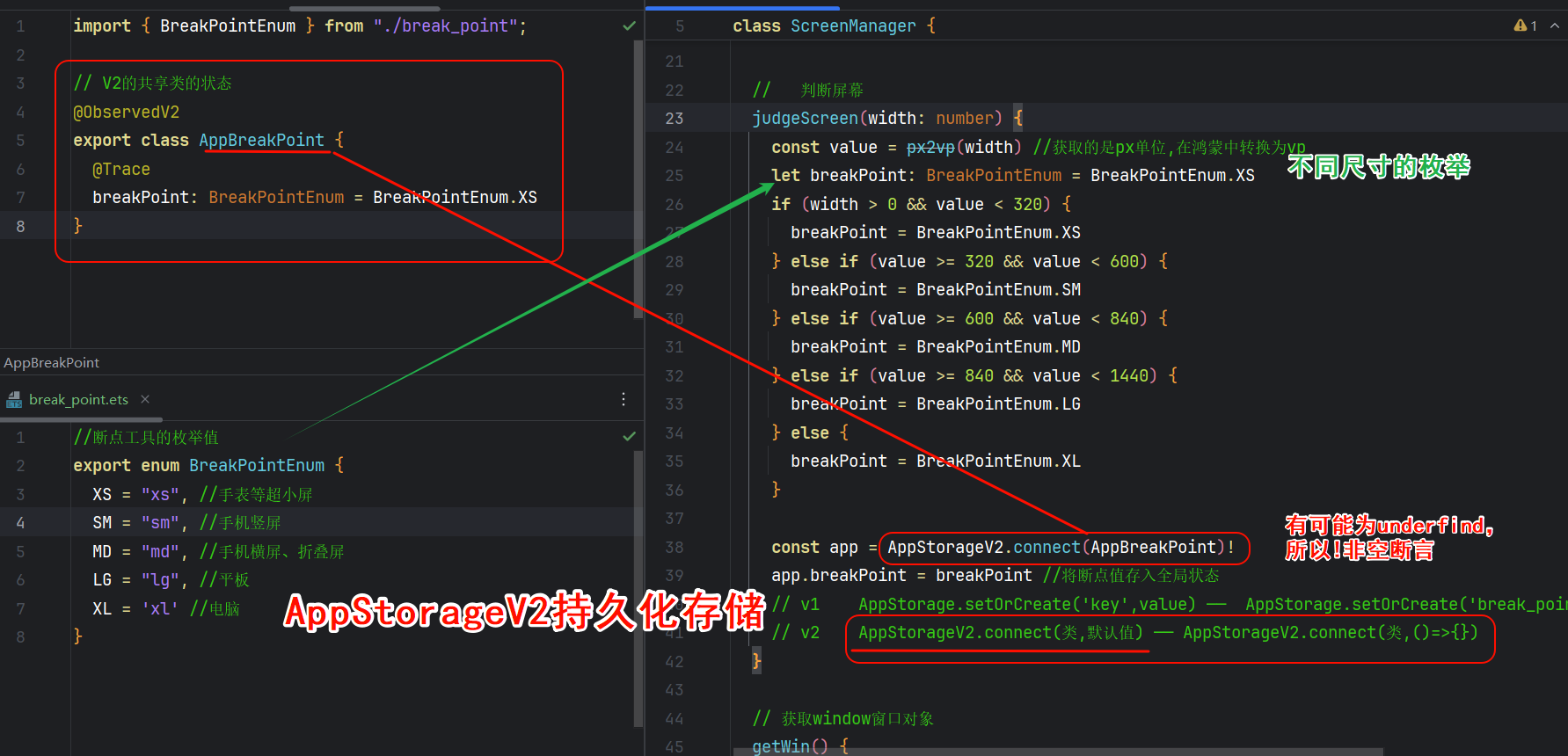
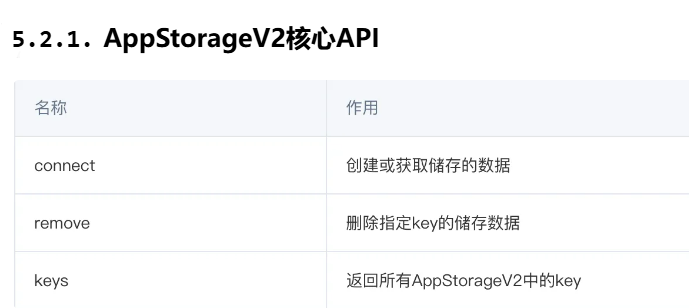
10. AppStorageV2: 全局UI状态存储
是应用级别的数据管理技术,跨组件、跨页面、跨ability 共享数据。但是退出应用数 据会自动销毁。
只支持class类型、不支持存储基本类型
注意:不支持存储基本类型意味着connect接口传入的类型不能是基本类型
AppStorageV2(参数1:类,参数2:类的默认值()=>{})!
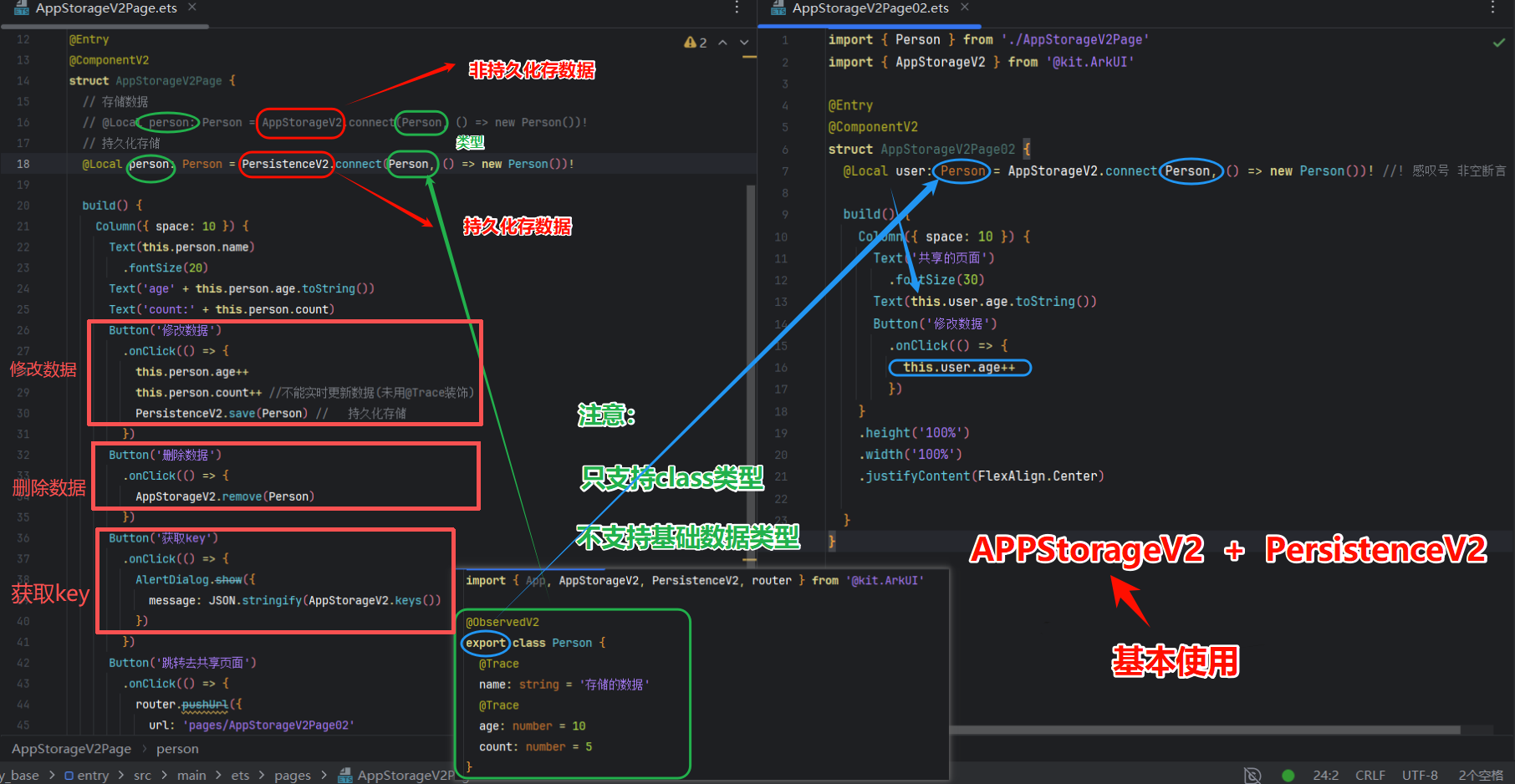
import { App, AppStorageV2, PersistenceV2, router } from '@kit.ArkUI'

@ObservedV2
export class Person {
  @Trace
  name: string = '存储的数据'
  @Trace
  age: number = 10
  count: number = 5
}

@Entry
@ComponentV2
struct AppStorageV2Page {
  // 存储数据
  // @Local person: Person = AppStorageV2.connect(Person, () => new Person())!
  // 持久化存储
  @Local person: Person = PersistenceV2.connect(Person, () => new Person())!

  build() {
    Column({ space: 10 }) {
      Text(this.person.name)
        .fontSize(20)
      Text('age' + this.person.age.toString())
      Text('count:' + this.person.count)
      Button('修改数据')
        .onClick(() => {
          this.person.age++
          this.person.count++ //不能实时更新数据(未用@Trace装饰)
          PersistenceV2.save(Person) //   持久化存储
        })
      Button('删除数据')
        .onClick(() => {
          AppStorageV2.remove(Person)
        })
      Button('获取key')
        .onClick(() => {
          AlertDialog.show({
            message: JSON.stringify(AppStorageV2.keys())
          })
        })
      Button('跳转去共享页面')
        .onClick(() => {
          router.pushUrl({
            url: 'pages/AppStorageV2Page02'
          })
        })
    }
    .height('100%')
    .width('100%')
    .justifyContent(FlexAlign.Center)
  }
}
import { Person } from './AppStorageV2Page'
import { AppStorageV2 } from '@kit.ArkUI'
@Entry
@ComponentV2
struct AppStorageV2Page02 {
@Local user: Person = AppStorageV2.connect(Person, () => new Person())! //! 感叹号 非空断言
build() {
Column({ space: 10 }) {
Text('共享的页面')
.fontSize(30)
Text(this.user.age.toString())
Button('修改数据')
.onClick(() => {
this.user.age++
})
}
.height('100%')
.width('100%')
.justifyContent(FlexAlign.Center)
}
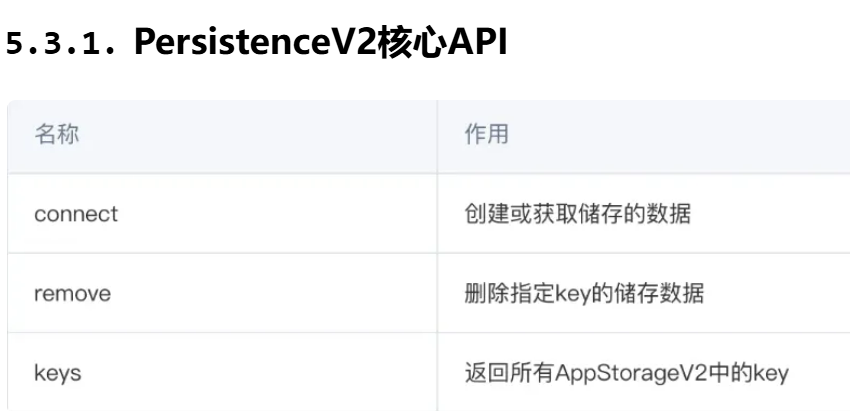
}11. PersistenceV2: 持久化储存UI状态
不支持存储基本类型
注意:不支持存储基本类型意味着connect接口传入的类型不能是基本类型,
持久化的数据必须是class对象,如果需要持久化非class对象,建议使用 Preferences 数据持久化。
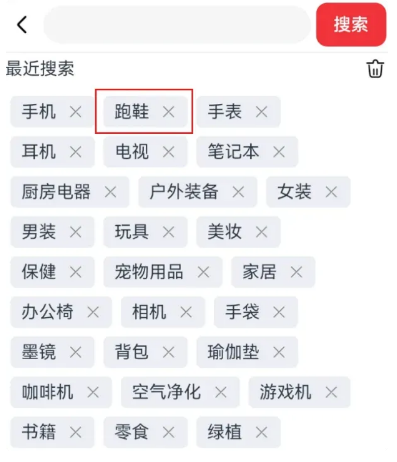
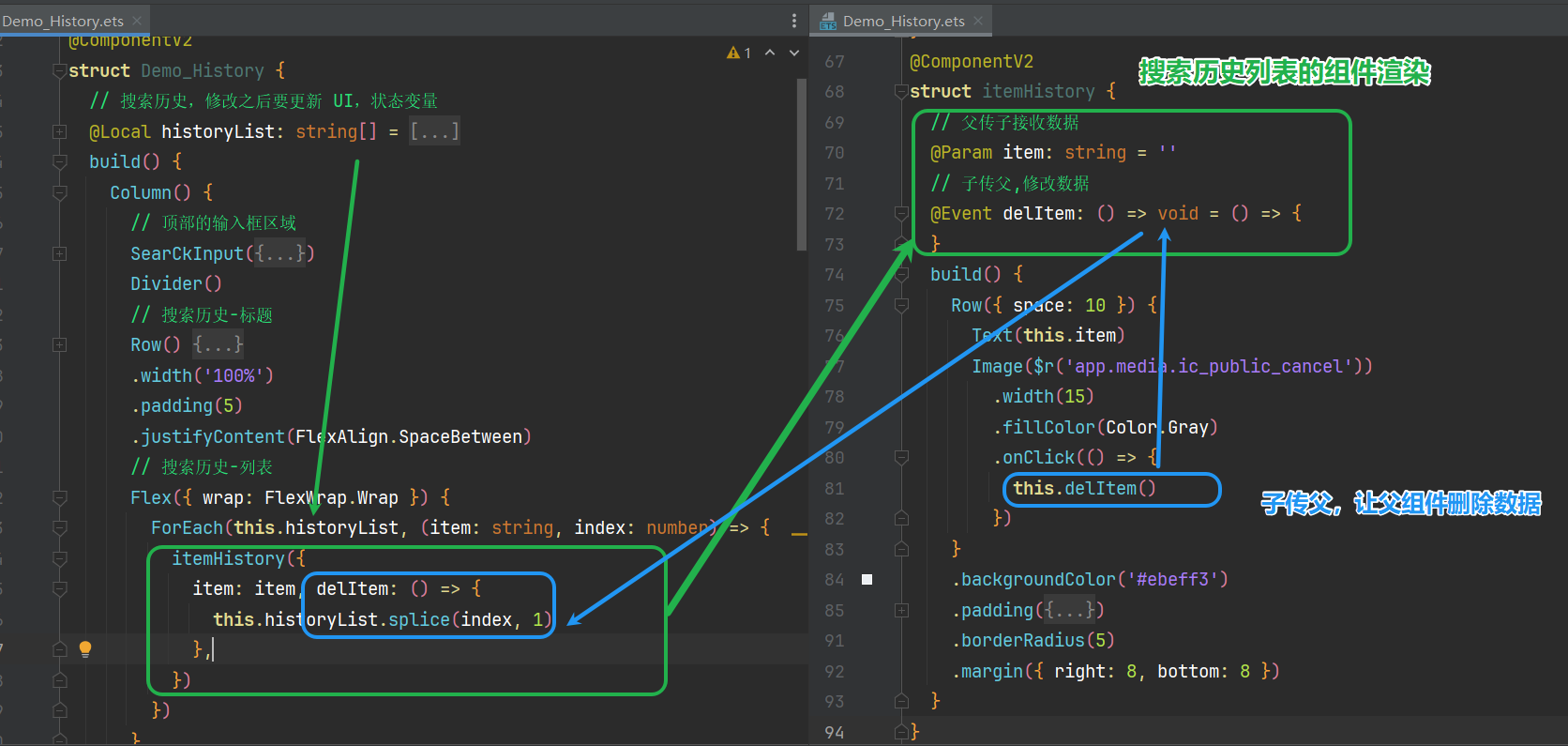
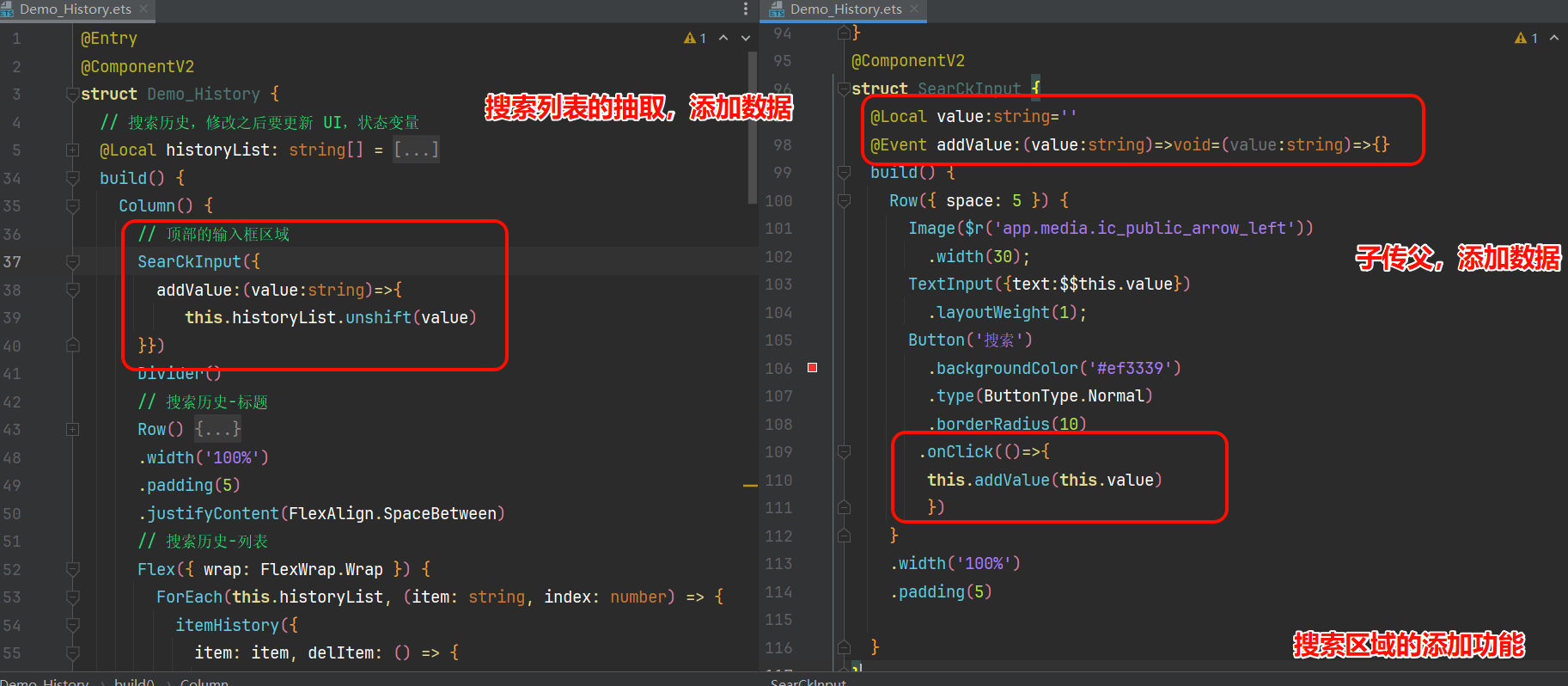
demo:搜索历史V2版
需求:
- 搜索列表【列表项】抽取为组件,并实现【删除】功能
- 【搜索区域】抽取为组件,实现点击搜索【添加】功能

作为“人工智能6S店”的官方数字引擎,为AI开发者与企业提供一个覆盖软硬件全栈、一站式门户。
更多推荐

 8
8 0
0- 0


 已为社区贡献3条内容

所有评论(0)