
鸿蒙中深色模式适配及持久化实现方式
调用ApplicationContext.setColorMode(ConfigurationConstant.ColorMode.COLOR_MODE_DARK)将应用配色方案设为深色模式后,仅运行期间有效。ApplicationContext.setColorMode属性本身并不支持数据持久化,可以采用用户首选项的数据持久化方式实现配置储存,然后在进入应用时读取用户首选项内容重新配置上一次退出
·
问题现象
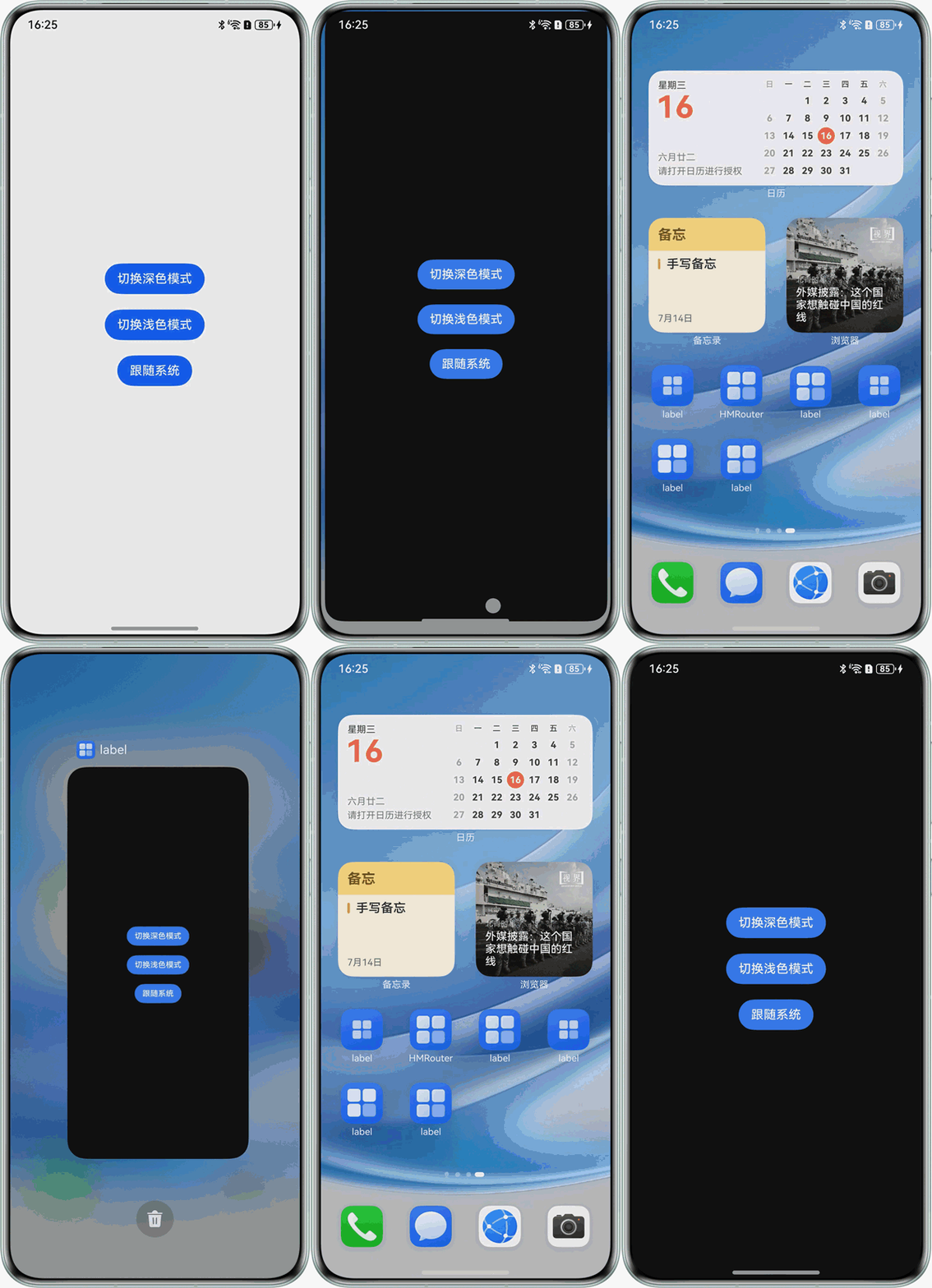
调用ApplicationContext.setColorMode(ConfigurationConstant.ColorMode.COLOR_MODE_DARK)将应用配色方案设为深色模式后,仅运行期间有效。退出应用重新进入后,设置丢失,深色模式失效。如何实现设置深色模式后,下次进入应用能保留配置。
效果预览
背景知识
- 深色模式适配属于应用最常见的功能,通过ApplicationContext.setColorMode自定义应用的颜色模式,官网案例参考:深色模式适配。该案例内有详细说明如何实现深浅色模式适配以及,如何取消或跟随系统的深浅色切换。其中深浅色模式监听参考:深浅色监听。
- 首选项模块(Preferences)可以提供Key-Value键值型数据的处理接口,实现对轻量级数据的查询、修改和持久化功能。
解决方案
ApplicationContext.setColorMode属性本身并不支持数据持久化,可以采用用户首选项的数据持久化方式实现配置储存,然后在进入应用时读取用户首选项内容重新配置上一次退出软件时设置的深浅色模式。
第一步:创建用户首选项对象。用户首选项实现指南详见通过用户首选项实现数据持久化。
import { preferences } from '@kit.ArkData';

export class PreferencesUtil {
  preference?: preferences.Preferences;

  getColorModel(context: Context) {
    this.preference = preferences.getPreferencesSync(context, { name: 'Color' });
  }

  saveColorModel(current: string) {
    this.preference?.putSync('colorModel', current);
    this.preference?.flush();
  }

  getChangeColorModel() {
    let current: string = 'COLOR_MODE_LIGHT';
    current = this.preference?.getSync('colorModel', 0) as string;
    return current;
  }
}

let preferenceUtilsObject: PreferencesUtil = new PreferencesUtil();

export default preferenceUtilsObject;第二步:在Index页面设置深浅色模式切换,并保存在用户首选项内。
import { ConfigurationConstant } from '@kit.AbilityKit';
import preferenceUtilsObject from './PreferencesUtil';

@Entry
@Component
struct DarkModePage {
  @State message: string = 'Hello World';

  build() {
    Column({ space: 20 }) {
      Button('切换深色模式')
        .onClick(() => {
          getContext(this).getApplicationContext().setColorMode(ConfigurationConstant.ColorMode.COLOR_MODE_DARK)
          preferenceUtilsObject.saveColorModel('COLOR_MODE_DARK')
        })
      Button('切换浅色模式')
        .onClick(() => {
          getContext(this).getApplicationContext().setColorMode(ConfigurationConstant.ColorMode.COLOR_MODE_LIGHT)
          preferenceUtilsObject.saveColorModel('COLOR_MODE_LIGHT')
        })
      Button('跟随系统')
        .onClick(() => {
          getContext(this).getApplicationContext().setColorMode(ConfigurationConstant.ColorMode.COLOR_MODE_NOT_SET)
          preferenceUtilsObject.saveColorModel('COLOR_MODE_NOT_SET')
        })
    }
    .justifyContent(FlexAlign.Center)
    .height('100%')
    .width('100%')
  }
}第三步:应用启动时获取储存的用户首选项,并设置应用深浅色模式。
import preferenceUtilsObject from '../pages/PreferencesUtil';

export default class EntryAbility extends UIAbility {
  onWindowStageCreate(windowStage: window.WindowStage): void {
    windowStage.loadContent('pages/Index', (err) => {
      preferenceUtilsObject.getColorModel(this.context)
      let colorModel: string = preferenceUtilsObject.getChangeColorModel();
      if (colorModel === 'COLOR_MODE_DARK') {
        getContext(this).getApplicationContext().setColorMode(ConfigurationConstant.ColorMode.COLOR_MODE_DARK)
      } else if (colorModel === 'COLOR_MODE_LIGHT') {
        getContext(this).getApplicationContext().setColorMode(ConfigurationConstant.ColorMode.COLOR_MODE_LIGHT)
      } else {
        getContext(this).getApplicationContext().setColorMode(ConfigurationConstant.ColorMode.COLOR_MODE_NOT_SET)
      }
    });
  }
}
作为“人工智能6S店”的官方数字引擎,为AI开发者与企业提供一个覆盖软硬件全栈、一站式门户。
更多推荐

 7
7 0
0- 0


 已为社区贡献3条内容

所有评论(0)